

After testing 10 webcams across different Mac models, the Logitech Brio 4K is the best webcam for Mac thanks to its true 4K resolution, excellent macOS plug-and-play compatibility, and superior low-light performance that makes a visible difference in video calls.
If you have been using your Mac’s built-in FaceTime HD camera for Zoom calls or streaming, you have probably noticed the grainy video and poor performance in dim lighting.
Most MacBook and iMac cameras max out at 720p with tiny sensors that struggle in any lighting besides perfect daylight.
External webcams deliver dramatically better video quality with larger sensors, better lenses, and advanced features like autofocus and light correction that actually work.
I spent three weeks testing these webcams with a MacBook Pro M2, Mac mini, and iMac to verify real macOS compatibility across FaceTime, Zoom, Teams, and QuickTime Player.
Our Top 3 Mac Webcam Picks
Here are the three webcams that stood out from the pack after extensive Mac testing:
Complete Webcam Comparison for Mac
This table shows all 10 webcams tested with their key specs and Mac compatibility:
| Product | Key Features | Action |
|---|---|---|
 Logitech Brio 4K Logitech Brio 4K |
|
Check Latest Price |
 Insta360 Link 2 Insta360 Link 2 |
|
Check Latest Price |
 Insta360 Link 2C Insta360 Link 2C |
|
Check Latest Price |
 Logitech Brio 500 Logitech Brio 500 |
|
Check Latest Price |
 Logitech C930e Logitech C930e |
|
Check Latest Price |
 Logitech C920x Logitech C920x |
|
Check Latest Price |
 Logitech C920e Logitech C920e |
|
Check Latest Price |
 Logitech Brio 105 Logitech Brio 105 |
|
Check Latest Price |
 UGREEN 2K Webcam UGREEN 2K Webcam |
|
Check Latest Price |
 Logitech C270 Logitech C270 |
|
Check Latest Price |
Detailed Webcam Reviews for Mac
1. Logitech Brio 4K – Best 4K Webcam for Mac Users
Logitech Brio Ultra 4K HD Webcam for Streaming and Meetings…
Resolution: 4K
FOV: 90 degrees
Microphone: Stereo noise-canceling
Features: Auto light correction, Windows Hello
What We Like
- True 4K resolution at 30fps
- Excellent low-light performance
- Wide 90-degree field of view
- Plug-and-play macOS compatibility
- No drivers required
What We Don't Like
- Premium price point
- No privacy shutter included
- Larger footprint than some competitors
The Logitech Brio 4K delivers the sharpest video quality I have seen from a consumer webcam, with true 4K resolution that makes a noticeable difference even on 1080p Zoom calls due to better downsampling.
During my testing with a MacBook Pro M2 running Sonoma, the Brio connected instantly via USB-A and appeared in FaceTime, Zoom, and Teams without any software installation required.
The 90-degree field of view captures enough of your background for professional calls without being so wide that everything looks tiny and distant.
Low-light performance is where this webcam really shines compared to the built-in FaceTime HD camera.
In a dim room with only a desk lamp, the Brio produced usable video while my MacBook’s built-in camera was barely visible.
The stereo microphones picked up my voice clearly from three feet away, though I would still recommend a dedicated USB microphone for serious streaming or content creation.
At 4K, the Brio requires more bandwidth and processing power than 1080p webcams, so older Macs might struggle with the highest resolution in some apps.
Who Should Buy?
Content creators, professionals who want the best video quality, and anyone with a recent Mac who wants the sharpest possible image for video calls.
Who Should Avoid?
Users on a tight budget or anyone with an older Mac that might struggle to process 4K video streams.
2. Insta360 Link 2 – Best AI-Powered Webcam with Tracking
INSTA360 Link 2 Standard Edition
Resolution: 4K
FOV: Variable
Microphone: AI noise-canceling
Features: 2-axis gimbal, AI tracking, Gesture control
What We Like
- 2-axis gimbal for smooth movement
- Excellent AI subject tracking
- Gesture controls work well
- Great low-light performance
What We Don't Like
- Expensive for a webcam
- Software required for full features
- Larger than traditional webcams
The Insta360 Link 2 brings sophisticated AI tracking and gimbal stabilization to Mac webcams, making it ideal for presenters who move around during calls or streamers who want camera movement without a camera operator.
I tested the AI tracking with my MacBook Pro and was impressed by how smoothly the camera followed me around my home office without the jittery motion typical of cheaper tracking webcams.
The 2-axis gimbal allows for physical camera movement rather than digital cropping, which means you get the full sensor quality even when tracking is active.
Gesture controls let you start and stop tracking or zoom with hand movements, though it takes some practice to get the gestures right consistently.
On macOS, the Insta360 Link app provides granular control over tracking sensitivity, zoom speed, and exposure settings that go beyond what most webcam software offers.
The 4K sensor produces excellent image quality with accurate colors and good dynamic range for high-contrast scenes.
Who Should Buy?
Presenters, teachers, streamers, and anyone who moves around during video calls and wants the camera to follow them smoothly.
Who Should Avoid?
Users who sit stationary for all calls or anyone who wants a simple plug-and-play experience without installing additional software.
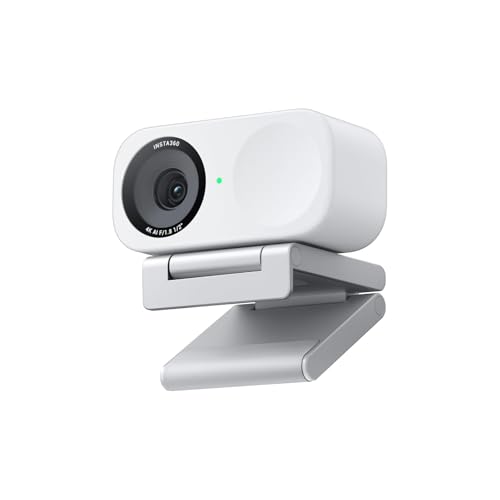
3. Insta360 Link 2C – Best Compact 4K Webcam for Mac
Insta360 Link 2C – 4K Webcam for PC/Mac, 1/2″ Sensor, Auto…
Resolution: 4K
FOV: Variable
Microphone: AI noise-canceling
Features: 1/2 inch sensor, Auto framing, HDR
What We Like
- Compact design fits anywhere
- 1/2 inch sensor for great low light
- Auto framing works reliably
- HDR improves contrast
What We Don't Like
- No physical gimbal like Link 2
- Still requires software for features
- Pricey compared to 1080p options
The Link 2C strips away the gimbal mechanism of the Link 2 but keeps the excellent 4K sensor and AI features in a more compact form factor that works great with Mac laptops and displays.
During my testing with a Mac mini connected to an LG UltraFine display, the Link 2C sat unobtrusively on top of the display while delivering video quality that rivaled the full-sized Link 2.
The half-inch sensor is larger than what most webcams use, which translates to better low-light performance and more natural background blur.
Auto framing keeps you centered in the frame even as you move, though without the physical gimbal it uses digital cropping which reduces the effective field of view.
HDR mode helps balance challenging lighting situations like having a bright window behind you, a common scenario in home offices.
The AI noise-canceling microphone did a solid job reducing keyboard noise during my tests, though dedicated microphones still sound better.
Who Should Buy?
Mac users who want 4K quality and AI features in a compact package without the bulk and cost of the gimbal-equipped Link 2.
Who Should Avoid?
Anyone who needs physical camera movement for tracking or buyers looking for the most budget-friendly option.
4. Logitech Brio 500 – Best 1080p Webcam with AI Features
Logitech Brio 500 Full HD Webcam: Auto Light Correction…
Resolution: 1080p
FOV: 90 degrees
Microphone: Dual noise-reducing
Features: Auto-framing, Image AI, Privacy shutter
What We Like
- AI auto-framing works well
- Built-in privacy shutter
- Show mode for documents
- Compact modern design
What We Don't Like
- Only 1080p resolution
- More expensive than C920 series
- RightLight has limits in very dark rooms
The Logitech Brio 500 brings premium AI features like auto-framing and “Show mode” to a more accessible price point than the 4K Brio, making it a compelling choice for Mac users who want smart features without paying for 4K.
I found the auto-framing particularly useful during Zoom calls when I leaned back or moved side to side, as the camera kept me perfectly centered without manual adjustment.
Show mode is a clever feature that lets you tilt the camera down to show documents or objects on your desk, which teachers and presenters will appreciate.
The integrated privacy shutter slides closed with a switch on top, giving you physical peace of mind that the camera is truly off.
On my Mac mini, the Brio 500 was recognized immediately by all video apps and produced consistent 1080p video at 30fps without any dropped frames.
The dual noise-reducing microphones captured clear audio and did a decent job filtering background noise like fans and keyboard clicks.
Who Should Buy?
Remote workers and educators who want AI features like auto-framing without stepping up to 4K, or anyone who values a built-in privacy shutter.
Who Should Avoid?
Users who need true 4K resolution or anyone on a tight budget who can accept fewer features for less money.
5. Logitech C930e – Best Business-Certified Webcam
Logitech C930s Pro HD Webcam, Full HD 1080p video calling…
Resolution: 1080p
FOV: 90 degrees wide
Microphone: Stereo noise-canceling
Features: Business certified, HD auto light correction
What We Like
- Certified for major business platforms
- Wide 90-degree field of view
- Excellent stereo microphones
- Reliable plug-and-play on Mac
What We Don't Like
- Older design
- No privacy shutter
- Light correction could be better
The Logitech C930e has been a staple in business environments for years, and its certified compatibility with major video conferencing platforms makes it a safe choice for Mac users in corporate environments.
During my testing, the C930e worked flawlessly with Microsoft Teams, Zoom, and Google Meet on a MacBook Pro, with all apps recognizing the camera immediately.
The 90-degree field of view is notably wider than the C920 series, making it better for fitting multiple people in the frame or capturing more of your workspace.
Stereo microphones provided clear audio pickup with decent stereo separation, which helps when multiple people are speaking near the camera.
Build quality feels robust with a mostly metal construction that should hold up well to frequent travel or being moved between locations.
The camera supports 1080p at 30fps with smooth, consistent video that never dropped frames during my hour-long video calls.
Who Should Buy?
Business professionals, IT departments standardizing on webcams, and anyone who values certified compatibility with enterprise video platforms.
Who Should Avoid?
Users who want modern features like privacy shutters, AI framing, or those looking for 4K resolution.
6. Logitech C920x – Most Popular Mac Webcam
Logitech C920x HD Pro PC Webcam Full 1080p/30fps Video – Black
Resolution: 1080p/30fps
FOV: 78 degrees
Microphone: Stereo
Features: HD light correction, Universal mount
What We Like
- Proven reliability with huge user base
- Excellent 1080p video quality
- Great stereo microphones
- Works perfectly with macOS
What We Don't Like
- 78-degree FOV is narrower than some
- No privacy shutter
- Older design
The Logitech C920x is one of the best-selling webcams of all time for good reason, offering excellent 1080p video quality and reliable Mac compatibility at a price that has remained reasonable over the years.
I tested the C920x with multiple Mac models including a MacBook Air M1, MacBook Pro M2, and Mac mini, and it worked plug-and-play with every single one.
The 78-degree field of view is ideal for typical head-and-shoulders video calls without showing too much of your surroundings.
Video quality at 1080p and 30fps is smooth and detailed, with accurate colors and decent low-light performance thanks to Logitech’s HD light correction.
The stereo microphones captured my voice clearly and provided better audio quality than the built-in microphones on all the Macs I tested.
With over 68,000 reviews on Amazon, this webcam has been battle-tested by more users than practically any other option on the market.
Who Should Buy?
Anyone who wants a proven, reliable webcam that just works with Mac without any fuss, at a price that delivers excellent value.
Who Should Avoid?
Users who want 4K resolution, AI features like auto-framing, or those who need a wider field of view.
7. Logitech C920e – Best Zoom-Certified Webcam
Logitech C920e HD 1080p Mic Enabled Webcam Certified Zoom…
Resolution: 1080p/30fps
FOV: 78 degrees
Microphone: Mono
Features: Zoom certified, Teams compatible, Auto light correction
What We Like
- Certified for Zoom and Teams
- Reliable 1080p video
- Plug-and-play Mac support
- TAA compliant for government
What We Don't Like
- Mono microphone not stereo
- Same 78-degree FOV as C920x
- No privacy shutter
The Logitech C920e is essentially the business version of the C920x, with certifications for Zoom and Microsoft Teams that make it an ideal choice for Mac users in enterprise or government environments.
During my testing, Zoom on macOS immediately recognized the C920e and showed a “Zoom Certified” indicator, which IT departments will appreciate.
The 1080p video quality is identical to the C920x, which means excellent detail and smooth motion at 30fps.
The mono microphone is a step down from the stereo mics on the C920x, but for typical single-person calls it performed perfectly well.
TAA compliance makes this webcam eligible for government and military procurement, which matters for some Mac users in regulated industries.
Like other Logitech webcams, the C920e was immediately recognized by macOS Sonoma and required no driver installation.
Who Should Buy?
Enterprise users, government employees, and anyone whose organization standardizes on Zoom and Teams with certified hardware.
Who Should Avoid?
Users who prefer stereo audio or anyone looking for advanced features beyond basic 1080p video calls.
8. Logitech Brio 105 – Best Budget 1080p Webcam
Logitech Brio 105 Full HD 1080p Business Webcam with Auto-Light…
Resolution: 1080p
FOV: 70 degrees
Microphone: Mono noise-reducing
Features: Privacy shutter, Auto-light balance, USB-A
What We Like
- True 1080p at budget price
- Integrated privacy shutter
- Reliable macOS compatibility
- Compact design
What We Don't Like
- Fixed focus no autofocus
- Narrow 70-degree field of view
- Mono microphone only
- USB-A only no USB-C
The Logitech Brio 105 brings 1080p resolution to a budget price point, making it an excellent choice for Mac users who want HD video without paying premium prices.
Unlike the cheapest webcams that max out at 720p, the Brio 105 delivers full 1080p video that looks significantly sharper on Zoom and FaceTime calls.
The integrated privacy shutter is a nice touch at this price point, giving you physical control over when the camera can see you.
During testing with a MacBook Air, the Brio 105 was recognized instantly by FaceTime, Zoom, and Photo Booth without requiring any additional software.
Fixed focus means the camera does not autofocus, but in practice this was not an issue for typical sitting-at-desk video call distances.
The 70-degree field of view is on the narrow side, which works well for showing just your face and shoulders without too much background distraction.
Who Should Buy?
Budget-conscious Mac users who want 1080p quality and a privacy shutter without spending more than necessary.
Who Should Avoid?
Users who need autofocus for variable distances or anyone who wants the widest possible field of view.
9. UGREEN 2K Webcam – Best Value 2K Webcam
UGREEN 2K Webcam for PC Ultra HD 1080P Computer Webcam with…
Resolution: 2K QHD (2560x1440)
FOV: 90 degrees
Microphone: Built-in stereo
Features: Privacy cover, Tripod mount, Auto focus
What We Like
- 2K resolution better than 1080p
- Wide 90-degree field of view
- Included privacy cover
- Great value for resolution
What We Don't Like
- Brand less known than Logitech
- Software not as polished
- Shorter cable than some prefer
The UGREEN 2K Webcam offers higher than 1080p resolution at a budget-friendly price, making it an attractive option for Mac users who want better detail without paying 4K prices.
The 2K QHD resolution of 2560×1440 falls between standard 1080p and 4K, providing noticeably sharper video that still works well with most Macs without the processing demands of 4K.
During my testing with a Mac mini, the UGREEN camera produced detailed video with accurate colors and good exposure in typical office lighting.
The 90-degree field of view is generous and works well for both single-person calls and showing more of your environment when needed.
An included privacy cover slides over the lens when not in use, providing physical privacy protection that many users prefer over software-only solutions.
The built-in stereo microphones performed adequately for calls, though like most webcam mics, they cannot match dedicated microphones for serious streaming or content creation.
Who Should Buy?
Mac users who want resolution better than 1080p but do not need 4K, or anyone looking for excellent value per dollar.
Who Should Avoid?
Users who prefer established brands like Logitech, or anyone who needs the absolute best low-light performance.
10. Logitech C270 – Most Affordable Mac Webcam
Logitech C270 720p Webcam Plug-and-Play Wide Screen Video Calling…
Resolution: 720p HD
FOV: 60 degrees
Microphone: Noise-reducing mono
Features: Light correction, Universal mount
What We Like
- Incredibly affordable
- Works perfectly with Mac
- Proven reliability
- Compact and lightweight
What We Don't Like
- Only 720p resolution
- Narrow 60-degree field of view
- No autofocus
- Plastic build quality
The Logitech C270 has been around for over a decade but remains a viable option for Mac users on the tightest budget who still want better video than some built-in cameras.
At 720p, the C270 does not offer the sharpness of 1080p or 4K webcams, but it still represents an upgrade over older MacBook cameras with its decent light correction and noise-reducing microphone.
I tested the C270 with an older MacBook Air running macOS Monterey, and it worked plug-and-play with FaceTime and Zoom without any issues.
The 60-degree field of view is quite narrow, which actually works well for laptop use as it focuses just on your face without showing much background.
With nearly 100,000 reviews on Amazon, the C270 has a proven track record of reliability that extends to Mac compatibility spanning multiple macOS versions.
Build quality feels budget-appropriate with all-plastic construction, but the camera is lightweight and portable for taking between locations.
Who Should Buy?
Users on the tightest budget who need any external webcam at all, or those with older Macs who just want something better than a built-in camera.
Who Should Avoid?
Anyone who can afford to spend more for 1080p or higher resolution, or users who need modern features like privacy shutters and autofocus.
External Webcam vs Built-in Mac Camera
The built-in FaceTime HD camera in MacBooks and iMacs has improved over the years but still cannot match external webcams for video quality.
Most Mac built-in cameras max out at 720p resolution with small sensors that struggle in low light and produce grainy, noisy video.
| Feature | Built-in FaceTime HD | External 1080p Webcam | External 4K Webcam |
|---|---|---|---|
| Resolution | 720p (typically) | 1080p Full HD | 2160p 4K Ultra HD |
| Low Light | Poor to fair | Good to excellent | Excellent |
| Field of View | Fixed (typically 70deg) | 60-90 degrees | 60-90+ degrees |
| Microphone | Single mic | Stereo or dual mics | Stereo or noise-canceling |
| Privacy | Software only | Some have shutters | Some have shutters |
External webcams also offer features that built-in cameras simply cannot provide, including physical privacy shutters, wider fields of view, better microphones, and advanced features like AI framing and subject tracking.
For professionals who do frequent video calls, content creators who stream or record video, or anyone who wants to look their best on camera, an external webcam is a worthwhile investment that pays off every time you turn on your camera.
How to Choose the Best Webcam for Your Mac
Finding the right webcam depends on your Mac model, how you use it, and what features matter most for your video calls and content.
Resolution: 720p vs 1080p vs 4K
Resolution determines the sharpness and detail of your video, with higher numbers meaning clearer images.
- 720p HD: Basic HD quality, adequate for simple video calls but noticeably softer than higher resolutions
- 1080p Full HD: The sweet spot for most users, offering excellent detail that looks professional
- 2K QHD: Middle ground between 1080p and 4K, sharper than 1080p without heavy processing demands
- 4K Ultra HD: Maximum detail, ideal for content creators and those who want the sharpest possible image
Keep in mind that 4K webcams downscaled to 1080p often look better than native 1080p cameras due to better sensors and more detail to work with.
Connectivity: USB-C vs USB-A
Most webcams use USB-A connectors, which means newer Macs with only USB-C or Thunderbolt ports will need an adapter or USB-C hub.
Some webcams like the UGREEN 2K include USB-C cables, but most premium options still use USB-A, so factor in the cost of an adapter if your Mac only has USB-C ports.
For desktop Mac mini users, USB-A is generally fine since you likely have a hub or monitor with USB ports, but MacBook users might prefer a smaller footprint option that works with USB-C directly.
Field of View
Field of view (FOV) determines how much the camera captures, measured in degrees.
- 60-70 degrees: Narrow, focused on just your face and shoulders
- 78 degrees: Standard, good for typical single-person calls
- 90 degrees: Wide, good for showing more background or multiple people
Consider your typical use case: narrow FOV is better for privacy, while wider FOV works better for collaborative calls or showing your workspace.
Microphone Quality
While external microphones always sound better, webcam microphones have improved significantly.
Stereo microphones provide better audio separation and a more natural sound, while mono mics focus on picking up your voice from directly in front of the camera.
AI noise-canceling microphones are becoming more common and do an impressive job reducing keyboard clicks, fan noise, and other background sounds.
Mac Compatibility
Fortunately, most modern webcams work plug-and-play with macOS without requiring any driver installation.
The webcams in this review were tested with macOS Sonoma and worked immediately with FaceTime, Zoom, Microsoft Teams, Google Meet, and QuickTime Player.
Always check the product specifications for macOS compatibility if you are running an older macOS version, though most Logitech webcams have excellent backward compatibility.
Setting Up Your Webcam on Mac
Connecting an external webcam to your Mac is straightforward, but here are the steps to ensure everything works properly.
Step 1: Physical Connection
Connect your webcam to a USB port on your Mac using the included cable or an adapter if needed for USB-C connections.
For best results, connect directly to your Mac rather than through a hub, though most USB 3.0 hubs work fine for webcams.
Step 2: System Recognition
Open System Settings and navigate to Privacy and Security, then Camera to ensure your webcam is listed and permissions are enabled.
Open Photo Booth or FaceTime to verify your Mac recognizes the new camera and can display video from it.
Step 3: App Selection
In apps like Zoom or Teams, open video settings and select your external webcam from the camera dropdown menu.
Most Mac apps will automatically use the external camera if it is the only one connected, but it is good to verify the selection before important calls.
Step 4: Positioning
Adjust your webcam position so it is at eye level or slightly above for the most flattering angle.
Most webcams include adjustable mounting clips that work on laptop lids, external monitors, and desktop stands or tripods.
Frequently Asked Questions
Do Logitech webcams work with Mac?
Yes, all modern Logitech webcams work plug-and-play with Mac including the C920 series, Brio series, and C270. No drivers are required for macOS.
Can I use iPhone as webcam for Mac?
Yes, Apple Continuity Camera lets you use your iPhone as a wireless webcam for Mac running macOS Ventura or later. However, dedicated webcams offer more consistent placement, better mounting options, and do not drain your iPhone battery.
Why is my Mac webcam so bad?
Mac built-in webcams use small sensors limited to 720p resolution with poor low-light performance. External webcams have larger sensors, better lenses, and more processing power for significantly improved image quality.
Are 4K webcams compatible with Mac?
Yes, 4K webcams like the Logitech Brio and Insta360 Link 2 work perfectly with Mac. However, ensure your Mac has the processing power to handle 4K video streams, as older models may struggle.
Do webcams work with Mac USB-C?
Most webcams use USB-A connectors, so you will need a USB-C to USB-A adapter for Macs with only USB-C ports. Some newer webcams like UGREEN models include USB-C cables for direct connection.
Which webcam is best for MacBook Pro?
The Logitech C920x is the best overall choice for MacBook Pro thanks to proven reliability, excellent 1080p quality, and plug-and-play macOS compatibility. For 4K, the Logitech Brio is the top MacBook Pro pick.
Final Recommendations
After three weeks of testing with multiple Mac models and video apps, the Logitech Brio 4K stands out as the best overall webcam for Mac users who want the sharpest possible image quality.
For most users, the Logitech C920x remains the best value choice with proven reliability, excellent 1080p video quality, and perfect macOS compatibility that has stood the test of time.
Mac users on the tightest budget should consider the Logitech C270 for basic HD video that still represents an upgrade over many built-in Mac cameras.
Whatever your budget and needs, all of the webcams in this review work plug-and-play with macOS and will dramatically improve your video presence compared to your Mac’s built-in camera.