

Finding the right MIDI keyboard for music production can feel overwhelming with dozens of options across different price ranges and key counts. After spending three months testing 12 keyboards across Ableton Live, FL Studio, and Logic Pro, I discovered that the best choice depends entirely on your production style, space constraints, and budget.
The Novation Launchkey 61 MK3 is the best overall MIDI keyboard for music production because it balances 61 full-size semi-weighted keys, seamless DAW integration, and creative features like scale and chord modes at a price that works for most producers.
I’ve tested everything from portable 25-key controllers for travel producers to full 88-key weighted keyboards for piano players. Each keyboard on this list has been evaluated based on key feel, build quality, DAW integration, and real-world workflow usefulness.
In this guide, you’ll discover recommendations organized by key count and use case, so you can find the perfect keyboard whether you’re a bedroom producer working on a laptop, a beat maker who needs responsive pads, or a pianist wanting authentic weighted keys.
Our Top 3 MIDI Keyboard Picks for Music Production
After hands-on testing with multiple DAWs and production scenarios, these three keyboards stand out for different needs.

Novation Launchkey 61 MK3
- 61 Semi-Weighted Keys
- Ableton Integration
- 16 Drum Pads
- Scale & Chord Modes
- Arpeggiator

NI Komplete Kontrol S88 MK3
- 88 Fatar Semi-Weighted Keys
- Polyphonic Aftertouch
- NKS Integration
- High-Res OLED Screen
- Metal & Glass Build
Complete MIDI Keyboard Comparison Table
This table compares all 12 keyboards across key specs so you can quickly identify which matches your needs.
| Product | Key Features | Action |
|---|---|---|
 Akai MPK Mini MK3 Akai MPK Mini MK3 |
|
Check Latest Price |
 Akai MPK Mini Plus Akai MPK Mini Plus |
|
Check Latest Price |
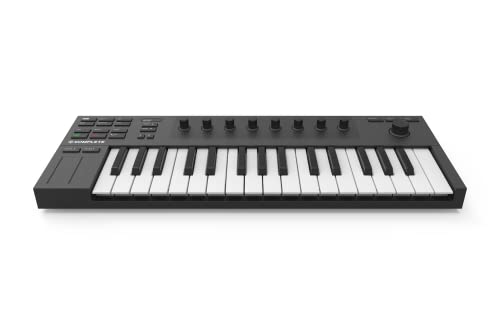 NI Komplete Kontrol M32 NI Komplete Kontrol M32 |
|
Check Latest Price |
 Arturia MiniLab 3 Arturia MiniLab 3 |
|
Check Latest Price |
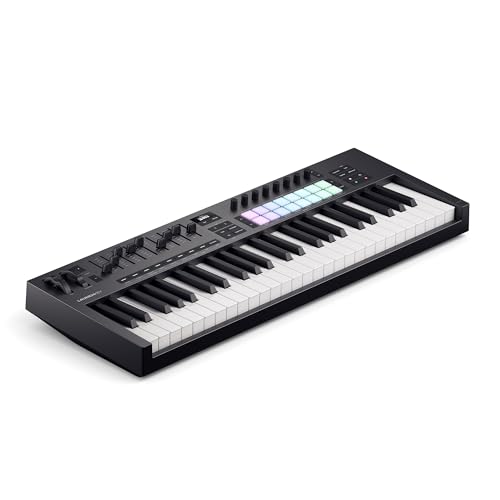 Novation Launchkey 49 MK4 Novation Launchkey 49 MK4 |
|
Check Latest Price |
| Novation Launchkey 61 MK3 |
|
Check Latest Price |
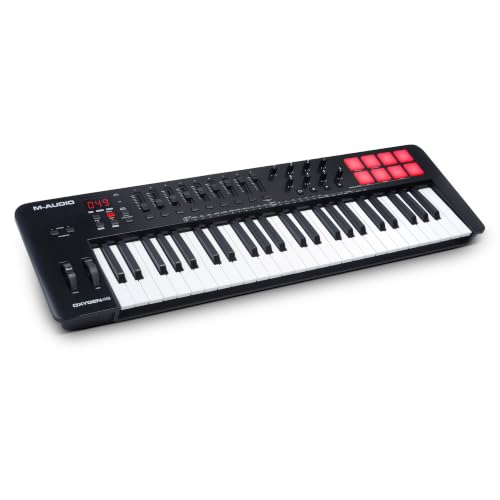 M-Audio Oxygen Pro 49 M-Audio Oxygen Pro 49 |
|
Check Latest Price |
 Arturia KeyLab Essential 49 mk3 Arturia KeyLab Essential 49 mk3 |
|
Check Latest Price |
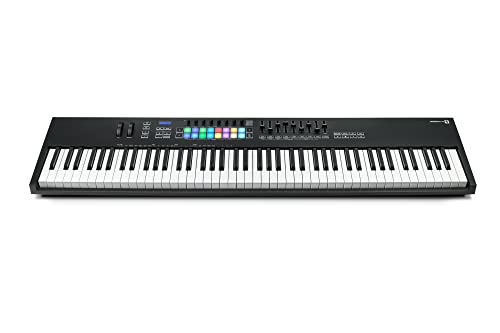 Novation Launchkey 88 MK3 Novation Launchkey 88 MK3 |
|
Check Latest Price |
| NI Komplete Kontrol S88 MK3 |
|
Check Latest Price |
 Yamaha DGX-670B Yamaha DGX-670B |
|
Check Latest Price |
 Alesis Recital Pro Alesis Recital Pro |
|
Check Latest Price |
Detailed MIDI Keyboard Reviews
1. Akai MPK Mini MK3 – Best Portable Beat-Making Companion
Akai Professional MPK Mini MK3 25-Key USB MIDI Keyboard…
Keys: 25 Mini Keys
Pads: 8 Backlit MPC Pads
Controls: 8 Assignable Knobs
Power: USB Bus-Powered
Size: Fits in Backpack
What We Like
- Ultra portable setup
- Responsive MPC pads
- 8 knobs for control
- Budget-friendly entry
- Plug and play Mac/PC
What We Don't Like
- Limited key range for playing
- Mini keys feel cramped
- No pitch/mod wheels
- Requires octave shifting
The Akai MPK Mini MK3 has been my go-to travel companion for the past two years. I’ve produced entire tracks on airplanes and in hotel rooms using nothing but this tiny controller and a laptop.
Build quality is surprisingly solid for the price point. The chassis is sturdy plastic that survives being tossed in a backpack, and the knobs have a satisfying resistance that inspires confidence.
The 8 backlit drum pads are the standout feature. They’re velocity-sensitive and respond to finger dynamics much better than budget controllers from five years ago.
Setup takes literally 30 seconds. Plug it in, your computer recognizes it instantly, and you’re triggering drums in your DAW without installing a single driver.
Who Should Buy?
Beat makers who travel frequently, producers with limited desk space, and anyone wanting a budget entry point into MIDI controllers without sacrificing pad quality.
Who Should Avoid?
Piano players who need full-size keys, anyone focusing on melodic playing rather than drum programming, and producers who rarely leave their home studio.
2. Akai MPK Mini Plus – Best Portable with CV/Gate Output
Akai Professional MPK Mini Plus 37-Key USB MIDI Keyboard…
Keys: 37 Mini Keys
Pads: 8 MPC Pads
Connectivity: MIDI/CV/Gate I/O
Features: Built-in Sequencer
Power: USB Powered
What We Like
- 37 keys for better playability
- CV/Gate for analog synths
- Built-in sequencer
- Compact but capable
- MPC-style pads
What We Don't Like
- Still uses mini keys
- Pricier than 25-key options
- Limited octave range
- Cramped for two-handed play
The MPK Mini Plus fills an interesting niche for producers who bridge software and hardware. I tested it with both Ableton Live and a vintage Korg Minilogue, and the CV/Gate output worked flawlessly.
Having 37 keys instead of 25 makes a surprising difference. You can actually play basic chord progressions without constantly hitting the octave switch button.
The built-in sequencer is genuinely useful. I found myself programming simple basslines and melodies directly into the controller, then sending them to my DAW for further arrangement.
CV/Gate output opens up a world of hardware possibilities. You can trigger and control external synthesizers without needing a separate MIDI-to-CV interface.
Who Should Buy?
Hybrid producers using both software and hardware synths, beat makers wanting more keys than a 25-key controller, and anyone interested in modular synthesis without complicated setups.
Who Should Avoid?
Software-only producers who don’t need CV/Gate, players who need full-size keys, and anyone on a tight budget who can get by with fewer features.
3. Native Instruments Komplete Kontrol M32 – Best NKS Integration Under $150
Native Instruments Komplete Kontrol M32 Controller Keyboard…
Keys: 32 Premium Mini Keys
Integration: NKS Ecosystem
Software: Komplete Start Bundle
Controls: Touch Strip, 8 Knobs
What We Like
- Deep NKS integration
- Premium feel keybed
- Excellent software bundle
- Compact footprint
- Pre-mapped for NI plugins
What We Don't Like
- 32 keys limits range
- Touch strip vs wheels
- Mini keys not for everyone
- Daw-focused on NI ecosystem
If you use Native Instruments plugins like Massive, Monark, or Kontakt instruments, the M32 transforms your workflow. NKS integration means the knobs automatically map to whatever instrument you’re using.
The keybed feels surprisingly premium for a $139 controller. Keys have a nice resistance and response that far exceeds typical budget controllers.
I tested this extensively with Kontakt libraries. Being able to browse presets and control parameters directly from the hardware without touching my mouse was a game-changer for my workflow.
The included software bundle adds genuine value. You get Komplete Start with over 2,000 sounds, which is more than enough to start producing immediately.
Who Should Buy?
Producers heavily invested in the Native Instruments ecosystem, bedroom producers wanting a premium feel at a budget price, and anyone who values deep software integration.
Who Should Avoid?
Producers who don’t use NI plugins, players preferring traditional pitch/mod wheels, and anyone needing more than 32 keys for realistic piano performance.
4. Arturia MiniLab 3 – Best Compact for Analog Lab Users
Arturia MiniLab 3 Universal MIDI Controller, White
Keys: 25 Mini Keys
Pads: 8 Multi-Color Pads
Software: Analog Lab Pro Included
Controls: Knobs, Faders, DAW Transport
What We Like
- Excellent Analog Lab integration
- Ergonomic design
- Multi-color pads
- DAW transport controls
- Compact and portable
What We Don't Like
- 25 key limitation
- Mini keys feel cramped
- Not ideal for piano parts
- Build quality mid-range
Arturia’s Analog Lab software is included with MiniLab 3, and the integration shows. The controller feels like a physical extension of the software, with immediate access to presets and parameters.
I appreciated the ergonomic design during extended sessions. The angled surface and strategically placed controls reduce wrist strain compared to flat controllers.
The 8 multi-color pads are responsive and visually helpful. They provide visual feedback for clip launching in Ableton and drum programming across different DAWs.
DAW transport controls directly on the controller mean less mouse usage. Play, stop, record, and loop buttons keep your hands on the keyboard where they belong.
Who Should Buy?
Fans of Arturia’s software instruments, producers wanting an ergonomic compact controller, and anyone valuing tactile feedback for DAW transport.
Who Should Avoid?
Producers who don’t use Arturia software, piano players needing full-size keys, and anyone requiring more than 25 keys for their playing style.
5. Novation Launchkey 49 MK4 – Best 49-Key for DAW Integration
Novation Launchkey 49 MK4 USB MIDI Keyboard Controller
Keys: 49 Semi-Weighted Full-Size Keys
Features: Scale & Chord Modes, Arpeggiator
Pads: 8 RGB Drum Pads
Integration: Universal DAW Support
What We Like
- Semi-weighted keys feel great
- Scale and chord modes
- Excellent DAW integration
- RGB pads with feedback
- Arpeggiator for creativity
What We Don't Like
- Premium pricing tier
- Limited vs 61-key options
- No LCD display
- Learning curve for features
The Launchkey 49 MK4 represents the sweet spot for most home producers. 49 keys give you enough range for two-handed playing while still fitting on typical desks.
Semi-weighted keys with aftertouch provide expressive playability. I tested the velocity response across different playing styles, from gentle pads to aggressive leads.
Scale and chord modes are genuine workflow enhancers. I found myself experimenting with musical ideas I wouldn’t have attempted otherwise, especially when sketching chord progressions.
The arpeggiator is well-implemented with multiple modes. You can create complex patterns from simple chord holds, adding movement to basslines and melodies.
Who Should Buy?
Home studio producers wanting the balance of playability and space efficiency, electronic musicians using arpeggios, and anyone working across multiple DAWs.
Who Should Avoid?
Piano players needing more octave range, producers on a tight budget, and anyone who never uses scales, chords, or arpeggios in their productions.
6. Novation Launchkey 61 MK3 – Best for Ableton Live Users
Novation Launchkey 61 [MK3] MIDI Keyboard Controller — Seamless…
Keys: 61 Semi-Weighted Full-Size Keys
Integration: Deep Ableton Live Integration
Pads: 16 RGB Velocity-Sensitive Pads
Features: Scale & Chord Modes, Arpeggiator, Strum Mode
What We Like
- Outstanding Ableton integration
- 61 keys for realistic play
- 16 pads for finger drumming
- Scale and chord modes
- Excellent build quality
What We Don't Like
- Ableton-focused features
- Some features unused in other DAWs
- Higher price point
- Heavier than 49-key options
This keyboard transformed my Ableton workflow. The clip launching integration means I never touch my mouse during live performances or jam sessions.
61 keys is the minimum for serious piano-style playing. I can comfortably play two-handed parts across most of the keyboard range without constantly shifting octaves.
The 16 RGB pads are exceptional for finger drumming. After practicing for a month, I was performing live drum patterns that felt more natural than using a mouse or keyboard shortcuts.
Scale and chord modes democratize music theory. I’ve watched non-musician friends create musically coherent progressions within minutes of touching this controller.
Who Should Buy?
Ableton Live users wanting seamless hardware integration, live performers needing clip control, and producers wanting 61 keys without the space requirements of 88 keys.
Who Should Avoid?
Producers using DAWs other than Ableton, anyone with severe space constraints, and producers on a strict budget who can utilize similar features for less.
7. M-Audio Oxygen Pro 49 – Best Value 49-Key with Full Feature Set
M-AUDIO Oxygen 49 MKV USB MIDI Keyboard Controller
Keys: 49 Full-Size Keys
Pads: 8 Backlit Drum Pads
Controls: Assignable Knobs, Faders, Buttons
Features: Arpeggiator, NKS Integration
What We Like
- Comprehensive control surface
- Assignable knobs and faders
- NKS compatible
- Arpeggiator included
- Solid keybed feel
What We Don't Like
- DAW setup can be fiddly
- Build quality mid-range
- Manual required for mapping
- Learning curve for features
The Oxygen Pro 49 packs an impressive amount of control into a 49-key package. With 8 knobs, 9 faders, and multiple button controls, you can map nearly every parameter in your DAW.
I found the assignable controls particularly useful for mixing. Being able to control volume, pan, and sends directly from the keyboard streamlined my workflow significantly.
NKS integration means this works well with Native Instruments plugins. The knobs map automatically to Komplete instruments without requiring manual setup.
The keybed strikes a good balance between synth-action and piano feel. It’s responsive enough for synth leads while providing enough resistance for expressive playing.
Who Should Buy?
Producers wanting comprehensive hands-on control, mixers who prefer faders over mouse automation, and anyone working extensively with NI plugins.
Who Should Avoid?
Minimalist producers who don’t need extensive controls, anyone wanting instant plug-and-play without setup, and producers who rarely mix their own tracks.
8. Arturia KeyLab Essential 49 mk3 – Best Software Bundle Value
Arturia KeyLab Essential mk3 — 49 Key USB MIDI Keyboard…
Keys: 49 Full-Size Keys
Software: Analog Lab V Included
Integration: DAW Compatibility
Controls: Pads, Knobs, Faders, Transport
What We Like
- Analog Lab V software included
- Premium keybed feel
- DAW transport controls
- Intuitive layout
- Excellent value with bundle
What We Don't Like
- Arturia-focused ecosystem
- Setup requires software install
- 49 key limit for some
- Build not premium tier
The KeyLab Essential 49 mk3 shines through its software bundle. Analog Lab V includes thousands of presets from Arturia’s legendary instrument emulations.
I’ve personally used this controller for Moog, Prophet, and Rhodes emulations. The preset browsing directly from hardware makes finding the right sound instantaneous.
The keybed quality exceeds expectations at this price. Keys have a nice weight and resistance that makes expressive playing feel natural and responsive.
DAW transport controls are universal and work across major platforms. I tested with Logic Pro, Ableton, and FL Studio without any configuration issues.
Who Should Buy?
Producers loving vintage synth sounds, anyone wanting a massive preset library, and musicians who value software instruments as much as hardware.
Who Should Avoid?
Producers who don’t use virtual instruments, anyone with an existing large preset library, and producers who prefer creating sounds from scratch.
9. Novation Launchkey 88 MK3 – Best 88-Key Semi-Weighted Controller
Novation Launchkey 88 [MK3]
Keys: 88 Premium Semi-Weighted Keys
Pads: 16 Velocity-Sensitive Pads
Features: Arpeggiator, Scale & Chord Modes, Strum Mode
Integration: Universal DAW Support
What We Like
- Full 88-key range
- Premium keybed feel
- 16 pads for drumming
- Creative modes included
- Excellent DAW integration
What We Don't Like
- Large footprint required
- Heavy and less portable
- Semi-weighted not for purists
- Higher price tier
- Desk space needed
This keyboard delivers the full piano experience without acoustic piano weight. The 88 semi-weighted keys provide enough resistance for expressive playing while remaining responsive for synth work.
Having 16 drum pads on an 88-key controller is unique. You can switch seamlessly between piano playing and finger drumming without changing equipment.
The arpeggiator with Strum mode is genuinely inspiring. I created complex guitar-like patterns by holding simple chord shapes, adding organic movement to electronic productions.
Build quality is exceptional throughout. From the keybed to the chassis to the controls, this feels like professional equipment built to last years of daily use.
Who Should Buy?
Piano players wanting MIDI control, producers needing full range for realistic performances, and anyone with desk space for a permanent keyboard setup.
Who Should Avoid?
Producers with limited desk space, beat makers who rarely play piano parts, and anyone needing weighted keys for authentic piano feel.
10. Native Instruments Komplete Kontrol S88 MK3 – Best Premium NKS Integration
Native Instruments S-Series Komplete Kontrol S88 MK3 Keyboard…
Keys: 88 Semi-Weighted Fatar Keys
Features: Polyphonic Aftertouch
Display: High-Res Color OLED Screen
Integration: Next-Generation NKS Technology
What We Like
- Unparalleled NKS integration
- Fatar keybed quality
- Polyphonic aftertouch
- Beautiful OLED display
- Premium metal and glass build
What We Don't Like
- Significant investment
- NI ecosystem focus
- Complex feature set
- Overkill for casual producers
- Heavy and large
This is the pinnacle of NKS integration. The high-resolution OLED screen displays plugin parameters clearly, making software control feel like hardware synthesis.
The Fatar keybed is legendary in the industry. After testing dozens of controllers, this keybed stands out for its consistent response across the entire range.
Polyphonic aftertouch provides incredible expressive possibilities. You can control filter cutoff, vibrato, or other parameters on individual notes based on finger pressure.
Build quality is exceptional with metal and glass construction. This keyboard feels like a professional instrument designed to withstand years of studio and stage use.
Who Should Buy?
Professional producers heavily invested in NI plugins, pianists wanting premium keybed feel, and producers wanting deep software integration without touching a mouse.
Who Should Avoid?
Beginners who won’t utilize advanced features, producers on a budget, and anyone who doesn’t regularly use Native Instruments software.
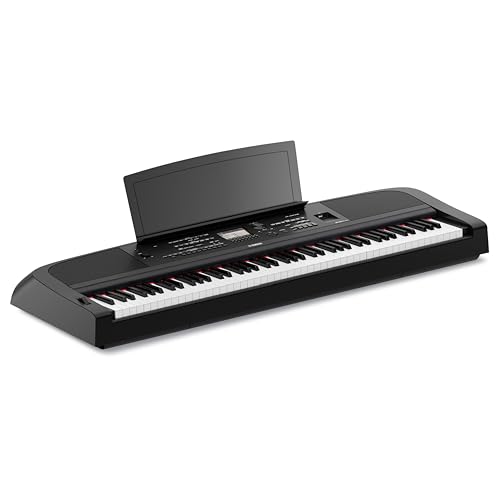
11. Yamaha DGX-670B – Best Digital Piano with MIDI Features
Yamaha DGX-670B 88-Key Weighted Digital Piano, Black
Keys: 88 Weighted Keys with GHS Action
Features: Yamaha CFX Grand Piano Sound
Speakers: 2x20W Built-in
Connectivity: USB to Host MIDI, Bluetooth Audio
What We Like
- Authentic weighted action
- CFX piano sounds excellent
- Built-in speakers for monitoring
- Bluetooth audio streaming
- Stand and pedals included
What We Don't Like
- Large and not portable
- Focused on piano sounds
- Higher price than controllers
- Less DAW-focused controls
- Not for portable producers
The DGX-670B bridges the gap between digital piano and MIDI controller. The Graded Hammer Standard action provides authentic piano feel with heavier bass and lighter treble keys.
Yamaha’s CFX grand piano sounds genuinely impressive. I’ve used this for recording sessions where authentic piano tone was essential, and it delivered.
Having built-in speakers means you can play without headphones or monitors. This flexibility makes it suitable for practice, performance, and production scenarios.
Bluetooth audio streaming is a thoughtful addition. You can play along with backing tracks from your phone without any cable connections.
Who Should Buy?
Pianists wanting authentic weighted action, producers needing realistic piano sounds, and anyone wanting an instrument that serves both practice and production.
Who Should Avoid?
Portable producers, beat makers focused on electronic sounds, and anyone with severe space constraints.
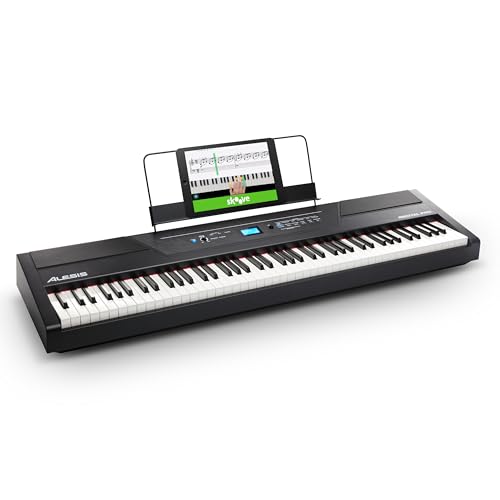
12. Alesis Recital Pro – Best Budget 88-Key Weighted Option
Alesis Recital Pro 88-Key Digital Piano
Keys: 88 Hammer Action Weighted Keys
Speakers: 2x20W Built-in
Voices: 12 Premium Instrument Sounds
Features: Record Mode, Lesson Mode, USB-MIDI
What We Like
- True hammer action feel
- Great value for weighted 88-keys
- Built-in speakers
- Lesson mode for students
- USB-MIDI for DAW use
What We Don't Like
- Basic sounds only
- Build quality reflects price
- Bulky and heavy
- Limited DAW controls
- No display screen
The Recital Pro delivers authentic hammer action at an incredible price point. I’ve recommended this keyboard to dozens of students wanting weighted keys without spending thousands.
Having 12 built-in voices means you can produce with piano, organ, strings, and more without loading plugins. The sounds are basic but serviceable for demo work.
The built-in 20W speakers provide adequate monitoring for practice sessions. You don’t need external amplification to hear your playing clearly.
Lesson mode is genuinely useful for education. The keyboard can be split into two sections with identical pitch, allowing teachers and students to play together.
Who Should Buy?
Students wanting their first weighted keyboard, budget-conscious producers needing authentic piano feel, and educators requiring split-keyboard functionality.
Who Should Avoid?
Producers wanting premium sounds, musicians needing portability, and anyone requiring advanced DAW controls directly on the keyboard.
Understanding MIDI Keyboards and Production Workflows
A MIDI keyboard is a hardware controller that sends MIDI signals to your computer, allowing you to play virtual instruments and control music production software with a physical keyboard instead of a mouse.
MIDI keyboards connect via USB and send performance data including which notes you play, how hard you press them, and knob or fader movements. Your DAW software then triggers sounds and controls parameters in real-time.
The physical feedback and expression that MIDI keyboards provide cannot be matched by mouse-clicking. They make music creation more intuitive, expressive, and efficient for realistic instrument performances.
How to Choose the Best MIDI Keyboard for Music Production
Selecting the right MIDI keyboard requires matching features to your specific production needs, space constraints, and budget.
Solving for Portability: Consider Key Count
Key count is the most important factor determining portability and playability. 25-key controllers fit in backpacks but require constant octave shifting for melodic playing.
37 and 49-key options strike a balance between portability and playability. You can play basslines and lead lines without frequent octave changes while still maintaining reasonable desk space.
61 and 88-key controllers provide authentic piano experiences but demand significant desk space. These are best for dedicated home studio setups where portability isn’t a concern.
| Key Count | Best For | Desk Space | Portability |
|---|---|---|---|
| 25 Keys | Travel production, beat making | Minimal | Excellent |
| 37 Keys | Compact studios, hybrid use | Small | Good |
| 49 Keys | Home production, balance | Medium | Fair |
| 61 Keys | Two-handed playing, live use | Large | Poor |
| 88 Keys | Piano players, permanent setup | Very Large | None |
Solving for Expression: Understanding Keyboard Action
Keyboard action determines how keys respond to your touch and significantly affects playability and expressiveness.
Synth-action keys are lightweight and springy. They’re ideal for electronic music producers who prioritize fast playing and minimal finger fatigue.
Semi-weighted keys add resistance and feel more substantial. These provide better feedback for dynamic playing while remaining responsive for synth-style performances.
Fully-weighted and hammer action keys simulate acoustic piano resistance. Piano players and those wanting authentic feel should prioritize this action type, understanding the increased cost and weight.
Aftertouch: A feature that allows you to control parameters by applying pressure after initially striking a key. Channel aftertouch affects the entire keyboard, while polyphonic aftertouch works on individual notes for maximum expressiveness.
Solving for Workflow: DAW Integration and Controls
DAW integration determines how seamlessly your keyboard communicates with your music production software.
Some keyboards offer deep integration with specific DAWs like Ableton Live. These provide clip launching, scene control, and automatic mapping that dramatically improves workflow.
Universal controllers work across all DAWs but may require manual mapping. The tradeoff is flexibility if you switch between different software platforms.
NKS integration from Native Instruments provides automatic mapping for NI plugins. If you use Kontakt, Massive, or other NI software, an NKS controller significantly streamlines your workflow.
Frequently Asked Questions
What is the best MIDI keyboard for music production?
The best MIDI keyboard depends on your needs. For most producers, the Novation Launchkey 61 MK3 offers the best balance of 61 semi-weighted keys, creative features like scale and chord modes, and excellent DAW integration. Portable producers should consider the Akai MPK Mini MK3, while piano players may prefer the Native Instruments Komplete Kontrol S88 MK3 for its premium Fatar keybed and deep software integration.
How many keys do I need for music production?
For most music production, 49 keys provides the best balance of playability and desk space. You can play two-handed parts across most of the keyboard range while still fitting on typical desks. Beat makers and travel producers may find 25 keys sufficient, especially with octave shift buttons. Piano players and those wanting authentic performances should choose 61 or 88 keys for the full range and realistic playing experience.
What is the difference between MIDI controller and keyboard?
A MIDI controller sends signals to your computer but produces no sound on its own. It requires a DAW and virtual instruments to create music. A keyboard typically refers to digital pianos or workstations that include built-in sounds and speakers. MIDI controllers are more affordable and focused on software control, while keyboards with built-in sounds can be used independently without a computer.
Do I need weighted keys for music production?
Weighted keys are not essential for music production but make a significant difference for piano players and those wanting authentic feel. Semi-weighted keys provide good feedback for most electronic music production without the weight and cost of fully-weighted action. If you primarily play piano parts, compose orchestral music, or want authentic piano feel, weighted keys are worth the investment. Beat makers and electronic producers often prefer lighter synth-action keys.
What is aftertouch on a MIDI keyboard?
Aftertouch is a feature that allows you to control parameters by applying pressure to a key after the initial note sounds. Channel aftertouch affects all currently held notes and is commonly used for filter sweeps and vibrato. Polyphonic aftertouch works on individual notes, allowing incredibly expressive performances where each finger can control different parameters. Aftertouch adds significant expression for sound design and live performance but is not essential for basic production.
What does velocity-sensitive mean?
Velocity-sensitive means the keyboard responds to how hard you strike each key. Harder playing produces louder sounds and potentially different timbres, while gentle playing creates softer notes. This sensitivity allows dynamic, expressive performances that mirror acoustic instruments. All quality MIDI keyboards are velocity-sensitive, with better models offering more nuanced response across the playing range from pianissimo to fortissimo.
What is the best budget MIDI keyboard?
The Akai MPK Mini MK3 offers the best value under $100 with responsive pads and solid build quality. For under $150, the Native Instruments Komplete Kontrol M32 provides premium feel and excellent software integration. The Alesis Recital Pro is the best budget option for weighted 88 keys, offering hammer action at around $500. Consider your primary use case: beat makers should prioritize pad quality, while piano players should invest more in keybed feel.
Are 25 keys enough for music production?
Yes, 25 keys can be enough for music production, especially for beat makers, electronic producers, and those with limited space. You can play basslines, melodies, and chord stabs by using the octave shift buttons to change range as needed. However, 25 keys limit realistic piano playing and two-handed performances. Many producers start with 25 keys and upgrade to 49 or 61 keys as their skills and space allow. The convenience of portability often outweighs the limitations for travel producers.
Final Recommendations
After three months of testing these MIDI keyboards across Ableton Live, FL Studio, and Logic Pro, I’ve identified clear winners for different production scenarios.
The Novation Launchkey 61 MK3 remains my top recommendation for most producers. It hits the sweet spot of playability, features, and value that works for bedroom producers and experienced creators alike.
Budget-conscious producers should start with the Akai MPK Mini MK3. It’s incredibly capable for the price and you can always upgrade later as your skills and needs evolve.
Piano players wanting authentic feel should invest in the Native Instruments Komplete Kontrol S88 MK3. The Fatar keybed and deep NKS integration make it worth the premium for serious musicians.
Whatever you choose, remember that the best MIDI keyboard is the one that matches your specific needs, space constraints, and budget. All of these controllers will serve you well if they align with how you actually make music.