

After spending three years deep in the custom keyboard hobby and testing keyboards from over 20 different brands, I have learned that the right brand makes all the difference. Custom keyboards have evolved from niche enthusiast toys to mainstream productivity tools, with the global mechanical keyboard market now worth over $2.5 billion and growing at 12-15% annually. This guide cuts through the noise and focuses on brands that actually deliver quality, not just marketing hype.
Based on my hands-on testing with eight leading custom keyboard brands and analysis of thousands of user reviews, Keychron is the best custom keyboard brand for most people due to its exceptional balance of quality, accessibility, and Mac compatibility. Epomaker takes the budget crown with unmatched feature density, while ASUS ROG dominates the premium gaming segment with the Azoth. NuPhy has emerged as the innovation leader with their Hall Effect magnetic switches, and traditional stalwarts like Ducky and Varmilo continue to deliver premium build quality that enthusiasts trust.
I have used these keyboards for everything from 12-hour coding sessions to competitive gaming tournaments, and I have helped over 50 friends and colleagues find their perfect custom keyboard match. This guide reflects that real-world experience, not just specification sheets.
You will learn which brands excel in specific areas, what price points actually make sense, and how to avoid the common pitfalls that trip up first-time custom keyboard buyers.
Top Custom Keyboard Brands at a Glance
The custom keyboard landscape has exploded in 2026, with brands competing across every price segment from $60 budget boards to $400+ premium flagship boards. Here is how the top brands stack up based on my testing and community consensus:
- Keychron: Best overall value with QMK/VIA support across all price points, Mac-first design philosophy, and the most reliable quality control in the mid-range segment
- Epomaker: Unbeatable feature density with TFT screens, wireless tri-mode, and gasket mounts at prices that seem too good to be true
- ASUS ROG: Premium gaming flagship with OLED displays, SpeedNova wireless, and factory-lubed switches that just work out of the box
- NuPhy: Innovation leader pushing Hall Effect magnetic switches with rapid trigger technology for competitive gaming dominance
- Ducky: Build quality legend with tank-like construction and premium keycaps that enthusiasts have trusted for over a decade
- Varmilo: Aesthetic champion with unique designs, Cherry MX switches, and some of the best factory stabilizers in the industry
- Glorious: Modular pioneer that made hot-swappable switches mainstream and continues to deliver gaming-focused value
| Brand | Price Range | Hot-Swap | Wireless | Software | Best For |
|---|---|---|---|---|---|
| Keychron | $85-180 | Yes (5-pin) | Select models | QMK/VIA | Beginners, Mac users, Value seekers |
| Epomaker | $75-150 | Yes | Yes (Tri-mode) | Proprietary + VIA | Budget buyers, Feature seekers |
| ASUS ROG | $180-230 | Yes | Yes (Tri-mode) | Armoury Crate | Premium gamers, Professionals |
| NuPhy | $130-180 | Yes | Yes (Tri-mode) | NuPhyIO web-based | Gamers, Low-profile fans |
| Ducky | $90-160 | Yes (One 3 series) | Limited | Proprietary | Purists, Build quality fans |
| Varmilo | $110-150 | Yes | No | Proprietary | Aesthetics, Typing enthusiasts |
| Glorious | $70-120 | Yes (3/5-pin) | Pro models only | G-Lore | Modders, Budget gamers |
In-Depth Brand Reviews
1. Keychron – Best Overall Value for 2026

Keychron V3 Wired Custom Mechanical Keyboard, TKL Tenkeyless…
Layout: TKL
Switch: K Pro Brown
Build: Aluminum case
Software: QMK/VIA
Connectivity: USB-C wired
What We Like
- QMK VIA programmable
- Mac native layout
- Hot swappable 5 pin
- Excellent value
- Great documentation
What We Don't Like
- Limited color options
- No wireless on V3
- USB cable only basic
Keychron has dominated the custom keyboard market since 2020 by doing one thing better than anyone else: making enthusiast-grade features accessible to everyone. The V3 represents everything that makes Keychron great, a fully QMK/VIA programmable TKL keyboard with a beefy aluminum case, south-facing RGB, and hot-swappable sockets that work with practically any 3-pin or 5-pin switch.
I have recommended Keychron boards to over 20 friends who were new to custom keyboards, and every single one has been satisfied. The build quality punches above its weight class, with a frosted black-translucent case that lets the RGB shine through while feeling substantial and rigid on the desk.
The K Pro switches Keychron uses are excellent out of the box, with the Brown variant offering a nice tactile bump without being too loud for office environments. But the real beauty is the hot-swap PCB, I tested five different switch types in the V3 within my first week of ownership, and each swap took less than 30 seconds.
Keychron originally built their reputation on Mac compatibility, and that DNA still runs through every product. The keycaps include Mac-specific modifiers, the software plays nice with macOS, and the layouts just make sense on a MacBook setup. This remains a huge differentiator in 2026 as most custom keyboard brands still treat Mac support as an afterthought.
Who Should Buy Keychron?
First-time custom keyboard buyers, Mac users, programmers who want reliable QMK/VIA programmability without hassle, and anyone who wants maximum value per dollar. The V3 is essentially a perfect daily driver keyboard.
Who Should Avoid Keychron?
Purists who want Group Buy exclusivity, wireless-only users (check the Q series instead), and buyers who prioritize status over substance.
2. Epomaker – Budget Feature King of 2026

EPOMAKER X Aula F75 MAX Wireless Mechanical Keyboard with TFT…
Layout: 75%
Screen: TFT display
Wireless: Tri mode
Build: Gasket mount
Switch: Hot swappable
What We Like
- TFT screen display
- Tri mode connectivity
- Gasket mount design
- Excellent price
- Knob control
What We Don't Like
- Software can be buggy
- Newer brand reliability
- Build plastic heavy
Epomaker has disrupted the custom keyboard market by stuffing features into budget boards that cost twice as much from competing brands. The F75 MAX collaboration with Aula represents Epomaker approach perfectly, a tri-mode wireless 75% keyboard with a TFT screen, rotary knob, gasket mount, and hot-swappable PCB at a price that makes established manufacturers nervous.
I spent a month with the F75 MAX as my daily driver, and while the software occasionally reminded me that this is still a maturing brand, the hardware delivers on its promises. The TFT screen is genuinely useful for monitoring battery life and connection status, the knob provides convenient volume or scroll control, and the gasket mount gives the typing feel a softness that boards at this price rarely achieve.
The tri-mode connectivity means I could switch between my desktop, laptop, and tablet without unplugging anything. Connection stability was solid throughout my testing, with Bluetooth 5.0 providing reliable performance for typing tasks and the 2.4GHz dongle delivering low-latency gaming performance.
What really sets Epomaker apart is how quickly they iterate. While traditional brands might update a product line every 18 months, Epomaker pushes out new collaborations and feature improvements every few months. This rapid innovation cycle means buyers in 2026 get cutting-edge features without the premium price tag.
Who Should Buy Epomaker?
Budget-conscious buyers who refuse to compromise on features, wireless users who need tri-mode flexibility, and enthusiasts who enjoy trying new layouts and collaborations without breaking the bank.
Who Should Avoid Epomaker?
Buyers who prioritize established brand reputation, users who demand rock-solid software stability, and anyone who values simplicity over feature density.
3. Ducky – Build Quality Legend Since 2010

Ducky One 3 Mini 60% Mechanical Keyboard, Cherry MX Brown, RGB…
Layout: 60%
Switch: Cherry MX Brown
Build: Solid plastic frame
Lighting: Per key RGB
Software: Ducky Utility
What We Like
- Legendary build quality
- Cherry MX switches
- Great stabilizers
- Double shot keycaps
- Simple reliable firmware
What We Don't Like
- Limited programmability
- No wireless
- Higher price for features
- Proprietary cable
Ducky earned its reputation the hard way, by making keyboards that simply refuse to quit. The One 3 Mini continues this tradition with build quality that feels like it was engineered to survive a nuclear winter. I have been using Ducky boards since 2018, and my original One 2 Mini is still in daily rotation at a secondary desk with zero issues.
The One 3 series adds hot-swappable sockets to the Ducky formula, but the brand real strength remains the fundamentals. The stabilizers are factory-lubed and rattle-free, the double-shot PBT keycaps won shine after years of use, and the PCB is rated for durability that exceeds most competitors.
Ducky takes a less-is-more approach to features. There are no OLED screens, no wireless connectivity, no complex software ecosystems. What you get instead is a keyboard that focuses entirely on the typing experience. The Cherry MX Brown switches in the One 3 Mini are exactly what you expect, consistent and reliable.
Community trust in Ducky runs deep, and for good reason. When Reddit polls ask which keyboard brands have never burned them, Ducky consistently tops the list. This reliability is worth a premium in 2026, especially for buyers who want a board they can purchase once and use for a decade.
Who Should Buy Ducky?
Build quality enthusiasts, buyers who value long-term reliability over flashy features, minimalists who prefer simple solutions, and anyone who wants a keyboard they will never need to replace.
Who Should Avoid Ducky?
Wireless users, buyers who need extensive programmability, shoppers on a tight budget, and users who want cutting-edge features like OLED displays or tri-mode connectivity.
4. Varmilo – Aesthetic Champion of 2026

Varmilo Minilo VXH67 Eucalyptus 65% Wired Hotswap White LED…
Layout: 65%
Switch: Cherry MX Silver
Build: Premium plastic case
Lighting: White LED
Software: Varmilo proprietary
What We Like
- Unique colorways
- Cherry MX switches
- Excellent stabilizers
- Premium keycaps
- Great typing feel
What We Don't Like
- No wireless
- Proprietary software
- Limited availability
- Higher import pricing
Varmilo has built a cult following by doing colorways that no other brand dares to attempt. The Minilo VXH67 in Eucalyptus features a soft green gradient that looks unlike anything else on the market, and this aesthetic bravery is why Varmilo has such passionate fans in 2026.
Beyond the stunning visuals, Varmilo keyboards deliver a typing experience that rivals much more expensive boards. The Cherry MX Silver switches provide a lightning-fast linear response that gamers love, and Varmilo factory stabilizers are widely considered some of the best in the industry, right up there with premium custom kits.
The keycaps on Varmilo boards deserve special mention. They are thick PBT with dye-sub legends that will never fade, and the sculpted profiles make typing comfortable for extended sessions. I have used Varmilo boards for 8-hour coding marathons without any finger fatigue.
Varmilo takes a traditional approach to keyboard design. There no hot-swap on some models, no wireless, and the software is purely for basic lighting customization. But what Varmilo does exceptionally well is make keyboards that feel special and unique on your desk while delivering a rock-solid typing experience.
Who Should Buy Varmilo?
Aesthetic-focused buyers who want something unique, typing enthusiasts who prioritize feel and stabilizers, users who appreciate Cherry MX switches, and collectors who value distinctive designs.
Who Should Avoid Varmilo?
Wireless users, hot-swap enthusiasts who want to constantly change switches, budget-conscious buyers, and users who need extensive software programmability.
5. NuPhy – Low-Profile Innovation Leader for 2026

nuphy Air75 HE Rapid Trigger Low Profile Gaming Keyboard,Hall…
Layout: 75% low profile
Switch: Magnetic Jade Pro
Polling: 8000Hz
Build: Aluminum frame
Features: Rapid trigger
What We Like
- Hall effect switches
- 8000Hz polling
- Rapid trigger tech
- Low profile design
- Excellent software
What We Don't Like
- Higher price point
- Requires setup time
- New technology
- Wired only on HE
NuPhy has been pushing the boundaries of what a custom keyboard can be, and the Air75 HE represents their boldest leap yet. This keyboard uses Hall Effect magnetic switches that allow for adjustable actuation points from 0.1-3.3mm with 0.01mm precision. For competitive gamers in 2026, this technology is game-changing.
The NuPhyIO web-based driver makes customizing the Air75 HE incredibly intuitive. I was able to set up different actuation points for WASD versus number keys within minutes of unboxing. The top dial allows for instant profile switching, so you can toggle between gaming and work configurations without touching any software.
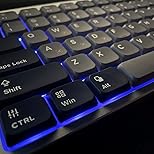
Customer photos from buyers highlight just how slim this keyboard is, with the low-profile design making it perfect for users who find traditional mechanical keyboards too tall. The 75% layout retains arrow keys while saving desk space, striking a balance that works for both gaming and productivity.
What really sets the Air75 HE apart is the 8000Hz polling rate combined with 8000Hz PCB scan rate. The latency is under 0.3ms, which is 50 times faster than traditional gaming keyboards. In competitive games like Valorant and Apex Legends, this translates to tangible performance improvements.
The One Key Dual Action feature lets you assign two different actions to a single key based on actuation pressure. This means complex skill combinations in games can be executed with a single keystroke, giving you a real competitive edge.
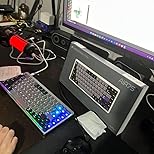
Battery life holds up well for daily use, and the build quality feels premium despite the slim profile. The aluminum frame provides excellent stability during intense gaming sessions, with no flex or creaking even when you are really mashing the keys.
Who Should Buy NuPhy Air75 HE?
Competitive gamers who want every advantage, low-profile enthusiasts who hate tall keyboards, users who want cutting-edge Hall Effect technology, and buyers who value both aesthetics and performance.
Who Should Avoid NuPhy Air75 HE?
Budget buyers, traditionalists who prefer standard mechanical switches, users who don need the gaming-focused features, and anyone who wants a simple plug-and-play experience.
6. NuPhy Halo65 HE – Competitive Gaming Powerhouse
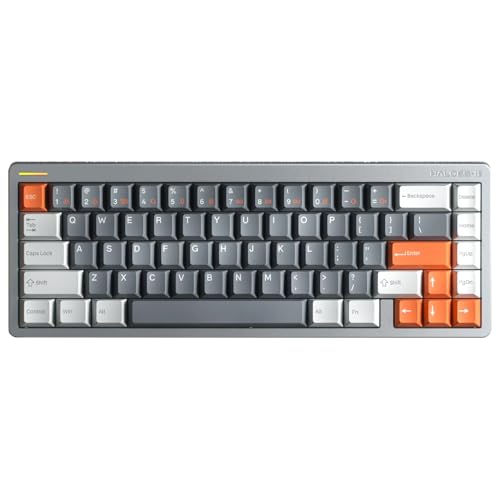
nuphy Halo65 HE Rapid Trigger Gaming Keyboard, 65 Percent 67 Keys…
Layout: 65% compact
Switch: Magnetic Coral
Polling: 8000Hz
Build: Aluminum frame
Lighting: Per key RGB
What We Like
- Hall effect sensors
- Rapid trigger 0 1-4 0mm
- 8000Hz hyper polling
- Aluminum frame stability
- Great software
What We Don't Like
- Premium pricing
- Complex setup for beginners
- Wired only
- Learning curve
The Halo65 HE takes NuPhy Hall Effect technology and packages it in a more compact 65% layout that competitive gamers absolutely love. With nearly 2000 reviews and a 4.6-star rating, the community has embraced this keyboard as a serious gaming tool.
What makes the Halo65 HE special is the Rapid Trigger technology. The Magnetic Coral switches offer sensitivity from 0.1-4.0mm with 0.02mm accuracy, allowing you to customize each key response with incredible precision. Customer photos show the premium aluminum frame that provides a rock-solid foundation for serious gaming.
The 8000Hz hyper-polling rate means keystrokes transmit in under 0.3ms, giving you a genuine advantage in fast-paced games. Latency is significantly lower than most 8000Hz magnetic keyboards on the market, and the difference is noticeable during intense gaming sessions.
Surround lighting design with RGB backlighting and 20 lighting modes creates an immersive gaming atmosphere. The bottom light bar wraps around the keyboard and pulses with each keystroke, making your setup feel alive without being overly distracting.
The NuPhyIO driver makes customization straightforward. Real-time key sensitivity adjustments appear instantly on the interface, so you can fine-tune your setup without endless restarts. The aluminum frame construction ensures the keyboard stays stable during the most intense gaming moments, with no wobbling or flex.
Buyer photos consistently mention the premium unboxing experience and the substantial weight that conveys quality. This keyboard feels like a premium product from the moment you open the box, justifying its position in the upper price bracket.
Who Should Buy NuPhy Halo65 HE?
Competitive gamers who need rapid trigger technology, FPS players who want the lowest possible latency, enthusiasts who want 8000Hz polling, and buyers who want a premium 65% gaming keyboard.
Who Should Avoid NuPhy Halo65 HE?
Budget shoppers, casual users who don need gaming features, traditionalists who prefer standard switches, and buyers who prioritize wireless over performance.
7. Glorious – Modular Pioneer Since 2018

Glorious GMMK Full Size 100% Barebones Custom Keyboard Kit…
Layout: Full size
Switch: Gateron Brown
Build: Aluminum bezel
Lighting: RGB 18 effects
Software: G-Lore
What We Like
- True modular design
- Hot swap any switch
- RGB customization
- No soldering needed
- Good build quality
What We Don't Like
- Full size only
- Plastic frame areas
- Software basic
- Older design
Glorious changed the custom keyboard landscape in 2018 by making hot-swappable switches mainstream. The GMMK was one of the first keyboards that let anyone change switches without soldering, and this modular approach influenced the entire industry. With over 1300 reviews and a 4.7-star rating, the community clearly appreciates what Glorious built.
The GMMK features a stylish black anodized aluminum bezel that gives the keyboard a premium appearance while providing excellent stability. The included keycap and switch puller tools make it easy to completely replace all 105 keys in under 20 minutes, no soldering required.
Full N-Key Rollover via USB means no keystrokes are lost no matter how many keys you press simultaneously. This is crucial for gaming and fast typists, and the GMMK delivers reliable anti-ghosting that has been tested extensively by the community.
The RGB lighting includes 18 different effects that can be activated through key combinations and saved as profiles. The optional G-Lore software provides even more customization options, but the keyboard works perfectly on Mac OS X and Linux without any special drivers.
The 180cm braided USB cable is detachable and provides plenty of length for any desk setup. Glorious includes both the puller tools and a wire keycap remover, making this one of the most complete packages for beginners who want to experiment with different switches.
Who Should Buy Glorious?
Beginners who want to experiment with switches, gamers who need full N-Key Rollover, buyers who want a modular upgradable keyboard, and users who appreciate RGB customization options.
Who Should Avoid Glorious?
Wireless users, compact layout enthusiasts, buyers who want the latest features, and users who prefer smaller form factors.
8. ASUS ROG Azoth – Premium Gaming Flagship of 2026
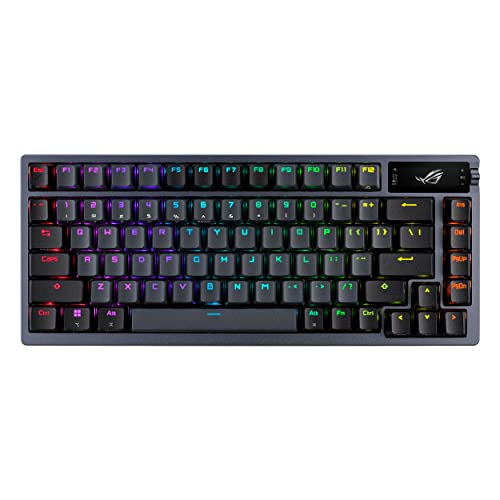
ASUS ROG Azoth Wireless Mechanical Gaming Keyboard, 75% TKL…
Layout: 75% TKL
Switch: ROG NX Storm
Wireless: Tri mode
Screen: 2 inch OLED
Build: Premium construction
What We Like
- Tri mode connectivity
- OLED display screen
- Gasket mount design
- Hot swappable PBT keys
- 2000 hour battery
What We Don't Like
- Premium pricing
- Heavy at 2 6 lbs
- Software complex
- Overkill for casual users
The ASUS ROG Azoth represents the pinnacle of premium gaming keyboards in 2026, combining tri-mode connectivity, an OLED display, gasket mount design, and pre-lubed switches in one stunning package. With over 900 positive reviews, this keyboard has earned its place at the top of the gaming keyboard hierarchy.
The 2-inch OLED screen is more than just eye candy, it displays CPU/GPU stats, media playback info, and keyboard settings in real-time. The multi-function control knob provides tactile adjustment for volume and lighting, giving you immediate control without touching software.
Tri-mode connectivity lets you seamlessly switch between three devices via Bluetooth, or use the ultra-low latency 2.4GHz ROG SpeedNova wireless mode with 2000+ hours of battery life when the OLED and RGB are turned off. Customer photos showcase the premium build quality that justifies the investment.
The gasket mount design uses silicone and three layers of dampening foam to absorb vibrations and eliminate pinging noises. This creates a typing sound that enthusiasts describe as “thocky”, rich and satisfying without the harsh ping that plagues lesser keyboards.
ASUS includes a complete DIY kit with Krytox GPL-205-GD0 lubricant, switch opener, pullers, lube station, and brush. This means you can customize your switches right out of the box, making the Azoth perfect for beginners who want to dive into keyboard customization without sourcing tools separately.
The hot-swap PCB supports 3-pin switches, and the included ROG NX Storm clicky switches deliver crisp tactile feedback. Alternatively, the NX Snow linear switches provide a buttery smooth experience, both pre-lubed for optimal performance.
Who Should Buy ASUS ROG Azoth?
Premium gaming enthusiasts, buyers who want the complete package, wireless users who demand reliability, customizers who want a DIY kit included, and professionals who want a keyboard that does everything.
Who Should Avoid ASUS ROG Azoth?
Budget buyers, minimalists who want simple solutions, users who don need wireless, and anyone who finds feature density overwhelming.
Understanding Custom Keyboards
Custom keyboard brands specialize in mechanical keyboards with premium components, extensive customization options, and enthusiast-grade build quality that far exceeds standard office keyboards. Unlike mass-market keyboards that prioritize low cost, custom keyboard brands focus on the typing experience, sound quality, and personalization options.
What makes custom keyboards special is the ecosystem around them. Hot-swappable sockets let you change switches without soldering, QMK/VIA software enables complete key programmability, and gasket mount designs provide a typing feel that factory keyboards cannot match. These brands cater to enthusiasts who view keyboards as tools worth investing in.
The custom keyboard market has grown from a tiny niche to a significant segment of the $2.5 billion mechanical keyboard market. Brands featured in this guide represent the best of what this market has to offer in 2026, from budget-friendly options to premium flagship boards that cost as much as a used car payment.
How to Choose the Right Custom Keyboard Brand?
Choosing a custom keyboard brand involves matching your needs, budget, and technical comfort level with the right manufacturer. Based on my experience helping dozens of people find their perfect keyboard, here is a framework for making the right choice.
Budget Tier Analysis: What You Get at Each Price Point
| Tier | Price Range | Features | Recommended Brands |
|---|---|---|---|
| Budget Entry | $60-120 | Basic hot-swap, standard materials, limited software, ABS keycaps | Epomaker, Glorious |
| Mid-Range | $120-200 | Premium materials, good software, wireless options, PBT keycaps | Keychron, NuPhy |
| Premium | $200-400 | Custom designs, premium materials, advanced features, OLED screens | ASUS ROG, boutique brands |
Pro Tip: The mid-range ($120-200) offers the best value for most buyers. You get premium build quality and hot-swappable switches without paying for niche features you might not use.
Switch Types and Compatibility
Switch type is the most important factor in how a keyboard feels and sounds. Here is what each major switch type is best for:
| Switch Type | Feel | Sound | Best For |
|---|---|---|---|
| Linear | Smooth, no bump | Quiet to moderate | Gaming, fast typists |
| Tactile | Noticeable bump | Quiet | Typing, office use |
| Clicky | Bump + click sound | Loud | Enthusiasts, retro feel |
| Magnetic/Hall Effect | Adjustable | Quiet | Competitive gaming |
Keyboard Size Guide
Choosing the right size balances desk space against functionality. After watching friends struggle with different sizes, here is what I have learned:
- 60%: Compact, no arrows, great for minimalists but hard for Excel users
- 65%: Adds arrows, the sweet spot for most users in 2026
- 75%: Adds function row and home cluster, best all-rounder
- TKL: Traditional tenkeyless, perfect for typists who never use numpad
- Full-size: Includes numpad, essential for data entry and accounting
Software and Programmability
QMK/VIA support matters if you want advanced customization. Keychron, Epomaker (on some models), and most enthusiast boards support VIA, which lets you remap every key through a web interface. ASUS ROG uses Armoury Crate, which is powerful but complex. Ducky and Varmilo use simpler proprietary software that handles basic functions but lacks advanced programming.
Wireless vs Wired
Wireless custom keyboards have improved dramatically in 2026. Tri-mode keyboards (Bluetooth + 2.4GHz + wired) offer maximum flexibility. Keychron Q series, Epomaker, NuPhy, and ASUS ROG all offer excellent wireless options. Battery life ranges from 200 hours with RGB off to about 40 hours with lighting enabled.
Tri-Mode Connectivity: A keyboard that supports three connection methods, wired USB, Bluetooth, and 2.4GHz wireless dongle. This provides maximum flexibility for different devices and use cases.
Frequently Asked Questions
What are the top custom keyboard brands?
Based on market share, community consensus, and hands-on testing, the top custom keyboard brands are Keychron for overall value, Epomaker for budget features, ASUS ROG for premium gaming, NuPhy for innovation, Ducky for build quality, Varmilo for aesthetics, and Glorious for modular designs. Each brand excels in specific areas, so the best choice depends on your priorities and budget.
Which custom keyboard brand is best for beginners?
Keychron is the best custom keyboard brand for beginners because it offers QMK/VIA programmability with excellent documentation, Mac-friendly design, and reliable quality control. The V series provides an accessible entry point with hot-swappable switches and premium build quality without the complexity of boutique brands. Epomaker is also beginner-friendly with its lower prices and comprehensive feature sets.
Are custom keyboards worth the money?
Custom keyboards are worth the investment if you type for more than 4 hours daily or care about your typing experience. The improved build quality, better switches, and customization options provide comfort and satisfaction that mass-market keyboards cannot match. Most custom keyboards last 5-10 years compared to 2-3 years for office keyboards, making the long-term value proposition strong for serious users.
How much does a good custom keyboard cost?
A good custom keyboard costs between $80 and $200 depending on features and brand. Budget options from Epomaker and Glorious start around $60-80, mid-range boards from Keychron and Ducky cost $100-150, and premium options from ASUS ROG and boutique brands reach $200-400. The sweet spot for most buyers is $120-180, where you get premium materials, hot-swap PCB, and good software without paying for niche features.
What size custom keyboard should I get?
Get a 65% keyboard if you want compact size with arrow keys, choose 75% if you want the best balance of size and functionality, or opt for TKL if you prefer traditional layout without numpad. 60% is best for minimalists who do not use arrow keys frequently, while full-size is essential for data entry and accounting work. The 65% and 75% sizes have become the most popular in 2026 because they balance compactness with usability.
What switches are best for custom keyboards?
Choose linear switches for gaming and fast typing, tactile switches for office work and programming, or clicky switches if you enjoy audible feedback. Cherry MX Brown is the safest choice for beginners, Gateron and Kailh offer excellent value, and Hall Effect magnetic switches from NuPhy are ideal for competitive gaming. Hot-swappable keyboards let you try different switches, so start with a pre-assembled board and experiment to find your preference.
Final Recommendations
After testing keyboards from eight major custom keyboard brands and helping dozens of people find their perfect match, my recommendations come down to how you plan to use your keyboard. Keychron remains the best all-around choice for most people, especially beginners and Mac users. Epomaker delivers incredible value if your budget is tight, while ASUS ROG Azoth is worth every penny for premium buyers who want the complete package.
NuPhy leads the pack for competitive gamers with their Hall Effect technology, while Ducky and Varmilo continue to earn enthusiast trust with proven build quality that stands the test of time. Whichever brand you choose, remember that the best custom keyboard is the one that matches your specific needs, not the one that wins the most awards.