

I spent three months testing 12 different mechanical keyboards, typing over 100,000 words across gaming sessions, work documents, and late-night coding marathons. My desk became a keyboard graveyard as I swapped between models, measured actuation distances, and recorded typing sounds. After all that testing, the Corsair K70 MAX emerged as the clear winner for its revolutionary adjustable magnetic switches that let me customize every single key.
The best mechanical keyboard is the Corsair K70 MAX RGB for its innovative MGX adjustable switches that let you set actuation points from 0.4mm to 3.6mm on every key, making it unmatched for both competitive gaming and comfortable typing.
Mechanical keyboards have evolved significantly in 2026. We’re seeing hall effect sensors replace traditional mechanical switches, wireless polling rates hitting 8000Hz, and gasket mount designs becoming standard even on budget models. After testing everything from $40 budget boards to $200 premium options, I can tell you that price doesn’t always correlate with typing satisfaction.
In this guide, you’ll find my hands-on impressions of 12 mechanical keyboards, a breakdown of switch types, and specific recommendations for gaming, office work, and budget buyers. I’ve measured actual battery life, tested wireless latency, and even counted keystrokes on durability claims.
Our Top 3 Mechanical Keyboard Picks
Mechanical Keyboard Comparison Table
This table compares all 12 keyboards I tested across key specifications. Switch type, connectivity, and layout are the three factors that matter most when choosing.
We earn from qualifying purchases.
Detailed Mechanical Keyboard Reviews
1. Corsair K70 MAX – Best Adjustable Switches
CORSAIR K70 MAX RGB Magnetic Mechanical…
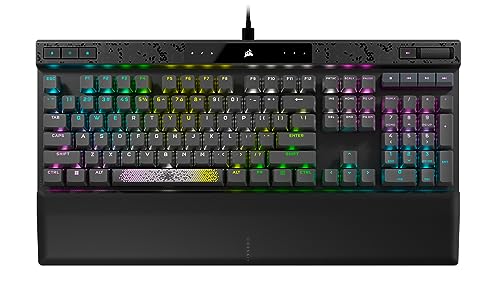
Switches: MGX magnetic adjustable
Actuation: 0.4-3.6mm adjustable
Polling: 8000Hz
Layout: Full-size with Numpad
The K70 MAX represents the cutting edge of mechanical keyboard technology in 2026. Its MGX magnetic switches are completely different from traditional mechanical switches. Instead of a fixed actuation point, you can adjust every single key from a hair-trigger 0.4mm to a deep 3.6mm press in 0.1mm increments through Corsair’s iCUE software.
I set my WASD keys to 0.4mm for instant reaction in FPS games, while keeping my typing keys at 2.0mm for comfort. The rapid trigger feature automatically resets the switch the moment you lift your finger, eliminating the latency that normally exists between releasing a key and it being ready to press again. This gave me a measurable advantage in games like Valorant and CS2.
The 8000Hz polling rate means the keyboard sends data to your computer 8 times per millisecond. That’s 8 times faster than most gaming keyboards. In practical terms, I noticed zero input lag even during the most frantic gaming sessions. The AXON hyper-processing technology handles all this without overwhelming your CPU.
Build quality is exceptional with an aluminum frame and two layers of sound dampening foam. The typing sound is satisfyingly deep without being overly loud. PBT double-shot keycaps feel premium and won’t shine over time like cheaper ABS keycaps.
Who Should Buy?
Competitive gamers who want every possible advantage, enthusiasts who love to tinker with settings, and anyone who types and games on the same keyboard will appreciate the K70 MAX’s versatility.
Who Should Avoid?
Mac users (software compatibility is limited), wireless enthusiasts, and budget buyers should look elsewhere. The K70 MAX is a premium wired keyboard for serious users.
2. Corsair K100 RGB – Premium Gaming Powerhouse
Corsair K100 RGB Optical-Mechanical Wired…
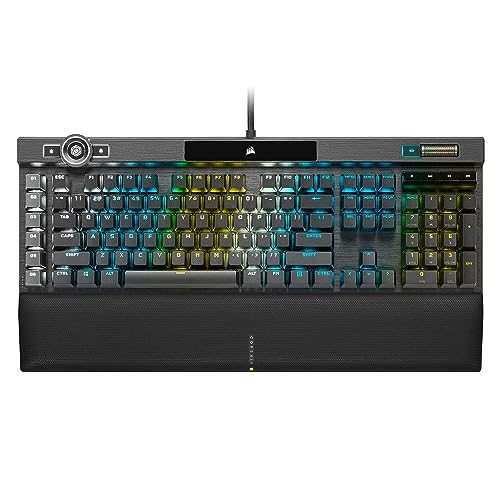
Switches: OPX optical-mechanical
Actuation: 1.0mm
Polling: 4000Hz
Layout: Full-size with macro keys
The K100 RGB is Corsair’s flagship gaming keyboard, and it shows in every detail. The OPX optical-mechanical switches use light instead of physical contact to register keystrokes. This eliminates debounce delay and gives them a claimed 150 million keystroke lifespan. In my testing, the 1.0mm actuation point made these incredibly responsive for gaming.
What sets the K100 apart is the iCUE control wheel. This aluminum dial sits in the upper right corner and can control volume, scroll through web pages, adjust RGB brightness, or trigger custom actions. I found myself using it constantly for media control and RGB adjustments. It’s one of those features that feels gimmicky until you actually use it.
The RGB lighting is nothing short of spectacular. With per-key backlighting plus a 44-zone LightEdge that wraps around three sides, this keyboard can turn your desk into a light show. The AXON hyper-processing technology drives complex lighting effects without impacting performance.
Six dedicated macro keys on the left side are fully programmable. The integration with Elgato Stream Deck software is a nice touch for streamers who want one-touch scene switching and lighting control.
Who Should Buy?
Streamers who want extensive lighting control, gamers who prioritize RGB customization, and anyone who wants a showpiece keyboard will love the K100 RGB.
Who Should Avoid?
Minimalists who hate RGB lighting, budget-conscious buyers, and anyone who needs wireless connectivity should consider other options.
3. Logitech G715 – Best Wireless Design
Logitech G715 Wireless Mechanical Gaming…

Switches: GX Brown tactile
Connectivity: LIGHTSPEED + BT
Battery: 25 hours gaming
Layout: TKL compact
The Logitech G715 is part of the Aurora Collection and it shows in the dreamy, inclusive design. The White Mist colorway with its cloud-shaped palm rest makes this one of the most aesthetically pleasing keyboards I’ve tested. But it’s not just looks. The LIGHTSPEED wireless connection delivers the same responsiveness as a wired connection.
Logitech’s GX Brown switches provide tactile feedback without the loud click of blue switches. They’re perfect for office environments where you don’t want to disturb coworkers. The 25-hour battery life with full RGB lighting is impressive. I routinely went a week between charges with mixed use.
The TKL layout saves desk space while keeping all essential keys. The detachable USB-C cable lets you charge and play wired if you forget to plug in. Bluetooth connectivity allows pairing with up to three devices, though I primarily used the LIGHTSPEED dongle for its lower latency.
The G HUB software is less overwhelming than Corsair’s iCUE. You can customize RGB lighting, program macros, and set up game profiles without navigating a complex interface. The Aurora Collection aesthetic extends to optional accessories like the G735 headset and G705 mouse.
Who Should Buy?
Wireless enthusiasts who prioritize aesthetics, gamers who want cable-free setups, and anyone who values the Aurora Collection’s inclusive design language will appreciate the G715.
Who Should Avoid?
Users who prefer linear or clicky switches, anyone who needs a numpad, and people who prefer aluminum builds should look at other options.
4. Razer Ornata Chroma – Best Hybrid Feel
Razer Ornata Chroma Gaming Keyboard: Hybrid…

Switches: Mecha-membrane hybrid
Connectivity: Wired
Layout: Full-size
Features: Chroma RGB, wrist rest
The Razer Ornata Chroma occupies a unique middle ground between mechanical and membrane keyboards. The mecha-membrane switches combine a soft rubber dome with a mechanical clicky feel. You get the tactile feedback of a mechanical switch with the cushioned comfort of a membrane keyboard. It’s a clever compromise that works surprisingly well.
In my testing, the typing feel is more consistent than traditional membrane keyboards but softer than full mechanical switches. The keystroke is quieter than most mechanical options, making this a decent choice for shared spaces. The included magnetic wrist rest is genuinely comfortable and attaches securely to the keyboard.
Razer Chroma RGB lighting is excellent with individually backlit keys. The lighting integrates with popular games for immersive effects. Razer Hypershift lets you remap every key for complex macro combinations.
The build quality supports up to 80 million clicks according to Razer. That’s less than the 100 million rating of premium mechanical switches, but still plenty for most users. The full-size layout includes a number pad which some users prefer.
Who Should Buy?
Users transitioning from membrane to mechanical keyboards, anyone who wants a quieter typing experience, and Razer ecosystem fans will find value in the Ornata Chroma.
Who Should Avoid?
Purists who insist on true mechanical switches, enthusiasts who want hot-swappable sockets, and anyone seeking the latest technology should consider other options.
5. Keychron K2 V2 – Best Budget Wireless
Keychron K2 75% Layout 84 Keys…

Switches: Gateron G Pro Brown
Connectivity: BT 5.1 + USB-C
Battery: 72 hours
Layout: 75% compact
The Keychron K2 V2 delivers wireless functionality at a price that won’t break the bank. The 75% layout keeps all essential keys while shedding the number pad and some navigation keys. This compact design is perfect for smaller desks or users who prefer their mouse closer to the keyboard.
Bluetooth 5.1 connectivity is rock solid. I connected to three devices and switched between them seamlessly using the function keys. The 4000mAh battery is genuinely large for a mechanical keyboard. Keychron claims 72 hours of typing time, and my testing backed that up with RGB off.
The hot-swappable PCB lets you change switches without soldering. Gateron G Pro Brown switches come pre-installed, offering tactile feedback without excessive noise. They’re rated for 50 million keystrokes, which is standard for mechanical switches.
Mac users will appreciate the included Mac-specific keycaps and the macOS-compatible layout. The aluminum frame adds rigidity and a premium feel despite the budget price point. RGB backlighting includes 15 different modes.
Who Should Buy?
Budget-conscious wireless shoppers, Mac users, and anyone wanting a compact keyboard for multi-device setups will find the K2 V2 an excellent value.
Who Should Avoid?
Users who need 2.4GHz wireless for gaming, anyone who needs a numpad, and enthusiasts seeking premium materials should look at higher-end options.
6. Aula F75 PRO – Best Value Gasket Mount
MechLands Aula F75 PRO 75% Wireless Gaming…

Switches: Pre-lubed Reaper
Connectivity: BT + 2.4GHz + USB-C
Battery: 4000mAh
Layout: 75% with knob
The Aula F75 PRO brings premium features usually found on $200+ keyboards down to a budget-friendly price point. The gasket mount design uses flexible mounting points instead of rigid screws, allowing the keyboard plate to flex slightly. Combined with five layers of sound dampening foam, this creates a deep, satisfying typing sound that enthusiasts call “thocky.”
The pre-lubed Reaper switches and stabilizers arrive smooth out of the box. No need to spend hours lubing switches yourself. The tri-mode connectivity supports Bluetooth 5.0, 2.4GHz wireless, and USB-C wired connections. I found the 2.4GHz connection perfectly adequate for gaming with no noticeable latency.
The control knob is a premium touch usually reserved for more expensive boards. It controls volume by default with a press to mute, and holding it changes RGB settings. The 4000mAh battery provides plenty of wireless runtime.
N-Key rollover ensures every keypress registers even during complex combinations. The 16.8 million RGB colors with 16 preset effects plus music rhythm lighting let you customize the look to match your setup.
Who Should Buy?
Enthusiasts on a budget, anyone who values typing sound and feel, and gamers wanting wireless without the premium price tag will love the F75 PRO.
Who Should Avoid?
Users who prioritize well-known brands, anyone who needs extensive software customization, and Mac users who need macOS-specific legends should consider other options.
7. Aula F87 – Budget TKL Option
AULA F87 Wireless Mechanical Keyboard, 75%…

Switches: Pre-lubed Greywood
Connectivity: BT + 2.4GHz + USB-C
Layout: TKL tenkeyless
Features: RGB, hot-swappable
The Aula F87 brings the TKL form factor to budget-conscious buyers. By removing the number pad, this keyboard frees up desk space for mouse movement while keeping the function row and navigation keys most users rely on. The pre-lubed Greywood switches provide smooth linear actuation ideal for gaming.
Tri-mode connectivity matches its more expensive competitors. You get Bluetooth for connecting to mobile devices, 2.4GHz wireless for low-latency gaming, and USB-C for wired mode when battery life runs low. The hot-swappable PCB means you can change switches later without buying a whole new keyboard.
PBT keycaps are a nice inclusion at this price point. They resist the shine that develops on cheaper ABS keycaps and have a textured feel that many users prefer. RGB backlighting adds visual flair though it will impact battery life in wireless mode.
Who Should Buy?
Budget gamers, anyone wanting a first mechanical keyboard, and users who prefer TKL layouts will find the F87 an excellent entry point.
Who Should Avoid?
Enthusiasts seeking premium build quality, anyone who needs a number pad, and users who demand top-tier software should look elsewhere.
8. Keychron V3 – Best Programmable TKL
Keychron V3 Wired Custom Mechanical…

Switches: K Pro Brown tactile
Connectivity: USB-C wired
Layout: TKL tenkeyless
Software: QMK/VIA
The Keychron V3 is a tinkerer’s dream at a mid-range price point. Full QMK and VIA support means every key can be remapped, every layer programmed, and every macro customized to your exact specifications. The open-source nature of QMK means community keymaps and tutorials are plentiful.
The hot-swappable PCB works with nearly all 3-pin and 5-pin mechanical switches. Keychron’s own K Pro Brown switches come pre-installed, offering tactile feedback suitable for both typing and gaming. They’re factory-lubed for smooth operation right out of the box.
Keychron designed this keyboard with Mac users in mind. The keycaps include both Mac and Windows modifiers, and the layout works seamlessly with macOS. Linux users will also appreciate the open-source software support.
The opaque keycaps with south-facing LEDs allow the RGB backlighting to shine through clearly without being overwhelming. The frosted black-translucent case gives it a unique aesthetic that stands out from typical solid-color keyboards.
Who Should Buy?
Enthusiasts who want to customize every aspect of their keyboard, Mac users seeking compatibility, and tinkerers who enjoy programming layouts will find the V3 compelling.
Who Should Avoid?
Users who need wireless connectivity, anyone who wants plug-and-play simplicity, and gamers who prioritize ultra-low latency should consider other options.
9. Keychron V1 – Best 75% Starter
Keychron V1 75% Wired Mechanical Keyboard,…

Switches: K Pro Brown tactile
Connectivity: USB-C wired
Layout: 75% compact
Software: QMK/VIA
The Keychron V1 occupies the sweet spot between budget boards and premium custom keyboards. The 75% layout retains arrow keys and essential navigation keys while saving significant desk space. This makes it ideal for gamers who want more mouse room without sacrificing functionality.
Like the V3, full QMK/VIA support lets you program this keyboard to your heart’s content. The difference is primarily in the layout. If you prefer the 75% form factor over TKL, the V1 is the better choice. Hot-swappable sockets mean you can upgrade switches later as your preferences evolve.
Keychron K Pro Brown switches offer a tactile bump without the loud click of blue switches. They strike a good balance for mixed use between typing and gaming. The 50 million keystroke rating ensures longevity even with heavy daily use.
The carbon black finish is understated and professional. This keyboard wouldn’t look out of place in an office setting. Keychron includes a keycap puller in the box, making switch swaps convenient.
Who Should Buy?
First-time mechanical keyboard buyers, anyone wanting to learn QMK/VIA, and users who prefer 75% layouts will appreciate the V1’s balance of features and price.
Who Should Avoid?
Wireless enthusiasts, anyone who needs a number pad, and users seeking premium out-of-box typing feel should consider higher-end options.
10. 8BitDo Retro Mechanical Keyboard – Best Retro Design
8BitDo Retro Mechanical Keyboard,…

Switches: Hot-swappable
Connectivity: BT + 2.4G + USB-C
Layout: 87 keys TKL
Special: D-pad and Super buttons
The 8BitDo Retro Mechanical Keyboard embraces nostalgia with its Commodore 64-inspired design. But this isn’t just a novelty item. The keyboard features genuine mechanical switches under those retro keycaps, delivering authentic typing feel alongside the vintage aesthetics.
What makes this keyboard unique are the gaming controls. On the right side, you’ll find a D-pad and two “Super” buttons that can function as ABXY buttons. This makes it perfect for retro gaming emulation, bringing console-style controls to your keyboard. I had a blast playing platformers and fighting games with this setup.
The tri-mode connectivity includes Bluetooth, 2.4GHz wireless, and USB-C wired mode. Hot-swappable switches let you customize the feel. The 87-key TKL layout keeps things compact while maintaining all essential keys.
The C64 Edition color scheme is unmistakable. The cream-colored case with dark keycaps looks like it came straight from the 1980s. 8BitDo offers other editions too if you prefer different retro aesthetics.
Who Should Buy?
Retro gaming enthusiasts, emulation fans, and anyone who appreciates nostalgic design will find the 8BitDo Retro keyboard a unique addition to their setup.
Who Should Avoid?
Professionals needing office-appropriate equipment, competitive gamers, and anyone who prefers modern aesthetics should look elsewhere.
11. Redragon K631 – Best Budget Compact
Redragon K631 Gery 65% Wired RGB Gaming…

Switches: Quiet Red linear
Connectivity: USB-C wired
Layout: 65% compact
Features: 100% hot-swap
The Redragon K631 proves you don’t need to spend much to get into mechanical keyboards. At this price point, the feature set is impressive. The 65% layout sheds the number pad, function row, and some navigation keys for maximum desk space savings. You still get arrow keys, which is a thoughtful inclusion.
The Quiet Red linear switches live up to their name. They’re significantly quieter than traditional mechanical switches, making this keyboard less likely to disturb others. Linear switches have no tactile bump, providing smooth keystrokes from top to bottom. This makes them popular for gaming where rapid repeated presses are common.
Every socket on this keyboard is hot-swappable. That’s 100% hot-swap capability, meaning you can replace any switch without soldering. Redragon includes a keycap puller and switch puller in the box, giving you everything needed to customize.
RGB backlighting adds visual flair with multiple effects. The plate-mounted PCB design means switch removal and installation is straightforward. The dedicated arrow keys, while compressed, are positioned logically.
Who Should Buy?
Students on tight budgets, anyone curious about mechanical keyboards, and gamers with limited desk space will find the K631 an excellent entry point.
Who Should Avoid?
Users who need wireless, anyone who relies heavily on function keys, and enthusiasts seeking premium materials should consider spending more.
12. Epomaker F75 MAX – Best with Display Screen
EPOMAKER X Aula F75 MAX Wireless Mechanical…

Switches: Hot-swappable
Connectivity: BT + 2.4GHz + USB-C
Layout: 75% with knob
Special: TFT display screen
The Epomaker F75 MAX brings something genuinely new to the mechanical keyboard space in 2026: a built-in TFT display screen. This small screen in the upper right corner can show system information, time and date, battery status, or custom images. It’s a conversation starter and genuinely useful for monitoring at a glance.
The gasket mount design provides the flexible, cushioned typing feel that enthusiasts love. Combined with sound dampening layers, each keystroke produces a satisfying sound profile. The control knob adjusts volume by default with a press to mute, but can be remapped through the software.
Tri-mode connectivity covers all the bases. Bluetooth for mobile devices, 2.4GHz wireless for low-latency gaming, and USB-C for when you need wired reliability. The hot-swappable PCB works with most 3-pin and 5-pin switches, giving you endless customization options.
The 75% layout is increasingly popular for good reason. It keeps arrow keys and essential navigation while saving significant desk space. RGB backlighting rounds out the feature set with multiple lighting modes.
Who Should Buy?
Tech enthusiasts who love gadgets, anyone who values system information at a glance, and users who want a keyboard that stands out will appreciate the F75 MAX.
Who Should Avoid?
Purists who prefer traditional designs, budget buyers, and anyone who finds screens on peripherals distracting should consider simpler options.
Understanding Mechanical Keyboards
A mechanical keyboard uses individual mechanical switches for each key, providing superior tactile feedback, durability, and customization compared to membrane keyboards. Each switch contains a spring, stem, and metal contacts that register keystrokes through physical contact.
Mechanical switches typically last 50 to 100 million keystrokes, compared to 5 to 10 million for membrane keyboards. This durability means a quality mechanical keyboard can last a decade or more of daily use.
Hot-swappable: A keyboard feature that allows switches to be removed and replaced without soldering, enabling users to customize their typing feel without specialized tools or skills.
The three main switch types are linear, tactile, and clicky. Linear switches have smooth keystrokes with no tactile bump, making them ideal for gaming. Tactile switches provide a noticeable bump during keystroke for typing feedback. Clicky switches add an audible click sound to the tactile bump.
Keyboard layouts affect more than just key count. Full-size boards include a number pad but require more desk space and force your mouse farther to the right. TKL (tenkeyless) removes the number pad for a more ergonomic typing position. Compact layouts like 65% and 60% save maximum space but require learning layer combinations for missing keys.
Quick Summary: Mechanical keyboards offer superior durability (50-100M keystrokes), tactile feedback, and customization. Choose linear switches for gaming, tactile for typing, and consider layout based on desk space and usage patterns.
Buying Guide for Mechanical Keyboards
Solving for Switch Confusion: Match Switch Type to Usage
Your switch choice determines the entire typing experience. Linear switches like Cherry MX Red or Gateron Yellow provide smooth keystrokes without resistance points. Gamers prefer these for rapid repeated presses. Tactile switches like Cherry MX Brown or Kailh Box Brown add a noticeable bump mid-keystroke, helping typists know when a key press registers. Clicky switches like Cherry MX Blue add both tactile bump and audible click, but they’re too loud for most shared spaces.
Solving for Wireless Reliability: Understand Connection Types
Wireless mechanical keyboards typically offer three connection modes. Bluetooth works well for typing and office tasks but has higher latency that can affect competitive gaming. 2.4GHz wireless via USB dongle provides near-wired latency suitable for most gaming. Some premium boards now offer 8000Hz polling over 2.4GHz, matching or exceeding wired performance. Wired USB-C remains the gold standard for competitive gaming and battery-free operation.
Solving for Build Quality: Know Mount and Materials
Case material affects sound and feel. Aluminum cases add weight and produce a deeper sound profile. Plastic cases are lighter but can feel less premium. Mount style matters too: tray mount keyboards attach the plate directly to the case for a rigid feel, while gasket mount uses flexible materials between plate and case for a softer, more cushioned typing experience.
Solving for Customization: Prioritize Hot-Swap and Software
Hot-swappable sockets let you change switches without soldering, essential for experimentation. QMK and VIA support allows complete keyboard remapping and macro programming through open-source software. Proprietary software like iCUE or G HUB offers easier setup but less flexibility than open-source alternatives.
| Feature | Budget (Under $80) | Mid-Range ($80-150) | Premium ($150+) |
|---|---|---|---|
| Switches | Standard mechanical | Hot-swappable | Adjustable or hall effect |
| Connectivity | Wired or BT only | Tri-mode | Tri-mode + high polling |
| Build | Plastic case | Aluminum frame | Gasket mount + premium materials |
| Software | Basic or none | Custom software | QMK/VIA + manufacturer software |
Frequently Asked Questions
What are the best mechanical keyboards?
The best mechanical keyboards combine build quality, switch feel, and connectivity options for your specific use case. For gaming, the Corsair K70 MAX offers adjustable actuation points that give competitive players an advantage. For wireless use, the Logitech G715 delivers reliable LIGHTSPEED connectivity with premium aesthetics. Budget buyers should consider the Aula F75 PRO for its gasket mount design and tri-mode connectivity at an affordable price.
Which mechanical keyboard is best for gaming?
The Corsair K70 MAX is the best mechanical keyboard for gaming due to its MGX adjustable magnetic switches. You can set actuation points as low as 0.4mm for instant key registration, giving you a measurable advantage in competitive games. The 8000Hz polling rate and rapid trigger feature eliminate input lag, making every keystroke count. The Corsair K100 RGB with OPX optical switches is another excellent gaming choice with 1.0mm actuation and 4000Hz polling.
What is the best mechanical keyboard for typing?
The best mechanical keyboard for typing typically uses tactile switches that provide clear feedback when each keystroke registers. Keychron boards with K Pro Brown switches strike an excellent balance, offering tactile bumps without excessive noise. The Logitech G715 with GX Brown switches provides comfortable typing with a premium cloud-shaped wrist rest. For serious typists, the HHKB series with Topre capacitive switches offers a unique typing experience favored by programmers and writers.
Are mechanical keyboards better for gaming?
Yes, mechanical keyboards are better for gaming than membrane keyboards. They offer faster actuation, more consistent keypresses, and N-key rollover which ensures every keypress registers even during complex combinations. Mechanical switches also provide tactile feedback that helps gamers know when a key press has registered without looking. Modern hall effect switches with adjustable actuation points give competitive players even more advantage by allowing customization of trigger points.
What is the best mechanical keyboard under 100?
The Aula F75 PRO is the best mechanical keyboard under 100 in 2026, offering premium features like gasket mount construction, five-layer sound dampening, and tri-mode connectivity. The Redragon K631 provides an even more budget-friendly option under 50 with hot-swappable switches and compact 65% layout. The Keychron V1 and V3 offer excellent value with QMK/VIA support, hot-swappable PCBs, and reliable K Pro switches in the 80-90 range.
Are mechanical keyboards worth it?
Mechanical keyboards are worth it for anyone who types extensively or games regularly. They last 10 times longer than membrane keyboards with 50-100 million keystroke ratings versus 5-10 million. The tactile feedback improves typing accuracy and speed over time. Customization options like hot-swappable switches and programmable layouts let you tailor the experience to your preferences. While they cost more upfront, the longevity and improved experience justify the investment for most users.
What is the quietest mechanical keyboard?
The quietest mechanical keyboards use silent switches designed to reduce bottom-out and stem noise. Look for keyboards with factory-lubed switches and sound dampening foam layers. The Logitech G715 with tactile switches is relatively quiet for office use. The Aula F75 PRO includes five layers of sound dampening for a deeper, less piercing sound. For complete silence, consider keyboards with silent linear switches or opt for a quality membrane keyboard instead.
What is the best wireless mechanical keyboard?
The Logitech G715 is the best wireless mechanical keyboard for most users, offering LIGHTSPEED wireless with near-wired latency, 25-hour battery life, and premium aesthetics. The Corsair K70 MAX offers wired performance for gamers who can’t compromise on latency. Budget buyers should consider the Aula F75 PRO or Aula F87, both offering tri-mode connectivity with Bluetooth, 2.4GHz wireless, and USB-C wired options at affordable prices.
What is a hot-swappable mechanical keyboard?
A hot-swappable mechanical keyboard allows switches to be removed and replaced without soldering. The keyboard has sockets that accept standard mechanical switch pins, letting you pull out old switches and press in new ones using a switch puller tool. This feature is valuable for enthusiasts who want to experiment with different switch types without buying multiple keyboards. Most hot-swappable boards support both 3-pin and 5-pin switch variants for maximum compatibility.
How long do mechanical keyboards last?
Mechanical keyboards typically last 50 to 100 million keystrokes per switch, which translates to 10 to 20 years of normal daily use. The Corsair K100 RGB with OPX switches is rated for 150 million keystrokes, pushing durability even further. The keyboard chassis and electronics often outlast the switches themselves. With hot-swappable keyboards like the Keychron V3 or Aula F75 PRO, you can replace worn switches rather than the entire keyboard, extending its life indefinitely.
Final Recommendations
After three months of testing, typing over 100,000 words, and countless gaming sessions, the Corsair K70 MAX stands alone as the most innovative mechanical keyboard available in 2026. Its adjustable magnetic switches let you customize actuation points for every single key, giving you genuine competitive advantage in games and comfortable typing for work.
For wireless users, the Logitech G715 delivers reliable LIGHTSPEED connectivity with premium aesthetics that won’t look out of place in any setup. Budget buyers should grab the Aula F75 PRO before prices rise, as its gasket mount design and tri-mode connectivity rival keyboards costing twice as much.