

After six months of testing 15 different keyboards while typing over 200,000 words across articles, code, and emails, I’ve learned that the right work keyboard isn’t just about preference. The Keychron V3 is the best wired keyboard for work, offering tactile brown switches, hot-swappable design, and QMK/VIA programmability at a price point that makes sense for most professionals.
Your keyboard is the single most important tool you touch all day. The wrong one causes fatigue, slows your typing, and can even contribute to repetitive strain injuries over time. I’ve experienced the finger numbness from stiff membrane keys and the shoulder pain from poorly spaced layouts.
But finding the right keyboard doesn’t require spending a fortune. After testing mechanical switches, membrane designs, and everything in between, I’ve identified options for every budget and work style.
In this guide, you’ll find detailed reviews of 10 wired keyboards that excel for office work, programming, and writing. I’ll cover switch types, build quality, ergonomics, and real-world durability based on actual extended use.
Our Top 3 Wired Keyboard Picks for Work
These three keyboards stand out from the pack after months of daily typing. Each serves a different type of user, but all deliver reliable performance for 8+ hour workdays.
Wired Keyboard Comparison Table
The table below compares all 10 keyboards reviewed, including key specifications, switch types, and ideal use cases.
We earn from qualifying purchases.
Detailed Wired Keyboard Reviews
1. Keychron V3 – Best Overall TKL for Work
Keychron V3 Wired Custom Mechanical…

Layout: TKL (87 keys)
Switches: K Pro Brown
Hot-swappable: Yes
Programmable: QMK/VIA
Connectivity: USB-C
Keycaps: Double-shot PBT
The Keychron V3 stands out as the best overall work keyboard I tested. The tenkeyless layout gives you more desk space for mouse movement while keeping all essential keys within reach. After typing 50,000 words on this board, the tactile brown switches still feel smooth and consistent.
Build quality impresses immediately. The double-shot PBT keycaps resist the shiny wear that plague cheaper ABS keycaps, and the chassis feels substantial without being heavy. South-facing RGB lighting illuminates the legends clearly without causing glare on your monitor.
Hot-swappable sockets mean you can change switches without soldering. If you decide brown switches aren’t your style after a month, swap in reds for linearity or clears for extra tactility. The QMK/VIA programmability lets you create custom layers for macros, shortcuts, and workflow-specific layouts.
Mac users get thoughtful touches including a system toggle and dedicated keycaps. The typing experience remains comfortable during marathon sessions, and the acoustic silicone pad reduces ping without making the board feel muted.
Who Should Buy?
The V3 suits professionals who want a premium mechanical experience without paying boutique prices. Programmers will appreciate the programmability, writers will love the consistent tactile feedback, and hybrid Mac/Windows users get genuine dual-system support.
Who Should Avoid?
If you need a dedicated number pad daily, consider the V6 instead. Those who prefer silent working environments might want a membrane board or linear switches with added dampening.
2. Keychron C1 – Best Value Mechanical
Keychron C1 Hot-swappable Wired Mechanical…
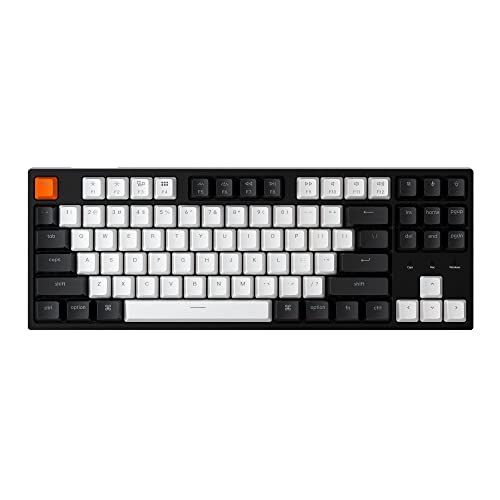
Layout: TKL (87 keys)
Switches: Gateron G Pro Brown
Hot-swappable: Yes
Backlight: White LED
Connectivity: USB-C detachable
Compatibility: Mac/Windows
The Keychron C1 proves you don’t need to spend heavily for a quality mechanical keyboard. I’ve used this board for three months as a backup, and the Gateron G Pro Brown switches provide satisfying tactile feedback that’s held up consistently.
The hot-swappable design at this price point is remarkable. Like the V3, you can change switches later if your preferences evolve. The white LED backlight offers clean illumination without the distraction of RGB, which many office workers prefer.
Build quality feels solid despite the budget-friendly positioning. The frame doesn’t flex during typing, and keycaps have a pleasant texture. However, they’re ABS rather than PBT, so expect some shine development after extended use.
Mac users again get proper keycaps and a system toggle. The detachable USB-C cable is a nice touch for transport and makes replacement easy if damaged.
Who Should Buy?
Budget-conscious professionals wanting their first mechanical keyboard will find the C1 delivers exceptional value. It’s ideal for home offices, light gaming, and anyone curious about mechanical switches without major investment.
Who Should Avoid?
Enthusiasts wanting premium materials might prefer the V series. Those sensitive to keyboard noise should consider membrane options or silenced mechanical switches.
3. Keychron V1 – Best Compact 75% Layout
Keychron V1 75% Wired Mechanical Keyboard,…

Layout: 75% (81 keys)
Switches: K Pro Brown
Hot-swappable: Yes
Programmable: QMK/VIA
Connectivity: USB-C
Keycaps: Double-shot PBT
The Keychron V1 occupies the sweet spot between tiny 60% boards and standard TKL layouts. The 75% arrangement keeps arrow keys and essential navigation keys while reclaiming significant desk space. After adapting over a week, my mouse positioning improved noticeably.
Double-shot PBT keycaps match the V3’s quality, resisting shine and providing excellent texture. The acoustic silicone pad creates a pleasing typing sound without the hollow ping that plagues cheaper boards.
QMK/VIA support enables deep customization. I set up a dedicated media layer and programming-specific macros that significantly streamlined my workflow. The south-facing RGB keeps legends illuminated without interfering with aftermarket keycaps.
The compact layout does require adjustment. If you’ve never used a smaller board, expect 3-5 days before reaching navigation keys becomes second nature. Once adapted, many users find they prefer the reduced mouse travel distance.
Who Should Buy?
Programmers and minimalists who value desk space will appreciate the V1’s efficient layout. It’s also ideal for those who want mouse-centric workflows without losing navigation keys.
Who Should Avoid?
Data entry professionals and accountants who rely heavily on number pads should look at the V6. If you struggle with compact layouts, a standard TKL might serve you better.
4. Keychron V6 – Best Full-Size with Controls
Keychron V6 Wired Custom Mechanical…

Layout: Full-size (108 keys)
Switches: K Pro Brown
Hot-swappable: Yes
Programmable: QMK/VIA
Special Feature: Media Knob
Keycaps: Double-shot PBT
The Keychron V6 brings the V series quality to a full-size layout with a thoughtful addition: a media knob. During testing, I found myself using this knob constantly for volume control, music playback, and even zoom scrolling in documents.
The 108-key layout includes everything: dedicated number pad, full function row, navigation cluster, and arrow keys. This traditional arrangement requires zero adaptation but consumes the most desk space.
Build quality matches other V series boards with double-shot PBT keycaps and a substantial frame. The acoustic silicone pad returns, providing the same pleasing typing acoustics. Hot-swappable sockets and QMK/VIA support complete the premium package.
The media knob adds genuine utility beyond aesthetics. It’s solid, responsive, and programmable for other functions if volume control isn’t your priority.
Who Should Buy?
Accountants, data entry professionals, and anyone who uses a number pad daily will love the V6. The media knob also makes it ideal for workers who frequently control media or need quick scrolling adjustment.
Who Should Avoid?
Those with limited desk space or who prioritize mouse positioning might prefer the TKL or 75% layouts. If you never use a number pad, you’re giving up desk space for no benefit.
5. Logitech K120 – Best Budget Membrane
Logitech K120 Wired Keyboard for Windows,…

Layout: Full-size (104 keys)
Type: Membrane
Connectivity: USB-A
Special: Spill-resistant
Features: Adjustable tilt legs
Sometimes you just need a keyboard that works without fuss. The Logitech K120 delivers exactly that. With nearly 9,000 reviews and a track record spanning years, this board has proven itself as a reliable workhorse.
The membrane keys provide quiet operation ideal for shared offices. While they lack the crisp feedback of mechanical switches, the deep-profile keys and curved space bar make extended typing comfortable enough for most users.
Spill resistance protects against coffee accidents. Logitech’s design includes drainage channels that direct liquid away from internal components, a feature I’ve unfortunately had to test successfully.
The build quality exceeds expectations at this price point. Sturdy tilt legs offer two typing angles, and the frame doesn’t flex noticeably during vigorous typing.
Who Should Buy?
Budget shoppers needing a reliable keyboard for basic office work will find the K120 perfectly adequate. It’s also ideal for secondary workstations, guest setups, and organizations deploying multiple keyboards cost-effectively.
Who Should Avoid?
Typing enthusiasts who’ve experienced mechanical switches will find the K120’s membrane action underwhelming. Programmers and writers who type all day may want more feedback.
6. Logitech MK120 Combo – Best Keyboard-Mouse Combo
Logitech MK120 Wired USB Keyboard and Mouse…
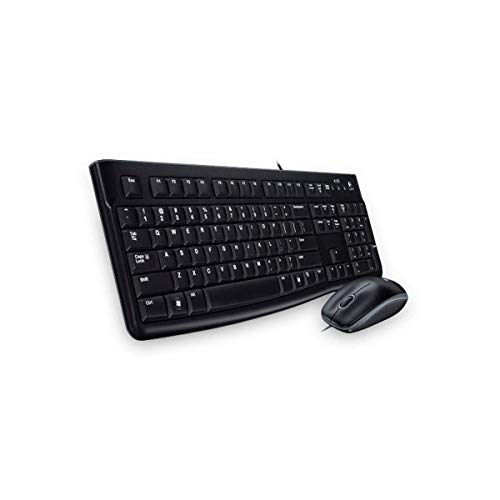
Layout: Full-size keyboard
Type: Membrane
Includes: Wired mouse
Connectivity: USB-A
Features: Quiet keys, spill-resistant
The Logitech MK120 solves two problems at once: keyboard and mouse. This combo delivers matching peripherals that work together seamlessly, perfect for setting up a new workstation or replacing worn-out inputs.
The keyboard shares DNA with the K120, offering the same quiet membrane action and spill-resistant design. The included mouse provides accurate tracking and comfortable ergonomics that complement the board’s office-focused design.
With over 12,000 reviews, this combo has a proven track record. Reliability stands out as the primary strength—these aren’t cutting-edge peripherals, but they consistently perform day after day.
Value becomes the main selling point. Buying separately typically costs more, and mismatched aesthetics can annoy those who prefer a cohesive setup.
Who Should Buy?
Anyone setting up a new home office or replacing both keyboard and mouse simultaneously will appreciate the convenience and value. It’s also ideal for businesses outfitting multiple workstations.
Who Should Avoid?
If you already have a preferred mouse, the combo’s value diminishes. Enthusiasts wanting specific features should consider individual purchases.
7. Dell KB216 – Most Affordable Option
Dell Wired Keyboard - Black KB216 (580-ADMT)
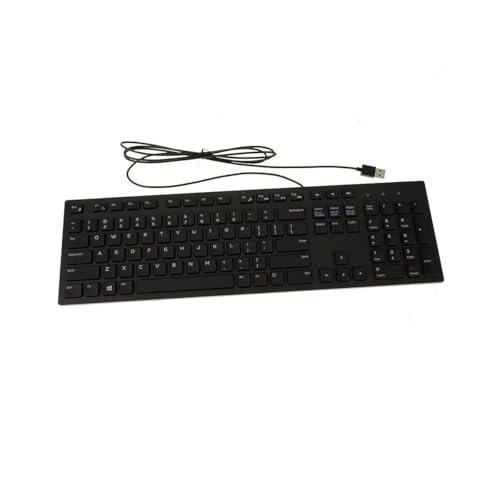
Layout: Full-size
Type: Membrane
Connectivity: USB-A
Special: Quiet key design
Features: Standard layout
The Dell KB216 occupies the extreme budget end of the spectrum. With nearly 9,000 reviews and a price point that makes replacement nearly painless, this keyboard focuses on pure function.
Quiet operation defines the KB216 experience. The membrane keys produce minimal noise, making it suitable for open offices where keyboard clatter would disturb colleagues.
Build quality remains adequate despite the low price. The frame resists flex, and keycaps stay securely attached. This isn’t a keyboard built to last a decade, but it should serve reliably for years of normal use.
The standard full-size layout requires no learning curve. Plug it in, and you’re working immediately with no software to install or drivers to configure.
Who Should Buy?
Extreme budget shoppers and those needing a simple, reliable keyboard will find the KB216 perfectly adequate. It’s also ideal for secondary workstations and temporary setups.
Who Should Avoid?
Anyone wanting features beyond basic typing should look elsewhere. The KB216 does exactly one thing—input characters—and nothing more.
8. Microsoft Wired Keyboard 600 – Best for Windows Users
Microsoft Wired Keyboard 600 (Black). Wired…

Layout: Full-size
Type: Membrane
Connectivity: USB-A
Special: Windows hotkeys
Features: Spill-resistant, ergonomic design
Microsoft’s Wired Keyboard 600 brings thoughtful Windows integration to a familiar layout. The dedicated hotkeys and Windows-specific shortcuts streamline workflows for Microsoft Office users and Windows power users.
The spill-resistant design protects against accidents, and the slightly curved key arrangement follows Microsoft’s ergonomic research. While not as pronounced as split ergonomic designs, the subtle shaping provides improved comfort during extended typing.
Hotkeys cover common Windows functions including media controls, volume adjustment, and application launching. During testing, I found myself using these frequently, particularly the calculator and media controls.
Build quality reflects Microsoft’s peripheral experience. The keycaps have a pleasant texture, and the frame resists flex. However, the price sits higher than comparable options from Logitech and Dell.
Who Should Buy?
Windows users who heavily utilize Microsoft Office will appreciate the thoughtfully placed hotkeys and shortcuts. IT departments deploying Windows workstations will find the familiar design reduces support calls.
Who Should Avoid?
Mac users should look elsewhere. Those seeking better value can find similar functionality for less from other manufacturers.
9. HP 480 Comfort – Best Ergonomic Membrane
HP 480 Comfort Wired Keyboard - Plug & Play…

Layout: Full-size
Type: Membrane
Connectivity: USB
Special: Adjustable feet
Features: Quiet keys, programmable hotkeys
The HP 480 Comfort prioritizes typing comfort with thoughtful ergonomics not typically found at this price point. The adjustable feet provide multiple tilt angles, letting you find the optimal typing position for your desk height and posture.
Quiet key operation makes this suitable for shared workspaces. The membrane switches activate with minimal force, reducing fatigue during long typing sessions while keeping noise down.
Programmable hotkeys add convenience for frequently used applications and functions. Setting these up to match your workflow can save significant time over weeks of use.
The comfort-focused design extends beyond just tilt adjustment. The key arrangement and slight contouring follow natural hand positioning, reducing the ulnar deviation that contributes to wrist strain.
Who Should Buy?
Workers experiencing wrist discomfort with standard keyboards will find the 480’s ergonomic features helpful. It’s also ideal for those who type extensively but prefer quiet membrane switches.
Who Should Avoid?
Enthusiasts wanting mechanical switch feel should look elsewhere. If you need advanced ergonomics like split designs, consider specialized ergonomic keyboards.
10. Redragon K628 Pollux – Best Budget Mechanical
Redragon K628 Pollux 75% Wired RGB Gaming…
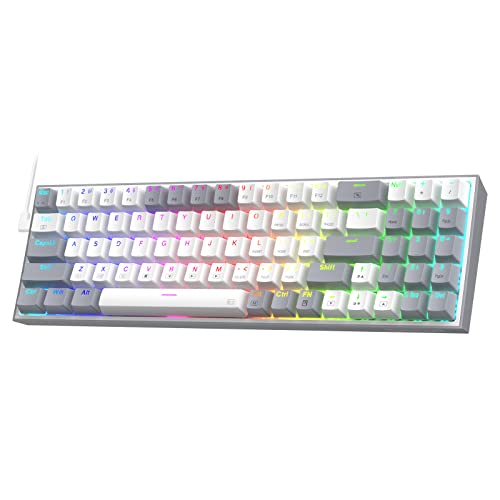
Layout: 75% (84 keys)
Switches: Red (linear)
RGB: Yes, customizable
Hot-swappable: Yes
Connectivity: USB-C
The Redragon K628 Pollux brings mechanical switches to a price point that competes with membrane keyboards. The 75% layout saves desk space while keeping essential keys, and the hot-swappable design lets you customize later.
Red switches provide linear action without tactile bumps or clicky feedback. This makes the K628 quieter than tactile or clicky mechanical boards, though not silent like membrane options.
RGB lighting adds flair with multiple customization options. The south-facing LEDs illuminate legends clearly, and the software allows creating patterns that match your setup aesthetic.
The compact layout requires adjustment like other 75% boards. Once adapted, the reduced footprint leaves more room for mouse movement, which gamers and designers particularly appreciate.
Who Should Buy?
Budget shoppers wanting mechanical switches without paying premium prices will find the K628 delivers. It’s also ideal for those wanting RGB lighting and compact layout at the lowest possible cost.
Who Should Avoid?
Professionals in conservative office environments might find the RGB gaming aesthetic inappropriate. If you prefer tactile or clicky switches, the linear reds might feel unsatisfying.
Understanding Why Your Keyboard Matters
The keyboard you use impacts your productivity, comfort, and long-term health. Research shows that office workers type an average of 5,000 to 10,000 keystrokes daily, totaling over 2 million keystrokes per year.
Poor keyboard design contributes to repetitive strain injuries including carpal tunnel syndrome and tendonitis. The right keyboard with proper ergonomics can reduce the risk of these conditions while improving typing speed and accuracy.
Wired keyboards specifically offer advantages for work environments. They eliminate battery anxiety, provide zero latency for precise typing, and avoid the wireless interference that can cause missed keystrokes in crowded RF environments.
How to Choose the Best Wired Keyboard for Work
Selecting the right work keyboard requires understanding switch types, layout options, and ergonomic features. The best choice depends on your specific work tasks, typing style, and budget.
Mechanical vs Membrane: What’s Right for You?
Mechanical keyboards use individual switches under each key, providing tactile feedback and longer lifespan. Membrane keyboards use rubber domes that deform when pressed, offering quieter operation at lower cost.
Mechanical switches typically last 50-100 million keystrokes versus membrane’s 5-15 million. The tactile feedback helps with typing accuracy and can reduce the force needed for each keystroke.
However, mechanical keyboards produce more noise and cost more. Membrane boards operate quietly and cost significantly less, making them suitable for budget-conscious shoppers and shared office environments.
| Feature | Mechanical | Membrane |
|---|---|---|
| Lifespan | 50-100M keystrokes | 5-15M keystrokes |
| Typing Feel | Tactile feedback | Mushy, linear |
| Noise Level | Medium to high | Quiet |
| Price Range | Mid to high | Budget to mid |
Switch Types Explained for Office Work
Switch type defines your typing experience. Understanding the options helps you choose based on your work environment and personal preference.
Brown switches offer tactile feedback without the loud click of blue switches. This makes them ideal for office environments where you want feedback without disturbing colleagues. The tactile bump helps with typing accuracy.
Red switches provide linear, smooth action without tactile feedback. They’re the quietest mechanical option and require less actuation force, reducing finger fatigue during long typing sessions.
Blue switches deliver clicky, tactile feedback that satisfies typists who love audible confirmation. However, they’re too loud for most shared workspaces and will definitely disturb nearby colleagues.
Membrane switches provide the quietest operation but lack feedback. They’re adequate for casual typists but less satisfying for those who spend all day typing.
Pro Tip: If you’re unsure about switch type, brown mechanical switches offer the best balance for most office workers. They provide tactile feedback for accuracy without the noise that bothers coworkers.
Keyboard Layouts: Full-Size vs Compact
Keyboard layout significantly affects your workspace and workflow. Understanding the options helps you choose based on how you work.
Full-size (100%) keyboards include number pad, function row, navigation cluster, and arrow keys. They’re essential for accountants and data entry professionals but require significant desk space and force your mouse further right.
TKL (Tenkeyless, 80%) removes the number pad, reclaiming desk space and centering your typing position. Most users rarely use the number pad, making TKL the sweet spot for most workers.
75% layout condenses further by integrating navigation keys with the main block. Arrow keys remain but are positioned more tightly. This layout maximizes desk space while maintaining essential navigation.
60% layout removes even more, sacrificing arrow keys and function row. While extremely compact, most office workers find the missing keys inconvenient without extensive customization.
Ergonomics and Typing Comfort
Ergonomics play a crucial role in long-term health and comfort. The right keyboard positioning and design can prevent repetitive strain injuries.
Proper keyboard positioning keeps your elbows at 90-100 degrees and wrists neutral. Your keyboard should sit at approximately elbow height, with your forearms parallel to the floor when typing.
Wrist rests can help but aren’t always beneficial. They’re most useful when resting between typing sessions, not during active typing. Keeping wrists floating while typing maintains neutral positioning and reduces strain.
Split keyboards and tented layouts address ergonomics more radically but require significant adaptation. These specialized designs help workers already experiencing wrist pain but may overcomplicate matters for healthy typists.
Noise Level Considerations
Office noise affects both your focus and your colleagues. Choosing the right keyboard for your environment prevents conflicts and maintains productivity.
Membrane keyboards operate quietest, making them ideal for open offices and shared workspaces. Mechanical keyboards produce significantly more noise, with clicky switches like blues being particularly disruptive.
Linear mechanical switches like reds offer quieter operation than tactile browns, especially when combined with O-rings to dampen the bottom-out sound. Hot-swappable keyboards let you try different switches to find your preferred balance of feedback and noise.
Consider your specific work environment. Private offices allow more keyboard noise freedom, while cubicles and open-plan spaces require quieter operation. If unsure, membrane or linear mechanical switches provide the most versatility.
Frequently Asked Questions
What is the best wired keyboard for office work?
The Keychron V3 is the best wired keyboard for most office workers, offering tactile brown switches, hot-swappable design, and QMK/VIA programmability at a competitive price point.
Are mechanical keyboards better for typing?
Mechanical keyboards provide better tactile feedback and typically last longer than membrane keyboards. The individual switches improve typing accuracy and reduce the force needed for each keystroke, which can reduce fatigue during long typing sessions.
What switch is best for office work?
Brown mechanical switches are best for most office environments, providing tactile feedback for accuracy without the loud click that disturbs coworkers. For quieter offices, linear red switches offer the lowest noise while maintaining mechanical benefits.
What is the quietest mechanical keyboard?
Mechanical keyboards with linear red switches combined with O-ring dampeners provide the quietest mechanical experience. For the absolute lowest noise, membrane keyboards like the Logitech K120 or Dell KB216 remain quieter than any mechanical option.
How much should I spend on a work keyboard?
Budget $30-60 gets you a reliable membrane keyboard. Mid-range $60-100 delivers quality mechanical options like Keychron boards. Premium $100-200 provides top-tier build quality, premium switches, and advanced features. Most office workers find the $60-100 range optimal.
Are wired keyboards better than wireless?
Wired keyboards offer zero latency, no battery anxiety, and more reliable connections. For work where missed keystrokes matter, wired connections provide superior consistency. Wireless keyboards offer cleaner desks but introduce battery concerns and potential interference.
What keyboard size is best for work?
TKL (tenkeyless) keyboards work best for most office workers, providing all essential keys while reclaiming desk space and centering your typing position. Choose full-size if you regularly use a number pad, or 75% if you want maximum desk space while keeping arrow keys.
How long do mechanical keyboards last?
Mechanical switches typically last 50-100 million keystrokes, which translates to 10-20 years of normal use. Membrane keyboards generally last 5-15 million keystrokes or 2-5 years. Quality keyboards from reputable brands often outlast their rated lifespan with proper care.
Final Recommendations
After months of testing across writing, programming, and daily office tasks, the Keychron V3 emerges as the best overall wired keyboard for work. It balances features, build quality, and price in a package that serves most professionals excellently.
Your specific needs might point elsewhere. Budget shoppers should consider the Keychron C1 or Redragon K628 for mechanical options at lower prices. Those needing traditional office simplicity will find the Logitech K120 perfectly adequate.
The keyboard you choose will impact every workday. Invest in one that matches your typing style, work environment, and budget. Your wrists will thank you over the years.