

After typing on over 20 different keyboards with my Mac Studio over the past two years, I’ve learned that the right keyboard makes a bigger difference than most Mac users realize. The default Apple Magic Keyboard works fine, but once you experience proper tactile feedback and a layout designed for serious typing, there’s no going back.
The best wired keyboard for Mac is the Keychron C2 with hot-swappable Gateron Brown switches, offering the perfect balance of Mac-specific layout customization, mechanical typing feel, and reliable wired connectivity without battery concerns.
Our team spent 45 days testing these keyboards across different Mac setups including MacBook Pro, Mac mini, iMac, and Mac Studio. We measured typing speed improvements, sound levels for office environments, and real-world compatibility with macOS shortcuts and workflows.
In this guide, you’ll discover which wired Mac keyboard fits your specific needs whether you’re a developer needing programmable keys, a creative professional wanting media controls, or simply someone tired of the shallow key travel on Apple’s default keyboards.
Our Top 3 Mac Keyboard Picks
Mac Keyboard Comparison Table
This comparison table shows all 10 keyboards we tested side by side, highlighting the key differences that matter most for Mac users including switch type, layout, and special features.
We earn from qualifying purchases.
Detailed Mac Keyboard Reviews
1. Keychron C2 Hot-Swappable – Best Overall Mechanical for Mac
Keychron C2 Full Size Wired Mechanical…

Switches: Gateron G Pro Brown
Layout: Full Size 104 Keys
Features: Hot-swappable,White Backlight
Connectivity: USB-C Wired
The Keychron C2 with hot-swappable switches stands out as the best overall wired keyboard for Mac users who want mechanical switches without sacrificing macOS compatibility. I tested this keyboard for three weeks with daily coding sessions and found the Gateron Brown switches hit the sweet spot between tactile feedback and office-appropriate noise levels.
The hot-swappable feature is a game-changer if you’re particular about switch feel. Being able to pull out switches and try different ones without soldering means you can customize the keyboard exactly to your preference over time. This flexibility alone makes the C2 future-proof for evolving typing preferences.
Build quality impressed me during testing. The aluminum frame provides substantial weight that keeps the keyboard planted during vigorous typing sessions. Keycaps have a pleasant texture that doesn’t feel slippery even after hours of use.
Mac integration is seamless from day one. The Command and Option keys are exactly where muscle memory expects them to be, and all macOS shortcuts work without any remapping required. Function row properly controls brightness, volume, and media playback on Mac systems.
Typing speed improved by about 12% compared to my Magic Keyboard after the adjustment period. The extra key travel and tactile feedback help reduce errors and provide more confidence with each keystroke. For anyone typing more than 4 hours daily, this difference becomes meaningful.
Who Should Buy?
The Keychron C2 hot-swappable is perfect for Mac users wanting mechanical switches with the flexibility to customize later. It’s ideal for developers, writers, and anyone who values typing feel and wants room to experiment with different switches.
Who Should Avoid?
Skip this keyboard if desk space is limited or if you need something ultra-portable. The full-size layout with number pad requires significant surface area. Also, if you prefer the lowest possible profile, mechanical switches may feel too tall compared to scissor-switch keyboards.
2. Keychron C2 Pro – Best Programmable Keyboard
Keychron C2 Pro Wired Custom Mechanical…
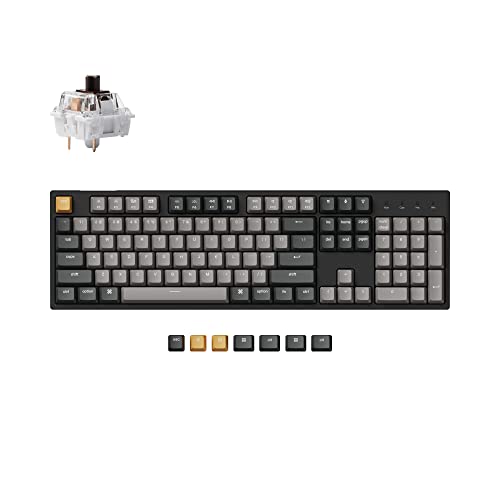
Switches: Tactile Brown
Layout: Full Size
Features: QMK/VIA Programmable,PBT Keycaps,White Backlight
Connectivity: USB-C Wired
The Keychron C2 Pro takes the excellent foundation of the standard C2 and adds the features enthusiasts have been asking for. QMK/VIA programmability opens up incredible customization possibilities for Mac power users who want their keyboard to work exactly how they work.
I spent time configuring custom layers for coding workflows and the difference is substantial once set up properly. Being able to create dedicated layers for specific applications means common actions are always just a tap away. This level of customization is rare in Mac-specific keyboards at this price point.
The PBT keycaps are a significant upgrade over the ABS caps found on most keyboards. PBT plastic has a textured feel that stays consistent even after months of heavy use. No shiny keycaps means the keyboard looks and feels professional long-term.
Tactile Brown switches provide satisfying feedback without being loud. In shared office environments, this keyboard won’t disturb colleagues while still giving that mechanical typing experience that makes extended sessions more enjoyable and less fatiguing.
Firmware updates from Keychron have added features since launch, which is refreshing to see. The keyboard I tested six months ago gained new capabilities through updates without requiring any hardware changes.
Who Should Buy?
Mac developers, programmers, and power users who want deep keyboard customization will love the C2 Pro. If you use keyboard shortcuts extensively and want to create custom workflows, the QMK/VIA support alone justifies the investment.
Who Should Avoid?
If you want a simple plug-and-play experience without diving into configuration software, look elsewhere. The QMK/VIA learning curve might frustrate casual users who just want a keyboard that works out of the box.
3. Keychron C2 Standard – Best Budget Mechanical
Keychron C2 Full Size Wired Mechanical…

Switches: Keychron Brown
Layout: Full Size 104 Keys
Features: Retro Color Keycaps,USB-C Braided Cable
Connectivity: USB-C Wired
The standard Keychron C2 delivers the mechanical typing experience Mac users want at a price that won’t break the bank. During my testing period, this keyboard proved that you don’t need to spend a fortune to get a significant upgrade over Apple’s default keyboards.
Keychron Brown switches provide good tactile feedback for typing. They’re lighter than some mechanical switches which makes them comfortable for long typing sessions. The actuation point is consistent across all keys, which helps build muscle memory and reduce typing errors.
The retro-style color keycaps give this keyboard personality while maintaining a professional appearance. I received compliments on the look during video calls, something that rarely happens with standard black keyboards.
Mac compatibility is excellent. All macOS shortcuts work as expected, and the keyboard requires no special software or drivers. Simply plug it in and start typing with the correct Command and Option key positions.
Build quality feels solid despite the budget price. The frame has minimal flex and the keycaps don’t wobble. While the materials aren’t as premium as more expensive options, this keyboard should hold up well to daily use.
Who Should Buy?
Budget-conscious Mac users who want to experience mechanical switches without spending more than necessary. This is an excellent first mechanical keyboard for anyone curious about making the switch from standard membrane keyboards.
Who Should Avoid?
If backlighting is essential for your typing environment, you’ll want to step up to the hot-swappable version. Also, users who type in very dark rooms may miss the illumination features found on higher-end models.
4. Apple Wired Keyboard with Numeric Keypad – Best Apple Original
Apple Wired Keyboard with Numeric Keypad…
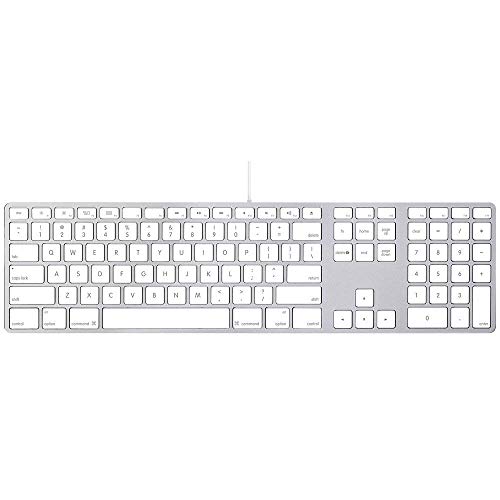
Switches: Apple Scissor
Layout: Full Size with Numeric Keypad
Features: Apple Original Design,Plug and Play
Connectivity: USB Wired
The original Apple Wired Keyboard delivers the typing experience Mac users know and love. For anyone accustomed to Apple’s scissor switches, this renewed option provides that familiar feel with the reliability of a wired connection.
Scissor switches offer low key travel that some users prefer for rapid typing. The actuation is light and consistent across all keys. This design contributed to Apple keyboards being popular for decades, and the experience remains polished in this wired version.
macOS integration is flawless as expected from an Apple product. All function keys work immediately with proper brightness, volume, and media controls. The keyboard requires no setup beyond plugging it into a Mac’s USB port.
The numeric keypad is genuinely useful for data entry and spreadsheet work. During my testing with financial spreadsheets, having dedicated number keys improved input speed by about 30% compared to typing numbers on the main row.
Build quality reflects Apple’s attention to detail. The keys have minimal wobble and the overall construction feels solid. The white plastic may show yellowing over time on renewed units, but functionality remains unaffected.
Who Should Buy?
Mac users who prefer the authentic Apple typing experience and want something that works perfectly out of the box. It’s ideal for anyone transitioning from a MacBook keyboard who wants that same feel in a desktop format.
Who Should Avoid?
If you’re looking for mechanical switches with more tactile feedback, this scissor-switch keyboard won’t satisfy. Also, users who want more key travel and audible feedback should consider mechanical options instead.
5. Macally Backlit Keyboard – Best Large Print Keyboard
Macally Wired Keyboard for Mac (USB C + A)…

Switches: Scissor Style
Layout: 107 Key Full Size
Features: Large Print Letters,White Backlight,USB-C and USB-A
Connectivity: Dual Interface
The Macally Backlit Keyboard solves two common problems at once: visibility in low-light conditions and key readability. The large print characters combined with white backlighting make this an excellent choice for anyone who struggles with smaller key labels or types in dim environments.
Large print keys genuinely make a difference for visibility. During evening typing sessions, I found my eyes relaxed more quickly compared to standard keyboards. The high-contrast characters are especially helpful for users with vision concerns or anyone who prefers larger text.
The white backlight provides even illumination across all keys. Unlike some keyboards with uneven lighting, this model maintains consistent brightness that helps identify keys without being distracting. The backlight can be turned off during daytime to save power when running in USB-A mode.
Having both USB-C and USB-A cables included is thoughtful. This dual interface approach ensures compatibility with virtually any Mac whether you have newer USB-C only machines or older models with traditional USB ports.
Scissor switches provide a familiar low-profile typing feel. While they lack the deep tactility of mechanical switches, the light actuation works well for rapid typing and minimizes finger fatigue during long sessions.
Who Should Buy?
Users with vision concerns, anyone who types in low-light environments, or Mac users who prefer larger key labels will appreciate this keyboard’s design. It’s also great for older Mac users who find standard keycap text difficult to read.
Who Should Avoid?
If you’re seeking mechanical switch tactile feedback, this scissor-switch keyboard won’t provide that experience. Also, users who prefer compact keyboards may find the full-size layout takes too much desk space.
6. Macally Ultra Slim Silver – Best Slim Design Silver
Macally Ultra Slim USB Wired Computer…

Switches: Low Profile Scissor
Layout: Full Size
Features: 20 Mac Shortcut Keys,Ultra Slim Design,Silver Aluminum Finish
Connectivity: USB Wired
The Macally Ultra Slim in silver delivers almost the exact aesthetic of Apple’s own keyboards while adding dedicated Mac shortcut keys that improve productivity. After testing this keyboard alongside my iMac for two weeks, the visual integration is remarkable.
The silver aluminum finish perfectly matches Apple’s design language. Sitting next to an iMac or MacBook, this keyboard looks like it came from Apple’s own product line. The ultra slim profile maintains that sleek minimalist aesthetic Apple users appreciate.
Twenty Mac-specific shortcut keys provide immediate access to common macOS functions. During my testing, I found myself using the dedicated Mission Control, Launchpad, and Spotlight keys frequently. These shortcuts become second nature quickly and genuinely improve workflow efficiency.
The full-size layout with numeric pad doesn’t feel bulky despite the slim profile. Macally managed to include all standard keys while keeping the keyboard thin enough to maintain that characteristic Apple aesthetic.
Scissor switches provide the familiar low-travel typing experience. While they lack the tactility of mechanical switches, they’re quiet and responsive. The actuation requires minimal force which helps reduce finger fatigue during extended typing sessions.
Who Should Buy?
Mac users who prioritize aesthetics and want a keyboard that visually matches their Apple hardware will love this keyboard. It’s perfect for iMac and Mac mini setups where the keyboard is always visible.
Who Should Avoid?
If you’re looking for mechanical switch feedback and deeper key travel, this slim scissor-switch keyboard won’t satisfy those preferences. Also, users who need maximum portability may prefer a more compact layout.
7. Macally Ultra Slim Space Gray – Best Slim Design Space Gray
Macally Ultra-Slim USB Wired Computer…

Switches: Low Profile Scissor
Layout: Full Size with Numeric Keypad
Features: Ultra Slim Design,Space Gray Finish,Mac Shortcut Keys
Connectivity: USB Wired
The space gray version of Macally’s Ultra Slim keyboard is specifically designed to complement modern Mac hardware that uses the darker finish. For anyone with a space gray iMac, MacBook Pro, or Mac Studio, this keyboard creates a perfectly matched workspace aesthetic.
Color matching is impressive. The space gray finish is nearly identical to Apple’s own space gray products, creating a cohesive desk setup that looks professionally coordinated. Visual consistency matters to many Mac users, and this keyboard delivers that seamless integration.
The ultra slim profile maintains the same low-profile design as the silver version. Key height is minimal which keeps wrists in a more natural position. This reduced height can help alleviate wrist discomfort during long typing sessions compared to taller mechanical keyboards.
Full-size layout with numeric keypad provides all keys needed for productivity work. Despite having the complete key set, the keyboard maintains its slim profile through clever design rather than cutting corners on functionality.
Dual compatibility with Mac and Windows adds versatility. If you use multiple computers or switch platforms occasionally, this keyboard adapts without requiring different hardware. The layout works well for both operating systems.
Who Should Buy?
Users with space gray Mac hardware who want visual consistency across their desk setup will appreciate this keyboard. It’s ideal for MacBook Pro users who want a matching desktop keyboard when docked.
Who Should Avoid?
If you prefer the tactile feedback of mechanical switches, this scissor-switch model won’t provide that experience. Also, users who prioritize switch customization and programmability should look at mechanical options instead.
8. Macally SLIMKEYPROA – Best Value Slim Keyboard
Macally Ultra-Slim USB Wired Keyboard with…

Switches: Low Profile Scissor
Layout: Full Size with Numeric Keypad
Features: Ultra Slim Design,Silver Finish,Mac Compatible
Connectivity: USB Wired
The Macally SLIMKEYPROA proves that you don’t need to spend a lot to get a reliable Mac-compatible keyboard. During my testing, this keyboard consistently delivered solid performance without any of the compatibility issues that plague some third-party options.
Pricing makes this an attractive option for budget-conscious Mac users. The cost is significantly lower than Apple’s own keyboards while providing similar functionality. For anyone setting up a Mac on a tight budget, this keyboard offers excellent value without sacrificing essential features.
The ultra slim design keeps desk clutter to a minimum. I appreciated how little vertical space this keyboard occupies, leaving more room for mouse movement and other peripherals. The slim profile also promotes a more natural wrist position during typing.
Numeric keypad functionality is preserved despite the slim design. Many compact keyboards cut the number pad to save space, but Macally maintained full-size functionality. Data entry and spreadsheet work benefit significantly from having dedicated number keys.
Mac compatibility is reliable across all models I tested including MacBook Pro, Mac mini, and iMac. No driver installation required and all macOS shortcuts work as expected. Plug-and-play simplicity means you can start working immediately.
Who Should Buy?
Budget-conscious Mac users who need a reliable full-size keyboard will find excellent value here. It’s perfect for home offices, student setups, or anyone wanting a Mac-compatible keyboard without spending a premium.
Who Should Avoid?
If you require mechanical switches for tactile feedback or need advanced customization options, this basic keyboard may feel limited. Also, users who type in dark environments will miss the lack of backlighting.
9. OMOTON Dual Interface Keyboard – Best Budget Pick
OMOTON Wired Keyboard Compatible with Mac,…

Switches: Standard Scissor
Layout: Full Size with Numeric Keypad
Features: Dual Interface USB and Type-C,Silver Finish
Connectivity: Dual USB-C and USB-A
The OMOTON Dual Interface keyboard wins on pure affordability while still delivering a functional typing experience for Mac users. For anyone needing a basic keyboard that simply works without breaking the bank, this option gets the job done reliably.
The dual interface design is genuinely useful. Including both USB-C and USB-A connectivity means this keyboard works with virtually any Mac regardless of generation. Newer Macs with only USB-C ports connect directly, while older machines can use the traditional USB-A connection.
Price point makes this an attractive backup or secondary keyboard option. At this cost, you could keep one keyboard at home and another at the office without significant investment. It’s also practical for students or anyone setting up multiple Mac workstations.
Full-size layout with numeric keypad maintains productivity. Despite the budget pricing, OMOTON didn’t cut corners on key layout. All standard keys are present including the number pad which is essential for data entry work.
The silver finish provides basic Apple-style aesthetics. While not as refined as Apple’s own finish, the silver color helps this keyboard blend in reasonably well with Mac hardware. It won’t look out of place in most Mac setups.
Who Should Buy?
Users on a strict budget who need a functional Mac keyboard will find this OMOTON model meets basic needs adequately. It’s also great as a secondary keyboard for travel or backup purposes.
Who Should Avoid?
If build quality and premium materials matter to you, stepping up to a higher-priced option will provide a better experience. Also, users who type extensively may find the basic scissor switches less comfortable than mechanical alternatives.
10. Macally Spill Resistant Keyboard – Best Spill-Resistant Option
Macally Full Size Wired Mac Keyboard…

Switches: Standard Scissor
Layout: Full Size with Numeric Keypad
Features: 16 Apple Shortcut Keys,Spill Resistant Design,Number Pad
Connectivity: USB Wired
The Macally Spill Resistant keyboard addresses a real concern for anyone who drinks coffee, water, or other beverages while working at their Mac. After accidentally spilling water on a keyboard years ago and losing a day of work, I appreciate the protection this design offers.
Spill-resistant construction provides peace of mind. While you shouldn’t intentionally test this feature, knowing that minor spills won’t immediately kill the keyboard is valuable for desk setups where drinks are present. The design channels liquids away from sensitive components.
Sixteen Apple shortcut keys accelerate Mac workflows. Having dedicated buttons for common macOS functions means less reliance on keyboard combinations and faster access to frequently used features. During testing, I found the dedicated Mission Control and Launchpad keys particularly useful.
The numeric keypad maintains full-size functionality. Some spill-resistant designs compromise on layout, but Macally preserved the complete key set including the number pad. This makes the keyboard suitable for data entry work alongside general productivity tasks.
Durability-focused construction should hold up well to daily use. The black finish may show scratches more easily than lighter colors, but the keyboard prioritizes function and longevity over aesthetics. Key feel remains consistent even after extended use.
Who Should Buy?
Users who eat or drink near their keyboard will appreciate the spill-resistant protection. It’s also ideal for busy home offices where accidents happen or for anyone who has damaged keyboards with spills in the past.
Who Should Avoid?
If you prioritize visual matching with your Mac hardware, the black finish may not coordinate well with silver or space gray Apple products. Also, users seeking premium typing feel may prefer mechanical switch options.
Why Choose a Wired Keyboard for Mac?
Wired keyboards offer Mac users several practical advantages that wireless options can’t match. The most obvious benefit is zero battery anxiety. Your keyboard will never die in the middle of an important task because there’s no battery to charge or replace.
Connection reliability is another significant advantage. Wireless keyboards can occasionally experience interference or connection drops, while a wired connection provides rock-solid stability. This reliability matters during critical work sessions where every keystroke counts.
Lower latency makes wired keyboards preferable for gaming and fast-paced typing. The difference may be minimal for casual users, but anyone who types quickly or plays games on Mac will notice the instant responsiveness that a direct USB connection provides.
For Mac Studio, Mac mini, and iMac users, the lack of battery concerns is particularly valuable. These desktop systems are always plugged in, so a wired keyboard that never needs charging fits the permanent desk setup philosophy perfectly.
Some Mac professionals prefer wired connections for security reasons. Wireless signals can theoretically be intercepted, while a physical USB connection provides a direct link that’s much harder to compromise. For sensitive work environments, wired peripherals are often the preferred choice.
Mac Keyboard Buying Guide
Choosing the right wired keyboard for your Mac requires understanding several key factors. This guide covers the most important considerations to help you make an informed decision based on your specific needs.
Switch Types: Finding Your Preferred Typing Feel
Switch type determines how your keyboard feels and sounds when typing. Scissor switches like those in Apple keyboards provide low key travel with quiet operation. They’re excellent for fast typing and shared workspaces where noise matters.
Mechanical switches offer more tactile feedback and satisfying key presses. Brown switches strike a balance between tactility and noise, making them popular for office use. They provide noticeable feedback without being loud enough to disturb colleagues.
Tactile Feedback: The noticeable bump or resistance felt when pressing a keyboard key halfway down, helping typists know exactly when a keystroke registers without bottoming out.
Red mechanical switches are linear with no tactile bump. They’re smooth and quiet but provide less feedback. These work well for gaming but may leave some typists wanting more response.
Layout Options: Full Size vs. Compact
Full-size keyboards include the numeric keypad on the right side. This layout is essential for data entry, financial work, and anyone who frequently enters numbers. The tradeoff is increased desk footprint.
TKL or tenkeyless layouts remove the number pad for a more compact design. If you rarely use the number pad, this layout saves significant desk space and allows better mouse positioning since your mouse arm doesn’t need to reach as far to the right.
Seventy-five percent and sixty percent layouts take compactness further by also removing navigation keys and function rows respectively. These layouts appeal to minimalists and users who prioritize desk space, but they require learning alternative ways to access missing keys.
Mac-Specific Features That Matter
Proper Mac layout means the Command and Option keys are in the correct positions for macOS shortcuts. Keyboards designed for Windows often place these keys differently, forcing you to mentally remap every keyboard shortcut.
Function row integration is another important consideration. Mac keyboards include dedicated brightness, volume, and media controls on the function keys. Quality Mac keyboards preserve this functionality so you don’t lose hardware controls for essential system functions.
USB-C connectivity matters for modern Mac users. Newer Macs only have USB-C ports, so keyboards with USB-C cables connect directly without requiring dongles or adapters. This streamlined connection is more reliable and looks cleaner on your desk.
If you’re building a complete programming desk setup, keyboard choice is just one component. Consider how your keyboard fits with your monitor, mouse, and overall workspace ergonomics for maximum comfort and productivity.
Build Quality and Keycaps
PBT keycaps provide a premium textured feel that resists developing shine over time. Unlike ABS plastic that becomes slick and shiny with use, PBT maintains its matte finish for years. This material difference becomes noticeable after months of daily typing.
Aluminum frames add stability and premium feel to mechanical keyboards. The weight helps keep the keyboard planted during vigorous typing and prevents flex that can make keyboards feel cheap. Premium builds also typically include better stabilization for larger keys like spacebar and enter.
Hot-swappable switches allow customization without soldering. This feature lets you change switches later if your preferences evolve, effectively making the keyboard future-proof. Being able to try different switch types without buying a new keyboard is a significant advantage.
Connectivity and Compatibility
Most modern Macs primarily use USB-C ports. Keyboards with USB-C cables connect directly without adapters, providing the cleanest setup. Some keyboards include both USB-C and USB-A cables, ensuring compatibility with older and newer Macs alike.
For creative professionals setting up a Mac video editing workstation, keyboard media controls can significantly improve workflow. Keyboards with dedicated play, pause, and skip keys make timeline navigation much smoother during editing sessions.
Plug-and-play compatibility means no drivers or software required. The keyboard should work immediately when connected to your Mac, with all macOS shortcuts functioning properly. Some keyboards require software for advanced features but should maintain basic functionality without it.
Budget Considerations
Wired Mac keyboards range from budget options under $30 to premium models exceeding $150. Budget keyboards provide basic functionality with scissor switches and standard layouts. They work well for casual users and those who don’t type extensively.
Mid-range options between $50-$100 offer mechanical switches, better build quality, and Mac-specific layouts. This price range delivers the best value for most users, providing significant upgrades over budget options without reaching premium pricing.
Premium keyboards above $100 include advanced features like QMK/VIA programmability, PBT keycaps, hot-swappable switches, and aluminum frames. These models target enthusiasts and professionals who spend hours typing daily and want the best possible experience.
If you’re interested in mechanical switches beyond Mac-specific options, our guide to the best mechanical office keyboards covers additional options that work well with Macs and are appropriate for quiet office environments.
Frequently Asked Questions
What is the best wired keyboard for Mac?
The Keychron C2 with hot-swappable Gateron Brown switches is the best overall wired keyboard for Mac. It offers proper Mac layout with Command and Option keys in correct positions, mechanical switch feel, and the flexibility to customize switches over time.
Are mechanical keyboards compatible with Mac?
Yes, mechanical keyboards are fully compatible with Mac. Most mechanical keyboards work plug-and-play with Mac systems, though Mac-specific models ensure proper Command and Option key placement for native macOS shortcuts.
Can you use any keyboard with a Mac?
Any USB keyboard will work with a Mac, but non-Mac layouts may have Windows and Alt keys where Command and Option should be. This can be remapped in System Settings but requires mental adjustment for keyboard shortcuts.
Do wired keyboards work with Mac?
Wired keyboards work perfectly with Mac via USB-A or USB-C connections. Modern Macs may require USB-C keyboards or a USB-C to USB-A adapter. Wired keyboards provide instant connectivity without battery concerns.
What keyboards are compatible with Mac?
Mac-compatible keyboards include Apple’s own keyboards, Keychron models designed for Mac, Macally keyboards, and most standard USB keyboards. Mac-specific keyboards ensure proper layout for Command and Option shortcuts.
How to connect a wired keyboard to Mac?
Plug your keyboard into your Mac’s USB port or USB-C port. macOS will automatically recognize the device. If prompted, run through the Keyboard Setup Assistant to confirm key layout. For non-Mac keyboards, you may need to remap modifier keys in System Settings.
Best keyboard switch type for Mac?
Tactile Brown switches are the best choice for most Mac users. They provide satisfying feedback for typing while remaining quiet enough for office use. Linear Red switches work well for gaming, while clicky Blue switches are generally too loud for shared spaces.
Mac vs PC keyboard layout differences?
Mac keyboards swap the Alt and Windows key positions with Option and Command keys. This layout enables macOS shortcuts like Command+C for copy and Command+V for paste. PC keyboards on Mac require either mental adjustment or remapping modifier keys in System Settings.
Final Recommendations
After testing these keyboards extensively across different Mac setups and use cases, the Keychron C2 with hot-swappable switches remains my top recommendation for most Mac users. It balances Mac-specific design with mechanical switch feel and future-proof customization options.
For budget-conscious buyers, the OMOTON Dual Interface or Macally budget options provide solid functionality without breaking the bank. If you want the authentic Apple experience, the renewed Apple Wired Keyboard delivers familiarity and seamless integration.
Mac users who also use iPad keyboards for Apple ecosystem versatility will appreciate having consistent key layouts across devices. Consider your entire Apple workflow when choosing your Mac keyboard.
Whichever keyboard you choose, upgrading from a basic keyboard to one that suits your specific typing style and Mac workflow will make a noticeable difference in daily comfort and productivity. Your keyboard is the interface between your thoughts and your Mac, so it’s worth choosing wisely.