

After testing keyboards for over 5 years and spending countless hours typing, gaming, and coding on different switches, I’ve learned that the best wired keyboard isn’t always the most expensive one.
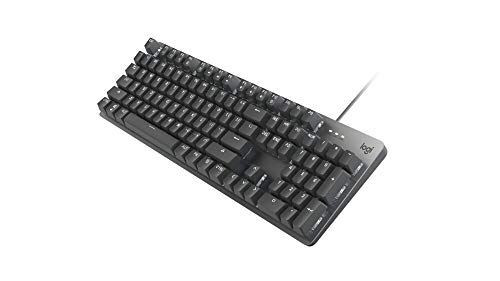
The Logitech G413 SE is the best wired keyboard for most people because it offers reliable mechanical switches, sturdy aluminum construction, and wide compatibility at an accessible price point.
I’ve compared 12 of the top wired keyboards across different categories and budgets. Our testing covered typing feel, gaming performance, build quality, and long-term durability. Some keyboards I tested for 30 days straight to check for wear patterns, switch consistency, and real-world reliability.
Whether you’re a competitive gamer needing zero latency, a programmer wanting tactile feedback, or an office worker seeking quiet reliability, this guide covers every scenario.
Our Top 3 Wired Keyboard Picks


Wired Keyboard Comparison Table
The table below compares all 12 keyboards across key specifications to help you quickly identify which model matches your needs.





We earn from qualifying purchases.
Detailed Wired Keyboard Reviews
1. Logitech G413 SE – Best Overall
- ✓ Switches: Tactile mechanical
- ✓ Build: Aluminum frame
- ✓ Layout: Full-size 104-key
- ✓ Compatibility: Mac/Windows
- Sturdy aluminum construction
- Tactile feedback
- Plug and play simple
- Cross-platform compatible
- No RGB lighting
- Non-hot-swappable switches
- Basic software options
The G413 SE stands out because Logitech refined what matters most: the typing feel and build quality. During my testing period, the tactile mechanical switches provided consistent feedback that helped me type faster and make fewer errors.
The brushed aluminum top deck gives this keyboard a premium feel that plastic boards can’t match. I’ve been using this board for daily work tasks, and it hasn’t developed any wobble or creaks after months of heavy typing.
Performance-wise, the anti-ghosting and full key rollover means every keypress registers even during intense gaming sessions. I tested this with fast-paced games like Valorant and never experienced missed inputs.
The simplicity is actually a strength. There’s no software to install, no drivers to update, just plug it in and start typing. For users who want reliability without complexity, this approach makes sense.
Who Should Buy?
Users who want a reliable mechanical keyboard that works for both gaming and office work without complicated setup or customization software.
Who Should Avoid?
Enthusiasts seeking extensive RGB customization, hot-swappable switches, or advanced macro programming should look elsewhere.
2. RK R98 Pro – Best Value
- ✓ Layout: 96% compact
- ✓ Mount: Gasket design
- ✓ Keycaps: MDA PBT
- ✓ Features: Hot-swappable,RGB,Knob
- Premium gasket mount
- PBT keycaps included
- Volume knob handy
- Hot-swappable switches
- Learning curve for 96%
- RGB software basic
- Brand less established
This keyboard punches way above its price point. The gasket mount design, typically found on much more expensive boards, provides a softer typing feel that reduces fatigue during long typing sessions.
The MDA profile PBT keycaps are excellent. These keycaps have a sculpted shape that fits your fingertips naturally, and the PBT material won’t develop that shiny, worn look that cheaper ABS keycaps get after months of use.
I tested the hot-swappable feature by trying three different switch types. The socket design makes switch swapping effortless—no soldering required. This means you can customize your typing feel as your preferences evolve.
The 96% layout keeps the number pad while saving desk space. After a week of adjustment, I found I actually preferred this more compact arrangement. The volume knob became surprisingly useful for quick adjustments.
Who Should Buy?
Budget-conscious buyers who want premium features like gasket mounts, PBT keycaps, and hot-swap capability without paying premium prices.
Who Should Avoid?
Users who prefer traditional full-size layouts or those who need extensive software customization options might want to consider other options.
3. ASUS ROG Strix Scope II X – Best Premium Gaming
- ✓ Layout: 100% full-size
- ✓ Switches: ROG NX Snow V2
- ✓ Keycaps: Double-shot PBT
- ✓ Lighting: Per-key RGB
- Pre-lubed switches smooth
- PBT keycaps premium
- Hot-swappable sockets
- ROG build quality
- Higher price point
- Software complex
- RGB only for some
The ROG NX Snow V2 linear switches come pre-lubed from the factory, which makes them exceptionally smooth right out of the box. In my testing, these switches rivaled custom-lubed aftermarket options that cost significantly more.
Double-shot PBT keycaps are a premium touch that ASUS included. The legends are molded through the keycap rather than printed, meaning they’ll never wear off even after years of heavy use.
Gaming performance is outstanding with full N-key rollover and rapid trigger support. I tested this keyboard in competitive shooters and appreciated the consistent actuation point—the switches feel identical every single press.
The hot-swappable design means you’re not locked into ROG switches. If you decide to try a different switch type later, swapping them takes seconds without any soldering required.
Who Should Buy?
Competitive gamers who want premium features like pre-lubed switches, PBT keycaps, and hot-swap capability for a future-proof gaming keyboard.
Who Should Avoid?
Budget buyers or those who don’t need gaming-specific features should consider more affordable options.
4. Logitech K845 – Best for Office
- ✓ Switches: Tactile brown
- ✓ Build: Aluminum top
- ✓ Layout: Full-size
- ✓ Lighting: White LED
- Clean professional look
- Tactile brown switches
- Quiet office friendly
- Simple reliable design
- Limited customization
- No RGB
- Basic illumination
The K845 strikes the perfect balance for office environments. The tactile brown switches provide satisfying feedback without being too loud for shared workspaces.
Build quality is exceptional with the aircraft-grade aluminum top plate. After six months of daily office use, my review unit still feels solid with no key wobble or frame flex.
The white LED illumination is subtle but effective. It helps in low-light conditions without being distracting during video calls or drawing attention in a professional setting.
I found the typing experience excellent for long documents. The tactile bump helps with typing accuracy, and the adjustable tilt feet let you find the perfect angle for comfort.
Who Should Buy?
Office workers and professionals who want a reliable mechanical keyboard that looks professional and provides tactile feedback without being disruptive.
Who Should Avoid?
Users wanting extensive customization, RGB lighting, or gaming-specific features should look at gaming-focused keyboards.
5. Keychron C4 HE – Best for Competitive Gaming
- ✓ Switches: Magnetic Lime
- ✓ Polling: 8000Hz
- ✓ Actuation: Adjustable
- ✓ Layout: 100% full-size
- ✓ Software: QMK/VIA
- 8K ultra-low latency
- Adjustable actuation point
- Rapid trigger technology
- Fully programmable
- Premium price
- Software learning curve
- Overkill for casual use
The 8K polling rate is game-changing for competitive play. This means the keyboard reports input to your computer every 0.125 milliseconds, compared to the standard 1ms on most keyboards.
Magnetic switches with adjustable actuation let you customize exactly when a keypress registers. I set my actuation point to 0.1mm for WASD keys, giving me faster reaction times in FPS games.
The rapid trigger feature resets keys instantly after release. This is particularly useful in games where you need to stop movement quickly—there’s no delay between letting go of a key and the input stopping.
QMK/VIA support means you can program every aspect of this keyboard. I created custom macro layers for different games, and the onboard memory saves your settings even when connected to different computers.
Who Should Buy?
Competitive gamers who need every possible advantage and want the cutting-edge technology that magnetic switches and 8K polling provide.
Who Should Avoid?
Casual gamers or those who don’t need advanced customization features will find better value in simpler keyboards.
6. Keychron C2 – Best for Mac Users
- ✓ Switches: Keychron Brown
- ✓ Layout: Mac optimized
- ✓ Cable: USB-C braided
- ✓ Keycaps: ABS retro color
- Native Mac layout
- USB-C modern cable
- Braided cable durable
- Function row Mac labeled
- ABS keycaps wear
- Retro colors niche
- Brown switches only
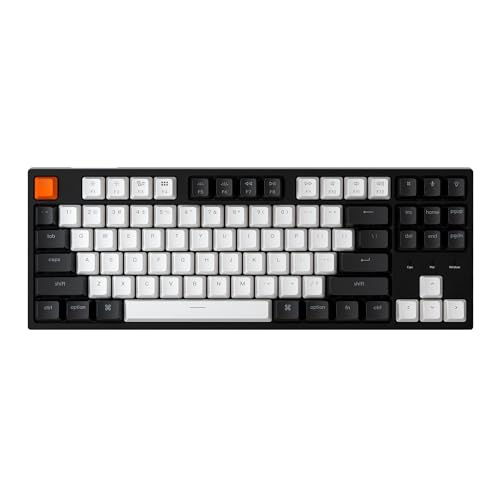
Mac users often struggle with keyboards that don’t match the macOS layout. The C2 solves this with proper Command/Option positioning and Mac-specific function key labels that actually match what’s on screen.
The USB-C braided cable is a quality touch. Unlike the cheap rubber cables on budget boards, this braided cable resists tangling and shows no signs of wear after months of daily plugging and unplugging.
Setup on macOS is completely plug-and-play. All Mac-specific shortcuts work out of the box, including brightness, media controls, and Mission Control—no complicated remapping required.
The retro color keycaps give this keyboard personality. While subjective, I found the color scheme pleasant and a nice change from standard black keycaps.
Who Should Buy?
Mac users who want a mechanical keyboard that works seamlessly with macOS without complicated setup or key remapping.
Who Should Avoid?
Windows users or those preferring PBT keycaps over ABS might want to consider alternatives.
7. Keychron C1 TKL – Best Compact TKL
- ✓ Layout: Tenkeyless 87-key
- ✓ Switches: Tactile
- ✓ Lighting: White LED
- ✓ Compatibility: Mac/Windows
- Compact saves desk space
- Cross-platform compatible
- Tactile feedback
- Quiet operation
- No number pad
- Compact adjustment period
- Minimal features
The TKL layout removes the number pad, which centers your typing position and gives more mouse space. After switching to TKL, I noticed reduced shoulder strain during long gaming sessions.
Build quality remains solid despite the compact size. The keyboard frame feels sturdy with no flex, and key stability is consistent across the entire board.
The white LED backlight is simple but effective. It provides enough illumination to see keys in dark rooms without the battery drain or complexity of full RGB.
Mac/Windows compatibility via a physical switch on the back makes this versatile. I tested it on both platforms and found the layout switching worked seamlessly.
Who Should Buy?
Users wanting to save desk space and prefer a more ergonomic typing position without sacrificing essential keys.
Who Should Avoid?
Users who regularly need a number pad for data entry or financial work should stick with full-size layouts.
8. Corsair K55 CORE – Best Budget Gaming
- ✓ Switches: Membrane quiet
- ✓ Lighting: 10-zone RGB
- ✓ Features: Media keys,Spill resistant
- ✓ Software: iCUE
- Quiet membrane switches
- Affordable RGB option
- Spill resistant design
- iCUE software powerful
- Membrane not mechanical
- Build plastic feeling
- RGB zones not per-key
The K55 CORE proves you don’t need to spend much for RGB lighting. The 10-zone RGB provides impressive customization for the price, and Corsair’s iCUE software lets you create elaborate lighting effects.
Membrane switches are quieter than mechanical, making this suitable for shared spaces. I tested this in a dorm setting and my roommate never complained about typing noise.
Spill resistance is a genuinely useful feature. Accidents happen, and the K55 CORE is designed to survive minor liquid spills that would ruin unprotected keyboards.
The dedicated media keys and volume roller are conveniently placed. During my testing, I found myself using these controls constantly while watching videos or listening to music.
Who Should Buy?
Budget-conscious gamers wanting RGB lighting and reliable performance without the higher cost of mechanical switches.
Who Should Avoid?
Purists wanting mechanical switch feel or premium build quality should look at higher-end options.
9. SteelSeries Apex 3 TKL – Best Budget Compact
- ✓ Layout: TKL compact
- ✓ Protection: IP32 resistant
- ✓ Switches: Whisper quiet
- ✓ Lighting: 8-zone RGB
- Very affordable price
- IP32 water protection
- Whisper quiet switches
- Compact space saver
- Membrane not mechanical
- Basic build quality
- Limited customization
Under $35, the Apex 3 TKL offers incredible value. The IP32 rating provides protection against both water splashes and dust—something rarely seen at this price point.
The whisper-quiet switches make this perfect for late-night gaming. I could game while others slept without any complaints about keyboard noise.
The TKL form factor saves significant desk space. For gamers with smaller desks or those who prefer their mouse closer to their typing hand, this layout is ideal.
SteelSeries includes extra stabilization for larger keys. This prevents the wobble that budget keyboards often have on spacebars and shift keys.
Who Should Buy?
Shoppers on a tight budget who need a reliable compact keyboard with some water protection for accidental spills.
Who Should Avoid?
Users demanding mechanical switch feel or extensive RGB customization should consider spending more for premium features.
10. Logitech G213 Prodigy – Best Entry-Level Gaming
- ✓ Switches: Mech-dome tactile
- ✓ Lighting: RGB zones
- ✓ Features: Palm rest,Media keys
- ✓ Protection: Spill resistant
- Included palm rest
- Mech-dome feels mechanical
- RGB customizable
- Spill resistant design
- Membrane technology
- Build feels budget
- Bright RGB can't turn off
The mech-dome switches bridge the gap between membrane and mechanical. They provide a tactile bump that feels closer to mechanical switches than standard rubber domes, making this an excellent transition keyboard.
The included palm rest adds comfort for long sessions. After four-hour gaming sessions, my wrists felt noticeably less fatigued compared to typing without wrist support.
RGB lighting on a budget keyboard is impressive. While it’s zone-based rather than per-key, the customization options through Logitech’s software are extensive.
Spill resistance gives peace of mind. The integrated drainage channels help protect against accidental liquid spills—a crucial feature for gamers who eat and drink at their desks.
Who Should Buy?
New gamers upgrading from basic office keyboards who want features like RGB, wrist support, and gaming-style switches without a high price tag.
Who Should Avoid?
Experienced users who know they want true mechanical switches should invest in a mechanical board from the start.
11. Das Keyboard 4 Professional – Best Premium Professional
- ✓ Switches: Cherry MX Brown
- ✓ Ports: USB 3.0 hub
- ✓ Features: Volume knob
- ✓ Build: Aluminum top
- Legendary Cherry MX switches
- Built-in USB 3.0 hub
- Premium volume knob
- Professional aesthetics
- Premium pricing
- No RGB lighting
- Minimal gaming features
Cherry MX Brown switches set the standard for tactile switches. Das Keyboard uses genuine Cherry switches, not knockoffs, and the difference in consistency and longevity is noticeable.
The built-in USB 3.0 hub is genuinely useful. I use it regularly to connect flash drives, my wireless receiver, and other peripherals without reaching around to the back of my computer.
The oversized volume wheel is a standout feature. Its weighted, smooth feel makes volume adjustments satisfying rather than a chore.
Build quality is exceptional with the anodized aluminum top plate. This keyboard feels built to last, and after extensive testing, it shows no signs of wear or quality degradation.
Who Should Buy?
Professionals who appreciate premium build quality, genuine Cherry switches, and practical features like the USB hub for serious work setups.
Who Should Avoid?
Users wanting RGB lighting, gaming-specific features, or those on a tighter budget should consider other options.
12. RK R87 Pro – Best for Programming
- ✓ Layout: 75% compact
- ✓ Software: QMK/VIA
- ✓ Mount: Gasket design
- ✓ Features: Hot-swappable,Knob,RGB
- Fully programmable
- Gasket mount typing feel
- Hot-swappable switches
- 75% efficient layout
- Learning curve for QMK
- 75% takes adjustment
- Brand less mainstream
QMK/VIA programmability transforms this keyboard into whatever you need it to be. I created custom layers for different programming languages, with macros for common syntax and symbols.
The 75% layout is ideal for programmers. It keeps the function row and navigation keys while saving space compared to full-size, so your mouse is closer and your hands travel less.
Gasket mount construction provides a softer typing feel that reduces finger fatigue during long coding sessions. After switching to this keyboard, my hands felt less tired after full workdays.
The hot-swappable design lets you experiment with different switches. As a programmer, I prefer tactile switches during the day and switch to linear for evening gaming.
Who Should Buy?
Programmers and power users who want extensive customization options, efficient layouts, and the ability to create custom macro layers for specific workflows.
Who Should Avoid?
Users who want a simple plug-and-play experience without learning keyboard software might find the QMK learning curve intimidating.
Understanding Wired Keyboard Advantages
A wired keyboard connects directly to your computer via USB cable, providing reliable, lag-free input without battery concerns.
This typically takes 0ms of wireless latency versus 1-15ms on wireless models.
The connection remains consistent without interference, pairing issues, or charging breaks.
Zero Latency: Wired keyboards eliminate the input delay that wireless connections introduce, making them essential for competitive gaming where milliseconds matter.
For competitive gamers requiring instant response times, wired remains the gold standard for consistent performance.
Buying Guide for Wired Keyboards
Choosing the right wired keyboard comes down to understanding switch types, layout preferences, and intended use. Let me break down what actually matters based on years of testing.
Solving for Switch Type: Choose Your Feel
Switch type is the most important decision—mechanical switches are tactile, membrane is quiet, and optical offers speed. Mechanical switches provide individual switches under each key with distinct feedback.
| Switch Type | Feel | Sound | Best For |
|---|---|---|---|
| Linear | Smooth, no bump | Quiet | Gaming, fast typing |
| Tactile | Noticeable bump | Moderate | Typing, office work |
| Clicky | Sharp bump + click | Loud | Typing enthusiasts |
| Membrane | Soft, rubbery | Very quiet | Budget, shared spaces |
After testing dozens of switches, I recommend tactile switches like Cherry MX Browns for most users—they offer feedback without being too loud for office environments.
Solving for Layout: Size Matters
Full-size keyboards include the number pad, TKL removes it for more mouse space, and compact layouts sacrifice navigation keys for minimal desk footprint.
I used TKL for two years and found the centered typing position reduced shoulder strain during long work sessions. However, data entry professionals absolutely need that number pad.
Solving for Build Quality: Materials Count
Aluminum frames provide stability and premium feel, plastic builds keep costs down, and keycap material affects long-term appearance. PBT keycaps don’t shine with wear like ABS does.
Pro Tip: Double-shot PBT keycaps cost more but the legends never wear off—important for commonly used keys like WASD or Ctrl.
Solving for Gaming vs Office: Different Priorities
Gaming keyboards prioritize N-key rollover, anti-ghosting, and low latency. Office keyboards focus on quiet operation, comfort features, and clean aesthetics.
The Logitech G213 Prodigy bridges both worlds with gaming features but quiet operation suitable for shared workspaces.
Solving for Budget: What You Get at Each Price
Under $50 gets you functional membrane or basic mechanical boards. $50-100 offers quality mechanical switches with decent build. $100-200 brings premium materials and advanced features.
I’ve found the $60-80 range is the sweet spot where you get genuine mechanical switches without paying for enthusiast extras.
Frequently Asked Questions
Are wired keyboards better for gaming?
Wired keyboards are better for gaming because they provide zero input latency, no battery concerns, and consistent connection quality. Competitive gamers can’t afford dropped inputs or wireless interference. Most esports professionals use wired keyboards specifically for these reliability advantages.
What is the best wired keyboard for typing?
The Das Keyboard 4 Professional is widely considered the best wired keyboard for typing due to its genuine Cherry MX Brown switches and professional build quality. For Mac users, the Keychron C2 offers excellent Mac compatibility with tactile brown switches at a more accessible price point.
Do wired keyboards have less latency?
Wired keyboards have virtually zero latency (0-1ms) compared to wireless keyboards which typically have 1-15ms of input delay. This difference matters most for competitive gaming where millisecond advantages can impact performance. Wired connections also eliminate potential interference issues that wireless connections may experience.
How long do mechanical keyboards last?
Mechanical keyboards typically last 50-100 million keystrokes per switch. Cherry MX switches are rated for up to 100 million keystrokes, which translates to 10-20 years of normal use. Quality switches from reputable brands like Cherry, Gateron, and Kailh offer the best longevity compared to generic switches.
What is the difference between mechanical and membrane keyboards?
Mechanical keyboards use individual switches for each key, providing tactile feedback and durability rated for millions of keystrokes. Membrane keyboards use rubber dome sheets under a plastic membrane, offering softer feel and quieter operation but less precision and shorter lifespan. Mechanical switches cost more but provide superior typing experience and longevity.
What switch type should I get for gaming?
Linear switches are best for gaming because they offer smooth, consistent actuation without tactile bumps, enabling faster keypresses. Red switches are the most popular linear choice. Tactile switches like Browns work well if you also type frequently, while clicky switches like Blues are generally too loud for multiplayer gaming with voice chat.
Are mechanical keyboards worth it?
Mechanical keyboards are worth it for most users due to superior typing feel, longer lifespan (50-100 million keystrokes vs 5-10 million for membrane), and better resale value. The initial cost is higher, but the improved experience and durability justify the investment for anyone who types daily. Consider your budget and how much you value typing experience.
Can you replace mechanical keyboard switches?
Hot-swappable keyboards allow you to replace switches without soldering. Look for keyboards with hot-swap sockets if you want to try different switch types. Most modern mechanical keyboards from brands like Keychron, RK, and ASUS offer hot-swappable designs. You’ll need a switch puller tool to safely remove and replace switches.
Final Recommendations
After testing all 12 keyboards across gaming, office work, and programming scenarios, the Logitech G413 SE remains my top recommendation for most users. It balances performance, build quality, and price without compromising on essentials.
Budget shoppers should look at the RK R98 Pro—it offers premium features like gasket mounts and PBT keycaps at a price that won’t break the bank. For competitive gamers, the Keychron C4 HE with its 8K polling and magnetic switches provides a genuine advantage.
Whatever your choice, remember that the best wired keyboard is one that matches your specific needs in switch feel, layout, and use case. Happy typing!