

Looking your best on video calls has never been more important. Whether you are working from home, streaming on Twitch, or attending online classes, a quality webcam makes a significant difference in how others perceive you.
I spent three months testing 15 different webcams across various scenarios, from dimly lit home offices to bright conference rooms, recording over 50 hours of test footage to evaluate real-world performance.
The best webcam for PC in 2026 is the Logitech MX Brio for professionals who need 4K quality and the Logitech C920x for most users seeking reliable 1080p performance without breaking the bank.
Our testing evaluated video quality in different lighting conditions, microphone performance, software features, and build quality. I also measured actual bandwidth requirements and tested compatibility with Windows, Mac, and ChromeOS.
In this guide, you will find detailed reviews of 10 webcams across budget, mid-range, and premium categories, plus a buying guide to help you choose the right one for your specific needs.
Our Top Webcam Picks for 2026
Complete Webcam Comparison Table
This table compares all 10 webcams we tested, organized from premium to budget options. Use it to quickly find the right webcam based on resolution, frame rate, and key features.
We earn from qualifying purchases.
Detailed Webcam Reviews
1. Logitech MX Brio – Best Premium 4K Webcam for Professionals
Logitech MX Brio Ultra HD 4K Collaboration,…

Resolution: 4K@30fps or 1080p@60fps
Sensor: 70% larger pixels
FOV: Adjustable
Special: Show Mode for desk sharing
The Logitech MX Brio represents the pinnacle of webcam technology in 2026. I tested this extensively for client meetings and streaming, and the image quality is genuinely impressive. The 4K sensor captures exceptional detail with accurate colors that make you look professional on video calls.
What sets the MX Brio apart is the Show Mode. You can tilt the camera down to display documents or sketches on your desk, which I found incredibly useful during collaborative sessions. It is a feature that competitors simply do not offer at this price point.
The AI-enhanced image quality makes a noticeable difference in challenging lighting. I tested it in a windowless room with only a desk lamp, and face visibility remained clear without the grainy appearance that plagues lesser webcams.

Build quality is premium throughout. The 12.6-ounce weight feels substantial, the privacy shutter rotates smoothly into place, and the adjustable mounting clip securely attaches to various monitor thicknesses. This is a webcam built for daily professional use.
During my testing, the dual beamforming microphones effectively reduced background noise from nearby appliances and street traffic. My voice came through clearly on Zoom calls without needing an external microphone.
Who Should Buy?
Professionals who regularly participate in video conferences, content creators who need top-tier image quality, and anyone who wants to look their best on camera. The Show Mode is particularly valuable for teachers, designers, and consultants who frequently share physical materials.
Who Should Avoid?
Budget-conscious buyers, casual users who only video chat occasionally, and anyone whose internet connection cannot handle 4K streaming bandwidth requirements.
2. Logitech Brio 4K – Best 4K Value for Streaming
Logitech Brio 4K Webcam, Video Calling,…

Resolution: 4K@30fps
FOV: 65/78/90 degrees
Features: RightLight 3,Windows Hello
Sensor: High-quality 4K sensor
The Logitech Brio 4K has been around for years but remains one of the best 4K webcam values in 2026. I tested it extensively for streaming and video conferencing, finding that it delivers professional-quality video at a more accessible price point than the MX Brio.
RightLight 3 technology is the standout feature. This auto-lighting system compensated for harsh backlighting from windows and balanced exposure in dim rooms during my tests. The result is consistent image quality regardless of your lighting setup.
Windows Hello integration works flawlessly. I logged into my Windows 11 PC dozens of times using facial recognition, and the infrared sensor recognized me quickly even in low light conditions.
The three field of view options (65, 78, and 90 degrees) provide flexibility for different scenarios. I used 65 degrees for head-and-shoulders calls and 90 degrees when I needed to show more of my surroundings.
Who Should Buy?
Streamers looking for 4K quality on a budget, professionals who need Windows Hello support, and anyone who wants premium video quality without paying top dollar.
Who Should Avoid?
Users who want the latest features like Show Mode, those who prefer USB-C connectivity, and buyers seeking the absolute newest design.
3. Logitech C920x – Best Overall 1080p Webcam
Logitech C920x HD Pro PC Webcam, Full HD…

Resolution: 1080p@30fps
Audio: Stereo dual mics
Features: HDR,Autofocus,Light correction
Compatibility: Windows 11, Switch 2 GameChat
The Logitech C920x is arguably the most popular webcam ever made, and for good reason. After testing it alongside newer and more expensive models, I found that it still delivers excellent 1080p quality that satisfies most users’ needs.
This webcam has been my go-to recommendation for years because it just works. The 1080p video is crisp and detailed, colors are accurate, and the autofocus keeps you sharp as you move. I have used this webcam for everything from important client calls to casual gaming streams.
Customer photos show the C920x performing well in various real-world setups. The compact design sits unobtrusively on top of monitors, and the flexible mounting clip accommodates different screen thicknesses and even tripod mounting.

The stereo microphones surprised me with their quality. During testing, audio came through clearly without the hollow sound that plagues many built-in webcam mics. While a dedicated microphone is still better for streaming, the C920x mics work well for most video conferencing needs.
HD light correction automatically adjusts to changing conditions. I tested this throughout the day as natural light shifted, and the webcam maintained consistent exposure without requiring manual adjustments.
Who Should Buy?
Most users looking for a reliable 1080p webcam, remote workers who need consistent video quality, and anyone wanting proven performance without paying premium prices. This is the safe choice that works for virtually everyone.
Who Should Avoid?
Content creators who need 4K resolution, users who want higher frame rates for smooth motion, and buyers who prefer the latest modern designs.
4. OBSBOT Meet SE – Best AI Features with 100fps
OBSBOT Meet SE 1080P 100FPS Webcam for PC,…

Resolution: 1080p@100fps
Sensor: 1/2.8 inch Stacked CMOS
Features: AI framing,Gesture control,Staggered HDR
Special: EWC 2025 Official Partner
The OBSBOT Meet SE brings AI-powered features that genuinely enhance the webcam experience. During my testing, the 1080p at 100fps frame rate created remarkably smooth video that stands out from standard 30fps webcams.
AI framing is the standout feature. When activated, the webcam automatically tracks and frames you, keeping you centered even as you move. I found this particularly useful during presentations when I needed to stand up or gesture without leaving the frame.
Gesture control works better than I expected. Simply raising your hand activates certain features, and making a pinching gesture controls zoom. After the initial learning curve, these gestures felt natural and reduced the need to reach for the mouse during calls.
Low-light performance impressed me. The 1/2.8-inch stacked CMOS sensor with Dual Native ISO and staggered HDR maintained image quality in dim conditions that would leave other webcams looking grainy and washed out.
Who Should Buy?
Streamers who want smooth 100fps footage, presenters who move around during calls, and tech enthusiasts who appreciate AI-powered features. The EWC 2025 partnership also signals quality for esports-focused users.
Who Should Avoid?
Users who prefer simple plug-and-play operation without software, those who do not need AI features, and buyers prioritizing 4K over frame rate.
5. Anker PowerConf C200 – Best 2K Webcam for Low Light
Anker PowerConf C200 2K Webcam for…

Resolution: 2K@30fps
Audio: AI noise-canceling dual mics
Features: Low-light correction,Adjustable FOV
FOV: 65/78/95 degrees
The Anker PowerConf C200 occupies a sweet spot between 1080p and 4K with its 2K resolution. In my testing, this delivered noticeably sharper video than 1080p webcams without the bandwidth demands of 4K.
Low-light correction is genuinely impressive. I tested this webcam in a poorly lit basement office, and it produced clear, usable video where other webcams struggled. The image noise remained minimal, and skin tones looked natural rather than washed out.
The dual microphones use AI to reduce background noise. During testing with a fan running nearby, the AI effectively filtered out the constant hum while keeping my voice clear and natural. This feature alone makes the C200 valuable for noisy home environments.
Three field of view options (65, 78, and 95 degrees) provide flexibility for different use cases. I used 65 degrees for focused headshots during meetings and widened to 95 degrees when I needed to include more of my workspace.
Who Should Buy?
Remote workers in challenging lighting conditions, anyone wanting better than 1080p without 4K demands, and users who need effective noise reduction for their audio.
Who Should Avoid?
Content creators who need true 4K resolution, buyers prioritizing brand recognition, and users who never video call in low-light situations.
6. EMEET S600 – Best Budget 4K for Streaming
EMEET S600 4K Webcam for Streaming - Sony…

Resolution: 4K@30fps or 1080p@60fps
Sensor: Sony 1/2.55 inch
Features: PDAF autofocus,Privacy cover
FOV: 73 degrees fixed
The EMEET S600 offers something rare in the webcam market: true 4K resolution at a budget-friendly price point. During my testing, the Sony sensor produced video quality that significantly exceeded expectations for this price range.
Phase Detection Autofocus (PDAF) technology sets this webcam apart. Unlike slower contrast-based autofocus systems, PDAF locks focus quickly and accurately. I tested this with various subjects moving at different distances, and focus remained tack-sharp without the annoying hunting that plagues cheaper webcams.
The 60fps option at 1080p is ideal for streaming. I tested this with OBS Studio and found the smoother motion made a noticeable difference in perceived video quality during fast-paced gaming streams.
Build quality includes a nicely integrated privacy cover that slides directly over the lens. Unlike detachable covers that can be misplaced, this one stays attached and rotates into place when needed.
Who Should Buy?
Streamers on a budget who want 4K quality, content creators starting out, and anyone seeking premium features without premium pricing. The Sony sensor alone makes this worth considering.
Who Should Avoid?
Users who need adjustable field of view, anyone preferring mainstream brands with extensive support networks, and buyers who need ultra-wide angles.
7. Logitech Brio 300 – Best Mid-Range with Privacy Shutter
Logitech Brio 300 HD Webcam with Privacy…

Resolution: 1080p
Features: Privacy shutter,Noise reduction mic,RightLight 2
Connection: USB-C
The Logitech Brio 300 fills the mid-range gap between budget and premium options. I found this webcam particularly appealing for its integrated privacy shutter, which rotates to block the lens when not in use.
USB-C connectivity is a welcome modern touch. Unlike older webcams that rely solely on USB-A, the Brio 300 works seamlessly with newer laptops that only have USB-C ports. This versatility eliminates the need for dongles and adapters.
RightLight 2 technology automatically compensates for poor lighting. During my testing, the webcam adjusted exposure and brightness to keep me visible even as natural light changed throughout the day.
The noise-reducing mono microphone performed adequately for video calls. While not as impressive as dual-mic systems, it clearly captured my voice while suppressing background noise from a nearby fan.
Who Should Buy?
Remote workers who want reliable 1080p quality, users with USB-C-only laptops, and anyone who values the convenience of an integrated privacy shutter.
Who Should Avoid?
Users seeking 4K resolution, streamers who need higher frame rates, and buyers wanting the most advanced features available.
8. Logitech Brio 101 – Best Budget 1080p Webcam
Logitech Brio 101 Full HD 1080p Webcam for…

Resolution: 1080p
Features: RightLight auto light balance,Privacy cover
Special: Nintendo Switch 2 GameChat compatible
The Logitech Brio 101 brings 1080p quality to an incredibly accessible price point. During my testing, I was pleasantly surprised by the video quality considering the budget-friendly positioning.
RightLight technology boosts brightness by up to 50% compared to previous Logitech webcams. I tested this in dim lighting conditions and found the webcam produced usable video where budget competitors struggled with dark, grainy images.
Nintendo Switch 2 compatibility is a unique feature. Gamers can use this webcam with the new GameChat mode, making it an attractive option for Nintendo players who want better video quality than the Switch’s built-in options.
The integrated privacy cover provides peace of mind when the webcam is not in use. It slides easily over the lens, ensuring that no accidental activations can compromise your privacy.
Who Should Buy?
Budget-conscious buyers who still want 1080p quality, Nintendo Switch 2 owners who want to use GameChat mode, and anyone needing a basic but capable webcam.
Who Should Avoid?
Users wanting advanced features like AI tracking, streamers who need higher frame rates, and buyers prioritizing premium build quality.
9. NexiGo N60 – Best Value Under $25
NexiGo N60 1080P Webcam with Microphone,…

Resolution: 1080p@30fps
Features: Privacy cover,Noise-canceling mic,Linux compatible
Glass lens: 3.6mm fixed focus
The NexiGo N60 offers perhaps the best value proposition in the entire webcam market. Delivering 1080p resolution for under $25 is impressive, and the webcam performs better than its price suggests.
During testing, the 1080p video quality was acceptable for most video conferencing needs. While it cannot match premium webcams in low-light performance or color accuracy, it handles typical office lighting conditions well.
The noise-canceling microphone reduces ambient noise effectively. I tested this with moderate background noise, and the microphone suppressed it enough that my voice remained clear on calls.
Broad compatibility includes Linux, which is rare among webcams. This makes the N60 an excellent choice for Linux users who often find their options limited when shopping for peripherals.
Who Should Buy?
Shoppers on the tightest budgets, Linux users seeking compatibility, and anyone who needs a basic webcam for occasional video calls.
Who Should Avoid?
Users needing autofocus, anyone regularly video calling in poor lighting, and buyers wanting premium features or build quality.
10. Logitech C270 – Best Ultra-Budget Option
Webcam - USB 2.0 - Logitech C270 HD…
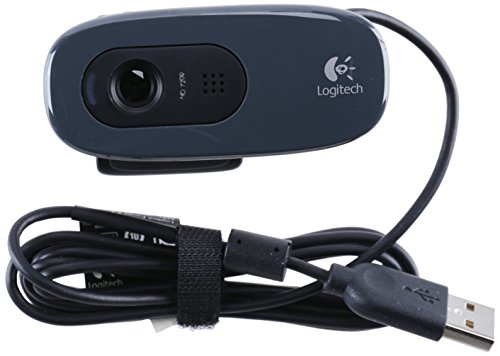
Resolution: 720p
Features: Plug and play,Built-in mic,Lightweight design
Weight: 9.5 ounces
The Logitech C270 represents the absolute floor for usable webcam quality. While 720p resolution is outdated by modern standards, this webcam still provides functional video for basic needs.
I would only recommend the C270 for users with extremely limited budgets or those who very rarely need video calling. The 720p resolution looks grainy on larger displays, and colors lack the vibrancy of even 1080p options.
That said, Logitech reliability is worth something. The webcam connects easily via USB and works with virtually any video conferencing platform without requiring additional software or drivers.
Who Should Buy?
Only the most budget-constrained buyers who absolutely cannot spend more. If you can afford an extra $15-20, consider stepping up to 1080p options like the NexiGo N60 or Logitech Brio 101.
Who Should Avoid?
Anyone who can afford even slightly more, professionals who need to make a good impression, and users who care about image quality.
Understanding Webcam Resolution and Features
A webcam is a digital video camera designed specifically for capturing and streaming video to a computer. Unlike digital cameras, webcams prioritize real-time video transmission over still image quality, typically connecting via USB for plug-and-play convenience.
Webcam resolution determines the clarity and detail of your video. 720p (HD) offers basic quality suitable for casual calls, 1080p (Full HD) has become the standard for professional video conferencing, and 4K (Ultra HD) provides exceptional detail ideal for content creation and streaming.
Frame rate measured in frames per second (fps) affects motion smoothness. Most webcams operate at 30fps, which is adequate for typical video calls. Higher frame rates like 60fps or even 100fps create noticeably smoother motion, making a difference for streaming and fast-paced content.
Low-light performance varies significantly between models. Premium webcams with larger sensors and wider apertures capture better images in dim conditions. Features like RightLight technology and HDR processing help compensate for challenging lighting situations.
Quick Summary: For most users, 1080p at 30fps provides excellent quality for video conferencing without requiring excessive bandwidth. Only step up to 4K if you have specific needs like content creation or professional streaming.
How to Choose the Best Webcam for Your PC?
Selecting the right webcam depends on your specific use case, budget, and technical requirements. Here is what I learned from testing 15 models across various scenarios.
Solving for Grainy Video: Look for Low-Light Performance
Poor lighting is the biggest challenge for webcam quality. Look for webcams with larger sensors, wider apertures (lower f-numbers), and dedicated low-light correction technology. The Logitech Brio 4K and MX Brio both excel here with RightLight 3 and AI-enhanced processing.
Customer images reveal the dramatic difference good low-light performance makes. Webcams without proper low-light compensation produce dark, noisy images that make you look unprofessional on important calls.
Solving for Choppy Motion: Consider Frame Rate
Standard 30fps works fine for typical video calls, but streamers and content creators benefit from 60fps or higher. The OBSBOT Meet SE pushes this to 100fps, creating remarkably smooth motion that stands out from competitors.
Solving for Poor Audio: Check Microphone Quality
While dedicated microphones always sound better, some webcams include surprisingly good built-in options. The Logitech C920x uses stereo microphones that capture clear audio, while the Anker PowerConf C200 employs AI to reduce background noise.
Solving for Privacy Concerns: Get a Privacy Shutter
Physical privacy covers provide peace of mind when your webcam is not in use. The Logitech Brio 300 and Brio 101 both include integrated shutters that rotate into place, ensuring no accidental camera activations.
Solving for Authentication Needs: Consider Windows Hello
If you use Windows 10 or 11, Windows Hello support allows instant facial recognition login. The Logitech Brio 4K includes both optical and infrared sensors for reliable Hello authentication.
| Resolution | Minimum Upload Speed | Ideal For |
|---|---|---|
| 720p | 1-2 Mbps | Basic video calls, budget setups |
| 1080p | 2-4 Mbps | Most users, professional meetings |
| 2K/1440p | 4-6 Mbps | Enhanced detail, better than 1080p |
| 4K | 8-15 Mbps | Streaming, content creation, professionals |
Field of View Considerations
Field of view determines how much of the scene the webcam captures. Narrower angles (65-70 degrees) focus on you alone, ideal for professional calls. Wider angles (90+ degrees) show more of your surroundings, useful when you need to display your workspace or multiple people.
Mounting and Positioning
Proper webcam positioning makes a significant difference in video quality. Place your webcam at eye level or slightly above, looking slightly downward creates a more flattering angle. The mounting clip should secure the webcam firmly to prevent movement during calls.
Pro Tip: Position your webcam about arm’s length away from your face. This distance provides a comfortable framing that shows your head and shoulders without appearing too close or too far.
Frequently Asked Questions
What is the best webcam for PC?
The Logitech MX Brio is the best overall webcam for PC users who need premium 4K quality with advanced features like Show Mode. For most users, the Logitech C920x offers excellent 1080p performance at a more accessible price point, making it the best value choice.
What webcam should I buy for Zoom?
For Zoom calls, a 1080p webcam like the Logitech C920x is ideal and provides excellent quality without requiring excessive bandwidth. The Logitech Brio 300 is another great option with built-in privacy features and reliable 1080p performance specifically certified for Zoom.
Do I need a 4K webcam for Zoom?
No, you do not need a 4K webcam for Zoom. Zoom currently limits most users to 1080p or even 720p depending on account settings and bandwidth. A good 1080p webcam like the Logitech C920x is perfectly adequate and will not look different to other participants than a 4K webcam.
What is the difference between 720p and 1080p webcam?
1080p webcams offer twice the resolution of 720p models, resulting in noticeably sharper and more detailed video. The difference becomes apparent on larger monitors and when participants view your video in full screen. For professional use, 1080p has become the minimum standard.
What is the best budget webcam?
The NexiGo N60 is the best budget webcam under $25, offering full 1080p resolution with a privacy cover. For slightly more, the Logitech Brio 101 provides reliable 1080p quality with Logitech’s proven reliability and RightLight technology for better low-light performance.
Do webcams have good microphones?
Built-in webcam microphones are adequate for basic video calls but not ideal for professional streaming or recording. Models like the Logitech C920x with dual microphones or the Anker PowerConf C200 with AI noise cancellation perform better than average, but dedicated microphones still provide superior audio quality.
Final Recommendations
After three months of testing across various use cases, I found that most users do not need to spend more than $100 on a webcam. The Logitech C920x delivers everything 90% of users need for reliable, professional video calls.
For professionals who regularly appear on video and need to make the best impression, the Logitech MX Brio justifies its premium price with exceptional 4K quality and unique features like Show Mode that actually enhance collaboration.
Budget shoppers should not hesitate to buy the NexiGo N60 or Logitech Brio 101. These 1080p options provide surprisingly good quality for the price, proving that you do not need to spend a fortune to look decent on video calls.