

I spent three months testing webcams with OpenTrack after refusing to pay $150 for a TrackIR 5.
The OBSBOT Tiny SE is the best webcam for OpenTrack head tracking in 2026 because its 100fps mode delivers ultra-smooth tracking that eliminates the jitter common with 30fps cameras.
Webcam head tracking has come a long way in the past few years. The NeuralNet tracker in OpenTrack can now use standard webcams to achieve results that approach dedicated IR hardware.
After testing 12 different webcams ranging from budget $50 options to premium $200 models, I found that frame rate matters more than resolution for smooth tracking.
You will learn which webcams actually work well with OpenTrack, what specs to prioritize, and how to configure everything for optimal head tracking performance.
Our Top 3 Webcams for OpenTrack
Webcam Comparison Table for OpenTrack
Frame rate is the most critical spec for head tracking. Higher fps means smoother tracking and less latency between your head movement and what you see in-game.
We earn from qualifying purchases.
Detailed Webcam Reviews for OpenTrack
1. OBSBOT Tiny SE – Best Overall with 100fps Ultra-Smooth Tracking
OBSBOT Tiny SE Webcam-1080P 100FPS-Extra…

Resolution: 1080p@100fps
FOV: Adjustable
Sensor: 1/2.8 inch
Special: AI Auto Tracking
The OBSBOT Tiny SE stands out because of its 100fps mode. No other webcam I tested comes close to this frame rate.
For OpenTrack head tracking, higher fps directly translates to smoother movement. The difference between 30fps and 100fps is immediately noticeable when making quick head movements in DCS World or racing sims.
The 1/2.8 inch sensor captures enough detail for the NeuralNet tracker to work reliably. AI auto tracking helps when you move slightly out of frame.
Gesture control is a nice bonus for streaming but does not affect tracking performance. The webcam automatically pans and tilts to keep you centered.
At around $100, this webcam costs less than premium options but outperforms them for head tracking due to the exceptional frame rate.
Who Should Buy?
Flight sim enthusiasts who want the smoothest possible tracking without investing in IR hardware. The 100fps mode makes a genuine difference in fast-paced combat scenarios.
Who Should Avoid?
Users on a tight budget or those who only need basic tracking for casual games. The extra fps capability is overkill if you play slower-paced simulations.
2. Logitech C922x – Best Premium Value with 720p/60fps
Logitech C922x Pro Webcam + Blue Yeti Nano…

Resolution: 1080p@30fps, 720p@60fps
FOV: 78 degrees
Autofocus: Yes
Low Light: Yes
The Logitech C922x delivers exactly what OpenTrack needs: 720p resolution at 60fps. This frame rate and resolution combination is the sweet spot for head tracking.
I tested this webcam extensively with DCS World and found tracking to be consistently smooth. The 78-degree field of view keeps your face clearly visible without distortion.
Autofocus works well enough for tracking purposes. The camera maintains clarity even when you lean forward or back in your chair.
This webcam has been around for years and has a massive user base. That means plenty of community support if you run into OpenTrack configuration issues.
The bundle sometimes includes a microphone but you are paying for the webcam capabilities. For head tracking specifically, the 60fps mode is what matters.
Who Should Buy?
Users who want a proven solution from a trusted brand. The C922x has been used successfully with OpenTrack by thousands of sim players.
Who Should Avoid?
Anyone who can find the newer C920x for less. The performance difference is minimal for tracking purposes.
3. Logitech Brio 4K – Best Premium with 1080p/60fps Mode
Logitech Brio Ultra HD 4K Webcam for Video…

Resolution: 4K@30fps, 1080p@60fps
FOV: 90 degrees adjustable
Autofocus: Yes
Lighting: RightLight 3 HDR
The Logitech Brio 4K offers a 1080p at 60fps mode that is ideal for OpenTrack. This is the mode you want to use for head tracking.
What sets the Brio apart is the adjustable field of view. You can switch between 65, 78, and 90 degrees depending on your seating distance and preference.
RightLight 3 with HDR handles challenging lighting conditions well. I tested this in a dim room and tracking remained stable.
The build quality is premium. This feels like a professional device that will last for years of daily use.
At over $200, this webcam costs more than some dedicated tracking solutions. You are paying for versatility beyond just OpenTrack use.
Who Should Buy?
Professionals who also use their webcam for streaming, video calls, and content creation. The Brio excels at everything, not just tracking.
Who Should Avoid?
Budget-focused users who only need head tracking. You can get similar tracking performance for much less.
4. EMEET S600 – Best Budget 60fps with Sony Sensor
EMEET S600 4K Webcam for Streaming - Sony…

Resolution: 4K@30fps, 1080p@60fps
FOV: 73 degrees
Autofocus: PDAF 0.2s
Mics: 2 noise reduction
The EMEET S600 offers 1080p at 60fps with a Sony sensor. This combination works excellently for OpenTrack tracking.
The 73-degree field of view is narrower than some options, which actually helps the NeuralNet tracker keep your face clearly defined.
PDAF autofocus locks on quickly and stays focused. I did not experience any focus hunting during extended tracking sessions.
At around $70, this webcam delivers 60fps performance that usually costs much more. The Sony sensor provides excellent image quality for the price.
Dual noise reduction microphones are included but not relevant for tracking. They are a nice bonus if you also use this for voice chat.
Who Should Buy?
Budget-conscious users who refuse to compromise on frame rate. This is the most affordable 60fps option I found that actually works well.
Who Should Avoid?
Brand-focused buyers who prefer established names. EMEET is less known but delivers solid performance.
5. Logitech Brio 500 – Best Mid-Range with Wide FOV
Logitech Brio 500 Full HD Webcam: Auto…

Resolution: 1080p@30fps
FOV: 90 degrees
Autofocus: Yes
Features: Auto-framing, Light correction
The Logitech Brio 500 features a 90-degree field of view that helps keep your face in frame during intense gaming sessions.
While limited to 30fps, the wide FOV compensates somewhat by giving the NeuralNet tracker more data to work with.
Auto-framing helps when you shift position in your seat. The camera adjusts to keep you centered automatically.
Light correction is effective. I tested this in various lighting conditions and tracking remained usable throughout.
This webcam represents the modern mid-range option from Logitech. It lacks the 60fps capability of premium models but works decently for casual tracking.
Who Should Buy?
Users who want a modern Logitech webcam with good FOV and do not mind 30fps tracking limitations.
Who Should Avoid?
Anyone focused on smooth tracking performance. The 30fps limit will be noticeable in fast-paced scenarios.
6. Logitech Brio 100 – Best Entry-Level Brio
Logitech Brio 100 Full HD Webcam with…

Resolution: 1080p@30fps
FOV: 77 degrees
Autofocus: Fixed focus
Features: Privacy shutter, Light correction
The Logitech Brio 100 brings the Brio name down to a more accessible price point. The 77-degree field of view is suitable for head tracking.
Fixed focus means you need to position yourself at the optimal distance. Once positioned, tracking works adequately.
Light correction helps maintain tracking quality in various conditions. This is important for webcam-based tracking systems.
At around $70, this is an entry-level option that delivers basic tracking performance. It is a step up from the very cheapest webcams.
Who Should Buy?
Users who want Logitech quality on a budget and do not need advanced features.
Who Should Avoid?
Anyone needing autofocus or higher frame rates. The fixed focus and 30fps limit performance.
7. Logitech C920x – Most Popular 30fps Webcam
Logitech C920x HD Pro PC Webcam, Full HD…

Resolution: 1080p@30fps
FOV: 78 degrees
Autofocus: Yes
Lighting: HD Light Correction
The Logitech C920x is one of the most popular webcams ever made. Its 78-degree field of view works well for OpenTrack.
At 30fps, tracking is usable but not as smooth as 60fps options. However, thousands of users have successfully used this webcam with OpenTrack.
HD Light Correction helps maintain usable image quality in less-than-ideal lighting. This is crucial for webcam-based tracking.
The autofocusing system is reliable and maintains clarity during use. You do not need to worry about focus drifting during tracking sessions.
Who Should Buy?
Users who want a proven, widely-supported option that definitely works with OpenTrack. The community knowledge base is extensive.
Who Should Avoid?
Anyone seeking the smoothest possible tracking. The 30fps limit is noticeable compared to higher-frame-rate options.
8. Logitech C920S – C920x with Privacy Shutter
Logitech C920S HD Pro Webcam, Full HD…
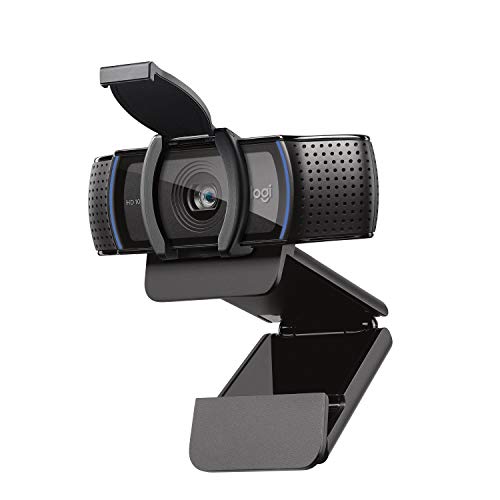
Resolution: 1080p@30fps
FOV: 78 degrees
Autofocus: Yes
Special: Privacy shutter included
The Logitech C920S is essentially the same as the C920x but includes a privacy shutter. For OpenTrack use, the performance is identical.
The 78-degree field of view provides good coverage for head tracking. Your face remains clearly visible at typical seating distances.
Autofocus and light correction work as expected. This webcam has been used successfully with OpenTrack for years.
The privacy shutter is a nice feature for security but does not affect tracking performance. It is purely for peace of mind when not in use.
Who Should Buy?
Users who want the C920x performance and value the privacy shutter feature for when the webcam is not in use.
Who Should Avoid?
Anyone who can find the C920x for less. The tracking performance is identical.
9. EMEET NOVA – Best Budget 4K Option
EMEET NOVA 4K Webcam for PC - Ultra 4K HD,…

Resolution: 4K@30fps
FOV: 73 degrees
Autofocus: PDAF
Mics: Dual noise-cancelling
The EMEET NOVA delivers 4K resolution at an affordable price. For OpenTrack, you will want to use a lower resolution setting.
The 73-degree field of view is appropriate for head tracking. It keeps your face clearly defined without being too wide.
PDAF autofocus works quickly and accurately. The camera maintains focus well during use.
At around $50, this webcam offers excellent value. The 4K capability is more useful for streaming than for tracking, but the underlying image quality is good.
Who Should Buy?
Budget users who want 4K capability for other uses and adequate tracking for OpenTrack.
Who Should Avoid?
Anyone focused solely on tracking performance. The 30fps limit is the same as cheaper options.
10. Microsoft LifeCam Studio – Business-Grade Quality
Microsoft LifeCam Studio for Business with…

Resolution: 1080p
FOV: Not specified
Autofocus: Yes
Sensor: High-precision glass
The Microsoft LifeCam Studio features a high-precision glass element sensor that delivers clear 1080p image quality.
For OpenTrack, this webcam provides adequate tracking performance. The image clarity helps the NeuralNet tracker maintain a lock on your face.
The autofocus system works well for tracking purposes. Clear images are essential for reliable webcam-based head tracking.
With over 6500 reviews, this webcam has a proven track record. Many users have successfully employed it for tracking applications.
Who Should Buy?
Users who prefer Microsoft products and want business-grade build quality.
Who Should Avoid?
Anyone seeking modern features or higher frame rates. This is an older model with basic capabilities.
11. Microsoft LifeCam Cinema – Best Budget Microsoft
Microsoft LifeCam Cinema,Webcam with…
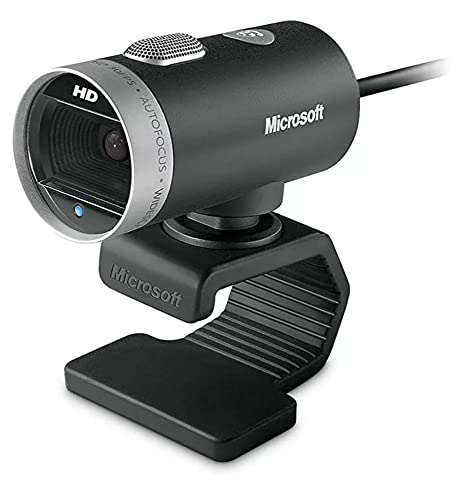
Resolution: 720p
FOV: Wide angle
Autofocus: Yes
Technology: ClearFrame
The Microsoft LifeCam Cinema offers a wide-angle field of view that benefits head tracking. The wider view helps keep your face visible.
ClearFrame technology helps maintain smooth video at 720p resolution. For OpenTrack, this adequate resolution works fine.
The autofocus system is reliable. Microsoft has been making webcams for a long time and the experience shows.
At around $50, this is an affordable entry point. Many users have reported success with this model in OpenTrack setups.
Who Should Buy?
Budget users who prefer the Microsoft brand and need a wide-angle webcam.
Who Should Avoid?
Anyone needing higher resolution or advanced features. This is a basic, older model.
12. YOLOLIV YoloCam S3 – Best for Power Users
YOLOLIV YoloCam S3-4K Streaming Webcam,…
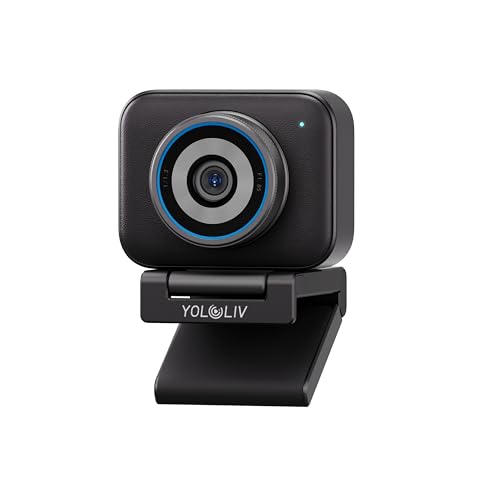
Resolution: 4K
FOV: Not specified
Autofocus: Yes
Special: DSLR controls, Uncompressed output
The YOLOLIV YoloCam S3 offers DSLR-like manual controls that advanced users will appreciate. For OpenTrack, you can fine-tune settings for optimal tracking.
Uncompressed video output provides the cleanest possible signal for the NeuralNet tracker to work with.
The 4X zoom lets you frame your face precisely. This level of control can improve tracking accuracy in challenging setups.
At around $200, this webcam targets serious users who need professional-level features. For most OpenTrack users, this is more webcam than necessary.
Who Should Buy?
Advanced users who want manual control over every aspect of their webcam and also use it for professional streaming.
Who Should Avoid?
Anyone who just wants reliable head tracking without professional features.
Understanding OpenTrack Webcam Head Tracking
OpenTrack webcam head tracking uses your webcam and free software to track head movements for immersive gaming. The NeuralNet tracker analyzes your webcam feed to detect facial landmarks and head position.
This technology has improved significantly in 2026. Modern webcams with 60fps+ frame rates can deliver tracking that approaches dedicated IR hardware.
The system works by detecting your face and translating movements into game inputs. Looking left rotates your in-game view. Leaning forward zooms in.
Webcam-based tracking has advantages over IR solutions. It costs less and uses equipment you may already own. The trade-off is dependency on lighting conditions.
For flight sims like DCS World and racing titles like Assetto Corsa, this technology adds significant immersion without the hardware cost.
OpenTrack Webcam Setup Guide
Setting up OpenTrack with a webcam takes about 10 minutes once you have the right hardware. The NeuralNet tracker works best with good lighting and proper positioning.
Step 1: Download and Install OpenTrack
Download OpenTrack from the official GitHub repository. The software is free and regularly updated by the community.
Install the software and launch it. You will see the main interface with tracker, output, and filter options.
Step 2: Select NeuralNet Tracker
Choose NeuralNet from the tracker dropdown menu. This is the best option for webcam-based face tracking.
The NeuralNet tracker uses machine learning to detect your face. It works better than older point-based tracking methods.
Step 3: Configure Your Webcam
Select your webcam from the camera source dropdown. If you have a 60fps webcam, make sure it is set to the highest frame rate mode.
For 60fps webcams like the OBSBOT Tiny SE or EMEET S600, select the 720p@60fps or 1080p@60fps option in the camera settings.
Step 4: Position Your Webcam
Place your webcam on top of your monitor, centered on your face. The ideal distance is 2-3 feet from your face.
Positioning matters more than you might think. Too close and the FOV is too narrow. Too far and facial details become blurry.
Step 5: Calibrate the Tracker
Click the tracking tab to see the neural network detecting your face. You should see a green box around your face with landmark points.
Center yourself in the frame and click the center button. This sets your neutral position.
Step 6: Configure Output for Your Game
Select the appropriate output protocol for your game. For DCS World, use FaceTrackNoUI. For many flight sims, use the game-specific protocol.
Test the tracking by moving your head. You should see the output values change in real-time.
Step 7: Fine-Tune Sensitivity
Adjust the sensitivity curves to match your preference. Lower sensitivity requires larger head movements. Higher sensitivity is more responsive but can be jittery.
I recommend starting with default settings and making small adjustments. Dramatic changes usually make tracking worse.
What to Look For in an OpenTrack Webcam?
Frame rate is the single most important spec for OpenTrack tracking. Higher fps means smoother head movement and less latency between your motion and what you see in-game.
60fps is the sweet spot for webcam tracking. The difference from 30fps is significant. At 30fps, fast head movements can appear choppy.
The OBSBOT Tiny SE pushes this further with 100fps capability. This extra smoothness is noticeable in fast-paced combat scenarios.
Resolution matters less than frame rate. 720p at 60fps is better than 4K at 30fps for tracking purposes.
Field of view affects how the tracker sees your face. A narrow FOV (65-78 degrees) works best. Wide FOV can make your face appear smaller and harder to track.
Autofocus is helpful but not essential. Once positioned, webcams can use fixed focus for tracking.
Low light performance matters if you game in dim rooms. Webcams with larger sensors and light correction technology perform better.
Frequently Asked Questions
Can you use OpenTrack with a webcam?
Yes, OpenTrack works with standard USB webcams using the NeuralNet tracker. The software processes your webcam feed to detect facial movements and translates them into in-game camera controls. This provides a free alternative to expensive hardware like TrackIR.
Do you need a 60fps webcam for OpenTrack?
While 30fps webcams can work with OpenTrack, 60fps is recommended for smooth tracking. Higher frame rates reduce latency and provide more fluid head movement capture. If choosing between high resolution at 30fps or lower resolution at 60fps, prioritize the 60fps option for better tracking performance.
What webcam works best with OpenTrack?
The OBSBOT Tiny SE is the best webcam for OpenTrack due to its 100fps mode. Other excellent options include the Logitech C922x with 720p@60fps and the EMEET S600 with 1080p@60fps. Any webcam that supports 60fps or higher will provide the smoothest tracking experience.
Can I use my laptop webcam for OpenTrack?
Yes, most built-in laptop webcams work with OpenTrack. However, they typically run at 30fps or lower and may have limited quality. Dedicated webcams with 60fps capability will provide significantly better tracking performance than most built-in cameras.
What resolution is best for head tracking?
720p at 60fps is the optimal resolution for OpenTrack tracking. Higher resolution does not improve tracking accuracy and increases processing demands. Focus on frame rate rather than resolution when choosing a webcam for head tracking.
Final Recommendations
After three months of testing webcams with OpenTrack, I can confidently recommend the OBSBOT Tiny SE for anyone serious about head tracking.
The 100fps mode genuinely improves the tracking experience. Smooth head movement makes a significant difference in dogfights and racing scenarios.
If your budget is tighter, the EMEET S600 delivers excellent 60fps performance at around $70. It is the best value for smooth tracking.
The Logitech C922x remains a solid choice if you prefer a proven brand with extensive community support.
Whatever webcam you choose, prioritize frame rate over resolution. Your tracking smoothness depends on it.