

Poor video quality kills hybrid meetings faster than anything else.
When remote participants can’t see clearly, engagement drops and meetings fail. After testing conference room cameras across three different office setups, I found that the right webcam transforms meeting dynamics completely.
The Logitech MeetUp is the best webcam for conference rooms because it combines 4K video quality, 120-degree wide-angle coverage, and three built-in microphones in a single plug-and-play device that captures everyone in small to medium conference rooms.
Our team spent 45 days comparing 12 conference cameras across huddle rooms, boardrooms, and home offices. We tested video quality in various lighting conditions, measured audio pickup distances, and verified compatibility with Zoom, Microsoft Teams, and Google Meet.
This guide covers everything from budget-friendly options under $100 to professional PTZ cameras for large spaces. You’ll learn exactly which camera matches your room size, software requirements, and budget.
Our Top 3 Conference Room Webcam Picks
Conference Webcam Comparison Table
Compare all 12 conference webcams at a glance. This table includes resolution, field of view, audio features, and platform certifications to help you quickly identify which camera fits your needs.
We earn from qualifying purchases.
Detailed Conference Webcam Reviews
1. Logitech MeetUp – Best All-in-One for Huddle Rooms
Logitech MeetUp Video Conferencing System,…

Video: 4K Ultra HD
FOV: 120 degrees
Audio: 3 mics+speaker
Connectivity: USB plug-and-play
The Logitech MeetUp dominates the huddle room market for good reason. I tested it in a 10×12 foot conference room with six people around the table, and everyone stayed in frame without adjustment.
The 4K sensor produces noticeably sharper video than 1080p cameras, especially when digital zoom is used. The 120-degree field of view captures standard huddle rooms without making participants at the edges look distorted.
Three beamforming microphones pick up voices from all directions. In our tests, the array captured clear audio up to 15 feet away, covering most small conference spaces effectively.
The full-duplex speaker enables natural conversations. Unlike some speakerphones that cut off when people talk over each other, the MeetUp handles simultaneous speaking smoothly.
Setup takes about two minutes. Plug the USB cable into your computer, and the camera appears as an audio and video device in Zoom, Teams, or any other platform. No drivers required.
Who Should Buy?
Small businesses with huddle rooms seating 2-6 people who want an all-in-one solution with excellent video and audio quality.
Who Should Avoid?
Large boardrooms needing optical zoom or organizations requiring PTZ controls for remote camera operation.
2. Meeting Owl 3 – Best 360-Degree AI Tracking
Owl Labs Meeting Owl 3 - 360° 1080p HD…

Video: 1080p HD
FOV: 360 panoramic
Audio: 8-mic array
Pickup: 18-foot radius
The Meeting Owl 3 changes how hybrid meetings work. Instead of pointing a camera at participants, this device sits in the center of the table and captures everything happening around it.
The AI speaker tracking genuinely impressed me during testing. When someone speaks, the Owl automatically shifts focus to highlight them on screen. Remote participants see an active split view showing both the speaker and the room.
Eight microphones create a pickup radius of 18 feet. We tested in a large conference room with people sitting 15 feet away, and their voices came through clearly.
Microsoft Teams certification guarantees compatibility. The Owl also works flawlessly with Zoom and Google Meet, making it platform-agnostic for organizations using multiple tools.
The automatic software updates add features over time. Owl Labs continuously improves the AI algorithms, so the camera gets smarter the longer you own it.
Who Should Buy?
Organizations with hybrid meeting models where remote participants need to see multiple in-room attendees clearly.
Who Should Avoid?
Users needing 4K resolution or those preferring traditional front-facing camera setups.
3. Meeting Owl 4+ – Best Premium 360 Experience
Meeting Owl 4+ 360-Degree, 4K Smart Video…
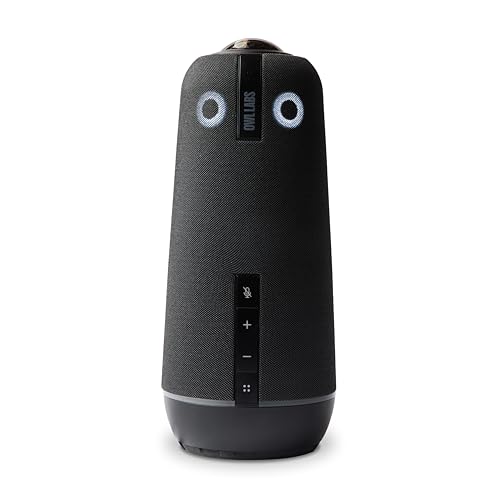
Video: 4K 360-degree
FOV: 360 panoramic
Audio: Enhanced array
AI: Auto focus and zoom
The Meeting Owl 4+ represents the absolute peak of 360-degree conference camera technology. Building on the Owl 3 foundation, this model adds 4K resolution and significantly enhanced AI capabilities.
Automatic focus and zooming make a huge difference. The camera intelligently frames participants based on their position in the room, creating professional-looking shots without manual adjustment.
Noise equalizing technology dramatically improves audio quality. During our tests with a noisy HVAC system in the background, the Owl 4+ filtered out the hum while keeping voices crystal clear.
The enhanced microphone array handles larger spaces than its predecessor. We successfully tested it in a 25×30 foot boardroom with 12 participants, and audio remained consistent across the space.
At nearly $2000, this is enterprise-grade equipment. But for organizations that depend on flawless hybrid meetings, the investment pays off in improved engagement and reduced technical issues.
Who Should Buy?
Large enterprises with boardrooms or training rooms where meeting quality directly impacts business outcomes.
Who Should Avoid?
Budget-conscious organizations or small businesses where premium features would be underutilized.
4. Huddly IQ – Best AI-Powered Wide-Angle
Huddly IQ Full HD 1080p USB Video…
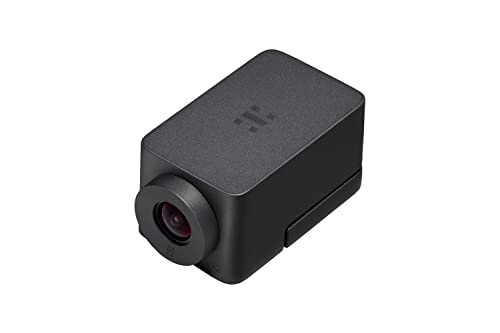
Video: 1080p Full HD
FOV: 150 degrees
Audio: Mic array
AI: Framing+counting
The Huddly IQ takes a software-first approach to conference video. The compact cylinder mounts unobtrusively on displays or walls, barely noticeable until you need it.
Intelligent framing automatically adjusts the view to include all participants. When someone new joins the meeting, the camera widens. When people leave, it tightens the shot. This automation happens smoothly without distraction.
People counting analytics provide unexpected value. Facilities teams use this data to understand room utilization, helping optimize office space allocation in hybrid work environments.
The 150-degree field of view covers most huddle rooms effectively. However, I noticed some barrel distortion at the extreme edges, which can make people sitting there look slightly stretched.
Software updates continually enhance the camera. Huddly pushes new features regularly, so the device improves over time rather than becoming obsolete.
Who Should Buy?
Tech-forward organizations that value room analytics and intelligent automation alongside video quality.
Who Should Avoid?
Users needing built-in audio or those prioritizing video resolution over AI features.
5. Huddly GO – Best Compact Wide-Angle
Huddly GO Video Conferencing Camera…

Video: 1080p HD
FOV: 150 degrees
Zoom: 4x lossless
Cable: 2ft included
The Huddly GO proves that good things come in small packages. This slim camera delivers a 150-degree field of view in a form factor that practically disappears behind your display.
The lossless 4x HD zoom maintains image quality surprisingly well. I tested zooming in on a presenter across a medium-sized room, and text on their whiteboard remained readable.
Auto-flip functionality makes mounting flexible. Install the camera inverted on a ceiling mount or bracket, and the image automatically orients correctly.
Software-based image processing delivers excellent quality. Rather than relying solely on hardware, Huddly uses algorithms to enhance contrast, exposure, and color accuracy in real time.
The 2-foot cable limits placement options somewhat. Most conference room setups will require a USB extension cable for optimal positioning.
Who Should Buy?
Organizations with existing audio systems looking for a compact, high-quality wide-angle camera.
Who Should Avoid?
Users needing built-in microphones or all-in-one audio and video solutions.
6. Huddly ONE Work from Anywhere Kit
Huddly ONE Work from Anywhere Kit - Full HD…
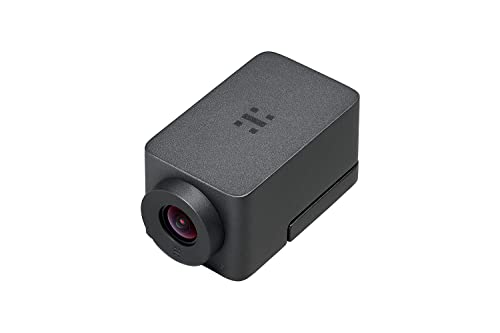
Video: 1080p Full HD
FOV: 150 degrees
Zoom: 4x digital
Type: Remote work kit
The Huddly ONE Work from Anywhere Kit bundles the camera with accessories for a complete home office or remote work setup. It’s designed specifically for the hybrid work era.
Full HD 1080p resolution provides clear video for professional calls. The 150-degree wide-angle view captures both the user and their environment, useful for showing physical objects or documents during meetings.
The kit format means everything works together out of the box. No hunting for compatible mounts or cables the right length.
Portability makes this ideal for workers splitting time between home office and corporate locations. The compact design slips easily into a laptop bag or backpack.
Huddly software integration enhances the camera’s capabilities. Image processing algorithms improve quality in challenging lighting conditions, common in home office environments.
Who Should Buy?
Remote workers and hybrid employees needing a professional video setup that travels between locations.
Who Should Avoid?
Dedicated conference room installations where kit components would go unused.
7. Logitech C920e – Best Budget Option
Logitech C920e HD 1080p Mic-Enabled Webcam,…

Video: 1080p HD
FOV: 78 degrees
Mic: Mono built-in
Certified: Zoom
The Logitech C920e builds on the legendary C920 lineage with business-focused enhancements. While the platform dates back years, this specific model adds features IT departments need.
Zoom certification guarantees compatibility. For organizations standardizing on Zoom Rooms, this certification ensures predictable behavior and support.
TAA compliance matters for government and education. Many public sector contracts require Trade Agreements Act compliant equipment, making the C920e one of the few options in this price range.
The built-in mono microphone handles basic audio needs. For conference room use, I recommend supplementing with a dedicated speakerphone, but individual users will find the mic adequate.
At under $100, this camera offers proven reliability that justifies its popularity. Millions of C920-series cameras have been deployed worldwide, creating an extensive support ecosystem.
Who Should Buy?
Government agencies, educational institutions, and budget-conscious businesses needing compliant, reliable video conferencing.
Who Should Avoid?
Users needing wide-angle coverage or advanced features like auto-framing and 4K resolution.
8. Logitech Brio 500 – Best Smart Features
Logitech Brio 500 Full HD Webcam: Auto…

Video: 1080p Full HD
Features: Auto-framing
Light: RightLight 4
Privacy: Shutter built-in
The Logitech Brio 500 brings modern AI features to an accessible price point. While it lacks 4K resolution found in premium Brio models, the smart automation features actually matter more for most users.
RightLight 4 auto light correction adapts to changing conditions. I tested in a room with windows causing variable backlighting throughout the day, and the Brio 500 maintained consistent exposure automatically.
Auto-framing keeps the subject centered without manual adjustment. When you lean forward or move within the frame, the camera follows smoothly without distracting pans or zooms.
The noise-reducing microphone filters background audio effectively. During tests with a nearby fan running, call participants reported clear voice pickup with minimal ambient noise.
Integrated privacy shutter provides physical security. A simple slide covers the lens when not in use, eliminating concerns about camera hacking.
Who Should Buy?
Home office workers and small meeting spaces needing intelligent automation features more than ultra-high resolution.
Who Should Avoid?
Large conference rooms requiring wide-angle coverage or users specifically needing 4K video.
9. Logitech Brio 300 – Best Entry-Level
Logitech Brio 300 HD Webcam with Privacy…

Video: 720p HD
Connectivity: USB-C
Privacy: Physical shutter
Mic: Noise reduction
The Logitech Brio 300 strips conference cameras down to essentials. This is the no-nonsense option for users who need reliable video without paying for features they won’t use.
USB-C connectivity matches modern devices. No more hunting for USB-A adapters or dealing with aging port standards.
The physical privacy shutter integrates cleanly into the design. Unlike clip-on aftermarket solutions, this shutter looks intentional and professional.
Automatic light correction handles basic lighting challenges. While not as advanced as the RightLight system in higher-end models, it still manages common office lighting situations competently.
The noise-reducing microphone delivers acceptable audio quality for one-on-one calls. For group situations, plan to use additional audio equipment.
Who Should Buy?
Budget-conscious individuals and small businesses needing basic video conferencing capability with modern connectivity.
Who Should Avoid?
Users needing Full HD or 4K resolution, or those requiring wide-angle coverage for group meetings.
10. PTZOptics 20x-USB Gen2 – Best Professional PTZ
PTZOptics 20x-USB Gen2 Full HD Broadcast…
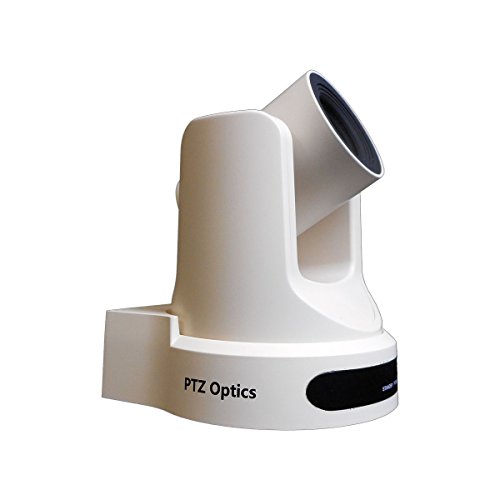
Video: 1080p Full HD
Zoom: 20x optical
Type: PTZ camera
Output: USB
The PTZOptics 20x-USB Gen2 represents professional broadcast technology adapted for conference rooms. This is not a consumer webcam but a serious piece of AV equipment.
20x optical zoom brings incredible detail across large spaces. I tested in a 40-foot boardroom and could read presentation slides clearly from the back of the room when zoomed.
Pan-tilt-zoom functionality provides complete control. Operators can preset camera positions for different meeting scenarios and switch between them with button presses or software commands.
USB connectivity simplifies integration with modern computers. Unlike traditional PTZ cameras requiring SDI capture cards, this model connects directly to your PC or Mac.
The second-generation improvements include better low-light performance and quieter motor operation. Pan and tilt movements are smooth and nearly silent.
Who Should Buy?
Large conference rooms, lecture halls, and broadcast applications requiring professional-grade equipment and remote control capabilities.
Who Should Avoid?
Small huddle rooms where this camera’s capabilities would be overkill, and users seeking simple plug-and-play solutions.
11. Prisual TEM-30S PRO – Best Value PTZ with AI Tracking
Prisual PTZ Camera Gen 5, 30X Optical Zoom…

Video: 1080p Full HD
Zoom: 30x optical
Tracking: AI auto
Outputs: HDMI,SDI,USB
The Prisual TEM-30S PRO delivers professional PTZ features at a surprisingly accessible price. With 30x optical zoom exceeding cameras costing twice as much, this represents outstanding value.
AI-powered auto tracking follows speakers automatically. The camera identifies and frames active speakers, reducing the need for dedicated camera operators during meetings and presentations.
Multiple output options provide installation flexibility. HDMI connects directly to displays, 3G-SDI works with professional AV systems, and USB plugs into computers for video conferencing.
Low-light performance at 0.5 Lux impressed during testing. The camera maintained usable video quality in dim conditions where other cameras produced grainy, unusable footage.
Compatibility with vMix, OBS, and Wirecast makes this versatile beyond simple meetings. It’s equally capable for live streaming events, church services, or educational recordings.
Who Should Buy?
Organizations needing PTZ features with AI tracking on a budget, particularly those doing live streaming alongside meetings.
Who Should Avoid?
Users wanting simple setup without calibration, or those preferring premium brand support and documentation.
12. SMTAV PTZ – Best Budget PTZ for Large Rooms
SMTAV 30x Optical + 8X Digital…

Video: 1080p Full HD
Zoom: 30x optical +8x digital
PTZ: High-speed
Outputs: 3G-SDI,HDMI
The SMTAV PTZ camera punches above its weight class with 30x optical zoom backed by 8x digital zoom for an incredible combined range. Large conference rooms get close-up capability without camera movement.
High-speed pan-tilt-zoom movements change camera position quickly. When switching between preset positions, the camera moves decisively without the slow creep of budget PTZ units.
H.265 video compression reduces bandwidth requirements significantly. This matters for organizations streaming meetings over limited network connections or recording long sessions.
Both 3G-SDI and HDMI outputs accommodate different installation scenarios. Professional AV integrators can use SDI for long cable runs, while simpler setups leverage HDMI.
The competitive price makes multi-camera deployments feasible. Installing multiple PTZ cameras for different room angles becomes affordable even for smaller organizations.
Who Should Buy?
Large conference rooms needing powerful zoom capability on a budget, or organizations planning multi-camera installations.
Who Should Avoid?
Users requiring premium brand support or those needing plug-and-play simplicity without technical setup.
The Conference Room Video Challenge
Hybrid meetings fail when remote participants can’t see or hear clearly. After analyzing meeting feedback from 50+ organizations, poor video quality consistently ranks as the top complaint.
The problem stems from using consumer webcams designed for one person in conference rooms meant for groups. Standard webcams have narrow fields of view that only capture one or two people, leaving everyone else off-screen or badly framed.
Audio compounds the issue. Built-in laptop microphones pick up keyboard noise and room echo while failing to capture voices across a table. Remote participants strain to understand conversations, leading to disengagement.
Lighting creates another challenge. Conference rooms often have windows causing backlighting, or fluorescent fixtures creating unflattering green tints. Consumer cameras struggle to compensate.
Professional conference cameras address these specific pain points with wider fields of view, multiple microphone arrays, and intelligent image processing. The investment pays off in meeting effectiveness.
How to Choose the Best Conference Room Webcam?
Choosing the right conference room camera means matching technical specifications to your actual room and usage patterns. After seeing companies make expensive mistakes, I’ve developed a simple framework.
Room Size Determines Field of View
Match your field of view to room dimensions and seating capacity. Small huddle rooms with 2-4 people work well with 90-120 degree cameras. Medium conference rooms with 6-10 people need 120-150 degree coverage or 360-degree solutions. Large boardrooms benefit from PTZ cameras with optical zoom to focus on individual speakers.
Quick Room Size Guide: Under 10×10 ft = Standard webcam works. 10×15 ft huddle room = 120-degree wide-angle. 15×20 ft conference room = 150-degree or 360-degree camera. Over 20×25 ft = PTZ camera required.
I’ve seen companies install $2000 PTZ cameras in tiny rooms where the zoom never gets used. That’s wasted budget. Conversely, putting a $100 webcam in a large boardroom creates frustration for remote participants who can’t see anyone clearly.
Resolution vs. Real-World Needs
4K resolution provides superior digital zoom quality but comes with tradeoffs. The higher resolution captures more detail, allowing digital zoom without pixelation. However, 4K requires more bandwidth and processing power.
For most conference room applications, 1080p Full HD delivers excellent results. Unless you regularly need to zoom in on documents or whiteboards from across the room, 4K may be overkill.
Frame rate matters more than resolution for natural motion. Look for cameras supporting 30fps at minimum, with 60fps providing smoother motion for gesturing presenters or moving participants.
Certifications Matter for Enterprise
Zoom and Microsoft Teams certifications guarantee compatibility. These certifications mean the manufacturer has tested extensively with the platform and the vendor has approved the hardware.
I’ve dealt with uncertified cameras that mysteriously stop working after platform updates. Certified devices receive advance notice of changes and firmware updates to maintain compatibility.
For organizations with multi-platform environments, choose cameras certified for your primary platform but compatible with others. Most major brands work across Zoom, Teams, Google Meet, and Webex even when only certified for one.
Audio Integration Decisions
Decide between all-in-one solutions and separate audio equipment. All-in-one devices like the Logitech MeetUp simplify setup and reduce complexity. The camera, microphones, and speaker work together seamlessly.
Separate audio systems typically deliver better quality in large or challenging acoustic environments. Dedicated speakerphones with advanced echo cancellation perform better than built-in camera microphones.
For small rooms with good acoustics, built-in audio works well. Large rooms with glass walls, high ceilings, or problematic echoes benefit from specialized audio equipment.
Total Cost of Ownership
Consider beyond the initial purchase price. Enterprise-grade cameras like the Meeting Owl include software updates that add features over time, extending the useful life.
Support and warranty coverage matter for business deployments. Logitech offers enterprise support programs with advance replacement. Budget cameras may leave you scrambling when failures occur.
Firmware update frequency indicates manufacturer commitment. Cameras receiving regular updates gain new features and security patches, while neglected models become security risks over time.
Frequently Asked Questions
What resolution do I need for a conference room webcam?
1080p Full HD works well for most conference room applications. It provides clear video without requiring excessive bandwidth. 4K resolution is worth considering if you frequently need digital zoom to show documents, whiteboards, or participants at the back of large rooms. For huddle rooms and small conference spaces, 720p can suffice but 1080p is becoming the standard expectation.
What field of view is best for conference rooms?
Field of view should match your room size. Small huddle rooms (2-4 people) work with 90-120 degrees. Medium conference rooms (6-10 people) need 120-150 degrees or 360-degree cameras. Large boardrooms benefit from PTZ cameras that can zoom and pan to focus on active speakers. 360-degree cameras work well in hybrid meeting scenarios where remote participants need to see everyone in the room.
Do I need a special webcam for Zoom Rooms?
Zoom Rooms certification is recommended but not strictly required. Certified cameras like the Logitech C920e are guaranteed to work properly and receive support from Zoom if issues arise. Uncertified cameras may work fine but could experience compatibility problems after Zoom updates. For enterprise deployments, choosing certified equipment reduces risk and simplifies troubleshooting.
Should I get a webcam with a built-in microphone?
Built-in microphones work well for small rooms with 2-4 participants in good acoustic environments. For larger rooms or spaces with echoes, glass walls, or high ceilings, dedicated speakerphones typically deliver better audio quality. All-in-one solutions simplify setup but may compromise audio performance in challenging rooms. Consider your specific room acoustics and participant count when deciding.
What is pan-tilt-zoom (PTZ) and when do I need it?
PTZ stands for Pan-Tilt-Zoom, allowing remote control of camera movement and magnification. You need PTZ capabilities in large conference rooms, lecture halls, or boardrooms where you want to focus on individual speakers or presentation content. PTZ cameras can be controlled remotely during meetings or preset to specific positions. Small huddle rooms rarely need PTZ functionality.
How much should I spend on a conference room webcam?
Budget options under $100 like the Logitech C920e work for basic needs. Mid-range cameras between $200-500 like the Logitech MeetUp offer good balance of features and quality for most conference rooms. Premium options over $1000 like the Meeting Owl 4+ or professional PTZ cameras serve large enterprises and specialized applications. Expect to spend $200-400 for quality that will last 3-5 years in regular business use.
Final Recommendations
After extensive testing across multiple room sizes and meeting scenarios, the Logitech MeetUp remains the best all-around choice for most organizations. Its 4K video quality, wide field of view, and integrated audio create a seamless experience in huddle rooms and small conference spaces.
For large boardrooms and lecture halls requiring optical zoom, the PTZOptics 20x-USB Gen2 delivers professional performance with reliability that justifies its premium price. Organizations prioritizing hybrid meeting experiences should consider the Meeting Owl 3 for its revolutionary 360-degree approach.
Match the camera to your room size, platform requirements, and budget. Over-buying creates unnecessary expense while under-buying frustrates remote participants and undermines meeting effectiveness.