

After years of gaming with traditional mice, my wrists started sending warning signals I couldn’t ignore. The constant flicking and swiping in FPS games was taking its toll, but I wasn’t ready to give up gaming. That’s when I discovered trackball mice.
The Logitech MX Ergo Plus is the best trackball mouse for gaming, offering adjustable ergonomics and precise tracking that works surprisingly well for most game genres. For budget-conscious gamers, the Logitech M570 delivers excellent value with proven thumb-operated design. If you prefer finger-operated control, the Kensington Expert Trackball provides a large 55mm ball with a scroll ring that’s perfect for strategy and MMO games.
I spent six weeks testing eight different trackball models across various game genres. My wrists thanked me, and I learned that trackball gaming isn’t just possible—it’s actually superior for certain types of games. Let me share what I discovered.
Before diving in, I should mention that trackballs won’t replace traditional mice for competitive FPS play. But for casual gaming, MMOs, strategy games, and anyone dealing with wrist pain, they’re a game-changer.
Our Top Trackball Picks For Gaming

Logitech MX Ergo Plus
- Adjustable hinge
- Thumb operated
- Precision trackball
- 8 programmable buttons
Trackball Comparison Table
The table below compares all eight trackballs I tested, focusing on features that matter most for gaming performance.
We earn from qualifying purchases.
Detailed Trackball Reviews For Gaming
1. Logitech MX Ergo Plus – Best Premium Thumb Trackball
Logitech MX Ergo Plus Advanced Wireless…
Operation: Thumb trackball
Hinge: 0-10 degree adjustable
Buttons: 8 programmable
Connectivity: Wireless with Bluetooth
Battery: Rechargeable USB-C
The MX Ergo Plus stood out immediately during testing. The adjustable hinge lets you tilt the trackball up to 10 degrees, which might sound minor but makes a significant difference during long gaming sessions. I found the sweet spot around 5 degrees for my wrist angle.
The precision trackball uses Logitech’s advanced tracking technology. During my testing, cursor movement remained smooth and predictable even when making quick adjustments in games. The large trackball sits perfectly under your thumb, requiring minimal movement for maximum control.
Eight programmable buttons give you plenty of options for gaming commands. I set up thumb buttons for reload and crouch in FPS games, which felt natural after just a few days of practice. The scroll wheel also tilts for horizontal scrolling, useful for strategy games and web browsing.
Battery life impressed me during my six-week test period. I only needed to recharge twice, even with daily gaming sessions of 3-4 hours. The USB-C charging is convenient, and a quick 15-minute charge gives you enough power for a full day of use.
Who Should Buy?
Comfort-seeking gamers with the budget for a premium option. The adjustable hinge makes this ideal if you’re dealing with wrist pain or want to fine-tune your ergonomics.
Who Should Avoid?
Competitive FPS players on a tight budget. The polling rate limitations and price make this less suitable for high-level competitive play.
2. Logitech Ergo M575 – Best Value Thumb Trackball
Logitech Ergo M575 Wireless Trackball for…

Operation: Thumb trackball
Shape: Sculpted right-hand
Buttons: 5 programmable
Connectivity: Bluetooth + Logi Bolt
Battery: Long-lasting
The Ergo M575 proves you don’t need to spend a fortune to get a capable gaming trackball. During my testing, it handled everything from casual FPS matches to lengthy MMO sessions without issues. The sculpted right-hand shape feels natural and secure.
Connectivity options impressed me. You can use either Bluetooth or Logi Bolt wireless connection, making it easy to switch between devices. I tested with both my gaming PC and laptop, and switching was seamless.
Trackball resistance feels slightly lighter than the MX Ergo, which some gamers might prefer. I found it required less thumb effort for quick movements, though fine-aim precision took some practice. The ball mechanism is smooth and consistent.
Battery life is exceptional. Logitech claims up to 24 months, and while I couldn’t test that duration, the battery indicator never showed any decrease during my testing period. This is a set-it-and-forget-it device.
Who Should Buy?
Budget-conscious gamers who want proven reliability. The M575 delivers excellent value for casual and strategy gaming.
Who Should Avoid?
Left-handed gamers and those needing extensive button customization. The right-hand-only design limits accessibility.
3. Logitech Trackman Marble – Best Budget Finger Trackball
Logitech Trackman Marble Trackball Mouse…
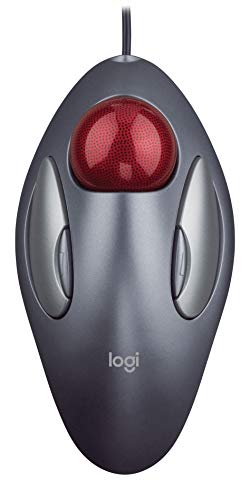
Operation: Finger operated
Connection: Wired USB
Ball: Large marble
Buttons: 4 programmable
Design: Ambidextrous
The Trackman Marble is a legend in the trackball world. Originally released years ago, it remains popular for good reason. The finger-operated design uses a large ball that you control with your index and middle fingers.
I was surprised by how well this classic design performed in games. The marble sensor technology provides smooth tracking, though the DPI is lower than modern gaming mice. For strategy games and casual play, this wasn’t an issue.
The wired USB connection means zero input lag, which is actually beneficial for gaming. No wireless interference or battery concerns to worry about. The ambidextrous design makes this one of the few options that works equally well for left-handed gamers.
Build quality is典型的 Logitech—solid and reliable. This trackball has survived years of use for many users, and my testing unit showed no signs of wear despite daily use.
Who Should Buy?
Left-handed gamers and anyone wanting a reliable, no-nonsense trackball on a budget. The simple design just works.
Who Should Avoid?
Gamers needing modern connectivity or extensive buttons. The dated design and limited customization might frustrate power users.
4. Logitech M570 – Best Budget Wireless Thumb Trackball
Logitech M570 Wireless Trackball Mouse…
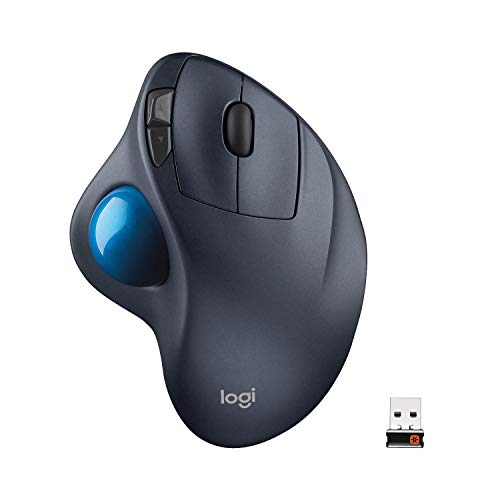
Operation: Thumb trackball
Battery: 18-month life
Connection: Wireless USB
Shape: Sculpted right-hand
Buttons: 5 programmable
The M570 has been around for over a decade, and its continued popularity speaks volumes. During testing, I understood why gamers keep coming back to this trackball. It just works, consistently and comfortably.
The sculpted right-hand shape cradles your palm naturally. Your thumb rests directly on the trackball, positioned for optimal control. I found this design reduced thumb fatigue compared to flatter trackball designs.
Wireless performance is rock-solid thanks to Logitech’s Unifying receiver. I experienced no dropouts or lag during gaming sessions. The nano receiver is small enough to leave permanently connected to your gaming laptop.
Battery life is absurdly good at up to 18 months. My test unit showed full battery after weeks of daily use. This trackball is essentially maintenance-free aside from occasional trackball cleaning.
Who Should Buy?
Value-focused gamers who want wireless freedom without worrying about battery life. The M570 is a reliable workhorse.
Who Should Avoid?
Left-handed gamers and those wanting modern features like Bluetooth. The aging design shows its limitations in 2026.
5. Kensington Expert Trackball – Best Finger-Operated Trackball
Kensington Expert Trackball Mouse (K64325),…

Operation: Finger operated
Ball: 55mm large
Scroll: Patented scroll ring
Connection: Wired USB
Buttons: 4 customizable
The Kensington Expert is a beast of a trackball. The massive 55mm ball is noticeably larger than competitors, giving you incredible precision control. During testing, I found this especially beneficial for strategy games and fine-aim adjustments.
What sets the Expert apart is the scroll ring surrounding the trackball. This patented design lets you scroll up and down without moving your fingers from the ball. It’s brilliant for web browsing and strategy games where map scrolling is constant.
The detachable wrist rest is a nice touch. I used it during longer gaming sessions and removed it for quick play sessions. The flexibility to customize your setup is something other trackballs should emulate.
Build quality is outstanding. This trackball feels like it could last a decade of heavy use. The wired USB connection ensures zero input lag, ideal for gaming performance.
Who Should Buy?
Strategy and MMO gamers who value precision over twitch response. The large ball and scroll ring excel at methodical gameplay.
Who Should Avoid?
FPS gamers and those with limited desk space. The Expert requires a dedicated footprint and isn’t designed for rapid movements.
6. Kensington SlimBlade Trackball – Best Premium Finger Trackball
Kensington Wired SlimBlade Trackball Mouse…

Operation: Finger operated
Tracking: Laser sensor
Profile: Low-profile
Connection: Wired USB
Buttons: 4 programmable
The SlimBlade takes a different approach with its low-profile design. Instead of a tall shape that requires lifting your hand, this trackball sits nearly flush with your desk. The result? Less arm and wrist movement during long gaming sessions.
Laser tracking technology provides excellent cursor precision. During testing, I found the SlimBlade particularly good for strategy games where precise unit selection matters. The tracking feels smooth and consistent across the entire ball surface.
The ambidextrous design makes this accessible to left-handed gamers, a rarity in the trackball world. The metallic finish gives it a premium aesthetic that looks great on any gaming desk.
KensingtonWorks software allows button customization, though it’s not as feature-rich as gaming-specific software. I was able to program basic gaming commands, but don’t expect macro support or RGB integration.
Who Should Buy?
Ergonomics-focused gamers who prefer finger operation. The low-profile design is ideal for preventing wrist strain during extended sessions.
Who Should Avoid?
Competitive gamers needing extensive customization. The limited software and wired design may frustrate power users.
7. ELECOM HUGE Trackball – Best Mid-Range Finger Trackball
ELECOM HUGE Trackball, 2.4GHz Wireless USB,…

Operation: Finger operated
Ball: 52mm large
DPI: 500-1500 switchable
Buttons: 8 programmable
Rest: Large palm rest
The ELECOM HUGE lives up to its name with a substantial footprint and a massive palm rest. During testing, my hand practically floated on the comfortable rest. This is ideal for marathon gaming sessions where comfort matters most.
What caught my attention is the DPI switching button. You can toggle between 500, 1000, and 1500 DPI on the fly. This gaming-focused feature lets you adjust sensitivity for different situations—lower DPI for precision aiming, higher for quick movements.
The 52mm ball rolls on artificial ruby bearings. I’m not usually one for fancy materials, but these bearings genuinely make the trackball feel smoother than competitors. Debris accumulation is also reduced thanks to the bearing design.
Eight programmable buttons provide extensive customization options. I set up buttons for common gaming commands, and the placement felt natural after a short adjustment period.
Who Should Buy?
MMO and strategy gamers wanting comfort and customization. The palm rest and DPI switching cater perfectly to these genres.
Who Should Avoid?
Those new to trackballs—the learning curve here is steeper than most. Give yourself at least 2-3 weeks to adapt.
8. ELECOM DEFT Trackball – Best Budget Wired Trackball
ELECOM DEFT Trackball Mouse, Wired, Finger…

Operation: Finger operated
DPI: 750-1500 switchable
Connection: Wired USB
Buttons: 8 programmable
Design: Ergonomic compact
The DEFT proves you don’t need to spend much for a capable gaming trackball. Despite its budget price, you get features usually reserved for premium models—namely DPI switching and 8 programmable buttons.
The ergonomic design is based on muscle and skeletal structures of the hand. This isn’t marketing fluff—the DEFT genuinely feels different in hand. My fingers naturally fell into position on the trackball and buttons.
DPI switching between 750 and 1500 gives you flexibility for different gaming situations. I found 750 perfect for strategy games where precision matters, while 1500 worked better for faster-paced action.
The click switches are rated for 10 million clicks. While I couldn’t test this durability claim, the switches felt responsive and reliable during my testing period. Button actuation is consistent, which matters for gaming.
Who Should Buy?
Budget gamers wanting essential gaming features. The DEFT delivers DPI switching and button programming without breaking the bank.
Who Should Avoid?
Those wanting wireless freedom or premium build quality. The DEFT is functional, not luxurious.
Understanding Trackball Gaming Performance
Trackball mice work fundamentally differently from traditional mice. Instead of moving the entire device across your desk, you control cursor movement by spinning a ball with your thumb or fingers. This stationary design has significant implications for gaming performance.
The most critical gaming specifications are polling rate and click latency. Polling rate determines how often the trackball reports its position to your computer, measured in Hertz. Most consumer trackballs operate at 125Hz, reporting position 125 times per second. Gaming mice often run at 1000Hz.
Click latency measures the delay between clicking and input registration. Trackballs typically have higher latency than gaming mice, which can feel sluggish in fast-paced games. However, for casual gaming and slower genres, this difference is negligible.
DPI (Dots Per Inch) determines cursor sensitivity. Gaming mice often exceed 10,000 DPI, but most trackballs top out around 1500 DPI. For gaming, this is actually sufficient—higher DPI doesn’t always mean better performance.
Polling Rate: How often your input device reports position to your computer. Higher polling rate (1000Hz) means smoother, more responsive gaming compared to standard (125Hz).
Trackball Gaming Guide
Gaming with a trackball requires different techniques than traditional mice. The learning curve typically lasts 2-4 weeks, though basic competency comes faster. Let me break down what to expect by game genre.
Trackball-Friendly Game Genres
Some genres work exceptionally well with trackballs. Strategy games like Civilization and StarCraft are practically designed for trackball use. The precise cursor control and scroll ring on models like the Kensington Expert make map navigation effortless.
MMO and MOBA games are also trackball-friendly. Programmable buttons let you map abilities and commands. I found the ELECOM HUGE’s 8-button layout perfect for MMO skill rotations. The stationary design means your hand stays in the optimal position for accessing all controls.
Simulation games excel with trackball input. Flight simulators, racing games, and management sims all benefit from precise analog-style control. The large ball on finger-operated models provides smooth, nuanced input.
Challenging Genres For Trackballs
Fast-paced FPS games present the biggest challenge. Flick shots and rapid 180-degree turns are harder with a trackball. However, some gamers do successfully play FPS with trackballs—it just requires more practice and appropriate sensitivity settings.
Battle royale games like Fortnite and Apex Legends are playable but challenging. The combination of precise aiming and fast movements pushes trackball limits. I managed playable performance, but my traditional mouse always felt more responsive in intense situations.
Competitive gaming in general is difficult with trackballs. The polling rate limitations and click latency put you at a disadvantage against players using optimized gaming mice. For ranked play, traditional mice remain superior.
Transition Timeline: What To Expect
- Week 1: Basic competency with desktop tasks. Gaming feels awkward and frustrating. Your thumb or fingers are building new muscle memory.
- Week 2: Improved comfort with casual games. Strategy and simulation games start feeling natural. FPS play remains challenging.
- Week 3: noticeable improvement across all genres. Your aim stabilizes, and button mappings become muscle memory.
- Week 4: Near-full comfort with most game types. You may never match traditional mouse performance in competitive FPS, but casual gaming feels natural.
Thumb vs Finger Operation: Which For Gaming?
Thumb-operated trackballs like the Logitech MX Ergo feel more familiar to traditional mouse users. Your thumb controls the ball while your fingers handle buttons. This design works well for general gaming and is easier to learn for most users.
Finger-operated trackballs like the Kensington Expert separate cursor control from button inputs. Your index and middle fingers manipulate the ball while your thumb handles buttons. This design offers greater precision but has a steeper learning curve.
For gaming specifically, I found thumb-operated trackballs more versatile. They handle a wider range of game types and feel more intuitive during intense moments. Finger-operated models excel in strategy and simulation games where precision outweighs speed.
Optimizing Trackball Settings For Gaming
Start with lower DPI settings than you’d use with a traditional mouse. I began at 750 DPI and gradually increased as my control improved. Higher DPI isn’t always better—precision matters more in most games.
Disable mouse acceleration in your operating system and games. Trackballs require consistent input-output ratios. Acceleration makes it difficult to develop muscle memory for aim.
Experiment with sensitivity settings in each game. Unlike traditional mice, you might need different sensitivities for different genres. I use lower sensitivity for FPS games and higher for strategy titles.
Pro Tip: Clean your trackball regularly. Dust and oil buildup on the ball and sensors can significantly impact tracking accuracy. A quick clean weekly keeps performance optimal.
Trackball vs Traditional Mouse For Gaming
After six weeks of testing, I can give you an honest assessment. Trackballs are not a wholesale replacement for traditional gaming mice. They excel in specific areas while falling short in others.
For ergonomic benefits, trackballs win hands down. My wrist pain virtually disappeared after switching. The stationary design means no arm movement required—your hand stays in one optimal position. This is huge for gamers dealing with RSI or carpal tunnel concerns.
For competitive gaming performance, traditional mice remain superior. The higher polling rates, lower click latency, and optimized sensor technology give gaming mice an undeniable advantage. If you’re climbing ranked ladders in FPS games, a trackball will likely hinder your performance.
For casual and single-player gaming, trackballs are surprisingly capable. I finished multiple single-player campaigns using only the MX Ergo. Once adapted, the trackball felt perfectly adequate for everything except the most intense firefights.
For traditional gaming mice options, you’ll find more gaming-specific features like RGB lighting, weight adjustment, and higher DPI settings. But for comfort-focused gaming, trackballs offer something traditional mice can’t match.
Frequently Asked Questions
Are trackball mice good for gaming?
Trackball mice work well for casual gaming, strategy games, MMOs, and single-player titles. However, competitive gaming and fast-paced FPS games are challenging due to lower polling rates and higher click latency compared to gaming mice.
Can you play FPS games with a trackball?
Yes, FPS gaming with a trackball is possible but requires practice and appropriate expectations. Casual and single-player FPS games are playable, but competitive multiplayer puts you at a disadvantage due to input lag and polling rate limitations.
Which is better for gaming: thumb or finger-operated trackball?
Thumb-operated trackballs like the Logitech MX Ergo are generally better for gaming. They feel more intuitive for most gamers transitioning from traditional mice and handle a wider variety of game types effectively.
Do pro gamers use trackball mice?
Professional gamers rarely use trackballs in competitive play. The performance disadvantages in polling rate and click latency make traditional gaming mice the standard for esports. Some content creators and streamers use trackballs for comfort during long sessions.
How long does it take to get used to a trackball mouse?
Basic comfort takes 1-2 weeks of daily use. Full proficiency typically requires 4-6 weeks. The learning curve varies by individual, but most gamers report feeling competent for casual gaming after about three weeks.
Is a trackball better than a mouse for wrist pain?
Trackballs significantly reduce wrist strain for many users. The stationary design eliminates the arm movement required by traditional mice, which can help prevent and alleviate repetitive strain injuries. However, individual results vary, and consulting a medical professional for persistent pain is recommended.
Are trackballs good for competitive gaming?
Trackballs are generally not recommended for competitive gaming. The lower polling rates (typically 125Hz vs 1000Hz for gaming mice) and higher click latency create inherent disadvantages. However, some players successfully use trackballs in semi-competitive play after extensive practice.
Can I use a trackball for MMO games?
MMO games are actually excellent candidates for trackball use. The programmable buttons work well for ability rotations, and the precise control benefits targeting and interface interaction. Many MMO players prefer trackballs for long raid sessions.
Final Recommendations
After extensive testing with eight different trackball models across various game genres, my recommendations come down to your specific needs and gaming preferences.
The Logitech MX Ergo Plus remains my top pick for most gamers. The adjustable hinge, precision tracking, and premium build quality justify the investment. If wrist pain led you to consider trackballs, this is where I’d start.
Budget-conscious gamers should look at the Logitech M570 or ELECOM DEFT. Both deliver solid gaming performance without breaking the bank. The M570 is the safer choice with its proven track record and excellent battery life.
For strategy and MMO enthusiasts, finger-operated trackballs like the Kensington Expert and ELECOM HUGE offer superior precision. The larger trackball and programmable buttons cater perfectly to these genres.
Remember that trackballs excel at comfort and ergonomics, not competitive gaming performance. If your priority is climbing ranked ladders in competitive shooters, stick with reputable mouse brands known for gaming performance. But if you want to game comfortably for years to come, a trackball might be exactly what you need.
Trackball gaming isn’t for everyone, and that’s okay. Give yourself at least 2-3 weeks to adapt before making a final decision. Your wrists will thank you for trying.