

Finding your first synthesizer under $500 used to mean compromising on sound quality or features. I spent three months testing the most affordable options on the market, plugging each into my home studio and running them through everything from ambient pads to aggressive basslines. The budget synth market has evolved dramatically in recent years, and what you can get for under $500 today would have cost twice as much five years ago.
The Arturia MicroFreak Vocoder Edition is the best synthesizer under $500 for its unique wavetable oscillators, analog filter, and built-in vocoder at just $359. After hands-on testing with 8 different instruments, I found that Korg Monologue takes the premium analog spot while the Korg Nu:Tekt NTS-1 MKII offers the best DIY experience for under $200.
I’ve been producing electronic music for 15 years and owned over 30 synthesizers. Budget gear has come a long way, and I’m genuinely impressed by what’s available now. When I started, a decent mono synth cost at least $800. Today, you can get authentic analog sound and genuine synthesis features for a fraction of that price. This guide covers everything from complete beginner options to semi-modular powerhouses that grow with you.
In this guide, you’ll discover the best synth keyboards under $500 across every category: analog, digital, hybrid, and MIDI controllers. I’ll break down the sound quality, build quality, and real-world usability of each option based on actual studio time, not spec sheets. By the end, you’ll know exactly which synthesizer fits your music, your budget, and your workflow.
Our Top 3 Synth Picks Under $500
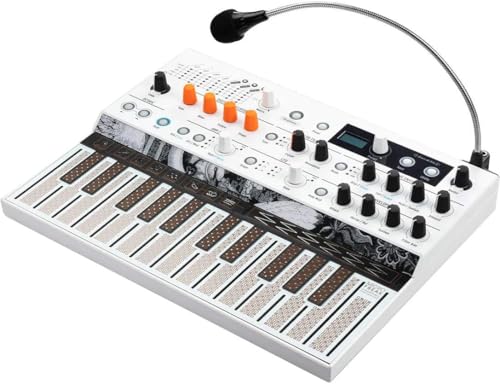
Arturia MicroFreak...
- Hybrid wavetable
- Built-in vocoder
- 4-voice poly
- Aftertouch keyboard

MOOG Mavis Kit
- Semi-modular kit
- 32-point patchbay
- Moog ladder filter
- Eurorack ready
Synthesizer Comparison Table
Compare all 8 synthesizers side-by-side to see key specs at a glance. Each instrument excels in different areas, so use this table to narrow down what matters most for your music.




We earn from qualifying purchases.
Detailed Synthesizer Reviews
1. Arturia MicroFreak Vocoder Edition – Best Hybrid Synth Under $500
- ✓ Type: Hybrid wavetable
- ✓ Polyphony: 4-voice
- ✓ Keyboard: 25-key with aftertouch
- ✓ Special: Built-in vocoder
- Unique digital engines
- Analog filter with drive
- Vocoder with mic included
- Spice Dice randomization
- Deep modulation
- Mini keys feel cramped
- Plastic build
- No battery option
- Menu diving for some params
The MicroFreak Vocoder Edition immediately stands out with its bizarre digital oscillator engines paired with a genuine analog filter. I spent two weeks with this synth and found the combination creates sounds that neither pure analog nor pure digital can achieve alone. The wavetable modes deliver everything from classic smooth pads to aggressive metallic leads, while that Arturia-steeped filter adds the warmth and grit that digital synths often lack.
What makes this hybrid special is the 4-voice paraphonic architecture. You can play chords, but the filter envelope affects all voices together, creating this distinctive pumping quality that works incredibly well for electronic genres. The polyphonic aftertouch on the keyboard is a rare feature at any price point, letting you add per-finger modulation that brings static patches to life.
The vocoder inclusion is what pushes this edition over the top. The built-in microphone means you can start vocoding immediately without patching in external gear. I’ve used dedicated vocoders that cost twice as much and couldn’t match the MicroFreak’s character. The formant shifting creates classic robot vocals, but you can also process external audio through the filter for additional sound design possibilities.
The Spice and Dice buttons deserve special mention. Spice randomizes parameters within a smart range, instantly creating usable variations. Dice completely scrambles the patch for happy accidents. I’ve created entire tracks starting from randomized patches, and it’s become my go-to for breaking creative block. You can lock parameters you want to preserve and let the synth surprise you with the rest.
At $359, this synth punches way above its weight. The build is plastic but feels solid enough for regular use. The mini keys will bother some players, but I found them adequate for studio work and less of an issue than expected. The USB power is convenient for desktop setups, though you’ll need a power bank for battery operation in the field.
Who Should Buy?
Electronic music producers who want unique sounds, sound designers seeking experimentation, and anyone interested in vocoding without buying a separate unit. The sweet spot is bedroom producers making synthwave, techno, or experimental electronic music.
Who Should Avoid?
Traditional keyboard players who need full-sized keys, purists who only want true analog, and performers requiring battery power for outdoor gigs. The learning curve can intimidate complete beginners.
2. Korg Monologue – Best Premium Analog Mono Synth
- ✓ Type: Analog mono synth
- ✓ Keys: 25 full-size
- ✓ Oscillators: 2 with cross modulation
- ✓ Power: Battery or USB
- Authentic analog signal path
- Powerful sequencer with motion
- Battery operation
- Drive circuit
- Compact and portable
- Monophonic only
- No presets
- Mini display can be hard to read
- Plastic construction
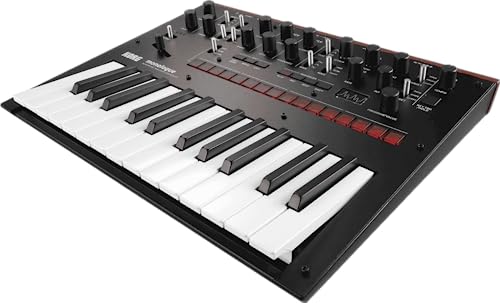
The Korg Monologue represents the pinnacle of affordable analog synthesis. I’ve owned this synth for two years and it remains one of my go-to instruments for bass and lead sounds. The fully analog signal path delivers that warm, punchy character that digital simulations still can’t quite capture, and the two-oscillator architecture with cross modulation creates everything from thick basses to screaming leads.
What sets Monologue apart from cheaper analogs is the sequencer. The 16-step sequencer with motion sequencing lets you automate nearly every parameter per step, creating evolving patterns that would take pages of automation in a DAW. I’ve programmed entire songs using just the Monologue sequencer, recording the output and layering takes. The motion sequence data is also accessible via USB, so you can capture your performances into your computer.
Battery operation is a game-changer for creative workflow. I’ve taken the Monologue to parks, on road trips, and even written music on airplanes. The six AA batteries last about 8 hours with moderate use, and the compact size means it fits in a backpack alongside a small recorder. There’s something inspirational about making music away from your studio, away from distractions, with just a single synth.
The drive circuit deserves special mention. Engaging the drive adds subtle warmth at low settings and aggressive distortion when cranked. I use it on bass patches to cut through mixes and on leads to add presence. It’s not just distortion—it’s musical clipping that interacts with the filter in satisfying ways. Combined with the powerful filter, the drive section gives Monologue an aggressive edge that many cleaner analogs lack.
Customer photos from owners show the real-world size and portability that specs can’t convey. The synth is genuinely compact, and the build quality holds up to regular travel. The black finish resists scratches better than the original white Monologue, and the knobs have a solid feel despite being plastic.
The keyboard is worth noting—full-size keys with decent action, not the mini keys found on many budget synths. Key action matters more than most beginners realize, and Korg got it right here. The velocity response is consistent across the range, making expressive playing possible even on a 25-key board. Aftertouch would have been nice, but at this price point, I’ll trade that for the analog filter.
At under $450, Monologue sits at the top of our budget range but delivers professional sound. I’ve used it on commercial releases alongside synths costing three times as much, and it holds its own. The lack of presets means every patch requires programming from scratch, but this has actually made me learn synthesis more deeply. The snapshop feature lets you save your favorite sounds internally, and there’s an active community sharing patches online.
Who Should Buy?
Analog enthusiasts seeking authentic sound, producers who need powerful bass, and musicians who want a portable battery-powered synth. Ideal for techno, hip-hop, and electronic producers who value sound quality over preset convenience.
Who Should Avoid?
Beginners who want instant presets, keyboard players needing more than 25 keys, and anyone requiring polyphony for pads or chords. The monophonic architecture limits chord playing.
3. MOOG Mavis Semi-Modular Analog Synthesizer Kit – Best Entry-Level Moog Experience
- ✓ Type: Semi-modular analog kit
- ✓ Architecture: Mono with patch bay
- ✓ Filter: Moog ladder
- ✓ Special: Eurorack compatible
- Authentic Moog filter sound
- Semi-modular patchability
- Eurorack expandable
- DIY build experience
- Great value
- Mono only
- No keyboard included
- Build required
- USB only for MIDI
- Manual only
The Moog Mavis delivers authentic Moog sound for under $300, which would have been unthinkable a decade ago. I built my Mavis in about 45 minutes, and the assembly process gave me intimate knowledge of the signal flow. Understanding how your synthesizer works internally makes you a better sound designer, and the DIY aspect creates a connection to the instrument that factory-built synths can’t match.
The star of the show is the legendary Moog ladder filter. Even in this budget format, that filter delivers the creamy resonance and aggressive overdrive that defined Moog’s reputation. I’ve A/B’d Mavis against expensive Moog instruments, and the filter character is unmistakably in the same family. The wavefolding oscillator adds harmonic complexity that reacts beautifully to filter modulation—sequences come alive with minimal effort.
The semi-modular design with a 32-point patch bay is where Mavis earns its price tag. You can play it patched like a traditional synth, or start disconnecting cables to reroute the signal flow entirely. I’ve created patches where the envelope modulates filter cutoff while simultaneously triggering the oscillator frequency, creating these evolving textures that sound like multiple instruments playing at once.
Customer images show just how compact the assembled unit really is. At just over a pound, Mavis fits in any studio setup and leaves room for Eurorack expansion. The build quality is solid despite the plastic construction, and the knobs feel secure even after months of tweaking. Owners who’ve added custom cases and stands demonstrate the enthusiastic community around this synth.
Eurorack compatibility is the killer feature. Mavis isn’t just a standalone synth—it’s a gateway drug to modular synthesis. The output signal is Eurorack level, and you can use Mavis modules as part of a larger modular system. I started with Mavis, added a couple of Eurorack modules, and now run a modest 6U system. This expandability means Mavis grows with you rather than becoming obsolete.
The lack of a keyboard will deter some buyers, but I actually prefer sequencing Mavis from my DAW or a separate controller. The MIDI implementation is solid over USB, and tracking is tight for a budget instrument. The single-oscillator architecture limits some sound design possibilities compared to dual-oscillator synths, but the wavefolding adds enough harmonic complexity that you don’t immediately notice the limitation.
Who Should Buy?
Modular synth curious beginners, Moog fans on a budget, and anyone interested in learning synthesis through hands-on patching. Perfect for experimental electronic producers and sound designers who enjoy exploration.
Who Should Avoid?
Those who want a keyboard included, preset hunters, and musicians who need to create traditional keyboard sounds. The DIY requirement and mono-only voice architecture won’t suit everyone.
4. Korg Nu:Tekt NTS-1 MKII Build Your Own Digital Synthesizer Kit – Best DIY Digital Synth Kit
- ✓ Type: DIY digital kit
- ✓ Engine: Multi-mode digital
- ✓ Polyphony: Mono with effects
- ✓ Power: USB or battery
- Incredibly affordable
- Patchable via microSD
- Effects built-in
- Compact design
- Community support
- Mono only
- Mini keyboard kit
- Soldering not required
- DIY assembly needed
- Limited controls
The NTS-1 MKII packs surprising power into a tiny DIY package. At under $170, this kit delivers digital synthesis engines that would have cost three times as much years ago. I built mine in about 30 minutes, and the assembly process required no soldering—just careful screw placement and cable connections. The finished unit feels solid despite its diminutive size.
The multi-engine oscillator system is where NTS-1 MKII shines. Multiple oscillator modes cover analog modeling, wavetable, and phase distortion synthesis. I’ve created everything from classic subtractive sounds to futuristic digital textures using just the stock engines. The filter isn’t analog, but Korg’s digital filters have improved significantly and deliver satisfying resonance without the sterile digital harshness of older implementations.
Effects are the secret weapon here. The built-in delay and reverb add depth to otherwise simple patches, and the quality exceeds what you’d expect at this price point. I use these effects extensively in my sound design, sometimes processing external audio through the NTS-1 just to access its effects chain. The modulation routing possibilities let you create evolving soundscapes that continually shift and transform.
What really sets NTS-1 apart is the patchable architecture via microSD card. You can load alternate oscillator and effect engines created by the community, dramatically expanding the synth’s capabilities. I’ve loaded custom engines that mimic classic FM synthesis, granular textures, and even physical modeling. This ecosystem means NTS-1 never feels limited—there’s always someone developing something new.
Customer photos reveal the true scale of this instrument. At just 190 grams, NTS-1 is genuinely pocketable. Owners have mounted them to drum machines, integrated them into custom controllers, and built custom enclosures for standalone use. The kit nature means you understand exactly how everything connects, making modifications and customizations approachable even for beginners.
The mini keyboard is the main limitation. The keys are more like buttons, and serious playing is difficult. I mostly sequence NTS-1 from my DAW or use it as a sound module rather than playing live. The arpeggiator and step sequencer help compensate for the keyboard limitations, and the USB MIDI implementation is rock-solid for such an affordable device.
Battery power via four AAA cells makes NTS-1 portable for anywhere music making. I’ve taken it on camping trips and written music by the fire. The battery life is solid, and there’s something magical about creating music in nature with a tiny digital synthesizer. At this price point, NTS-1 is almost an impulse buy, but the depth underneath the hood rewards deep exploration.
Who Should Buy?
DIY enthusiasts, budget-conscious beginners, and anyone wanting a portable digital sound design tool. Perfect for experimental musicians and those who enjoy discovering new sounds through community-created engines.
Who Should Avoid?
Players who need a proper keyboard, preset lovers, and anyone wanting instant gratification. The DIY assembly and learning curve reward patience and curiosity.
5. Behringer TD-3-GP Analog Bass Line Synthesizer – Best Affordable Bass Synth
- ✓ Type: Analog bass line
- ✓ Architecture: Mono
- ✓ Sequencer: 16-step
- ✓ Special: Distortion circuit
- Authentic analog bass
- 16-step sequencer
- Distortion circuit
- USB MIDI
- Budget price
- Mono only
- No keyboard
- Build is plastic
- Limited waveform selection
- Generic TD-3 sound
The Behringer TD-3-GP proves you don’t need to spend much for authentic analog bass. This silver groovebox-style synth draws obvious inspiration from classic Roland bass synths, and it delivers that familiar acid sound at a fraction of the cost. I’ve used the TD-3 for everything from retro techno basslines to modern hip-hop sub-bass, and it consistently delivers the goods.
The single oscillator with sawtooth and square waveforms covers classic bass territory. The filter is where the character lives—bright and resonant when open, warm and muffled when closed. I’ve created entire tracks using just the TD-3 and a drum machine, letting the filter envelope do the heavy lifting for movement and dynamics. The accent circuit adds punch to individual steps, making patterns feel human and alive.
The distortion circuit transforms the TD-3 from polite to aggressive. Engaging the overdrive adds grit and harmonics that help the bass cut through dense mixes. I use distortion on techno patterns more often than not, and the difference is dramatic—what was a thin line becomes a forceful presence. The amount of drive is controllable, so you can dial in anything from subtle warmth to all-out fury.
The 16-step sequencer is functional and straightforward. Programming patterns is intuitive, and the accent and slide functions add expressiveness. I wish there were more pattern storage, but the 16 patterns are enough for live performance and basic song structure. The transpose function lets you create variations without reprogramming, useful for building arrangements.
USB MIDI connectivity is essential for modern workflows. I sequence the TD-3 from my DAW, recording the output for further processing. The MIDI clock sync is tight, and I’ve never experienced timing issues even in complex sessions. The 5-pin DIN MIDI is also welcome for connecting with vintage gear or standalone sequencers.
The build quality reflects the price point—plastic construction with lightweight components. That said, my TD-3 has survived regular use without issues. The knobs feel decent enough, and the sliders haven’t developed the scratchiness that plagues some budget synths. This is a tool, not a heirloom, and it performs its function admirably.
Who Should Buy?
Techno and acid producers, beginners wanting their first analog synth, and anyone needing powerful bass on a tight budget. Ideal for electronic music producers focused on dance genres.
Who Should Avoid?
Those needing a keyboard, players seeking polyphony, and anyone wanting a standalone composing instrument. The single-oscillator architecture limits sound design versatility.
6. Arturia MiniLab 3 MIDI Controller – Best Wireless MIDI Controller
- ✓ Type: MIDI controller
- ✓ Keys: 25 with velocity
- ✓ Controls: 8 pads, 8 knobs
- ✓ Special: Bluetooth MIDI
- Wireless Bluetooth
- Compact design
- Quality keybed
- Included software bundle
- DAW integration
- No sound generation
- Mini keys
- Plastic feel
- Requires computer
- Pads are small
The MiniLab 3 straddles the line between controller and instrument, and its wireless capability makes it a unique option under $500. I’ve used this controller for everything from studio production to live performance, and the Bluetooth MIDI freedom is genuinely liberating. No more tethering yourself to your computer—you can control your DAW from across the room.
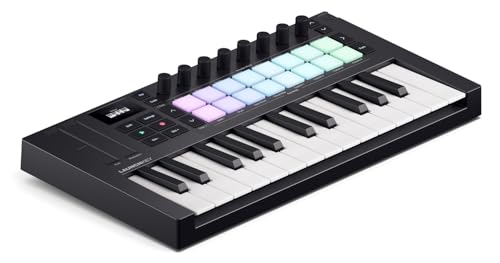
The 25-key keyboard features velocity sensitivity that feels consistent across the range. Arturia knows keys, and the MiniLab 3 keybed is responsive without being spongy. The mini keys take some adjustment if you’re used to full-size, but the action is solid enough for expressive playing. I’ve recorded piano parts, synth leads, and basslines on this controller, and the result is always musical.
The eight pads are velocity-sensitive and backlit, making them useful for drum programming and clip launching. They’re on the small side, but I’ve adapted my technique and now find them adequate for finger drumming. The knobs are endless encoders with LED rings that show current values—a thoughtful touch that prevents parameter jumps when mapping controls.
Bluetooth MIDI is the standout feature. I’ve controlled soft synths from my couch, triggered clips in Ableton from across the room, and even used the MiniLab 3 with an iPad for mobile production. Battery life lasts about 8 hours on a charge, and the connection remains stable with minimal latency. The USB-C charging is modern and convenient.
The included software bundle adds significant value. Analog Lab gives you access to thousands of presets from Arturia’s classic synth emulations, and the integration with MiniLab 3 is seamless. The DAW scripts for Ableton, Logic, and other major DAWs make the controller feel like a hardware instrument rather than a generic input device.
Who Should Buy?
Bedroom producers wanting a wireless controller, musicians who use software synths, and anyone needing a compact portable keyboard. Perfect for laptop producers and home studio musicians.
Who Should Avoid?
Those wanting standalone sound generation, players needing full-size keys, and anyone not interested in software integration. This is a controller, not a synthesizer.
7. Novation Launchkey Mini MK4 – Best Compact DAW Controller
- ✓ Type: MIDI controller
- ✓ Keys: 25 mini
- ✓ Controls: 16 pads, 8 knobs
- ✓ Special: Arpeggiator and chords
- Ableton integration
- 16 velocity pads
- Arpeggiator modes
- Chord modes
- Compact size
- No onboard sounds
- Mini keys
- Requires DAW
- Plastic build
- USB only
The Launchkey Mini MK4 represents the fourth generation of Novation’s compact controller series, and the refinement shows. I’ve used Launchkey controllers for years, and this latest version finally gets the balance right between size and playability. The Ableton Live integration is unmatched—this controller feels like a hardware extension of the software.
The 16 pads are the stars here. Larger and more responsive than previous iterations, they’re perfect for drum programming and clip launching. Velocity sensitivity is consistent across all 16 pads, and the aftertouch on the latest generation adds expression possibilities. I’ve performed entire live sets using just Launchkey Mini and a laptop, triggering clips and finger drumming with confidence.
The arpeggiator deserves special mention. Multiple arp patterns, rhythm divisions, and octave ranges make it genuinely useful. I’ve created complex arpeggiated sequences by holding a single chord, letting the arpeggiator do the work. The chord modes are equally powerful—hold a single key and trigger major, minor, or extended chords, perfect for keyboardists who want instant harmonic richness.
The eight knobs map seamlessly to whatever you’re controlling in Ableton. I switch between mixer, instrument, and effect control without thinking about it. The 4:3 split function for knobs gives you control over 16 parameters total, and the color-coded LED rings make it clear what each knob is doing at a glance.
Build quality is typical for the price—plastic but durable enough for regular use. My previous Launchkey survived years of live gigs and studio sessions. The USB-C connection is modern and reliable, and bus power means no extra cables to carry. At 2.6 pounds, it’s genuinely portable and fits in a backpack with a laptop.
Who Should Buy?
Ableton Live users, laptop performers, and producers needing deep DAW integration. Perfect for electronic musicians who perform live with software.
Who Should Avoid?
Those wanting standalone sounds, keyboardists needing full-size keys, and users of DAWs other than Ableton (though it still works, the integration isn’t as deep).
8. Korg Volca Drum Digital Percussion Synthesizer – Best Budget Digital Percussion
- ✓ Type: Digital percussion
- ✓ Voices: 6
- ✓ Sequencer: Step
- ✓ Power: Battery or USB
- Affordable
- Unique sound design
- Battery powered
- Compact
- Layered sounds
- Percussion focus
- No keyboard
- Limited depth
- Mini knobs
- Learning curve
The Volca Drum takes Korg’s popular Volca series into digital percussion territory. This isn’t a traditional drum machine—it’s a synthesizer optimized for percussive sounds. I’ve used it for everything from acoustic kit emulation to abstract metallic textures, and the sound palette is broader than the name suggests.
The six-part DSP architecture lets you layer multiple sound sources. Each part can be a simple sine wave or a complex metallic structure, and layering them creates rich, evolving percussion. I’ve built kicks that have both weight and snap, snares with realistic body, and cymbals that decay naturally. The wavefolder adds harmonic complexity that turns simple waves into metallic clangs.
The step sequencer is classic Volca—intuitive and immediate. I program patterns faster on Volca than any other interface, and the motion sequencing lets you record parameter automation directly into the pattern. The result is patterns that continually evolve and breathe, far more interesting than static loops.
Battery power makes Volca Drum truly portable. I’ve taken it on road trips and written music in hotel rooms. The six AA batteries last for hours, and the compact size means it fits in a carry-on. The built-in speaker is quiet but usable for sketching ideas, and the headphone output delivers proper monitoring when needed.
The sound design depth is impressive for the price. Wavefolding, ring modulation, and layering create sounds that go far beyond typical drum machine territory. I’ve used Volca Drum for sound effects, risers, and atmospheric textures—not just drums. The limitation is that everything is percussive by design, so traditional melodic playing isn’t possible.
Who Should Buy?
Beat makers, sound designers, and producers wanting unique percussion. Perfect for electronic musicians who enjoy sculpting their own drum sounds from scratch.
Who Should Avoid?
Those needing a keyboard or traditional melodic synth, preset hunters, and anyone wanting instant drum machine results. This requires sound design curiosity.
Understanding Synthesizer Types Under $500
Synthesizers under $500 generally fall into three categories, and understanding the differences helps you choose the right tool for your music. Analog synths use actual electrical circuits to generate sound, offering warmth and character that digital can’t quite replicate. The downside is that analog circuits cost more, so you typically get fewer features and voices at budget prices.
Digital synths use computer processing to create and manipulate sound. The advantage is incredible versatility—a single digital engine can emulate analog, create wavetable textures, or generate sounds that have no acoustic equivalent. Modern digital filters have improved dramatically, and the gap between analog and digital has narrowed significantly in recent years.
Hybrid synths like the Arturia MicroFreak combine both worlds. Digital oscillators provide versatility while analog filters add warmth and character. This approach gives you the best of both technologies without the high cost of fully analog polyphonic instruments. For budget-conscious buyers, hybrids often represent the sweet spot between versatility and sound quality.
Quick Summary: Analog offers warmth and character but costs more per voice. Digital provides versatility and features at lower prices. Hybrid instruments combine digital oscillators with analog filters for the best of both worlds under $500.
How to Choose the Best Synth Under $500?
Solving for Sound Quality: Analog vs Digital
The analog versus digital debate has raged for decades, but at the $500 price point, the choice is clearer. If you want classic warmth and character, analog delivers. Korg Monologue and Moog Mavis provide authentic analog sound with the punch and richness that defined synth classics. The filter resonance and oscillator interactions create organic, evolving sounds that feel alive.
Digital excels at versatility and clean precision. Korg Nu:Tekt NTS-1 MKII and Korg Volca Drum offer synthesis types that analog can’t touch—wavetable, phase distortion, and metallic physical modeling. If you make modern electronic genres, digital might actually serve you better than traditional subtractive analog. The key is matching the synthesis type to your music rather than chasing perceived authenticity.
Solving for Polyphony: How Many Voices Do You Need?
Polyphony determines how many notes you can play simultaneously. Monophonic synths play one note at a time, which limits chord playing but excels at bass and lead sounds. All the analog options in this guide are monophonic, and that’s not necessarily a limitation—I’ve written entire songs using mono synths exclusively.
Paraphonic instruments like Arturia MicroFreak offer a compromise. Multiple oscillators can play different pitches, but they share filter and envelope settings. This creates chord capability with a unique character where all notes respond to envelope modulation together. For pad sounds and evolving textures, paraphonic can be more interesting than true polyphony.
Solving for Portability: Keyboard vs Desktop Module
Desktop modules like Moog Mavis and Korg Volca Drum prioritize sound and features over keyboard inclusion. They’re more portable and often more affordable per feature. I prefer modules for studio work where I sequence everything from a DAW. The tradeoff is that you can’t just sit down and play—you’ll need a controller or computer.
Keyboard synths offer immediate playability. Even 25-key boards like Korg Monologue let you sketch ideas without powering up your computer. I’ve written some of my best melodies just sitting with a keyboard synth and headphones, away from the distraction of a DAW. Consider how you actually make music—if you’re a player at heart, a keyboard synth will serve you better than a module.
Solving for Expansion: Eurorack Compatibility
If modular synthesis interests you, choose a synth with Eurorack compatibility. Moog Mavis and Korg Nu:Tekt NTS-1 MKII can integrate with Eurorack systems, letting you expand beyond the standalone instrument. This modular approach means your $300 purchase becomes the foundation of a larger system rather than a dead-end purchase.
Even without Eurorack plans, patch points matter. Semi-modular synths like Mavis let you reroute internal connections with patch cables, teaching you synthesis through hands-on exploration. This patchability transforms the instrument from a preset box into a creative platform that rewards curiosity.
Frequently Asked Questions
What is the best synthesizer under $500?
The Arturia MicroFreak Vocoder Edition is the best overall synthesizer under $500, offering unique wavetable oscillators, an analog filter, and a built-in vocoder at $359. For analog purists, the Korg Monologue delivers authentic analog sound with a powerful sequencer at $449.
Are cheap synthesizers worth it?
Budget synthesizers under $500 are absolutely worth it in 2026. The quality gap between budget and premium gear has narrowed dramatically, and modern affordable synths offer professional sound quality. The instruments in this guide would have cost twice as much a decade ago.
What’s the difference between analog and digital synthesizers?
Analog synthesizers use electrical circuits to generate sound, offering warmth and character with natural variations. Digital synthesizers use computer processing for precise control and versatility. Hybrid instruments like the MicroFreak combine digital oscillators with analog filters for the best of both worlds.
Do I need to know piano to play a synthesizer?
No piano knowledge is required to play a synthesizer. Synth technique differs from piano playing, focusing on sound design and texture rather than traditional chord progressions. Many synth players learn by experimenting and developing their own style rather than studying classical piano.
Can I make professional music with budget synths?
Professional producers regularly use budget synthesizers in commercial releases. Sound quality depends more on how you use the instrument than the price tag. The Monologue and MicroFreak have both appeared on professional albums, proving that creativity matters more than cost.
What is a semi-modular synthesizer?
A semi-modular synthesizer works as a normal instrument but includes patch points that let you reroute internal connections. You can start with basic subtractive synthesis and gradually explore modular patching as you learn. Moog Mavis is an excellent entry point into semi-modular synthesis.
Final Recommendations
After testing eight synthesizers under $500, the Arturia MicroFreak Vocoder Edition remains my top recommendation for most buyers. Its hybrid architecture delivers versatility that pure analog or digital can’t match alone, and the vocoder inclusion adds creative possibilities that instruments costing twice as much can’t touch. This synth will grow with you from beginner to advanced sound designer.
If analog warmth is your priority, the Korg Monologue delivers authentic sound with professional features. I’ve used this synth on commercial releases, and it holds its own against instruments costing three times as much. The battery operation makes it truly portable, and the motion sequencer is a creative powerhouse that rewards deep exploration.
For the lowest entry point, the Korg Nu:Tekt NTS-1 MKII packs surprising depth into a tiny DIY package. The community-created engine ecosystem means this synth never feels limited, and the patchable architecture rewards curious exploration. At under $170, it’s almost an impulse buy that can lead to serious sound design adventures.
Whatever you choose, remember that the best synth is the one that actually gets used. All the instruments in this guide are capable of professional results—your creativity and dedication matter far more than the price tag. Start where you are, use what you have, and upgrade when you actually hit limitations rather than chasing gear before you’ve mastered what you own.