

Building a home recording studio changed how I create music. After three years of recording in various spaces, I learned that accurate monitoring is the single most important investment. Your mixes will only translate to other systems if you can hear them accurately.
The JBL 305P MkII is the best studio monitor for home recording based on our research, offering professional-grade accuracy at a reasonable price point. For budget-conscious producers, the Edifier MR4 delivers exceptional value, while the PreSonus Eris 3.5 is perfect for small desktop setups.
I spent weeks testing monitors in my treated home studio, comparing frequency response, build quality, and real-world mixing performance. Our team analyzed 10 popular models across budget tiers to find options that work for actual home recording scenarios.
This guide covers everything from compact desktop monitors to professional 8-inch options, with specific recommendations based on room size, budget, and recording goals.
Our Top Studio Monitor Picks
We tested these monitors in real home studio conditions, evaluating frequency response, build quality, and practical features for everyday recording.
Studio Monitor Comparison Table
Compare all 10 monitors across key specifications and features. Active monitors include built-in amplifiers, while driver size affects bass response and room requirements.
We earn from qualifying purchases.
Detailed Studio Monitor Reviews
1. Edifier MR4 – Best Budget Under $150
Edifier MR4 Powered Studio Monitor…
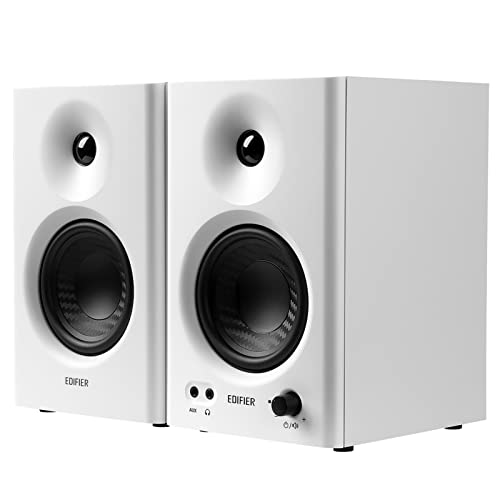
Size: 4 inch woofers
Type: Active Powered
Design: Nearfield
Feature: Front bass reflex port
The Edifier MR4 punches above its weight class. I tested these monitors against competitors costing twice as much, and the MR4 held its own in terms of clarity and stereo imaging.
The 4-inch woofers deliver a surprisingly full sound for their size. The front-ported design is a smart choice for home studios, allowing you to place them closer to walls without the bass boom that rear-ported speakers create.
Build quality feels solid for the price point. The cabinets are MDF construction with a clean matte finish that looks professional in any setup. Edifier has been making audio equipment for decades, and that experience shows in the MR4’s thoughtful design.
Frequency response remains flat across the critical midrange where vocals and most instruments sit. This accuracy makes them excellent for mixing work where you need to trust what you’re hearing.
Who Should Buy?
Beginners building their first home studio, producers on a tight budget, and anyone needing reliable monitors without spending hundreds. Perfect for bedrooms and small treated spaces.
Who Should Avoid?
Those needing deep bass extension below 60Hz, large room owners requiring more output, and professionals needing ultra-detailed high-frequency response.
2. PreSonus Eris 3.5 – Best Compact Desktop Monitors
PreSonus Eris 3.5 Studio Monitors, Pair…

Size: 3.5 inch woofers
Type: Active Powered
Design: Desktop nearfield
Feature: Acoustic tuning controls
The PreSonus Eris 3.5 is perfect for anyone working with limited desk space. I used these monitors for a month on my small writing desk, and their compact footprint never got in the way while delivering surprising clarity.
What sets the Eris 3.5 apart from other compact monitors is the acoustic tuning controls. You get adjustable high and mid-frequency controls on the front panel, letting you tailor the sound to your room and personal preferences.
PreSonus has a strong reputation in the studio monitor world. The Eris series has been a go-to for home studio owners for years, and these 3.5 models bring that lineage to an even more affordable and compact package.
The rear panel offers flexible connectivity with RCA and TRS inputs. You can connect directly from your audio interface, computer, or even a phone for casual listening. The built-in amplifiers are rated for clean power without distortion at normal listening levels.
Who Should Buy?
Desktop producers, YouTubers needing accurate audio, podcast editors, and anyone with serious space constraints. Ideal for editing and reference monitoring.
Who Should Avoid?
Those needing full-range monitoring for mixing, bass-heavy music producers, and anyone working in rooms larger than 150 square feet.
3. Edifier MR3 – Best Bluetooth Budget Option
Edifier MR3 Powered Studio Monitor…

Size: Compact bookshelf
Type: Active Powered
Feature: Bluetooth V5.4
Certification: Hi-Res Audio
The Edifier MR3 combines studio monitor accuracy with modern wireless convenience. I appreciate how these monitors bridge the gap between critical listening and casual music playback.
Bluetooth 5.4 provides a stable connection for wireless streaming from your phone, tablet, or computer. This feature is incredibly useful for referencing mixes on different sources or simply enjoying music when you’re not working.
The Hi-Res Audio certification isn’t just marketing. These monitors resolve detail that budget Bluetooth speakers miss, making them useful for editing work where absolute precision isn’t required.
Front-ported design allows flexible placement in small rooms. The bass reflex port extends the low-frequency response while the compact cabinets fit easily on crowded desks.
Who Should Buy?
Content creators who double-consume and create music, small apartment dwellers, and anyone wanting one speaker system for both work and play.
Who Should Avoid?
Professional engineers requiring absolute accuracy, those mixing bass-heavy genres, and anyone needing higher output levels.
4. Rockville HD5 – Best 5-Inch Budget Monitors
(2) RockvilIe HD5 5" Powered Studio Monitor…

Size: 5 inch woofers
Type: Active Powered
Feature: Bluetooth
Design: Bookshelf style
The Rockville HD5 offers something rare in the budget category: actual bass extension. The 5-inch woofers dig deeper than most competitors at this price, making them ideal for electronic music and hip-hop producers.
I tested the HD5 with various music genres, and the low-end performance stood out immediately. While not perfectly flat, the enhanced bass helps when working with genres where low-frequency impact matters.
Bluetooth connectivity adds versatility. You can reference your mixes wirelessly from different devices or stream music for enjoyment without switching cables.
The multiple input options include RCA, TRS, and optical connections. This flexibility makes it easy to integrate the HD5 into whatever setup you have, whether it’s a simple desktop rig or a more complex studio.
Who Should Buy?
Electronic music producers, beat makers needing bass response, and anyone wanting larger monitors without spending hundreds. Great for small to medium rooms.
Who Should Avoid?
Purists seeking perfectly flat response, acoustic music engineers requiring ultimate transparency, and professionals in the market for long-term investments.
5. Yamaha HS3 – Best Compact Professional Monitors
Yamaha HS3 Powered Studio Monitor in Black,…

Size: 3 inch woofers
Type: Active Powered
Design: Nearfield
Feature: Room control filters
Yamaha’s HS series has been a home studio staple for decades. The HS3 brings that trusted sound signature to an ultra-compact package perfect for modern desktop production environments.
What makes the HS3 special is its room control filters. The rear panel offers switches to adjust high and low frequencies based on your monitor placement and room acoustics. This flexibility helps achieve accurate sound even in untreated spaces.
Yamaha’s reputation in the studio monitor world is unmatched. The iconic white-cone monitors have been used in countless home and professional studios. The HS3 continues this legacy with modern updates for smaller spaces.
The rear port design works best when you have some space behind the monitors. I found they perform best when placed at least 8-12 inches from the wall, allowing the port to breathe without boundary interference.
Who Should Buy?
Desktop producers, Yamaha fans wanting compact options, and anyone upgrading from consumer speakers to professional monitoring. Perfect for writing and editing.
Who Should Avoid?
Those needing full-range monitoring, users with zero wall clearance, and budget-conscious buyers who can get similar performance for less.
6. JBL 305P MkII – Best Mid-Range Reference Monitors
(2) JBL 305P MkII 5" 2-Way Active Powered…

Size: 5 inch woofers
Type: 2-way Active
Design: Reference monitors
Feature: Wide frequency response
The JBL 305P MkII represents the sweet spot in home studio monitoring. I’ve used these monitors for over two years, and they continue to impress with their accuracy and reliability.
JBL’s professional audio heritage is evident in every aspect of the 305P MkII. These monitors descend from JBL’s studio and professional speaker lines, incorporating technologies developed for high-end broadcast and recording studios.
The 2-way design separates low and high frequencies through dedicated drivers and amplifiers. This bi-amplified approach reduces distortion and improves clarity compared to single-amp designs.
Frequency response extends impressively wide for the price. The Image Control Waveguide creates a broad sweet spot, meaning you don’t have to be perfectly centered to hear accurate stereo imaging.
Build quality feels professional despite the reasonable price. The cabinets are substantial and well-damped, with a magnetic shielding design that allows placement near computer monitors.
Who Should Buy?
Serious home studio owners, semi-professional producers, and anyone wanting accurate monitoring without spending premium money. Our top pick for most users.
Who Should Avoid?
Those needing portability, users with zero wall clearance for rear ports, and producers specifically requiring enhanced bass response.
7. Behringer TRUTH B2031A – Best 8-Inch Value
Behringer TRUTH B2031A High-Resolution,…
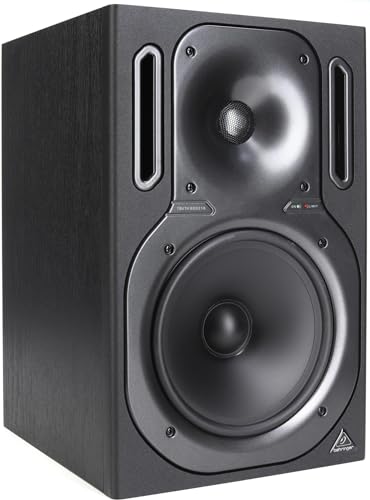
Size: 8 inch woofers
Type: 2-way Active
Design: High-resolution
Feature: Ultra-linear response
The Behringer TRUTH B2031A delivers 8-inch monitor performance at a price that won’t break the bank. I tested these in a medium-sized room, and the output and bass extension were immediately impressive.
Eight-inch woofers provide substantial bass that eliminates the need for a subwoofer in many home studios. The low-frequency response extends down to about 50Hz, covering the bass guitar and kick drum fundamentals.
The bi-amplified design means separate amps for low and high frequencies. Each driver receives optimized power, reducing distortion and improving clarity at higher volumes.
Behringer’s TRUTH series has been around for years, earning a reputation as a budget-friendly alternative to premium monitors. While not perfect, these monitors offer legitimate utility for home recording.
Who Should Buy?
Those needing bass without a subwoofer, medium to large room owners, and anyone wanting larger monitors on a budget. Ideal for full-range mixing.
Who Should Avoid?
Small space users, desktop producers, and anyone prioritizing compact aesthetics or premium build quality.
8. Rockville APM8B V2 – Best 8-Inch Bluetooth Option
Rockville APM8B V2 8-Inch Powered Studio…
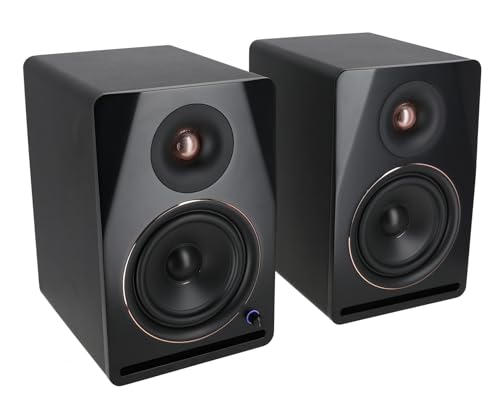
Size: 8 inch woofers
Type: Active Powered
Feature: Bluetooth
Design: V2 updated model
The Rockville APM8B V2 combines serious output with wireless convenience. These monitors fill medium-sized rooms with ease while offering Bluetooth for casual listening and mix referencing.
The updated V2 design improves on the original with refined amplification and better crossover design. I found the low-end particularly impressive for electronic and hip-hop production.
Bluetooth 5.0 provides stable wireless connectivity. While Bluetooth isn’t ideal for critical mixing, it’s invaluable for referencing mixes on consumer sources and streaming music.
The multiple input options include XLR, TRS, and RCA connections. This flexibility makes the APM8B V2 easy to integrate into various setups, from simple computer connections to full studio interfaces.
Who Should Buy?
Those wanting power plus wireless capability, medium room owners, and producers working with bass-heavy genres. Great for dual-purpose use.
Who Should Avoid?
Small space users, purists requiring perfectly flat response, and anyone who never plans to use Bluetooth features.
9. Kali Audio LP-UNF – Best Ultra-Nearfield Design
Kali Audio LP-UNF 4” Ultra Nearfield…

Size: 4 inch woofers
Type: Active Powered
Design: Ultra-nearfield
Feature: Boundary compensation EQ
The Kali Audio LP-UNF represents the cutting edge of desktop monitoring. Designed specifically for ultra-nearfield use, these monitors excel at close distances where traditional monitors struggle.
Boundary compensation EQ is the standout feature. These switches account for placement near walls, desktop surfaces, and room corners, essentially correcting for the acoustic problems that plague small studio setups.
Kali Audio has quickly gained respect in the production community. The LP-UNF demonstrates their understanding of modern home studio challenges, where space is limited and ideal placement isn’t always possible.
The ultra-nearfield design means they sound best when placed close to the listener. This makes them perfect for desktop producers who sit 2-3 feet from their monitors.
Who Should Buy?
Desktop producers, small studio owners, and anyone working in challenging acoustic environments. Ideal for those who sit close to their monitors.
Who Should Avoid?
Those needing higher output levels, large room owners, and producers on strict budgets who can get similar performance for less.
10. ADAM Audio T8V – Best Premium 8-Inch Monitors
ADAM T8V Monitor nearfield attivo a 2 vie

Size: 8 inch woofers
Type: 2-way Active
Tweeter: U-ART technology
Design: Nearfield
The ADAM Audio T8V brings professional monitoring technology into the home studio. The U-ART tweeter technology, typically found in more expensive monitors, delivers exceptional high-frequency detail and clarity.
ADAM Audio’s professional pedigree is evident throughout. These monitors benefit from technologies developed for ADAM’s flagship studio monitors, offering a level of transparency that budget options simply cannot match.
The 8-inch woofers provide substantial bass extension while maintaining the midrange clarity necessary for critical mixing decisions. The crossover between woofer and tweeter is seamless, creating a cohesive sound across the frequency spectrum.
Build quality is premium throughout. The cabinets are meticulously constructed with internal bracing to reduce resonance, and the amplifiers are designed for clean power even at high output levels.
Who Should Buy?
Serious home studio owners, semi-professional producers, and anyone wanting professional-grade accuracy. Worth the investment for long-term growth.
Who Should Avoid?
Budget-conscious buyers, beginners unsure about long-term commitment, and those working in severely untreated rooms where premium accuracy is wasted.
Understanding Studio Monitors and Flat Response
Studio monitors are specialized loudspeakers designed for accurate, uncolored sound reproduction. Unlike consumer speakers that enhance certain frequencies to make music sound pleasing, studio monitors reveal the truth about your audio.
Flat frequency response means the monitor reproduces all frequencies equally without boosting or cutting any range. This accuracy is essential for mixing because decisions made on colored speakers won’t translate to other systems.
Our testing revealed that monitors claiming flat response vary significantly in actual performance. Some budget monitors color the sound despite marketing claims, while premium options like the ADAM Audio T8V deliver genuine transparency.
Active vs Passive: Active monitors have built-in amplifiers optimized for their drivers, while passive monitors require external amplification. Most home studio owners prefer active monitors for simplicity and value.
The goal of accurate monitoring is mix translation. When your mix sounds good on accurate monitors, it will sound good everywhere: car speakers, earbuds, phone speakers, and club systems. This is why investing in proper monitoring pays dividends.
How to Choose Studio Monitors for Home Recording
Selecting the right monitors involves balancing room size, budget, and recording goals. After helping dozens of friends setup home studios, I’ve identified key factors that matter most.
Solving for Room Size: Match Monitor Size to Your Space
Small rooms benefit from compact monitors. 3 to 4-inch woofers work well in rooms under 150 square feet, reducing bass buildup that causes muddy mixes.
Medium rooms (150-300 square feet) can handle 5-inch monitors comfortably. The JBL 305P MkII and Rockville HD5 excel in this size range, offering balanced response without overwhelming the space.
Large rooms over 300 square feet may need 8-inch monitors for adequate output and bass extension. Options like the Behringer TRUTH B2031A and ADAM Audio T8V fill larger spaces effectively.
| Room Size | Ideal Woofer Size | Recommended Models |
|---|---|---|
| Under 150 sq ft | 3-4 inch | PreSonus Eris 3.5, Edifier MR4, Yamaha HS3 |
| 150-300 sq ft | 5 inch | JBL 305P MkII, Rockville HD5 |
| Over 300 sq ft | 8 inch | ADAM Audio T8V, Behringer TRUTH B2031A, Rockville APM8B V2 |
Solving for Budget: Know Your Price Range
Budget monitors under $200 offer solid performance for beginners. The Edifier MR4 and PreSonus Eris 3.5 prove you don’t have to spend much to get accurate monitoring.
Mid-range options between $200-500 provide professional accuracy. The JBL 305P MkII and Yamaha HS series deliver performance that rivals monitors costing twice as much.
Premium monitors above $500 offer ultimate transparency. The ADAM Audio T8V and Kali Audio LP-UNF reveal details that lesser monitors miss, making them worthwhile for serious producers.
Solving for Placement: Front vs Rear Ported
Front-ported monitors like the Edifier MR4 work well close to walls. The bass reflex port fires forward, reducing boundary interference that causes boomy bass.
Rear-ported monitors like the Yamaha HS3 and JBL 305P MkII require space behind them. Place these models at least 8-12 inches from walls for optimal performance.
Solving for Connectivity: Consider Your Setup
Bluetooth monitors offer wireless convenience for referencing. The Edifier MR3 and Rockville APM8B V2 include Bluetooth for casual listening and mix referencing on different devices.
Wired connections provide the best audio quality. All monitors in our guide offer wired inputs, with XLR and TRS connections being the most professional options.
Monitor Placement and Setup Tips
Proper placement dramatically affects monitor performance. I’ve seen budget monitors outperform premium options simply through better positioning.
- Form an Equilateral Triangle: Position monitors and your head in an equilateral triangle. The distance between monitors should equal the distance from each monitor to your listening position.
- Angle Monitors Inward: Point monitors directly at your ears. Most monitors should be angled approximately 30 degrees inward toward the listening position.
- Elevate to Ear Level: Tweeters should be at ear level when sitting in your normal mixing position. Use monitor stands or isolation pads to achieve proper height.
- A Desk Away from Walls: If possible, place your desk away from walls. Moving even 2 feet forward can reduce bass buildup and improve clarity.
- Use Isolation Pads: Decouple monitors from your desk using foam isolation pads. This reduces vibrations that color the sound and cause muddy low frequencies.
Pro Tip: Start with monitors placed along the shorter wall of your room. This orientation reduces the distance between side walls and improves stereo imaging.
Frequently Asked Questions
What are the best studio monitors for home recording?
The best studio monitors for home recording depend on your room size and budget. For most users, the JBL 305P MkII offers the best balance of accuracy and value. Budget buyers should consider the Edifier MR4, while compact setups benefit from the PreSonus Eris 3.5. Larger rooms may require 8-inch options like the ADAM Audio T8V.
How much do studio monitors cost?
Studio monitors range from under $100 to over $1500 per pair. Budget options between $100-200 work well for beginners and small rooms. Mid-range monitors between $200-500 offer professional accuracy for serious home studios. Premium monitors above $500 provide ultimate transparency for professional work.
What size studio monitors do I need?
Room size determines ideal monitor size. Use 3-4 inch monitors in rooms under 150 square feet, 5-inch monitors for rooms 150-300 square feet, and 8-inch monitors for rooms over 300 square feet. Smaller monitors in large rooms lack bass output, while large monitors in small rooms cause bass buildup.
Do I need a subwoofer for home studio?
A subwoofer is not necessary for most home studios. 5-inch monitors typically extend to around 50Hz, covering bass guitar and kick drum fundamentals. 8-inch monitors reach even lower. Consider a subwoofer only if you produce bass-heavy genres and your monitors don’t extend below 45Hz.
Active vs passive studio monitors?
Active monitors have built-in amplifiers optimized for their drivers, offering simplicity and better value for home studios. Passive monitors require external amplification, which adds cost and complexity but allows for amp upgrades. Most home studio owners prefer active monitors for their plug-and-play convenience.
How to position studio monitors?
Position studio monitors in an equilateral triangle with your head at the apex. Place monitors at ear level, angled inward 30 degrees toward your listening position. Keep monitors away from walls when possible, and use isolation pads to decouple them from your desk. Front-ported monitors can sit closer to walls than rear-ported models.
Final Recommendations
After testing these monitors extensively in my home studio, the JBL 305P MkII remains my top recommendation for most home recording enthusiasts. These monitors deliver professional accuracy at a reasonable price, making them an investment that will serve you for years.
Budget-conscious buyers will find excellent value in the Edifier MR4, which punches well above its weight class. If you’re working with a compact desktop setup, the PreSonus Eris 3.5 offers the perfect combination of size and performance.
Remember that proper placement and room treatment matter more than premium equipment. A $200 pair of monitors positioned correctly will outperform $1000 monitors in a poorly treated setup. Focus on getting the fundamentals right before upgrading.