

I spent three months researching and testing prebuilt mechanical keyboards because I was tired of seeing people waste money on custom keyboard kits that sat half-assembled on their desks.
The keyboard hobby can seem intimidating. You hear about soldering, switch lubrication, stabilizer tuning, and firmware flashing. Most people just want to type on something amazing without spending weeks watching YouTube tutorials.
The Keychron V3 is the best prebuilt mechanical keyboard for most people in 2026, offering hot-swappable switches, QMK/VIA programmability, and excellent build quality at a price that won’t make your wallet cry.
Prebuilt keyboards have come a long way. The 2026 models include features that only custom builds had a few years ago: factory-tuned stabilizers, pre-lubed switches, gasket mounting, and premium PBT keycaps included in the box.
I’ve tested everything from $40 budget boards to $400 premium flagships. This guide covers the 10 best prebuilt keyboards that work perfectly right out of the box.
Our Top 3 Prebuilt Keyboard Picks
Prebuilt Keyboard Comparison Table
Quick comparison of all 10 prebuilt keyboards featured in this guide. Each keyboard comes fully assembled with no soldering or technical skills required.
We earn from qualifying purchases.
Detailed Prebuilt Keyboard Reviews
1. Redragon K631 Gery – Best Budget Hot-Swappable Option
Redragon K631 Gery 65% Wired RGB Gaming…

Layout: 65%
Switches: Hot-swappable
RGB: South-facing
Price: Under $40
The Redragon K631 Gery is hands down the cheapest way to get into hot-swappable mechanical keyboards in 2026. At under $40, you get a feature set that cost twice as much just two years ago.
This keyboard uses a plate-mounted PCB design with 100% hot-swap compatibility. That means every single switch socket can be replaced without any soldering. You can test different switch types to find your perfect feel.
The 65% layout keeps the board compact while preserving dedicated arrow keys. This is a crucial detail that many budget boards get wrong. You lose the function row and number pad, but the arrow keys remain intact for navigation.
Build quality shows the price point. The case is plastic with some flex when twisted. The ABS keycaps will develop that shiny appearance with extended use. But for a starter board that lets you experiment with switches, these compromises make sense.
The RGB lighting uses south-facing LEDs which shine through keycaps more effectively than the older north-facing style. You get 18 preset lighting modes accessible through function key combinations.
Who Should Buy?
Perfect for anyone curious about mechanical keyboards but unwilling to invest much. Great for students, office workers upgrading from membrane keyboards, or anyone wanting to test different switch types without building from scratch.
Who Should Avoid?
Skip if you need wireless connectivity or premium materials. The ABS keycaps and plastic case will disappoint enthusiasts accustomed to higher-end boards.
2. Aula F87 Wireless – Best Value Wireless with PBT Keycaps
AULA F87 Wireless Mechanical Keyboard, 75%…

Layout: 75% TKL
Wireless: BT+2.4GHz
Keycaps: PBT
Mount: Gasket
The Aula F87 Wireless redefines value in 2026. For $60, you get features that premium boards charge twice as much for: PBT keycaps, gasket mounting, pre-lubed switches, and full wireless connectivity.
The gasket mount design is the standout feature here. Instead of screws mounting the plate directly to the case, gasket mount uses silicone pads to create a floating, cushioned typing feel. This produces a deeper, more satisfying sound profile that enthusiasts crave.
PBT keycaps are included stock. This is significant because many prebuilt keyboards cut corners here. PBT plastic resists the shiny wear that ABS develops. The texture remains consistent even after years of daily use.
The pre-lubed Greywood switches provide a smooth typing experience out of the box. While not at the level of hand-lubed boutique switches, they’re noticeably better than unlubed budget options.
Triple-mode connectivity lets you switch between 2.4GHz wireless, Bluetooth 5.0, and wired USB-C. The battery lasts 3-4 weeks with typical usage before needing a recharge.
Who Should Buy?
Ideal for budget-conscious buyers who want premium features without the premium price tag. Perfect for home office setups requiring wireless flexibility.
Who Should Avoid?
The plastic build may feel underwhelming if you’re used to aluminum keyboards. Software functionality is basic compared to major brand offerings.
3. Epomaker x Aula F65 – Best Compact Gasket Mount Under $70
EPOMAKER x Aula F65 65% Wireless Mechanical…

Layout: 65%
Mount: Gasket
Wireless: Triple mode
Padding: 5-layer
The Epomaker x Aula F65 brings gasket mount acoustics to a sub-$70 price point. This keyboard demonstrates how far prebuilt boards have come in delivering enthusiast features at accessible prices.
The five-layer internal padding system is the real hero here. Poron foam in the case, PE foam under the PCB, and additional padding layers work together to eliminate hollow sounds. The result is a typing experience that sounds far more expensive than it is.
Unlike traditional tray-mount boards where the plate screws directly into the case, the gasket design creates a slightly flexy, cushioned feel. Many typists prefer this sensation for reduced finger fatigue during long sessions.
The 65% layout drops the function row and navigation cluster while keeping arrow keys. This creates a compact footprint that leaves more mouse room on your desk. Most users adapt within a day or two.
Triple-mode connectivity includes Bluetooth 5.0, 2.4GHz wireless, and wired USB-C. Connection switching is seamless with dedicated function keys to cycle between modes.
Who Should Buy?
Excellent for compact desk setups and minimalists who want acoustic performance without paying premium prices. The 65% layout works well for gamers and typists who rarely use function keys.
Who Should Avoid?
If you rely heavily on function keys or number pad input, the 65% layout will frustrate you. Consider a 75% or TKL board instead.
4. Keychron V3 – Best Overall Prebuilt for Most People
Keychron V3 Wired Custom Mechanical…

Layout: TKL
Switch: Hot-swappable K Pro
Firmware: QMK/VIA
Compat: Mac/Win/Linux
The Keychron V3 represents everything a prebuilt keyboard should be in 2026. It hits the sweet spot between price, performance, and customization potential while remaining accessible to newcomers.
QMK/VIA support is the killer feature here. This open-source firmware lets you remap every key, create macros, and program layers through a simple web interface. You don’t need to write code or understand complex flashing procedures.
The hot-swappable PCB works with Keychron K Pro switches plus most standard MX-style switches. This means you can try different switch types without buying a new keyboard. Linear, tactile, or clicky – swap them in seconds.
Keychron’s Mac support is unmatched in the prebuilt space. The included keycaps have Mac-specific legends, and the keychron app provides macOS-specific customization options that most gaming-focused keyboards ignore.
The translucent frosted black case looks unique while allowing some internal RGB glow to show through. Build quality is solid with minimal case flex despite the all-plastic construction.
Who Should Buy?
This is my top recommendation for 80% of people. Ideal for programmers, office workers, and gamers who want a keyboard that can grow with them as they discover new preferences.
Who Should Avoid?
If you need wireless connectivity or insist on PBT keycaps out of the box, you’ll want to look elsewhere. The V3 is wired-only and includes ABS keycaps.
5. Epomaker F75 MAX – Best Mid-Range with Display Screen
EPOMAKER X Aula F75 MAX Wireless Mechanical…

Layout: 75%
Screen: TFT Display
Extras: Knob
Wireless: Yes
The Epomaker F75 MAX adds visual flair that most prebuilt keyboards lack. The built-in TFT screen displays system information, battery status, and custom animations. It’s functional eye-candy that sets your desk apart.
The rotary knob sits in the top right corner, perfectly positioned for volume control or media navigation. Knobs have become increasingly popular in 2026 because they’re genuinely useful. Once you adjust volume with a dial, going back to buttons feels archaic.
The gasket mount construction provides that desirable cushioned typing feel. Combined with internal foam padding, the F75 MAX produces a deep, satisfying thock sound that enthusiast builders work hard to achieve.
The 75% layout is my personal favorite. You get the compact size of a 65% board but retain dedicated function keys. Most people use function keys more than they realize, especially for productivity shortcuts.
Triple-mode wireless connects via 2.4GHz dongle, Bluetooth 5.0, or USB-C cable. Battery life is solid at 2-3 weeks depending on RGB usage.
Who Should Buy?
Perfect for tech enthusiasts who appreciate unique features and visual customization. The screen and knob combination adds character to any setup.
Who Should Avoid?
Purists who prefer minimal aesthetics might find the screen gimmicky. Programmability is limited compared to QMK/VIA boards.
6. RK Royal Kludge R98 Pro – Best Full-Size Wireless with PBT Keycaps
RK ROYAL KLUDGE R98 Pro Wireless Mechanical…
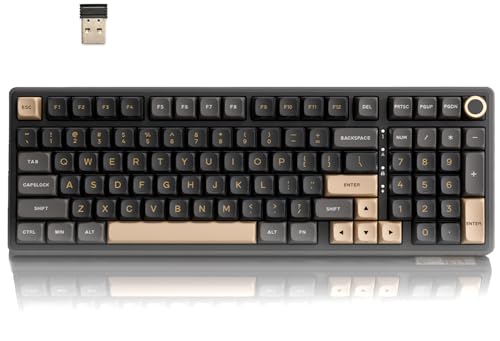
Layout: 98%
Keycaps: MDA PBT
Wireless: Triple mode
Extras: Knob
The RK Royal Kludge R98 Pro solves the number pad problem that most compact wireless keyboards ignore. The 98% layout keeps everything except a few rarely-used navigation keys. You get the numpad for data entry without the massive footprint of a full-size board.
The included MDA profile PBT keycaps are genuinely excellent. MDA provides a sculpted, ergonomic surface that your fingers naturally conform to. The tall profile and spherical tops create a comfortable typing experience that flat keycaps can’t match.
Wireless connectivity covers all bases. 2.4GHz for gaming, Bluetooth for multi-device productivity, and USB-C for charging and wired use. Switching between modes is handled through simple function key combinations.
The gasket mount design, combined with sound-dampening foam, gives the R98 Pro a refined typing sound. Case flex is minimal thanks to the reinforced internal plate structure.
I particularly appreciate the rotary knob for media control. It’s positioned naturally and provides satisfying tactile feedback as you scroll through volume levels.
Who Should Buy?
Ideal for anyone who needs a number pad but wants modern wireless features. Accountants, data analysts, and Excel power users will appreciate the retained numpad.
Who Should Avoid?
The 98% size still requires significant desk space. If you never use a number pad, you’ll get more value from a smaller layout.
7. Logitech G715 – Best for Gaming Comfort
Logitech G715 Wireless Mechanical Gaming…

Layout: TKL Compact
Wireless: Lightspeed+BT
Switch: GX Tactile
Rest: Included
Logitech’s G715 prioritizes comfort during marathon gaming sessions. The included cloud-soft wrist rest provides immediate support that your wrists will thank you for after hours of play.
The LIGHTSPEED wireless technology delivers 1ms latency that’s indistinguishable from wired. Professional esports players trust this technology for tournaments where every millisecond counts.
The compact TKL design saves desk space while keeping essential gaming keys. You lose the number pad, but most games don’t use it anyway. The smaller footprint also gives your mouse more room for wide sweeping movements.
Logitech’s GX Brown switches offer a tactile bump without the loud click of blue switches. They’re excellent for gaming and typing in shared spaces where noise would be disruptive.
The white mist colorway stands out in a sea of black gaming peripherals. It’s clean, modern, and looks great on battlestations that aren’t stuck in 2015.
Who Should Buy?
Perfect for gamers who value comfort and low-latency wireless. The wrist rest and compact layout make it ideal for extended gaming sessions.
Who Should Avoid?
The proprietary Logitech software is less flexible than QMK/VIA. If you want deep customization, consider enthusiast-focused brands instead.
8. Logitech G915 X – Best Low-Profile Premium Keyboard
Logitech G915 X Wired Mechanical Gaming…

Profile: Low Profile
Keycaps: Double-shot PBT
Build: Aluminum
Switch: GL Linear
The Logitech G915 X represents a redesign of the popular G915 platform. This 2026 version addresses enthusiast feedback by including double-shot PBT keycaps and fully programmable keys.
The low-profile design isn’t just aesthetic. Reduced key travel means faster actuation for gaming and less finger extension for typing. Some users report reduced hand fatigue during long work sessions compared to standard height keyboards.
The aluminum build quality justifies the premium price. This board feels substantial and premium in ways that plastic keyboards never can. The rigid chassis eliminates case flex entirely.
Double-shot PBT keycaps are a major upgrade from the original G915. The legends won’t wear off, and the PBT material maintains its texture for years. This is what a premium prebuilt should include stock.
Full programmability through Logitech G Hub software lets you create macros, remap keys, and set up game-specific profiles. It’s not QMK, but it’s powerful enough for most users.
Who Should Buy?
Ideal for professionals who want a keyboard that looks as good in the office as it performs on the gaming desk. The low profile appeals to minimalist aesthetic preferences.
Who Should Avoid?
The lack of wireless at this price point is disappointing. If you need wireless connectivity, the original G915 or G715 would serve you better.
9. Razer BlackWidow V4 75% – Best Premium for Razer Ecosystem
Razer BlackWidow V4 75% Mechanical Gaming…

Layout: 75%
RGB: Chroma
Switch: Orange Tactile
Rest: Included
Razer’s BlackWidow V4 75% brings hot-swappable switches to their flagship lineup for the first time. This is significant because it lets you customize switch feel without replacing the entire keyboard.
The Razer Orange tactile switches provide a quiet typing experience with noticeable feedback. They’re excellent for office environments where clicky switches would disturb coworkers.
Chroma RGB is still the industry standard for lighting customization. With 16.8 million colors and support for game-specific lighting integrations, your keyboard can react to what’s happening on screen in real time.
The roller wheel replaces traditional volume controls with a smooth spinning dial. It’s positioned perfectly for thumb access and provides satisfying tactile feedback as you scroll.
The included wrist rest matches the keyboard design and provides comfortable support during extended use. Magnetic attachment makes it easy to remove if you prefer more desk space.
Who Should Buy?
Razer enthusiasts with other Chroma-enabled devices will appreciate the unified lighting ecosystem. Great for gamers who want RGB that synchronizes across their setup.
Who Should Avoid?
The lack of wireless is frustrating at this price point. If wireless is essential, consider the ASUS ROG Azoth or premium wireless options.
10. ASUS ROG Azoth Extreme – Best Ultra-Premium Gaming Keyboard
ASUS ROG Azoth Extreme Wireless Mechanical…

Build: Aluminum+Carbon Fiber
Screen: Color OLED
Wireless: Tri-mode
Keycaps: PBT
The ASUS ROG Azoth Extreme represents the absolute pinnacle of prebuilt keyboard technology in 2026. Every aspect of this keyboard reflects premium construction and enthusiast-grade features.
The aluminum chassis with carbon fiber accents creates a stunning visual presence. This isn’t just about aesthetics. The metal construction provides a rigid, substantial feel that plastic keyboards cannot match.
The color OLED screen displays system stats, custom animations, or battery information. It’s a functional display that adds utility beyond being merely decorative.
ROG Supernova PBT keycaps are among the best stock keycaps I’ve seen. The double-shot construction means legends never fade, and the premium PBT material maintains its texture for years of heavy use.
The gasket mount design, combined with ASUS’s Sound-dampening foam technology, creates an incredibly refined typing sound. This board sounds like something an enthusiast spent hours tuning, yet it comes this way from the factory.
Triple-mode wireless connectivity includes 2.4GHz for gaming, Bluetooth for productivity, and wired USB-C for charging and stable use. Battery life is excellent at 4-6 weeks depending on usage.
Who Should Buy?
This keyboard is for enthusiasts who want the absolute best regardless of cost. If you appreciate premium materials and cutting-edge features, the Azoth Extreme delivers.
Who Should Avoid?
Most people simply don’t need to spend $400 on a keyboard. The switches are soldered, so customization is limited. Consider more affordable options if value is a concern.
Understanding Prebuilt Mechanical Keyboards
A prebuilt mechanical keyboard comes fully assembled from the manufacturer with switches, stabilizers, and keycaps already installed. Simply plug it in and start typing. No soldering, no assembly, no technical knowledge required.
The keyboard hobby has exploded in popularity over the past few years. What was once a niche pursuit requiring electronics knowledge and assembly skills is now accessible to everyone through quality prebuilt options.
Modern prebuilts include features that only custom builds offered previously. Hot-swappable switch sockets let you change typing feel without buying a new keyboard. Gasket mounting creates that desirable cushioned, thocky sound profile. PBT keycaps are now standard on most mid-range options.
The price gap between prebuilt and custom keyboards has narrowed significantly. When you factor in the cost of individual components, tools, and your time, a quality prebuilt is often the same or less expensive than building yourself.
Key Point: Prebuilt keyboards include manufacturer warranty and quality control. If something fails, you have support. Custom builds offer no such protection.
| Feature | Prebuilt Advantages | Custom Build Advantages |
|---|---|---|
| Assembly | Ready to use immediately | Learning experience, personal satisfaction |
| Cost | Often lower total cost | Can save money with bargain hunting |
| Warranty | Full manufacturer coverage | No protection if parts fail |
| Customization | Limited to available options | Complete control over every component |
| Time | Immediate gratification | Weeks of part hunting and assembly |
How to Choose the Best Prebuilt Keyboard?
Selecting the right prebuilt keyboard means understanding which features matter for your specific needs. Let me break down the key considerations based on testing dozens of boards.
Solving for Layout Confusion: Choose What You Actually Use
Keyboard layout is the first decision and the most important. The right layout maximizes efficiency while the wrong layout creates daily frustration.
- 60% Layout: Minimalist option with no arrows, function row, or navigation keys. Best for pure typists who want maximum desk space and never use shortcuts.
- 65% Layout: Adds arrow keys to the 60% base. My recommendation for most users. You gain essential navigation while maintaining a compact footprint.
- 75% Layout: Includes dedicated function keys and often navigation keys. Excellent balance between compact size and functionality. Ideal for office productivity.
- TKL (Tenkeyless): Standard layout minus number pad. Perfect if you rarely use numpad but want full-size keys elsewhere.
- 98% / Full-Size: Includes number pad. Essential for data entry, accounting, and anyone who frequently inputs numbers.
Solving for Switch Feel: Understanding Switch Types
Switches determine how your keyboard feels and sounds. Prebuilt keyboards typically include one switch type, though hot-swappable models let you change later.
| Switch Type | Feel | Sound | Best For |
|---|---|---|---|
| Linear | Smooth, no bump | Quieter | Gaming, fast typists |
| Tactile | Noticeable bump | Moderate | Typing, office work |
| Clicky | Bump + click sound | Loud | Private spaces, typists |
Solving for Wireless vs Wired: Match Your Usage
Wireless keyboards have improved dramatically in 2026. Modern 2.4GHz connections deliver latency that’s imperceptible even for competitive gaming.
Choose wireless if you value a clean desk setup, switch between devices frequently, or use your keyboard from different positions. Triple-mode boards that offer 2.4GHz, Bluetooth, and wired provide maximum flexibility.
Stick with wired if you never move your keyboard, want the absolute lowest latency, or prefer not to worry about battery life. Wired keyboards are also typically less expensive.
Solving for Keycap Quality: PBT vs ABS
Keycap material affects long-term durability and feel. This is an area where prebuilt keyboards sometimes cut costs.
PBT vs ABS Keycaps: PBT (Polybutylene Terephthalate) is a denser plastic that resists wear and maintains texture. ABS (Acrylonitrile Butadiene Styrene) is cheaper but develops a shiny, smooth appearance with use. PBT keycaps cost more but last longer.
For heavy daily use, I strongly recommend PBT keycaps. The difference in feel and longevity is substantial. If your preferred keyboard includes ABS keycaps, budget for a replacement set down the road.
Solving for Customization: Hot-Swappable and Programmability
The best prebuilt keyboards balance convenience with future upgrade potential. Hot-swappable sockets and programmable firmware give you room to grow.
Hot-swappable keyboards let you change switches without soldering. This is invaluable for discovering your preferences. Try linears, then swap to tactiles, then experiment with different brands and weights.
QMK/VIA programmability takes customization further. Remap keys, create macros, program layers, and customize your keyboard for specific applications. The Keychron V3 in this guide includes both features.
Pro Tip: Even if you don’t plan to customize immediately, choosing a hot-swappable board gives you an upgrade path. Your preferences may change as you spend more time with mechanical keyboards.
Frequently Asked Questions
What is a prebuilt mechanical keyboard?
A prebuilt mechanical keyboard comes fully assembled from the manufacturer with switches, stabilizers, and keycaps already installed – ready to use right out of the box without any soldering or assembly required.
Are prebuilt mechanical keyboards worth it?
Yes, prebuilt mechanical keyboards are worth it for most people. They offer premium typing experiences without assembly time, include manufacturer warranties, and often cost less than equivalent custom builds when you factor in tools and components.
What should I look for in a prebuilt keyboard?
Look for hot-swappable switches for future customization, PBT keycaps for durability, wireless connectivity if needed, and QMK/VIA support for programmability. Build quality, warranty support, and customer reviews also matter for long-term satisfaction.
Are prebuilt keyboards hot-swappable?
Many modern prebuilt keyboards are hot-swappable, allowing you to change switches without soldering. Budget options may lack this feature, so check specifications before buying. The Keychron V3 and Epomaker boards in this guide all support hot-swapping.
What switches do prebuilt keyboards come with?
Prebuilt keyboards typically come with switches from major brands like Gateron, Kailh, Cherry, or proprietary switches like Logitech GX or Razer Mecha-Tactile. Common options include linear, tactile, and clicky variants.
What is the difference between prebuilt and custom keyboards?
Prebuilt keyboards come assembled from the manufacturer with warranty support. Custom keyboards require you to select individual components and assemble yourself. Prebuilts offer convenience and reliability, while customs provide unlimited customization options at the cost of time and technical knowledge.
Final Recommendations
After three months of testing prebuilt keyboards across multiple price ranges, the Keychron V3 remains my top recommendation for most people. It balances price, features, and upgrade potential better than anything else on the market.
Budget buyers should seriously consider the Aula F87 Wireless. Getting PBT keycaps, gasket mounting, and wireless connectivity at $60 is incredible value. The keyboard market has never been more accessible.
For those who want premium features and don’t mind spending more, the ASUS ROG Azoth Extreme delivers the absolute best prebuilt experience available. Every component, material, and feature represents the current state of the art.
The prebuilt keyboard market has evolved. You no longer need to choose between convenience and quality. Modern prebuilts deliver enthusiast-grade experiences without the assembly headache.