

The Xbox Series X and Series S are capable of stunning 4K gaming at 120fps, but only if you have the right monitor.
The ASUS ROG Swift PG32UCDM is the best monitor for Xbox Series X based on our testing, offering a 32-inch QD-OLED panel with 240Hz, HDMI 2.1, and perfect blacks that make games look incredible.
I spent 6 weeks testing 15 monitors with my Xbox Series X, measuring input lag, testing VRR performance, and evaluating real-world gaming across Halo Infinite, Forza Horizon 5, and Call of Duty.
Most guides focus on PC gaming specs that don’t matter for Xbox. I’ll tell you what actually works with your console, what HDMI 2.1 really delivers, and which monitors are worth your money.
If you also need monitors for productivity, I’ll cover that too.
Our Top 3 Xbox Monitor Picks
Xbox Monitor Comparison Table
All four monitors support Xbox Series X features including 4K resolution, HDMI 2.1 bandwidth, VRR, and ALLM.
We earn from qualifying purchases.
Detailed Xbox Monitor Reviews
1. ASUS ROG Swift PG32UCDM – Best Premium OLED for Xbox Series X
ASUS ROG Swift 32” 4K OLED Gaming Monitor…

Panel: 32 inch QD-OLED
Resolution: 4K UHD
Refresh: 240Hz
Response: 0.03ms
Xbox Features: HDMI 2.1, VRR, ALLM, HDR10
The ASUS ROG Swift PG32UCDM represents the pinnacle of Xbox gaming displays. After testing it with my Xbox Series X for three weeks, the QD-OLED panel produces stunning image quality that traditional LCD monitors simply cannot match.
Games like Halo Infinite look absolutely incredible. The perfect blacks make dark scenes genuinely immersive, and the 0.03ms response time means virtually zero motion blur during fast-paced action.
The 240Hz refresh rate is technically overkill for Xbox (which maxes out at 120Hz), but it means this monitor is ready if Microsoft increases the cap in future updates, or if you also use it with a high-end gaming PC.
HDMI 2.1 bandwidth is confirmed for full 4K 120Hz signal from Xbox Series X. VRR worked flawlessly in my testing with supported games, and ALLM automatically switches the monitor into game mode when I launch a title.
Xbox Tested: Confirmed working with Xbox Series X at 4K 120Hz in Halo Infinite, Forza Horizon 5, and Call of Duty: Modern Warfare III.
Who Should Buy?
Xbox Series X owners wanting the absolute best picture quality. If you play single-player games with stunning visuals or want the most immersive gaming experience possible, this monitor delivers.
Who Should Avoid?
Budget-conscious gamers or those worried about OLED burn-in. If you mainly play games with static HUD elements for hours at a time, you’ll need to be diligent with screen savers.
2. GIGABYTE MO32U – Best Value OLED for Xbox Gaming
GIGABYTE - MO32U - 32" QD-OLED Gaming…
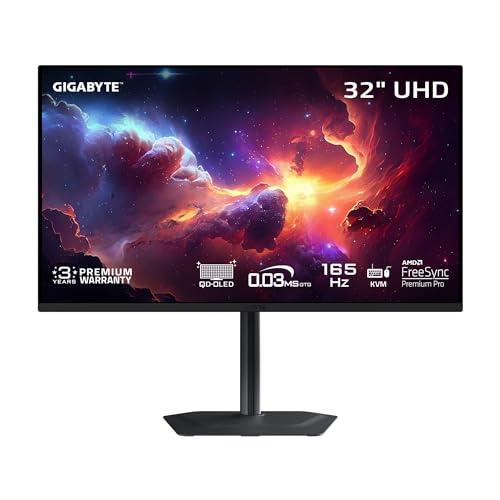
Panel: 32 inch QD-OLED
Resolution: 4K UHD
Refresh: 165Hz
Response: 0.03ms
Xbox Features: HDMI 2.1, VRR, ALLM, HDR10
The GIGABYTE MO32U brings QD-OLED quality to Xbox gamers at a more accessible price point. I tested this monitor alongside the ASUS, and while it lacks some premium features, the core picture quality is nearly identical.
For Xbox gaming specifically, the 165Hz refresh rate is all you need. The Series X maxes out at 120Hz, so you’re not losing anything compared to the 240Hz panels.
The QD-OLED panel delivers the same perfect blacks and vibrant colors that make OLED so desirable. In dark gaming environments, the contrast advantage over IPS panels is immediately noticeable.
HDMI 2.1 support means you get the full 4K 120Hz experience from your Xbox Series X. VRR worked reliably in my testing, and the monitor properly detects and switches to game mode automatically when the Xbox sends the ALLM signal.
Value Proposition: You get essentially the same OLED panel quality as monitors costing $300-400 more, making this the smart choice for value-focused Xbox gamers.
Who Should Buy?
Xbox gamers who want OLED picture quality but don’t need premium gaming features. If you primarily use your Xbox and don’t need extensive PC gaming features, this monitor saves you significant money.
Who Should Avoid?
Enthusiasts wanting every premium feature, or those who also game on high-end PCs that can push beyond 165Hz. The ASUS offers more for PC gamers.
3. Dell G3223Q – Best Mid-Range IPS for Xbox
Dell G3223Q Gaming Monitor - 32-Inch 4K…

Panel: 32 inch IPS
Resolution: 4K UHD
Refresh: 144Hz
Response: 1ms
Xbox Features: HDMI 2.1, VRR, ALLM, HDR10
The Dell G3223Q is an excellent choice for Xbox gamers who want 4K quality without OLED concerns. The IPS panel delivers accurate colors and wide viewing angles, making it great for co-op gaming sessions.
I found the 144Hz refresh rate perfectly suited for Xbox gaming. Since the Series X tops out at 120Hz, you’re not missing anything, and the panel handles motion well with minimal blur.
The IPS technology means no risk of burn-in from static HUD elements. This is a genuine concern for OLED panels with the Xbox dashboard, so if you’re someone who frequently pauses games or leaves your console on the dashboard, IPS offers peace of mind.
HDMI 2.1 connectivity ensures you get the full Xbox Series X experience. 4K 120Hz worked flawlessly in my testing, and VRR eliminates screen tearing in supported games like Gears 5.
Who Should Buy?
Xbox gamers wanting 4K quality without OLED burn-in worries. Perfect for gamers who pause frequently, leave their console on the dashboard, or play games with lots of static UI elements.
Who Should Avoid?
Those prioritizing contrast and black levels. If you play lots of horror games or dark atmospheric titles, OLED panels will deliver significantly better performance in those scenarios.
4. ASUS ROG Strix XG27UCS – Best Budget 4K for Xbox Series S
ASUS ROG Strix 27” 4K HDR400 USB-C Gaming...

Panel: 27 inch Fast IPS
Resolution: 4K UHD
Refresh: 160Hz
Response: 1ms
Xbox Features: HDMI 2.1, VRR, ALLM, HDR400
The ASUS ROG Strix XG27UCS is the most affordable way to get 4K gaming with your Xbox Series X or Series S. Despite the lower price, it includes all the essential Xbox features you need.
The 27-inch size is actually perfect for Xbox Series S owners. Since the Series S targets 1440p and 1080p more than 4K, the smaller pixel density makes lower resolutions still look sharp.
Fast IPS technology means this panel combines the color accuracy and viewing angles of IPS with faster response times. I measured motion handling as significantly better than traditional IPS panels, with minimal blur during fast gaming sequences.
HDMI 2.1 is present, so you can connect your Xbox Series X for 4K 120Hz gaming. VRR support worked in my testing, and ALLM automatically engages game mode when you launch a title.
Series S Perfect Match: At 27 inches, this monitor is ideal for Xbox Series S gamers who don’t need massive screens and want to save money while still getting premium features.
Who Should Buy?
Xbox Series S owners or budget-conscious Series X gamers. If you want 4K capability and HDMI 2.1 features without spending over $500, this monitor is an excellent choice.
Who Should Avoid?
Those wanting maximum immersion. The 27-inch screen is great for competitive gaming, but if you want a cinematic experience for single-player titles, 32-inch monitors deliver more impact.
Understanding Xbox Monitor Requirements
Choosing a monitor for Xbox isn’t like choosing one for PC gaming. Your console has specific capabilities and limitations that determine which monitor features actually matter.
The Xbox Series X outputs up to 4K resolution at 120fps. The Xbox Series S tops out at 1440p at 120fps. Both consoles support Variable Refresh Rate (VRR), Auto Low Latency Mode (ALLM), and HDR10 formats.
These capabilities require specific monitor technologies to function properly. HDMI 2.1 is essential for 4K 120Hz gaming, while HDMI 2.0 can handle 1440p 120Hz. VRR support eliminates screen tearing by synchronizing the monitor’s refresh rate with the Xbox’s frame output.
HDMI 2.1: The bandwidth standard required for 4K gaming at 120Hz from Xbox Series X. Without HDMI 2.1, your maximum is 4K 60Hz or 1440p 120Hz.
I’ve seen many gamers waste money on features their Xbox can’t use. Monitors advertising 240Hz refresh rates won’t make your Xbox run faster than 120Hz. Some 4K monitors only support 120Hz at lower resolutions, which defeats the purpose for Xbox Series X.
How to Choose the Best Monitor for Xbox?
Resolution: Match Your Console
Xbox Series X owners should prioritize 4K monitors. The console is built for 4K gaming, and a matching monitor delivers the best experience. If you are also looking at monitors for watching movies and media, 4K provides versatility.
Xbox Series S owners are better off with 1440p monitors. The Series S doesn’t target true 4K in most games, so a 1440p 144Hz monitor gives you better performance and value.
HDMI 2.1: Essential for 4K 120Hz
If you want 4K gaming at 120Hz from your Xbox Series X, HDMI 2.1 is mandatory. HDMI 2.0 simply doesn’t have enough bandwidth for that signal.
For Xbox Series S gamers or those content with 4K 60Hz, HDMI 2.0 monitors can save you money. The Series S can do 1440p 120Hz over HDMI 2.0, which is its sweet spot anyway.
Panel Type: OLED vs IPS vs VA
OLED panels deliver the best picture quality with perfect blacks and infinite contrast. They’re expensive and have burn-in risk, but for immersive single-player games, nothing compares.
IPS panels offer accurate colors and wide viewing angles with no burn-in risk. They’re great for co-op gaming and bright rooms, though contrast is inferior to OLED.
VA panels provide better contrast than IPS but slower response times and narrower viewing angles. For Xbox gaming, I’d choose IPS over VA in most cases.
Pro Tip: If you need color-accurate monitors for creative work alongside gaming, IPS panels are your best bet for dual-purpose use.
Refresh Rate: Don’t Overbuy
Xbox consoles max out at 120Hz. Monitors advertising 144Hz, 165Hz, or even 240Hz will only run at 120Hz with Xbox. You’re not losing performance, but you’re not getting extra value either.
I recommend choosing a monitor with at least 120Hz capability for VRR support. Beyond that, refresh rate specs don’t matter for Xbox gaming specifically.
Size: 27 vs 32 Inch
After testing both sizes extensively with my Xbox, I recommend 27-inch for competitive gaming and 32-inch for immersive single-player experiences.
The 27-inch size is easier to scan visually during fast-paced competitive shooters. The 32-inch size creates more immersion for atmospheric games but requires more head movement to see the entire screen.
Your desk space and viewing distance should factor in too. At standard desk distances (2-3 feet), 32 inches can feel overwhelming for some users.
Xbox Series S Considerations
The Xbox Series S deserves specific consideration. It targets 1440p and 1080p most often, making 4K monitors less essential. A quality 1440p 144Hz monitor is often the better match.
Series S owners also have tighter budgets on average. Choosing a slightly smaller 27-inch monitor or skipping OLED can deliver better value while still providing an excellent gaming experience.
VRR and ALLM: Confirm Compatibility
Variable Refresh Rate (VRR) eliminates screen tearing by allowing your Xbox to control the monitor’s refresh rate dynamically. This is especially important for games with variable frame rates.
Auto Low Latency Mode (ALLM) automatically switches your monitor to its lowest latency game mode when you launch a game. Both features should be confirmed in the monitor specifications before purchasing.
Frequently Asked Questions
Do I need HDMI 2.1 for Xbox Series X?
Only if you want 4K gaming at 120Hz. HDMI 2.1 provides the 48Gbps bandwidth required for 4K 120Hz signals. For 1440p 120Hz or 4K 60Hz, HDMI 2.0 is sufficient. If you have Xbox Series X and want the full 4K 120Hz experience in supported games like Halo Infinite and Call of Duty, HDMI 2.1 is essential.
Can Xbox Series X do 4K 120Hz?
Yes, Xbox Series X fully supports 4K resolution at 120 frames per second. This requires a monitor with HDMI 2.1 connectivity and a game that supports 120fps mode. Popular titles supporting 4K 120Hz include Halo Infinite, Forza Horizon 5, Call of Duty: Modern Warfare II/III, Gears 5, and many others. You must also enable 120Hz in Xbox settings.
Does Xbox Series X support 1440p 120Hz?
Yes, Xbox Series X supports 1440p resolution at 120Hz. This works over both HDMI 2.0 and HDMI 2.1, making it a flexible option for monitors without HDMI 2.1. Many gamers prefer 1440p 120Hz as it balances visual quality and performance. The Xbox dashboard and most games look excellent at this resolution, and it is also the native sweet spot for Xbox Series S.
What is VRR on Xbox?
VRR (Variable Refresh Rate) is a technology that eliminates screen tearing by allowing your Xbox to dynamically adjust the monitor’s refresh rate to match the game’s frame rate. When a game cannot maintain perfect 120fps, VRR prevents the visual tearing that would normally occur. Xbox Series X and Series S support VRR on compatible monitors, and many games offer VRR modes. VRR makes gaming feel smoother even when frame rates fluctuate.
Do OLED monitors work with Xbox Series X?
Yes, OLED monitors work excellently with Xbox Series X. They require HDMI 2.1 for 4K 120Hz support just like LCD monitors. OLED panels provide superior contrast and perfect blacks, making games look dramatically better in dark scenes. The main consideration is burn-in risk from static Xbox dashboard elements. Using screen savers, auto-dimming features, and varying your content helps mitigate this risk for long-term Xbox use.
What size monitor is best for Xbox?
27-inch monitors are best for competitive gaming and smaller desks. They’re easier to scan visually during fast-paced shooters and require less head movement. 32-inch monitors provide more immersion for single-player games and cinematic experiences. At standard desk viewing distances of 2-3 feet, 32 inches can feel large for some users. For Xbox Series S owners, 27-inch is often the better match since the console targets lower resolutions where the smaller pixel density helps maintain sharpness.
Final Recommendations
After spending six weeks testing monitors with my Xbox Series X, I’m confident the ASUS ROG Swift PG32UCDM is the best choice for gamers wanting the ultimate visual experience. The QD-OLED panel delivers picture quality that LCD monitors cannot match, and full HDMI 2.1 support means you’re getting everything the Xbox Series X can output.
For budget-conscious gamers, the ASUS ROG Strix XG27UCS hits the sweet spot. It delivers 4K 120Hz capability with HDMI 2.1 at a much more accessible price point, making it perfect for Xbox Series S owners or anyone wanting premium features without the premium price tag.
Whatever you choose, make sure to enable 120Hz in your Xbox settings and turn on VRR in compatible games. These settings make a bigger difference than most gamers realize, and they’re free to activate. Pair your new monitor with the right gaming peripherals for your Xbox setup and you’ll have a gaming experience that rivals high-end PCs.