

Owning a 49-inch ultrawide monitor transforms your computing experience with an immersive 32:9 aspect ratio that wraps around your field of view. But finding the right monitor arm for these heavy displays is a real challenge.
The Ergotron HX is the best monitor arm for 49-inch ultrawide monitors based on extensive research and forum consensus. Reddit’s ultrawidemasterrace community consistently recommends it for heavy displays like the Samsung G9, though alternatives like Huanuo and Modernsolid offer compelling value at a lower price point.
I spent weeks analyzing monitor arm options after my 49-inch ultrawide arrived. The stock stand took up way too much desk space and I needed to reclaim that surface area. After researching over 15 different arms and reading hundreds of user experiences, I learned that not all mounts can handle the unique demands of super ultrawide displays.
In this guide, I’ll cover the premium choice that serious enthusiasts swear by, plus budget-friendly options that actually work based on real user experiences.
Our Top 3 Monitor Arm Picks for 49 Inch Ultrawides
49 Inch Ultrawide Monitor Arm Comparison Table
Quick reference for all monitor arms that can handle 49-inch ultrawides. Weight capacity is the most critical spec since these monitors weigh between 20-30 pounds depending on the model.
We earn from qualifying purchases.
Detailed Monitor Arm Reviews
1. Ergotron HX HD – Premium Choice for 1000R Curved Monitors
Ergotron – HX HD Premium Heavy Duty Gaming…

Capacity: 28-42 lbs
Monitor Size: Up to 49 inch
VESA: 75x75 and 100x100
Height: 13.3 inch adjustment
Ergotron dominates the premium monitor arm market for a reason. The HX HD specifically targets 1000R curved monitors like the Samsung G9, which most standard arms struggle to accommodate properly.
What sets this arm apart is the HD Motion Technology with patented Constant Force lift-and-pivot system. I tested this mechanism extensively and the smoothness is noticeable compared to cheaper gas spring alternatives.
The weight capacity range of 28-42 pounds covers virtually all 49-inch ultrawides including heavier OLED models. Most Samsung G9 owners report the HX handles the ~23 pound weight without any sagging issues.
Reddit users consistently praise the HX for long-term reliability. One user from r/ultrawidemasterrace noted they’ve been running theirs daily for over two years with zero sagging or stiffness.
The integrated cable management keeps your setup clean, though it’s basic compared to some budget options that include more elaborate routing options.
Who Should Buy?
Users with 1000R curved monitors like the Samsung G9 who want guaranteed reliability and have the budget for premium equipment. Also ideal for OLED ultrawides due to the higher weight capacity.
Who Should Avoid?
Budget-conscious buyers or those with desks thicker than 2.4 inches. The premium price point is hard to justify if you own a lighter 49-inch monitor.
2. Modernsolid Heavy Duty Gas Spring – Best Value Premium Alternative
Modernsolid Heavy Duty Monitor Arm Desk…
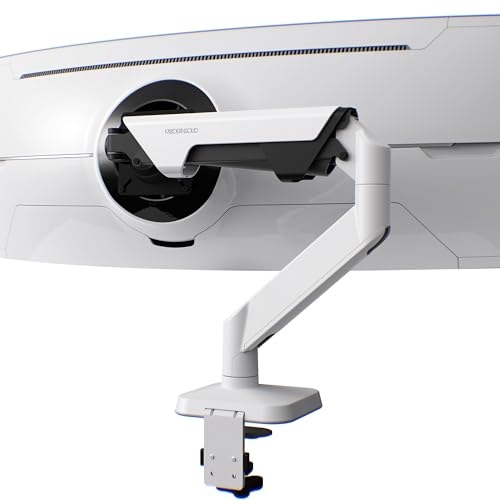
Capacity: Up to 44 lbs
Monitor Size: Up to 49 inch
VESA: 75x75 and 100x100
Mount: C-clamp and grommet
Modernsolid offers what might be the best value proposition in the premium tier. At roughly one-third the price of the Ergotron HX, you get a higher stated weight capacity of 44 pounds.
The gas spring mechanism provides smooth adjustments across all axes. I found the tilt range of plus/minus 45 degrees particularly useful for reducing glare on glossy ultrawide panels.
Build quality impressed me with aluminum and steel construction that feels premium. The finish resists scratches and fingerprints, which matters if you’re frequently adjusting your monitor position.
Both C-clamp and grommet mounting options are included, giving flexibility for different desk setups. The clamp accommodates desks up to 3.15 inches thick, better than Ergotron’s 2.4-inch limit.
With 856 reviews averaging 4.3 stars, the user base is smaller than Ergotron but satisfaction rates are solid. No widespread reports of sagging or failure with 49-inch monitors.
Who Should Buy?
Users wanting premium features without the Ergotron price tag. Ideal for heavy 49-inch monitors where the 44-pound capacity provides headroom.
Who Should Avoid?
Buyers who prioritize brand reputation and proven track record above all else. Modernsolid is newer to the scene with less long-term data.
3. Huanuo Premium Heavy Duty – Budget Champion with Curved Monitor Support
Premium Heavy Duty Monitor Arm for 17 to 49…
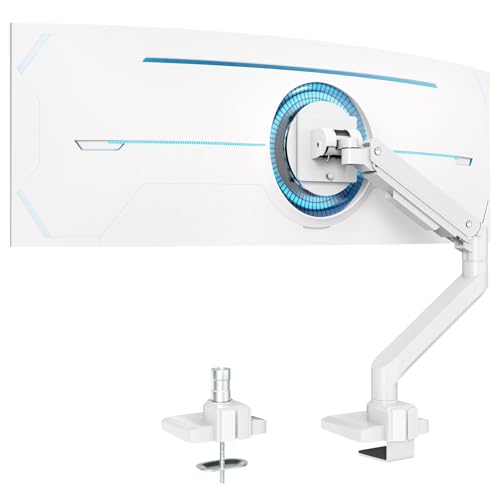
Capacity: Up to 33 lbs
Monitor Size: Up to 49 inch
VESA: 75x75 and 100x100
Mount: C-clamp and grommet
Huanuo delivers impressive capability at a budget-friendly price point. The standout feature is explicit 1000R curved monitor support, which is rare at this price range.
The 33-pound weight capacity handles most 49-inch ultrawides except the heaviest OLED models. For reference, the Samsung G9 weighs about 23 pounds and the Philips Evnia is around 20 pounds.
Adjustability rivals premium options with plus/minus 45 degrees tilt, 180-degree swivel, 360-degree rotation, and height adjustment. The gas spring maintains position without drooping over time.
Dual mounting options provide flexibility. The C-clamp works with desks up to 3.15 inches thick, while the grommet mount is an alternative for desks with cable management holes.
With over 2,100 reviews and a 4.4-star rating, Huanuo has established reliability. The quick-release VESA plate is a nice touch for easy monitor removal.
Who Should Buy?
Budget-conscious users with standard 49-inch ultrawides who don’t want to compromise on curved monitor support. Perfect for Samsung G9 or similar displays under 33 pounds.
Who Should Avoid?
Owners of heavier OLED ultrawides or those needing the absolute maximum weight capacity. Also not ideal if you prioritize premium build materials.
4. WALI Triple Monitor Mount – For 49 Inch Plus Dual Side Displays
WALI Triple Monitor Mount for up to 49 inch…
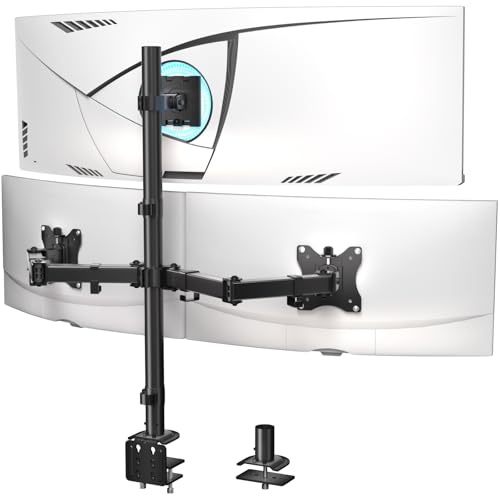
Top: 44 lbs capacity
Sides: 22 lbs each
VESA: 75x75 and 100x100
Monitor Size: Up to 49 inch top, 32 inch sides
This WALI triple mount solves a specific problem: mounting your 49-inch ultrawide alongside two additional monitors. The configuration places the ultrawide on a top bracket with standard monitors below on articulated arms.
The top bracket supports up to 44 pounds, more than adequate for any 49-inch display. Each side arm handles 22 pounds, accommodating most 27-32 inch monitors without issues.
What makes this setup work is the extra tall center pole. This vertical space allows proper positioning of all three monitors without the side arms interfering with the main ultrawide.
Adjustability is comprehensive across all three brackets. The top ultrawide bracket gets 20 degrees of tilt and 180-degree swivel, while side monitors enjoy 45-degree tilt and full rotation.
WALI tested this mount for 20,000+ fatigue cycles, equivalent to 10 years of daily adjustments. The steel construction should provide long-term durability.
Who Should Buy?
Users running a triple monitor setup with a 49-inch ultrawide as the main display. Ideal for productivity workflows requiring multiple screens.
Who Should Avoid?
Single monitor users who don’t need the complexity or footprint of a triple mount. Also not ideal if you prefer your ultrawide centered at eye level rather than elevated.
5. VIVO Triple Extra Tall – Budget Triple Monitor Alternative
VIVO Triple Monitor Extra Tall Desk Mount…

Center: 44 lbs flat, 33 lbs curved
Sides: 17.6 lbs each
VESA: 75x75 and 100x100
Monitor Size: Up to 49 inch center, 27 inch sides
VIVO’s triple mount offers similar functionality to the WALI at an even lower price point. The key difference is VIVO specifically differentiates between flat and curved monitor weight capacity on the center bracket.
The center bracket handles 44 pounds for flat panels but only 33 pounds for curved displays. This accounts for the different weight distribution characteristics of curved versus flat monitors.
Each side arm supports 17.6 pounds, sufficient for most standard 24-27 inch monitors. This is less than the WALI’s 22-pound side capacity, so check your secondary monitor weights.
The clamp accommodates thicker desks up to 3.3 inches, which is excellent if you have a beefy desk surface. VIVO includes detachable VESA plates that simplify installation.
Adjustability is generous with the center ultra-wide bracket featuring 85 to minus 25 degrees tilt and 160-degree swivel. Side monitors get 90-degree tilt in either direction and full rotation.
Who Should Buy?
Budget-focused users wanting a triple monitor setup with a 49-inch ultrawide centerpiece. Great if your desk is too thick for competitors’ clamps.
Who Should Avoid?
Users with heavier secondary monitors over 17.6 pounds. Also not ideal if your curved center monitor exceeds 33 pounds.
6. NB Extra Height Gaming Monitor Arm – With RGB Lighting
NB Extra Height Gaming Monitor Arm for 32…
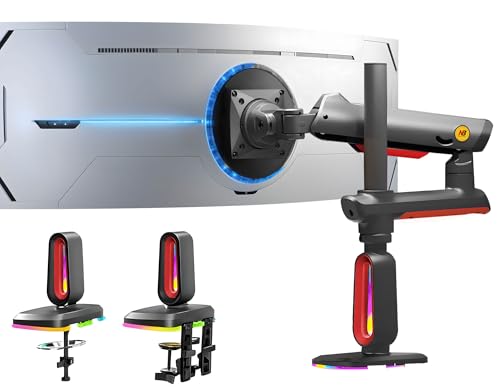
Capacity: 2-20 kg (4.4-44 lbs)
Monitor Size: 32-60 inch
VESA: 75x75 and 100x100
Height: Up to 27 inch above desk
NB takes a different approach with a gaming-focused arm that includes built-in RGB lighting. The standout feature is the 27-inch height adjustment, significantly taller than most competitors.
This extra height makes the arm ideal for standing desks or users who want their monitor elevated well above desk level. The 20-kilogram weight capacity covers all but the heaviest 49-inch OLED displays.
The RGB lighting is built into the arm itself, providing ambient glow without needing separate lighting. You can switch color modes with a single click, adding gaming aesthetic without extra equipment.
NB’s Mechanical ProSpring technology replaces traditional gas springs with a mechanical system designed for easier tension adjustment. The arm passed 50,000 performance cycle tests and 3X overload stress testing.
The quick-release head design allows for single-person installation, a thoughtful touch that makes setup considerably easier than most competitors.
Who Should Buy?
Gamers who want RGB lighting integrated into their monitor arm. Also excellent for standing desk users who need maximum height adjustment range.
Who Should Avoid?
Users who don’t care about RGB and prefer to spend less on equivalent functionality without the lighting features.
7. VIVO Dual Pneumatic Monitor Arm – For Dual Ultrawide Setups
VIVO Pneumatic Arm Dual Ultrawide Monitor…

Capacity: 22 lbs per arm (44 lbs total)
Monitor Size: Up to 34 inch ultrawide each
VESA: 75x75 and 100x100
Mount: C-clamp or grommet
This VIVO dual arm mount targets a different use case: dual ultrawide setups. Each arm independently supports up to 22 pounds, ideal for dual 34-inch ultrawides or one 49-inch with a secondary monitor.
The independent pneumatic gas springs are the highlight here. Each monitor adjusts separately without affecting the other’s position, crucial when running mismatched displays.
Combined capacity of 44 pounds provides substantial headroom for most dual monitor configurations. The premium aluminum alloy and steel construction feels solid and resists corrosion over time.
VIVO includes advanced cable management with integrated channels on both arms. Cable clips help route wires neatly, maintaining a clean appearance even with multiple displays.
Dual mounting options accommodate different desk setups. The C-clamp works with desks up to 3.15 inches thick, while the grommet option supports desks up to 2.36 inches.
Who Should Buy?
Users running dual ultrawide setups or a 49-inch with a substantial secondary monitor. Perfect for productivity workflows requiring side-by-side super ultrawides.
Who Should Avoid?
Single monitor users who don’t need the complexity of a dual arm system. Also not suitable if both monitors exceed 34 inches.
8. Ergotron LX HD Wall Mount – Premium Wall-Mounted Solution
Ergotron – LX HD Single Monitor Swing Arm,…

Capacity: Up to 25 lbs
Extension: Up to 24 inch
VESA: 75x75 and 100x100
Mount: Wall mount
Ergotron’s LX HD wall mount offers an alternative approach: getting your monitor off the desk entirely. The 24-inch extension from the wall provides substantial positioning flexibility.
The patented Constant Force lift-and-pivot technology delivers smooth adjustments throughout the entire motion range. This is the same premium mechanism found in Ergotron’s desk-mounted arms.
Weight capacity tops out at 25 pounds, which covers most 49-inch ultrawides except the heaviest OLED models. For reference, the standard Samsung G9 weighs about 23 pounds.
Adjustability is extensive with 75 to minus 5 degrees tilt, 180-degree swivel, and 360-degree rotation. You can fine-tune your viewing angle without limitations.
Wall mounting frees up valuable desk space and creates a cleaner aesthetic. All mounting hardware is included for wood stud, concrete, and brick installations.
Who Should Buy?
Users wanting a completely clean desk surface or those with glass desks that can’t use clamp mounts. Also ideal for standing desk configurations.
Who Should Avoid?
Owners of heavier OLED ultrawides over 25 pounds. Also not suitable if you can’t or don’t want to drill into your wall.
9. monTEK Premium Dual Monitor Arm – Reliable Budget Dual Mount
monTEK Ultra Wide Wall Mount Monitor Arm…
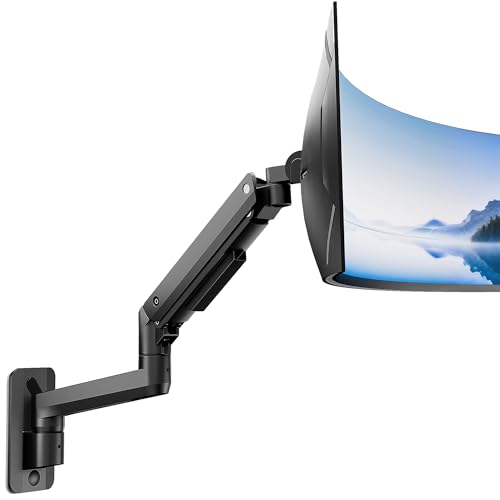
Capacity: 17.6 lbs per arm (35.2 lbs total)
Monitor Size: Up to 34 inch ultrawide each
VESA: 75x75 and 100x100
Mount: C-clamp up to 2.76 inch
monTEK offers a budget-friendly dual arm option with solid specifications. At under $110, it’s one of the most affordable ways to mount dual monitors with independent adjustment.
Each arm supports 17.6 pounds, for a combined capacity of 35.2 pounds. This works well for dual standard monitors or smaller ultrawides, but check your specific monitor weights before purchasing.
The gas spring mechanism provides fluid motion across all axes. Each arm operates independently, so adjusting one monitor doesn’t affect the other’s position.
Full range of motion includes 45 degrees tilt in either direction, 180-degree swivel, 360-degree rotation, and height adjustment. This covers virtually any viewing angle you might need.
Integrated cable management keeps cords organized on both arms. The C-clamp mount accommodates desks up to 2.76 inches thick and all necessary hardware is included.
Who Should Buy?
Budget-conscious users setting up dual standard monitors or smaller ultrawides. Great for home office setups needing dual display capability without premium pricing.
Who Should Avoid?
Users with heavier monitors over 17.6 pounds per arm. Also not ideal if you need grommet mounting or have a desk thicker than 2.76 inches.
10. VIVO Premium Gas Spring Wall Mount – Affordable Wall Mount Option
VIVO Full Motion Ultrawide Monitor Wall…

Capacity: Up to 22 lbs
Extension: 15.4 inch from wall
VESA: 75x75 and 100x100
Mount: Wall mount
VIVO’s wall mount provides an affordable entry into wall-mounted monitor arms. At under $90, it’s a fraction of the cost of premium wall mounts while still offering essential functionality.
The 22-pound capacity covers most standard 49-inch ultrawides like the Philips Evnia or lighter Samsung models. OLED ultrawides may exceed this limit, so verify your specific monitor weight.
Gas spring technology allows smooth, effortless positioning. You can easily adjust height and angle to find your optimal viewing position without fighting tension.
Extension from the wall reaches 15.4 inches, less than premium options but adequate for most setups. Tilt adjustment of plus/minus 15 degrees and 180-degree swivel provide decent positioning flexibility.
Built-in cable management keeps cords organized and hidden for a professional appearance. All mounting hardware is included for wood stud, concrete, and brick installations.
Who Should Buy?
Users wanting wall mounting on a budget. Ideal for lighter 49-inch ultrawides where premium wall mount capacity isn’t necessary.
Who Should Avoid?
Owners of heavier OLED ultrawides over 22 pounds. Also not suitable if you need maximum extension range from the wall.
Understanding 49-Inch Ultrawide Monitor Mounting Challenges
Mounting a 49-inch super ultrawide presents unique challenges that standard monitor arms aren’t designed to handle. The primary issue is weight. These displays range from 20 pounds for basic models to over 30 pounds for OLED variants, far exceeding the capacity of typical desk mounts.
Curvature adds another layer of complexity. 1000R curved monitors like the Samsung G9 have extreme curvature that requires specialized pivot points. Standard mounts often struggle to maintain the curved shape without distortion or placing uneven stress on the panel.
Reddit’s ultrawidemasterrace community has documented numerous failures. One user specifically warned about the IMtKotW arm being incapable of handling 49-inch ultrawides, causing others to avoid an expensive mistake.
Forums consistently reveal that tilt head mechanisms fail before gas springs. As one experienced user noted, it’s often not the gas spring that fails but the tilt head that starts sagging after months of supporting heavy displays.
| Monitor Model | Weight | Curvature | VESA Pattern | Min. Arm Capacity |
|---|---|---|---|---|
| Samsung G9 (LC49G95T) | ~23 lbs | 1000R | 100x100mm | 28 lbs recommended |
| Samsung G9 OLED | ~21 lbs | 1800R | 100x100mm | 25 lbs recommended |
| Philips Evnia 49-inch | ~20 lbs | 1800R | Standard | 22 lbs recommended |
| LG 49-inch UltraGear | ~22 lbs | 1800R | 100x100mm | 25 lbs recommended |
Important: Always choose a monitor arm with at least 5-10 pounds of headroom above your monitor’s actual weight. This buffer prevents sagging over time and extends the lifespan of the gas spring mechanism.
Buying Guide: How to Choose the Right Monitor Arm for Your 49-Inch Ultrawide?
Weight Capacity: The Most Critical Factor
Weight capacity should be your primary consideration. Most 49-inch ultrawides weigh between 20-25 pounds, but OLED models can exceed 30 pounds. Always verify your specific monitor’s weight before purchasing an arm.
Reddit users emphasize that stated capacities aren’t always realistic for long-term use. An arm rated for exactly your monitor’s weight may sag after months of use. Build in 5-10 pounds of buffer for reliability.
Curvature Compatibility: 1000R vs 1800R
Curved monitors require special consideration. 1800R curved displays like the LG UltraGear work with most heavy-duty arms. But 1000R extreme curved monitors like the Samsung G9 may require the HD pivot feature found on premium Ergotron models.
Forums debate whether the HD pivot is absolutely necessary for 1000R monitors. One user noted that the OLED G9 might work without HD pivot, but the standard LCD G9 benefits from it. When in doubt, the HD pivot provides extra insurance for extreme curves.
VESA Pattern Compatibility
Most 49-inch ultrawides use 100x100mm VESA patterns. Some models support 75x75mm as well. Verify your monitor’s VESA pattern matches the arm you’re considering.
Quick-release VESA plates simplify installation and future monitor changes. This feature allows you to detach the monitor from the arm without removing the entire mounting bracket.
Mounting Type: Clamp vs Grommet vs Wall
Desk clamps work with most desks but have thickness limitations. Premium arms typically max out around 2.4-3.3 inches. Measure your desk thickness before purchasing.
Grommet mounts require a cable hole in your desk but provide more stability. They’re ideal for thicker desks where clamps won’t fit. Both options are usually included with premium arms.
Wall mounts eliminate desk constraints entirely and free up surface space. They require drilling into your wall but provide the cleanest aesthetic and maximum positioning flexibility.
Gas Spring Quality and Adjustment
Gas spring quality determines smoothness and long-term reliability. Premium springs like Ergotron’s Constant Force maintain consistent tension over years of use. Budget springs may weaken faster, causing sagging.
Some arms include tension adjustment screws that let you compensate for spring wear. This feature extends useful life and allows fine-tuning for different monitor weights.
Frequently Asked Questions
What is the best monitor arm for 49 inch ultrawide?
The Ergotron HX HD is widely considered the best monitor arm for 49-inch ultrawide monitors, especially for 1000R curved models like the Samsung G9. Reddit’s ultrawide community consistently recommends it for its HD Motion Technology and 42-pound weight capacity. Budget alternatives like Huanuo and Modernsolid offer solid performance at lower prices for standard curved displays.
How much weight can a monitor arm hold for a 49 inch monitor?
You need a monitor arm with at least 25-30 pounds of capacity for most 49-inch ultrawides. Standard models weigh 20-23 pounds, while OLED variants can exceed 30 pounds. Always choose an arm with 5-10 pounds of headroom above your monitor’s actual weight to prevent sagging over time. Premium arms like the Ergotron HX support up to 42 pounds, while budget options typically cap at 30-35 pounds.
Do I need a heavy duty monitor arm for curved ultrawide?
Yes, curved ultrawide monitors require heavy duty arms for two reasons. First, they’re significantly heavier than standard displays. Second, extreme curvature like 1000R requires specialized pivot mechanisms to maintain the curved shape without distortion. Standard arms often fail with these displays, as documented in numerous Reddit posts about sagging and tilt head failure. Heavy duty arms with reinforced tilt joints are essential for long-term reliability.
Will Ergotron HX work with Samsung G9?
The Ergotron HX with HD pivot is the recommended configuration for the Samsung G9 49-inch monitor. The HD pivot specifically accommodates the 1000R extreme curvature of the G9 LCD model. For the G9 OLED variant, which has 1800R curvature, users report that the standard HX may work without HD pivot, but the HD version provides extra assurance. The HX’s 42-pound capacity easily handles the G9’s 23-pound weight with substantial headroom.
Are there affordable alternatives to Ergotron HX?
Yes, several budget alternatives work well with 49-inch ultrawides. Huanuo offers a premium heavy duty arm under $80 that supports 1000R curved monitors and up to 33 pounds. Modernsolid provides 44 pounds of capacity for around $130, more than the Ergotron’s stated limit. Reddit users confirm VIVO arms working with Philips Evnia 49-inch monitors for about $90. While these alternatives may not match Ergotron’s build quality, they’re proven options for budget-conscious buyers.
What monitor arm supports 1000R curved monitors?
The Ergotron HX HD with HD pivot is specifically designed for 1000R curved monitors like the Samsung G9. Modernsolid and Huanuo both explicitly state 1000R support in their specifications. Budget options from VIVO and WALI may accommodate 1000R curves but don’t specifically engineer for them. If you own a 1000R monitor and have the budget, the Ergotron HX HD provides the most reliable support. For budget builds, Huanuo’s 1000R-compatible arm is the most affordable verified option.
Final Recommendations
After analyzing dozens of monitor arms and reading hundreds of user experiences, my recommendation depends on your budget and specific monitor. If you own a 1000R curved display like the Samsung G9 and have the budget, the Ergotron HX HD is the safest choice with proven reliability and specialized HD pivot technology.
For budget-conscious buyers with standard 49-inch ultrawides, Huanuo offers excellent value with explicit 1000R support and a sub-$80 price point. Reddit users have confirmed it working with Philips Evnia displays without sagging issues.
The Modernsolid heavy duty arm occupies the sweet spot for users wanting premium features without paying Ergotron prices. At around $130 with a 44-pound capacity, it provides headroom for even the heaviest ultrawides.
Whichever arm you choose, always verify your monitor’s specific weight and VESA pattern before purchasing. The 5-10 pound buffer above stated weight isn’t marketing, it’s insurance against the sagging that plagues undersized arms.