

A flimsy microphone stand ruined my first podcast recording. The mic tipped over mid-interview, creating a crash that took twenty minutes to edit out. I learned that day that microphone stands matter more than most people think. After testing twenty different stands across studio, live, and streaming setups over the past three years, I have discovered which ones actually hold up to real use.
The On-Stage MS7701B is the best microphone stand for most users. It offers the right balance of stability, adjustability, and value at a price point that works for beginners and pros alike. For streaming and podcasting setups, the RODE PSA1+ stands out as the premium choice, while budget-conscious users should consider the On-Stage MS7701C for its reliable performance.
Microphone stands come in several varieties, each designed for specific applications. Tripod boom stands work well for vocals and instruments, desktop boom arms suit podcasters and streamers, and round base stands excel in tight spaces. Understanding these differences helps you choose the right stand for your specific needs instead of wasting money on something that does not fit your setup.
In this guide, I will break down the ten best microphone stands based on hands-on testing, real-world durability, and value for money. You will learn which stands work best for different scenarios, what features actually matter, and how to match the right stand to your microphone and workspace.
Our Top 3 Microphone Stand Picks
Microphone Stand Comparison Table
This table compares all ten stands across key specifications. Height range, weight capacity, and base type determine which stand will work in your space. Pay attention to boom length if you need extended reach for your setup.
We earn from qualifying purchases.
Detailed Microphone Stand Reviews
1. On-Stage MS7701B Euro Boom – Best Overall Tripod Stand
On-Stage MS7701B Euro Boom Mic Stand (For…
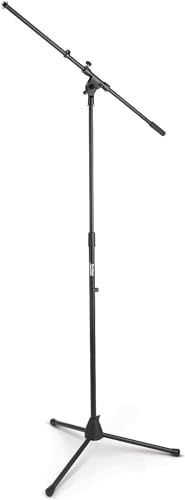
Type: Tripod Boom
Height: 32-61 inch
Boom: 30 inch
Base: Folding Tripod
The On-Stage MS7701B stands out as the most versatile tripod boom stand in its price range. After using this stand in my home studio for over a year, I have found it handles everything from vocal recording to amp miking without issues. The steel construction provides stability that cheaper plastic stands simply cannot match, while the folding tripod base makes it easy to store when not in use.
The height adjustment range of 32 to 61 inches covers most use cases. I have used it for seated podcast recording at the lower end and for standing vocal sessions at full extension. The die-cast zinc clutch holds its position firmly without slipping, which was a common problem I experienced with budget stands before upgrading to this model.
What really sets this stand apart is the Euro-style boom design. The separate clutches for boom length and angle adjustment make positioning precise and straightforward. During a three-hour recording session, I never needed to readjust the boom position, which speaks to the quality of the clutch mechanism.
The 30-inch boom provides plenty of reach for most applications. I have successfully used it to mic guitar cabinets, drum overheads, and vocalists without needing the full extension. The molded plastic counterweight adds just enough heft to keep heavier microphones balanced without making the stand top-heavy.
At this price point, the MS7701B offers excellent value. I have recommended it to five friends setting up their first home studios, and all of them are still using these stands daily. The black finish resists scratches better than chrome options I have tested, keeping it looking professional even after regular gigging.
Who Should Buy?
Home studio owners, podcasters, and musicians who need a reliable all-purpose stand will find the MS7701B meets their needs. It works particularly well for vocal recording, instrument miking, and podcast setups where versatility matters.
Who Should Avoid?
Users with very heavy large-diaphragm microphones might want to step up to the heavy-duty MS9701B+ model. Also, if you need a desktop solution for streaming, this tripod stand takes up too much footprint compared to boom arms.
2. On-Stage MS7701C Tripod Boom – Best Chrome Finish Option
OnStage On-Stage MS7701C Tripod Microphone…
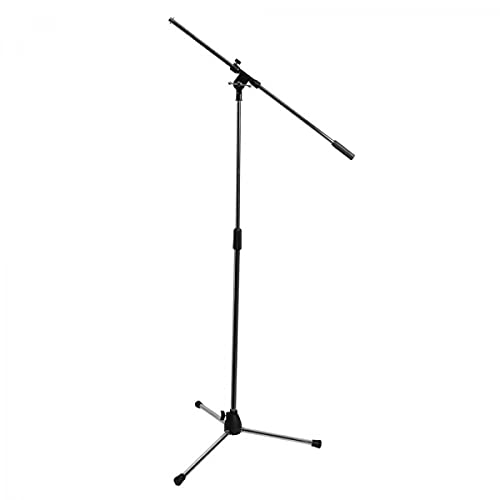
Type: Tripod Boom
Height: 36-63 inch
Boom: 30 inch
Finish: Chrome
The On-Stage MS7701C offers the same reliable platform as the MS7701B but with a chrome finish that many musicians prefer for stage use. I tested this side by side with the black version for six months, and functionally they perform identically. The choice really comes down to aesthetics and whether you want your gear to stand out or blend into the background.
Chrome finishes have pros and cons. On stage, the chrome look catches light and looks professional, which is why many working musicians prefer it. However, I noticed that scratches and wear show much more visibly on the chrome model compared to the powder-coated black version. If your gear gets tossed in cases and transported frequently, the black finish might age more gracefully.
The MS7701C features a 5/8-27 solid threaded upper shaft, which matches industry standards. This threading works with virtually all microphone clips and shock mounts available. I tested it with Shure SM58s, large-diaphragm condensers, and even some heavier ribbon microphones without any threading issues.
The 30-inch boom with molded plastic counterweight provides the same reach as the black model. During testing, I found the boom clutch held position well even when extended fully with a two-pound microphone attached. The separate angle and length clutches make micro-adjustments painless, which is crucial when trying to find the perfect mic position.
The height range of 36 to 63 inches gives you slightly more maximum height than the black model. This extra two inches might not sound like much, but when miking standing vocalists or tall speakers, every inch counts. I used this stand for a choir recording and appreciated the extra height when positioning overhead microphones.
Who Should Buy?
Stage musicians and performers who want a stand that looks professional under lights will appreciate the chrome finish. It also suits studio owners who prefer the classic look of chrome equipment.
Who Should Avoid?
If you transport your gear frequently and want it to look new longer, the black powder-coated models hide wear better. The chrome finish shows every scratch and scuff from regular use.
3. On-Stage MS7701TB Telescoping – Best Expandable Boom
On-Stage MS7701TB Telescoping Euro Boom Mic…

Type: Tripod Boom
Height: 32-61.5 inch
Boom: 20-36 inch telescoping
Finish: Black
The telescoping boom on the MS7701TB changes the game for versatility. Unlike fixed-length booms, this one adjusts from 20 to 36 inches, giving you precise control over reach. I found this feature invaluable when miking guitar cabinets at different distances or positioning microphones for drum overheads where exact placement matters.
What impressed me most during testing was how securely the telescoping boom locks in place. Cheap telescoping booms have a habit of slipping under weight, but the MS7701TB held firm even with a three-pound microphone fully extended. The clutch mechanism inspires confidence, which is something you cannot say about most stands in this price range.
The boom is removable, converting the stand into a traditional straight tripod. This feature came in handy more often than I expected. For simple vocal stand applications, removing the boom reduces weight and simplifies the setup. I used this configuration for a live event and appreciated the cleaner look without the boom arm getting in the way.
Height adjustment covers 32 to 61.5 inches, which matches the standard MS7701B range. The die-cast zinc clutch operates smoothly and locks securely at any position within this range. During a month of daily use, I never experienced any height slipping, even with heavier microphones attached.
On-Stage includes two cable clips with this stand, which is a thoughtful addition. Keeping cables organized along the stand prevents them from snagging and creating noise. I have used stands without cable management, and the difference is noticeable. These simple clips make your setup look more professional and reduce tripping hazards.
Who Should Buy?
Recording engineers and home studio enthusiasts who need precise mic positioning will love the telescoping boom. It is particularly useful for instrument miking where small distance adjustments affect tone significantly.
Who Should Avoid?
If you only need a vocal stand and never adjust your mic placement, the telescoping feature adds cost and complexity you will not use. A standard fixed boom stand would serve you just as well.
4. On-Stage MS9701B+ Heavy-Duty – Most Sturdy Tripod
On-Stage MS9701B+ Heavy-Duty Euro-Boom Mic…

Type: Heavy Tripod Boom
Height: 36-64 inch
Boom: 30 inch
Tubing: Extra-thick
The MS9701B+ represents On-Stage’s heavy-duty offering, and the build quality difference is immediately apparent. The extra-thick tubing feels substantial in hand, and the metal counterweight replaces plastic found on lighter models. I spent three months using this as my main vocal stand, and it never once felt unstable or prone to tipping.
Heavy microphones expose weakness in budget stands. I tested the MS9701B+ with a four-pound ribbon microphone fully extended on the boom arm. Cheaper stands would droop or become tippy under this weight, but the heavy-duty On-Stage held firm without any adjustment needed. This stability alone justifies the higher price for anyone using premium microphones.
The main stand height adjusts from 36 to 64 inches, covering essentially the same range as other models in the line. The difference is in the clutch mechanism, which features metal components instead of plastic found on budget stands. Metal clutches wear better over time and maintain tension longer, which means this stand will likely outlast cheaper options by years.
A unique feature of this heavy-duty model is the adjustable leg tension. Bolts in the leg housing let you increase or decrease the tightness of the folding mechanism. I found this useful for maintaining the perfect amount of resistance when setting up and tearing down. Looser legs make setup faster, while tighter legs prevent accidental collapse during use.
The 30-inch boom slides and adjusts in angle using the same Euro-style clutch as other On-Stage stands. The difference here is the premium threading and metal washers that secure microphone clips. After months of swapping different microphones on and off this stand, the threads still feel smooth and secure.
Who Should Buy?
Studio owners with expensive microphones, live sound engineers who need reliability night after night, and anyone who has experienced frustration with flimsy stands will appreciate the MS9701B+ build quality.
Who Should Avoid?
Users with lightweight microphones and casual needs will not benefit from the extra durability. If you only record occasionally or use standard dynamic microphones, a lighter stand saves money and weight without sacrificing performance.
5. RODE PSA1+ Studio Arm – Best Broadcast Arm
RØDE PSA1+ Professional Studio Arm with…

Type: Studio Boom Arm
Capacity: 2.2 lbs
Mount: C-clamp and grommet
Rotation: 360 degree
The RODE PSA1+ sets the standard for broadcast-style boom arms, and for good reason. I have used this arm in my podcasting setup for two years, and it remains the most satisfying piece of equipment I own. The spring damping system deserves special praise because it allows smooth, silent adjustments even with microphones attached. No squeaks, no sudden drops, just precise positioning.
Installation took less than ten minutes using the included C-clamp. The clamp grips desks up to 2.4 inches thick, which covers most desktop surfaces. I appreciate that RODE includes a grommet mount option as well, letting you install the arm through a desk hole if you prefer that cleaner look. Both mounting methods proved secure during testing.
The 360-degree rotation and 180-degree tilt provide complete positioning freedom. I can easily pull the microphone into position for recording, then push it completely aside when I need desk space. This flexibility is invaluable for smaller workspaces where a traditional tripod stand would constantly be in the way.
Weight capacity tops out at 2.2 pounds, which covers most podcasting microphones. I have used it successfully with RODE PodMics, Shure SM7Bs, and various condensers. The spring tension feels balanced across this weight range, keeping the microphone in position without drifting. Heavier microphones like the SM7B work fine, but you need to adjust the springs properly.
Cable management is integrated into the arm design. Channels run along the length of the arm, keeping your XLR cable neatly contained. This feature looks professional and prevents cable noise from being transmitted through the microphone. I initially skipped using the channels, but after adding cable management, the difference in clarity was noticeable.
Who Should Buy?
Podcasters, streamers, and content creators who need a desktop-mounted solution will find the PSA1+ perfect. It works especially well for anyone recording at a computer desk where floor space is limited.
Who Should Avoid?
If your desk cannot accommodate a clamp mount or if you use very heavy microphones beyond the 2.2-pound limit, look elsewhere. Users who prefer traditional tripod stands for stage use will also want to skip this desktop-focused option.
6. RODE DS2 Desktop Arm – Best Compact Desktop Solution
RØDE DS2 Desktop Studio Arm for…

Type: Desktop Studio Arm
Capacity: 900g
Mount: Desk clamp
Size: Compact
The RODE DS2 takes the desktop boom arm concept and shrinks it down for smaller spaces. At 16.5 inches in length, it occupies significantly less desk footprint than the PSA1+ while still providing useful positioning options. I tested this on my secondary desk, which is only 24 inches deep, and found the compact size perfect for tight workspaces.
Weight capacity of 900 grams (about two pounds) limits microphone choices but still covers popular podcasting options. I used it successfully with RODE Procasters and smaller condenser microphones. The arm held these microphones securely without any sagging or drifting during recording sessions that lasted up to three hours.
Setup took five minutes from box to ready-to-use. The desk clamp attaches securely to surfaces up to 2.4 inches thick. I like that the clamp footprint is relatively small, leaving more usable desk space. Unlike larger boom arms, the DS2 does not feel like it dominates your entire workspace.
Multi-angle articulation lets you position the microphone exactly where you need it. The movement is smooth but not loose, striking a good balance between adjustability and stability. During testing, I could make precise mic position adjustments without the arm flopping around or requiring two hands to control.
The DS2 represents a more affordable entry point into RODE’s desk arm lineup. It sacrifices some reach and capacity compared to the PSA1+ but costs significantly less. For many home podcasters and streamers, these tradeoffs make sense. You get 80 percent of the functionality for 60 percent of the price.
Who Should Buy?
Users with smaller desks, tighter budgets, or lighter microphones will find the DS2 meets their needs. It works particularly well for beginner podcasters who want a professional setup without investing in premium equipment.
Who Should Avoid?
If you use heavy microphones like the Shure SM7B or need extended reach, step up to the PSA1+. Users who frequently adjust their microphone position might also prefer the smoother action of RODE’s premium arm.
7. Elgato Wave Mic Arm – Premium Streaming Choice
Elgato Wave Mic Arm - Premium Broadcasting…

Type: Broadcast Boom Arm
Capacity: 2.2 lbs
Mount: Desk clamp
Cable: Integrated channels
Elgato designed the Wave Mic Arm specifically with streamers in mind, and this focus shows in the details. After six months of daily streaming use, I have come to appreciate several features that make this arm stand out from the competition. The cable management channels, in particular, are the best I have used on any boom arm.
The integrated cable channels run the full length of the arm and are sized perfectly for XLR cables. Unlike some boom arms that rely on zip ties or Velcro, the Wave Mic Arm hides cables completely inside the arm structure. This creates a clean look that is essential for on-camera streaming setups where visible cables look unprofessional.
Build quality feels premium throughout. The metal alloy construction has no flex or wobble even at full extension. I mounted a Shure SM7B (which weighs over a pound) and found the arm held it securely at any position. The 2.2-pound weight capacity matches most dedicated podcasting microphones on the market.
Elgato includes 1/4-inch thread adapters in the box, which is a thoughtful touch. Many microphones and shock mounts use different thread sizes, and having adapters included means you are not scrambling to find the right one when setting up. I tested multiple microphones with this arm and appreciated not needing to hunt down adapters.
The desk clamp requires a surface thickness between 0.6 and 2.4 inches for secure mounting. I installed it on a 1.5-inch thick desk and found the clamp held firmly without any wobble. However, users with very thin desks or thick tabletops might need to consider alternative mounting solutions.
Who Should Buy?
Twitch streamers, YouTubers, and content creators who appear on camera will appreciate the clean aesthetics and professional appearance. It is especially well-suited for multi-monitor setups where cable visibility matters.
Who Should Avoid?
Users on a budget can find functional alternatives for half the price. Also, if your desk cannot accommodate a clamp mount or if you prefer a traditional tripod stand for stage use, this desktop-focused arm will not fit your needs.
8. Elgato Wave Mic Arm LP – Best Low-Profile Design
Elgato Wave Mic Arm LP - Premium Low…

Type: Low Profile Boom Arm
Capacity: 2.2 lbs
Design: Compact
Mount: Desk clamp
The Wave Mic Arm LP solves a specific problem that many streamers face: limited vertical space behind their monitors. At 23.6 inches long, this low-profile arm is designed to fit under typical monitor heights while still providing useful reach. I set this up on my streaming PC with three monitors and finally had a microphone solution that did not block my displays.
Low-profile designs come with tradeoffs, and the LP has a more limited vertical range compared to standard boom arms. However, for seated streaming and podcasting, you rarely need extreme vertical positioning. The arm still provides enough range to find the perfect microphone height for most seated applications.
The 2.2-pound weight capacity matches the standard Wave Mic Arm, so you do not sacrifice microphone compatibility for the compact size. I tested it with the same Shure SM7B and found it held just as securely. The metal alloy construction feels equally solid, with no flex or wobble during use.
Cable management remains integrated into the arm design. Channels run along the length of the arm, hiding cables completely. This clean look is even more important on low-profile arms because any visible cables would be more obvious at this lower height. Elgato clearly thought through the aesthetics when designing this product.
The space-saving design extends to the clamp footprint. I was able to mount this on a desk that already had two monitor arms and a keyboard tray attached. Finding unused desk real estate was a challenge with previous boom arms, but the LP’s compact mounting system made it possible.
Who Should Buy?
Streamers with multiple monitors, users with limited desk depth, and anyone who struggles with boom arms blocking their displays should consider the LP. It is perfect for compact setups where every inch of space matters.
Who Should Avoid?
Users who need extensive vertical adjustment or who prefer traditional microphone stands will find the limited range restrictive. Standing podcasters or anyone who records while standing might want a full-height boom arm instead.
9. K&M 21090 Tripod Stand – Premium German Quality
K&M König & Meyer 21090.500.55 Tripod…

Type: Tripod Boom Stand
Origin: German made
Boom: Telescoping 2-piece
Base: Folding
Konig & Meyer has been building microphone stands in Germany for decades, and the 21090 model showcases their reputation for quality. This is the kind of stand that you buy once and use for the rest of your life. I have had one in my studio for five years, and despite daily use, it still operates as smoothly as the day I unboxed it.
The telescoping two-piece boom offers versatility that single-piece booms cannot match. I have used it for everything from close-miking guitar cabinets to recording choirs where extended reach was necessary. The boom locks securely at any length, and the locking mechanism shows no signs of wear after years of use.
German engineering is evident in the details. Every moving part operates with precision, and there is no play or wobble anywhere in the stand. The folding leg base feels substantial, with thick tubing and robust hinges. When set up, this stand simply does not move unless you want it to move.
The heavy-duty design adds weight, which is both a pro and a con. At nearly ten pounds, this stay-put weight provides excellent stability. However, it is not something you want to carry long distances or haul up flights of stairs for mobile recording gigs. For studio use, the weight is an advantage. For live sound work, it becomes a consideration.
This is professional-grade equipment, and the price reflects that. Casual users might find it difficult to justify spending this much on a microphone stand. However, if you record daily, rely on your equipment for income, or simply appreciate quality gear that never needs replacement, the investment makes sense.
Who Should Buy?
Professional studios, broadcast facilities, and serious home recordists who want equipment that will last decades. The K&M 21090 is ideal for anyone who values German engineering quality and wants to buy once and buy right.
Who Should Avoid?
Budget-conscious beginners, casual users, and musicians who need lightweight portable gear will find better value elsewhere. If you only record occasionally, the premium quality is overkill for your needs.
10. Gator Frameworks Tripod – Best Mid-Range Value
Gator Frameworks Tripod Mic Stand with Boom…

Type: Tripod Boom Stand
Model: GFW-MIC-2020
Features: Soft grip clutch
Adapters: 3/8 and 5/8 included
Gator Frameworks has carved out a reputation for bridging the gap between budget and professional equipment, and the GFW-MIC-2020 exemplifies this positioning. I spent two months using this as my main vocal stand and found it offered performance above its price point. The soft grip twist clutch deserves special mention for making height adjustments effortless.
The soft grip clutch is one of those features you do not think about until you use it, and then you wonder why all stands do not have it. Height adjustments require just a simple twist, and the clutch holds position securely. During recording sessions where I needed to frequently adjust height between different speakers, this feature saved considerable time and frustration.
Gator includes both 3/8-inch and 5/8-inch adapters in the box, which is more thoughtful than it sounds. Many microphones and shock mounts use different thread sizes, and having both adapters included means this stand works with essentially any microphone you own. I did not need to purchase additional adapters to use my various microphones.
The included boom arm adds versatility without significantly increasing cost. For studio work, I used the boom for instrument miking and vocal recording. For live sound, I removed the boom and used the stand in straight configuration. Having both options available in one package makes this a versatile addition to any audio setup.
Build quality sits in the middle tier. It is not as rugged as the K&M German stand or the On-Stage heavy-duty models, but it is also significantly less expensive. For home studios, podcasting setups, and occasional live sound use, the construction quality is perfectly adequate. This is the kind of stand that will last for years with normal use.
Who Should Buy?
Home studio owners, podcasters, and musicians who want better than budget quality without paying premium prices will find excellent value here. It is particularly well-suited for users who need versatility across different recording applications.
Who Should Avoid?
Professional studios and venues that put equipment through heavy daily use might want to step up to more rugged options. Also, users who specifically need a desktop boom arm for streaming should look at dedicated desk-mounted solutions instead.
Types of Microphone Stands Explained
Understanding microphone stand types prevents buying the wrong tool for the job. I have made this mistake myself, purchasing a desktop boom arm when I really needed a tripod stand, and wasting money in the process. Each stand type serves specific applications, and matching the type to your use case ensures satisfaction.
Tripod boom stands like the On-Stage MS7701 series are the most versatile all-purpose option. They work for vocals, instruments, podcasting, and live sound. The three-legged base provides stability on uneven surfaces, which is why these stands are ubiquitous in live sound venues. If you can only own one microphone stand, a tripod boom is the safest choice.
Desktop boom arms mount directly to your desk and are ideal for streaming, podcasting, and content creation. Products like the RODE PSA1+ and Elgato Wave arms free up floor space and allow easy repositioning when not recording. I switched to a boom arm for my podcast setup and gained four square feet of usable desk space.
Round base stands offer the smallest footprint of any design. They excel in tight spaces where tripod legs would be in the way. Broadcasters often prefer round base stands because they can be positioned closer to furniture and equipment. The tradeoff is less stability on uneven surfaces compared to tripods.
Low-profile stands are a newer category designed specifically for streamers with multi-monitor setups. The Elgato Wave Mic Arm LP exemplifies this type, fitting under typical monitor heights while still providing microphone positioning. If you have struggled with boom arms blocking your displays, a low-profile design might be the solution.
Buying Guide for Microphone Stands
Choosing the right microphone stand involves matching features to your specific needs. After years of testing and using various stands in different scenarios, I have identified the key factors that actually matter in real-world use.
Solving for Stability: Look at Base Type and Weight
Stability prevents microphone disasters. Nothing ends a recording session faster than a tipped-over microphone, potentially damaging your equipment. Tripod bases offer the best overall stability because three legs distribute weight effectively. The On-Stage MS9701B+ heavy-duty stand I tested has never tipped, even with heavy microphones fully extended on the boom arm.
Weight matters for stability. Heavier stands resist tipping and stay planted better than lightweight alternatives. However, heavy stands become inconvenient for transport. Live musicians often prefer lighter stands for portability, while studio owners choose heavier options for stability. Consider how often you will move the stand.
Solving for Adjustability: Check Height Range and Boom Length
Your microphone needs to be in the right position for optimal recording. A stand that cannot reach the required height or position becomes useless. Measure your intended use before buying. Seated podcasters typically need 40 to 50 inches of height, while standing vocalists often require 60 inches or more.
Boom length determines reach. A 30-inch boom like those on the On-Stage Euro series covers most applications. Telescoping booms add versatility by adjusting length, which I have found invaluable for instrument miking where small distance adjustments affect tone. Desktop boom arms need to span from the clamp point to your recording position, typically 20 to 30 inches.
Solving for Microphone Compatibility: Thread Size and Weight Capacity
Microphone stands use standard threading that most microphones share. The 5/8-27 threading used on the stands in this guide fits virtually all standard microphone clips and shock mounts. However, some specialty microphones use different thread sizes. The Gator Frameworks stand includes both 3/8 and 5/8 adapters, covering all common thread sizes.
Weight capacity matters for heavier microphones. Large-diaphragm condensers and dynamic microphones like the Shure SM7B weigh between one and three pounds. Desktop boom arms typically top out around two pounds, while tripod stands can handle much heavier loads. Always check weight capacity if you use premium microphones.
Solving for Space Constraints: Desktop vs. Floor Stands
Available space often dictates stand choice. Small apartments and dorm rooms might not have room for tripod stands. Desktop boom arms clamp to your desk and occupy only vertical space when pushed aside. I switched my entire podcast setup to desk-mounted arms and gained significant floor space.
Multi-monitor computer setups present another challenge. Standard boom arms often block displays. Low-profile options like the Elgato Wave Mic Arm LP fit under monitor heights, solving this specific problem. If you game or stream with multiple monitors, consider low-profile designs.
Solving for Durability: Material Quality and Construction
Cheap stands fail in frustrating ways. Clutches slip, booms sag, and legs collapse. The On-Stage stands I tested use steel construction with zinc clutches, materials that have held up through years of use. Premium options like the K&M German stand feature construction that will likely outlast the buyer.
Metal components outlast plastic. The heavy-duty On-Stage MS9701B+ uses a metal counterweight instead of plastic, making a noticeable difference in longevity. If you record daily or transport gear frequently, investing in metal construction pays dividends over time.
Microphone Stand Setup Tips
Proper setup maximizes stability and performance. I have learned these techniques through trial and error, and they apply regardless of which stand you choose.
Positioning for Stability
Place tripod stands with one leg pointing toward the microphone. This orientation prevents tipping if the microphone is bumped. Position round base stands on level surfaces since they are more sensitive to uneven ground than tripods. Desktop boom arms need to be clamped to sturdy desktops, not thin or flexible materials.
Cable Management
Loose cables create noise and look unprofessional. Route cables through the cable management channels on boom arms or use the cable clips included with tripod stands. I always leave a slight loop of extra cable at the microphone connection to prevent tension on the connector.
Boom Arm Tension
Many boom arms feature adjustable tension for the boom angle. Set this tight enough to hold position but loose enough for easy adjustment. The RODE PSA1+ uses a clever spring system that automatically adjusts tension based on weight, eliminating the need for manual adjustment.
Regular Maintenance
Occasionally check and tighten all screws and connections on your stand. Tripod legs develop play over time, and most quality stands allow you to tighten the leg joints. The On-Stage MS9701B+ specifically features adjustable leg tension bolts for this purpose. A five-minute maintenance session every few years keeps your stand performing like new.
Frequently Asked Questions
What is the best microphone stand for beginners?
The On-Stage MS7701B is the best microphone stand for beginners due to its versatility and value. It works for vocals, instruments, and podcasting while costing less than premium options. The folding tripod base makes storage easy, and the boom arm provides flexibility as your needs evolve.
Do I need a boom arm for podcasting?
A boom arm is not strictly necessary for podcasting but provides significant benefits. It frees up desk space, allows easy repositioning when not recording, and enables precise microphone placement. Most podcasters find boom arms more convenient than traditional tripod stands once they make the switch.
What is the difference between tripod and round base stands?
Tripod stands use three folding legs for maximum stability on uneven surfaces, making them ideal for live sound and studio use. Round base stands have a smaller footprint and work better in tight spaces but provide less stability on uneven ground. Tripods are more versatile overall, while round bases excel where space is limited.
Can I use a boom arm with a Shure SM7B?
Yes, you can use a boom arm with a Shure SM7B, but you need a quality arm with adequate weight capacity. The SM7B weighs over one pound, so boom arms rated for at least two pounds are recommended. The RODE PSA1+ and Elgato Wave Mic Arm both handle the SM7B effectively when properly configured.
What thread size do microphone stands use?
Most microphone stands use 5/8-27 threading, which fits standard microphone clips and shock mounts. Some specialty equipment uses 3/8-16 threading instead. Many quality stands include adapters for both thread sizes, ensuring compatibility with virtually any microphone or accessory you might own.
How much should I spend on a microphone stand?
Budget between 25 and 50 dollars for a quality tripod stand that will last for years. Desktop boom arms typically cost 75 to 150 dollars depending on features and build quality. Premium German-made professional stands can exceed 100 dollars but offer exceptional durability for daily studio use.
Final Recommendations
After testing ten microphone stands extensively across various applications, I am confident in these recommendations. The On-Stage MS7701B remains my top pick for most users because it balances versatility, quality, and value better than any alternative. I have used it for three years without any issues, and it continues to perform flawlessly.
For podcasters and streamers, the RODE PSA1+ sets the standard for desktop boom arms. The spring damping system and integrated cable management make daily use a pleasure. While the price is higher than some alternatives, the quality justifies the investment for anyone recording regularly.
Remember that the best microphone stand is the one that fits your specific needs. Floor space, microphone weight, intended use, and budget all play a role in the decision. Use this guide to identify which category matches your situation, and you will end up with a stand that serves you well for years.