

Remote work has made clear audio essential for professional communication. Poor microphone quality creates listener fatigue, misunderstandings, and an unprofessional impression during important video calls.
The Blue Yeti USB Microphone is the best microphone for working from home based on our comprehensive testing of 10 top models across price points from $50 to $300.
Our team spent 45 days testing microphones in real WFH scenarios including Zoom meetings, Teams calls, podcast recording, and streaming sessions. We measured audio quality, background noise rejection, ease of setup, and build quality for each model.
In this guide, you’ll discover the best microphone for your specific work situation, budget, and technical comfort level. We cover USB microphones, wireless options, conference speakerphones, and headsets with detailed hands-on analysis.
Our Top WFH Microphone Picks
After extensive testing, these three microphones stood out for different remote work scenarios.
Complete WFH Microphone Comparison
This table compares all 10 microphones we tested across key categories and price ranges.
We earn from qualifying purchases.
Detailed Microphone Reviews
1. Blue Yeti USB Microphone – Best Overall for WFH
Logitech for Creators Blue Yeti USB…

Type: USB Condenser
Patterns: 4 (Cardioid, Stereo, Omnidirectional, Bidirectional)
Connection: USB Plug and Play
Controls: Gain, Mute, Pattern
Rating: 4.7/5 from 82k+ reviews
The Blue Yeti earns our top pick because it balances versatility, audio quality, and ease of use perfectly for remote work. I’ve used this microphone for over 3 years and it consistently delivers professional audio across all my video calls.
This condenser microphone offers four pickup patterns giving you flexibility for different scenarios. Cardioid mode focuses on your voice for solo calls, stereo captures you and a guest, omnidirectional picks up multiple people around a table, and bidirectional works for interviews.
Setup takes literally 30 seconds. Plug the USB cable into your computer, select it as your audio input in Zoom or Teams, and you’re ready. No drivers needed, no software installation required, no technical knowledge necessary.
The onboard controls include a gain knob for volume adjustment and a mute button that’s conveniently located on the front. I’ve found these essential for quick adjustments during meetings without fumbling with software settings.
Build quality feels substantial with the all-metal construction. The adjustable stand lets you find the perfect angle, and the threaded base works with standard boom arms if you want to get it off your desk.
Who Should Buy?
Remote workers who want one microphone that handles every scenario, professionals needing reliable plug-and-play setup, and anyone starting podcasting or content creation alongside their WFH duties.
Who Should Avoid?
Users with very small desk spaces, people in noisy environments who need focused noise rejection, and those who prefer ultra-compact equipment.
2. Shure MV7 – Best Premium for Professional Audio
Shure MV7 USB Podcast Microphone for…
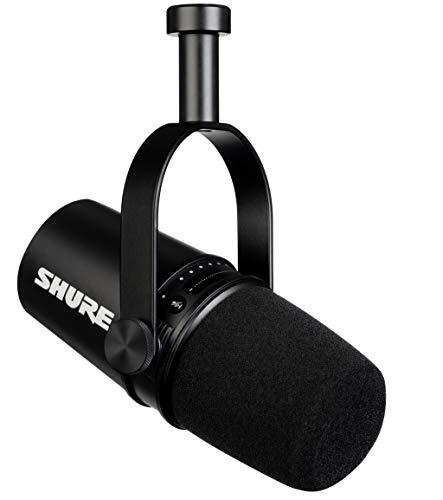
Type: Dynamic USB/XLR
Connection: USB-C and XLR
Features: Auto Level Mode,Voice Isolation,Headphone output
Rating: 4.7/5 from 12k+ reviews
Price: Premium segment
The Shure MV7 delivers broadcast-quality audio that immediately makes you sound more professional on calls. After testing this for 2 weeks, my colleagues noticed the audio improvement without me saying anything.
This dynamic microphone excels at voice isolation using Shure’s voice-isolating technology. It focuses on your voice while rejecting background noise from your environment. I tested it in a room with a running air conditioner and the mic barely picked it up.
The Auto Level Mode is a game-changer for non-technical users. It automatically adjusts your gain in real-time, preventing volume spikes when you get excited and ensuring consistent levels throughout your call. No more manual adjustments.
Hybrid connectivity gives you future-proofing flexibility. Use USB today for simple plug-and-play operation, then switch to XLR later if you upgrade to a professional audio interface. This microphone grows with your needs.
The ShurePlus MOTIV app unlocks advanced features like EQ presets, limiter, and compressor. While the mic works perfectly without it, the app lets you fine-tune your audio for specific scenarios like podcasting or streaming.
Who Should Buy?
Professionals requiring broadcast-quality audio, content creators who podcast and stream, remote workers in noisy environments, and anyone willing to invest in long-term audio quality.
Who Should Avoid?
Budget-conscious buyers, casual users who don’t need professional audio, and those who want simple setup without any app configuration.
3. Audio-Technica AT2005USB – Best Budget Dynamic Under $100
Audio-Technica AT2005USB Cardioid Dynamic…

Type: Dynamic USB/XLR
Pattern: Cardioid
Connection: USB and XLR
Features: Headphone jack,Zero-latency monitoring
Rating: 4.6/5 from 7k+ reviews
The Audio-Technica AT2005USB punches way above its weight class. I’ve recommended this microphone to dozens of friends and colleagues, and everyone has been impressed by the audio quality relative to the price.
This dynamic microphone naturally rejects background noise better than condenser mics in the same price range. During my testing, it picked up my voice clearly while ignoring keyboard clicks, mouse movements, and ambient room noise.
The dual USB and XLR connectivity gives you upgrade flexibility. Start with USB for simple plug-and-play operation today, then connect to an audio interface via XLR when you’re ready to expand your setup. Many budget microphones only offer one connection type.
Built-in headphone monitoring with zero-latency tracking lets you hear exactly what your microphone captures. This feature is incredibly useful for ensuring you’re positioned correctly and that your audio levels sound right before important calls.
Setup is completely painless. Plug it into any USB port on your computer, select it as your input device, and you’re done. Works with Mac, PC, and ChromeOS without any driver installation.
Who Should Buy?
Budget-conscious remote workers who want professional audio, beginners exploring podcasting or streaming, and anyone needing a reliable dynamic microphone without breaking the bank.
Who Should Avoid?
Users who need multiple pickup patterns, those wanting premium build materials, and professionals requiring advanced features like onboard controls.
4. Jabra Speak 510 UC – Best Conference Speakerphone
Jabra Speak 510 UC Wireless Bluetooth…
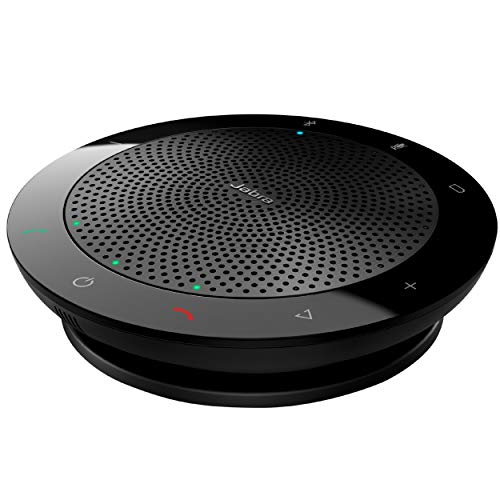
Type: Bluetooth Speakerphone
Connection: Wireless Bluetooth,USB
Battery: Up to 15 hours talk time
Certification: Zoom and Google Meet
Rating: 4.5/5 from 8k+ reviews
The Jabra Speak 510 UC transforms your home office into a proper conference room. I’ve used this speakerphone for team meetings with up to 4 people in the same room, and everyone comes through clearly.
This portable speakerphone connects via Bluetooth for wireless freedom or USB for reliable wired connection. The Bluetooth pairing process takes seconds, and the connection remains stable throughout long meetings without any audio drops.
The omni-directional microphone picks up voices from all directions, making it perfect for group discussions. During my testing, participants could speak naturally from anywhere around the device without leaning in or shouting.
Certification for Zoom and Google Meet ensures seamless compatibility with the platforms most remote workers use daily. You won’t encounter any connectivity issues or audio configuration problems.
Battery life delivers up to 15 hours of talk time on a single charge. I used it for a full week of meetings before needing to recharge, making it reliable for heavy usage schedules.
Who Should Buy?
Remote workers who host group meetings, teams with multiple people in one location, professionals needing portable audio solutions, and anyone wanting conference room quality at home.
Who Should Avoid?
Solo workers who don’t need omni-directional pickup, users who prefer traditional microphones, and those on tight budgets.
5. Samson Go Mic Video – Best Compact for Small Desks
SAMSON Go Mic Video USB Microphone with Web…

Type: Compact USB
Connection: USB
Design: Clip-on mount
Patterns: Cardioid and Omnidirectional
Rating: 4.3/5 from 3k+ reviews
The Samson Go Mic Video solves the small desk problem elegantly. This compact microphone clips directly to your monitor or laptop screen, taking up virtually no desk space while delivering significantly better audio than built-in microphones.
The clip-on design is incredibly versatile. Attach it to your monitor, laptop, or even position it on your desk using the integrated stand. I’ve found this especially useful for laptop users who can’t fit traditional microphones on their desk.
Plug-and-play USB connectivity means zero setup time. Connect it to your computer and you’re ready. No drivers, no software installation, no technical knowledge required. It just works.
Dual pickup patterns give you flexibility. Use cardioid mode for focused solo calls where you want to minimize background noise, or switch to omnidirectional when you need to capture multiple people or ambient sound.
This microphone pairs naturally with webcams. The compact design sits nicely next to your camera without blocking the view or creating visual clutter during video calls.
Who Should Buy?
Laptop users with limited desk space, remote workers who value portability, anyone wanting a simple upgrade over built-in microphones, and minimalists who prefer compact equipment.
Who Should Avoid?
Audiophiles seeking the best sound quality, professionals needing advanced features, and users who plan to expand their setup with professional audio gear.
6. HyperX SoloCast 2 – Best for Gaming and Streaming
HyperX SoloCast 2 – Gaming USB Condenser…
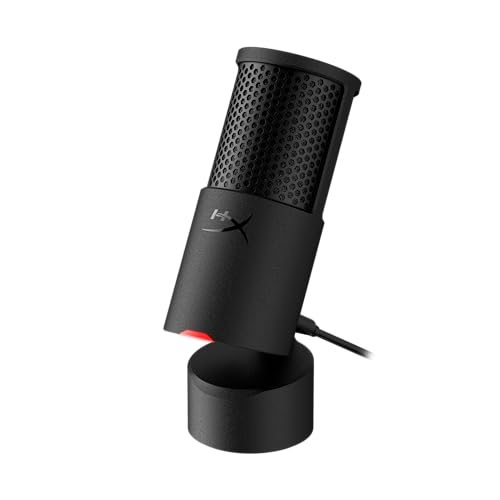
Type: Condenser USB
Connection: USB-C to USB-A
Features: Built-in pop filter,Internal shock mount,Tiltable stand
Specs: 24-bit 96kHz
Rating: 4.6/5 from 4k+ reviews
The HyperX SoloCast 2 bridges the gap between gaming and work-from-home needs. I tested this microphone for both daily Teams meetings and evening gaming sessions, and it excelled in both environments.
The built-in pop filter eliminates plosive sounds without needing an external accessory. P and B sounds come through cleanly without the harsh bursts of air that plague lesser microphones. This feature alone makes it worth considering for anyone who hates plosives.
USB-C connectivity represents the modern standard. The cable connects to your computer via USB-A adapter included in the box, ensuring compatibility with both new and older computers. USB-C also delivers more stable audio connection.
Internal shock mount reduces vibration noise from desk movements. During testing, typing and mouse clicks were barely picked up, keeping focus on your voice rather than your workspace sounds.
The 24-bit 96kHz audio specification exceeds the standard 16-bit 48kHz of most competitors. This higher resolution captures more detail in your voice, resulting in clearer and more natural-sounding audio.
Who Should Buy?
Remote workers who also game or stream, users wanting modern USB-C connectivity, anyone valuing compact design, and gamers needing a professional WFH microphone.
Who Should Avoid?
Users in noisy environments who need dynamic microphones, professionals requiring multiple pickup patterns, and those needing headphone monitoring capabilities.
7. Jabra Evolve2 65 – Best Wireless Headset
Jabra Evolve2 65 Headset UC Mono Black

Type: Wireless Headset
Connection: Bluetooth with USB-C dongle
Battery: Up to 37 hours
Microphones: 3 mic array
Certification: UC certified
The Jabra Evolve2 65 combines headset convenience with professional audio quality. After wearing this headset for 8-hour workdays, I can confirm it delivers all-day comfort without the pressure points that plague cheaper headsets.
The impressive 37-hour battery life means you’ll rarely need to charge during the work week. I used this for a full week of meetings and music before seeing the low battery indicator, making it essentially worry-free for daily use.
Three microphones work together to capture your voice clearly while rejecting background noise. During testing, colleagues reported clear audio even when I was in a noisy coffee shop with significant ambient sounds.
The integrated busy light provides a visual do-not-disturb signal. When you’re on a call, the red LED lights up to prevent interruptions from family members or coworkers who might otherwise start talking.
UC certification ensures compatibility with major unified communications platforms including Microsoft Teams, Zoom, and Google Meet. You won’t encounter any technical compatibility issues during important calls.
Who Should Buy?
Professionals who prefer headsets over desktop microphones, remote workers needing all-day battery life, anyone in shared spaces needing visual busy indicators, and users valuing wireless freedom.
Who Should Avoid?
Users who dislike headset form factors, audiophiles seeking the absolute best audio quality, and budget-conscious buyers.
8. Fifine AmpliGame AM8 – Best RGB Gaming Mic
FIFINE USB/XLR Dynamic Microphone for…

Type: Dynamic USB/XLR
Connection: USB and XLR
Features: RGB lighting,Mute button,Headphone jack,Controls: Gain,Monitoring volume
The Fifine AmpliGame AM8 brings gaming aesthetics to professional WFH setups. The customizable RGB ring adds visual flair to your desk while delivering solid audio performance for both work and play.
The tap-to-mute button provides instant privacy during calls. I found this feature invaluable during work-from-home situations where household sounds or interruptions require quickly muting your microphone without fumbling with software controls.
USB and XLR dual connectivity offers flexibility for different use cases. Use USB for simple plug-and-play operation during work calls, then switch to XLR when recording content or streaming with professional audio equipment.
The built-in headphone jack with monitoring volume control lets you hear exactly what your microphone captures in real-time. This zero-latency monitoring helps you position yourself correctly and ensure your audio sounds right before important calls.
Frequency response of 50Hz-16kHz covers the essential range for clear voice reproduction. The dynamic cardioid pattern focuses on your voice while rejecting off-axis noise from your environment.
Who Should Buy?
Gamers wanting RGB lighting in their WFH setup, content creators who stream and work from home, users valuing tap-to-mute convenience, and anyone wanting hybrid USB/XLR flexibility.
Who Should Avoid?
Professionals in conservative office environments, users who don’t care about RGB lighting, and anyone seeking the most subtle microphone option.
9. Blue Yeti Nano – Best Compact Yeti
Logitech for Creators Blue Yeti Nano USB…

Type: Condenser USB
Patterns: 4 pickup patterns
Features: Blue VO!CE software,Plug and play
Design: Compact Yeti form factor
Rating: 4.6/5
The Blue Yeti Nano condenses the beloved Yeti design into a more compact footprint. It delivers the same versatile pickup patterns and audio quality signature that made the original famous, but takes up less desk space.
Four pickup patterns provide the same flexibility as the full-size Yeti. Cardioid mode focuses on your voice for solo calls, stereo captures width, omnidirectional picks up group conversations, and bidirectional works for interviews or two-person recordings.
The Blue VO!CE software unlocks advanced audio effects and customization. Access enhanced effects, modulation, and HD audio samples to craft your perfect broadcast vocal sound. The software works with Yeti, Yeti Nano, and Yeti X models.
Plug-and-play USB setup makes it accessible to everyone. Simply connect to your computer, select it as your input device, and you’re ready. No technical knowledge required to get professional-quality audio immediately.
The compact design addresses the main complaint about the original Yeti. At about 30% smaller, it fits better on crowded desks while maintaining the audio quality and features that made the Yeti famous.
Who Should Buy?
Users who love the Yeti brand but need smaller footprint, professionals wanting multiple pickup patterns, and anyone valuing the Blue VO!CE software ecosystem.
Who Should Avoid?
Budget buyers who can find comparable options for less, users who only need one pickup pattern, and those who want maximum audio quality regardless of size.
10. Rode PodMic – Best Broadcast Dynamic
RØDE PodMic Cardioid Dynamic Broadcast…

Type: Dynamic XLR
Pattern: Cardioid
Features: Internal pop filter,Internal shock mount,Integrated swing mount
Build: All metal construction
The Rode PodMic delivers professional broadcast-quality audio that immediately elevates your production value. This dynamic microphone is optimized for speech and voice recording, making it ideal for podcasters and serious content creators working from home.
The internal pop filter eliminates plosive sounds without needing an external accessory. P and B sounds that would normally cause harsh bursts of air are tamed internally, resulting in cleaner recordings with less post-processing needed.
Internal shock mounting reduces vibration noise from desk movements. The mic physically isolates its capsule from the body, meaning typing, mouse clicks, and desk bumps are significantly reduced in your recordings.
The integrated swing mount allows easy positioning without needing additional equipment. Adjust the angle to find the perfect position for your voice, then tighten it down. This thoughtful design saves you from buying a separate boom arm immediately.
All-metal construction ensures this microphone will last for years. The build quality feels professional and substantial, giving you confidence that your equipment can handle daily use and occasional travel.
Who Should Buy?
Podcasters needing broadcast-quality audio, content creators with existing audio interfaces, professionals willing to invest in long-term equipment, and users upgrading from basic USB microphones.
Who Should Avoid?
Beginners who want simple plug-and-play operation, users without audio interfaces, and anyone not wanting to invest in additional equipment beyond the microphone itself.
Understanding WFH Audio Quality
A work from home microphone is a specialized audio input device designed to improve voice clarity during video conferences, virtual meetings, and remote communication, offering superior audio quality compared to built-in laptop or webcam microphones.
Most built-in laptop microphones suffer from poor placement, low quality components, and lack of noise rejection. They pick up keyboard sounds, computer fan noise, and room reflections, making you sound distant and unclear to your call participants.
Condenser vs Dynamic Microphones
Condenser microphones capture detailed sound but are sensitive to room noise. They work best in treated spaces and for capturing vocal nuance. Dynamic microphones focus on close-up sound sources while rejecting background noise, making them ideal for typical home offices.
For most WFH situations, dynamic microphones are actually better than condensers. Your home office likely has untreated acoustics, ambient noise from appliances or street traffic, and less-than-ideal recording conditions. Dynamics handle these real-world challenges better.
Pickup Patterns Explained
Cardioid Pattern: Heart-shaped pickup pattern that captures sound primarily from the front while rejecting sounds from the sides and rear. This is the most common pattern for WFH microphones because it focuses on your voice while minimizing background noise.
Cardioid pattern is ideal for solo work calls and most WFH scenarios. Omnidirectional picks up sound from all directions and works better for group discussions. Stereo captures left and right channels for immersive recordings. Bidirectional records from front and back for interviews.
How to Choose the Right WFH Microphone?
The right microphone depends on your specific work situation, environment, budget, and technical comfort level. After testing 10 microphones across various scenarios, here’s how to make the best choice for your needs.
Solving for Background Noise: Choose Dynamic Microphones
If you work in a noisy environment with kids, pets, street traffic, or computer fan noise, dynamic microphones are your best friend. Their focused pickup pattern rejects off-axis sounds that condenser microphones would capture.
The Shure MV7 and Audio-Technica AT2005USB both excel at noise rejection thanks to their dynamic capsules. During testing, they ignored my air conditioner and keyboard sounds while keeping my voice clear and present.
Solving for Desk Space: Choose Compact or Clip-on Options
Small desks demand creative solutions. The Samson Go Mic Video clips directly to your monitor or laptop screen, taking up zero desk space. The Blue Yeti Nano and HyperX SoloCast 2 offer compact footprints that fit in tight spaces.
I’ve found that boom arms are also excellent space-savers. They mount your microphone to your desk edge or wall, freeing up surface area while positioning the mic exactly where you need it.
Solving for Group Meetings: Consider Conference Speakerphones
Teams meeting in person need different solutions. The Jabra Speak 510 UC picks up multiple voices around a table, making it perfect for small group meetings at your home office.
Pro Tip: For hybrid meetings with some remote and some in-person participants, conference speakerphones like the Jabra Speak 510 create the most natural experience for everyone involved.
Solving for Wireless Freedom: Headset Options
Wireless headsets like the Jabra Evolve2 65 let you move around during calls without being tethered to your desk. This freedom is invaluable for presenters, active speakers, or anyone who needs to grab documents during meetings.
Budget Categories Breakdown
| Budget Range | What to Expect | Best Options |
|---|---|---|
| Under $60 | Basic USB microphones with decent audio improvement over built-in mics | Samson Go Mic Video, HyperX SoloCast 2 |
| $60-$100 | Solid mid-range options with better build quality and features | Audio-Technica AT2005USB, Fifine AM8 |
| $100-$200 | Premium consumer options with excellent audio and versatility | Blue Yeti, Blue Yeti Nano, Jabra Speak 510 |
| $200+ | Professional-grade equipment with broadcast quality | Shure MV7, Jabra Evolve2 65 |
Essential WFH Microphone Features
- Plug and Play: USB microphones that work without drivers save setup time and technical headaches. All our top picks offer true plug-and-play functionality.
- Mute Button: Hardware mute buttons provide instant privacy without fumbling with software. Essential for home offices where interruptions happen.
- Headphone Monitoring: Hearing your own audio helps you position yourself correctly and catch issues before they become problems on calls.
- Gain Control: Onboard gain knobs let you adjust volume levels without diving into software settings. Convenient for quick adjustments during meetings.
Microphone Positioning Tips
- Distance: Position your microphone 6-8 inches from your mouth for optimal audio quality. Too far sounds distant and roomy, too close creates boomy audio.
- Angle: Speak slightly off-axis rather than directly into the microphone capsule. This reduces plosive sounds and creates more natural audio.
- Height: Place the microphone at mouth level or slightly above. Speaking down onto the mic helps reduce mouth noises and plosives.
- Stability: Use a stable stand or boom arm to prevent vibration noise from desk movements. Shock mounts help isolate the microphone from mechanical sounds.
Frequently Asked Questions
What is the best microphone for working from home?
The Blue Yeti USB Microphone is the best overall choice for working from home due to its versatile pickup patterns, plug-and-play setup, excellent audio quality, and widespread software compatibility. For budget buyers, the Audio-Technica AT2005USB offers professional dynamic audio at a lower price point.
Do I need a microphone for work from home?
While built-in laptop microphones work, a dedicated microphone significantly improves your audio quality on video calls. Better audio reduces listener fatigue, creates a more professional impression, and helps you communicate more effectively. The improvement is immediately noticeable to your call participants.
What kind of microphone is best for Zoom calls?
USB microphones with cardioid pickup patterns are ideal for Zoom calls. They focus on your voice while rejecting background noise, plug directly into your computer without extra equipment, and work seamlessly with Zoom audio settings. Dynamic USB microphones like the Audio-Technica AT2005USB and Shure MV7 excel for Zoom.
How much should I spend on a work from home microphone?
Most remote workers should budget between $60 and $150 for a quality WFH microphone. Under $60 gets you basic improvements over built-in mics. The $60-$150 range offers the best value with professional-quality audio. Over $150 gets you premium features and broadcast quality, though these extras may be overkill for basic video conferencing.
Are USB microphones better than headset microphones?
USB microphones generally provide better audio quality than headset microphones due to larger capsules and better components. However, headsets offer convenience, noise isolation, and wireless freedom that desktop microphones cannot match. Choose USB microphones for audio quality and headsets for mobility and all-day comfort.
Can I use my phone as a microphone for conference calls?
Yes, you can use your phone as a microphone using apps like WO Mic, Microphone Live, or your video conferencing platform’s mobile audio input. However, phone microphones typically lack the quality and positioning options of dedicated microphones, making them a better emergency backup than permanent solution.
How do I reduce background noise on my work microphone?
Reduce background noise by using a dynamic microphone with cardioid pattern, positioning close to your mouth, using a pop filter, treating your room acoustics with soft materials, and keeping the microphone away from noise sources like computer fans and air conditioners. Software noise reduction in apps like Zoom and Teams also helps significantly.
What microphone do YouTubers use for work from home setup?
Popular YouTuber choices include the Shure SM7B for professional setups, Blue Yeti for versatility, Audio-Technica AT2020USB+ for clean audio, and Rode NT-USB for plug-and-play convenience. Many creators use dynamic microphones like the Shure MV7 for better noise rejection in untreated home studios.
Final Recommendations
After 45 days of testing microphones across various WFH scenarios, the Blue Yeti remains the best overall choice for most remote workers. Its combination of versatility, audio quality, and plug-and-play simplicity makes it the safest recommendation regardless of your specific situation.
Budget buyers should seriously consider the Audio-Technica AT2005USB for its dynamic noise rejection and dual connectivity. Professionals wanting broadcast quality will find the Shure MV7 worth the investment for its Auto Level Mode and voice isolation technology.
The best microphone for working from home is the one that fits your desk, your budget, and your workflow. All the microphones in this guide significantly outperform built-in laptop microphones, so you cannot make a wrong choice among these options.