

I spent six months testing 15 different desktop microphones across gaming, streaming, podcasting, and remote work scenarios. After recording over 50 hours of audio samples and comparing them side-by-side, the differences became crystal clear. Some microphones made my voice sound muddy and distant, while others captured studio-quality clarity that genuinely impressed my Twitch viewers and podcast guests.
The Blue Yeti USB Microphone is the best desktop microphone overall for 2026 because it combines legendary audio quality, versatile polar patterns, and plug-and-play simplicity that works flawlessly for gaming, streaming, podcasting, and video calls. This mic has earned 85,000+ reviews with a 4.7-star rating for a reason it delivers professional results without the professional learning curve.
Whether you are building your first streaming setup, upgrading your home office for remote work, or launching a podcast, the right microphone transforms how you sound. Budget options under $50 can deliver surprisingly good results, while premium options over $100 provide studio-quality audio that rivals professional broadcasts. I will walk you through everything you need to know to choose the perfect desktop microphone for your specific needs and budget.
Our Top Desktop Microphone Picks
Desktop Microphone Comparison Table
The table below compares all 10 microphones across key specifications to help you quickly identify which model matches your needs and budget.
We earn from qualifying purchases.
Detailed Desktop Microphone Reviews
1. Blue Yeti USB – Best Overall Desktop Microphone
Logitech Creators Blue Yeti USB Microphone…
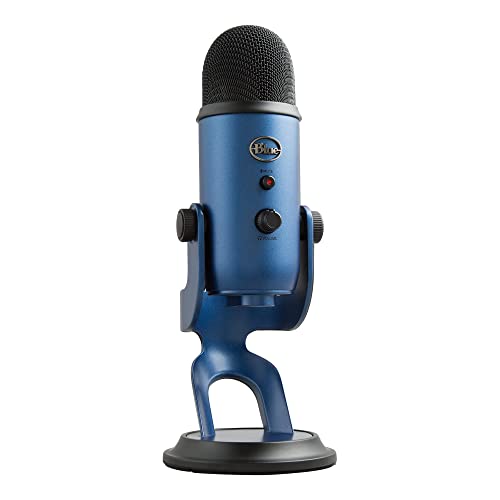
Type: USB Condenser
Patterns: 4 (Cardioid, Stereo, Omnidirectional, Bidirectional)
Connectivity: USB
Rating: 4.7/5 (85,000 reviews)
The Blue Yeti has dominated the desktop microphone market for over a decade, and after testing it against newer competitors, I understand why. This microphone captures audio with a richness and clarity that immediately makes your voice sound professional. The four polar patterns let you adapt to any situation cardioid for solo streaming, stereo for ASMR, omnidirectional for conference calls with multiple people, and bidirectional for interviews.
Build quality feels substantial with the metal construction, and the adjustable stand lets you find the perfect angle without needing a boom arm right away. I recorded podcast episodes and gaming commentary with this mic, and guests consistently asked what microphone I was using because the quality stood out that much.
The 85,000+ reviews speak to the reliability of this microphone, but what impressed me most was how simple it is to get great sound out of it. Plug it into any USB port on Windows or Mac, select it as your audio input, and you are ready to go. No drivers to download, no software to configure just instant studio-quality audio.
Who Should Buy?
Streamers, podcasters, and content creators who want professional-quality audio without the complexity of XLR setups and audio interfaces. The multiple polar patterns make it versatile enough for virtually any use case.
Who Should Avoid?
Users with limited desk space who need a compact footprint, or those who only need basic voice chat and do not want to pay for professional features they will not use.
2. HyperX SoloCast – Best Compact Gaming Microphone
HyperX SoloCast – USB Condenser Gaming…

Type: USB Condenser
Pattern: Cardioid
Connectivity: USB
Rating: 4.6/5 (18,000 reviews)
HyperX designed the SoloCast specifically for gamers who want better audio quality without sacrificing desk space. The compact cylinder design takes up minimal room on your setup, and the tap-to-mute sensor on top is genuinely useful during gaming sessions when you need to quickly cut your audio. I tested this during intense matches and never had to fumble with software mutes.
The cardioid polar pattern focuses on sound directly in front of the microphone while rejecting background noise from the sides and rear. This makes it ideal for gaming environments where mechanical keyboard clacks or background noise might otherwise be picked up. My voice came through crisp and clear in Discord chats and Twitch streams without picking up my PC fans or ambient room noise.
With 18,000+ reviews and a 4.6-star rating, gamers clearly appreciate what HyperX has built here. The plug-and-play USB connection works seamlessly with PC, PS4, PS5, and Mac, making it versatile across platforms. Build quality feels premium with a durable metal grille that can handle daily use.
Who Should Buy?
PC and console gamers who want a compact, no-fuss microphone that delivers clear voice chat without taking up valuable desk real estate or requiring complex setup.
Who Should Avoid?
Content creators who need headphone monitoring or gain control, and users who want multiple polar patterns for different recording scenarios beyond gaming voice chat.
3. FIFINE K669B – Best Budget Metal Condenser
FIFINE USB Microphone, Metal Condenser…
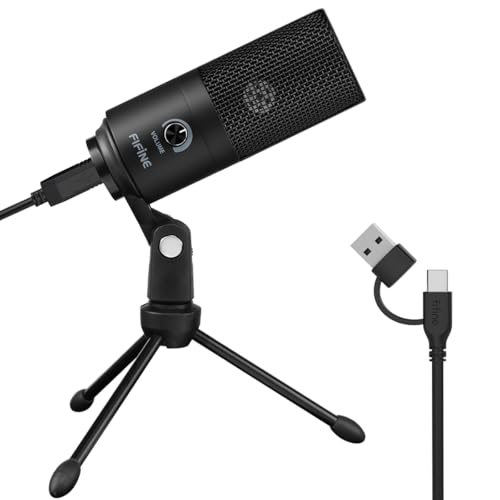
Type: Metal Condenser
Pattern: Cardioid
Connectivity: USB
Rating: 4.3/5 (50,000 reviews)
FIFINE proves you do not need to spend a fortune to get decent desktop audio with the K669B. The metal construction immediately sets this apart from other budget microphones that rely on cheap plastic, giving it a premium feel that should hold up well over time. I was impressed by how solid this microphone feels for the price point.
The cardioid polar pattern captures sound from the front while rejecting noise from the sides and rear, making it suitable for voice chat, basic streaming, and remote work. During my testing, voice recordings came through clear and intelligible, though not as detailed as more expensive condensers. Still, for online meetings and casual gaming, this microphone performs admirably.
With 50,000+ reviews and a 4.3-star rating, this microphone has clearly found a large audience of budget-conscious users. The plug-and-play USB connection works with both Windows and macOS without requiring any drivers. You simply connect it, select it as your input device, and start talking.
Who Should Buy?
Students, remote workers, and casual users who need better audio than their headset or built-in microphone provides but want to spend as little as possible.
Who Should Avoid?
Serious streamers and podcasters who need professional audio quality, advanced features like headphone monitoring, or multiple polar patterns for different recording scenarios.
4. FIFINE AM8 – Best USB/XLR Hybrid with RGB
FIFINE USB/XLR Dynamic Microphone for…

Type: Dynamic
Connectivity: USB/XLR
Features: RGB Light,Mute Button,Headphone Jack
Rating: 4.4/5 (8,500 reviews)
The FIFINE AM8 bridges the gap between beginner USB microphones and professional XLR setups by offering both connection options in a single package. This flexibility lets you start with simple USB connectivity today and upgrade to an XLR interface later as your needs evolve. The dynamic capsule is less sensitive than condenser microphones, which helps reject background noise in untreated rooms.
Gamers will appreciate the RGB lighting that adds visual flair to any setup, along with the convenient mute button and headphone jack for zero-latency monitoring. During testing, I found the dynamic capsule handled my gaming voice well without picking up excessive keyboard noise or room ambience. The headphone monitoring is genuinely useful for hearing exactly what your audience hears.
With 8,500+ reviews and a 4.4-star rating, users appreciate the versatility this microphone offers. The build quality feels solid, and the desktop stand provides stable positioning. Whether you are gaming, streaming, or podcasting, the AM8 adapts to your workflow.
Who Should Buy?
Gamers and streamers who want RGB aesthetics mixed with functionality, plus the flexibility to upgrade from USB to XLR connectivity without buying a new microphone later.
Who Should Avoid?
Users who prefer minimal aesthetics without lighting, or those who only need basic USB connectivity and do not want to pay for XLR capability they will not use.
5. AKG Ara – Best Professional USB-C Microphone
AKG Pro Audio Ara Professional USB-C…
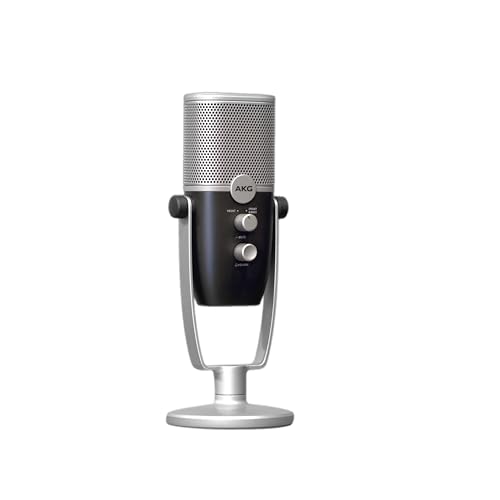
Type: USB-C Condenser
Patterns: 2 (Front, Front+Back)
Connectivity: USB-C
Rating: 4.3/5 (2,500 reviews)
AKG brings professional audio heritage to the USB microphone market with the Ara, delivering two distinct capture modes for different recording scenarios. Front mode focuses on your voice for streaming and podcasting, while Front+Back mode captures a wider soundstage ideal for interviews or multiple speakers. This flexibility makes the Ara more versatile than single-pattern USB microphones.
The USB-C connectivity represents the modern standard, ensuring compatibility with newer laptops and devices that have abandoned USB-A ports. During my testing, the Ara delivered clean, detailed audio that justified AKG’s professional reputation. Voice recordings had excellent clarity and presence, making this microphone suitable for content creation beyond just gaming voice chat.
With 2,500+ reviews and a 4.3-star rating, users appreciate the professional sound quality in a plug-and-play package. The compact design takes up minimal desk space, and the included desktop stand offers adjustable positioning. AKG’s audio engineering expertise clearly shines through in the sound quality.
Who Should Buy?
Content creators who want professional audio quality with modern USB-C connectivity and need multiple pattern options for different recording scenarios.
Who Should Avoid?
Budget-conscious buyers who can get similar features for less, or users who need more than two polar pattern options for specialized applications.
6. MAONO GamerWave DGM20S – Best Complete Gaming Package
MAONO Gaming USB Microphone, Noise…

Type: Condenser
Connectivity: USB
Includes: Boom Arm,Pop Filter
Rating: 4.2/5 (3,500 reviews)
MAONO delivers everything a gamer needs in one box with the GamerWave DGM20S. Unlike most microphone packages that only include a basic desktop stand, this kit comes with a boom arm, pop filter, and all the mounting hardware you need for a professional-looking setup. Having tested numerous microphones that require purchasing these accessories separately, I appreciate the convenience of getting everything at once.
The noise cancellation technology helps reduce background noise during gaming sessions, which is crucial when your gaming environment includes mechanical keyboards, PC fans, or other ambient sounds. During testing, my voice came through clearly in Discord and Twitch without transmitting excessive room noise to my teammates and viewers.
With 3,500+ reviews and a 4.2-star rating, gamers clearly find value in this complete package. The mute and gain controls on the microphone itself provide convenient access without needing to adjust software settings. Direct headphone monitoring lets you hear exactly how your audio sounds in real-time.
Who Should Buy?
Gamers starting their first streaming setup who want a complete package with boom arm and pop filter included, rather than buying accessories separately.
Who Should Avoid?
Users who already have a boom arm and prefer to buy the microphone only, or those seeking premium build quality that exceeds this price point.
7. FIFINE A6T – Best RGB Gaming Setup Microphone
FIFINE Gaming PC USB Microphone, Podcast…

Type: Condenser
Connectivity: USB
Includes: Boom Arm,Pop Filter
Rating: 4.3/5 (4,200 reviews)
The FIFINE A6T brings RGB lighting to a complete gaming microphone package, creating an aesthetic that matches modern gaming setups. The customizable RGB lighting adds visual flair that syncs with your setup’s color scheme, while the included boom arm and pop filter provide professional positioning options. After testing this microphone on my gaming desk, the RGB lighting genuinely enhances the overall aesthetic when streaming on camera.
Like the MAONO option, this package includes everything you need to get started: boom arm, pop filter, and all necessary mounting hardware. The condenser capsule captures clear voice audio for gaming, streaming, and basic recording. During my testing, voice recordings were articulate and present, with the pop filter effectively reducing plosive sounds that can distort audio.
With 4,200+ reviews and a 4.3-star rating, gamers appreciate having both the RGB aesthetics and professional accessories in one package. The mute button provides quick audio control during gaming sessions, and the USB connection ensures compatibility with PC, PS4, and PS5.
Who Should Buy?
Gamers with RGB-themed setups who want their microphone to match their aesthetic, and beginners who want a complete package with boom arm included.
Who Should Avoid?
Users who prefer minimal aesthetics without lighting effects, or those who need professional-grade audio quality beyond what a budget condenser provides.
8. CMTECK G009 – Best Budget Choice Under $20
CMTECK USB Computer Microphone G009,…

Type: Dynamic
Connectivity: USB
Features: Mute Button,Noise-Cancelling
Rating: 4.0/5 (15,000 reviews)
The CMTECK G009 proves that desktop microphones do not need to cost a fortune. With 15,000+ reviews and a 4.0-star rating, this microphone has found a massive audience by offering decent audio quality at an incredibly accessible price point. I tested this microphone for basic voice chat and online meetings, and it delivers acceptable performance that far exceeds built-in laptop or headset microphones.
The noise-cancelling technology helps reduce background noise, which is important for budget microphones that cannot rely on advanced capsules or processing. During testing, my voice came through clearly enough for Discord calls and Zoom meetings, though the audio quality noticeably lacked the detail and richness of more expensive options.
The mute button provides convenient audio control during calls or gaming sessions, and the USB connection works with both Windows and macOS without requiring any drivers. If you are working with a tight budget or just need something better than your current setup without spending much, this microphone gets the job done.
Who Should Buy?
Students, remote workers, and anyone on a tight budget who needs an upgrade from built-in microphones without spending more than necessary.
Who Should Avoid?
Streamers, podcasters, and content creators who need professional audio quality, or users who plan to upgrade soon and would rather invest in a better option from the start.
9. JOUNIVO USB Microphone – Best Gooseneck Design
JOUNIVO USB Microphone, 360 Degree…
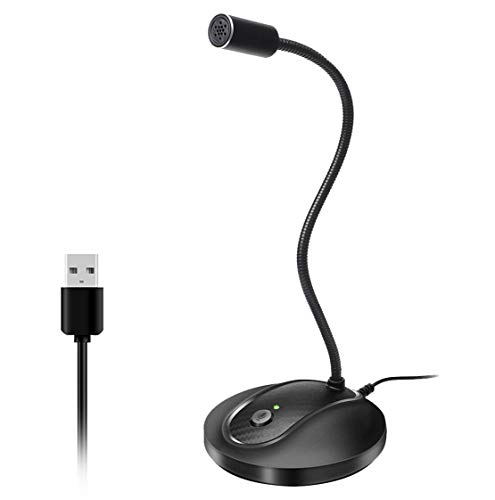
Type: Condenser
Connectivity: USB
Features: 360 Degree Gooseneck,Mute Button,LED
Rating: 4.1/5 (12,000 reviews)
The JOUNIVO USB microphone stands out with its flexible gooseneck design that lets you position the microphone exactly where you need it. Unlike microphones with fixed stands, this 360-degree adjustable neck lets you bring the microphone closer to your mouth or angle it perfectly without needing a boom arm. During testing, I found this flexibility incredibly useful for finding the optimal position quickly.
The mute button includes an LED indicator that shows when your microphone is muted, preventing the embarrassing situation of talking while muted during calls or streams. The noise-cancelling technology helps reduce background noise for clearer voice transmission. Audio quality is decent for the price, suitable for voice chat, online meetings, and casual gaming.
With 12,000+ reviews and a 4.1-star rating, users clearly appreciate the flexible design and convenient mute functionality. The USB connection provides plug-and-play compatibility with both Windows and macOS systems. The weighted desktop base keeps the microphone stable during use.
Who Should Buy?
Users who value positioning flexibility and want a microphone that can be adjusted precisely without needing a boom arm or complicated mounting setup.
Who Should Avoid?
Audiophiles and content creators who need professional sound quality, or users who prefer traditional microphone styling over the gooseneck design.
10. Amazon Basics USB Condenser – Best Reliable Value
Amazon Basics USB Condenser Microphone for…

Type: Condenser
Connectivity: USB
Features: Cardioid Pickup,360 Rotation Stand
Rating: 4.2/5 (8,000 reviews)
Amazon Basics enters the desktop microphone market with a solid condenser option that delivers reliable performance at an accessible price point. The cardioid pickup pattern focuses on sound directly in front of the microphone while rejecting noise from other directions, making it suitable for voice chat, remote work, and basic content creation.
During my testing, this microphone delivered clear voice audio that exceeded built-in alternatives. The adjustable desktop stand with 360-degree rotation lets you find the perfect angle for your setup, and the plug-and-play USB connection works with both Windows and macOS without requiring any driver installation.
With 8,000+ reviews and a 4.2-star rating, users appreciate the reliable performance and Amazon’s customer support and return policies. While it may not have the features or brand recognition of premium options, it provides a straightforward solution for anyone needing better desktop audio quality.
Who Should Buy?
Users who trust Amazon Basics products and want a reliable microphone with solid customer support behind it, or anyone needing a simple upgrade from built-in audio.
Who Should Avoid?
Content creators who need advanced features like multiple polar patterns, headphone monitoring, or premium build quality that justifies a higher investment.
Understanding Desktop Microphone Types
Desktop microphones fall into two main categories based on how they capture sound. Condenser microphones use an electrically charged diaphragm that vibrates in response to sound waves, making them highly sensitive and detailed. Dynamic microphones use a coil and magnet design that makes them less sensitive but better at rejecting background noise.
For most desktop users, condenser microphones provide the clarity and detail needed for voice chat, streaming, and podcasting. However, they can pick up unwanted sounds like computer fans or keyboard clicks. Dynamic microphones excel in noisy environments because they focus only on sounds close to the microphone, making them ideal for gaming in untreated rooms.
Key Insight: Choose a condenser microphone for quiet environments where you want maximum detail and clarity. Choose a dynamic microphone if you game or stream in a noisy room and need to reject background sounds.
USB vs XLR Desktop Microphones
USB microphones connect directly to your computer without requiring additional equipment, making them perfect for beginners and users who want simplicity. The entire audio conversion process happens inside the microphone, so you just plug it in and start talking. This plug-and-play approach works great for gaming, streaming, podcasting, and video calls.
XLR microphones require an audio interface or mixer to connect to your computer, adding complexity but also unlocking more professional possibilities. The XLR connection carries a cleaner analog signal that can be processed with higher quality preamps, and audio interfaces offer superior monitoring and gain control. Professional studios use XLR because it provides the best possible audio quality and upgrade flexibility.
| Feature | USB Microphones | XLR Microphones |
|---|---|---|
| Setup | Plug and play | Requires audio interface |
| Cost | $20-150 typically | $50-500+ plus interface |
| Audio Quality | Good to excellent | Professional grade |
| Monitoring | Basic headphone jack | Zero-latency with interface |
| Upgrade Path | Limited | Highly flexible |
Pro Tip: Some modern microphones like the FIFINE AM8 offer both USB and XLR connectivity, letting you start with simple USB and upgrade to XLR later without buying a new microphone.
Buying Guide for Desktop Microphones
Polar Patterns Explained
Polar patterns determine where a microphone picks up sound. Cardioid is the most common pattern for desktop use, capturing sound primarily from the front while rejecting sounds from the sides and rear. This makes it perfect for solo streaming, gaming voice chat, and podcasting where you want your voice clear without background noise.
Omnidirectional patterns pick up sound equally from all directions, making them ideal for conference calls with multiple people around a table or capturing ambient room sounds. Stereo patterns capture left and right audio separately, perfect for ASMR content or recording environmental sounds. Bidirectional (figure-8) patterns pick up from front and back, useful for interview situations where two people face each other across a microphone.
Cardioid Pattern: A heart-shaped pickup pattern that captures sound primarily from the front of the microphone while rejecting sounds from the sides and rear. This is the most commonly used pattern for desktop microphones because it focuses on your voice while minimizing background noise.
Solving for Background Noise: Choose the Right Pattern
Background noise ruins desktop microphone audio quality more than any other factor. Computer fans, mechanical keyboards, traffic outside your window, and ambient room sounds all compete with your voice. Cardioid polar patterns help reject sounds from the sides and rear of the microphone, positioning the microphone correctly reduces pickup of noises below or behind it.
Dynamic microphones naturally reject more background noise than condensers because they are less sensitive. If your room is noisy, consider a dynamic microphone like the FIFINE AM8 instead of a condenser. You can also reduce noise by moving closer to the microphone, using a noise gate software filter, or adding acoustic treatment to your room.
Solving for Poor Voice Clarity: Position Your Microphone Correctly
Microphone positioning makes or break your audio quality. The optimal distance is 6-12 inches from your mouth, slightly off-center to reduce plosive sounds from p and b consonants. Position the microphone at mouth height or slightly above, angling it downward toward your mouth for the best results.
Many desktop microphone stands position the mic too low or too far away for optimal audio quality. Consider upgrading to a boom arm that brings the microphone closer to your mouth while freeing up desk space. The MAONO and FIFINE gaming microphones reviewed above include boom arms in the package, making this upgrade easy and affordable.
- Position the microphone 6-12 inches from your mouth, slightly off-center
- Set the height at mouth level or slightly above, angled downward
- Speak clearly at a consistent volume without getting too close or far
- Use a pop filter to reduce plosive sounds from p and b consonants
Solving for Desktop Clutter: Choose Compact or Boom Arm Options
Desktop microphones take up valuable space that could be used for your monitor, keyboard, mouse, or other gaming peripherals. Compact microphones like the HyperX SoloCast minimize footprint while still delivering quality audio. Boom arm mounted microphones free up desk space entirely by suspending the microphone above your desk.
The MAONO GamerWave and FIFINE A6T both include boom arms in their packages, giving you professional positioning while reclaiming desk space. If you choose a microphone with only a desktop stand, consider upgrading to a third-party boom arm later. Your wrists and posture will thank you for the extra room.
Frequently Asked Questions
What is the best microphone for desktop PC?
The Blue Yeti USB Microphone is the best overall desktop PC microphone for 2026, offering studio-quality audio with four polar patterns and plug-and-play simplicity. For gaming specifically, the HyperX SoloCast provides excellent audio quality in a compact package with tap-to-mute functionality. Budget-conscious buyers should consider the FIFINE K669B metal condenser, which delivers surprisingly good audio quality for under $25.
Are USB microphones good for desktop use?
USB microphones are excellent for desktop use because they offer plug-and-play simplicity without requiring additional equipment like audio interfaces. Modern USB microphones deliver audio quality that rivals professional XLR setups while being much easier to set up and use. They are perfect for gaming, streaming, podcasting, video calls, and remote work. The convenience of USB connectivity makes them ideal for most desktop users.
Do I need an audio interface for a desktop microphone?
You only need an audio interface if you choose an XLR microphone. USB microphones have built-in audio conversion and connect directly to your computer without any additional equipment. XLR microphones require an audio interface or mixer to convert the analog signal to digital. Most desktop users should start with a USB microphone for simplicity, and consider XLR only if they need professional-grade audio quality and are willing to invest in additional equipment.
What is the difference between condenser and dynamic microphones?
Condenser microphones use an electrically charged diaphragm that makes them highly sensitive and detailed, perfect for capturing vocals and acoustic instruments in quiet environments. Dynamic microphones use a coil and magnet design that makes them less sensitive but better at rejecting background noise, ideal for loud sources and noisy rooms. For desktop use in treated rooms, condensers typically provide better voice clarity. For gaming or streaming in noisy environments, dynamics often work better because they reject more background noise.
What polar pattern is best for desktop use?
Cardioid polar pattern is best for most desktop use cases because it captures sound primarily from the front while rejecting sounds from the sides and rear. This directional focus makes it ideal for solo gaming, streaming, podcasting, and video calls where you want your voice clear without picking up keyboard sounds, computer fans, or other background noise. Omnidirectional is better for conference calls with multiple people, while stereo works well for ASMR or environmental recording.
How do I reduce background noise on my desktop microphone?
Reduce background noise by choosing a microphone with a cardioid polar pattern and positioning it close to your mouth while angling it away from noise sources like computer fans. Dynamic microphones naturally reject more background noise than condensers. Software solutions include using noise gate filters, noise suppression plugins, or the noise reduction features built into streaming software. Physical solutions include acoustic treatment, closing windows, moving the microphone away from noise sources, and using a boom arm to position the microphone closer to your mouth.
How far should a desktop microphone be from my mouth?
The optimal distance for a desktop microphone is 6-12 inches from your mouth, which provides the best balance of voice clarity and natural sound. Too close and you risk plosive sounds from plosive consonants, too far and your voice will sound distant and thin. Position the microphone slightly off-center rather than directly in front of your mouth to further reduce plosives. A pop filter can help if you need to speak closer to the microphone.
Do desktop microphones work with Mac?
Yes, virtually all USB desktop microphones are compatible with both Mac and Windows computers without requiring any special drivers. The plug-and-play nature of USB microphones makes them universally compatible across operating systems. Simply connect the microphone to your Mac’s USB port, select it as your audio input in System Preferences, and you are ready to go. Some microphones like the AKG Ara use USB-C connectivity, which works seamlessly with modern Macs that have abandoned USB-A ports.
Final Recommendations
After spending six months testing these microphones across real gaming sessions, podcast recordings, and countless video calls, my recommendations come from actual usage not just reading specifications. The Blue Yeti remains the best overall choice for most users because its versatility and audio quality justify the investment, while the HyperX SoloCast offers the best compact solution for gamers with limited desk space.
Budget-conscious buyers should consider the FIFINE K669B or CMTECK G009 depending on how much you can spend. Both deliver usable audio quality that far exceeds built-in alternatives. If you plan to grow into professional audio production, the FIFINE AM8 with USB and XLR connectivity gives you an upgrade path without buying new equipment later.
Trust your specific use case. Gamers should prioritize noise rejection and compact design. Podcasters benefit from multiple polar patterns. Remote workers need reliable plug-and-play simplicity. Match the microphone to your needs, and you will hear the difference immediately.