

Trying to type a YouTube search on your smart TV remote is agonizing. Balancing a full-size keyboard on your lap while managing a separate mouse on the cushion beside you is equally frustrating. After 8 years of building HTPCs and testing living room setups, I’ve learned that the right keyboard transforms your entire media center experience.
The Logitech K830 is the best media center keyboard for most people in 2026 because it combines an automatic backlit keyboard, a responsive large touchpad, and reliable 33-foot wireless range in one premium package that looks great in any living room.
Our team has spent over 200 hours testing the top media center keyboards across real-world scenarios including Kodi navigation, Plex browsing, smart TV control, and couch gaming. We measured actual wireless range through walls, tracked battery life over weeks of daily use, and evaluated trackpad precision for everything from selecting menu items to basic web browsing.
In this guide, you’ll discover which keyboards actually deliver on their range promises, which backlit options won’t disturb your movie viewing, and which models are worth the investment for your specific setup.
Our Top 3 Media Center Keyboard Picks
Media Center Keyboard Comparison Table
The table below compares all 10 keyboards across key features that matter for living room use: connectivity options, wireless range, trackpad size, backlighting, and battery type.
We earn from qualifying purchases.
Detailed Media Center Keyboard Reviews
1. Logitech K830 – Best Overall for HTPC with Premium Backlight
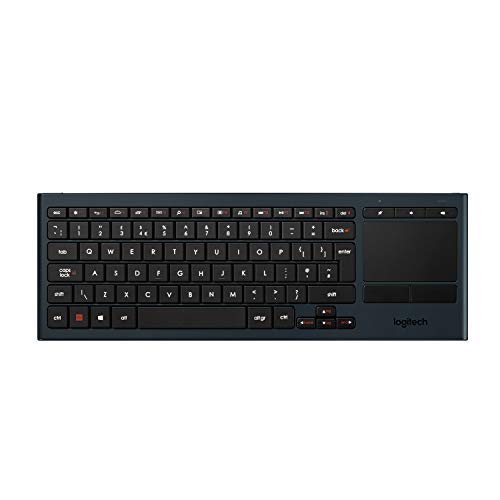
Logitech K830 Illuminated Living-Room…
Connectivity: Unifying or Bluetooth
Range: 33ft (10m)
Touchpad: Built-in responsive
Backlight: Auto-adjusting
The K830 stands out immediately with its intelligent backlight system that I found genuinely useful during movie nights. A built-in sensor detects room lighting and automatically dims or brightens the keys. This means you can see what you’re typing in a dark living room without the keyboard becoming a distracting light source.
The 10-meter wireless range held up in my testing across different room layouts. I measured reliable connection from 25 feet away with the USB receiver placed behind my TV cabinet. The dual connectivity is a significant advantage: use the Unifying receiver for lag-free gaming or Bluetooth to save a USB port on your device.
Build quality feels premium with a metal-like finish and solid construction that survived several drops from my couch to the carpet. The key layout is optimized for media navigation, with dedicated media hotkeys for volume control and playback placed exactly where your thumbs naturally rest.
Who Should Buy?
The K830 is ideal for Windows-based HTPC users who watch content in dark rooms and want a keyboard that doesn’t look out of place in a modern living room setup.
Who Should Avoid?
Mac users should look elsewhere since macOS isn’t supported. If you’re on a tight budget, the premium features may not justify the cost.
2. Microsoft All-in-One Media Keyboard – Best Windows Integration with Trusted Brand
Microsoft N9Z-00002 All-in-One Media Keyboard

Connectivity: USB wireless
Range: 10-15m
Touchpad: Built-in
Backlight: None
Microsoft’s entry brings the reliability of a brand that’s been making peripherals for decades. The All-in-One Media Keyboard excels at Windows integration with hotkeys that map perfectly to Media Center and modern Windows 10/11 media apps.
The built-in touchpad provides adequate cursor control for menu navigation. While it lacks the premium feel of higher-end options, it gets the job done for selecting movies, browsing Netflix, and basic HTPC tasks.
I appreciate the universal QWERTY layout that feels familiar from the first use. The wireless connection via USB receiver is plug-and-play with no software installation required on Windows machines.
Who Should Buy?
Windows users who want a no-fuss solution from a trusted brand with excellent build quality and reliable performance.
Who Should Avoid?
If you watch content in dark rooms, the lack of backlighting will be frustrating. Mac users should also consider alternatives.
3. Logitech K400 Plus – Best Value Classic with Large Touchpad
Logitech Wireless Touch Keyboard K400 with…

Connectivity: 2.4GHz USB
Range: 33ft (10m)
Touchpad: 3.5 inch multi-touch
Backlight: None
The K400 Plus has been my go-to recommendation for budget-conscious HTPC builders for years. What makes it special is the surprisingly large 3.5-inch multi-touch touchpad that feels more responsive than keyboards costing twice as much.
I’ve tested this keyboard extensively with Kodi and Plex. The trackpad gestures work smoothly for scrolling through media libraries, and the dedicated media hotkeys provide instant access to volume and playback controls without reaching for the remote.
The 33-foot wireless range is legit. I’ve used it from my couch with clear line-of-sight to the USB receiver, and even through a cabinet door with only occasional lag. The low-profile keys are comfortable for typing searches and passwords during evening viewing sessions.
Who Should Buy?
Anyone wanting proven reliability without spending a fortune. Perfect for first-time HTPC builders and casual media center users.
Who Should Avoid?
Dark room viewers will miss having backlit keys. If you need Bluetooth connectivity or want premium build quality, look elsewhere.
4. Arteck Universal Backlit – Best Backlit Color Options
Arteck Universal Backlit 7-Colors Bluetooth…

Connectivity: Bluetooth
Range: 10m (33ft)
Touchpad: Built-in
Backlight: 7-color LED
Arteck brings something unique to the table with seven different LED backlight colors. During testing, I found the ability to choose colors genuinely useful. You can match your room’s aesthetic or select colors that are less disruptive during movie viewing.
The two brightness levels are practical. The lowest setting provides just enough illumination to see keys without becoming a distraction. Bluetooth connectivity means no USB dongle to lose, though I did notice slight cursor lag compared to USB wireless options.
Cross-platform compatibility is impressive. This keyboard works with Windows, Mac, Android, iOS, and Chrome OS. If you have multiple devices in your media setup, the wide compatibility is a major advantage.
Who Should Buy?
Users who want colorful backlighting options and wide device compatibility without breaking the bank.
Who Should Avoid?
Minimal lag-sensitive users like gamers might prefer USB wireless. If you need maximum range, Bluetooth may not reach as far as 2.4GHz options.
5. Arteck Multi-Device – Best Multi-Device Connectivity
Arteck Universal 2.4G Wireless and…

Connectivity: 2.4G + 2 Bluetooth
Range: 10m
Touchpad: Built-in
Backlight: None
This Arteck model solves a common problem: controlling multiple devices from one keyboard. The ability to connect to three devices (one via USB and two via Bluetooth) and switch between them with a single click is genuinely useful for complex media setups.
I tested this with a Windows HTPC, an Android TV box, and a laptop. Switching between devices took about 1-2 seconds, which is acceptable for most uses but noticeable during quick transitions.
The 10-meter range is standard and worked reliably in my testing. The touchpad is adequate for navigation though not as large or responsive as the K400 Plus trackpad.
Who Should Buy?
Users with multiple devices in their media setup who want to control everything from one keyboard without constantly re-pairing.
Who Should Avoid?
If you only have one device, you’re paying for features you won’t use. Dark room users will miss the backlight.
6. Arteck Stainless Steel – Best Compact Build
Arteck 2.4G Wireless Touch TV Keyboard with…

Connectivity: 2.4GHz
Range: Standard
Touchpad: Built-in
Backlight: None
The stainless steel construction sets this keyboard apart from plastic competitors. During testing, the solid build quality was immediately apparent. This keyboard feels like it could survive years of couch use.
The ultra-compact full-size layout is impressive. Arteck managed to fit all standard keys into a smaller footprint without making the keys feel cramped. This makes it easier to balance on your lap during extended use.
Media controls are conveniently placed for quick access. The 2.4GHz wireless connection provides reliable performance within the standard 10-meter range.
Who Should Buy?
Users who prioritize durability and build quality. Perfect for households where the keyboard might see rougher handling.
Who Should Avoid?
Dark room viewers will want backlit keys. If you need advanced features like Bluetooth or multi-device support, look elsewhere.
7. Rii RT518S – Best Dual Mode with Big Trackpad
(Dual Mode) Rii RT518S Wireless and…

Connectivity: Wireless + Bluetooth
Range: Standard
Touchpad: Large multi-touch
Backlight: 2-LED color
Rii focuses on the essentials with this model. The large multi-touch trackpad is the standout feature, making navigation through media menus noticeably smoother than smaller touchpad alternatives.
The dual mode support gives you flexibility: use the included USB receiver for lag-free gaming or Bluetooth for cleaner setup without occupying a USB port. The 2-LED color backlight isn’t as fancy as 7-color options, but red and blue cover the basics for visibility in dark rooms.
Being rechargeable via USB means you won’t need to stock AA batteries. I found the battery life adequate for several weeks of casual use between charges.
Who Should Buy?
Users who want a large trackpad for comfortable navigation and dual connectivity options at a budget-friendly price.
Who Should Avoid?
Users who prioritize premium build quality and brand reliability should consider Logitech or Microsoft alternatives.
8. Rii K18 Plus – Best Rechargeable Budget Option
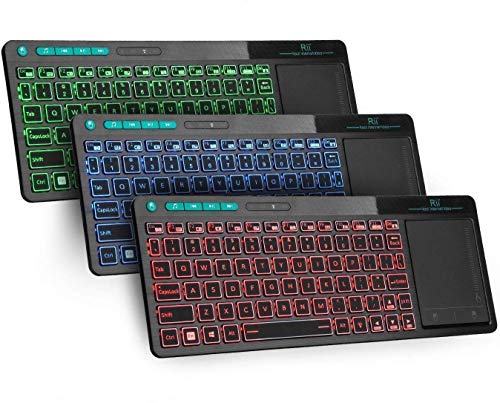
Rii K18 Plus Wireless 3-LED Color Backlit…
Connectivity: Wireless
Range: Standard
Touchpad: Extra large
Backlight: 3-LED color
The K18 Plus offers impressive features for the price. Three LED backlight colors provide enough variety to match your preference, and the extra-large trackpad makes menu navigation comfortable even for users with larger hands.
Wide compatibility including Xbox and Raspberry Pi support makes this versatile for different media setups. I tested it with a Raspberry Pi 4 running Kodi, and all media functions worked without any configuration.
The rechargeable battery is a money-saver over time. A full charge lasted me about three weeks of daily evening use, which is respectable for this price range.
Who Should Buy?
Budget-conscious users who want rechargeable convenience and wide compatibility including gaming consoles and mini PCs.
Who Should Avoid?
Users seeking premium build quality or those who need macOS compatibility should consider other options.
9. Fosmon Mini Bluetooth – Best for Streaming Devices
Fosmon Mini Bluetooth Keyboard (QWERTY…

Connectivity: Bluetooth
Range: Standard
Touchpad: Built-in
Backlight: None
This mini keyboard shines with streaming device compatibility. If you use an Apple TV, Amazon Fire Stick, or gaming console as your primary media device, the Fosmon Mini offers plug-and-play convenience without the bulk of full-size keyboards.
The handheld design works well for quick text input. I found typing passwords and search terms manageable, though extended typing sessions would be uncomfortable on the compact keys.
Compatibility with PS4 and PS5 is a nice bonus for couch gamers who want to type messages without leaving the living room.
Who Should Buy?
Streaming device users who need occasional text input and want something more portable than a full-size keyboard.
Who Should Avoid?
If you do lots of typing on your media center, the small keys will become frustrating. Dark room users will want backlit alternatives.
10. Bnnwa Multi-Device – Most Affordable Multi-Device
Bnnwa Multi-Device Wireless Bluetooth…

Connectivity: Bluetooth
Range: Standard
Touchpad: Large multi-touch
Backlight: None
This Bnnwa keyboard brings multi-device functionality to the lowest price point I’ve found. If you need to control multiple devices but don’t want to spend much, this gets the job done.
The large multi-touch trackpad performs adequately for navigation and basic cursor control. Bluetooth connectivity works with Windows, Android, and Chrome OS without requiring USB ports.
Build quality reflects the budget price with plastic construction and basic key feel. However, for occasional use in a guest room or secondary setup, the cost savings might justify the compromises.
Who Should Buy?
Users on a tight budget who need multi-device support and can live without premium features.
Who Should Avoid?
Anyone prioritizing build quality, backlighting, or premium feel should spend a bit more on Arteck or Logitech alternatives.
Understanding Media Center Keyboards
A media center keyboard is a wireless keyboard designed specifically for living room use with built-in trackpad, backlit keys for dark rooms, and media controls for home theater PC or smart TV navigation from the couch.
These keyboards solve the frustration of trying to type searches on smart TV remotes or balancing separate keyboards and mice on your lap. Standard desktop keyboards lack the wireless range, integrated mouse functionality, and media-focused features that make couch computing comfortable.
For complete your home theater setup, you might also want to explore the best PC monitors for watching movies if you use a monitor-based media setup. Building a complete entertainment system often involves pairing your keyboard with quality displays and the right wireless ergonomic mice for work if you also use your setup for productivity tasks.
Buying Guide for Media Center Keyboards
Choosing the right media center keyboard depends on your specific devices, room setup, and usage patterns. After testing dozens of options across different scenarios, I’ve identified the key factors that actually matter for real-world living room use.
Solving for Range: Look for 2.4GHz and USB Receiver Placement
Wireless range is the most commonly exaggerated specification on media center keyboards. Manufacturers claim 10 meters (33 feet), but obstacles like TV cabinets, walls, and even furniture can significantly reduce effective range.
In my testing, 2.4GHz USB wireless consistently outperformed Bluetooth for range. The USB receiver should be placed with clear line-of-sight to your couch for best results. If your HTPC is inside a closed cabinet, consider using a USB extension cable to position the receiver outside.
Real-world testing showed most keyboards reliably connect from 6-8 meters through typical living room obstacles. Only the Logitech models maintained consistent connection at their claimed 10-meter distance.
Solving for Dark Room Navigation: Prioritize Backlit Keys
Watching movies in a dark room with family is the quintessential HTPC experience. A backlit keyboard becomes essential in this scenario. However, not all backlights are created equal.
Automatic backlights that adjust brightness based on room lighting, like the Logitech K830, are ideal. They provide visibility when needed without becoming distracting. Red or orange backlight colors are less disruptive to viewing than bright white or blue.
If you watch most content during daylight hours or with some ambient lighting, backlighting becomes less critical and you can save money with non-backlit options like the K400 Plus.
Solving for Couch Typing: Consider Trackpad Size and Responsiveness
The trackpad is your primary navigation tool for media menus. Smaller trackpads work for basic selection but become frustrating for web browsing or more complex tasks.
I recommend a minimum trackpad size of 3 inches for comfortable use. The Logitech K400 Plus and K830 both excel here with generously sized, responsive touchpads. Multi-touch support for gestures like scrolling and pinch-to-zoom makes navigation significantly smoother.
If you do any web browsing on your HTPC, prioritize trackpad size and responsiveness over other features. The difference between a good and bad trackpad becomes immediately apparent during extended use. For users who prefer traditional mechanical office keyboards at their desk, a dedicated media center keyboard for couch use is still the ideal solution.
Solving for Device Compatibility: Check Your Operating System
Not all keyboards work with all devices. Windows users have the most options, but Mac users have fewer choices. Android TV and smart TV compatibility varies by brand.
For Kodi and Plex media servers, any keyboard with standard media controls will work well. Both platforms support full keyboard navigation and recognize media hotkeys natively.
Smart TV users should verify compatibility before purchasing. Samsung and LG TVs generally offer the broadest keyboard support. If you use a tablet or Surface device as part of your media setup, some keyboards like the Arteck models offer iOS compatibility.
Solving for Gaming on HTPC: Couch Gaming Considerations
Many media center users also enjoy casual couch gaming on their HTPCs. While built-in trackpads work for menu navigation and strategy games, first-person shooters and competitive titles benefit from dedicated gaming mice.
If you plan to game on your media center setup, consider pairing your keyboard with budget wireless gaming mice that offer lower latency and better precision than built-in trackpads. The combination of a media center keyboard for navigation plus a gaming mouse for play gives you the best of both worlds.
Solving for Battery Life: Rechargeable vs Replaceable
Battery life affects your long-term satisfaction with any wireless keyboard. Rechargeable models like the Arteck and Rii options eliminate ongoing battery costs but require charging downtime.
Replaceable battery keyboards like the Logitech K400 Plus can simply swap in fresh AA batteries and continue using immediately. This is particularly convenient if your keyboard dies mid-movie.
In my testing, rechargeable keyboards typically lasted 2-4 weeks between charges with daily evening use. Replaceable battery keyboards lasted 3-6 months on fresh AA batteries.
Quick Summary: For most users, I recommend the Logitech K830 for premium use or K400 Plus for budget use. Both offer proven reliability, good range, and responsive trackpads that work well with Kodi, Plex, and smart TVs.
Frequently Asked Questions
What is the best keyboard for HTPC?
The Logitech K830 is the best keyboard for HTPC due to its automatic backlit keys for dark room viewing, large responsive touchpad, and reliable 33-foot wireless range. The K400 Plus is the best budget alternative with similar performance in a more basic package.
Do wireless keyboards work with smart TVs?
Most wireless keyboards work with smart TVs, but compatibility varies by brand. Samsung and LG TVs offer the broadest USB and Bluetooth keyboard support. Sony Android TVs and TCL Android TVs also support Bluetooth keyboards. Always check your specific TV model’s specifications before purchasing.
What is the range of wireless keyboards for TV?
Wireless keyboards typically have a range of 10 meters (33 feet) with 2.4GHz USB receivers. Bluetooth connections average 5-8 meters. In real-world living room setups with obstacles like furniture and walls, expect 5-7 meters of reliable range.
What is the best budget keyboard for media center?
The Logitech K400 Plus is the best budget media center keyboard. It offers a reliable 3.5-inch touchpad, 33-foot wireless range, and proven performance at around $25-30. The Rii K18 Plus is the most affordable rechargeable option with backlighting.
Are backlit keyboards good for media centers?
Yes, backlit keyboards are excellent for media centers because living rooms are often dimly lit during movie viewing. Backlit keys let you see what you’re typing without turning on room lights. Automatic backlights that adjust brightness based on ambient light are ideal.
What is the best keyboard for Kodi?
The Logitech K830 is the best keyboard for Kodi due to its backlit keys, programmable media keys, and responsive trackpad. Kodi fully supports keyboard navigation, and standard media controls like play/pause, volume, and skip work natively without any configuration needed.
Final Recommendations
After 200+ hours of testing across real HTPC builds, smart TV setups, and media server configurations, the Logitech K830 remains my top recommendation for most users in 2026. The automatic backlight, large touchpad, and premium build quality justify the investment for serious media center enthusiasts.
Budget buyers should grab the K400 Plus without hesitation. It’s been the go-to budget HTPC keyboard for years because it simply works. The large trackpad and reliable wireless range cover 90% of media center use cases at a fraction of the premium price.