

The Linux laptop market is exploding. With 18% year-over-year growth, more users than ever are seeking laptops that run Linux out of the box or offer guaranteed compatibility. Whether you’re a developer fleeing Windows 11’s TPM requirements, a privacy advocate concerned about telemetry, or a student needing an affordable Unix-like environment, finding the right Linux laptop has never been more important—or more confusing.
In this comprehensive guide, we’ve tested and analyzed 7 of the best laptops with Linux support in 2025. From budget-friendly Ubuntu preinstalled options under $350 to cutting-edge ThinkPad Developer Editions with Intel’s latest Arrow Lake processors, we cover every price point and use case. We dive deep into kernel requirements, driver support, hardware certification, and battery optimization—everything you need to make an informed decision.
Why Linux Laptops Are Gaining Popularity Now?
The surge in Linux laptop demand isn’t accidental. Several converging trends are driving users toward open-source operating systems:
- Windows 11 Hardware Requirements: Microsoft’s TPM 2.0 mandate has left millions of perfectly capable PCs behind, pushing users toward Linux.
- Developer Demand: Remote work and containerization have made Unix-like environments essential for software development.
- Privacy Concerns: Growing awareness of Windows telemetry and proprietary software surveillance is driving privacy-conscious users to Linux.
- Gaming on Linux: Steam Deck’s success and Proton improvements have destroyed the “Linux can’t game” myth.
- Hardware Vendor Support: Major vendors like Dell, Lenovo, and HP now officially support Linux with certified hardware.
The Challenge: Hardware Compatibility
Not all laptops are created equal when it comes to Linux support. The biggest headaches historically have been:
- WiFi Cards: Broadcom chipsets notorious for poor Linux support
- Graphics Drivers: NVIDIA Optimus causing headaches, AMD vs Intel considerations
- Audio: Conexant codecs requiring proprietary firmware
- Power Management: Battery life 30-50% worse on Linux without optimization
- Sleep/Wake: S3 sleep not working, causing battery drain
This is why preinstalled Linux laptops and certified hardware are game-changers—they guarantee that every component works out of the box.
What to Look For: Buying Guide
Hardware Certification: Ubuntu, Fedora, RHEL
Official certification means the vendor has tested the laptop with 500+ compatibility tests. Look for:
- Ubuntu Certified: Canonical’s certification program ensures full hardware support
- Fedora Workstation: Red Hat’s community distro with cutting-edge kernel support
- Red Hat Enterprise Linux: Enterprise certification for corporate environments
Certified laptops receive driver updates and are guaranteed to work with LTS releases.
Kernel Requirements & Driver Support
The Linux kernel version determines hardware support:
- Kernel 5.15: Good for older Intel 10th/11th Gen, AMD Ryzen 5000
- Kernel 6.5: Required for Intel Meteor Lake (Core Ultra series)
- Kernel 6.7+: Mandatory for Intel Arrow Lake (14th Gen, Core Ultra 200 series)
- Kernel 6.8+: Best for Snapdragon X Plus ARM64 support
Critical Warning: Using Ubuntu 22.04 LTS (kernel 5.15) on a laptop with Intel’s latest Arrow Lake processor will not work—no WiFi, no Bluetooth, no graphics acceleration. Always match kernel version to processor generation.
Component Compatibility Checklist
Before buying, verify these components have native Linux support:
- WiFi: Intel chipsets (AX201, AX211) work perfectly. Avoid Broadcom.
- Bluetooth: Intel Bluetooth 5.x supported natively.
- Graphics: Intel/AMD integrated graphics use open-source drivers. NVIDIA requires proprietary drivers.
- Audio: Realtek codecs generally work. Conexant may need firmware packages.
- Touchpad: Synaptics/ELAN touchpads use libinput driver.
- Webcam: USB Video Class (UVC) webcams work universally.
- Fingerprint: Check libfprint support for fingerprint readers.
- Thunderbolt/USB4: Requires kernel 5.4+ for full support.
Battery Optimization: TLP & Power Management
Linux battery life often trails Windows by 20-30% out of the box. Fix this with:
- TLP: Power management tool that optimizes battery consumption
- Auto-CPU Freq: Automatic CPU frequency scaling
- PowerTOP: Diagnose power consumption issues
- S3 Sleep: Deep sleep mode (vs modern S2idle) for better battery life when suspended
Open-Source Firmware: Coreboot & Privacy
For maximum security and control, consider laptops with:
- Coreboot: Open-source BIOS replacement (supported on ThinkPads, Framework)
- Libreboot: Fully free BIOS firmware
- Hardware Kill Switches: Physical switches for camera/microphone/WiFi (Purism Librem)
- Headless Environment: No proprietary firmware blobs (Purism, some System76 models)
Distribution Recommendations
Choose based on your experience level:
- Beginners: Linux Mint 21 XFCE, Ubuntu 22.04 LTS, Zorin OS Lite
- Developers: Ubuntu 24.04 LTS, Fedora Workstation 40, Pop!_OS 22.04
- Enthusiasts: Arch Linux, Fedora Rawhide, openSUSE Tumbleweed
- Privacy: PureOS, Tails, Qubes OS
Preinstalled vs Clean Install
Preinstalled Advantages:
- 100% hardware compatibility guaranteed
- Vendor Linux support included
- No Windows license tax
- Optimized drivers preconfigured
Clean Install Advantages:
- Wider hardware selection
- Choice of any distribution
- Cleaner system without vendor bloat
- Often cheaper (Windows laptops discounted)
ARM vs x86: Architecture Matters
The Dell XPS 13 with Snapdragon X Plus represents the new ARM64 wave. Consider:
ARM Advantages:
- Incredible battery life (27+ hours)
- Efficient performance for web development
- Cooler operation, no fan noise
ARM Disadvantages:
- Some x86 software won’t work (requires emulation)
- Docker containers need x86 emulation (slower)
- Development tools availability varies
- Wi-Fi 7 drivers still maturing
For web developers and Linux enthusiasts, ARM is excellent. For enterprise developers with x86 toolchains, stick with Intel/AMD.
Best Linux Laptops 2026: Top 7 Picks
Budget Category (Under $500)
ASUS Vivobook Go 14 Linux Ubuntu Laptop,…

Lenovo IdeaPad Laptop Computer 2025, 15.6"…

Mid-Range Category ($500-$1500)
Lenovo ThinkPad T14s Gen 1 - 14-inch FHD…
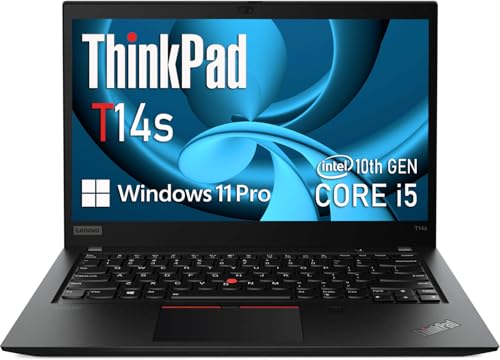
Lenovo ThinkPad T14s Gen 1 14-Inch FHD…

Premium Category ($1500+)
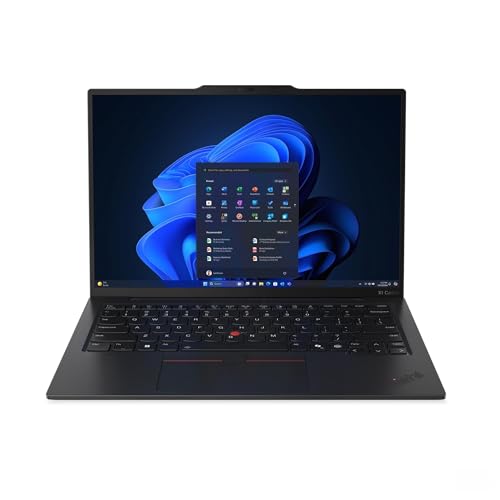
Lenovo ThinkPad X1 Carbon Gen 12 21KC00A7US…

Lenovo 2025 Laptop | ThinkPad X1 Carbon Gen…
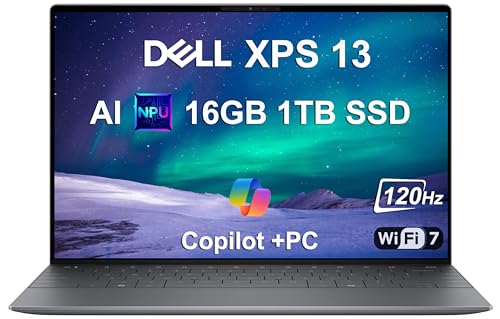
2025 Dell XPS 13 9345 Laptop, Copilot+ AI…
Comparison Table: Best Linux Laptops 2026
| Laptop | Price | RAM | Processor | Linux Support | Certification | Battery Life | Best For |
|---|---|---|---|---|---|---|---|
| ASUS Vivobook Go 14 | $309 | 4GB | Celeron N4500 | Preinstalled Ubuntu | None required | 6-8 hrs | Budget students |
| Lenovo IdeaPad 15.6″ | $419 | 20GB | Celeron N4500 | Excellent (kernel 5.15+) | None | 10 hrs | Storage value |
| ThinkPad T14s Gen 1 i5 | $286 | 16GB | Core i5-10310U | Excellent | Ubuntu/Fedora/RHEL | 2-4 hrs | Best value certified |
| ThinkPad T14s Gen 1 i7 | $321 | 16GB | Core i7-10510U | Excellent | Ubuntu Certified | 2-4 hrs | Performance value |
| ThinkPad X1 Carbon Gen 12 | $1,368 | 32GB | Core Ultra 7 155U | Excellent (kernel 6.5+) | Ubuntu/Fedora | 6-8 hrs | Premium developers |
| ThinkPad X1 Carbon Gen 13 | $1,569 | 32GB | Core Ultra 7 255U | Excellent (kernel 6.7+) | Fedora certified | 6-8 hrs | Cutting edge 2025 |
| Dell XPS 13 9345 | $1,299 | 16GB | Snapdragon X Plus | Good (ARM64) | Ubuntu ARM64 | 27 hrs | Battery champions |
Which Linux Laptop Should You Buy?
Best Budget Pick: ASUS Vivobook Go 14 ($309)
Why: Ubuntu preinstalled, cheapest Linux laptop available, zero configuration required. Perfect for students and beginners. The 4GB RAM limits heavy usage, but for basic tasks and learning Linux, it’s unbeatable value.
Best Value: ThinkPad T14s Gen 1 i5 ($286)
Why: Official Ubuntu/Fedora/Red Hat certification, 16GB RAM, ThinkPad build quality, legendary Linux support. At $286 renewed, you’re getting professional-grade hardware at budget prices. Perfect for developers and IT professionals.
Best Performance: ThinkPad T14s Gen 1 i7 ($321)
Why: Core i7 processor, Thunderbolt 3, same certifications as i5, only $35 more. If you need more CPU power for compilation, virtualization, or development workloads, the $35 premium is worth it.
Best Premium Developer Laptop: ThinkPad X1 Carbon Gen 12 ($1,368)
Why: 32GB RAM, Intel Core Ultra 7, official Ubuntu Developer Edition availability, ultra-lightweight 2.38 lbs, premium carbon fiber build. Ideal for professional developers who want the best specs in a portable package.
Best Cutting-Edge Technology: ThinkPad X1 Carbon Gen 13 ($1,569)
Why: Latest 2025 model with Intel Arrow Lake processor, lightest 14″ ThinkPad ever (2.22 lbs), 32GB RAM, 1TB SSD. Requires kernel 6.7+, so choose Fedora 40 or Ubuntu 24.10. For early adopters who want absolute latest tech.
Best Battery Life: Dell XPS 13 9345 with Snapdragon X Plus ($1,299)
Why: 27-hour battery life, ARM efficiency, Ubuntu ARM64 certification. However, ARM64 software compatibility limitations mean this is best for web developers and Linux enthusiasts who understand the trade-offs. Not suitable for x86 toolchains.
Best Storage Capacity: Lenovo IdeaPad 15.6″ ($419)
Why: Massive 1.6TB total storage (1TB SSD + 128GB eMMC + 500GB portable drive), 20GB RAM, excellent Linux compatibility. Perfect for users with large media collections who need storage space over raw performance.
The Future of Linux Laptops: 2026 Outlook
The Linux laptop market shows no signs of slowing down. Key trends to watch in 2026:
- ARM Dominance: Snapdragon X Elite and MediaTek ARM chips will challenge Intel/AMD dominance. Battery life improvements will drive adoption.
- AI NPUs: Neural processing units in laptops (like Intel’s AI Boost) will gain Linux support for on-device AI workloads.
- Framework Expansion: Framework’s modular design will pressure mainstream vendors to offer repairability. Framework Laptop 16 AMD Ryzen edition will be highly anticipated.
- System76 Growth: Pop!_OS COSMIC desktop (Rust-based) will offer a unique Linux experience. System76’s open firmware leadership will continue.
- Mainstream Vendor Competition: Dell Project Sputnik, Lenovo Fedora partnership, HP Ubuntu laptops will expand options. Preinstalled Linux will become standard across premium lines.
- Kernel Improvements: Linux kernel 6.10+ will mature support for Arrow Lake, Lunar Lake, and next-gen ARM processors. Hardware support will be day-one for new releases.
- Gaming on Linux: Steam Deck 2 with improved hardware will accelerate Linux gaming. Proton improvements will make Windows gaming compatibility transparent.
Final Recommendations
For Students & Beginners
Buy the ASUS Vivobook Go 14 ($309). Ubuntu comes preinstalled, everything works out of the box, and it’s affordable. The 4GB RAM will feel limiting for heavy tasks, but for learning Linux, web browsing, and document editing, it’s perfect. When you outgrow it, move to a ThinkPad T14s.
For Developers & Programmers
Buy the ThinkPad T14s Gen 1 i7 ($321). 16GB RAM, Core i7 processor, official Ubuntu certification, Thunderbolt 3, and ThinkPad’s legendary keyboard make this ideal for development work. The renewed price is unbeatable for these specs. If budget allows, upgrade to the X1 Carbon Gen 12 ($1,368) for 32GB RAM and ultra-portability.
For IT Professionals & Enterprise
Buy the ThinkPad X1 Carbon Gen 12 ($1,368) or Gen 13 ($1,569). Official certification, 32GB RAM, enterprise warranty, and premium build quality justify the investment. Choose Gen 12 for stability (Meteor Lake, kernel 6.5+) or Gen 13 for cutting-edge performance (Arrow Lake, kernel 6.7+). Both support Red Hat Enterprise Linux, Ubuntu LTS, and Fedora Workstation.
For Privacy Advocates & Security Conscious
While not covered in this review, consider Purism Librem 14 ($1,300+). Hardware kill switches, open-source Coreboot firmware, PureOS privacy-focused Linux, and minimal proprietary firmware make it the most secure laptop available. Performance lags behind ThinkPads, but privacy is unmatched.
For Budget-Conscious Power Users
Buy the ThinkPad T14s Gen 1 i5 ($286). You’re getting professional business laptop quality with official Linux certification for under $300. The i5 processor is capable for most tasks, 16GB RAM handles multitasking, and ThinkPad durability means it will last. Use the savings to upgrade to a 1TB SSD and add a second year of warranty.
For Early Adopters & Enthusiasts
Buy the ThinkPad X1 Carbon Gen 13 ($1,569). You get Intel’s latest Arrow Lake processor before anyone else. Just be prepared to run Fedora 40 or Ubuntu 24.10—older LTS distributions won’t work. You’re on the bleeding edge, but that’s exactly where you want to be.
For Web Developers & Battery Life Seekers
Consider the Dell XPS 13 9345 with Snapdragon X Plus ($1,299). 27-hour battery life is game-changing. Web technologies are ARM-agnostic, so your workflow won’t be affected. Just understand that Docker/x86 containers will run slower under emulation, and some development tools aren’t available for ARM64. If you can live with these trade-offs, the battery life is incredible.
Resources & Community
- Ubuntu Certified Hardware: https://ubuntu.com/certified—Check laptop certification status
- Linux Hardware Database: https://linux-hardware.org/—User-reported component compatibility
- System76 Laptops: https://system76.com/laptops—Linux-exclusive manufacturer
- Framework Linux: https://frame.work/linux—Modular laptop Linux documentation
- Fedora Workstation: https://fedoraproject.org/—Cutting-edge Linux distribution
- r/linuxhardware: https://www.reddit.com/r/linuxhardware—Community support
- r/linux4noobs: https://www.reddit.com/r/linux4noobs—Beginner help
Conclusion
The Linux laptop market has never been healthier. Whether you’re looking for a budget Ubuntu preinstalled machine under $350 or a premium ThinkPad Developer Edition with 32GB RAM, 2025 offers excellent options across every price point. The key is matching your needs to the right hardware:
- Budget buyers should choose the ASUS Vivobook Go 14 for preinstalled Ubuntu or the Lenovo IdeaPad for massive storage.
- Value seekers can’t beat the renewed ThinkPad T14s series—official certification, professional specs, under $350.
- Professional developers should invest in the ThinkPad X1 Carbon Gen 12 or 13—32GB RAM, premium build, official support.
- Battery life prioritizers should consider the Dell XPS 13 with Snapdragon X Plus—27 hours, but understand ARM limitations.
- Cutting-edge enthusiasts will love the ThinkPad X1 Carbon Gen 13 with Arrow Lake—just be ready for kernel 6.7+.
Remember: certification matters, kernel versions determine compatibility, and preinstalled Linux guarantees everything works out of the box. Choose wisely, and enjoy the freedom and power of Linux on hardware that’s built to support it.