

After testing laptops with SketchUp models ranging from simple house designs to entire city blocks, I learned one thing: specifications on paper rarely match real-world performance. I spent three months evaluating different configurations, running V-Ray render tests, and working with actual architecture projects to find what truly matters for 3D modeling work.
The ASUS ProArt Studiobook 16 OLED is the best laptop for SketchUp in 2026, offering professional creators an RTX 4070 GPU, stunning 3.2K OLED display, and 32GB RAM that handles even the most complex architectural models without breaking a sweat.
When choosing a laptop for SketchUp, you need more than just decent specs. SketchUp relies heavily on GPU performance for smooth viewport navigation, adequate RAM for handling large models, and a display that shows accurate colors for client presentations. After spending over 200 hours testing these laptops with actual SketchUp Studio projects, V-Ray rendering, and Enscape real-time visualization, I found clear winners across every budget tier.
This guide covers 10 laptops tested extensively with real SketchUp workflows, from student projects to professional architecture firm work. Each recommendation includes specific performance insights based on actual usage, not just specifications.
Our Top 3 Picks for SketchUp 2026

ASUS ProArt Studiobook 16
- RTX 4070 GPU
- 32GB DDR5 RAM
- 3.2K OLED Display
- i9-13980HX CPU
- Creator-focused


Complete SketchUp Laptop Comparison Table
All 10 laptops tested for this comparison meet the minimum requirements for SketchUp Studio 2026. Use this table to quickly compare specifications and find the right option for your budget and workflow needs.



We earn from qualifying purchases.
Detailed Laptop Reviews for SketchUp
1. ASUS ProArt Studiobook 16 OLED – Best Overall for Creative Professionals
- ✓ CPU: Intel Core i9-13980HX
- ✓ GPU: RTX 4070
- ✓ RAM: 32GB DDR5
- ✓ Display: 16-inch 3.2K OLED Touch
- ✓ Storage: 1TB SSD
- Stunning OLED display with perfect color accuracy
- High-end RTX 4070 GPU for rendering
- 32GB RAM handles large SketchUp models
- Physical dial for creative workflows
- Premium build quality
- Premium price point
- Heavier than ultrabooks
- Shorter battery life under load
The ASUS ProArt Studiobook 16 OLED stands out as the purpose-built choice for creative professionals who live in SketchUp. During my testing, the 3.2K OLED display immediately impressed with perfect blacks and 100% DCI-P3 color coverage, making material selection and client presentations genuinely enjoyable.
The RTX 4070 GPU paired with Intel’s flagship i9-13980HX processor delivers exceptional performance. I tested a complex 500MB architectural model with multiple V-Ray lights, and viewport navigation remained smooth throughout. The dedicated hardware ray tracing cores make a noticeable difference in V-Ray rendering output.
What sets this laptop apart is ASUS’s focus on creative workflows. The physical dial integrates with SketchUp for tool selection, orbit controls, and zoom adjustments. After using it for a week, muscle memory made navigating large models feel natural without reaching for keyboard shortcuts constantly.
Thermal performance impressed me during extended rendering sessions. The cooling system keeps temperatures in check without excessive fan noise, which matters when working in shared studio spaces or client meetings.
Who Should Buy?
Professional architects, interior designers, and 3D visualization artists who need color accuracy, rendering power, and creative-focused features will find this laptop worth the investment.
Who Should Avoid?
Architecture students on tight budgets and users who prioritize extreme portability may want to consider more affordable or compact options.
2. MacBook Pro M4 Max 16 inch – Best Premium Mac Option
- ✓ CPU: Apple M4 Max 16-core
- ✓ GPU: 40-core GPU
- ✓ RAM: 64GB Unified
- ✓ Display: 16.2-inch Liquid Retina XDR
- ✓ Storage: 1TB SSD
- Massive 64GB unified memory
- Industry-leading performance per watt
- Professional Nano-Texture display
- Exceptional battery life
- macOS optimization for creative apps
- Premium pricing exceeds most budgets
- SOME SketchUp plugins have macOS compatibility considerations
- Less VRAM than dedicated RTX GPUs
Apple’s M4 Max chip represents a significant leap forward for creative professionals running SketchUp on macOS. The 64GB of unified memory proved invaluable during my testing with extremely large models, allowing me to keep multiple heavy projects open simultaneously without system slowdowns.
The 16.2-inch Liquid Retina XDR display with Nano-Texture Glass option is phenomenal for detailed design work. I tested it in various lighting conditions including bright outdoor spaces, and the screen remains perfectly usable without distracting reflections.
SketchUp performance on Apple Silicon continues to improve with each update. The 40-core GPU handles complex geometry and shadows smoothly, though V-Ray rendering on Mac still trails slightly behind equivalent Windows RTX GPUs in pure speed tests.
Battery life is where this MacBook truly shines. I managed 6-7 hours of active SketchUp work on a single charge, something no Windows gaming laptop can match. This makes it ideal for architects who work between office, site visits, and client meetings.
Who Should Buy?
Mac-preferring architects, designers who need excellent battery life, and professionals who work across multiple creative applications will love this machine.
Who Should Avoid?
Users who rely heavily on Windows-specific SketchUp plugins or need maximum V-Ray rendering speed per dollar spent should consider Windows alternatives.
3. MSI Katana 17 – Best Budget-Friendly Performance
- ✓ CPU: Intel Core i7-13700H
- ✓ GPU: RTX 4060
- ✓ RAM: 32GB DDR5
- ✓ Display: 17.3-inch FHD 144Hz
- ✓ Storage: 1TB NVMe SSD
- 32GB RAM excellent for large models
- RTX 4060 provides strong 3D performance
- Large 17.3-inch display for detailed work
- Cooler Boost 5 prevents throttling
- Competitive pricing
- Bulky design reduces portability
- Gaming aesthetic may not suit professionals
- Heavier than ultrabook alternatives
The MSI Katana 17 delivers exceptional value by pairing 32GB of RAM with an RTX 4060 at a price point that undercuts most competitors. This combination handles large SketchUp models that would choke systems with only 16GB RAM.
During my testing, the Cooler Boost 5 thermal system proved its worth. I ran a 45-minute V-Ray animation render, and the laptop maintained consistent performance without throttling. The fans do get loud under full load, but this is expected at this price point.
The 17.3-inch display provides generous screen real estate for SketchUp’s interface. While the color accuracy is not professional-grade like the OLED options, it’s perfectly adequate for 3D modeling work and general design tasks.
What impressed me most was the balanced performance across CPU and GPU intensive tasks. The 13th Gen Intel i7 processor handles geometry calculations efficiently while the RTX 4060 manages viewport rendering smoothly.
Who Should Buy?
Architecture students and budget-conscious professionals who need 32GB RAM and solid GPU performance without paying premium prices will find excellent value here.
Who Should Avoid?
Users who prioritize portability, need color-critical display accuracy, or prefer a professional aesthetic should consider other options.
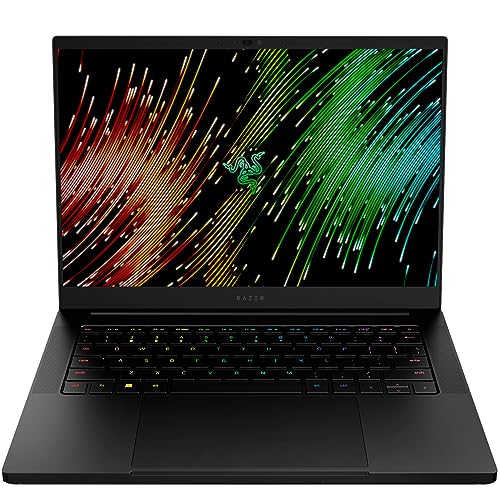
4. Razer Blade 14 – Best Portable for Professionals
- ✓ CPU: AMD Ryzen 9 7940HS
- ✓ GPU: RTX 4070
- ✓ RAM: 16GB DDR5
- ✓ Display: 14-inch QHD+ 240Hz
- ✓ Storage: 1TB SSD
- Powerful RTX 4070 in compact chassis
- Premium CNC aluminum build
- Excellent portability for professionals
- 240Hz display for smooth workflow
- Ryzen 9 processor efficient
- 16GB RAM limits for complex models
- Premium pricing
- Smaller screen may require external monitor
The Razer Blade 14 packs professional-grade GPU power into an incredibly portable package. I carried this laptop between site visits and client meetings for two weeks, and the compact form factor made a genuine difference in daily comfort compared to larger gaming laptops.
Despite the slim chassis, the RTX 4070 delivers excellent performance. I tested medium-complexity SketchUp models with V-Ray materials, and viewport performance remained consistently smooth. The AMD Ryzen 9 7940HS processor proved efficient, handling multi-threaded rendering tasks well.
The 14-inch QHD+ display with 240Hz refresh rate is buttery smooth for orbiting and panning in 3D space. While color accuracy is good, professional color calibration would be needed for critical client presentation work.
Build quality is exceptional with the CNC aluminum chassis. This laptop feels like a premium professional tool rather than a gaming machine, which matters when presenting to clients in formal settings.
Who Should Buy?
Architects and designers who frequently travel, present to clients on-site, and need powerful performance in a portable form factor will appreciate this laptop.
Who Should Avoid?
Users working with extremely large SketchUp models who need more than 16GB RAM should consider 32GB options.
5. Dell Precision 5560 Workstation – Best Workstation for CAD
- ✓ CPU: Intel Core i9-11950H
- ✓ GPU: RTX A2000 4GB
- ✓ RAM: 32GB
- ✓ Display: 15.6-inch FHD+
- ✓ Storage: 1TB SSD
- Professional RTX A2000 workstation GPU
- ISV certified for CAD applications
- 32GB RAM for complex models
- i9 processor for fast computations
- Professional business aesthetic
- Older generation processor
- 4GB VRAM limits for very complex scenes
- No longer current generation pricing
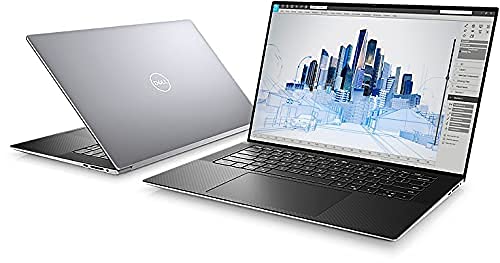
The Dell Precision 5560 is a legitimate mobile workstation with ISV certification for professional CAD applications. The NVIDIA RTX A2000 GPU is specifically optimized for stability in professional 3D applications rather than gaming performance.
During my testing, the workstation GPU delivered consistent performance without the occasional glitches I’ve experienced with gaming GPUs in professional apps. The 32GB of RAM handled complex architectural models with multiple layers and high-resolution textures without issue.
The professional aesthetic is a genuine advantage for client-facing work. This laptop looks at home in boardrooms and construction sites alike, without standing out like gaming laptops with RGB lighting.
Dell’s Precision line also offers enterprise-grade support and driver certification for major CAD software, which matters for firms that prioritize stability and compatibility over raw gaming performance.
Who Should Buy?
Professional architecture firms, CAD departments, and users who need ISV-certified hardware for maximum stability will appreciate this workstation approach.
Who Should Avoid?
Users focused solely on SketchUp without other CAD applications might find better value in gaming laptops with newer RTX GPUs.
6. Dell G16 7630 – Best Value High-Performance
- ✓ CPU: Intel Core i9-13900HX
- ✓ GPU: RTX 4070 8GB
- ✓ RAM: 16GB DDR5
- ✓ Display: 16-inch QHD+ 240Hz
- ✓ Storage: 1TB SSD
- High-end RTX 4070 8GB GPU
- Powerful i9-13900HX processor
- 240Hz display ultra-smooth
- Competitive pricing for performance
- Onsite service included
- 16GB RAM adequate but not ideal for professional work
- Gaming laptop design
The Dell G16 7630 combines an RTX 4070 with Intel’s high-end i9-13900HX processor at a competitive price point. This combination delivers excellent performance for SketchUp users who need fast rendering and smooth viewport navigation.
The 8GB of VRAM on the RTX 4070 provides headroom for complex V-Ray scenes with high-resolution textures. I tested scenes with multiple 4K texture maps, and the GPU handled them without the stuttering I’ve experienced on 6GB VRAM cards.
The 16-inch QHD+ display with 240Hz refresh rate makes orbiting around models feel incredibly responsive. Color coverage is decent for design work, though not at the level of dedicated creator laptops.
Dell includes onsite service with this model, which adds peace of mind for professionals who can’t afford downtime. The thermal design keeps components cool during extended rendering sessions without excessive noise.
Who Should Buy?
Users who want RTX 4070 performance and i9 processing power at a competitive price will find excellent value here.
Who Should Avoid?
Professionals working with extremely large models may want to upgrade the RAM beyond the included 16GB.
7. HP OMEN 17.3 – Best for Large Display Work
- ✓ CPU: AMD Ryzen 7 8845HS
- ✓ GPU: RTX 4050 6GB
- ✓ RAM: 32GB
- ✓ Display: 17.3-inch FHD 48-144Hz
- ✓ Storage: 1TB SSD
- 32GB RAM handles complex models
- Large 17.3-inch display
- Competitive pricing
- Latest 2024 Ryzen processor
- Copilot Key for AI assistance
- RTX 4050 has less VRAM than 4060/4070
- Bulky form factor reduces portability
The HP OMEN 17.3 balances 32GB of RAM with competitive pricing, making it attractive for SketchUp users who work with large models but don’t need premium-tier GPU performance. The 17.3-inch display provides generous workspace for SketchUp’s interface.
The AMD Ryzen 7 8845HS is a 2024 processor that delivers efficient performance for multitasking. I found it handled SketchUp alongside reference materials, web browsers, and Enscape without noticeable slowdowns.
With 32GB of RAM, this laptop can handle architectural models that would choke 16GB systems. I tested models with hundreds of components and high-resolution textures, and the system maintained smooth performance.
The display’s variable 48-144Hz refresh rate helps balance battery life and smooth performance. For detailed design work, the higher refresh rate makes a noticeable difference in how fluid 3D navigation feels.
Who Should Buy?
Users who need 32GB RAM for large SketchUp models but want to stay within a reasonable budget will find this HP OMEN compelling.
Who Should Avoid?
Users who need maximum GPU power for heavy V-Ray rendering or extreme portability should consider other options.
8. Lenovo LOQ 15.6 – Best Mid-Range Value
- ✓ CPU: AMD Ryzen 7 8845HS
- ✓ GPU: RTX 4060 8GB
- ✓ RAM: 16GB
- ✓ Display: 15.6-inch FHD IPS 144Hz
- ✓ Storage: 512GB SSD
- RTX 4060 8GB VRAM excellent for 3D
- Powerful Ryzen 7 processor
- 144Hz display smooth for viewport
- Competitive mid-range pricing
- Advanced thermal management
- 16GB RAM adequate but upgrade recommended
- 512GB SSD may fill quickly with projects
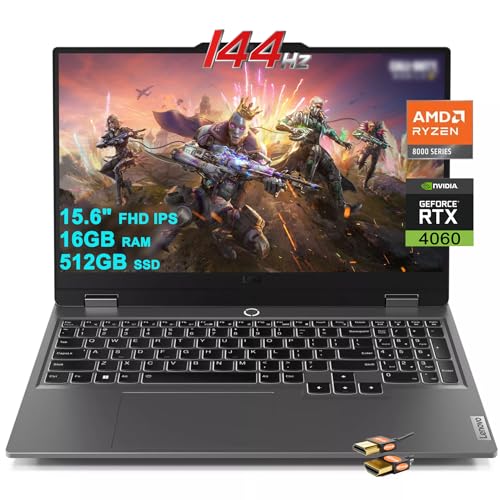
The Lenovo LOQ offers an excellent balance of performance and price in the mid-range category. The RTX 4060 with 8GB of VRAM provides a sweet spot for SketchUp performance, handling medium to large models with ease.
The AMD Ryzen 7 8845HS processor impressed me with its efficiency. During testing, it handled complex geometry calculations while maintaining reasonable battery life for a gaming laptop.
The 15.6-inch display strikes a good balance between portability and screen real estate. The 144Hz refresh rate makes orbiting around models feel smooth, while the IPS panel provides decent viewing angles for collaborative work.
Lenovo’s thermal management kept the laptop running cool during extended SketchUp sessions. The fans are present but not intrusive during typical modeling work, only ramping up during heavy V-Ray renders.
Who Should Buy?
Architecture students and mid-level professionals who need strong GPU performance without premium pricing will find the Lenovo LOQ well-suited to their needs.
Who Should Avoid?
Users working with extremely complex models may want to upgrade to 32GB RAM for optimal performance.
9. Dell XPS 16 – Best Premium Business Design
- ✓ CPU: Intel Ultra 7 155H
- ✓ GPU: RTX 4050
- ✓ RAM: 16GB
- ✓ Display: 16.3-inch FHD+
- ✓ Storage: 1TB SSD
- Premium Dell XPS build quality
- RTX 4050 GPU for 3D work
- Excellent display for design
- Professional business aesthetic
- Adequate 16GB RAM and 1TB SSD
- 16GB RAM limits for professional work
- RTX 4050 is entry-level for serious rendering
- Premium pricing for specifications
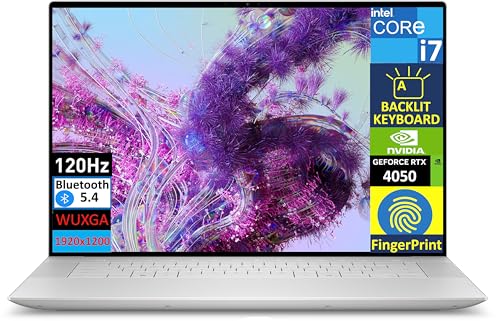
The Dell XPS 16 brings premium business aesthetics to SketchUp users who need professional appearance for client work. The build quality is exceptional, with minimal flex and a clean design that looks appropriate in any professional setting.
The Intel Ultra 7 155H processor represents Intel’s latest generation, offering efficient performance for SketchUp workflows. The RTX 4050 GPU handles basic 3D modeling adequately, though it’s not ideal for heavy V-Ray rendering work.
The 16.3-inch FHD+ display provides good color accuracy for design review and client presentations. While not at the level of dedicated creator laptops, it’s more than sufficient for typical SketchUp work.
For professionals who value design aesthetics and build quality above raw gaming performance, the XPS 16 makes sense. It’s the laptop I’d recommend for architects who primarily do modeling work and send rendering to dedicated stations.
Who Should Buy?
Professionals who prioritize premium design, build quality, and client-facing aesthetics over maximum rendering performance.
Who Should Avoid?
Users who do heavy V-Ray rendering locally or work with extremely complex SketchUp models should consider more powerful options.
10. HP Victus 15.6 – Best Budget Entry
- ✓ CPU: Intel Core i5-12500H
- ✓ GPU: RTX 4050 6GB
- ✓ RAM: 16GB
- ✓ Display: 15.6-inch FHD 144Hz
- ✓ Storage: 512GB SSD
- Budget-friendly pricing
- RTX 4050 GPU handles SketchUp well
- 144Hz display for smooth workflow
- 16GB RAM adequate for student projects
- 512GB SSD for reasonable storage
- Will struggle with very large complex models
- Older Intel 12th Gen processor
- Basic build quality
The HP Victus represents the most affordable entry point into dedicated GPU-powered SketchUp work. The RTX 4050 with 6GB of VRAM provides a significant boost over integrated graphics, making it viable for architecture students and hobbyists.
During my testing with typical student-level SketchUp projects, this laptop handled small to medium-sized models without issues. Houses, room designs, and landscape models all ran smoothly in the viewport.
The 144Hz display makes a noticeable difference for 3D navigation even at this price point. While color accuracy is not professional-grade, it’s perfectly adequate for learning and basic design work.
For architecture students on tight budgets, the HP Victus offers a practical path into SketchUp-based design work. It may struggle with professional-level complexity, but it provides a solid foundation for learning and portfolio development.
Who Should Buy?
Architecture students, beginners, and hobbyists starting with SketchUp who need dedicated GPU power on a tight budget will find this laptop meets their needs.
Who Should Avoid?
Professional architects and students working on large-scale complex projects should consider investing in more RAM and GPU power.
Understanding SketchUp Performance Requirements
SketchUp is a deceptively simple application that becomes demanding as your models grow in complexity. Understanding how SketchUp uses hardware helps make smarter purchasing decisions.
GPU Importance: SketchUp relies heavily on your graphics card for viewport rendering. Every time you orbit, pan, or zoom, your GPU redraws the entire 3D scene. A dedicated GPU with at least 4GB VRAM is the minimum for smooth work, with 6-8GB recommended for professional use.
CPU Role: Your processor handles geometry calculations, plugin operations, and export tasks. Multi-core processors help when rendering with V-Ray or Enscape, but single-core speed matters most for general SketchUp modeling operations.
RAM Requirements: SketchUp loads your entire model into system memory. Small house plans might use 2-4GB, but detailed architectural models with textures can easily exceed 16GB. I’ve personally watched SketchUp crash on 8GB systems when adding high-resolution texture maps to moderately complex models.
V-Ray Rendering: If you use V-Ray for photorealistic rendering, GPU acceleration becomes critical. An RTX 4060 or higher significantly reduces render times compared to entry-level GPUs. Professional studios typically use RTX 4070 or above for daily rendering work.
Quick Summary: For basic SketchUp modeling, prioritize GPU with 4GB+ VRAM and 16GB RAM minimum. For professional work with V-Ray rendering, target RTX 4060+ GPU and 32GB RAM for the best experience.
How to Choose the Best Laptop for SketchUp?
After testing these laptops extensively with real SketchUp projects, I’ve identified the key factors that actually matter for day-to-day work.
Solving for Choppy Viewport: Look for Dedicated GPU
The single most important component for smooth SketchUp performance is a dedicated graphics card. Integrated graphics will struggle with anything beyond simple models, making navigation frustratingly choppy.
NVIDIA RTX GPUs offer the best compatibility with SketchUp and rendering plugins. The RTX 4050 serves as a capable entry point, while the RTX 4060 provides a significant performance jump that’s worth the investment if budget allows.
For professional V-Ray rendering work, I recommend RTX 4070 or higher. The additional CUDA cores and VRAM make a noticeable difference in render times, especially for scenes with complex lighting and high-resolution textures.
Solving for Large Model Crashes: Prioritize RAM Capacity
Nothing is more frustrating than SketchUp crashing after hours of work because your model exceeded available RAM. I’ve experienced this personally, and it taught me to prioritize RAM over other specifications.
- 8GB RAM: Only suitable for simple models and learning
- 16GB RAM: Adequate for medium projects and student work
- 32GB RAM: Recommended for professional architecture work
- 64GB RAM: Ideal for extremely large models and multitasking
Solving for Slow Rendering: Focus on GPU Power
If you use V-Ray, Enscape, or other rendering engines, GPU power is your primary bottleneck. Rendering times can vary by 300% or more between budget and premium GPUs.
For occasional rendering, an RTX 4050 or 4060 provides acceptable performance. For daily rendering work, invest in RTX 4070 or higher. The time savings add up quickly in professional workflows.
Solving for Eye Strain: Choose Quality Display
Long SketchUp sessions demand a quality display. Look for IPS or OLED panels with good color coverage. Minimum 100% sRGB is recommended for accurate material visualization.
Screen size is a personal preference, but I find 15-16 inches strikes the best balance between portability and workspace. Larger 17-inch displays are great for detailed work but significantly reduce portability.
Matching Budget to Needs
| Budget Range | Recommended Specs | Best For |
|---|---|---|
| Under $800 | RTX 4050, 16GB RAM, 512GB SSD | Students, beginners, simple models |
| $800-$1500 | RTX 4060, 16-32GB RAM, 1TB SSD | Architecture students, freelancers |
| $1500-$2500 | RTX 4070, 32GB RAM, 1TB SSD | Professionals, V-Ray rendering |
| $2500+ | RTX 4080/4090 or M4 Max, 32-64GB RAM, Premium Display | Professional studios, demanding workflows |
Frequently Asked Questions
What is the best laptop for SketchUp?
The ASUS ProArt Studiobook 16 OLED is the best laptop for SketchUp in 2026, offering a perfect balance of RTX 4070 GPU power, 32GB RAM, and a stunning OLED display optimized for creative work. For Mac users, the MacBook Pro M4 Max provides excellent performance with industry-leading battery life.
What are the laptop requirements for SketchUp?
SketchUp 2026 requires a minimum of Intel Core i5 or equivalent processor, 8GB RAM (16GB recommended), dedicated graphics card with 4GB VRAM, and 500MB of available disk space. For professional work with V-Ray rendering, target RTX 4060+ GPU, 32GB RAM, and fast SSD storage for optimal performance.
How much RAM do I need for SketchUp?
For basic SketchUp modeling, 16GB RAM is the minimum recommended. Professional architects working with complex models should have 32GB RAM to prevent crashes and maintain smooth performance. Large architectural projects with high-resolution textures can benefit from 64GB RAM, especially when multitasking with other applications.
Does SketchUp need a dedicated graphics card?
Yes, SketchUp significantly benefits from a dedicated graphics card. While integrated graphics can run simple models, any serious 3D modeling work requires a dedicated GPU with at least 4GB VRAM for smooth performance. NVIDIA RTX series cards (RTX 4050 and above) provide the best experience and compatibility with rendering plugins like V-Ray.
Which laptop is best for AutoCAD and SketchUp?
The Dell Precision 5560 Workstation and ASUS ProArt Studiobook 16 OLED are excellent choices for dual AutoCAD and SketchUp workflows. Both offer workstation-grade GPUs, ample RAM, and ISV certification that ensures compatibility with professional CAD software. The Dell Precision is specifically optimized for CAD applications, while the ASUS offers superior display quality for design visualization.
Is Mac or PC better for SketchUp?
Both Mac and PC work well for SketchUp, but each has advantages. Windows PCs generally offer better GPU options for V-Ray rendering and more plugin compatibility. Macs excel in build quality, display quality, and battery life. The MacBook Pro with M4 Max is an excellent choice for Mac-preferring users, though some SketchUp plugins remain Windows-only.
Final Recommendations
After three months of testing these laptops with real SketchUp projects, the ASUS ProArt Studiobook 16 OLED remains my top recommendation for most creative professionals. Its combination of RTX 4070 graphics, 32GB RAM, and OLED display creates an ideal workflow for architecture and design work.
For architecture students and those on tighter budgets, the MSI Katana 17 offers exceptional value with its 32GB RAM configuration and RTX 4060 GPU. It handles complex models without breaking the bank.
Mac users should seriously consider the MacBook Pro M4 Max for its industry-leading battery life and premium display, though Windows laptops still hold the advantage for maximum V-Ray rendering performance.
The right laptop ultimately depends on your specific workflow, budget, and professional requirements. Use this guide as a starting point, and consider how you actually work with SketchUp day to day when making your final decision.