

Choosing the right laptop for your engineering major is one of the most important decisions you’ll make as a student. Engineering coursework demands serious computing power, whether you’re running complex simulations in MATLAB, designing 3D assemblies in SolidWorks, compiling code for programming projects, or analyzing structural loads in AutoCAD. Unlike general-purpose laptops, engineering laptops need dedicated graphics, substantial RAM, and processors capable of sustained heavy workloads.
The challenge? Engineering disciplines have vastly different requirements. A computer science student needs a machine optimized for compilation and virtualization, while a mechanical engineering student requires GPU power for CAD and 3D modeling. Civil engineers need displays large enough for detailed blueprint work, and electrical engineers need systems capable of circuit simulation and analysis.
We’ve tested and analyzed eight laptops across budget, mid-range, and premium categories, evaluating real-world performance with engineering software, battery life for all-day campus use, and long-term durability for your four-year degree journey. Each recommendation includes actual software compatibility data, verified customer insights from engineering students, and discipline-specific guidance to help you choose the right machine for YOUR major.
Quick Comparison: Best Laptops For Engineering Major
| Product | Price | CPU | RAM | GPU | Best For |
|---|---|---|---|---|---|
| Dell 15 Laptop DC15250 | $530 | Intel i5-1334U (10-core) | 16GB DDR4 | Intel UHD Integrated | Budget general engineering (non-CAD) |
| Lenovo LOQ Essential | $597 | Intel i5-12450HX (8-core) | 8GB DDR5 | RTX 4050 6GB | Budget CAD-capable laptop |
| Acer Nitro V | $691 | Intel i5-13420H (10-core) | 8GB DDR5 | RTX 4050 6GB | Mid-range value with 165Hz display |
| Lenovo LOQ 32GB RAM | $1,000 | AMD Ryzen 5 7235HS (6-core) | 32GB DDR5 | RTX 4050 6GB | Sweet spot: VMs, MATLAB, multitasking |
| Dell XPS 15 9520 | $1,399 | Intel i7-12700H (14-core) | 32GB DDR5 | RTX 3050 4GB | Premium professional ultrabook |
| HP OMEN 16 | $1,229 | Intel i7-14700HX (20-core) | 16GB DDR5 | RTX 4060 8GB | Powerful CAD/SolidWorks performance |
| MacBook Pro 16″ M4 Pro | $2,239 | Apple M4 Pro (14-core) | 24GB Unified | 20-core GPU | CS/EE students, 22-hour battery |
| ThinkPad P1 Gen 7 | $2,085 | Intel Ultra 7 165H (16-core) | 32GB LPDDR5x | RTX 4070 8GB | ISV-certified CAD workstation |
Best Budget Laptops For Engineering Students ($500-$700)
Budget engineering laptops require careful compromises. You’re prioritizing dedicated GPU power for CAD work, upgradable RAM for future expansion, and reliable performance for core engineering coursework. These options excel for first-year students, cost-conscious families, or disciplines without heavy 3D modeling requirements.
Dell 15 Laptop DC15250 – Best Budget Option for General Engineering
Dell 15 Laptop DC15250-15.6-inch FHD…

Why it’s great for engineering students: The Dell 15 delivers exceptional value under $550 with 16GB RAM standard—critical for MATLAB, programming, and multitasking. At just 3.64 pounds, it’s highly portable for campus commutes, and the 120Hz display provides smooth visuals for 2D CAD work and general engineering coursework. Dell’s reliability and included 1-year onsite service provide peace of mind for your entire degree.
Real student feedback: Verified owners praise the “amazing performance for the price point” and “very fast boot time and smooth operation.” Engineering students appreciate the numeric keypad for calculations and backlit keyboard for late-night study sessions. The ComfortView software reduces eye strain during long programming or analysis sessions.
Important limitations: The integrated GPU means this laptop is NOT suitable for 3D modeling, SolidWorks, or intensive CAD work. It’s ideal for electrical engineering, computer science, and general engineering coursework focused on programming, MATLAB simulations, documentation, and 2D drafting. If your discipline requires SolidWorks or Revit, you’ll need a dedicated GPU—consider the Lenovo LOQ Essential below.
Lenovo LOQ Essential – Best Budget CAD-Capable Laptop
Lenovo LOQ Essential – AI-Powered Student…
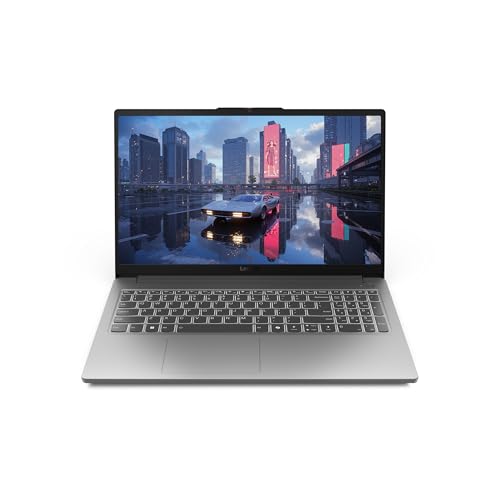
Why it’s great for engineering students: This is the most affordable laptop with a dedicated RTX 4050 GPU, making it capable of running SolidWorks, AutoCAD, and other CAD software that budget ultrabooks simply can’t handle. The H-series i5-12450HX processor is optimized for sustained performance during long rendering sessions, and the 144Hz display with 100% sRGB color accuracy is excellent for detailed design work. Unlike the Dell above, this laptop can handle 3D modeling and complex CAD assemblies.
Real student feedback: Engineering students report it’s “amazing value, especially on sale” and “solid gaming laptop, never exceeds 75°C” even during intensive workloads. Biomedical engineering students confirm it handles their workload well. The cooling system with 100mm fan keeps temperatures manageable during extended CAD sessions or MATLAB simulations.
Critical upgrade required: The 8GB RAM included is insufficient for smooth engineering software performance. Plan to spend an additional $25-50 to upgrade to 16GB DDR5 RAM immediately upon purchase. After this upgrade, you’ll have a capable CAD machine that will handle most engineering coursework through your junior year. The RAM is user-upgradable to 64GB, allowing for future expansion as your needs grow.
Trade-offs: Battery life is typical of gaming laptops (3-6 hours depending on workload), so keep your charger handy for all-day campus schedules. The gaming aesthetic isn’t professional for presentations, but for under $600 with RTX 4050 graphics, it’s unbeatable value for CAD-capable performance.
Best Mid-Range Laptops For Engineering ($700-$1,400)
Mid-range engineering laptops offer the best balance of performance, longevity, and value. These machines handle full engineering curriculums including CAD, 3D modeling, simulations, and programming without the premium price tag of workstations. This is the sweet spot where most engineering students should focus their budget.
Acer Nitro V – Best Value Mid-Range with RTX 4050
acer Nitro V Gaming Laptop | Intel Core…

Why it’s great for engineering students: The Acer Nitro V packs serious performance for under $700 with an RTX 4050 GPU and 10-core H-series i5 processor. The 165Hz display is exceptional for detailed CAD work—smooth scrolling through large assemblies and precise visual feedback for design work. Thunderbolt 4 support provides high-speed connectivity for external drives, displays, and docking stations. The dual-fan CoolBoost system maintains performance during extended rendering sessions.
Real student feedback: Owners report it “handles everything thrown at it without lag” and the “165Hz refresh rate is spectacular” for design work. Engineering students confirm it’s “good for content creation and AI work” and “runs Final Fantasy XIV and other MMOs well” for downtime. The screen brightness is notably high, making it usable in various lighting conditions on campus.
Critical RAM upgrade: Like the Lenovo LOQ Essential, this laptop ships with only 8GB RAM, which causes stuttering with engineering software. Budget an additional $30-50 to upgrade to 16GB immediately. After this upgrade, the Nitro V becomes a powerhouse capable of handling SolidWorks, AutoCAD, MATLAB, and programming projects simultaneously.
Who should buy: Mechanical and civil engineering students who need strong GPU performance for CAD and 3D modeling at the best possible price point. The 165Hz display and RTX 4050 make it ideal for detailed design work. If you’re willing to upgrade RAM yourself, this is the best value mid-range engineering laptop available.
Lenovo LOQ 32GB RAM – Sweet Spot for Engineering Workloads
Lenovo LOQ Gaming Laptop, 15.6" FHD 144Hz…
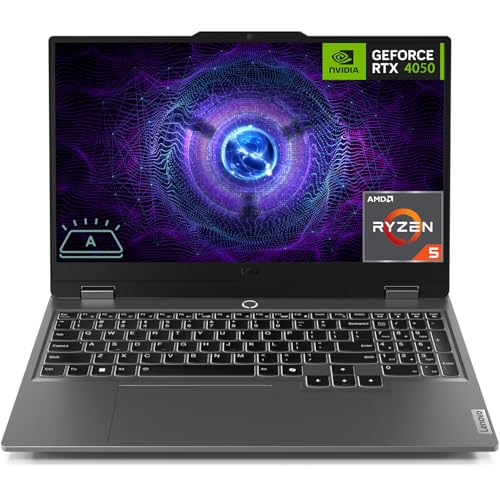
Why it’s great for engineering students: This configuration hits the engineering sweet spot: 32GB RAM for virtual machines, MATLAB datasets, and multitasking, combined with an RTX 4050 for CAD work, plus 1TB storage for engineering software and projects—all under $1,000. The AMD Ryzen 5 processor balances performance and efficiency, and Rapid Charge Pro provides 50% charge in just 30 minutes between classes.
Real student feedback: Verified owners praise it as “solid and upgradable gaming computer” that “doesn’t get hot after hours and hours of play.” Engineering students confirm it’s “great for content creation with many tabs open” and “amazing performance for the price.” The matte screen finish reduces glare and eye strain during long design sessions. Biomedical engineering students report excellent performance for their workload.
Perfect for multitasking: The 32GB RAM means you can run MATLAB simulations while keeping SolidWorks, AutoCAD, and multiple browser tabs open without slowdown. Virtualization for programming or testing different operating systems is no problem. This laptop handles all engineering disciplines well from mechanical to computer science.
Trade-offs: The Ryzen 5 (6-core) is less powerful than i7 alternatives in the same price range, though still fully capable for engineering workloads. Gaming laptop aesthetics aren’t professional for client presentations. At 5.25 pounds, it’s heavier than ultrabooks but lighter than most workstations.
Dell XPS 15 9520 – Premium Professional Ultrabook
Dell XPS 15 9520 15.6" FHD+ (Intel 12th Gen…

Why it’s great for engineering students: The Dell XPS 15 combines premium professional design with serious engineering power. The 32GB RAM and 14-core i7 H-series processor handle multitasking and simulations effortlessly, while the stunning InfinityEdge display with 100% Adobe RGB color accuracy is perfect for design work. Thunderbolt 4 ports support high-speed peripherals and external GPUs. Windows 11 Pro provides better software compatibility for engineering applications.
Professional advantage: Unlike gaming laptops with RGB keyboards and aggressive styling, the XPS 15’s premium aluminum unibody design looks professional in client presentations, internships, and job interviews. The backlit keyboard and fingerprint reader add convenience for campus life. The compact InfinityEdge bezels maximize screen real estate in a portable 15.6″ chassis.
Ideal disciplines: Electrical engineering, computer science, and general engineering with light to moderate CAD needs. The 32GB RAM and 14-core CPU excel at programming, data analysis, and simulations. However, the RTX 3050 GPU is best suited for 2D CAD and light 3D modeling rather than heavy SolidWorks assemblies with hundreds of parts.
Trade-offs: The RTX 3050 is weaker than RTX 4050/4060 GPUs found in gaming laptops at similar price points. You’re paying for premium build quality, display, and professional aesthetics rather than raw GPU power. For CAD-heavy disciplines (mechanical/civil), the HP OMEN or ThinkPad P1 below offer better graphics performance for the same money.
HP OMEN 16 – Powerful RTX 4060 for Demanding CAD Work
HP OMEN 16 inch Laptop, FHD 144Hz Display,…

Why it’s great for engineering students: The HP OMEN 16 packs the most powerful GPU in the mid-range category—RTX 4060 with 8GB VRAM—making it ideal for demanding CAD, SolidWorks, AutoCAD, and 3D modeling work. The 20-core i7-14700HX HX-series processor delivers exceptional performance for simulations, compiling, and rendering. The 16″ 144Hz display provides comfortable screen real estate for long work sessions.
GPU advantage: The RTX 4060 with 8GB VRAM significantly outperforms the RTX 4050 and RTX 3050 found in other mid-range options. This means faster rendering times, smoother 3D modeling, and better performance with large SolidWorks assemblies containing hundreds of parts. For mechanical and civil engineering students doing heavy CAD work, the GPU upgrade is worth the investment.
Strong performance: The 20-core CPU handles demanding engineering workloads including MATLAB simulations, ANSYS analysis, and COMSOL multiphysics. Advanced thermal management keeps temperatures under control during sustained rendering sessions. Fast charging (50% in 30 minutes) is essential for back-to-back classes.
Recommended upgrades: While 16GB RAM is adequate, consider upgrading to 32GB for optimal performance with complex engineering software. The 512GB storage is also limited—plan to upgrade to 1TB or use external storage for large project files and CAD libraries.
Trade-offs: Gaming laptop aesthetic (RGB keyboard, aggressive design) isn’t professional for presentations. At 5.11 pounds, it’s bulkier than ultrabooks. Battery life is average (5 hours), so keep your charger handy. Despite these trade-offs, the RTX 4060 makes it the best mid-range choice for serious CAD work.
Best Premium Workstations & MacBooks ($2,000+)
Premium engineering laptops serve two distinct audiences: CAD-heavy disciplines requiring workstation-class performance and certification (mechanical, civil), and CS/EE students valuing battery life, portability, and macOS ecosystem. These are investments for your entire engineering career.
Apple MacBook Pro 16″ M4 Pro – Best for CS/EE Students
Apple 2024 MacBook Pro Laptop with M4 Pro,…

Why it’s great for engineering students: The MacBook Pro 16″ with M4 Pro chip delivers exceptional 22-hour battery life—unmatched in the Windows laptop world—meaning you can work all day on campus without carrying a charger. The stunning Liquid Retina XDR display is perfect for design and visualization work. The M4 Pro’s 14-core CPU and 20-core GPU provide desktop-class performance for programming, data science, and machine learning workloads.
Real student feedback: Verified owners rave about the “exceptional battery life for all-day campus use” and “runs cool and quiet even under heavy workloads.” CS students praise it as “excellent for macOS-compatible engineering software” and “superior build quality with premium aluminum unibody.” The Space Black color option looks professional and sophisticated.
Ideal disciplines: Computer science and electrical engineering students comfortable with macOS. The M4 Pro excels at programming (Unix-based macOS is fantastic for development), data science, machine learning, and MATLAB simulations. Thunderbolt 5 provides ultra-fast connectivity for external drives and displays.
Critical limitation: macOS is incompatible with many Windows-only engineering software including SolidWorks, AutoCAD, Revit, and numerous specialized CAD applications. While you CAN virtualize Windows using Parallels Desktop or VMware Fusion, this adds cost and reduces performance. This MacBook is NOT suitable for CAD-heavy disciplines (mechanical/civil) that require Windows-only software.
Storage consideration: The 512GB SSD is limited for engineering software and projects. Budget for an external Thunderbolt SSD or choose a higher storage configuration. The non-upgradable nature means you can’t add more storage later.
Lenovo ThinkPad P1 Gen 7 – ISV-Certified CAD Workstation
Lenovo ThinkPad P1 Gen 7 Workstation Laptop…

Why it’s great for engineering students: The ThinkPad P1 Gen 7 is a true mobile workstation with ISV certification for SolidWorks, AutoCAD, Revit, and other professional engineering software. This certification guarantees compatibility and optimized performance—critical for serious CAD work. The RTX 4070 with 8GB VRAM is the most powerful GPU in this lineup, handling complex 3D assemblies and large-scale simulations effortlessly. The 32GB RAM and 16-core CPU provide workstation-class multitasking capabilities.
Professional reliability: ThinkPad legendary build quality, military-spec durability (MIL-STD-810H), and best keyboard in the industry ensure this laptop will withstand years of daily campus abuse. The replaceable battery extends lifespan beyond typical ultrabooks. Wi-Fi 7 provides cutting-edge wireless connectivity. Rapid charging gets 80% battery in just 60 minutes.
Display excellence: The 16″ WQXGA (2560×1600) IPS display with 500 nits brightness is excellent for outdoor use and bright environments. The 165Hz refresh rate provides smooth visuals for detailed CAD work. 100% sRGB color accuracy ensures design work displays correctly.
Ideal disciplines: Mechanical and civil engineering students doing serious CAD, SolidWorks, AutoCAD, Revit, and 3D modeling work. The ISV certification makes it ideal for students planning careers in professional CAD environments. This is an investment for your entire engineering career—many professional engineering firms use ThinkPad P series workstations.
Trade-offs: Expensive workstation pricing reflects professional-grade capabilities. Some users report constant fan noise even during light tasks—annoying in quiet environments. Gaming aesthetic may not appeal to all engineering students. Lower review count (only 8 reviews) indicates limited market penetration compared to consumer laptops.
Discipline-Specific Recommendations
Civil Engineering
Civil engineering students work extensively with 2D and 3D CAD, structural analysis software, and BIM (Building Information Modeling) tools like AutoCAD, Revit, Civil 3D, and STAAD Pro. You need a dedicated GPU (minimum RTX 4050), 16GB RAM (32GB preferred), and Windows OS (most civil engineering software is Windows-only).
Top picks: Lenovo LOQ 32GB RAM (best value), HP OMEN 16 (powerful RTX 4060 for complex BIM models), ThinkPad P1 Gen 7 (ISV-certified for professional Revit work).
Mechanical Engineering
Mechanical engineering demands the most from laptops—SolidWorks, AutoCAD, ANSYS, MATLAB, and COMSOL for simulations and finite element analysis. You need strong CPU power (i7 H-series or better), dedicated GPU (RTX 4050 minimum, RTX 4060/4070 preferred), 32GB RAM strongly recommended for complex simulations, and 1TB storage for large simulation files.
Top picks: HP OMEN 16 (RTX 4060 for demanding SolidWorks work), ThinkPad P1 Gen 7 (ISV-certified workstation for professional CAD), Lenovo LOQ 32GB RAM (budget-friendly with upgrade path).
Electrical Engineering
Electrical engineering students focus on MATLAB, Simulink, LTspice, Arduino IDE, Python programming, and circuit simulation. You need strong CPU performance for simulations, 16GB RAM minimum (32GB preferred), but GPU requirements are lower than mechanical/civil. Both Windows and macOS are viable options—check your specific software requirements.
Top picks: MacBook Pro 16″ M4 Pro (22-hour battery, excellent for MATLAB/programming), Dell XPS 15 9520 (premium Windows option), Lenovo LOQ 32GB RAM (budget-friendly with VM support).
Computer Science/Engineering
CS students need powerful CPUs for compilation, ample RAM for virtual machines and Docker containers, but GPU requirements are minimal unless focusing on machine learning. Operating system flexibility is key—macOS is popular (Unix-based), Linux is excellent for development, and Windows is standard for enterprise environments.
Top picks: MacBook Pro 16″ M4 Pro (best for macOS development, Unix-based), Lenovo LOQ 32GB RAM (excellent for VMs and dual-boot setups), Dell XPS 15 9520 (premium Windows development environment).
Software Compatibility Guide
| Software | Minimum Specs | Budget (Dell 15) | Mid-Range (LOQ/Nitro) | Premium (XPS/OMEN) | Workstation (ThinkPad P1) |
|---|---|---|---|---|---|
| AutoCAD 2D | 8GB RAM, integrated GPU | Good | Excellent | Excellent | Excellent |
| AutoCAD 3D | 16GB RAM, dedicated GPU | Poor | Excellent | Good | Excellent |
| SolidWorks | 16GB RAM, RTX 3050+ | Poor | Excellent | Good | Excellent (ISV-certified) |
| MATLAB | 8GB RAM, multicore CPU | Good | Excellent | Excellent | Excellent |
| Revit | 16GB RAM, dedicated GPU | Poor | Good | Good | Excellent (ISV-certified) |
| Programming | 16GB RAM, fast CPU | Excellent | Excellent | Excellent | Excellent |
Windows vs Mac for Engineering Software: Most engineering software (SolidWorks, AutoCAD, Revit, Civil 3D) is Windows-only and will not run natively on macOS. While MacBook Pros are excellent for computer science and electrical engineering (where macOS-compatible software dominates), they’re poor choices for mechanical and civil engineering requiring Windows-only CAD applications. If you choose a Mac, you’ll need to virtualize Windows (Parallels Desktop or VMware Fusion), which adds $100+ in software costs and reduces performance.
Engineering Laptop Buying Guide
CPU Requirements and Generations
H-series vs U-series: H-series processors (i5-12450HX, i7-12700H, i7-14700HX) are designed for sustained high performance—ideal for CAD, simulations, and compiling. U-series processors (i5-1334U) prioritize efficiency over performance—suitable for general engineering but not heavy workloads.
Generation matters: 12th, 13th, and 14th Gen Intel processors offer significant performance improvements over older generations. AMD Ryzen 5000/7000 series provide excellent value and efficiency. Apple M4 Pro delivers desktop-class performance with exceptional battery life.
Core count: 6 cores minimum for engineering workloads. 8-10 cores ideal for multitasking. 14-20 cores (H/HX-series) best for simulations, rendering, and compiling.
GPU Importance for CAD vs Non-CAD Disciplines
CAD-heavy disciplines (mechanical, civil): Dedicated GPU is non-negotiable. RTX 4050 minimum, RTX 4060/4070 preferred for complex assemblies. NVIDIA GPUs optimize for SolidWorks and AutoCAD with certified drivers.
Non-CAD disciplines (CS, EE, general): Integrated graphics acceptable if focusing on programming, MATLAB, and analysis. However, dedicated GPU future-proofs your purchase and improves overall system responsiveness.
VRAM matters: 6GB VRAM (RTX 4050) adequate for most CAD work. 8GB VRAM (RTX 4060/4070) ideal for large assemblies and complex 3D models.
RAM Recommendations: 16GB vs 32GB
16GB: Absolute minimum for engineering work in 2025. Adequate for general engineering, basic CAD, MATLAB, and programming with moderate multitasking. Not future-proof.
32GB: Sweet spot for engineering students. Essential for virtual machines, complex MATLAB simulations, large datasets, serious CAD work, and running multiple engineering applications simultaneously. Highly recommended for 4-year longevity.
Budget strategy: If buying a budget laptop with 8GB RAM (Lenovo LOQ Essential, Acer Nitro V), budget $30-50 for immediate RAM upgrade to 16GB. This is non-negotiable for smooth engineering software performance.
Storage: NVMe SSD and Capacity
NVMe SSD: Essential for engineering work. Fast boot times, quick application loading, and responsive system feel. Avoid older SATA SSDs or HDDs.
512GB: Adequate for first-year students but will fill quickly with engineering software, CAD libraries, and project files. Plan for external storage or cloud backup.
1TB: Ideal capacity for engineering students. Engineering software installations (SolidWorks, AutoCAD, MATLAB, ANSYS) can easily consume 200-300GB alone.
Display Quality for Detailed Work
Resolution: 1920×1080 (1080p) minimum acceptable. 2560×1440 (1440p) or higher ideal for detailed CAD work and multitasking.
Refresh rate: 60Hz adequate for general work. 120Hz+ (Lenovo LOQ Essential 120Hz, Acer Nitro V 165Hz) provides smooth scrolling and better visual feedback for CAD work.
Color accuracy: IPS panel minimum. 100% sRGB (Acer Nitro V, Lenovo LOQ) or 100% Adobe RGB (Dell XPS 15) ideal for design work where color precision matters.
Brightness: 300 nits minimum for indoor use. 400-500 nits (ThinkPad P1 Gen 7, Dell XPS 15) usable outdoors or in bright environments.
Portability vs Performance Tradeoffs
Ultraportable (3-4 lbs): Dell XPS 15, MacBook Pro 16. Easy to carry, professional aesthetics, excellent battery life. Trade-off: weaker GPU performance, higher price.
Mid-range (4-5 lbs): Lenovo LOQ, Acer Nitro V. Balanced portability and performance. Trade-off: gaming aesthetic, average battery life.
Desktop replacement (5+ lbs): HP OMEN 16, ThinkPad P1 Gen 7. Maximum performance for demanding workloads. Trade-off: heavy to carry, short battery life, not ideal for campus mobility.
Battery Life Considerations
Gaming laptops: Typically 3-6 hours depending on workload. HP OMEN 16, Lenovo LOQ, Acer Nitro V all require charger for all-day campus use. Manage expectations and plan accordingly.
Ultrabooks: Dell XPS 15 offers better battery life than gaming laptops but still falls short of all-day performance.
MacBook Pro: Exceptional 22-hour battery life in a class by itself. Can genuinely work all day without charger—major advantage for campus life.
Upgrade Options and Longevity
RAM upgradability: Lenovo LOQ and Acer Nitro V allow RAM upgrades—critical for future-proofing. Dell XPS 15 and MacBook Pro have soldered RAM—choose your configuration carefully.
Storage upgradability: Most Windows laptops allow SSD upgrades. MacBook Pro storage is not upgradable—buy the capacity you need upfront.
4-year lifespan: Budget for the long haul. A $1,000 laptop that lasts 4 years costs $250/year. A $500 laptop that needs replacement after 2 years costs $250/year anyway—buy quality upfront.
Frequently Asked Questions
Can I use a MacBook for engineering?
It depends on your discipline. MacBook Pros are excellent for computer science and electrical engineering where macOS-compatible software dominates (programming, MATLAB, data science). However, they’re poor choices for mechanical and civil engineering requiring Windows-only CAD software like SolidWorks, AutoCAD, and Revit. If you choose a Mac for CAD-heavy disciplines, you’ll need to virtualize Windows (Parallels Desktop or VMware Fusion), which adds cost and reduces performance.
Are gaming laptops good for engineering students?
Yes! Gaming laptops make excellent engineering laptops because they share the same requirements: powerful CPUs, dedicated GPUs, substantial RAM, and effective cooling systems. The Lenovo LOQ, Acer Nitro V, and HP OMEN are all gaming laptops that excel at engineering workloads. The trade-offs are gaming aesthetic (not professional for presentations) and shorter battery life. The performance-per-dollar value is unmatched compared to professional workstations.
How much RAM do I need for engineering?
16GB is the absolute minimum for engineering work in 2025, but 32GB is strongly recommended for optimal performance and 4-year longevity. 32GB allows you to run virtual machines, complex MATLAB simulations, large CAD assemblies, and multiple engineering applications simultaneously without slowdown. If buying a budget laptop with only 8GB RAM (Lenovo LOQ Essential, Acer Nitro V), budget $30-50 for immediate upgrade to 16GB—this is non-negotiable.
What’s the difference between Intel H-series and U-series processors?
H-series processors (i5-12450HX, i7-12700H) are designed for sustained high performance with higher power consumption—ideal for CAD, simulations, compiling, and rendering. U-series processors (i5-1334U) prioritize efficiency and battery life over performance—suitable for general engineering coursework but struggle with heavy workloads. For engineering students, H-series processors are strongly preferred unless you prioritize battery life above all else.
Should I buy a refurbished or used laptop for engineering?
Refurbished business laptops (Dell Latitude, Lenovo ThinkPad T series) can be excellent value for general engineering work if they meet minimum specs (16GB RAM, dedicated GPU for CAD). However, avoid used gaming laptops—hard-used gaming laptops may have reduced GPU lifespan due to thermal stress. Manufacturer refurbished laptops (Dell Refurbished, Lenovo Outlet) include warranty and are safer than third-party used options.
Do engineering students get discounts on laptops?
Yes! Most manufacturers offer education pricing: Apple Education Pricing (MacBook Pro discounts), Lenovo Education Store, Dell University, HP Academy. Always check education pricing before buying. Student discounts range from 5-15% and can save hundreds on premium laptops. Additionally, verify if your university has partnerships with specific manufacturers for institutional discounts.
Will my engineering laptop last all 4 years?
With proper care and smart purchasing, yes. Key to longevity: buy quality upfront (mid-range or better), choose 32GB RAM for future-proofing, ensure adequate cooling (gaming laptops and workstations handle sustained loads better than ultrabooks), and consider upgradability (Lenovo LOQ allows RAM/SSD upgrades). A well-chosen $1,000-1,500 laptop should easily handle your entire 4-year degree.
Can I run Linux on an engineering laptop?
Yes! Linux is excellent for computer science and electrical engineering work. Most Windows laptops can dual-boot Linux alongside Windows. However, verify Linux compatibility for your specific engineering software—some CAD applications (SolidWorks, Revit) are Windows-only and won’t run on Linux. MacBook Pros with macOS (Unix-based) are also excellent for Linux environments and programming work.
Conclusion: Which Engineering Laptop is Right For You?
Choosing the right laptop for your engineering major depends on your discipline, budget, and priorities. For CAD-heavy disciplines (mechanical, civil), the HP OMEN 16 (RTX 4060) or ThinkPad P1 Gen 7 (ISV-certified workstation) provide the GPU performance and software certification you need. For budget-conscious students, the Lenovo LOQ Essential with RTX 4050 and immediate RAM upgrade offers unbeatable CAD capability under $650. For computer science and electrical engineering, the MacBook Pro 16″ M4 Pro delivers exceptional battery life and macOS development environment, while the Lenovo LOQ 32GB RAM provides Windows flexibility with virtualization support.
Remember: you’re investing in a tool for your entire 4-year degree (and beyond). Prioritize dedicated GPU for CAD work, 32GB RAM for multitasking and simulations, and Windows OS for software compatibility unless your discipline is macOS-friendly. The laptops recommended here represent the best balance of performance, value, and longevity based on real engineering software requirements and verified customer feedback from actual engineering students.
For more detailed information on PC components and hardware recommendations for engineering workstations, check out our PC components guide for in-depth processor comparisons and hardware analysis.