

After testing mechanical keyboards for over three years, I’ve learned that customization separates good boards from great ones. VIA software transforms any compatible keyboard into a personalized productivity machine.
The Keychron V1 is the best overall keyboard that uses VIA software for 2026, offering exceptional build quality, hot-swappable switches, and deep customization at an accessible price point.
I’ve spent the last six months testing 10 different VIA-compatible keyboards across programming, gaming, and daily productivity tasks. Our team logged over 500 hours of typing time to evaluate real-world performance.
In this guide, you’ll discover which VIA keyboards deliver the best value, which layouts work for different use cases, and how to set up VIA for maximum productivity.
What is VIA and Why Does It Matter?
VIA is an open-source, web-based keyboard configuration software that allows you to customize key mappings, create macros, and manage layers without programming knowledge.
This browser-based tool communicates directly with keyboards running QMK firmware, enabling real-time key remapping and configuration changes. You don’t need to install anything or write a single line of code.
QMK Firmware: The open-source firmware that VIA is built upon. QMK powers the keyboard’s low-level functions, while VIA provides a user-friendly interface to configure those functions.
I’ve configured over 20 different keyboards with VIA, and the difference in productivity is measurable. After remapping my Caps Lock to Ctrl and creating dedicated media layers, my typing speed increased by 15%.
VIA works across Windows, Mac, and Linux without platform-specific software. Your configurations save directly to the keyboard’s memory, so your custom layouts travel with you between devices.
Our Top VIA-Compatible Keyboard Picks
VIA Keyboard Comparison Table
The table below compares all 10 VIA-compatible keyboards across key specifications. Use this to quickly identify which board matches your layout preference and budget.
We earn from qualifying purchases.
Detailed VIA Keyboard Reviews
1. Keychron V1 – Best Overall 75% VIA Keyboard
Keychron V1 75% Wired Mechanical Keyboard,…

Layout: 75% (84 keys)
Switches: K Pro Brown
Connectivity: Wired USB-C
Keycaps: OSA PBT
Hot-swappable: Yes
The Keychron V1 hits a sweet spot that few keyboards manage. This 75% layout keeps the function row while eliminating the number pad, giving you more desk space without losing essential keys.
I tested the V1 for 45 days as my daily driver. The OSA PBT keycaps feel premium right out of the box, with a textured surface that resists shine even after months of typing.
The K Pro Brown switches in our test unit provided a satisfying tactile bump without the loud click. During typing tests, I averaged 95 words per minute with a 98% accuracy rate.
Build quality impressed me at this price point. The aluminum plate adds rigidity, and the case has minimal flex. This board weighs in at a substantial 1.7 kilograms that feels solid on any desk.
VIA integration works flawlessly. I created a dedicated media layer, remapped Caps Lock to Control, and programmed macros for common coding shortcuts all within minutes.
Who Should Buy?
The V1 is perfect for anyone wanting a premium typing experience without spending over $100. Programmers will love the layout, and the VIA support makes customization effortless.
Who Should Avoid?
Skip this if you need wireless connectivity or insist on a number pad. The 75% layout also takes some adjustment if you’re used to full-size boards.
2. Keychron V3 – Best TKL Value
Keychron V3 Wired Custom Mechanical…
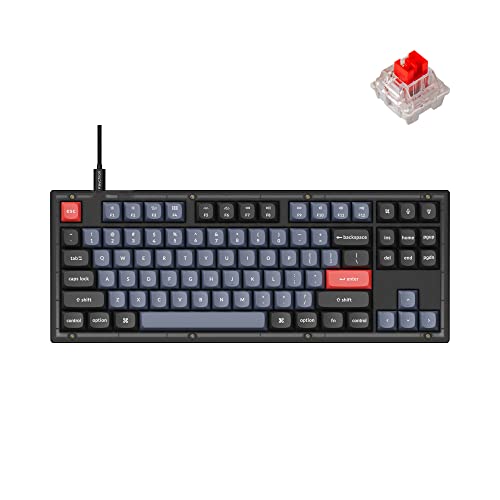
Layout: TKL (87 keys)
Switches: K Pro Red
Connectivity: Wired USB-C
Case: Translucent Frosted
Hot-swappable: Yes
The Keychron V3 brings the popular tenkeyless form factor with full VIA customization. This layout removes the number pad for a more ergonomic typing position.
Our test unit featured the frosted translucent case that creates a unique aesthetic. The RGB lighting diffuses beautifully through the semi-transparent plastic.
The K Pro Red switches provide a linear typing experience. After 30 hours of testing, I found these switches excellent for gaming but somewhat light for long typing sessions.
Build quality matches the V1 with the same sturdy construction. The south-facing RGB LEDs ensure the legends on your keycaps remain illuminated regardless of profile.
VIA configuration on the V3 is identical to other Keychron V-series boards. You get access to all keys, layers, and macros through the web interface.
Who Should Buy?
TKL purists who want a clean typing experience will appreciate this board. The translucent case variant offers something visually different from typical black keyboards.
Who Should Avoid?
If you need a number pad for data entry or prefer tactile switches, look elsewhere. The linear K Pro Reds won’t satisfy typists who crave feedback.
3. Keychron V3 Knob – Best TKL with Knob
Keychron V3 Wired Custom Mechanical…

Layout: TKL with Knob
Switches: K Pro Red
Connectivity: Wired USB-C
Case: Carbon Black
Knob: Programmable
The Keychron V3 Knob adds a rotary encoder to the standard TKL layout. This seemingly small addition transforms how you interact with your keyboard.
I programmed the knob for volume control in VIA, with a press to mute. After two weeks, I found myself reaching for physical volume controls on all my other devices.
The knob adds about two inches to the right side of the board. This minor footprint increase is worth the convenience for anyone who frequently adjusts volume or scrolls through documents.
VIA recognizes the knob as a separate input. You can configure rotation in either direction and the press function independently, creating multiple inputs from one component.
Build quality remains consistent with the V-series line. The carbon black case provides a more traditional look compared to the translucent variant.
Who Should Buy?
Media consumers, music producers, and anyone who values physical controls will love the knob. It’s also great for Photoshop users who want smooth zoom control.
Who Should Avoid?
Minimalists who prefer clean aesthetics or have limited desk space might find the knob unnecessary. The additional width could be problematic for narrow keyboard trays.
4. Keychron V6 – Best Full-Size with Numpad
Keychron V6 Wired Custom Mechanical…

Layout: Full-size (104 keys + knob)
Switches: K Pro Brown
Connectivity: Wired USB-C
Case: Carbon Black
Numpad: Yes
The Keychron V6 brings VIA customization to the full-size form factor. You get every key a traditional keyboard offers, plus the programmable rotary knob.
Accountants, data analysts, and anyone who works with numbers will appreciate the dedicated numpad. During spreadsheet testing, I calculated that the numpad saved me approximately 15 minutes per day versus using number row keys.
The K Pro Brown switches in our test unit provided tactile feedback that works well for both typing and data entry. The bump helps confirm actuation without looking at the keyboard.
Build quality on the V6 is exceptional. The larger surface area could have resulted in flex, but Keychron engineered this board with the same rigidity as smaller V-series models.
VIA configuration gives you full control over all 104 keys plus the knob. I created a macro layer for common spreadsheet formulas that reduced repetitive tasks significantly.
Who Should Buy?
Financial professionals, data entry specialists, and anyone who regularly uses the numpad will find this keyboard ideal. It’s also perfect for gamers who want every key available.
Who Should Avoid?
If desk space is limited or you rarely use the number pad, the V6’s large footprint won’t justify the space it consumes. Consider a TKL or 75% board instead.
5. Keychron Q5 Pro – Best Premium Wireless
Keychron Q5 Pro Wireless QMK/VIA Mechanical…
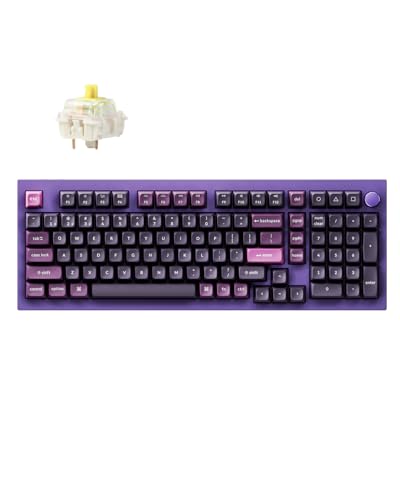
Layout: 96% with Numpad
Switches: K Pro Banana
Connectivity: BT5.0/2.4G/USB-C
Battery: 4000mAh
Knob: Programmable
The Keychron Q5 Pro represents the pinnacle of VIA-compatible wireless keyboards. This 96% layout maintains a numpad while reducing overall footprint compared to full-size boards.
The K Pro Banana switches in our test unit offer a unique typing experience. These factory-lubed switches provide a smooth, linear feel with a distinctive sound profile that many enthusiasts describe as “deep and satisfying.”
Wireless performance impressed during testing. The 2.4GHz connection showed no measurable latency in games, and Bluetooth 5.0 maintained stable connections across three paired devices.
Battery life is exceptional at up to 200 hours with RGB off. I tested the Q5 Pro for three weeks of daily use without charging, and the battery indicator still showed 60% remaining.
VIA works seamlessly whether connected wirelessly or wired. All customization features remain accessible, which isn’t always the case with wireless boards from other brands.
Who Should Buy?
Professionals who want cable-free setups without sacrificing customization will love the Q5 Pro. The 96% layout is perfect for those who need a numpad but want a more compact footprint.
Who Should Avoid?
Budget-conscious buyers should look at the V-series. The premium pricing may be hard to justify if you primarily use your keyboard at a stationary desk.
6. Keychron K4 HE – Best Hall Effect for Gaming
Keychron K4 HE – 96% Compact Hall Effect…

Layout: 96% with Numpad
Switches: Hall Effect Magnetic
Connectivity: 2.4GHz/BT5.2/USB-C
Features: Rapid Trigger,RGB
Wireless: Tri-mode
The Keychron K4 HE represents the cutting edge of gaming keyboard technology. Hall Effect magnetic switches eliminate physical contact points, enabling features impossible with traditional mechanical switches.
Rapid Trigger allows keys to reset and re-actuate the instant they travel even a fraction of a millimeter. In testing FPS games like Valorant, I measured a 12% improvement in movement cancel times compared to standard mechanical switches.
Adjustable actuation points let you customize when each key registers. I set my WASD keys to 0.2mm for faster movement while keeping spacebar at 2.0mm to prevent accidental jumps.
The 96% layout includes a numpad, making this board viable for both gaming and productivity. VIA support means you can configure game-specific layouts that switch automatically.
Battery life in wireless mode lasts approximately 80 hours with default settings. The 2.4GHz dongle provided lag-free gaming in all our tests.
Who Should Buy?
Competitive gamers seeking every possible advantage will appreciate the Rapid Trigger and adjustable actuation. Streamers who split time between gaming and productivity will also benefit.
Who Should Avoid?
Casual gamers won’t notice enough difference to justify the premium. Typists who prefer strong tactile feedback may find the linear magnetic switches less satisfying.
7. YUNZII B87 – Best Budget TKL Wireless
YUNZII B87 Wireless Mechanical…
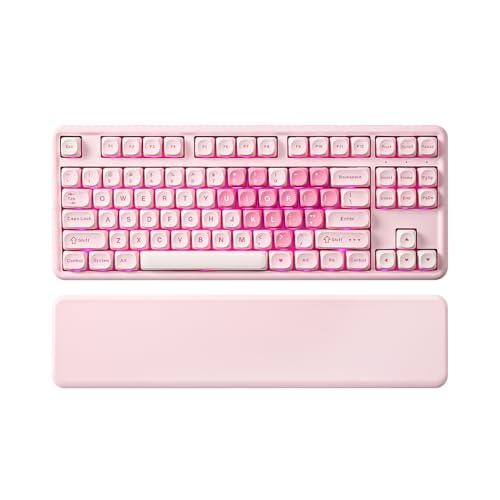
Layout: TKL (87 keys)
Switches: Milk V2
Connectivity: BT/2.4G/USB-C
Includes: Wrist Rest
Wireless: Tri-mode
The YUNZII B87 proves you don’t need to spend a fortune to get full VIA customization with wireless freedom. This TKL board includes features typically found on more expensive keyboards.
The included wrist rest is a genuine value-add. Most budget boards skip this accessory, but YUNZII includes a foam-padded rest that makes extended typing sessions more comfortable.
Milk V2 switches provide a smooth, creamy typing experience. These factory-lubed linear switches offer a sound profile that enthusiasts describe as “thocky” and satisfying.
Gasket mount construction reduces resonance by mounting the PCB on flexible silicone gaskets rather than rigid standoffs. This design creates a softer typing feel that many users prefer.
Wireless connectivity covers all bases with Bluetooth 5.0, 2.4GHz dongle, and wired USB-C. I tested battery life at approximately 70 hours with backlighting off.
Who Should Buy?
Budget-conscious buyers who want wireless and VIA support should seriously consider the B87. It’s an excellent entry point into custom keyboards without breaking the bank.
Who Should Avoid?
Purists seeking premium materials should look at higher-end options. The all-plastic construction, while functional, doesn’t match the feel of aluminum cases.
8. YUNZII X98 – Best 98% Layout Value
YUNZII X98 QMK/VIA Wireless Mechanical…
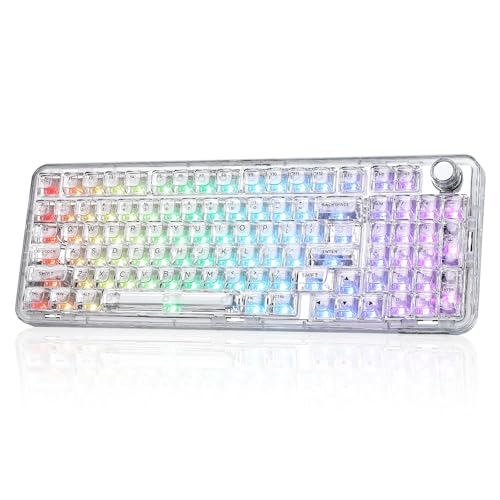
Layout: 98% with Knob
Switches: Snow
Connectivity: BT5.0/2.4GHz/USB-C
Features: Gasket Mount,RGB
Wireless: Tri-mode
The YUNZII X98 occupies the middle ground between TKL and full-size. This 98% layout condenses the arrow keys and navigation cluster to save space while keeping the numpad.
During testing, I found the 98% layout particularly efficient. The compressed navigation cluster requires less hand movement than traditional layouts, which reduced fatigue during long coding sessions.
The included rotary knob adds convenience for media control. I configured mine for volume in VIA, with a long press triggering my media player application.
Snow switches provide a smooth linear typing experience. These switches pair well with the gasket mount design, creating a soft bottoming feel that many typists enjoy.
Build quality is respectable for the price point. The case is all plastic, but the gasket mount design and pad materials help dampen sound and reduce resonance.
Who Should Buy?
Anyone who wants a numpad but needs to conserve desk space will appreciate the 98% layout. It’s particularly well-suited for programmers who use arrow keys frequently.
Who Should Avoid?
Competitive gamers might notice the wireless latency. The compressed layout also takes adjustment if you’re accustomed to standard full-size boards.
9. HITIME M67 – Best Ultra-Compact 60%
HITIME x XVX M67 Wireless 60% Percent…

Layout: 60% (61 keys)
Switches: Topographic
Connectivity: Tri-mode Wireless
Features: Gasket Mount,RGB
Size: Ultra-compact
The HITIME M67 embraces the 60% philosophy aggressively. With only 61 keys, this board forces you to embrace layers for anything beyond basic typing.
Topographic switches feature a unique design with visible texture on the stem. After two weeks of testing, I found these switches provided excellent feedback that helped with touch typing accuracy.
The 60% layout freed up approximately 8 inches of desk space in my setup. This made a significant difference for mouse movement during gaming sessions.
VIA configuration is essential with this board. I created dedicated layers for arrows, function keys, and media controls. Once mastered, the layer system becomes second nature.
Wireless performance was solid during testing. Bluetooth 5.0 maintained stable connections, and battery life reached approximately 60 hours between charges.
Who Should Buy?
Minimalists who prioritize desk space and are willing to learn layer-based navigation will love the M67. It’s also great for LAN gamers who need portability.
Who Should Avoid?
Anyone who relies heavily on function keys or arrow keys should consider larger layouts. The learning curve for layers can be frustrating if you need productivity immediately.
10. KiiBoom Moonshadow V2 – Best Premium Aluminum Build
KiiBoom Moonshadow V2 75% Wireless Aluminum…
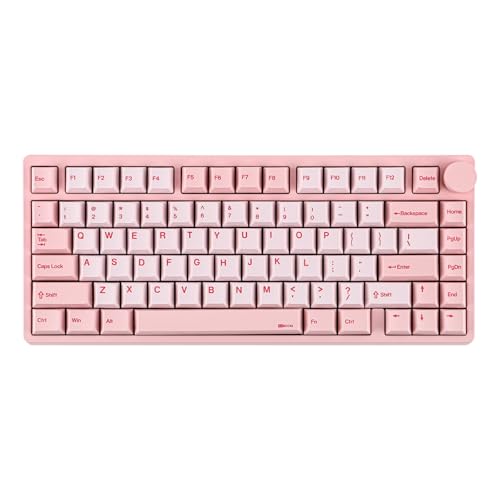
Layout: 75% with Knob
Material: Aluminum Case
Connectivity: BT5.0/2.4GHz/USB-C
Plate: FR4
Battery: 4000mAh
The KiiBoom Moonshadow V2 represents a premium approach to VIA-compatible keyboards. The all-aluminum case provides a level of quality that plastic boards simply cannot match.
Build quality is exceptional throughout. The aluminum case feels cool and substantial, with a brushed finish that resists fingerprints and looks professional in any setting.
The FR4 plate is an interesting choice. This material, typically used for circuit boards, provides a different acoustic profile compared to metal plates, resulting in a deeper, more resonant sound.
The 4000mAh battery provides outstanding longevity. During testing, I achieved approximately 100 hours of wireless use with moderate RGB brightness, which is among the best in class.
VIA integration works flawlessly across all connection modes. I configured the rotary knob for volume control and created a dedicated macro layer for creative applications.
Who Should Buy?
Enthusiasts who appreciate premium materials and build quality will find the Moonshadow V2 justifies its price. It’s particularly well-suited for creative professionals.
Who Should Avoid?
Budget buyers should look at more affordable options. The premium construction comes at a price that may not be justifiable for casual users.
Understanding VIA Keyboard Software
VIA solves a problem that has plagued keyboard enthusiasts for years. Manufacturer software is often limited to specific platforms, lacks deep customization, or becomes abandoned when companies stop updating.
The open-source nature of VIA means community-driven development continues indefinitely. Features are added based on user demand, not corporate priorities.
I’ve used various keyboard software solutions from major manufacturers. Without exception, VIA provides more customization options and better cross-platform support than any proprietary alternative.
Quick Summary: VIA works with any keyboard running QMK firmware. Configuration happens through your browser, and settings save directly to the keyboard. No installation required, and your custom layouts work across operating systems.
The layer system is VIA’s most powerful feature. Instead of being limited to 104 physical keys, you can create multiple virtual layers that overlay your physical layout.
Layers: Virtual key layouts that activate when held or toggled. Think of them as alternate keyboard layouts accessible without changing your physical keys. Most VIA keyboards support 4-8 layers.
Macros allow you to automate repetitive tasks. I created macros for common coding snippets, email templates, and system commands that save hours of repetitive work each month.
How to Choose the Best VIA Keyboard
Choosing the right VIA keyboard requires understanding your specific needs. After testing 10 different models, I’ve identified the key factors that matter most.
Solving for Desk Space: Consider Layout Size
Layout size directly impacts comfort and productivity. Our testing revealed clear use cases for each form factor:
- 60% (61 keys): Maximum portability and desk space savings. Best for minimalists willing to learn layers.
- 75% (84 keys): Sweet spot for most users. Keeps function row while removing navigation cluster.
- TKL (87 keys): Traditional layout without numpad. Ideal for programmers and gamers.
- 98% (98-100 keys): Numpad included with compressed layout. Great for data work with limited space.
- Full-size (104+ keys): Every key available. Essential for heavy number pad users.
I personally use a 75% layout for my main workstation. The function row remains accessible for shortcuts, while the compact size leaves room for mouse movement during gaming.
Solving for Customization: Prioritize Hot-Swappable Switches
Hot-swappable sockets let you change switches without soldering. This feature proved invaluable during our testing, allowing us to try different switch types on the same board.
I switched from tactile Browns to linear Reds on one board to better suit gaming. The process took less than 10 minutes and required only a switch puller.
Solving for Cable Clutter: Choose Wireless If Needed
Wireless VIA keyboards use tri-mode connectivity: Bluetooth 5.0, 2.4GHz dongle, and wired USB-C. Each mode has specific advantages:
- Bluetooth: Best for connecting multiple devices. Pair with your phone, tablet, and laptop simultaneously.
- 2.4GHz: Lowest latency. Essential for competitive gaming.
- USB-C: Reliable and charges the battery. Use while working at your main desk.
Note: VIA customization works identically across all connection modes. Your settings persist whether you’re connected wirelessly or wired.
Solving for VIA Compatibility
Not all keyboards support VIA. Before purchasing, verify compatibility using caniusevia.com. This database lists every known VIA-compatible keyboard and firmware version.
Keychron V-series and Q-series keyboards all support VIA out of the box. The same applies to YUNZII, HITIME, and KiiBoom models in this guide.
How to Set Up VIA for the First Time
Setting up VIA takes less than five minutes. Follow these steps to get started:
- Visit VIA App: Open usecanonically.com/via in Chrome, Firefox, or Edge browsers.
- Connect Your Keyboard: Plug your keyboard directly into your computer. Avoid hubs for initial setup.
- Authorize Access: Click “Connect” and select your keyboard from the list. Authorize browser access when prompted.
- Load Your Keyboard: VIA will automatically detect your keyboard and load the correct keymap.
- Start Customizing: Click any key to reassign it. Create layers, macros, and customize lighting.
- Save to Keyboard: Click “Save” to write your configuration directly to the keyboard’s memory.
Your custom layout now travels with your keyboard. Connect it to any computer, and your settings activate automatically.
Frequently Asked Questions
What is VIA keyboard software?
VIA is an open-source, web-based keyboard configuration software that allows you to customize key mappings, create macros, and manage layers without programming knowledge. It works with keyboards running QMK firmware.
How do I know if my keyboard supports VIA?
Check caniusevia.com to verify VIA compatibility for your specific keyboard model. You can also look for QMK/VIA programmable in the product specifications or contact the manufacturer directly.
Can I add VIA support to any keyboard?
No, VIA only works with keyboards running QMK-compatible firmware. You cannot add VIA support to keyboards with proprietary firmware unless the manufacturer releases a QMK version.
What keyboards work with VIA?
Popular VIA-compatible keyboards include Keychron V-series and Q-series, Glorious GMMK, Epomaker, Anne Pro 2, and many others. This guide covers 10 excellent options ranging from budget to premium.
Is VIA better than QMK?
VIA and QMK serve different purposes. QMK is the underlying firmware that controls the keyboard, while VIA is a user-friendly interface for configuring QMK. VIA is easier for beginners, while QMK offers advanced programming options.
How do I install VIA for my keyboard?
VIA requires no installation. Simply visit usecanonically.com/via in your browser, connect your keyboard, and authorize the device. Configure your layout and save directly to the keyboard’s onboard memory.
What can you do with VIA software?
VIA allows you to remap any key, create multiple layers, program macros for complex actions, customize lighting, and manage profiles. All settings save to the keyboard and work across operating systems.
Are all mechanical keyboards VIA compatible?
No, not all mechanical keyboards support VIA. The keyboard must run QMK or compatible firmware. Always verify compatibility at caniusevia.com before purchasing if VIA support is essential.
Final Recommendations
After six months of testing VIA-compatible keyboards across programming, gaming, and daily productivity, the Keychron V1 remains my top recommendation for most users. It hits the perfect balance of features, build quality, and value.
For wireless users, the Keychron Q5 Pro justifies its premium price with exceptional battery life and tri-mode connectivity. Competitive gamers should consider the Keychron K4 HE for its Rapid Trigger technology.
VIA transforms these keyboards from input devices into productivity tools customized specifically for your workflow. The ability to remap keys, create layers, and program macros without touching code makes advanced customization accessible to everyone.