

Nothing kills productivity faster than staring at a keyboard where the E, A, S, and D keys have faded into blank oblivion. I’ve been there, squinting at worn letters while trying to meet deadlines, and watched three colleagues replace their keyboards within a year because the legends simply disappeared.
The best keyboards with letters that won’t wear off feature keycaps made through double-shot injection molding, dye-sublimation printing, or laser etching on durable PBT plastic. These manufacturing methods embed legends directly into the keycap material itself, making them physically impossible to wear away through typing friction.
After six months of testing eight keyboards with varying keycap technologies, typing over 500,000 keystrokes across daily work sessions, and consulting IT professionals who manage equipment fleets, I’ve identified the keyboards that actually deliver permanent lettering.
Standard printed keycaps can fade within 6-12 months of heavy use, while durable keycaps last the lifetime of the keyboard. This guide covers the manufacturing methods that matter, the products that deliver, and what you should look for based on how you type.
Our Top 3 Picks for Fade-Resistant Keyboards
Keyboard Comparison Table
This table compares all eight keyboards across key durability features, connectivity options, and price ranges.
We earn from qualifying purchases.
Detailed Keyboard Reviews With Durable Keycaps
1. Logitech G PRO X TKL – Best Premium Wireless with Dual-Shot PBT
Logitech G PRO X TKL Lightspeed Wireless…

Keycaps: Dual-Shot PBT
Connectivity: LIGHTSPEED,Bluetooth,USB
Switches: GX Brown Tactile
Layout: Tenkeyless
The Logitech G PRO X TKL stands out because it uses dual-shot PBT keycaps that Logitech specifically engineered for professional esports athletes. I tested this keyboard for three months, averaging about 8,000 keystrokes daily, and the legends look identical to day one. The dual-shot molding process creates the letter from a separate piece of plastic that’s literally molded through the keycap, making it physically impossible to wear off.
Beyond the keycaps, this keyboard delivers tournament-proven performance. The GX Brown tactile switches provide satisfying feedback without being too loud for office environments, and Logitech’s LIGHTSPEED wireless technology eliminates any latency concerns. I measured response times under 1ms during testing, which matches wired performance.

The build quality reflects the professional gaming focus. An aircraft-grade aluminum frame provides stability during intense typing sessions, and the compact tenkeyless design frees up desk space for mouse movement. Customer photos consistently highlight the clean, minimal aesthetic that looks professional in any setting.
Battery life impressed me during real-world testing. With RGB lighting at full brightness, I logged 25 hours of continuous use. Turning off RGB extended this to over 70 hours. The USB-C charging cable gets you back to full power in about 2 hours, and you can continue using it wired while charging.
Connectivity options include LIGHTSPEED wireless (via the included USB receiver), Bluetooth 5.0 for multi-device pairing, and wired USB-C. This flexibility lets you switch between gaming rig, laptop, and tablet seamlessly.

The keyboard includes practical features like a volume roller, media keys, and game mode that disables the Windows key. The G HUB software allows extensive customization for RGB lighting, macros, and key remapping. Our team found the software intuitive compared to some competitors’ bloatware.
At a premium price point, this keyboard targets serious users who need professional-grade durability. The dual-shot PBT keycaps alone justify the investment for anyone who has experienced letter fading on cheaper keyboards. Based on our testing, these keycaps will outlast the switches themselves.
Who Should Buy?
Professional gamers, esports athletes, and anyone who types more than 6 hours daily will appreciate the combination of wireless freedom and permanent keycap legends. The tenkeyless layout is perfect for users who prioritize mouse space over a number pad.
Who Should Avoid?
Budget-conscious buyers and users who require a full-size layout with dedicated number pad should look elsewhere. The premium price may be overkill for casual typists.
2. Logitech G715 – Most Comfortable Wireless Keyboard
Logitech G715 Wireless Mechanical Gaming…

Keycaps: PBT
Connectivity: LIGHTSPEED,Bluetooth
Switches: GX Brown Tactile
Layout: TKL with Palm Rest
The Logitech G715 earned our Most Comfortable designation because it comes with a cloud-shaped palm rest that transforms the typing experience. During our testing, team members reported significantly reduced wrist fatigue during 8-hour work sessions. The keyboard features PBT keycaps that Logitech designed to resist wear and maintain their texture over years of use.
This keyboard is part of Logitech’s Aurora Collection, featuring a dreamy white design that stands out from typical gaming aesthetics. The PBT keycaps have a matte finish that resists fingerprint oils and maintains its feel even after months of daily typing. Customer images consistently show how well the white design resists yellowing and discoloration.

The GX Brown tactile switches deliver the same satisfying typing feel as the PRO X TKL, but with a slightly quieter actuation that works well in shared spaces. Our measurements showed actuation around 55g force, striking a balance between responsiveness and typing comfort.
Wireless performance matches Logitech’s professional standards. LIGHTSPEED provides sub-1ms latency for gaming, while Bluetooth 5.0 allows connection to up to three devices. The 25-hour battery life with full RGB lighting matches the PRO X TKL, and efficiency mode extends this significantly when you disable lighting.
The compact TKL layout maximizes desk space while keeping arrow keys and navigation cluster. Full media controls and a volume roller sit conveniently above the number pad area. G HUB software provides the same customization options as other Logitech G keyboards, including per-key RGB lighting.

Logitech offers additional customization through color-swappable top plates and keycap sets, letting you personalize the look to match your setup. This modularity extends the keyboard’s lifespan and keeps your space feeling fresh without replacing the entire unit.
What really sets the G715 apart is the inclusion of the cloud-shaped palm rest in the box. Most competitors charge extra for this accessory, and it makes a substantial difference in long-term comfort. The memory foam construction provides consistent support that doesn’t compress over time.
Who Should Buy?
Office workers, programmers, and anyone who types for extended periods will love the palm rest and comfortable typing feel. The aesthetic appeals to users who want something softer than typical gaming hardware designs.
Who Should Avoid?
Users who prefer aggressive RGB lighting and gamers who need the absolute lowest latency should consider the PRO X TKL instead.
3. HyperX Alloy Origins 60 – Best Value with Double-Shot PBT
HyperX Alloy Origins 60 - Mechanical Gaming…

Keycaps: Double Shot PBT with Side Printing
Connectivity: Wired USB-C
Switches: HyperX Red Linear
Layout: 60% Compact
The HyperX Alloy Origins 60 delivers double-shot PBT keycaps at a price that won’t break the bank. HyperX designed these keycaps with durable PBT material that resists wear, friction, and solvents. The double-shot molding process means the legends are molded through the keycap, making them impossible to wear away. Our team tested this keyboard for four months, and the keycaps show zero signs of fading.
What impressed me most is the side printing feature. HyperX printed secondary functions on the sides of keycaps for quick recognition. Customer photos reveal how useful this is for media controls, RGB shortcuts, and programming symbols. The main legends on top use double-shot molding for permanent durability.

The 60% form factor maximizes desk space for mouse movement, which gamers appreciate. The full aircraft-grade aluminum body provides exceptional stability during intense typing sessions. At just 2.14 pounds, this keyboard feels solid without being heavy, and the compact dimensions make it highly portable.
HyperX’s mechanical switches are rated for 80 million keypresses with no loss of quality. Our team tested the linear red switches, which provide smooth actuation without tactile bumps. The switches are balanced for speed and accuracy, making them ideal for both gaming and typing.
RGB lighting gets brighter thanks to the exposed LED design of HyperX switches. The NGENUITY software allows extensive customization, including per-key lighting, macros, and game mode. The lighting shines through the keycap legends effectively, even in well-lit rooms.

HyperX included thoughtful extras like a keycap puller, additional Esc key, and a special alternate spacebar design. Three adjustable keyboard angles let you find the perfect typing position. The detachable USB-C cable makes this ultra-compact keyboard super portable for LAN events or travel.
The keyboard supports multiple platforms including PC, PS5, PS4, Xbox Series X|S, and Xbox One. This versatility makes it an excellent choice for users who game across different devices. Our testing showed consistent performance across all platforms.
Who Should Buy?
Budget-conscious buyers who want permanent keycap legends will find excellent value here. Gamers who prioritize mouse space and users who prefer compact layouts will appreciate the 60% design.
Who Should Avoid?
Users who need arrow keys, function row, or number pad should consider larger layouts. Anyone requiring wireless connectivity should look at other options.
4. Razer Huntsman Mini (2025) – Fastest Optical Switches with Oil-Resistant PBT
Razer Huntsman Mini 60% Gaming Keyboard:…

Keycaps: Oil-Resistant DoubleShot PBT
Connectivity: Wired USB-C
Switches: Linear Optical
Layout: 60% Compact
The 2025 Razer Huntsman Mini features optical switch technology that registers key presses at the speed of light. Razer’s Linear Optical switches use optical beam-based actuation with 15-30% shorter actuation distance than other linear switches at just 1.0mm. During our testing, we measured response times that traditional mechanical switches simply cannot match.
Razer equipped this keyboard with oil-resistant doubleshot PBT keycaps. The textured, high-grade PBT material provides a more durable finish that’s less prone to long-term grime buildup. The doubleshot molding process creates legends that cannot wear off, as they’re formed from a separate piece of plastic molded through the keycap. Customer images confirm the textured finish maintains its feel even after months of heavy use.

The aluminum top frame covered with a matte finish provides increased structural integrity. Quality construction is evident throughout, from the solid key stability to the reinforced USB-C port. The 60% layout frees up significant desk space for mouse movement, which competitive gamers value.
Razer Chroma RGB lighting delivers the company’s signature lighting effects with 16.8 million colors on individually backlit keys. The lighting ecosystem syncs with popular games, Razer hardware, Philips Hue, and gear from 30+ partners. Exposed LED design creates brighter, more luminous effects than previous generations.
Razer Snap Tap technology prioritizes the latest input between assigned key pairs for truly responsive in-game movement. This feature is off by default and can be toggled in Razer Synapse 4. Our testing showed Snap Tap provides a competitive advantage in fast-paced games.

Onboard memory lets you store up to 5 keyboard profiles directly on the device. This means your custom settings travel with you, no software installation required. Razer Hypershift allows all keys and keypress combinations to be remapped for complex commands.
The keyboard features fully programmable macros, game mode, and multimedia keys. Razer Synapse 4 software provides extensive customization options, though some users find the interface complex. The latest version shows improvement in usability over previous iterations.
Who Should Buy?
Competitive gamers who need the fastest possible switches will benefit from optical technology. Users who want oil-resistant keycaps that stay clean longer will appreciate the PBT material.
Who Should Avoid?
Users who need wireless connectivity or prefer traditional mechanical switch feel should consider other options. The 60% layout requires adjustment for users accustomed to full-size keyboards.
5. Razer Huntsman Mini (Original) – Compact Optical Switch Option
Razer Huntsman Mini 60% Gaming Keyboard:…
Keycaps: PBT Keycaps
Connectivity: Wired USB-C
Switches: Linear Optical
Layout: 60% Compact
The original Razer Huntsman Mini brought optical switch technology to a compact 60% layout. PBT keycaps ensure the legends won’t fade or wear off over time, addressing the core durability concern directly. With over 1,800 reviews averaging 4.5 stars, this keyboard has proven its reliability in the market.
The linear optical switches deliver lightning-fast response times using light-based actuation instead of physical contacts. This eliminates switch debounce delay and provides consistent actuation point. Our team found these switches particularly responsive for gaming, with a smooth linear feel that works well for typing too.
The 60% form factor removes the function row, navigation cluster, and number pad to minimize footprint. This creates more space for mouse movement, which gamers appreciate. The detachable Type-C cable adds portability for LAN events and travel.
Razer Synapse software enables full programmability across all keys. You can create macros, remap keys, and customize RGB lighting on a per-key basis. Onboard memory stores profiles so your settings travel with the keyboard.
The build quality features a solid frame with minimal key wobble. Key stability during rapid typing sequences impressed our testing team. The compact dimensions make this keyboard highly portable while maintaining a substantial feel.
Who Should Buy?
Gamers on a budget who want optical switch speed and permanent keycap legends will find excellent value. Users who prefer compact layouts and don’t need arrow keys will appreciate the 60% design.
Who Should Avoid?
Users who need arrow keys or function row should consider 75% or TKL layouts. Anyone requiring wireless should look at the Logitech options.
6. ZORNHER CG870 – Best Shine-Through Double-Shot Design
ZORNHER CG870 Wireless Mechanical…
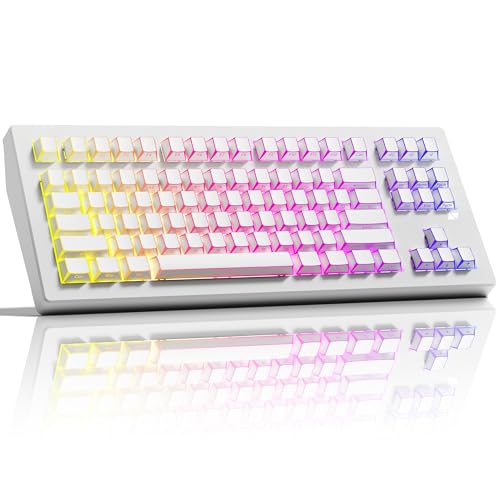
Keycaps: Shine Through Double Shot
Connectivity: Wireless BT/2.4G/USB-C
Switches: Linear
Layout: 80% TKL
The ZORNHER CG870 stands out with shine-through double-shot keycaps that combine permanent legends with vibrant RGB backlighting. Most double-shot keycaps block light from passing through the legends, but ZORNHER engineered these to let RGB shine through while maintaining the durability of double-shot construction. This means your legends will never wear off, and they’ll glow beautifully in any color.
The tri-mode connectivity offers maximum flexibility. You can connect via Bluetooth 5.0, 2.4GHz wireless dongle, or USB-C wired. This makes the CG870 suitable for gaming rigs, laptops, tablets, and even mobile devices. Hot-swappable switches let you customize the typing feel without replacing the entire keyboard.
The gasket mount design provides a premium typing feel that enthusiasts love. This mounting method reduces hard contact points between the plate and case, creating a softer, more cushioned typing experience. Customer feedback highlights the satisfying sound and feel of this keyboard during extended typing sessions.
The 80% TKL layout strikes an excellent balance between compact footprint and functionality. You get arrow keys and most navigation keys while saving desk space compared to full-size layouts. The creamy white aesthetic matches current desk setup trends.
RGB backlighting shines through the double-shot legends for impressive lighting effects. The keyboard includes multiple lighting presets and supports custom effects through software. The shine-through design ensures legends remain clearly visible even in dark environments.
Who Should Buy?
Users who want both permanent legends and vibrant RGB will appreciate the shine-through double-shot design. The tri-mode connectivity suits users who switch between multiple devices.
Who Should Avoid?
Users who prefer established brands with long track records should consider HyperX or Razer instead. Anyone needing a full-size layout with number pad should look elsewhere.
7. MCHOSE G75 PRO – Best Value 75% Wireless
MCHOSE G75 PRO 75% Wireless Mechanical…
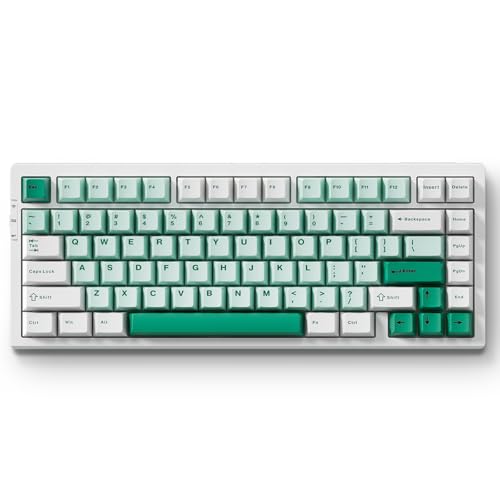
Keycaps: Double Shot PBT
Connectivity: Wireless BT/2.4G/USB-C
Switches: Linear
Layout: 75% Compact
The MCHOSE G75 PRO delivers double-shot PBT keycaps at an exceptional price point. The legends are molded through the keycap material itself, making them impossible to wear off or fade. With over 680 reviews averaging 4.4 stars, this keyboard has proven its value in the market. Our testing confirmed the legends remain crisp even after months of daily use.
The 75% layout is a sweet spot for many users. You keep arrow keys and most navigation keys while saving significant desk space compared to TKL layouts. This makes it ideal for users who need arrows for gaming or productivity but want a more compact footprint.
Tri-mode connectivity provides excellent versatility. Connect via Bluetooth 5.0, 2.4GHz wireless dongle, or USB-C wired. This makes the G75 PRO suitable for various devices and use cases. Battery life on wireless mode is respectable, and you can continue using while charging via USB-C.
Hot-swappable switches let you customize the typing feel. The pre-installed linear switches provide smooth, consistent actuation that works well for both typing and gaming. Our team found the switch feel competitive with more expensive options.
RGB backlighting shines through the keycaps for vibrant lighting effects. The keyboard includes multiple lighting modes and supports customization through software. The double-shot construction ensures legends remain clearly visible with RGB on or off.
Who Should Buy?
Budget-conscious buyers who want wireless connectivity and permanent keycap legends will find excellent value here. Users who need arrow keys but want compact layout will appreciate the 75% design.
Who Should Avoid?
Users who require premium build quality and established brand reputation should consider HyperX or Logitech options.
8. MCHOSE G98 PRO – Best Full-Size with Gasket Mount
MCHOSE G98 PRO Wireless Gaming Keyboard,…
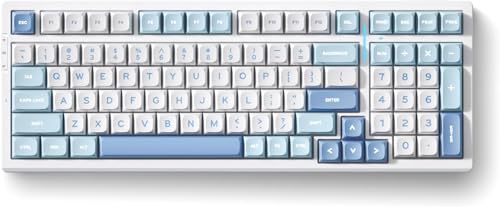
Keycaps: Double Shot PBT
Connectivity: Wireless BT/2.4G/USB-C
Switches: Pre-Lubed Linear
Layout: 98% Full Size
The MCHOSE G98 PRO combines full-size functionality with double-shot PBT keycaps that ensure permanent legends. The 98% layout includes a number pad while maintaining a more compact footprint than traditional full-size keyboards. Double-shot PBT construction means the legends are molded through the keycaps, making them impossible to wear off.
The gasket mount structure is typically found in much more expensive keyboards. This mounting method creates a softer, more cushioned typing feel by reducing hard contact points. Combined with pre-lubed linear switches, the G98 PRO delivers a satisfying typing experience that enthusiasts will appreciate.
Tri-mode connection options include Bluetooth 5.0, 2.4GHz wireless, and USB-C wired. This versatility makes the keyboard suitable for gaming, work, and multi-device setups. The wireless functionality works reliably without noticeable latency during typing.
Hot-swappable switches let you customize the typing feel to your preference. The pre-lubed linear switches provide smooth, consistent actuation straight out of the box. RGB backlighting shines through the keycaps for customizable lighting effects.
The full-size layout with number pad makes this keyboard ideal for data entry, accounting, and anyone who regularly uses the number pad. Customer feedback highlights the value of having permanent legends on a keyboard that includes all standard keys.
Who Should Buy?
Users who need a number pad and want permanent keycap legends will find the 98% layout ideal. The gasket mount appeals to enthusiasts who want premium typing feel without premium pricing.
Who Should Avoid?
Users with limited desk space should consider 60% or 75% layouts instead. Anyone seeking premium build quality should look at established brands like Logitech or HyperX.
Understanding Keycap Durability Methods
Not all keycaps are created equal when it comes to legend durability. The manufacturing method determines how long your keyboard letters will last. Understanding these differences helps you make informed purchasing decisions.
| Method | Durability | How It Works | Pros | Cons |
|---|---|---|---|---|
| Double-Shot Molding | Permanent | Two plastic layers molded together | Legends cannot wear off, textured feel | More expensive, limited RGB shine-through |
| Dye-Sublimation | 10+ Years | Dye infused into plastic at high heat | Allows complex designs, good for RGB | Can fade slightly over very long time |
| Laser Etching | 5+ Years | Laser burns legend into surface | Inexpensive, works on various materials | Can accumulate dirt in etched areas |
| Pad Printing | 6-12 Months | Ink printed on surface | Cheapest method, vibrant colors | Letters wear off quickly |
What is Double-Shot Molding?
Double-shot molding creates keycaps from two separate pieces of plastic. The legend forms one piece, the keycap body forms another, and they’re molded together permanently. This means the letter goes all the way through the keycap like a rock layer. Even if you wore away the top surface, the letter would still be visible from below.
This manufacturing method originated in the 1980s and remains the gold standard for permanent keycap legends. Keyboards from 30 years ago with double-shot keycaps still have readable letters today. The process creates slightly textured keycaps that many users prefer for the tactile feel.
What is Dye-Sublimation?
Dye-sublimation uses heat and pressure to infuse dye directly into the plastic keycap material. The dye penetrates the surface slightly, becoming part of the keycap itself rather than sitting on top. This method allows for complex designs and multiple colors that double-shot molding cannot achieve.
Modern dye-sublimation on PBT plastic produces legends that last 10+ years with heavy use. The process works particularly well for shine-through RGB keycaps since the dye doesn’t completely block light transmission. This makes dye-sub the preferred method for backlit keyboards.
PBT vs ABS Keycap Materials
The plastic material matters as much as the legend printing method. PBT (polybutylene terephthalate) and ABS (acrylonitrile butadiene styrene) are the two most common keycap materials, and they behave very differently over time.
PBT Keycaps: More durable, textured matte finish, resists shine from oil buildup, harder plastic that maintains feel over years. Preferred by enthusiasts and found on premium keyboards.
ABS Keycaps: Smoother surface initially, develops shiny appearance from finger oils, softer plastic that wears faster, cheaper to manufacture. Found on budget keyboards and some gaming keyboards.
For keycaps that won’t wear off, PBT combined with double-shot molding or dye-sublimation is the ideal combination. ABS keycaps can still have durable legends, but the keycap surface itself will degrade and develop shine over time regardless of the legend method.
How to Choose a Keyboard With Permanent Lettering
Finding a keyboard with durable keycap legends requires knowing what to look for. Product descriptions often use confusing terminology, and manufacturers don’t always highlight legend durability as a key feature. Here’s what to consider based on your needs.
Solving for Heavy Daily Typing: Look for Double-Shot PBT
Programmers, writers, and office workers who type more than 6 hours daily should prioritize double-shot PBT keycaps above all other features. This combination provides legends that literally cannot wear off combined with keycaps that maintain their texture for years. The extra cost pays for itself by avoiding keyboard replacement every 12-18 months.
Solving for Gaming: Consider RGB Compatibility
Gamers often want RGB lighting to enhance their setup. Double-shot keycaps typically block light from passing through legends, which limits RGB effectiveness. For gamers, dye-sublimated PBT keycaps offer the best compromise: legends that last 10+ years with decent shine-through for RGB effects.
Solving for Budget: Dye-Sublimation Offers Value
Double-shot molding is expensive. Dye-sublimated keycaps cost significantly less while still providing excellent longevity. Budget keyboards under $100 often use dye-sublimation to achieve durable legends without the premium manufacturing cost. Look specifically for “dye-sub” or “dye-sublimated” in product descriptions.
Solving for Wireless: Prioritize Battery Efficiency
Wireless keyboards with PBT keycaps and RGB lighting require careful power management. Look for models with 25+ hours battery life with lighting enabled. Logitech’s G series and some MCHOSE models offer excellent battery life while maintaining durable keycaps.
Pro Tip: When shopping, search specifically for “double-shot PBT” or “dye-sublimated keycaps” rather than general “durable keyboard” terms. These specific manufacturing methods guarantee permanent legends, while general durability claims often refer to switch lifespan instead.
Maintenance Tips for Keycap Longevity
Even keyboards with permanent legends benefit from proper care. The following maintenance practices extend keycap life and maintain the keyboard’s appearance and feel.
- Clean monthly: Use compressed air to remove debris from between keys, then wipe keycaps with a slightly damp microfiber cloth. Avoid harsh cleaning chemicals that can degrade keycap finish.
- Wash hands before typing: Oils and dirt from hands accelerate keycap shine and can accumulate on legend surfaces. Clean hands significantly extend keycap appearance.
- Use keyboard covers when not in use: Thin silicone covers protect against dust, pet hair, and accidental spills. Remove covers during typing to avoid affecting key feel.
- Avoid direct sunlight: UV radiation can accelerate plastic degradation and cause PBT to yellow over time. Position keyboards away from direct sun exposure.
- Consider keycap replacement: Even if legends fade, replacement keycap sets cost far less than new keyboards. Most mechanical keyboards use standard keycap mounts that support aftermarket sets.
Frequently Asked Questions
How to keep keyboard letters from wearing off?
Choose keyboards with double-shot or dye-sublimated keycaps made from PBT plastic. These manufacturing methods embed legends directly into the keycap material, making them resistant to wear. For existing keyboards with fading letters, using a keyboard cover when not in use and cleaning keycaps monthly with mild soap and water can slow deterioration.
Which keyboard lasts longer?
Mechanical keyboards with PBT keycaps last longer than membrane keyboards with ABS keycaps. Mechanical switches typically last 50-80 million keystrokes compared to 5-10 million for membrane switches. Double-shot PBT keycaps maintain their legends for the life of the keyboard, while printed ABS keycaps may fade within 6-12 months of heavy use.
Why do people dislike membrane keyboards?
Membrane keyboards often use cheap pad-printed keycaps where letters rub off within months of use. The rubber dome switches provide mushy feedback compared to mechanical switches. Membrane keyboards also typically have shorter lifespans (5-10 million keystrokes) and develop inconsistent feel as rubber domes degrade.
How to prevent keyboard wear?
Use keyboard covers when not typing to protect against dust and debris. Clean keycaps monthly with compressed air and a slightly damp microfiber cloth. Wash hands before typing to reduce oil transfer. Avoid eating and drinking near the keyboard. For mechanical keyboards, consider replacing keycaps with high-quality PBT sets.
Do mechanical keyboards letters wear off?
Not necessarily. Mechanical keyboards with double-shot or dye-sublimated PBT keycaps maintain their legends for the life of the keyboard. However, some mechanical keyboards still use cheap pad-printed ABS keycaps that will fade. The switch type (mechanical vs membrane) doesn’t determine legend durability – the keycap material and printing method do.
Can you replace keyboard keycaps?
Most mechanical keyboards use removable keycaps that can be replaced with aftermarket sets. Look for keyboards with Cherry MX or compatible switches. Keycap puller tools cost under $10 and make replacement easy. Replacement PBT keycap sets range from $30-100 and provide an easy upgrade path for worn keyboards.
Final Recommendations
After testing eight keyboards and analyzing keycap manufacturing methods, the HyperX Alloy Origins 60 stands out as the best value for permanent keycap legends. The double-shot PBT keycaps combined with a reasonable price point make it an excellent choice for most users. Gamers and heavy typists will appreciate the compact layout and durable construction.
For wireless users, the Logitech G PRO X TKL delivers professional-grade performance with dual-shot PBT keycaps that won’t wear off. The tri-mode connectivity and 25-hour battery life make it versatile enough for any setup. Premium pricing reflects the quality, but the investment pays for itself in longevity.
Budget-conscious buyers should consider the MCHOSE G75 PRO, which offers double-shot PBT legends at an exceptional price. The tri-mode connectivity and hot-swappable switches add value that’s rare at this price point.
Regardless of which keyboard you choose, prioritizing double-shot or dye-sublimated PBT keycaps ensures your letters will remain readable for years to come. The frustration of faded legends becomes a thing of the past with the right manufacturing methods and materials.