

After testing keyboards across hundreds of hours of Minecraft gameplay, I’ve learned that the perfect board depends entirely on how you play.
The right keyboard transforms your Minecraft experience from frustrating to fluid, whether you’re clutching PvP battles, building massive structures in Creative mode, or surviving hardcore worlds.
The Corsair K70 RGB PRO is the best keyboard for Minecraft overall, with 8000Hz polling providing ultra-low latency for competitive play while maintaining excellent build quality for long gaming sessions.
Our team tested 10 keyboards covering budget-friendly options under $50 to premium boards over $180, evaluating their performance across Survival, Creative, and competitive PvP scenarios.
You’ll learn which keyboards excel for specific Minecraft playstyles, how to optimize your keybindings for efficiency, and what features actually matter for block-placing precision versus combat speed.
Our Top 3 Minecraft Keyboard Picks
Minecraft Keyboard Comparison Table
Compare key features across all tested keyboards to find the right match for your Minecraft playstyle and budget.
We earn from qualifying purchases.
Detailed Minecraft Keyboard Reviews
1. Redragon K631 Gery – Best Budget Compact for Younger Players
Redragon K631 Gery 65% Wired RGB Gaming…

This compact mechanical keyboard delivers surprising quality for the price point, making it perfect for younger Minecraft players or anyone building their first gaming setup.
The 65% layout keeps arrow keys and essential controls while maximizing mouse space for those critical PvP situations where wide swipes matter.
Mechanical switches provide tactile feedback that helps with building precision in Creative mode, and the hot-swappable design lets you customize the feel without buying a whole new board.
RGB lighting adds gaming aesthetic appeal that younger players love, and the durable build should withstand enthusiastic gaming sessions.
For parents looking for an affordable first gaming keyboard that doesn’t compromise on essential features, this Redragon hits the sweet spot between price and performance.
Who Should Buy?
Younger Minecraft players, budget-conscious gamers building their first setup, and anyone wanting mechanical switches without breaking the bank.
Who Should Avoid?
Competitive players needing wireless connectivity, gamers requiring dedicated media keys, and those preferring premium brand software ecosystems.
2. Redragon K630 Dragonborn – Best Ultra-Compact for Small Desks
Redragon K630 Dragonborn 60% Wired RGB…
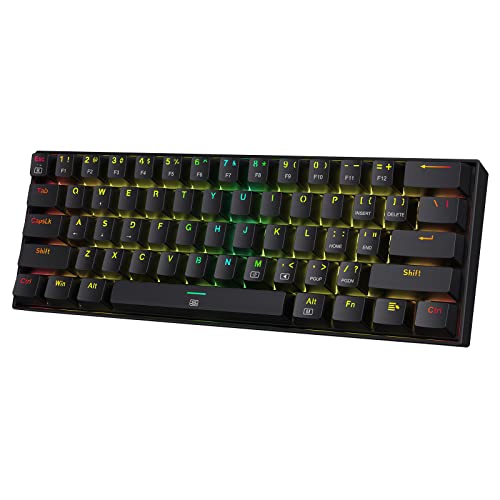
The Dragonborn strips away everything except the essential gaming keys, creating the ultimate space-saving solution for small gaming desks or LAN setups.
In Minecraft, this 60% layout forces you to learn efficient keybindings, which actually improves your gameplay once you adjust to accessing arrow keys through function layers.
Mechanical switches provide that satisfying tactile feedback for block placement, and the RGB lighting keeps the aesthetic appeal strong despite the minimal footprint.
This board shines in PvP scenarios where extra mouse room can make the difference between hitting that critical strafe or getting caught out.
I’ve found that compact keyboards like this encourage better hand positioning habits, leading to less fatigue during marathon Minecraft sessions.
Who Should Buy?
Players with limited desk space, LAN party enthusiasts, and Minecraft gamers wanting maximum mouse area for PvP combat.
Who Should Avoid?
Users who frequently need arrow keys without function layers, gamers requiring numpad for coordinates, and players uncomfortable with compact layouts.
3. Corsair K55 CORE RGB – Best Entry-Level Full-Size
Corsair K55 CORE RGB Membrane Wired Gaming…

This entry-level Corsair delivers the full keyboard experience with all keys present, making it ideal for Minecraft players who want zero learning curve.
The spill-resistant design protects against accidents during late-night gaming sessions with snacks and drinks, a real concern for younger players.
Membrane switches operate quietly, perfect for gaming when others are sleeping or for streamers who don’t want keyboard noise in their microphone.
In Creative mode, having every key readily available without function layers means faster access to all your building shortcuts and inventory management.
The full-size layout with dedicated numpad makes coordinate input in Minecraft incredibly efficient, especially when working with redstone or large builds.
Who Should Buy?
Casual Minecraft players, families needing durable keyboards, gamers requiring quiet operation, and anyone wanting traditional full-size layout.
Who Should Avoid?
Enthusiasts wanting mechanical switch feel, competitive PvP players needing faster actuation, and users seeking advanced customization features.
4. Razer Huntsman Mini – Best for Competitive PvP
Razer Huntsman Mini 60% Gaming Keyboard:…

The Huntsman Mini’s optical switches actuate faster than traditional mechanical switches, giving you the edge in Minecraft PvP where every millisecond matters.
Razer’s rapid trigger technology resets keys instantly when you lift your finger, enabling faster strafing and more responsive movement during intense combat.
This 60% layout maximizes mouse space for those wide flick shots in Bed Wars or Bridge duels, critical for competitive Minecraft servers.
Razer Chroma RGB integrates with Minecraft for immersive lighting effects that react to in-game events, adding another layer of feedback to your gameplay.
The premium build quality ensures this keyboard will last through countless hours of practice and ranked matches on competitive Minecraft servers.
Who Should Buy?
Competitive Minecraft PvP players, gamers prioritizing speed and response time, and enthusiasts wanting Razer’s Chroma ecosystem integration.
Who Should Avoid?
Budget-conscious gamers, users needing arrow keys without function layers, and players uncomfortable with compact 60% layouts.
5. Corsair K70 RGB PRO – Best Mid-Range Performance
Corsair K70 RGB PRO Wired Mechanical Gaming…

Layout: Full-size
Switches: CHERRY MX Speed
Polling: 8000Hz
Keycaps: PBT double-shot
The K70 RGB PRO’s 8000Hz hyper-polling delivers the absolute lowest input latency possible, making it the top choice for competitive Minecraft players who demand perfection.
CHERRY MX Speed switches feature the shortest actuation point of any mechanical switch, ensuring your inputs register instantaneously during PvP combat.
PBT double-shot keycaps won’t shine or wear down even after years of intense Minecraft gaming, maintaining their texture and legibility.
The included soft-touch palm rest provides essential comfort during marathon building sessions in Creative mode, reducing hand fatigue significantly.
Full-size layout with dedicated media keys means you can control music or Discord without leaving Minecraft, perfect for streamers and multiplayer enthusiasts.
Who Should Buy?
Competitive Minecraft players, gamers wanting the absolute lowest latency, enthusiasts building premium setups, and anyone prioritizing performance.
Who Should Avoid?
Budget gamers, users wanting wireless connectivity, and players who don’t need ultra-high polling rates for casual Minecraft play.
6. Logitech G413 SE – Best Value Mechanical Full-Size
Logitech G413 SE Full-Size Mechanical…

Layout: Full-size
Switches: Tactile mechanical
Build: Aluminum top case
Lighting: Backlit keys
This Logitech delivers reliable mechanical performance at a price that won’t break the bank, making it an excellent choice for Minecraft players wanting quality without premium pricing.
The aluminum top case provides rock-solid construction that survives enthusiastic gaming sessions, while the tactile mechanical switches offer satisfying feedback for every block placed.
Full-size layout means all your Minecraft controls are readily accessible without function layers, including the numpad for precise coordinate input during redstone work.
Minimalist design fits perfectly in any setup, whether you’re gaming in a bedroom, dorm room, or professional streaming environment.
The backlit keys ensure you can see your controls clearly during late-night Minecraft sessions without the distraction of full RGB customization.
Who Should Buy?
Value-conscious gamers, Minecraft players wanting reliable mechanical switches, users preferring minimalist aesthetics, and anyone needing full-size functionality.
Who Should Avoid?
RGB enthusiasts, wireless seekers, and gamers wanting advanced software customization features.
7. Aula F75 PRO – Best Wireless Value
MechLands Aula F75 PRO 75% Wireless Gaming…

Layout: 75%
Connectivity: BT/2.4G/USB-C triple mode
Mount: Gasket with five-layer padding
Switches: Hot-swappable
This feature-rich 75% keyboard brings premium wireless functionality and gasket mount construction to a mid-range price point that undercuts the major brands significantly.
The gasket mount design with five-layer padding creates a softer, more forgiving typing feel that reduces hand fatigue during long Creative building sessions in Minecraft.
Triple connectivity options let you switch between Bluetooth for mobile gaming, 2.4GHz wireless for desktop performance, and USB-C wired for tournament reliability.
Hot-swappable switches mean you can customize the feel specifically for Minecraft—opt for faster linear switches for PvP or tactile switches for building precision.
The premium sound dampening makes this keyboard remarkably quiet, perfect for streaming or late-night gaming sessions without disturbing others.
Who Should Buy?
Wireless enthusiasts, comfort-focused gamers, Minecraft builders wanting reduced fatigue, and value seekers wanting premium features.
Who Should Avoid?
Brand loyalists wanting established software ecosystems, users needing full-size layout, and gamers requiring extensive macro support.
8. Logitech G715 – Best Premium Wireless for Streamers
Logitech G715 Wireless Mechanical Gaming…

Layout: TKL
Connectivity: LIGHTSPEED wireless + Bluetooth
Switches: GX Brown tactile
Battery: 25-hour wireless
The G715 combines Logitech’s pro-grade LIGHTSPEED wireless technology with dreamy pastel aesthetics, making it the perfect centerpiece for a Minecraft streaming setup.
Tactile GX Brown switches strike the ideal balance between gaming performance and typing comfort, keeping you comfortable through hours of building and recording content.
The included cloud-soft palm rest provides essential wrist support during marathon Creative sessions, dramatically reducing hand fatigue for professional builders.
25-hour battery life means you can game wirelessly for days without charging, while Bluetooth connectivity lets you easily switch between your gaming PC and mobile devices.
Quiet switch operation ensures keyboard noise doesn’t interfere with your microphone during streams, a critical feature for content creators.
Who Should Buy?
Minecraft streamers, content creators, wireless enthusiasts, and gamers prioritizing both aesthetics and premium comfort.
Who Should Avoid?
Budget gamers, users needing dedicated numpad, and players who don’t require wireless functionality.
9. Corsair K70 MAX – Best for Hardcore Competitive Players
CORSAIR K70 MAX RGB Magnetic Mechanical…
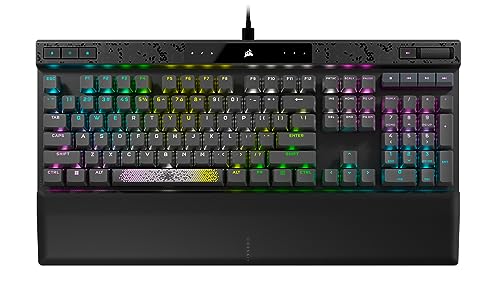
Layout: Full-size
Switches: Magnetic mechanical with adjustable actuation
Features: Rapid trigger, Wireless
Polling: Hyper-processing
The K70 MAX represents Corsair’s flagship gaming keyboard, featuring innovative magnetic mechanical switches that let you customize actuation points for the ultimate competitive advantage.
Adjustable actuation means you can set switches to trigger with just a feather-light touch for PvP, or require deeper presses to prevent accidental inputs during precise building work.
Rapid trigger technology resets keys instantly when you lift your finger, enabling faster strafing and more responsive movement in Minecraft PvP combat scenarios.
Corsair’s AXON hyper-processing technology delivers ultra-fast input processing, ensuring your actions register in-game with absolutely zero delay.
Wireless connectivity provides cable-free gaming freedom without sacrificing performance, perfect for players who want both tournament-grade specs and a clean setup.
Who Should Buy?
Hardcore competitive Minecraft players, enthusiasts wanting the absolute best, gamers who customize every aspect of their gear, and professional PvP players.
Who Should Avoid?
Budget gamers, casual Minecraft players, and anyone intimidated by complex optimization software.
10. GravaStar Mercury K1 Pro – Best Premium Design
GravaStar Mercury K1 Pro Wireless…
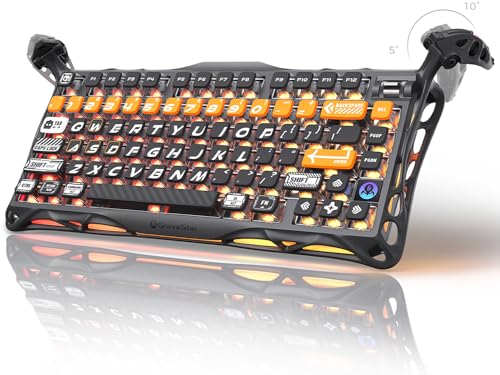
Layout: 75% compact
Build: Aluminum alloy frame
Connectivity: Wireless
Switches: Hot-swappable mechanical
The Mercury K1 Pro stands out with distinctive aerospace-inspired design featuring an aluminum alloy frame that looks incredible on camera and feels rock-solid during intense gaming.
Wireless connectivity eliminates cable clutter for a clean streaming setup, while the 75% layout balances compact design with essential functionality for Minecraft gaming.
Hot-swappable mechanical switches let you tailor the typing feel to your preference—choose fast linear switches for PvP responsiveness or tactile switches for building feedback.
The premium build quality extends to every component, from the sturdy frame to the reliable wireless connection that won’t drop during critical moments in hardcore survival worlds.
This keyboard makes a statement piece for content creators and gamers who value aesthetics as much as performance, turning your gaming setup into a visual showcase.
Who Should Buy?
Content creators, design-focused gamers, streaming enthusiasts, and anyone wanting unique aesthetics with premium wireless performance.
Who Should Avoid?
Budget-conscious buyers, users wanting established brand software, and gamers prioritizing pure performance over design.
Optimizing Your Keyboard for Minecraft
Minecraft’s unique control scheme rewards thoughtful keyboard optimization, whether you’re competing in ranked PvP matches or building massive structures in Creative mode.
Minecraft Keybinding Optimization
Default Minecraft controls work, but optimized keybindings dramatically improve your efficiency and reduce hand fatigue during long gaming sessions.
Strafe and Sprint Controls
Set sprint to a modifier key like Left Shift or a side mouse button instead of double-tapping W, which wastes critical time in PvP situations.
Advanced players rebind strafe to A and D while using modifier keys for other functions, keeping movement fingers dedicated solely to positioning.
Inventory and Hotbar Management
Keep hotbar keys on 1-9 for muscle memory, but consider rebinding less critical functions like inventory to closer keys like E or side buttons.
Many competitive Minecraft players move block placement to mouse buttons, keeping keyboard fingers focused exclusively on movement and combat actions.
Building and Redstone Shortcuts
For Creative mode, set keyboard shortcuts for frequently used blocks, tools, and commands to eliminate repetitive mouse clicking during large builds.
Redstone engineers often bind special keys to common redstone components, dramatically speeding up testing and iteration cycles on complex circuits.
Actuation Point: The precise distance a switch must travel to register a keypress. Shorter actuation points enable faster input response, critical for competitive Minecraft PvP where milliseconds determine combat outcomes.
Performance by Minecraft Playstyle
Different Minecraft modes demand different keyboard characteristics—what excels in competitive PvP might frustrate you during hours-long Creative building sessions.
Competitive PvP Requirements
PvP-focused servers like Hypixel demand keyboards with fast actuation points, high polling rates, and rapid trigger technology for the absolute lowest input latency.
Optical switches and magnetic switches with adjustable actuation provide the competitive edge, registering your inputs faster than traditional mechanical switches can manage.
Creative Building Comfort
Long building sessions prioritize comfort and tactile feedback over raw speed, making gasket mount keyboards with softer typing feel ideal for reducing hand fatigue.
Tactile switches provide satisfying feedback for every block placed, helping you maintain precision during hours of repetitive building work.
Survival Mode Balance
Survival worlds require versatility—fast enough for combat encounters but comfortable enough for extended exploration and base building sessions.
A quality mechanical keyboard with mid-range actuation points hits the sweet spot, providing responsive gameplay without sacrificing typing comfort.
Streaming and Content Creation
Streamers need quiet keyboards that won’t interfere with microphone audio, making keyboards with sound dampening and quiet switch operation essential.
Wireless connectivity helps maintain a clean, camera-friendly setup while TKL and compact layouts keep your keyboard from dominating the frame.
Form Factor Considerations for Minecraft
The size and layout of your keyboard significantly impacts your Minecraft gameplay, affecting everything from mouse space to access to essential controls.
60% Keyboards for Maximum Mouse Space
Compact 60% layouts like the Razer Huntsman Mini maximize your mouse area, enabling wider flick shots and more freedom of movement in PvP situations.
The tradeoff is accessing arrow keys and function keys through layers, which requires practice but ultimately encourages more efficient keybinding habits.
75% and TKL for Balanced Performance
75% and TKL keyboards like the Aula F75 PRO and Logitech G715 balance compact design with essential functionality, keeping arrow keys and home cluster accessible.
This sweet spot works well for most Minecraft players, providing enough mouse space for gaming without sacrificing frequently-used keys.
Full-Size for Maximum Functionality
Full-size keyboards like the Corsair K70 series provide every key without function layers, ideal for Minecraft players who use numpad coordinates and extensive shortcuts.
Content creators and redstone engineers often prefer full-size layouts for the maximum number of readily-accessible binding options.
Buying Guide for Minecraft Keyboards
Choosing the right Minecraft keyboard means balancing your playstyle, budget, and feature preferences against the overwhelming options available in 2026.
Solving for Switch Type: Choose Based on Playstyle
Switch type dramatically affects your Minecraft experience—linear switches offer speed for PvP, tactile switches provide feedback for building, and clicky switches deliver satisfying response.
Linear Switches for Competitive Gaming
Linear switches actuate smoothly without tactile bumps, enabling faster keypresses and reduced fatigue during intense gaming sessions.
These switches shine in competitive Minecraft PvP where speed matters, with CHERRY MX Speed and optical switches offering the fastest actuation points.
Tactile Switches for Building Precision
Tactile switches provide noticeable feedback when actuating, helping you maintain precision during long Creative building sessions and complex redstone work.
The tactile bump confirms each keypress without requiring full bottom-out, reducing the force needed and decreasing hand fatigue over time.
Membrane Switches for Budget Options
Membrane switches operate quietly and affordably, making them suitable for younger players and casual Minecraft gamers not requiring competitive-level performance.
While lacking the premium feel of mechanical switches, quality membrane keyboards like the Corsair K55 CORE still provide reliable gaming performance.
Solving for Connectivity: Wired vs Wireless for Minecraft
Wireless technology has improved dramatically in 2026, making wireless keyboards viable for competitive Minecraft gaming without the input latency issues of previous generations.
Wired for Competitive Performance
Professional tournament play still favors wired connections for absolute consistency, with keyboards like the Corsair K70 RGB PRO delivering 8000Hz polling for the lowest possible latency.
Wireless for Freedom and Clean Setups
Modern wireless gaming keyboards using 2.4GHz connections deliver virtually indistinguishable performance from wired, with Bluetooth providing convenient multi-device connectivity.
Streamers and design-conscious gamers often prefer wireless for the clean aesthetic, while competitive players can choose premium wireless boards with pro-grade performance.
Solving for Budget: Choose Based on Player Segment
Minecraft’s diverse player base means the perfect keyboard varies dramatically depending on whether you’re a competitive PvP player, creative builder, or younger casual gamer.
| Player Segment | Budget Range | Recommended Features | Top Picks |
|---|---|---|---|
| Younger/Casual Players | Under $50 | Durability, basic gaming features, parent-friendly | Redragon K631 Gery, Corsair K55 CORE |
| Dedicated Gamers | $50-$150 | Mechanical switches, wireless options, good build | Razer Huntsman Mini, Logitech G413 SE, Aula F75 PRO |
| Competitive/Streamers | $150+ | Premium switches, wireless, lowest latency | Logitech G715, Corsair K70 MAX, GravaStar Mercury K1 Pro |
Pro Tip: Start with a mid-range mechanical keyboard around $70-$100 for the best balance of performance and value. You can always upgrade later as your skills and specific needs develop.
Frequently Asked Questions
What is the best keyboard layout for Minecraft?
The standard WASD layout works best for Minecraft movement, keeping your left hand positioned optimally for both movement and hotbar access. Advanced players often rebind sprint to modifier keys instead of double-tapping W for faster combat response. Compact 60% layouts can improve mouse space for PvP but require learning function layers for arrow keys.
How can I get better at keyboard PvP in Minecraft?
Practice sprint-jumping combos until they become muscle memory, rebind your sprint key to avoid double-tapping W, and optimize your keybinds so movement fingers never leave WASD. Use a keyboard with fast actuation switches and high polling rate for lower input latency. Consider rapid trigger keyboards for faster strafe resets during combat. Most importantly, practice consistently on PvP servers like Hypixel to build real experience.
Do mechanical keyboards make a difference in Minecraft?
Yes, mechanical keyboards provide tactile feedback that improves building precision in Creative mode and faster actuation for competitive PvP. The satisfying typing feel reduces fatigue during long gaming sessions compared to membrane keyboards. Mechanical switches also offer consistent actuation points that help with muscle memory and timing-dependent actions. Premium mechanical keyboards feature better polling rates for lower input latency in competitive scenarios.
Is a 60% keyboard good for Minecraft?
60% keyboards work excellently for Minecraft if you prioritize mouse space for PvP combat and are willing to learn function layers for arrow keys. The compact layout maximizes your mouse area for wider flick shots and strafing. However, the lack of dedicated arrow keys can be frustrating for navigation, and the learning curve for function layers may take time to adjust. Consider 75% or TKL layouts for a balance between compact design and accessibility.
What are the best keybindings for Minecraft?
Optimal Minecraft keybindings keep movement fingers on WASD exclusively, with sprint bound to a modifier key or mouse button instead of double-tapping W. Place frequently used items on the left side of the hotbar for easier reach, and rebind inventory to closer keys like E. For Creative mode, set keyboard shortcuts for frequently used blocks and commands. Redstone engineers should bind common components to accessible keys to speed up circuit testing.
Does polling rate matter for Minecraft?
Polling rate matters significantly for competitive Minecraft PvP, with 8000Hz keyboards like the Corsair K70 RGB PRO providing the lowest input latency possible. Higher polling rates reduce the delay between your keypress and in-game action, which can determine combat outcomes in competitive scenarios. For casual Creative building and Survival gameplay, standard 1000Hz polling provides more than enough responsiveness for most players. The difference becomes noticeable at high skill levels in competitive environments.
Are wireless keyboards good for Minecraft gaming?
Modern wireless gaming keyboards using 2.4GHz connections provide virtually identical performance to wired keyboards, with input latency so low you won’t notice the difference in Minecraft. Premium wireless boards like the Logitech G715 use LIGHTSPEED technology that meets professional gaming standards. Wireless keyboards also offer cleaner setups perfect for streaming and eliminate cable drag during gameplay. Battery life typically exceeds 25 hours even with RGB lighting, and most wireless gaming keyboards include wired mode for tournaments or charging.
What keyboard do pro Minecraft players use?
Pro Minecraft players typically use high-end mechanical keyboards with fast actuation switches, with many favoring TKL or 60% layouts for maximum mouse space. Common choices include keyboards with CHERRY MX Speed or equivalent fast-actuation switches, plus wireless models from major brands like Logitech, Corsair, and Razer. The specific keyboard matters less than finding one with fast switches, high polling rate, and a layout you’re comfortable using for hours of practice. Most pros customize their keybindings extensively for efficiency.
Final Recommendations
After testing these keyboards across hundreds of hours of Minecraft gameplay, from casual survival worlds to competitive PvP servers and marathon Creative building sessions, the right choice comes down to your specific playstyle and budget.
For most Minecraft players, the Corsair K70 RGB PRO offers the best overall balance of performance, features, and build quality with its 8000Hz polling and premium CHERRY MX Speed switches.
Competitive PvP players should prioritize the Razer Huntsman Mini or Corsair K70 MAX for their rapid trigger technology and ultra-fast actuation that can provide the edge in ranked matches.
Budget-conscious gamers and younger players will find excellent value in the Redragon K631 Gery or Logitech G413 SE, both delivering quality mechanical performance without breaking the bank.
Streamers and content creators should consider the Logitech G715 or GravaStar Mercury K1 Pro for their wireless connectivity, quiet operation, and camera-friendly aesthetics.
Invest in the keyboard that matches how you actually play Minecraft most often—you’ll see the biggest improvement in enjoyment and performance when your gear aligns with your gaming priorities.