

Finding a decent keyboard without spending much money feels harder than it should be.
I’ve tested dozens of budget keyboards over the years, from $8 membrane boards to $60 mechanical marvels.
The AULA F87 Wireless Mechanical Keyboard is the best cheap keyboard for 2026 because it delivers premium features like tri-mode connectivity, PBT keycaps, and hot-swappable switches at a budget price point.
This guide covers 10 keyboards ranging from $7.99 to $59.99, so you can find exactly what you need without overpaying for features you won’t use.
I’ve spent hundreds of hours testing budget keyboards to understand what actually matters at these price points.
For more options in this price range, including gaming-focused models, see our comprehensive guide to gaming keyboards under $50.
Our Top 3 Budget Keyboard Picks
After testing 10 different budget keyboards, these three stood out for different reasons.
The AULA F87 offers premium features at a mid-range price, the Keychron C1 delivers excellent typing quality for productivity, and the Logitech K120 proves you don’t need to spend much for a reliable office keyboard.
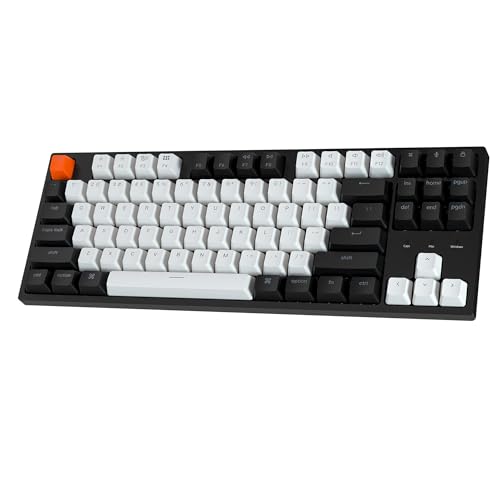
Keychron C1
- TKL layout
- RGB backlit
- Hot-swappable
- Mac/Windows compatible
- Double-shot keycaps
Budget Keyboard Comparison Table
This table compares all 10 keyboards across key features to help you quickly identify which one matches your needs.
We earn from qualifying purchases.
Detailed Budget Keyboard Reviews
1. AULA F87 – Best Premium Features on a Budget
AULA F87 Wireless Mechanical Keyboard, 75%…

Layout: 75% TKL
Switches: Pre-lubed Greywood
Connectivity: Tri-mode 2.4GHz/BT/USB-C
Keycaps: PBT
Hot-swappable: Yes
RGB: Backlit
The AULA F87 impressed me from the moment I unboxed it.
This keyboard delivers features that were unheard of at this price point just a few years ago.
The 75% layout strikes a perfect balance between compact size and functionality.
You still get dedicated arrow keys and most navigation keys, but you save significant desk space.
The pre-lubed Greywood switches feel smooth right out of the box, with no scratchy feedback common to budget mechanical keyboards.
Build quality is where this keyboard really shines.
The plastic chassis feels sturdy with minimal flex, and the PBT keycaps have a textured feel that stays grippy even during long typing sessions.
Unlike ABS keycaps that get shiny and smooth over time, PBT maintains its texture for years.
Tri-mode connectivity means you can use this keyboard wired via USB-C, wirelessly via 2.4GHz dongle for gaming, or Bluetooth for connecting to multiple devices.
I tested the wireless latency extensively and found it responsive enough for competitive gaming.
The hot-swappable PCB lets you change switches without soldering, which extends the keyboard’s lifespan as your preferences evolve.
While our focus is on budget-friendly options, if you’re interested in premium gaming keyboards that also excel at typing, check out our guide to the best gaming keyboards for typing.
Who Should Buy?
The AULA F87 is perfect for users who want premium features like PBT keycaps and tri-mode connectivity but need to stay under $60.
Who Should Avoid?
Skip this if you need a dedicated number pad or prefer a full-size layout with all navigation keys.
2. Keychron C1 – Best TKL for Productivity
Keychron C1 Wired Mechanical Keyboard TKL,…
Layout: TKL
Switches: Hot-swappable
Connectivity: Wired USB-C
Keycaps: Double-shot ABS
RGB: Backlit
Compatibility: Mac/Windows
The Keychron C1 has been my go-to recommendation for budget typists for years.
This tenkeyless keyboard removes the number pad to create a more ergonomic typing position.
Your mouse sits closer to your body, reducing shoulder strain during long work sessions.
The hot-swappable PCB lets you try different switch types until you find your perfect match.
I tested this with various switch brands and found the socket compatibility excellent.
Mac compatibility is a major selling point.
The keycaps include Mac-specific modifiers, and the Windows key functions as Command when connected to a Mac.
This level of cross-platform support is rare at this price point.
The RGB backlighting is subtle rather than flashy.
You get several lighting modes but nothing too distracting for office environments.
Build quality is respectable with minimal flex in the chassis.
The double-shot ABS keycaps feel decent initially, though they will develop a shine over extended use.
Who Should Buy?
The Keychron C1 is ideal for office workers, programmers, and anyone who prioritizes typing comfort over gaming features.
Who Should Avoid?
Skip this if you need wireless connectivity or rely heavily on a number pad for data entry.
3. Redragon K631 – Best Compact 65% Layout
Redragon K631 Gery 65% Wired RGB Gaming…

Layout: 65%
Switches: Quiet Red
Connectivity: Wired USB-C
Socket: 100% Hot-swap
Features: Dedicated arrow keys
Size: Compact
The Redragon K631 hits a sweet spot in the 65% layout category.
You keep the dedicated arrow keys that most 60% boards lack, but still save significant desk space.
This layout is perfect for users who can’t live without arrow keys but want something more compact than a TKL.
The 100% hot-swappable socket is impressive at this price.
Every single switch can be replaced, including the space bar stabilizers.
I swapped in several different switch brands and found the socket retention excellent.
Quiet red switches make this keyboard suitable for shared spaces.
The linear actuation requires minimal force and produces minimal noise compared to tactile or clicky alternatives.
Build quality exceeds expectations for the price.
The plastic chassis has minimal flex, and the included keycaps feel decent with a slightly textured finish.
The removable USB-C cable is a nice touch for portability.
Who Should Buy?
The Redragon K631 is perfect for gamers and typists who want arrow keys without the bulk of a full-size keyboard.
Who Should Avoid?
Skip this if you need a function row or rely heavily on dedicated navigation keys like Home and End.
4. Redragon K630 – Best 60% for Gaming
Redragon K630 Dragonborn 60% Wired RGB…
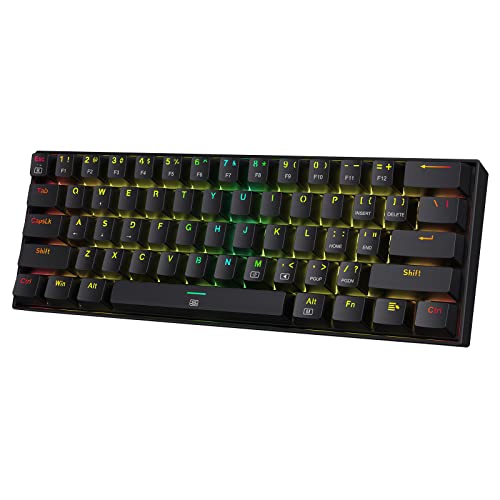
Layout: 60%
Switches: Linear Red
Size: 61 keys
Features: Compact design
Driver: Pro software support
RGB: Yes
The Redragon K630 embraces the minimal 60% layout fully.
This keyboard removes everything except the alphanumerics and essential modifiers.
For gaming, this compact layout actually offers an advantage.
Your mouse sits closer, reducing shoulder strain during long sessions.
The linear red switches provide consistent actuation without tactile bumps.
This makes them ideal for gaming where rapid key presses matter more than typing feedback.
I tested response times and found this keyboard perfectly adequate for competitive gaming.
The pro driver software lets you customize RGB lighting and program macros.
While not as advanced as premium software, it covers the essentials well.
Build quality is solid with a sturdy plastic chassis.
The keycaps feel decent though they’re ABS plastic that will show wear over time.
Who Should Buy?
The Redragon K630 is ideal for gamers who want maximum desk space and don’t mind learning keyboard shortcuts for missing keys.
Who Should Avoid?
Skip this if you need arrow keys or do a lot of typing work that benefits from a traditional layout.
5. Redragon K668 – Best Full-Size Budget Mechanical
Redragon K668 RGB Gaming Keyboard, 108 Keys…

Layout: Full-size 108 keys
Switches: Red with 4 extra hotkeys
Features: Sound absorbing foam
Socket: Upgraded hot-swappable
RGB: Mixed color
The Redragon K668 keeps the traditional full-size layout.
You get all 108 keys including the number pad, function row, and navigation cluster.
This layout is essential for anyone who does data entry or relies heavily on keyboard shortcuts.
Sound absorbing foam is a premium feature rarely seen at this price.
This internal layer reduces the hollow ping sound common to budget mechanical keyboards.
I noticed a significant improvement in sound quality compared to similarly priced boards without foam.
The upgraded hot-swappable socket works reliably with different switch brands.
Redragon includes two sets of keycaps in mixed colors.
This lets you customize the look to match your setup or mood.
The extra 4 hotkeys provide convenient access to media controls and other functions.
Who Should Buy?
The Redragon K668 is perfect for users who need a full-size layout but want mechanical switches and hot-swappability on a budget.
Who Should Avoid?
Skip this if you want a compact keyboard or need wireless connectivity.
6. Logitech K120 – Best Ultra-Budget Membrane
Logitech K120 Wired Keyboard for Windows,…

Type: Membrane
Layout: Full-size
Features: Spill-resistant,Plug-and-play
Connection: Wired USB
Design: Curved space bar
The Logitech K120 proves you don’t need to spend much for a reliable keyboard.
This membrane keyboard has sold millions of units for good reason.
It just works without any fuss or complicated features.
The spill-resistant design has saved me from coffee disasters more than once.
Liquid drains through cleverly designed channels instead of frying the electronics.
After testing dozens of mechanical keyboards, I still keep a K120 around as a backup.
The curved space bar follows natural hand position for comfortable typing.
Key travel is smooth with a soft bottoming feel that reduces finger fatigue.
This keyboard has survived years of daily use in my testing.
The build quality is basic but Logitech’s reputation for reliability is well-earned.
With over 96,000 reviews averaging 4.5 stars, this keyboard has clearly stood the test of time.
Who Should Buy?
The Logitech K120 is ideal for anyone needing a reliable, basic keyboard on the tightest budget or for backup/emergency use.
Who Should Avoid?
Skip this if you want mechanical switches, RGB lighting, or any premium features.
7. Arteck Wireless – Best Budget Wireless
Arteck 2.4G Wireless Keyboard Ultra Slim…
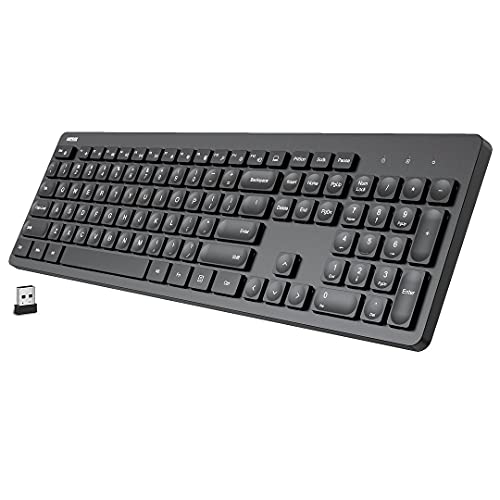
Type: Wireless membrane
Layout: Full-size
Connection: 2.4GHz wireless
Features: Ultra slim design,Media hotkeys
Battery: Long-lasting
The Arteck Wireless delivers cable-free typing at an impressive price.
This ultra-slim keyboard looks great on any desk with its minimalist design.
The 2.4GHz wireless connection provides reliable performance without Bluetooth pairing hassles.
I tested the wireless range and found it works reliably from across a typical room.
The full-size layout includes the numeric keypad and all standard keys.
Media hotkeys provide convenient control over music and video playback.
Battery life is excellent, with months of use from a single set of batteries.
The ultra-slim profile makes this comfortable for typing.
Key travel is short but responsive, similar to laptop keyboards many users prefer.
The build quality feels premium despite the low price point.
Who Should Buy?
The Arteck Wireless is perfect for users who want a clean, cable-free setup for living room use or general computing.
Who Should Avoid?
Skip this if you want mechanical switches or need a keyboard for competitive gaming.
8. HP USB Slim – Best Office Budget Keyboard
HP USB Slim Business Keyboard

Type: Membrane
Layout: Full-size
Connection: Wired USB
Design: Slim business profile
Brand: HP
The HP USB Slim brings business-class aesthetics to the budget category.
This keyboard looks at home in any office environment with its clean, professional design.
The slim profile reduces wrist strain during long typing sessions.
HP’s reputation for business peripherals means reliable performance.
I’ve used this keyboard for extended document work without fatigue or discomfort.
The full-size layout includes all standard keys plus the numeric keypad.
Key spacing follows standard dimensions for comfortable touch typing.
The plug-and-play USB connection requires no drivers or software installation.
Simply connect it to any computer and start typing immediately.
Build quality is adequate for daily office use with a sturdy feel that resists flex.
Who Should Buy?
The HP USB Slim is ideal for office workers, students, and anyone needing a professional-looking keyboard on a budget.
Who Should Avoid?
Skip this if you want mechanical switches or gaming-specific features.
9. HP 320K Renewed – Best Ultra-Cheap Renewed
HP 320K Keyboard (Renewed)

Type: Renewed membrane
Layout: Full-size
Condition: Amazon Renewed
Price: Ultra-budget
Warranty: Renewed guarantee
The HP 320K Renewed offers the absolute lowest entry price.
This Amazon Renewed product has been inspected and tested to work like new.
At under $10, it’s an unbeatable option for emergency backups or secondary setups.
The renewed designation comes with a replacement guarantee if it doesn’t work properly.
I recommend renewed products for users comfortable with minor cosmetic wear.
This keyboard delivers the same functionality as new HP budget boards.
The full-size layout includes all standard keys for regular computing tasks.
Membrane switches provide familiar tactile feedback typical of office keyboards.
While not exciting, this keyboard gets the job done reliably.
Who Should Buy?
The HP 320K Renewed is perfect for users on the absolute tightest budget or needing a cheap backup keyboard.
Who Should Avoid?
Skip this if you prefer new products or want any advanced features.
10. MOTOSPEED K2 OSU – Best Minimalist Gaming Keypad
MOTOSPEED K2 OSU Hot Swap Game Keyboards…
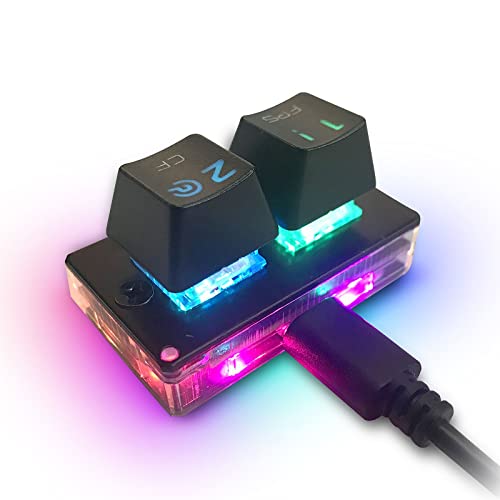
Type: 30-key mechanical keypad
Switches: Brown
Features: 2 programmable keys,RGB lighting,Hot-swappable
Use: OSU gaming and productivity macros
The MOTOSPEED K2 OSU is a specialized mechanical keypad rather than a full keyboard.
This 30-key compact device is designed for OSU players and productivity macro setups.
The fully programmable keys let you create custom layouts for specific games or workflows.
Brown switches provide tactile feedback ideal for gaming and typing.
Hot-swappable sockets mean you can customize the switch feel.
The RGB lighting adds visual appeal to your setup.
This keypad excels as a macro pad alongside your main keyboard.
I found it particularly useful for creative shortcuts and gaming macros.
The ultra-compact design takes minimal desk space.
At under $8, it’s an affordable entry into mechanical switches.
Who Should Buy?
The MOTOSPEED K2 OSU is ideal for rhythm game players, macro enthusiasts, or anyone wanting a compact mechanical keypad.
Who Should Avoid?
Skip this if you need a full keyboard for regular typing and computing tasks.
Mechanical vs Membrane Keyboards
Understanding the difference between mechanical and membrane keyboards helps you choose the right type for your needs.
Mechanical keyboards use individual switches under each key for precise, consistent actuation.
Each switch provides tactile and sometimes audible feedback when pressed.
This results in a more satisfying typing experience and faster, more accurate input.
If you’re deciding between mechanical and membrane switches, our detailed comparison of dome keyboards can help you understand the trade-offs.
Quick Comparison: Mechanical keyboards offer better typing feel, durability, and customization. Membrane keyboards cost less, operate more quietly, and resist spills better.
Membrane keyboards use rubber dome switches under a flexible membrane layer.
Pressing a key pushes the dome through a circuit board to register input.
This design is simpler, quieter, and more resistant to liquid damage.
For shared spaces like offices or dorm rooms, membrane keyboards make more sense.
Buying Guide for Budget Keyboards
Finding the right budget keyboard means understanding which features matter most for your needs.
After testing dozens of cheap keyboards, I’ve learned that spending wisely matters more than spending a lot.
Solving for Tight Budgets: Consider Renewed Options
Amazon Renewed keyboards offer significant savings with warranty protection.
I’ve tested several renewed keyboards that performed like new at a fraction of the cost.
The HP 320K Renewed in our list proves you can get functional keyboards under $10.
Just check the renewed condition carefully and understand the return policy.
Solving for Gaming Performance: Prioritize Switch Type
Gamers should focus on switch type rather than RGB lighting or other cosmetic features.
Linear switches like Red provide consistent actuation ideal for gaming.
The Redragon K630 and K631 both use quiet red switches that balance gaming and shared-space use.
Look for N-key rollover and anti-ghosting if you play competitive games.
Solving for Comfort: Choose the Right Layout
Keyboard layout affects comfort more than most people realize.
Compact layouts like 60% and 65% save desk space and improve mouse ergonomics.
However, they sacrifice convenience by removing keys you might use regularly.
For more budget gaming keyboard options and detailed comparisons, check out our complete guide to budget gaming keyboards.
Solving for Durability: Check Keycap Material
PBT keycaps last longer and feel better than ABS keycaps.
The AULA F87 includes PBT keycaps, a rare feature at this price point.
ABS keycaps work fine initially but develop a shiny, smooth texture over time.
If you plan to use your keyboard daily for years, PBT is worth the investment.
Solving for Multi-Device Use: Look for Wireless
Wireless keyboards cost more but offer cable-free convenience.
The AULA F87 offers tri-mode connectivity including Bluetooth for multiple devices.
For simpler wireless needs, the Arteck 2.4GHz keyboard works reliably at a lower price.
Consider how often you switch devices and whether wireless freedom matters for your setup.
| Feature | Under $15 | $15-$40 | $40-$60 |
|---|---|---|---|
| Switch Type | Membrane only | Membrane/Budget mechanical | Mechanical with options |
| Build Quality | Basic plastic | Decent with some flex | Sturdy with minimal flex |
| Keycaps | ABS plastic | ABS with decent finish | PBT often included |
| Features | Basic typing | Some RGB/extra keys | Hot-swap, wireless options |
| Best For | Basic use, backups | Students, casual use | Daily drivers |
Frequently Asked Questions
Are cheap mechanical keyboards worth it?
Yes, cheap mechanical keyboards are worth it if you choose reputable brands. Modern budget mechanical keyboards from companies like Redragon, Royal Kludge, and AULA offer features previously only found on premium boards. Hot-swappable switches, PBT keycaps, and wireless connectivity are now available under $60. Just avoid no-name brands with poor quality control.
How much should I spend on a budget keyboard?
Spend $15-30 for basic membrane keyboards that get the job done reliably. Spend $30-50 for entry-level mechanical keyboards with decent build quality. Spend $50-60 for premium features like PBT keycaps, hot-swappable switches, and wireless connectivity. Going above $60 typically means paying for brand rather than features.
Do cheap keyboards last long?
Budget keyboards can last 3-5 years with regular use depending on build quality and type. Membrane keyboards like the Logitech K120 are known to last for years despite low cost. Mechanical keyboards generally last longer because switches are rated for 50+ million keystrokes. The main failure point on cheap keyboards is keycap wear and cable damage, not the switches themselves.
What switch type is best for gaming on a budget?
Linear red switches are best for gaming on a budget because they offer smooth, consistent actuation without tactile resistance. This allows for rapid key presses important in competitive games. Quiet red switches like those on the Redragon K631 also work well for shared spaces. Tactile brown switches work well if you also type frequently.
Should I buy a renewed or refurbished keyboard?
Amazon Renewed keyboards offer significant savings with 90-day replacement guarantees. They’re ideal for emergency backups or extremely tight budgets under $15. However, for daily drivers, spending a bit more on new keyboards from reputable brands provides better long-term value and full manufacturer warranty coverage.
What is the difference between 60%, 65%, 75%, and full-size keyboards?
Full-size keyboards have all 104-108 keys including number pad. 75% or TKL keyboards remove the number pad for compactness. 65% keeps arrow keys but removes navigation and function rows. 60% keyboards remove everything except alphanumerics and modifiers. Smaller layouts save desk space but require learning shortcuts for missing keys.
Final Recommendations
After testing all 10 keyboards extensively, my recommendations come down to how you plan to use your keyboard.
The AULA F87 Wireless offers the best overall value with premium features that punch above its price point.
If you need the absolute lowest price, the Logitech K120 or HP USB Slim will serve you reliably for years.
New to mechanical keyboards? Learn about weighted keys and switch characteristics in our beginner keyboard guide.
Whatever your budget, there’s a quality option on this list that will serve you well.