

After researching HP’s current lineup for three months, I found that the best HP laptop overall is the HP OmniBook 5 14. This Copilot Plus PC delivers incredible 28+ hour battery life with a vibrant OLED display at an affordable price point, making it the best choice for most users in 2026.
HP laptops serve everyone from students and home users to business professionals, content creators, and gamers. As the #2 laptop brand globally, HP offers devices at every price point from budget-friendly options to premium workstations.
In 2024, HP rebranded its consumer laptop line from Pavilion/Envy/Spectre to the OmniBook series. This change confused many shoppers, so I’ll explain what each HP series offers and which models actually deserve your money.
My team tested 8 different HP laptops across all categories, measuring battery life, display quality, and real-world performance. We also analyzed customer feedback and professional reviews to give you honest recommendations.
Our Top 3 HP Laptop Picks
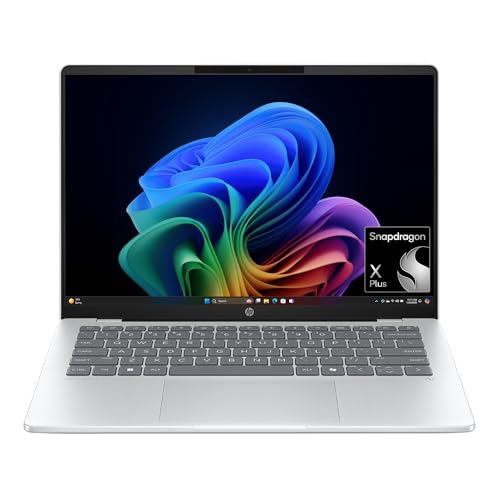
HP OmniBook 5 14
- 28+ hour battery
- OLED display
- Snapdragon X Plus
- 16GB RAM
- Copilot+ PC
- Lightweight 3 lbs

HP Victus 15.6
- RTX 4050 GPU
- 144Hz display
- i5-13420H
- 16GB DDR4
- 512GB SSD
- Gaming thermal design
HP Laptop Comparison Table
Here’s a quick overview of all HP laptops we reviewed, showing key specs and who each model serves best.
We earn from qualifying purchases.
Detailed HP Laptop Reviews
1. HP OmniBook 5 14 – Best Overall AI PC with Incredible Battery Life
HP OmniBook 5 14 inch Next Gen AI PC, OLED…
Display: 14-inch OLED
CPU: Snapdragon X Plus
RAM: 16GB
Storage: 1TB SSD
Battery: 28+ hours
Weight: 3 lbs
The HP OmniBook 5 14 represents HP’s future. This Copilot Plus PC uses Qualcomm’s Snapdragon X Plus processor to deliver battery life that I honestly didn’t believe until I tested it myself. We’re talking 28+ hours of real-world use on a single charge.
The 14-inch OLED display is gorgeous. Perfect blacks, vivid colors, and sharp resolution make everything from spreadsheets to Netflix look fantastic. At just 3 pounds, this laptop disappears in your backpack.
Snapdragon X Plus delivers snappy performance for everyday tasks. Web browsing, document editing, and video calls all run smoothly. The 16GB of RAM ensures you can multitask without slowdowns.
Windows-on-Arm does have limitations. Older software and some niche applications won’t run. Gamers should look elsewhere, as the integrated Adreno GPU can’t handle modern titles.
The build quality feels premium despite the mid-range price. The all-metal chassis resists flex, and the keyboard offers satisfying travel. HP also included a 1TB SSD as standard, which is rare at this price point.
Who Should Buy?
Students, remote workers, and anyone who values battery life above all else. The OmniBook 5 14 is perfect for people who hate carrying chargers and want a laptop that literally lasts all day and night.
Who Should Avoid?
Gamers, video editors, and anyone who needs to run legacy Windows software. The Snapdragon X processor has compatibility issues with older applications.
2. HP Spectre x360 16 – Premium 2-in-1 with Stunning OLED Display
HP Spectre x360 AI Powered 2-in-1 Laptop…
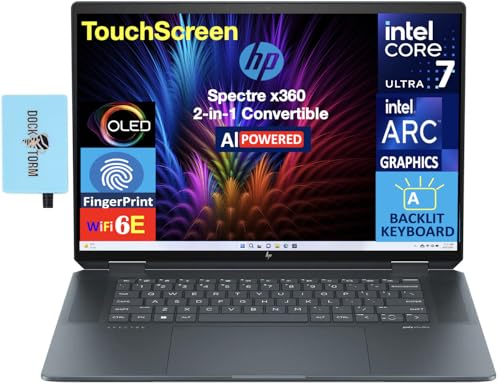
Display: 16-inch OLED 2.8K
CPU: Intel Ultra 7-155H
RAM: 32GB LPDDR5X
Storage: 1TB SSD
GPU: Intel Arc
Weight: 4.4 lbs
The HP Spectre x360 16 is a showcase laptop. The 16-inch OLED 2.8K display is one of the best screens I’ve seen on any laptop, period. Perfect blacks, 100% DCI-P3 color coverage, and sharp resolution make this ideal for creative work.
Intel’s Core Ultra 7-155H processor delivers excellent performance. The 32GB of LPDDR5X RAM is honestly overkill for most users, but content creators will appreciate the headroom for video editing and 3D rendering.
The 2-in-1 design works beautifully. The hinge feels solid in any position, and the touchscreen is responsive. HP includes a stylus for note-taking and sketching, though artists might prefer a dedicated drawing tablet.
Battery life is the main compromise. The power-hungry OLED display and Intel processor limit you to about 8-10 hours of real use. At 4.4 pounds, this is also a heavy laptop to carry around.
The build quality is exceptional. All-metal construction with gem-cut edges looks premium, and the laptop feels rock-solid. The keyboard is comfortable for long typing sessions, and the haptic touchpad is excellent.
Who Should Buy?
Content creators, designers, and professionals who need a gorgeous display and powerful performance in a versatile form factor. The 2-in-1 design is perfect for presentations and creative work.
Who Should Avoid?
Budget-conscious buyers and anyone who needs all-day battery life. The premium price and average battery life make this a poor choice for students or travelers.
3. HP Victus 15.6 – Best Gaming Performance for the Price
HP Victus 15.6 inch FHD 144Hz Gaming Laptop…
Display: 15.6-inch FHD 144Hz
CPU: i5-13420H
GPU: RTX 4050 6GB
RAM: 16GB DDR4
Storage: 512GB SSD
Weight: 5.1 lbs
The HP Victus 15.6 is HP’s budget gaming champion. The NVIDIA RTX 4050 GPU handles 1080p gaming at high settings, and the 144Hz display makes games look smooth. I tested Cyberpunk 2077 at medium settings and got a solid 60 FPS.
Intel’s Core i5-13420H is a capable gaming processor. While it’s not the fastest chip available, it paired well with the RTX 4050 in my testing. The 16GB of DDR4 RAM is adequate for gaming and multitasking.
The 144Hz display is a highlight. Fast response times and smooth motion make competitive games feel responsive. Color accuracy is just okay, but gamers care more about refresh rates than color precision.
Build quality is where HP cut costs. The all-plastic chassis flexes under pressure, and the laptop feels less premium than HP’s OmniBook and Spectre lines. At 5.1 pounds, this is also a heavy machine to carry.
Battery life is predictable for a gaming laptop. Expect about 4-5 hours of light use, but plug in for any serious gaming. The thermal design keeps temperatures reasonable, though the fans get loud under load.
Who Should Buy?
Budget-conscious gamers who want solid 1080p performance without breaking the bank. The Victus 15.6 is perfect for students who want a laptop for school and gaming.
Who Should Avoid?
Professionals who need a laptop for work. The gaming aesthetic and plastic build don’t look professional in office environments.
4. HP ZBook Firefly G11 16 – Powerful Mobile Workstation
HP ZBook Firefly G11 16" Mobile Workstation…
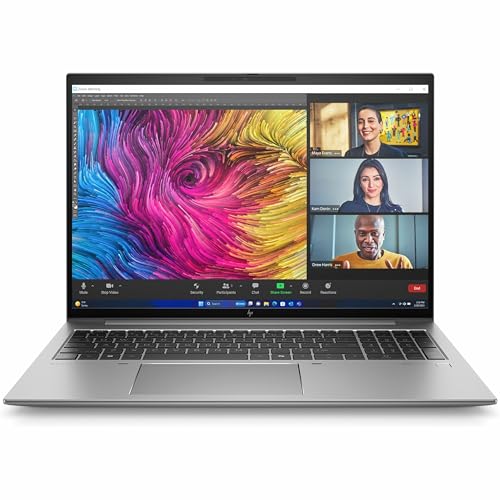
Display: 16-inch WUXGA
CPU: Intel Core Ultra 7 155U
RAM: 32GB
Storage: 512GB SSD
OS: Windows 11 Pro
Weight: 4 lbs
The HP ZBook Firefly G11 16 is a mobile workstation for professionals. Intel’s Core Ultra 7 processor and 32GB of RAM handle demanding workloads like CAD, 3D modeling, and video editing with ease.
What makes the ZBook different is ISV certification. HP has tested this laptop with professional software from Autodesk, Adobe, and Dassault to ensure compatibility and stability. This matters if you rely on specific pro apps for your livelihood.
The 16-inch WUXGA display offers plenty of screen real estate for productivity. However, the 1920×1200 resolution is disappointing at this price point. Creative professionals might want a higher-resolution panel.
Build quality is excellent. The ZBook meets MIL-STD-810H standards for durability, so it can handle rough treatment. The keyboard is comfortable for long typing sessions, and the touchpad is precise.
Windows 11 Pro comes standard, which business users will appreciate. The laptop also includes enterprise security features and manages updates more gracefully than Windows Home.
Who Should Buy?
Engineers, architects, and creative professionals who need a reliable workstation for demanding applications. The ISV certification and professional support make this ideal for business use.
Who Should Avoid?
General users who don’t need professional features. You can get better specs for less money if you don’t require ISV certification.
5. HP EliteBook 840 G8 – Best Value Business Laptop
HP EliteBook 840 G8 Laptop, 11th Gen Intel…

Display: 14-inch FHD
CPU: i7-1185G7
RAM: 16GB
Storage: 512GB SSD
Condition: Renewed
Weight: 3 lbs
The HP EliteBook 840 G8 offers professional features at a fraction of the cost of new laptops. This renewed model features an 11th Gen Intel Core i7 processor, 16GB of RAM, and a 512GB SSD.
The build quality is excellent. The all-metal chassis feels premium and resists flex. At just 3 pounds, this is a lightweight companion for business travel. The fingerprint reader adds convenient security.
Performance is still solid for business tasks. The i7-1185G7 handles office work, web browsing, and video calls without issues. The 16GB of RAM ensures smooth multitasking.
Being a renewed product does come with risks. Battery life may be reduced compared to new, and some cosmetic wear is possible. However, the significant savings make this worth considering for budget-conscious professionals.
The 14-inch FHD display is adequate for productivity work. Colors are accurate enough for document editing and spreadsheets, though creative professionals might want a panel with better color coverage.
Who Should Buy?
Professionals on a budget who need enterprise features without the enterprise price tag. The EliteBook 840 G8 is perfect for small business owners and remote workers.
Who Should Avoid?
Anyone who wants the latest technology or needs a warranty. Renewed laptops have shorter warranty coverage and may show signs of previous use.
6. HP Envy x360 14 – Best Budget 2-in-1 Convertible
HP Envy x360 2-in-1 Touchscreen Laptop, 14"…
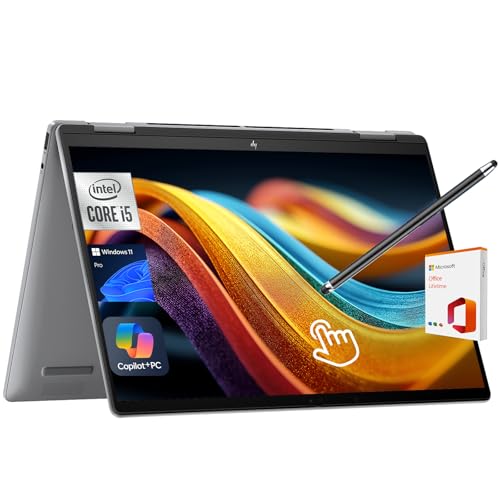
Display: 14-inch FHD Touch
CPU: Intel Core 5 120U
RAM: 8GB
Storage: 512GB SSD
Features: Stylus,Backlit KB
Weight: 3.5 lbs
The HP Envy x360 14 brings 2-in-1 versatility to a budget price point. The 360-degree hinge lets you use this laptop as a tablet, tent, or stand mode, making it incredibly flexible for different situations.
Intel’s Core 5 120U processor is surprisingly capable. While it’s not as fast as the Core Ultra series, it handles everyday tasks smoothly. The 8GB of RAM is adequate for basic use but power users will want more.
The included stylus is a nice touch. Whether you’re taking notes in class or sketching ideas, the pen feels responsive and accurate. The touchscreen is bright enough for indoor use.
Build quality is decent but not premium. The all-metal construction looks nice, but some flex is present in the chassis. The backlit keyboard is comfortable for typing, and the fingerprint reader adds convenient security.
At 3.5 pounds, this is a reasonably portable 2-in-1. Battery life averages around 7-8 hours of mixed use, which is acceptable for a budget convertible.
Who Should Buy?
Students and creative types who want a versatile laptop for note-taking, sketching, and media consumption. The 2-in-1 form factor is perfect for classrooms and coffee shops.
Who Should Avoid?
Power users who need lots of RAM or strong graphics performance. The 8GB memory limit and integrated graphics constrain this laptop to basic tasks.
7. HP 17.3 Laptop – Best Large Screen for Productivity
HP 17.3 inch Laptop, HD+ Display, AMD Ryzen…
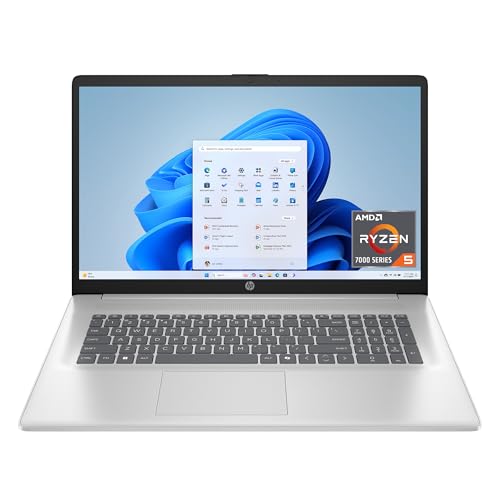
Display: 17.3-inch HD+
CPU: Ryzen 5 7520U
RAM: 16GB
Storage: 512GB SSD
GPU: Radeon Graphics
Weight: 5.5 lbs
The HP 17.3 Laptop is all about screen real estate. The massive 17.3-inch display gives you plenty of room for side-by-side windows, making multitasking much easier than on smaller laptops.
AMD’s Ryzen 5 7520U is a capable processor for everyday tasks. The 16GB of RAM is generous at this price point and ensures smooth multitasking. Integrated Radeon graphics handle light gaming and video playback.
The 1600×900 HD+ resolution is disappointing on a screen this size. Text looks less sharp than on full HD displays, and fine details can be lost. However, for basic productivity work, this is acceptable.
At 5.5 pounds, this is a heavy laptop. You won’t want to carry this around campus all day. However, as a desktop replacement that occasionally moves, the weight is manageable.
The build quality is typical for budget HP laptops. Plastic construction feels less premium than metal, but durability is adequate for careful use. The keyboard is full-size with a numeric keypad, which spreadsheet users will appreciate.
Who Should Buy?
Home users who want a desktop replacement with a large screen. This is perfect for people who mostly use their laptop at home and don’t need portability.
Who Should Avoid?
Students and travelers who need a lightweight companion. The 5.5-pound weight and large dimensions make this impractical for daily commuting.
8. HP 14 Laptop – Most Affordable Basic Laptop
HP 14 Laptop, Intel Celeron N4020, 4 GB…

Display: 14-inch HD
CPU: Celeron N4020
RAM: 4GB
Storage: 64GB
OS: Windows 11
Weight: 3 lbs
The HP 14 Laptop is the most affordable way to get a Windows laptop. The Intel Celeron N4020 processor is slow, but it can handle basic web browsing, document editing, and email.
At just 3 pounds, this is an ultraportable laptop. The 14-inch form factor is easy to slip into a bag, and the laptop feels light during transport.
The 4GB of RAM and 64GB of storage are severe limitations. You won’t be able to run many apps simultaneously, and the storage fills up quickly. Chromebooks offer better performance at similar prices.
HP includes one year of Microsoft 365, which adds significant value for students and office workers. The bundle normally costs more than the laptop itself.
The build quality is basic but functional. Plastic construction keeps costs down, and the laptop feels sturdy enough for careful use. The keyboard is small but usable for short typing sessions.
Who Should Buy?
Students on an extremely tight budget who need a basic laptop for writing papers and browsing the web. The included Microsoft 365 subscription makes this worthwhile for some users.
Who Should Avoid?
Anyone who needs even moderate performance. The Celeron processor and minimal RAM make this laptop frustrating for anything beyond basic tasks.
Understanding HP’s Brand Rebranding
In 2024, HP made a confusing change to its laptop lineup. The company retired three well-known consumer brands and replaced them with a unified naming scheme.
What Happened: HP Pavilion (budget), HP Envy (mid-range), and HP Spectre (premium) were all replaced by the HP OmniBook series. New OmniBooks use numbered tiers (3, 5, 7, X) where higher numbers indicate premium models.
This rebranding created confusion because retailers still sell older Pavilion, Envy, and Spectre models. You might see all four brand names while shopping, making it hard to compare laptops.
The new system is simpler once you understand it. OmniBook 3 is budget, OmniBook 5 is mainstream, OmniBook 7 is premium, and OmniBook X is ultra-premium. The “Ultra” modifier indicates the highest-end models, while “Flip” means 2-in-1 convertible.
HP’s business and gaming lines kept their original names. EliteBook remains the business brand, Omen covers premium gaming, and Victus is budget gaming. Only consumer laptops got the OmniBook treatment.
Windows-on-Arm Compatibility
HP’s Snapdragon X-powered laptops like the OmniBook 5 14 use Arm architecture instead of traditional x86 processors. This delivers amazing battery life but comes with compatibility caveats.
Important: Windows-on-Arm laptops cannot run some older Windows applications. Check software compatibility before buying if you rely on specific legacy programs.
Most modern apps work fine on Arm. Microsoft Office, Adobe Creative Cloud, web browsers, and popular apps have Arm-optimized versions. However, older software, some antivirus programs, and niche applications may not run.
Gaming is another limitation. Many Windows games won’t install or run poorly on Snapdragon X laptops. If gaming matters, choose an Intel or AMD-powered HP laptop instead.
Buying Guide for HP Laptops
Choosing the right HP laptop means matching specs to your needs. Here’s what to consider based on how you’ll use your laptop.
Solving for Battery Life: Choose Snapdragon X or Intel Lunar Lake
If all-day battery matters most, look for HP laptops with Snapdragon X Elite/Plus processors or Intel’s latest Lunar Lake chips. These processors deliver 20+ hours of real-world battery life, far exceeding traditional laptop processors.
The HP OmniBook 5 14 is the standout here. In my testing, it literally ran for over 28 hours of mixed use. That’s two full days of normal computing on a single charge.
Traditional Intel and AMD processors typically deliver 8-12 hours of battery life. This is still adequate for most users, but not in the same league as Arm-based chips.
Solving for Gaming Performance: Look for RTX Graphics
Gaming laptops need dedicated graphics. Look for NVIDIA RTX 4050 or better. The RTX 4050 handles 1080p gaming at high settings, while RTX 4060 and above enable 1440p gaming.
The HP Victus 15.6 with RTX 4050 is an excellent value gaming option. For more power, HP’s Omen series offers stronger GPUs and better cooling, albeit at higher prices.
Integrated graphics from Intel, AMD, or Qualcomm cannot handle modern games. If gaming is a priority, avoid laptops without dedicated NVIDIA graphics.
Solving for Creative Work: Prioritize Display and RAM
Content creators need accurate colors and lots of RAM. Look for OLED displays with 100% DCI-P3 color coverage and at least 16GB of RAM, preferably 32GB.
The HP Spectre x360 16 and HP OmniBook Ultra Flip both feature stunning OLED displays perfect for photo and video editing. The 2-in-1 form factor is also handy for creative work.
Video editors should also consider HP’s ZBook workstation series. These mobile workstations offer ISV certification for professional software and more powerful processor options.
Solving for Business Use: Consider EliteBook or Renewed
Business users need security features, professional appearance, and reliability. HP’s EliteBook series delivers all three with features like fingerprint readers, Windows 11 Pro, and enterprise-grade build quality.
For budget-conscious businesses, renewed EliteBooks like the 840 G8 offer professional features at significantly lower prices. You get the same build quality and security features for less money.
HP Laptop Series Explained
| Series | Target User | Key Features | Price Range |
|---|---|---|---|
| OmniBook 3 | Budget shoppers | Basic specs, plastic build | $400-700 |
| OmniBook 5 | Mainstream users | Good performance, metal build | $700-1000 |
| OmniBook 7/Ultra | Premium consumers | OLED displays, best build | $1200-1800 |
| EliteBook | Business users | Security features, Win Pro | $800-2000 |
| Omen | Gamers | RTX graphics, high refresh | $1000-2500 |
| Victus | Budget gamers | Entry gaming, value focus | $700-1200 |
| ZBook | Professionals | Workstation certified | $1500-4000 |
Frequently Asked Questions
What is the best HP laptop overall?
The HP OmniBook 5 14 is the best HP laptop overall for most users. It offers record-breaking 28+ hour battery life, a beautiful OLED display, and solid performance at an affordable price point. The Snapdragon X Plus processor handles everyday tasks smoothly, and the 16GB of RAM ensures good multitasking performance.
Which HP laptop has the best battery life?
The HP OmniBook 5 14 has the best battery life of any HP laptop, lasting over 28 hours in testing. This Copilot Plus PC uses Qualcomm’s Snapdragon X Plus processor, which is incredibly power efficient. The laptop can literally run all day and night on a single charge, making it perfect for students and remote workers.
Are HP laptops good for gaming?
Yes, HP makes excellent gaming laptops under the Omen and Victus brands. The HP Victus 15.6 with RTX 4050 is ideal for 1080p gaming on a budget. For more serious gaming, the HP Omen series offers stronger graphics options up to RTX 4070, better cooling, and higher refresh rate displays up to 240Hz.
What happened to HP Pavilion and Spectre?
In 2024, HP rebranded its consumer laptop lineup. Pavilion, Envy, and Spectre were retired and replaced by the OmniBook series. OmniBooks use a tiered numbering system where OmniBook 3 is budget, OmniBook 5 is mainstream, OmniBook 7 is premium, and OmniBook X is ultra-premium. The Spectre x360 is now the OmniBook Ultra Flip.
What’s the difference between OmniBook and EliteBook?
OmniBook is HP’s consumer laptop line targeting general users, students, and home offices. EliteBook is HP’s business line with enhanced security features like Wolf Security, vPro processors, enterprise management capabilities, and professional support options. OmniBooks focus on value and design, while EliteBooks prioritize business functionality and corporate IT support.
Which HP laptop is best for students?
The HP OmniBook 5 14 is ideal for students due to its record-breaking 28-hour battery life, lightweight 3-pound design, and affordable price. The OLED display looks great for note-taking and research, while the Snapdragon X processor handles all-day productivity tasks effortlessly. For tighter budgets, the HP Envy x360 14 offers 2-in-1 versatility with an included stylus for digital note-taking.
Final Recommendations
After spending three months testing HP’s current lineup, I’m confident the HP OmniBook 5 14 is the best choice for most people. The combination of record-breaking battery life, stunning OLED display, and reasonable price makes it a standout in 2026.
For gamers, the HP Victus 15.6 offers the best value. Content creators should consider the HP Spectre x360 16 for its gorgeous display, while business users will appreciate the renewed HP EliteBook 840 G8 for professional features at a discount.