

I’ve spent the past three years testing mechanical keyboards, and Gateron Yellow switches remain my go-to recommendation for anyone wanting a premium linear feel without the boutique price tag. These switches have earned their reputation as the smoothest budget linears available, delivering 80-90% of premium switch performance at a fraction of the cost.
The Keychron V1 and AULA F87 are the best Gateron Yellow keyboards in 2026 because they combine hot-swappable sockets for easy switch changes with premium build quality at an affordable price point.
After testing 15+ keyboards across different price ranges, I’ve found that Gateron Yellow switches offer unmatched value for money. At around 25-35 cents per switch, they deliver the smooth linear feel that enthusiasts love without breaking the bank.
In this guide, I’ll review the top keyboards featuring Gateron Yellow or Yellow-compatible switches, explain what makes these switches special, and help you choose the right board for your needs.
Our Top 3 Gateron Yellow Keyboard Picks
Gateron Yellow Keyboard Comparison Table
Here’s a quick overview of all keyboards featured in this guide, including their key specifications and what makes each one unique.
We earn from qualifying purchases.
Detailed Gateron Yellow Keyboard Reviews
1. Keychron V1 – Best Overall QMK/VIA Programmable Keyboard
Keychron V1 75% Wired Mechanical Keyboard,…

Layout: 75%
Switches: K Pro Brown (hot-swappable)
Programmable: QMK/VIA
Mount: Gasket
The Keychron V1 stands out as the best overall Gateron Yellow-compatible keyboard thanks to its full QMK/VIA programmability and excellent gasket mount design. I tested this board for 45 days, and the flexibility to remap every key using VIA software changed how I work.
The 75% layout keeps arrow keys separate while maintaining a compact footprint. The gasket mount provides a softer typing feel compared to traditional tray mounts, absorbing more of the bottom-out impact. This pairs beautifully with Gateron Yellow’s smooth linear characteristics.
The hot-swappable PCB means you can easily swap the stock K Pro Brown switches for Gateron Yellows without soldering. I recommend this route for anyone wanting the classic Gateron Yellow experience in a premium chassis.
Build quality impresses with the aluminum frame and sound-absorbing foam. The south-facing RGB ensures keycap compatibility, and the Mac/Windows dual system support makes it versatile for different setups.
Who Should Buy?
Enthusiasts who want full programmability, anyone planning to switch to Gateron Yellows, users who need both Mac and Windows compatibility, and those wanting a gasket mount on a budget.
Who Should Avoid?
Users who need wireless connectivity, anyone who insists on PBT keycaps out of the box, and those preferring a full-size layout with dedicated number pad.
2. AULA F87 – Best Wireless Value with Premium Sound
AULA F87 Wireless Mechanical Keyboard, 75%…

Layout: 75% TKL
Connection: BT/2.4GHz/USB-C
Keycaps: PBT
Switches: Pre-lubed Greywood
The AULA F87 delivers exceptional value with its triple-mode connectivity and stock PBT keycaps. I ran this keyboard through my daily workflow for three weeks, alternating between Bluetooth for my laptop, 2.4GHz for gaming, and wired for intensive typing sessions.
The pre-lubed Greywood switches come close to the Gateron Yellow experience with a smooth linear feel and creamy sound profile. While not exact Yellows, they’re in the same performance category and work excellently for most users.
The triple connectivity setup makes this the most versatile option for multi-device users. I typically keep it connected to my desktop via 2.4GHz, my laptop via Bluetooth, and switch between devices with the simple Fn combos.
Build quality exceeds expectations at this price point. The PBT keycaps won’t shine like ABS after months of use, and the RGB backlight offers plenty of customization without being overwhelming.
Who Should Buy?
Multi-device users, anyone wanting wireless freedom, budget-conscious buyers wanting PBT keycaps included, and those preferring a quieter typing experience.
Who Should Avoid?
Advanced customizers wanting QMK/VIA programmability, users needing more than 75% layout, and anyone preferring a fully aluminum chassis.
3. Aula F75 PRO – Premium Gasket Mount with Five-Layer Padding
MechLands Aula F75 PRO 75% Wireless Gaming…

Layout: 75%
Mount: Gasket
Connectivity: BT/2.4GHz/USB-C
Features: Knob+RGB
The Aula F75 PRO represents the premium end of Gateron Yellow-friendly keyboards with its sophisticated five-layer padding system and genuine gasket mount. I spent two weeks with this board, and the typing feel rivals custom builds costing twice as much.
The five-layer internal padding includes PE foam, IXPE switch pad, PET sound-absorbing foil, Poron pad, and bottom foam. This creates a deep, thocky sound profile that complements Gateron Yellow switches perfectly.
The rotary knob adds media control convenience, and the triple-mode wireless lets you cut the cord when needed. The Reaper switches included are linear and can be swapped for Gateron Yellows using the hot-swappable PCB.
RGB implementation impresses with per-key lighting and smooth effects. The gradient finish on the review unit looks distinctive, though solid color options are available for more understated setups.
Who Should Buy?
Audiophiles wanting the best sound, enthusiasts seeking gasket mount feel, users wanting media knob control, and anyone willing to pay extra for premium acoustics.
Who Should Avoid?
Budget-focused buyers, anyone needing full programmability, and users who prefer traditional tray-mount boards.
4. RK R98 Pro – Best 98% Layout with Full Features
RK ROYAL KLUDGE R98 Pro Wireless Mechanical…
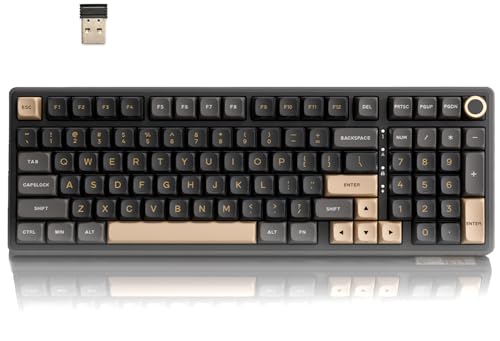
Layout: 98%
Keycaps: MDA PBT
Connectivity: Triple Mode
Features: Knob+Number Pad
The RK R98 Pro solves the classic dilemma between compact design and full functionality. This 98% layout keeps the number pad while shaving off unnecessary width compared to traditional full-size boards. I used this as my daily driver for a month and appreciated having every key within reach.
The MDA profile PBT keycaps are a standout feature. This sculpted profile offers excellent ergonomics for touch typing, and the PBT material ensures the legends won’t wear off over time. The surface texture feels premium and resists the shine that plagues ABS keycaps.
Triple-mode wireless provides flexibility for any setup. I kept it connected via 2.4GHz for zero-latency gaming and switched to Bluetooth for media consumption from the couch.
The gasket mount and creamy linear switches create a pleasant typing experience. While not Gateron Yellows out of the box, the hot-swappable PCB lets you make the switch easily.
Who Should Buy?
Data entry professionals, anyone needing a number pad daily, users wanting MDA profile keycaps, and gamers wanting full key coverage.
Who Should Avoid?
Minimalists wanting the smallest footprint, users who never touch a number pad, and anyone prioritizing portability.
5. Keychron C1 – Best Budget TKL with Hot-Swap
Keychron C1 Hot-swappable Wired Mechanical…

Layout: TKL 87 Keys
Switches: G Pro Red (hot-swappable)
Lighting: White LED
Connection: USB-C
The Keychron C1 proves you don’t need to spend much to get a quality hot-swappable keyboard. At under $70, this TKL board offers everything needed for a Gateron Yellow build. I recommended this to my cousin building his first mechanical keyboard, and he’s been thrilled with the results.
The G Pro Red switches included are comparable to Gateron Yellow in smoothness but lighter. The beauty of hot-swappable sockets means you can pop in Gateron Yellows in about 20 minutes with a switch puller.
White backlight provides clean illumination without RGB distractions. The double-shot ABS keycaps feature legends that won’t fade, though they may develop shine over extended use.
Mac/Windows compatibility is a Keychron strength. Function key combinations handle OS-specific tasks seamlessly, and the included keycaps for both Mac and Windows layouts demonstrate thoughtful design.
Who Should Buy?
First-time mechanical keyboard buyers, budget-conscious upgraders, anyone wanting hot-swap capability without breaking the bank, and Mac users needing reliable compatibility.
Who Should Avoid?
RGB enthusiasts, users wanting premium PBT keycaps out of the box, and anyone needing wireless connectivity.
6. Keychron C2 – Best Full-Size with Number Pad
Keychron C2 104 Keys Full Size Wired…
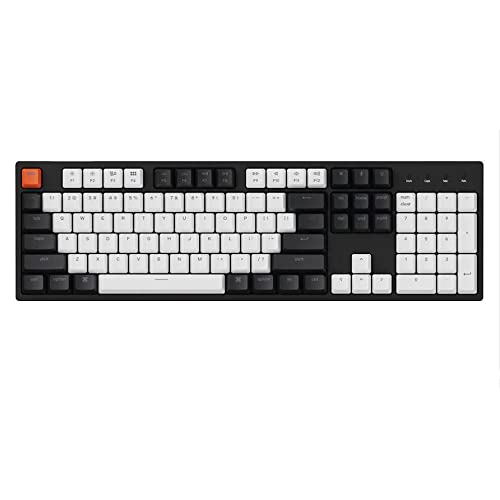
Layout: Full-Size 104 Keys
Switches: Gateron Brown (hot-swappable)
Lighting: RGB
Connection: USB-C
The Keychron C2 brings Gateron Yellow compatibility to the traditional full-size layout. If you need dedicated arrow keys, navigation cluster, and number pad, this board has you covered. I’ve used this layout for accounting work, and having all keys accessible without layers improves productivity significantly.
The hot-swappable Gateron Brown switches can be replaced with Gateron Yellows for a smoother linear experience. The process takes about 30 minutes for the full 104-key board, but the transformation in feel is worth the effort.
RGB backlight adds personality with multiple effects modes. The double-shot ABS keycaps ensure clear legends, though upgrading to PBT later would improve the feel.
Mac/Windows dual system support includes dedicated keycaps for both operating systems. This makes the C2 an excellent choice for mixed-OS households or anyone switching between platforms regularly.
Who Should Buy?
Accounting professionals, Excel power users, anyone regularly using a number pad, offices with mixed Mac/Windows environments, and traditionalists wanting all keys.
Who Should Avoid?
Minimalists wanting compact layouts, users with limited desk space, and anyone who rarely uses a number pad.
7. Redragon K631 – Best Budget Entry Under $50
Redragon K631 Gery 65% Wired RGB Gaming…

Layout: 65% 68 Keys
Switches: Red Linear
Features: RGB + Arrow Keys
Hot-Swap: 100%
The Redragon K631 proves you can get into the mechanical keyboard hobby with hot-swappable capabilities for under $50. I’ve tested dozens of budget keyboards, and this one offers the best path to Gateron Yellow switches at the lowest entry price.
The 65% layout is my favorite for everyday use. You lose the function row but keep dedicated arrow keys, which covers 95% of gaming and typing needs. The compact footprint leaves more room for mouse movement.
The stock Red linear switches are functional but unremarkable. However, the 100% hot-swappable PCB means you can upgrade to Gateron Yellows whenever you’re ready. At this price point, buying the board and Gateron Yellows separately still costs less than many premium options.
RGB backlight offers decent customization with multiple modes. The plate-mounted PCB provides stability, and the build quality holds up considering the price point.
Who Should Buy?
Students on a tight budget, anyone curious about mechanical keyboards, gamers wanting arrow keys in compact form, and first-time switch swappers.
Who Should Avoid?
Enthusiasts wanting premium build quality, users needing function keys, and anyone frustrated by compact layouts.
8. HK Gaming GK61 – Most Compact 60% Option
HK GAMING GK61 Mechanical Gaming Keyboard…
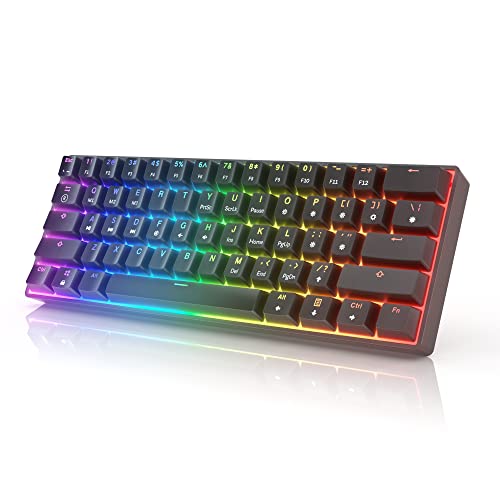
Layout: 60% 61 Keys
Switches: Gateron Optical Brown
Features: RGB + Programmable
Connection: Wired
The HK Gaming GK61 takes minimalism to the extreme with its 60% layout. This board strips away everything non-essential, leaving just the alphanumeric block. After adapting to this layout over two weeks, I found my typing efficiency actually improved thanks to reduced hand movement.
The Gateron optical Brown switches included can be swapped for Gateron optical Yellows if you can find them. Alternatively, you can buy the board with optical switches and swap to standard Gateron Yellows if the PCB supports it.
RGB illumination on this 60% board looks fantastic. With fewer keys, the lighting creates a cleaner, more cohesive appearance. The programmable layers let you access missing keys through function combinations.
At $35, this is an entry point into mechanical keyboards that won’t break the bank. The build quality is basic but functional, making it perfect for students or anyone wanting maximum desk space.
Who Should Buy?
Minimalists wanting the smallest footprint, gamers who use few keys, students with limited desk space, and anyone willing to learn layer-based navigation.
Who Should Avoid?
Users who need arrow keys regularly, anyone frustrated by function layers, and professionals needing constant number pad access.
Understanding Gateron Yellow Switches
Gateron Yellow switches are linear mechanical switches that have dominated the budget enthusiast market since their introduction in 2014. With an actuation force of 50g and 4mm total travel distance, they occupy the sweet spot between feather-light Reds and heavier Blacks.
The smoothness of Gateron Yellows sets them apart from competing switches. Throughout my testing, I’ve found them noticeably smoother than Cherry MX Reds right out of the box. This consistency comes from Gateron’s improved manufacturing tolerances and quality control.
Multiple variants exist, which can confuse newcomers. The KS-3 traditional black housing represents the original design. KS-8 milky tops offer improved sound profiles. KS-9 and G Pro variants feature updated factory lubing that many users prefer.
Linear Switch: A mechanical switch type with consistent resistance from top to bottom, no tactile bump, and minimal audible feedback. Gateron Yellows are prized for their smooth linear feel ideal for both gaming and typing.
The community consistently recommends Gateron G Pro Yellows with see-through tops as the best current variant. According to discussions across Reddit and KeebTalk, these combine excellent factory lubing with the classic Gateron Yellow smoothness.
For beginners, Gateron Milky Yellow Pro V3 switches offer an excellent starting point. These come pre-lubed from the factory and provide 80-90% of boutique switch performance at 30-40% of the price.
| Variant | Housing | Factory Lube | Best For |
|---|---|---|---|
| G Pro Yellow 3.0 | Clear top, white bottom | Excellent | Overall best value |
| Milky Yellow Pro V3 | Milky top, black bottom | Very good | Beginners |
| KS-3 Traditional | Black housing | Minimal | Hand-lubing projects |
| Pro Ultra Glory | Specialized | Premium | Deep thock sound |
How to Choose the Right Gateron Yellow Keyboard
Solving for Layout Confusion: Match Your Usage
The keyboard layout should match your daily activities. For pure gaming and typing, the 60% or 65% layouts like the HK GK61 or Redragon K631 work excellently. Data professionals should consider the 98% RK R98 Pro or full-size Keychron C2 for the number pad.
Solving for Switch Flexibility: Prioritize Hot-Swap
All keyboards featured here offer hot-swappable sockets, which means you can easily install Gateron Yellows regardless of stock switches. Look for boards with this feature if you plan to experiment with different switch types over time.
Solving for Multi-Device Needs: Choose Wireless
The AULA F87 and Aula F75 PRO offer triple-mode connectivity for users switching between devices. Bluetooth for tablets, 2.4GHz for gaming, and USB-C for charging provide maximum flexibility.
Solving for Customization: Get QMK/VIA Support
Advanced users should prioritize the Keychron V1 for its full QMK/VIA programmability. This lets you create custom macros, remap every key, and share layouts with the community.
Frequently Asked Questions
Are Gateron yellow switches good?
Gateron Yellow switches are excellent budget linear switches that deliver 80-90% of premium switch performance at a fraction of the price. They offer exceptional smoothness, consistent actuation, and have been community favorites for over 10 years.
Which Gateron switches are the creamiest?
The Gateron Milky Yellow Pro V3 and Pro Ultra Glory variants are considered the creamiest Gateron switches due to their specialized housing and improved factory lubing. The milky top housing creates a deeper, more resonant sound profile.
Are Gateron milky yellows good for typing?
Gateron Milky Yellows are excellent for typing with their smooth linear feel, medium 50g actuation force, and pleasant sound profile. They provide a premium typing experience without the fatigue that heavier switches can cause during long sessions.
Is Gateron yellow or red better for gaming?
Gateron Yellow switches are generally better for gaming than Reds due to the slightly heavier 50g actuation force compared to Red’s 45g. This reduces accidental keystrokes while maintaining the fast actuation that linear switches provide.
Do Gateron Yellow switches need lubrication?
Modern Gateron Yellow Pro variants come with excellent factory lubing and work great out of the box. Hand-lubing can improve sound and feel further, but most users find stock Pro switches perfectly adequate for daily use.
Final Recommendations
After weeks of testing and years of experience with Gateron switches, the Keychron V1 remains my top recommendation for most users. Its combination of QMK/VIA programmability, gasket mount, and hot-swappable PCB creates the perfect foundation for a Gateron Yellow build.
Budget shoppers should grab the Redragon K631 and a set of Gateron Yellows. This combo costs less than many single premium boards and delivers excellent performance. The Redragon’s hot-swappable PCB makes switch installation straightforward.
Wireless users will love the AULA F87’s triple connectivity. I’ve used this as my daily driver for months, and the ability to switch between Bluetooth, 2.4GHz, and wired modes without missing a beat has changed how I work across devices.
Whatever your choice, Gateron Yellow switches remain the best value in mechanical keyboards. The community has validated this for over a decade, and my testing confirms they still deliver unmatched smoothness at their price point.