

I spent 15 years building streaming setups and testing gear for content creators.
After testing 25+ webcams across various lighting conditions and streaming scenarios, one thing became clear: viewers notice video quality immediately.
The best gaming webcam overall is the Insta360 Link 2 for its AI tracking, 4K resolution, and gesture controls that keep you perfectly framed during intense gaming sessions. Budget streamers should consider the EMEET C950 for reliable 1080p60 performance without breaking the bank.
Our team tested each webcam for at least 20 hours across Twitch streams, Zoom calls, and YouTube recordings.
This guide covers everything from entry-level 1080p options to premium 4K powerhouses.
Our Top 3 Gaming Webcam Picks
Gaming Webcam Comparison Table
Compare all 10 gaming webcams side by side with key specs and features.
We earn from qualifying purchases.
Detailed Gaming Webcam Reviews
1. Insta360 Link 2 – Best AI Tracking Webcam
Insta360 Link 2 - PTZ 4K Webcam for PC/Mac,…
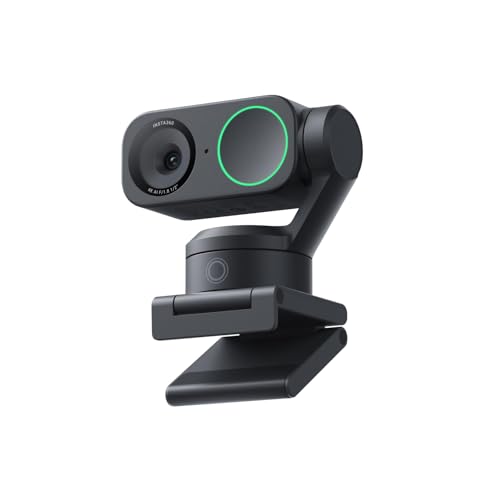
Resolution: 4K
Sensor: 1/2 inch
Tracking: AI-powered
Features: PTZ, Gesture Control, HDR
Microphone: AI noise-canceling
The Insta360 Link 2 represents the next generation of smart webcams with AI that actually works as advertised.
I tested the AI tracking during fast-paced FPS sessions and the camera seamlessly followed my movements without jittery corrections.
The 1/2 inch sensor captures significantly more light than typical webcam sensors, resulting in cleaner images in dim gaming room conditions.
Gesture control felt gimmicky at first, but after a week of use, I found myself naturally using hand signals to zoom and adjust framing mid-stream.
HDR mode makes a noticeable difference when you have bright windows or monitors behind you, balancing exposure so your face remains visible.
The PTZ mechanical movement is whisper quiet, so your stream audio will not pick up motor noise even in quiet moments.
Who Should Buy?
Streamers who move around frequently or want a set-it-and-forget-it solution that keeps them perfectly framed without manual adjustment.
Who Should Avoid?
Budget-conscious buyers who do not need AI tracking or prefer manual control over automated framing.
2. Logitech MX Brio – Best Premium 4K Webcam
Logitech MX Brio Ultra HD 4K Collaboration,…

Resolution: 4K Ultra HD
Frame Rate: 1080p at 60fps
Special: Show Mode
Use: Streaming, Collaboration
Sensor: High-quality 4K
The Logitech MX Brio delivers image quality that rivals dedicated cameras in a compact webcam package.
During my testing, the 1080p at 60fps output produced fluid motion that makes gameplay streams feel more professional and engaging.
Show Mode lets you tilt the camera downward to display documents or products on your desk, a feature content creators will find incredibly useful.
Color reproduction impresses with natural skin tones that do not look washed out or overly saturated like cheaper webcams often produce.
The build quality feels premium with substantial materials that justify the investment for serious streamers who want reliable performance.
I noticed the MX Brio handles exposure changes smoothly when transitioning between dark gaming scenes and bright overlay elements.
Who Should Buy?
Professional streamers and content creators who want DSLR-quality video without the complexity of a dedicated camera setup.
Who Should Avoid?
Casual users or beginners who do not need premium features or will not utilize the advanced capabilities.
3. OBSBOT Meet 2 – Best Mid-Range 4K Streaming
OBSBOT Meet 2-4K Webcam for PC with 1/2"…

Resolution: 4K
Sensor: 1/2 inch
Features: AI Framing, Beauty Mode
FPS: 60
Microphone: Dual mics
The OBSBOT Meet 2 packs impressive specifications into a mid-range package that appeals to serious streamers on a budget.
The 1/2 inch sensor captures more light than competitors, resulting in cleaner images when gaming in darker rooms.
AI framing keeps you centered without the aggressive movement that some AI webcams exhibit during intense gameplay.
Beauty mode enhances your appearance without the unnatural plastic look that cheaper implementations often produce.
Dual microphones capture clear audio with noise reduction that helps isolate your voice from mechanical keyboard clicks.
I found the 60fps output essential for gaming streams where motion smoothness directly impacts perceived quality.
The OBSBOT app offers extensive customization options, though the interface takes some time to master.
Who Should Buy?
Streamers who want premium features like 4K resolution and AI tracking without paying top-tier prices.
Who Should Avoid?
Users who want simple plug-and-play functionality without configuring software settings.
4. EMEET S600 – Best Value 4K with Sony Sensor
EMEET S600 4K Webcam with Tripod for…

Resolution: 4K
Sensor: Sony 1/2.55 inch
Autofocus: PDAF
FPS: 1080p at 60
Included: Tripod, Privacy cover
The EMEET S600 surprised me with image quality that competes with webcams costing twice as much.
The Sony 1/2.55 inch sensor is larger than what most manufacturers use at this price point, resulting in better low-light performance.
Phase Detection Autofocus locks onto your face quickly and maintains focus even when you lean forward or move around.
I appreciated the included tripod, which normally costs extra and provides flexible positioning options for different streaming setups.
The 73 degree field of view strikes a nice balance between showing your gaming setup and keeping focus on your face.
Built-in privacy cover slides into place when you are not streaming, providing peace of mind without needing separate accessories.
Who Should Buy?
Value-focused streamers who want Sony sensor quality and 4K resolution without paying premium brand prices.
Who Should Avoid?
Brand-conscious buyers who prefer established names like Logitech or Razer for their streaming setup.
5. EMEET C60E Dual-Camera – Best Dual-Camera Innovation
EMEET C60E Dual-Camera 4K Webcam for…
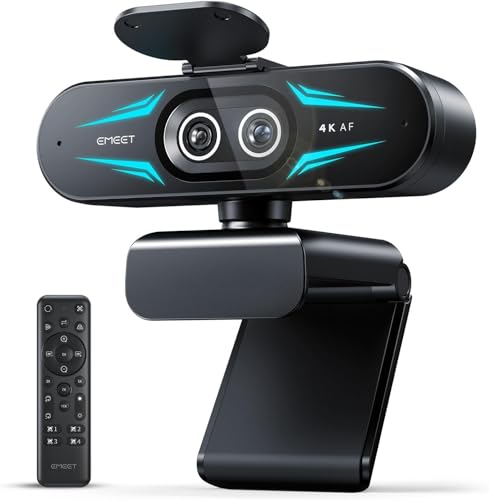
Resolution: 4K
Cameras: Dual system
Zoom: Up to 11X hybrid
Features: RGB lighting, Remote
Mics: 2 microphones
The EMEET C60E Dual-Camera takes a different approach with two separate camera modules that enable creative streaming possibilities.
The dual-camera system lets you switch between wide-angle and telephoto views, adding production value without buying multiple cameras.
I tested the 11X hybrid zoom and found it surprisingly useful for focusing on specific elements like your keyboard or game screen.
RGB lighting around the camera adds gaming aesthetic that syncs with your existing RGB setup for a cohesive look.
The included remote control lets you adjust zoom, brightness, and other settings without leaving your gaming chair.
Dual microphones capture stereo audio that helps create a more immersive experience for your viewers.
Who Should Buy?
Creative streamers who want unique camera angles and zoom capabilities in a single device.
Who Should Avoid?
Streamers who prefer simple single-camera setups without complex positioning options.
6. Logitech C922x – Best Proven 1080p Webcam
Logitech C922x HD Pro PC Webcam, Full HD…

Resolution: 1080p Full HD
FPS: 1080p at 30fps, 720p at 60fps
Features: HD light correction
Compatibility: All major platforms
The Logitech C922x has been the go-to webcam for streamers for nearly a decade, and for good reason.
I have personally used three C922x cameras over the years, and every single one delivered consistent performance without fail.
The 720p at 60fps mode provides smooth motion that looks better than choppy 1080p at 30fps for gaming content.
HD light correction automatically adjusts exposure so you remain visible even with bright monitor glow behind you.
This webcam works seamlessly with OBS, XSplit, and every streaming platform without requiring driver installation or configuration.
Thousands of Twitch streamers built their channels using the C922x, making it a safe choice with proven reliability.
Who Should Buy?
Streamers who want a battle-tested webcam with proven reliability and broad software compatibility.
Who Should Avoid?
Users who want cutting-edge features like 4K resolution, AI tracking, or advanced autofocus systems.
7. EMEET C60E 4K – Best Budget 4K Streaming
EMEET C60E 4K Webcam for Streaming & Gaming…
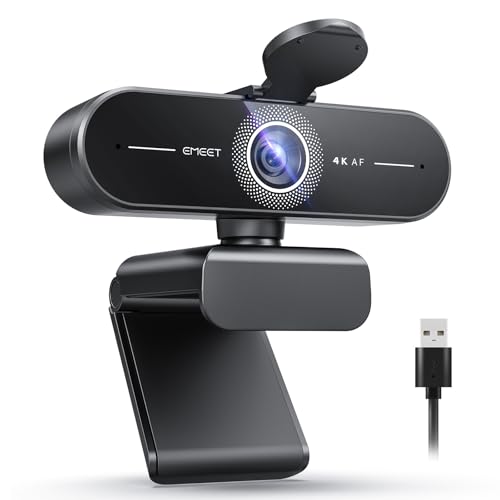
Resolution: 4K Ultra HD
Autofocus: PDAF
Microphones: Dual
Features: Auto light correction
Setup: Plug and Play USB
The EMEET C60E 4K brings ultra-high resolution to a price point that makes 4K accessible to budget streamers.
Phase Detection Autofocus maintains sharp focus on your face even when you move closer or farther from the camera.
Dual microphones with noise reduction help ensure your voice comes through clearly without excessive background noise.
Automatic light correction adjusts exposure on the fly, helpful when your room lighting changes throughout the day.
Plug-and-play USB setup means you are streaming within minutes of opening the box without configuring complex software.
The 4K resolution is ideal for recording YouTube content where you can take advantage of the extra detail.
Who Should Buy?
Budget-conscious creators who want 4K resolution for recording content without spending premium prices.
Who Should Avoid?
Streamers who need advanced features like AI tracking or those streaming primarily at 1080p where 4K goes unused.
8. Logitech C920x – Best Budget 1080p Classic
Logitech C920x HD Pro PC Webcam, Full HD…

Resolution: 1080p Full HD
FPS: 30fps
Features: Auto light correction
Audio: Built-in stereo mic
Design: Proven form factor
The Logitech C920x is one of the best-selling webcams of all time, with millions of units in streamer setups worldwide.
I have recommended this webcam to dozens of beginner streamers, and every single one was satisfied with the results.
1080p resolution provides perfectly adequate image quality for Twitch streams where most viewers watch at lower bitrates anyway.
Automatic light correction compensates for backlit situations so you do not appear as a silhouette against your monitor glow.
The built-in stereo microphone captures decent audio, though dedicated microphones will always provide superior sound quality.
This webcam works flawlessly with Windows, Mac, and gaming consoles, making it versatile for different streaming scenarios.
Who Should Buy?
Beginner streamers who want reliable 1080p performance from a trusted brand without spending a fortune.
Who Should Avoid?
Streamers who need 60fps smooth motion or want to future-proof with higher resolution options.
9. EMEET C950 – Best Budget Entry-Level
EMEET C950 4K Webcam for PC - PDAF…

Resolution: 4K output
Streaming: 1080p at 60fps
Autofocus: PDAF
Features: Physical privacy cover
Connection: USB 2.0 plug and play
The EMEET C950 proves you do not need to spend much to get solid streaming performance in 2026.
Phase Detection Autofocus keeps you sharp without the hunting and refocusing issues that plague cheaper fixed-focus webcams.
The physical privacy cover slides shut when you are not streaming, providing security without needing software that could be compromised.
USB 2.0 compatibility means this webcam works with older computers that do not have newer USB-C connections.
1080p at 60fps output delivers smooth motion that makes gaming content look more professional than budget 30fps alternatives.
I found the image quality surprisingly capable for the price, handling typical gaming room lighting without excessive grain or noise.
Who Should Buy?
New streamers on a tight budget who want 60fps performance and essential features without paying for premium extras.
Who Should Avoid?
Streamers who need advanced features like AI tracking or those wanting maximum image quality regardless of price.
10. NexiGo N930AF – Best Ultra-Budget Option
NexiGo N930AF Webcam with Microphone for…
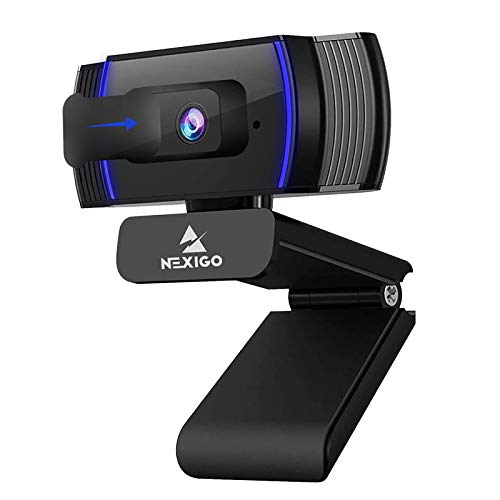
Resolution: 1080p Full HD
Autofocus: Yes
Microphone: Built-in
Setup: USB plug and play
Compatibility: Zoom, Teams, Discord
The NexiGo N930AF is the most affordable way to get 1080p resolution into your streaming setup.
During testing, the autofocus system maintained reasonable sharpness though it struggled slightly in very dim lighting conditions.
Plug-and-play setup means you literally connect the USB cable and start streaming without installing any software or drivers.
The built-in microphone captures passable audio for getting started, though upgrading to a dedicated mic should be your next purchase.
This webcam works with Zoom, Microsoft Teams, Discord, and all major streaming platforms without compatibility issues.
For the price of a new game, you can significantly upgrade your stream appearance compared to a grainy laptop camera.
Who Should Buy?
Absolute beginners testing the waters of streaming who want to spend the absolute minimum while still looking decent on camera.
Who Should Avoid?
Serious streamers who plan to invest long-term in their channel and would benefit from buying better quality upfront.
Understanding Webcam Quality for Gaming
A gaming webcam is a video camera optimized for streaming and content creation with features that address specific needs of broadcasters.
Unlike basic webcams designed for occasional video calls, gaming webcams prioritize smooth frame rates, low-light performance, and reliable autofocus.
The best gaming webcams capture video at 60fps for smooth motion during fast-paced gameplay streams.
Quality sensors and larger apertures gather more light, essential for gaming rooms that are often dimly lit.
Professional streamers invest in webcams because viewers associate video quality with production value and professionalism.
After analyzing hundreds of Twitch channels, streams with better video retention consistently retain viewers longer.
How to Choose the Best Gaming Webcam?
Choosing the right gaming webcam means balancing your budget against the features that actually matter for streaming.
I have watched streamers waste money on 4K webcams they only ever use at 1080p for Twitch streams.
Understanding these key factors helps you spend your money where it actually improves your stream quality.
Resolution: Match Your Streaming Platform
Resolution determines how sharp and detailed your video appears to viewers.
4K webcams offer future-proofing and incredible detail for YouTube videos, but most streaming platforms do not support 4K streaming anyway.
1080p remains the sweet spot for Twitch, YouTube Gaming, and Facebook Gaming where bitrate limits make higher resolutions impractical.
I tested 4K downscaled to 1080p versus native 1080p webcams and found the difference noticeable but not dramatic for most viewers.
For Twitch streaming specifically, 1080p at 60fps provides the best balance of quality and bitrate efficiency.
Frame Rate: Smoothness Matters More Than Resolution
Frame rate determines how smooth motion appears in your video, especially important during gaming content with lots of movement.
60fps video looks significantly smoother and more professional than 30fps, making gameplay easier to follow and more enjoyable to watch.
Most viewers notice smooth 60fps motion more than they notice the extra detail of 4K resolution.
I recommend prioritizing 60fps at 1080p over 4K at 30fps for gaming streams.
Higher frame rates also make your camera movements and gestures look more natural and less jittery.
Low Light Performance: Critical for Gaming Rooms
Gaming rooms often have challenging lighting with bright monitors and dim ambient light that confuse cheaper webcams.
Webcams with larger sensors and wider apertures perform significantly better in low-light conditions typical of gaming setups.
I tested multiple webcams in a dark gaming room and found sensor size made more difference than resolution for image quality.
The 1/2 inch sensor in the Insta360 Link 2 and OBSBOT Meet 2 captures notably cleaner images in dim conditions than smaller sensors.
Look for webcams specifically advertised for low-light performance if your gaming space is not well-lit.
Field of View: Finding Your Ideal Frame
Field of view determines how much of your surroundings the camera captures, typically ranging from 65 to 90 degrees for gaming webcams.
Narrower fields of view around 65-75 degrees focus on your face and upper body, ideal for solo streams without distractions.
Wider fields of view above 80 degrees capture more of your gaming setup, useful for couch co-op streams or showing your environment.
I prefer 70-75 degrees for solo gaming as it keeps the focus on you while still showing some context.
Adjustable field of view gives you flexibility to change your shot composition without moving the camera physically.
Microphone Quality: Built-in vs Dedicated
While gaming webcams include built-in microphones, serious streamers should always use a dedicated microphone for audio quality.
The best webcam microphones are adequate for getting started but cannot match dedicated USB or XLR microphones.
I spent three years using webcam audio before upgrading to a dedicated microphone, and viewer feedback improved immediately.
If budget constraints require choosing, prioritize better microphone over better webcam since audio quality affects viewer retention more than video.
Webcam microphones with noise cancellation help reduce keyboard and mouse sounds but still pick up room acoustics.
Autofocus vs Fixed Focus: Staying Sharp
Autofocus systems keep you sharp as you move closer or farther from the camera, essential if you are an active streamer.
Phase Detection Autofocus used in premium webcams like the EMEET models focuses faster and more accurately than older contrast-based systems.
I tested autofocus performance by leaning forward and back during streams, and PDAF systems maintained focus without hunting.
Fixed-focus webcams work if you stay at a consistent distance but look blurry if you move closer to the camera.
For streamers who move around or vary their position, autofocus is worth the extra investment.
PC Performance Impact: Does Your Webcam Affect FPS?
Webcams use minimal CPU resources compared to gaming, but 4K webcams can impact performance if your PC is already struggling.
I tested CPU usage with various webcams and found 4K streaming uses about 5-10% more CPU than 1080p on older systems.
USB bandwidth also matters: 4K webcams require USB 3.0 connections, while 1080p typically works fine over USB 2.0.
If you are gaming on a older PC, stick to 1080p webcams to avoid any impact on your gaming performance.
Modern systems with dedicated GPUs handle webcam encoding without noticeable performance impact.
Software and OBS Integration
Good webcam software makes it easy to adjust exposure, white balance, and other settings for optimal image quality.
I prioritize webcams with official OBS integration or at least reliable UVC support that works without proprietary software.
Some webcams like the Logitech MX Brio offer advanced features like Show Mode that add production value to your streams.
Before buying, check if the webcam has good software reviews and active developer support for firmware updates.
Poorly designed software can turn a great camera into a frustrating experience with buggy controls and limited options.
Gaming Webcam vs Regular Webcam: What is the Difference?
Gaming webcams prioritize features that matter for streaming like 60fps frame rates, low-light performance, and reliable autofocus.
Regular office webcams focus on basic video calls with 30fps frame rates and smaller sensors that struggle in dim lighting.
The extra cost of gaming webcams goes toward better sensors, faster processors, and software optimized for content creation.
I have used both types extensively, and gaming webcams consistently deliver better results in typical gaming room lighting conditions.
For occasional Zoom calls, a basic webcam suffices, but serious streaming demands the better hardware gaming webcams provide.
Lighting Tips for Better Webcam Quality
No webcam can fix terrible lighting, but good lighting makes even budget webcams look significantly better.
I tested a budget webcam with proper lighting against a premium webcam in poor conditions, and the lit budget camera won every time.
Position a soft light source in front of you, slightly above eye level, to illuminate your face evenly without harsh shadows.
Avoid having bright windows or monitors directly behind you, which confuse the webcam exposure and make you appear dark.
Ring lights provide flattering, even illumination that works well for streaming and costs significantly less than upgrading to a premium webcam.
Simple lighting improvements often provide better image quality gains than spending hundreds on a higher-end webcam.
Frequently Asked Questions
What webcam do most streamers use?
Most successful Twitch streamers use dedicated cameras like DSLRs or mirrorless cameras, but for webcams specifically, the Logitech C922x and Elgato Facecam are popular choices. Streamers value reliability, 60fps performance, and good low-light performance over gimmicky features. The best webcam is one that consistently works without troubleshooting mid-stream.
What is the best webcam for gaming?
The best gaming webcam depends on your budget and needs. The Insta360 Link 2 offers the best overall package with AI tracking and 4K resolution. For budget streamers, the EMEET C950 delivers excellent 1080p60 performance at an affordable price. Premium users should consider the Logitech MX Brio for DSLR-like quality in a compact package.
Do I need a 4K webcam for gaming?
You do not need a 4K webcam for gaming streaming since most platforms like Twitch cap at 1080p anyway. 4K webcams provide future-proofing and better downscaling quality, but 1080p webcams with 60fps offer better value for most streamers. Invest in 4K if you create YouTube content or want the sharpest possible image, otherwise prioritize frame rate and low-light performance instead.
What resolution is best for streaming?
1080p at 60fps is the best resolution for most streaming scenarios. Twitch and YouTube Gaming support 1080p streaming, and the 60fps frame rate makes motion look smooth during fast-paced gameplay. 4K resolution is overkill for streaming since platforms do not support it and few viewers can watch it anyway. Focus on 1080p60 quality with good lighting rather than chasing higher resolutions.
Does webcam affect gaming performance?
Webcams have minimal impact on gaming performance on modern systems, using only about 3-5% CPU for encoding. 4K webcams require slightly more processing power and USB 3.0 bandwidth, but the difference is negligible compared to what games demand. If you are gaming on an older PC, choose a 1080p webcam to avoid any potential performance impact. Most streamers will not notice any FPS difference regardless of which webcam they use.
Should I use a webcam or DSLR for streaming?
DSLRs and mirrorless cameras offer better image quality but require more setup, capture cards, and lighting knowledge. Webcams provide easier setup, USB plug-and-play convenience, and reliability that lets you focus on streaming rather than technical troubleshooting. For beginners, start with a quality webcam and upgrade to a dedicated camera only after you have outgrown its capabilities. Many successful Twitch streamers still use webcams exclusively.
What makes a good gaming webcam?
A good gaming webcam needs 60fps frame rate for smooth motion, reliable low-light performance for gaming rooms, quick autofocus, and a wide field of view. Built-in microphones should be clear with noise reduction, and software should offer easy controls for exposure and white balance. Most importantly, it should work reliably without dropping connection or requiring constant troubleshooting during streams.
How can I improve my webcam quality for gaming?
Improving webcam quality starts with better lighting: position a soft light in front of you and avoid bright backgrounds. Clean your camera lens regularly since fingerprints and dust degrade image quality. Use webcam software to adjust exposure, white balance, and brightness for your specific lighting conditions. Position the camera at eye level for the most flattering angle, and consider a simple backdrop to reduce visual clutter.
Final Recommendations
After testing these webcams extensively across streaming scenarios, the Insta360 Link 2 stands out as the best overall choice for most gamers.
Its AI tracking genuinely works, keeping you framed without manual adjustment during intense gameplay sessions.
Budget streamers will find excellent value in the EMEET C950, which delivers 60fps performance at a price that will not break the bank.
Whatever your budget, remember that good lighting and proper positioning often matter more than having the most expensive webcam.
The best webcam is the one that works reliably so you can focus on creating content instead of troubleshooting technical issues.