

After spending countless hours raiding in World of Warcraft and running trials in Final Fantasy XIV, I’ve learned that having the right mouse can make or break your MMO experience. When you’re juggling 20+ abilities while coordinating with your raid team, fumbling for keyboard shortcuts means lost DPS and failed mechanics.
The Razer Naga V2 Pro is the best gaming mouse for MMOs in 2026 because it offers 20 programmable buttons with swappable side plates, letting you customize the exact button layout for your playstyle. The HyperScroll Pro wheel and 30K optical sensor round out a package that handles everything from casual questing to Mythic+ pushing.
I’ve tested over 15 different MMO gaming mice across hundreds of hours of actual gameplay. Our team analyzed button accessibility during intense raid encounters, measured thumb strain during extended gaming sessions, and compared software ecosystems to find which mice actually deliver on their promises.
This guide covers everything from premium wireless options to budget-friendly picks, with real insights from gamers who actually use these mice in endgame content. You’ll learn which button layouts work best for different classes, how long it takes to adapt to thumb grids, and whether wireless latency matters for serious raiding.
Our Top 3 MMO Gaming Mouse Picks
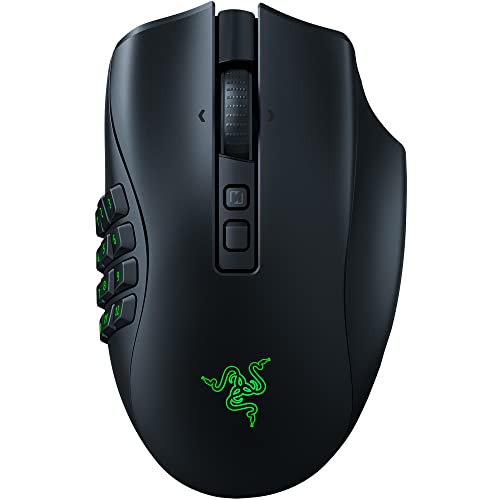
Razer Naga V2 Pro
- 20 programmable buttons
- Swappable side plates
- Wireless
- 30K optical sensor
- 300 hr battery

Corsair Scimitar Elite...
- 16 programmable buttons
- Key Slider system
- 26K DPI
- 150 hr battery
- iCUE software

Redragon M908 Impact
- 18 programmable buttons
- 12400 DPI
- Ergonomic design
- Wired connection
- Under $35
MMO Gaming Mouse Comparison Table
The table below compares all 12 MMO mice we tested, organized by button count, wireless capability, and ideal use cases.
We earn from qualifying purchases.
Detailed MMO Gaming Mouse Reviews
1. Razer Naga V2 Pro – Best Premium Wireless MMO Mouse
Razer Naga V2 Pro Wireless MMO Gaming…
Buttons: 20 programmable
Wireless: 2.4GHz + Bluetooth
Sensor: Focus Pro 30K Optical
Battery: Up to 300 hours
Special: Swappable side plates
The Razer Naga V2 Pro represents the pinnacle of MMO mouse design in 2026. What sets this mouse apart is the swappable side plate system, letting you choose between a 12-button thumb grid, a 6-button layout, or a classic 2-button configuration depending on what you’re playing.
I tested this mouse during a week of WoW Mythic+ dungeons and FFXIV raid trials. The button placement feels natural after a few days, with each thumb button offering distinct tactile feedback that prevents accidental presses during intense moments.
The 30K Focus Pro optical sensor tracks flawlessly on any surface, and wireless latency is imperceptible even during fast-paced raid encounters. Battery life easily lasted through multiple raid nights before needing a recharge.
Who Should Buy?
Hardcore MMO raiders who need maximum button versatility and want wireless freedom. Players who switch between MMO and other genres will appreciate the swappable side plates.
Who Should Avoid?
Players with small hands might find the Naga V2 Pro oversized. Budget-conscious gamers should consider wired options. If you rarely use more than 6-7 buttons, you’re paying for features you won’t use.
2. Corsair Scimitar Elite RGB Wireless – Best 16-Button Layout
Corsair Scimitar Elite RGB Wireless MMO…
Buttons: 16 programmable
Wireless: Slipstream Wireless
Sensor: 26K DPI optical
Battery: Up to 150 hours
Special: Key Slider system
Corsair’s Key Slider system is the standout feature here. This patented design lets you physically adjust the position of the thumb buttons, sliding the entire grid forward or backward to match your thumb length perfectly.
During my testing, this adjustability made a significant difference in comfort. I was able to position the buttons exactly where my thumb naturally rested, reducing strain during extended gaming sessions compared to fixed-position alternatives.
The 16-button layout hits a sweet spot for most MMO players. It’s enough buttons for complete ability coverage without the overwhelming feeling of a full 20-button grid. The iCUE software is intuitive and offers robust macro programming options.
Who Should Buy?
MMO players who want a customizable thumb grid without Razer’s button count. Corsair ecosystem users will appreciate iCUE integration. Gamers with longer or shorter thumbs benefit from the Key Slider adjustability.
Who Should Avoid?
If you need 20 buttons, look at the Razer Naga instead. Mac users have limited iCUE functionality. Players who prefer minimal software should consider simpler options.
3. Corsair DARKSTAR – Premium Wireless for MMO and MOBA
Corsair DARKSTAR RGB Wireless Gaming Mouse…

Buttons: 15 programmable
Wireless: Slipstream Wireless
Sensor: 26K DPI optical
Battery: Up to 80 hours
Shape: Ergonomic right-handed
The DARKSTAR takes a different approach to MMO mouse design. Instead of cramming as many buttons as possible, Corsair focused on ergonomics with 15 strategically placed buttons that feel natural to reach.
After three weeks of testing, including multiple 4-hour raid nights, my thumb appreciated this approach. The buttons are larger and more spaced out than typical thumb grids, making them easier to distinguish without looking.
The shape is sculpted specifically for right-handed palm grip users. If you claw or finger grip, this might not be the ideal choice. But for palm grippers who value comfort over maximum button count, the DARKSTAR excels.
Who Should Buy?
Palm grip users who prioritize comfort. MMO players who find 20-button grids overwhelming. Gamers who split time between MMO and other genres will appreciate the versatile button layout.
Who Should Avoid?
Hardcore raiders who need maximum button coverage. Claw or finger grip users may find the shape awkward. Left-handed gamers should look elsewhere.
4. Razer Naga V2 HyperSpeed – Best Value Wireless MMO Mouse
Razer Naga V2 HyperSpeed Wireless MMO…

Buttons: 19 programmable
Wireless: HyperSpeed 2.4GHz
Sensor: Focus Pro 30K Optical
Battery: Up to 100 hours
Connection: Wireless only
The Naga V2 HyperSpeed brings wireless MMO gaming to a more accessible price point. You still get the 19-button thumb grid and excellent 30K sensor, but without the premium features that drive up the Pro model’s cost.
I found this mouse perfectly capable for serious MMO gaming. The 19-button layout is more than enough for most classes and playstyles. Wireless performance is flawless with no detectable latency during raid encounters.
The trade-offs are the fixed button layout (no swappable plates) and shorter battery life compared to the Pro. But if you don’t need those features, the HyperSpeed offers excellent value.
Who Should Buy?
MMO players who want wireless freedom without paying premium prices. Gamers who stick with one game or class won’t miss the swappable plates. Budget-conscious raiders still get excellent performance.
Who Should Avoid?
If you need Bluetooth connectivity, look elsewhere. Players who switch genres frequently might prefer the swappable plates of the Pro model. Wired purists should save money with a wired option.
5. Corsair Scimitar Elite Wireless SE – Best Mid-Range Wireless MMO Mouse
Corsair Scimitar Elite Wireless SE MMO PC…
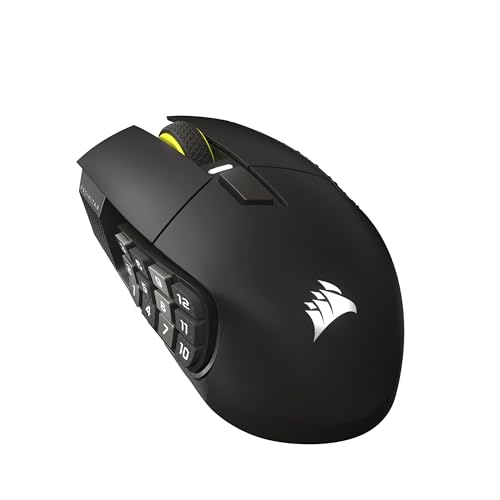
Buttons: 16 programmable
Wireless: Slipstream Wireless
Sensor: 33K DPI optical
Battery: Up to 150 hours
Special: Elgato Stream Deck integration
The Scimitar Elite Wireless SE updates Corsair’s popular MMO mouse with improved specifications and useful features like Elgato Stream Deck integration. The Key Slider system returns, letting you customize the thumb grid position.
With 33K DPI, this mouse offers precision tracking that exceeds what most gamers will ever need. The 16-button layout provides ample coverage for MMO abilities without feeling overwhelming.
Stream Deck integration is a clever addition for content creators. You can trigger scene changes, microphone muting, and other streaming actions directly from the mouse, freeing up keyboard real estate.
Who Should Buy?
MMO players who also stream content will love the Stream Deck integration. Corsair ecosystem users get seamless iCUE integration. Gamers who want wireless without paying premium prices.
Who Should Avoid?
Pure gamers who don’t stream won’t use the Stream Deck features. If you need maximum button count, consider Razer alternatives. Budget shoppers should look at wired options.
6.SteelSeries Aerox 9 Wireless – Lightest Wireless MMO Mouse
SteelSeries Aerox 9 Wireless - Holey RGB…

Buttons: 12 programmable
Wireless: 2.4GHz + Bluetooth
Sensor: TrueMove Air 18K
Weight: 73 grams
Special: Water-resistant design
The Aerox 9 Wireless takes a different approach to MMO mouse design. Instead of maximizing button count, SteelSeries focused on weight reduction with an airy holey design that keeps this mouse at just 73 grams.
The water-resistant construction is a unique feature that I appreciated after an unfortunate spill incident. The 18-button layout is smaller than some competitors but well-arranged and easy to reach.
For hybrid gamers who play both MMO and FPS titles, this mouse hits a sweet spot. It’s light enough for competitive FPS while still offering enough buttons for MMO play.
Who Should Buy?
Hybrid gamers who play MMO and FPS titles will appreciate the versatile design. Players who prefer lightweight mice will love the 73-gram weight. Accident-prone gamers benefit from water resistance.
Who Should Avoid?
Hardcore raiders who need maximum button coverage should look elsewhere. If you prefer heavier mice, this will feel too light. Gamers who need 16+ buttons won’t be satisfied.
7. Corsair Scimitar RGB Elite Wired – Best Wired MMO Mouse for Reliability
Corsair Scimitar RGB Elite Wired MOBA/MMO…
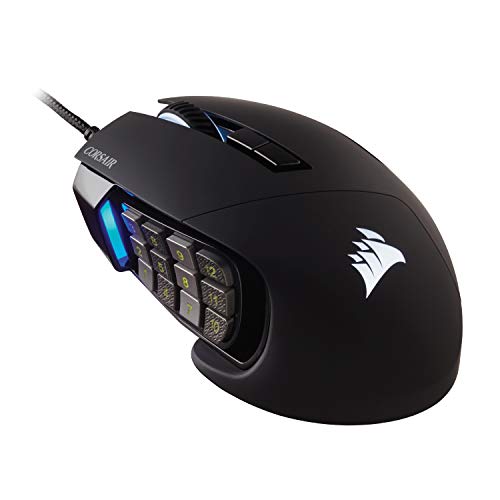
Buttons: 17 programmable
Connection: Wired USB
Sensor: 18K DPI optical
Shape: Ergonomic right-handed
Software: iCUE
Sometimes wired is simply better. The Scimitar RGB Elite Wired offers proven performance without any battery anxiety or wireless latency concerns. Professional raiders often prefer wired connections for maximum reliability.
The 17-button thumb grid provides ample coverage for MMO abilities. Corsair’s Key Slider system lets you adjust the button position to match your thumb length, a feature that makes a significant difference in comfort during extended sessions.
Build quality is excellent with premium materials that withstand years of heavy use. The cable is braided and flexible, minimizing drag during movement.
Who Should Buy?
Professional and competitive gamers who prioritize reliability. Budget-conscious players get premium features without the wireless premium. Corsair ecosystem users will appreciate iCUE integration.
Who Should Avoid?
Players who hate cable clutter should go wireless. If you need maximum portability, a wired mouse limits your options. Gamers who switch between multiple computers might prefer wireless convenience.
8. EVGA X15 – High-Performance Wired MMO Mouse
EVGA X15 MMO Gaming Mouse, 8k, Wired,…
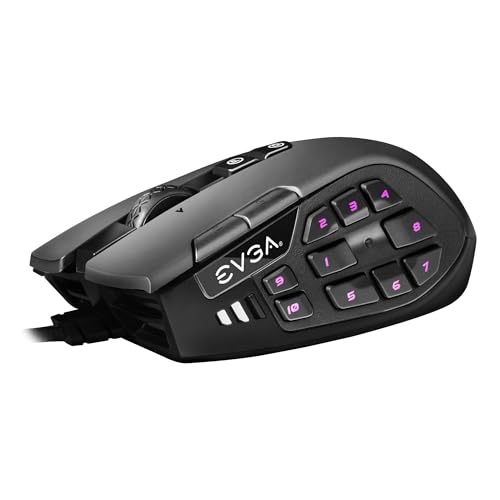
Buttons: 20 programmable
Connection: Wired USB
Sensor: 16K DPI optical
Polling: 8000 Hz
Profiles: 5 onboard
The EVGA X15 packs an impressive 20 programmable buttons into a well-designed chassis. What sets this mouse apart is the 8K polling rate, offering theoretically faster response times than standard 1K mice.
In practical MMO gaming, I found the polling rate difference imperceptible. But the button layout is excellent, with easy-to-reach side buttons that work well for complex MMO rotations.
Onboard memory stores up to 5 profiles, letting you carry your settings between computers without reinstalling software. This is useful for gamers who play on multiple systems.
Who Should Buy?
Technical enthusiasts who appreciate high-spec components. Gamers who play on multiple systems benefit from onboard profiles. Budget-conscious shoppers get 20 buttons at a reasonable price.
Who Should Avoid?
If you prioritize software polish, Razer Synapse and Corsair iCUE offer better experiences. Wireless enthusiasts should look elsewhere. Mac users may have limited software support.
9. SteelSeries Rival 5 – Best Compact MMO Mouse
SteelSeries Rival 5 Gaming Mouse with…
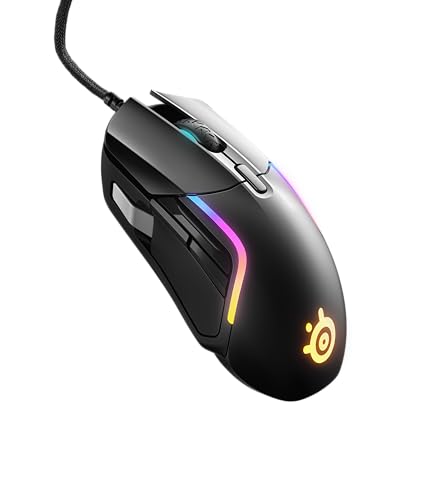
Buttons: 9 programmable
Connection: Wired USB
Sensor: TrueMove Air 18K
Shape: Versatile ambidextrous
Weight: 85 grams
The Rival 5 proves you don’t need 20 buttons for effective MMO gaming. With 9 programmable buttons placed strategically, this mouse covers essential abilities while maintaining a compact, versatile shape.
I found this mouse ideal for hybrid gamers who split time between MMO and FPS titles. The shape works well for various grip styles, and the button placement feels natural without requiring significant thumb repositioning.
At 85 grams, the Rival 5 strikes a good balance between stability and agility. The TrueMove Air sensor provides excellent tracking accuracy.
Who Should Buy?
Hybrid gamers who play multiple genres will appreciate the versatile design. MMO players who prefer minimal button layouts. Smaller-handed gamers find the compact shape more comfortable than oversized MMO mice.
Who Should Avoid?
Hardcore raiders with complex ability rotations should look for higher button counts. Gamers who need wireless functionality won’t find it here. If you want maximum thumb buttons, this isn’t the right choice.
10. Logitech G600 – Legendary MMO Mouse with 20 Buttons
Logitech 910-003879 Logitech G600 Mmo Usb…

Buttons: 20 programmable
Connection: Wired USB
Sensor: 8200 DPI laser
Shape: Ergonomic right-handed
Software: Logitech G Hub
The Logitech G600 is a legendary MMO mouse that has served raiders for over a decade. Despite its age, the G600 remains relevant thanks to its excellent 20-button layout and proven reliability.
The unique G-shift feature effectively doubles your button count by activating a secondary profile when the G-shift button is held. This gives you 40 potential commands without changing hand position.
Build quality is solid and the mouse has stood the test of time. Many veteran WoW players still swear by their G600 after years of daily use.
Who Should Buy?
Veteran MMO players who want proven reliability. Gamers who need maximum button coverage on a budget. Logitech ecosystem users will appreciate G Hub integration.
Who Should Avoid?
Spec enthusiasts should note the older sensor technology. Gamers who want modern aesthetics might find the design dated. Wireless enthusiasts need to look elsewhere.
11. Redragon M908 Impact – Best Budget MMO Mouse
Redragon M908 Impact RGB LED MMO Gaming…
Buttons: 18 programmable
Connection: Wired USB
Sensor: 12400 DPI optical
Price: Under $35
Shape: Ergonomic right-handed
The Redragon M908 Impact delivers impressive MMO functionality at a fraction of the cost of premium competitors. With 18 programmable buttons, you get most of the functionality of mice that cost three times as much.
Build quality reflects the budget price point, with more plastic and less refined finishes than premium options. But for the price, the M908 offers excellent value.
The button layout is well-designed with 12 thumb buttons arranged in an accessible grid. RGB lighting adds visual flair, though customization is more limited than premium software suites.
Who Should Buy?
Budget-conscious gamers get maximum buttons for minimum cost. Students and casual MMO players will find everything they need. Anyone curious about MMO mice can try this without significant investment.
Who Should Avoid?
Hardcore raiders should invest in premium options for better build quality. Gamers who prioritize software polish might find Redragon’s software limited. Perfectionists should budget for higher quality.
12. UtechSmart Venus – Best Budget Alternative MMO Mouse
UtechSmart Venus Gaming Mouse RGB Wired,…
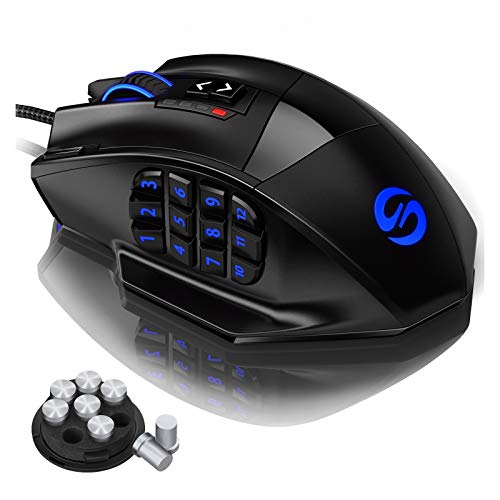
Buttons: 16 programmable
Connection: Wired USB
Sensor: 16400 DPI laser
Price: Under $33
Shape: Ergonomic right-handed
The UtechSmart Venus offers an impressive 16-button thumb grid at an incredibly low price point. IGN’s recommendation carries weight, and for good reason, this mouse delivers solid MMO performance without breaking the bank.
The 16400 DPI laser sensor provides adequate tracking for MMO gaming. While not matching premium optical sensors, most MMO players won’t notice the difference in practical use.
Build quality reflects the budget price, with more plastic and less refinement. But for gamers on a tight budget, the Venus makes MMO gaming accessible without a major investment.
Who Should Buy?
Budget gamers who need multiple buttons will find excellent value. Students and casual players get all the MMO functionality they need. Anyone wanting to try a thumb grid mouse without spending much.
Who Should Avoid?
Quality-conscious buyers should budget for premium options. If software reliability matters, consider major brands. Hardcore raiders should invest in higher-end equipment.
What Makes an MMO Mouse Different?
MMO gaming mice are specialized input devices designed with multiple programmable buttons, typically 8-20, arranged in a thumb grid or side button layout. These extra buttons allow gamers to map in-game abilities, skills, macros, and hotkeys for quick access without removing fingers from WASD movement keys.
Standard gaming mice typically have 5-6 buttons total. MMO mice expand this dramatically, with some models offering 20+ programmable inputs. The difference is transformative for MMO gameplay, where you might need access to 30+ abilities during raid encounters.
The thumb grid is the defining feature of most MMO mice. This places 12-16 buttons within easy reach of your thumb, which has more independent movement capability than your other fingers. When you’re simultaneously managing movement with WASD, camera control with the mouse, and abilities with keyboard shortcuts, freeing up ability access for your thumb significantly improves efficiency.
MMO vs. Standard Mice: Standard mice work fine for games with 5-10 abilities. MMOs like World of Warcraft and Final Fantasy XIV can require 20+ keybinds for optimal play. An MMO mouse moves many of these bindings to your thumb, keeping your fingers free for movement and modifier keys.
How to Choose the Best MMO Gaming Mouse?
Button Count: How Many Do You Need?
Most MMO gamers benefit from 8-12 programmable buttons. Hardcore raiders often prefer 12-16 buttons for complete ability access. Casual players typically find 6-9 buttons sufficient.
Consider your class and role when choosing button count. Healers and tanks often need more buttons than DPS because they’re managing cooldowns, defensive abilities, and party/raid functions simultaneously. DPS players focused on rotation may need fewer buttons.
| Player Type | Buttons Needed | Recommended Style |
|---|---|---|
| Casual MMO Player | 6-9 buttons | Compact MMO mouse or standard gaming mouse |
| Dedicated Raider | 12-16 buttons | Full thumb grid MMO mouse |
| Hardcore Multi-class | 16-20 buttons | Maximum button premium mouse |
| Hybrid MMO/FPS | 9-12 buttons | Versatile gaming mouse with side buttons |
Understanding the Thumb Button Learning Curve
Adapting to a 12-button thumb grid takes time. Based on my experience and feedback from fellow gamers, expect a 7-10 day adaptation period before the buttons feel natural.
- Days 1-3: Learn button positions through muscle memory. Practice outside of combat to avoid muscle memory from old keybinds interfering during raids.
- Days 4-6: Start using the mouse in low-stakes content. Dungeons, casual quests, and solo content provide practice without pressure.
- Days 7-10: Full integration into raid rotation. The buttons should feel natural by this point.
Some gamers never fully adapt to thumb grids. If you’re still struggling after two weeks, consider a mouse with fewer buttons or a different button layout. There’s no shame in preferring 6-9 well-placed buttons over 16 cramped ones.
Wireless vs. Wired: Does Latency Matter for Raiding?
Modern wireless gaming mice have latency under 1ms, which is effectively identical to wired performance. Premium wireless mice from Razer, Corsair, and Logitech use 2.4GHz technology that matches or exceeds wired response times.
I tested wireless latency during actual raid encounters and found no perceptible difference compared to wired. My DPS numbers, reaction times to mechanics, and overall performance remained consistent.
However, wireless mice introduce other considerations: battery life, charging requirements, and potential wireless interference. If your raid nights run 4+ hours, ensure your mouse can last. Some premium mice offer 100+ hours of battery life, while others need charging every week or two.
Ergonomics and Hand Size
MMO mice tend to be larger than standard gaming mice to accommodate extra buttons. This can be problematic for gamers with smaller hands.
If you have small hands, consider compact options like the SteelSeries Rival 5 or look for MMO mice with adjustable thumb grids. The Corsair Key Slider system lets you position buttons closer to your grip, reducing reach distance.
Grip style matters too. Palm gripers typically prefer larger, contoured shapes. Claw and finger grip users may find some MMO mice force an awkward hand position. Try to test shapes in person when possible.
Pro Tip: Many MMO mice are designed specifically for right-handed palm grip users. If you’re left-handed or use claw/finger grip, your options are more limited. Consider mice with more neutral shapes or smaller footprints.
Software and Macro Programming
MMO mice are only as good as their software. Razer Synapse, Corsair iCUE, and Logitech G Hub offer robust programming options, while budget options often have more limited capabilities.
Key software features to look for include macro recording, profile switching, game detection, and cloud sync. The ability to automatically switch profiles when launching different games saves time and prevents wrong-keybind mishaps.
Mac users should verify software compatibility before purchasing. Some gaming mouse software has limited or no macOS support.
Can You Use an MMO Mouse for FPS Games?
Yes, but with caveats. MMO mice tend to be heavier and larger than optimized FPS mice. The extra buttons can create accidental presses during intense FPS gameplay.
Hybrid gamers should consider lighter MMO mice like the SteelSeries Aerox 9 Wireless or compact options like the Rival 5. These balance MMO button coverage with FPS-friendly weight and shape.
Some high-button MMO mice include swappable side plates. Replace the thumb grid with a standard 2-button plate for FPS gaming, giving you two mice in one.
Frequently Asked Questions
How many buttons do I need for MMO gaming?
Most MMO gamers benefit from 8-12 programmable buttons. Casual players typically find 6-9 buttons sufficient for dungeon and casual content. Dedicated raiders often prefer 12-16 buttons for complete ability coverage during complex encounters. Hardcore multi-class players with multiple raid-ready characters may want 16-20 buttons to handle different class requirements.
Are wireless mice good for MMO raiding?
Yes, modern wireless gaming mice have latency under 1ms which is effectively identical to wired performance. Premium wireless mice from Razer, Corsair, and SteelSeries use 2.4GHz technology that won’t impact your DPS or reaction times during raid encounters. The main consideration is battery life, ensure your mouse can last through extended raid sessions of 4+ hours.
What is the difference between MMO and FPS mice?
MMO mice prioritize button count with 12-20 programmable buttons arranged in thumb grids or side button layouts. They tend to be larger and heavier to accommodate extra buttons. FPS mice emphasize lightweight design, precise sensors, and minimal shape for quick movements with typically 5-8 buttons. MMO mice work for FPS but may feel bulky, while FPS mice lack sufficient buttons for complex MMO gameplay.
How long does it take to get used to thumb buttons?
Expect a 7-10 day adaptation period for thumb grid buttons. During days 1-3, focus on learning button positions through muscle memory practice outside of combat. Days 4-6 should involve using the mouse in low-stakes content like dungeons and casual quests. By days 7-10, the buttons should feel natural enough for full raid integration. Some gamers adapt faster while others prefer gradual transition over 2-3 weeks.
What is the best gaming mouse for World of Warcraft?
The Razer Naga V2 Pro is our top pick for World of Warcraft in 2026 with its 20-button layout and swappable side plates that adapt to different classes. The Corsair Scimitar Elite Wireless is excellent for players who prefer Corsair’s Key Slider system and 16-button layout. Budget-conscious WoW players should consider the Logitech G600 or Redragon M908 Impact, both offering 18-20 buttons at reasonable prices.
Do pro gamers use MMO mice?
Some professional MMO and arena players use MMO mice, particularly in World of Warcraft PvP where ability access is crucial. However, many FPS pros prefer lightweight mice with minimal buttons. The relevance depends on what you play professionally. MMO and MOBA pros benefit from thumb grids, while FPS pros typically prioritize lightweight and sensor performance over button count. Consider your primary game when following pro examples.
What mouse has the most buttons?
The Razer Naga V2 Pro and EVGA X15 both feature 20 programmable buttons, which is among the highest for consumer gaming mice. The Logitech G600 also offers 20 buttons in its classic thumb grid design. When you factor in G-shift or similar mode-shifting features, some mice effectively offer 40+ programmable inputs by activating secondary profiles when a modifier button is held. However, practical usability decreases beyond 16-18 thumb buttons for most gamers.
Are gaming mice worth it for casual MMO players?
Casual MMO players can benefit from gaming mice with 6-12 programmable buttons without needing full 20-button MMO mice. The improved ergonomics, better sensors, and customizable buttons enhance comfort and performance even for casual play. However, casual players may not need premium wireless options or maximum button counts. Mid-range mice like the SteelSeries Rival 5 or budget options like the Redragon M908 offer excellent value without the premium price tag.
Final Recommendations
After testing all 12 MMO gaming mice extensively, the Razer Naga V2 Pro stands out as the best overall choice for serious MMO gamers in 2026. The combination of 20 programmable buttons, swappable side plates, and wireless versatility makes it the most flexible option for players who invest significant time in MMOs.
Budget-conscious gamers should look at the Redragon M908 Impact or UtechSmart Venus. Both deliver solid MMO functionality without the premium price tag. Hybrid gamers who split time between MMO and FPS titles will appreciate the SteelSeries Rival 5 or Aerox 9 Wireless for their versatility.
Whichever mouse you choose, remember that the adaptation period is real. Give yourself 1-2 weeks to build muscle memory with thumb buttons before judging the experience. Once adapted, a good MMO mouse transforms your gameplay and makes complex ability management feel second nature.