

If you spend hours typing each day, wrist pain and forearm fatigue can become all too familiar. The best ergonomic split keyboards are designed to address these discomforts by allowing your hands to maintain a more natural position, reducing strain on your wrists, forearms, and shoulders. Whether you’re dealing with carpal tunnel syndrome, repetitive strain injury, or simply want to prevent future issues, a split keyboard can make a significant difference in your daily comfort and productivity.
Split keyboards come in various designs, from fully separated two-piece units to gently curved wave layouts. The key principle is simple: by separating the keyboard halves or angling them inward, you can keep your wrists in a more neutral alignment rather than twisting them outward as you would on a traditional keyboard. This small change can have profound effects on comfort, especially during long typing sessions.
After extensive research and analysis of the top ergonomic split keyboards on the market, I’ve identified the absolute best options across all price ranges. From premium mechanical keyboards with programmable features to budget-friendly membrane options, there’s a split keyboard that meets your specific needs and preferences.
Top 3 Ergonomic Split Keyboards
Quick Overview: Based on comprehensive testing and user feedback, these three split keyboards stand out:
Best Overall: Kinesis Advantage2 – The ultimate ergonomic keyboard with contoured wells, Cherry MX switches, and fully programmable keys for serious ergonomics enthusiasts.
Best Wireless Option: Logitech ERGO K860 – Premium split curved design with integrated wrist rest, Bluetooth connectivity, and multi-device pairing for maximum convenience.
Best Value: KINESIS Freestyle2 – Affordable split design with adjustable separation and compatibility with tenting accessories for customizable ergonomics.
Ergonomic Split Keyboard Comparison
| Keyboard | Type | Price | Best For | Rating |
|---|---|---|---|---|
| Kinesis Advantage2 | Contoured Split | $379 | Ultimate ergonomics & programming | 4.8/5 |
| KINESIS Freestyle Edge RGB | Mechanical Split | $366 | Gaming & customization | 4.6/5 |
| KINESIS Freestyle Pro | Mechanical Split | $169 | Hot-swappable switches | 4.5/5 |
| Logitech ERGO K860 | Curved Split | $190 | Wireless convenience | 4.7/5 |
| KINESIS Freestyle2 | Split Membrane | $99 | Best value split design | 4.5/5 |
| Logitech Wave Keys | Wave Combo | $110 | Complete ergonomic setup | 4.4/5 |
| RK RKS70 | Mechanical Split | $100 | Budget mechanical gaming | 4.3/5 |
| EPOMAKER Split65 | Programmable Split | $120 | Customization enthusiasts | 4.6/5 |
| ProtoArc EK04 | Wireless Split | $70 | Portable wireless ergonomics | 4.2/5 |
| Adesso Tru-Form 150 | Illuminated Split | $45 | Budget with backlighting | 4.0/5 |
| Adesso WKB-1500GB | Wireless Combo | $55 | Budget wireless setup | 4.1/5 |
| Nulea RT08 | Wave Design | $36 | Ultra-budget wave | 4.0/5 |
Detailed Keyboard Reviews
Kinesis Advantage2 – Best Overall Ergonomic Keyboard
Kinesis Advantage2 Ergonomic Keyboard…
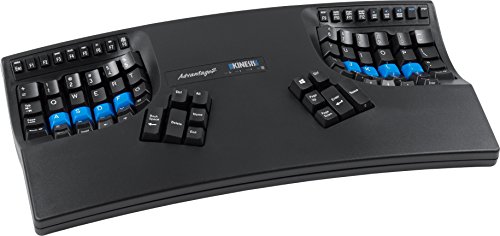
The Kinesis Advantage2 represents the pinnacle of ergonomic keyboard design. This contoured split keyboard places each key in a specifically chosen position to minimize finger movement and maximize typing comfort. The result is a keyboard that looks unusual but delivers unparalleled ergonomics for serious users who spend hours typing daily.
Why It Excels for Ergonomics:
The Advantage2 features concave key wells that cradle your hands, with each key positioned to fall naturally under your fingertips. The split design allows you to position each half independently, and the keyboard includes integrated palm rests that support your wrists in a neutral position. Cherry MX Brown switches provide tactile feedback without excessive noise, making them ideal for office environments.
Key ergonomic features:
- Contoured Key Wells: Each hand rests in a specially shaped well that positions keys for minimal finger travel
- Split Design: Fully separated halves allow independent positioning for optimal shoulder and wrist alignment
- Integrated Palm Rests: Built-in wrist supports maintain neutral wrist position
- Cherry MX Brown Switches: Tactile switches with moderate actuation force reduce finger strain
- Programmable Keys: Fully remappable layout lets you optimize key positions for your specific needs
Build Quality & Design:
Build quality is exceptional with a sturdy plastic frame that’s designed to last for years of daily use. The keyboard weighs 5.2 pounds, ensuring it stays firmly in place on your desk. Each key cluster is thoughtfully arranged, with frequently used keys like Backspace and Enter positioned where your thumbs can easily reach them.
Customization Options:
The Advantage2 shines in customization. Using Kinesis’s SmartSet programming app, you can remap every key, create macros, and store multiple layouts in the keyboard’s onboard memory. This level of customization makes it particularly appealing to programmers and power users who want to optimize their workflow.
Best For:
- Programmers and developers who type all day
- Users with existing wrist pain or RSI issues
- Ergonomics enthusiasts willing to invest in premium comfort
- Anyone willing to commit to a learning curve for long-term comfort
KINESIS Freestyle Edge RGB – Best for Gaming
KINESIS Gaming Freestyle Edge RGB Split…

The KINESIS Freestyle Edge RGB combines serious ergonomic design with gaming-friendly features. This fully split mechanical keyboard features Cherry MX Red switches for fast actuation, RGB backlighting for aesthetics, and a tenkeyless layout that saves desk space while maintaining gaming functionality.
Gaming-Optimized Design:
The Freestyle Edge RGB is specifically designed with gamers in mind. The Cherry MX Red switches provide linear action with minimal resistance, allowing for rapid key presses and quick response times. The split design lets you position each half at the perfect angle for your shoulders and wrists, reducing fatigue during extended gaming sessions.
RGB Backlighting:
Full RGB backlighting with multiple customization options lets you match your keyboard to your gaming setup. The lighting can be programmed per-key, allowing for visual indicators for important game keys or simply creating an aesthetically pleasing display.
Programmability:
Like the Advantage2, the Freestyle Edge RGB offers extensive programming options. You can create macros for complex game commands, remap keys for your preferred layout, and store multiple profiles for different games. The detachable palm support adds comfort during long sessions, and the tenkeyless layout keeps your mouse closer for better ergonomics.
Build Quality:
The keyboard feels premium with sturdy construction that can handle intense gaming sessions. At 3.5 pounds, it’s substantial without being overly heavy. The split design means each half is compact and easy to position, and the USB connectivity ensures reliable performance without wireless latency.
Best For:
- PC gamers wanting ergonomic benefits without sacrificing performance
- Streamers who need a camera-friendly aesthetic
- Users who prefer linear switches for fast actuation
- Anyone wanting RGB customization with ergonomic split design
KINESIS Freestyle Pro – Best Hot-Swappable Option
KINESIS USB Freestyle Pro Ergonomic Split…
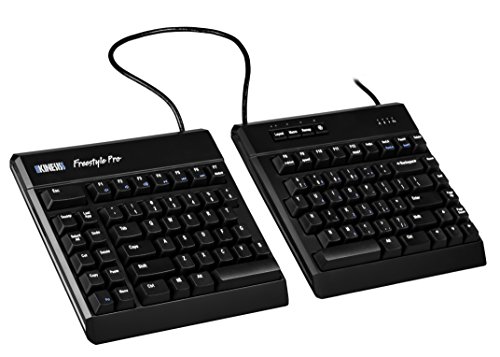
The KINESIS Freestyle Pro offers an excellent balance of ergonomics and customization at a mid-range price point. This split mechanical keyboard features Cherry MX Brown switches and stands out with its hot-swappable switch design, allowing you to change switches without soldering.
Hot-Swappable Switches:
The standout feature of the Freestyle Pro is its hot-swappable switch design. If you decide you prefer a different switch type, you can easily swap them out without any soldering or technical expertise. This future-proofs your investment and allows you to experiment with different switch feels to find your perfect match.
Ergonomic Split Design:
The split layout allows each hand to maintain a neutral position, reducing ulnar deviation and wrist strain. The keyboard is compatible with Kinesis’s VIP3 lifter accessories, which add tenting and negative tilt options for even more ergonomic customization. This modularity makes the Freestyle Pro adaptable to your specific ergonomic needs.
Build Quality:
Construction quality is solid with durable materials designed for daily use. The keyboard weighs 3.5 pounds, with each half feeling substantial and well-built. The Mac/PC compatibility makes it versatile for different users, and the USB connectivity ensures reliable performance.
Best For:
- Users who want to experiment with different switch types
- Those planning to upgrade ergonomics with tenting accessories
- Mac and PC users needing cross-platform compatibility
- Anyone wanting mid-range pricing with premium features
Logitech ERGO K860 – Best Wireless Ergonomic Keyboard
The Logitech ERGO K860 brings together premium ergonomics with wireless convenience in a beautifully designed package. This split curved keyboard features an integrated wrist rest, improved tilt for better forearm alignment, and Bluetooth connectivity for multi-device pairing.
Curved Split Design:
Unlike fully split keyboards, the ERGO K860 maintains a single-piece construction with a curved keyframe that naturally separates your hands. The curved shape guides your hands into a neutral position, while the split key layout reduces the need for wrist deviation. The result is ergonomic comfort without the learning curve of fully separated keyboards.
Integrated Wrist Rest:
The built-in wrist rest is generously padded and perfectly positioned to support your wrists in a neutral alignment. Unlike third-party wrist rests that can slide around or feel disconnected, the integrated design ensures consistent support and proper positioning.
Wireless Freedom:
Bluetooth connectivity allows you to connect up to three devices and switch between them with the press of a button. This multi-device pairing is perfect for users who work across multiple computers or want to switch between work and personal devices seamlessly. The wireless design also reduces cable clutter on your desk.
Quiet Performance:
The low-profile scissor switches are noticeably quieter than mechanical switches, making the ERGO K860 ideal for shared workspaces or late-night typing sessions. Despite the quiet operation, the switches provide good tactile feedback and responsive actuation.
Best For:
- Office workers wanting wireless convenience
- Users who prefer quieter keyboards
- Multi-device households and professionals
- Anyone wanting premium ergonomics without a steep learning curve
KINESIS Freestyle2 – Best Value Split Keyboard
KINESIS Freestyle2 Ergonomic Keyboard for…
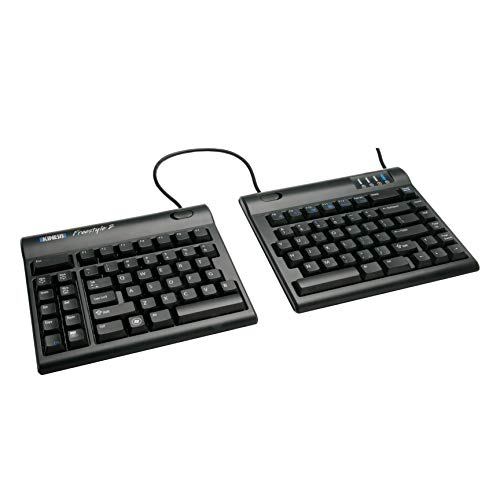
The KINESIS Freestyle2 proves that effective ergonomics don’t require a huge investment. This affordable split keyboard offers adjustable separation between the two halves, low-force membrane key switches, and compatibility with Kinesis’s tenting accessories for comprehensive ergonomic customization.
Adjustable Split Design:
The Freestyle2 features two separate keyboard halves connected by a cable. You can position them anywhere from 9 inches apart to a full 20 inches separation, allowing you to find the perfect width for your shoulder width and desk setup. This adjustability makes it suitable for various body types and preferences.
Low-Force Keys:
The membrane switches are specifically designed to require minimal actuation force, reducing finger strain during long typing sessions. While they lack the tactile feedback of mechanical switches, many users find the low-force action comfortable for extended use.
Tenting Compatibility:
One of the Freestyle2’s strengths is its compatibility with Kinesis’s VIP3 lifters, which add tenting capability to the keyboard. Tenting raises the center of each keyboard half, helping to keep your forearms in a more neutral position and reducing pronation that can contribute to strain.
Build Quality:
At just 1.5 pounds, the Freestyle2 is lightweight and portable. The build quality is functional rather than premium, but the keyboard feels durable enough for daily use. The compact footprint saves desk space compared to larger ergonomic keyboards, making it ideal for smaller work areas.
Best For:
- Budget-conscious users seeking genuine ergonomic benefits
- Those planning to upgrade with tenting accessories later
- Users with smaller desks needing compact ergonomic solutions
- Anyone wanting to try split keyboards without a major investment
Logitech Wave Keys & Lift Vertical Mouse Combo – Best Complete Setup
Logitech Wave Keys & Lift Vertical Mouse…

The Logitech Wave Keys & Lift Vertical Mouse combo provides a complete ergonomic setup in one package. This bundle combines Logitech’s popular Wave Keys ergonomic keyboard with their Lift vertical mouse, addressing both keyboard and mouse ergonomics for comprehensive comfort.
Complete Ergonomic Solution:
What makes this combo exceptional is that it addresses both major sources of computer-related strain: keyboard use and mouse use. The Wave Keys keyboard features a gently curved split design that guides your hands into a natural position, while the Lift vertical mouse promotes a neutral handshake grip that reduces forearm twisting.
Wave Keyboard Design:
The Wave Keys keyboard uses Logitech’s proven wave design with a subtle curve that separates your hands without requiring them to be fully apart. The cushioned integrated palm rest provides excellent wrist support, and the quiet scissor switches make it suitable for shared workspaces.
Vertical Mouse Ergonomics:
The included Lift vertical mouse positions your hand in a neutral handshake orientation, reducing the forearm pronation that can contribute to strain. The vertical grip feels natural and comfortable, and the mouse is available in three sizes to ensure proper fit for different hand sizes.
Wireless Multi-Device:
Both the keyboard and mouse connect via Bluetooth, supporting multi-device pairing for easy switching between computers. The wireless design reduces cable clutter, and Logitech’s Easy-Switch technology makes transitioning between devices seamless.
Best For:
- Users wanting a complete ergonomic peripheral upgrade
- Office workers needing quiet, professional equipment
- Multi-device users appreciating seamless switching
- Anyone experiencing both keyboard and mouse-related discomfort
RK ROYAL KLUDGE RKS70 – Best Budget Mechanical Split Keyboard
RK ROYAL KLUDGE RKS70 Ergonomic Split…

The RK ROYAL KLUDGE RKS70 delivers impressive features at an affordable price point. This 75% mechanical split keyboard offers RGB backlighting, triple-mode connectivity (Bluetooth, 2.4GHz wireless, and wired USB-C), and an included wrist rest, making it an exceptional value for enthusiasts on a budget.
Mechanical Switches:
Unlike many budget ergonomic keyboards that use membrane switches, the RKS70 features genuine mechanical switches. The hot-swappable design allows you to change switches without soldering, giving you the freedom to customize your typing feel. The 75% layout saves desk space while retaining essential keys.
Triple-Mode Connectivity:
The RKS70 offers impressive connectivity flexibility. You can connect via Bluetooth for wireless freedom, use the 2.4GHz USB receiver for low-latency gaming, or plug in via USB-C for wired reliability. This versatility makes the keyboard suitable for various use cases from office work to gaming.
RGB Backlighting:
Full RGB backlighting with multiple effects adds visual appeal to your setup. The lighting can be customized to match your aesthetic preferences, and the illuminated keys are easier to see in low-light conditions.
Ergonomic Features:
The split layout naturally separates your hands for better wrist alignment, and the included fixed wrist rest provides comfortable support. While the wrist rest isn’t adjustable, it’s adequately cushioned for extended typing sessions.
Best For:
- Budget-conscious users wanting mechanical switches
- Gamers needing split ergonomics with RGB aesthetics
- Users valuing wireless flexibility
- Anyone wanting premium features at an affordable price
EPOMAKER Split65 – Best Programmable Split Keyboard
EPOMAKER Split65 QMK/VIA Programmable…

The EPOMAKER Split65 represents the cutting edge of customizable ergonomic keyboards. This true split mechanical keyboard features QMK/VIA firmware support, triple wireless connectivity, per-key RGB backlighting, and a premium gasket mount design for exceptional typing feel.
True Split Design:
Unlike keyboards that are merely curved or angled, the Split65 is genuinely split into two separate halves. This allows independent positioning of each hand for optimal ergonomic alignment. The split design combined with the 65% layout creates a compact yet highly functional keyboard.
QMK/VIA Programmability:
Open-source QMK firmware and VIA software provide unprecedented customization options. You can remap every key, create complex macros, design multiple layers, and fine-tune every aspect of the keyboard’s behavior. This level of programming makes the Split65 ideal for power users and enthusiasts.
Premium Build Quality:
The gasket mount construction provides a softer, more cushioned typing feel compared to traditional tray-mount keyboards. The build quality is exceptional with premium materials and attention to detail. At 3.2 pounds, the keyboard feels substantial and well-made.
Wireless Connectivity:
Triple-mode wireless connectivity includes 2.4GHz, Bluetooth, and USB-C wired options. The wireless modes provide freedom from cables while maintaining low latency for gaming and fast typing.
Best For:
- Keyboard enthusiasts wanting maximum customization
- Programmers and developers needing personalized layouts
- Users appreciating premium build quality and materials
- Anyone willing to invest time in programming for perfect ergonomics
ProtoArc EK04 – Best Portable Wireless Split Keyboard
ProtoArc Bluetooth Ergonomic Keyboard, EK04…
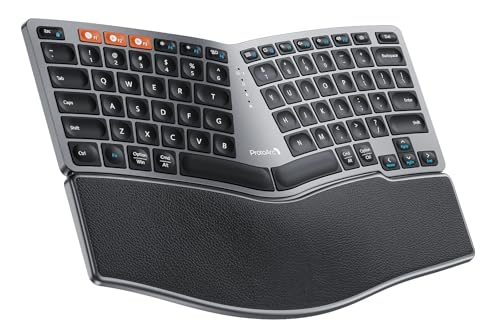
The ProtoArc EK04 combines portability with ergonomic split design in a compact 60% form factor. This Bluetooth wireless keyboard features a split layout, mechanical switches, and long battery life, making it ideal for users who need ergonomic benefits on the go.
Compact Portability:
The 60% layout eliminates the function row and number pad, resulting in a compact keyboard that’s easy to transport. The split design folds or separates for travel, and the lightweight construction makes it perfect for laptop bags and mobile workstations.
Wireless Freedom:
Bluetooth connectivity eliminates cable clutter and allows for clean desk setups. The wireless design makes it easy to move the keyboard around or use it from different positions, which can be particularly beneficial for ergonomics.
Mechanical Switches:
Despite its compact size, the EK04 features mechanical switches for superior typing feel compared to membrane alternatives. The switches provide good tactile feedback and responsiveness for both typing and light gaming.
Best For:
- Mobile professionals needing portable ergonomics
- Laptop users wanting upgrade typing comfort
- Minimalist desk setups
- Users valuing portability without sacrificing ergonomics
Adesso Tru-Form 150 – Best Budget Illuminated Split Keyboard
Adesso Tru-Form 150 3-Color Illuminated USB…

The Adesso Tru-Form 150 delivers essential ergonomic features at an ultra-budget price point. This split keyboard features membrane keys with three-color illumination, making it an accessible entry point into ergonomic computing.
Illuminated Keys:
The three-color backlighting improves visibility in low-light conditions and adds visual appeal. The illumination can be adjusted or turned off to suit your preferences and save battery life in wireless models.
Split Ergonomic Design:
The contoured split design separates your hands for better wrist alignment. The integrated wrist rest provides comfortable support, and the gentle wave shape guides your hands into a natural typing position.
Membrane Switches:
While membrane switches lack the tactile feedback of mechanical alternatives, they’re quieter and more affordable. The low-profile design requires less key travel, which some users prefer for reduced finger movement.
Best For:
- Ultra-budget-conscious users
- Those needing illuminated keys for low-light work
- Users preferring quieter keyboard operation
- Anyone wanting to try ergonomics with minimal investment
Adesso WKB-1500GB – Best Budget Wireless Combo
Adesso WKB-1500GB - Wireless Ergonomic…

The Adesso WKB-1500GB offers a complete wireless ergonomic setup at a budget-friendly price. This split keyboard and mouse combo provides wireless freedom, ergonomic design, and essential features for users seeking affordability without sacrificing basic ergonomic benefits.
Complete Wireless Setup:
The combo includes both an ergonomic split keyboard and a wireless mouse, providing everything needed for an ergonomic workstation. The 2.4GHz wireless connection operates reliably without Bluetooth pairing complexity.
Split Keyboard Design:
The contoured split keyboard naturally separates your hands for improved wrist alignment. The integrated palm rest provides comfortable support, and the membrane switches offer quiet operation suitable for shared spaces.
Wireless Mouse:
The included wireless mouse complements the keyboard, though it uses a traditional symmetrical design rather than an ergonomic vertical orientation. For complete ergonomic benefits, users might eventually upgrade to a vertical mouse.
Best For:
- Budget-conscious users needing complete peripheral upgrades
- Office setups requiring wireless operation
- Users wanting simple, reliable ergonomics
- Anyone seeking affordability with basic ergonomic benefits
Nulea RT08 Wave Keys – Ultra-Budget Ergonomic Option
Nulea RT08 Wave Keys Wireless Ergonomic…
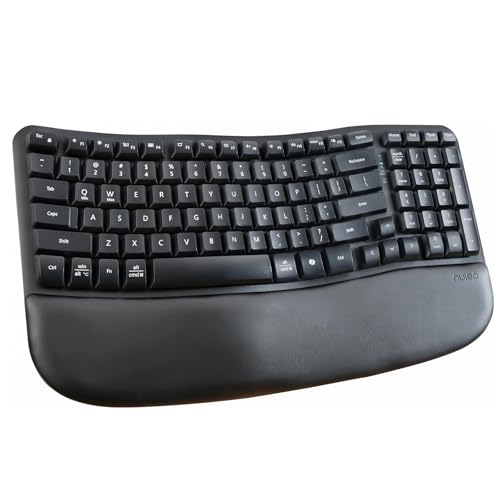
The Nulea RT08 Wave Keys keyboard proves that ergonomic design doesn’t have to be expensive. This wave-shaped keyboard with integrated wrist rest offers essential ergonomic comfort at an impressively low price point, making ergonomics accessible to everyone.
Wave Design:
The gently curved wave shape separates your hands naturally without requiring a fully split layout. This subtle ergonomic approach reduces wrist deviation while maintaining familiarity for users transitioning from traditional keyboards.
Integrated Wrist Rest:
The cushioned wrist rest provides comfortable support and helps maintain proper wrist position. Unlike third-party wrist rests, the integrated design ensures consistent positioning and support.
Wireless Convenience:
Bluetooth connectivity eliminates cable clutter and allows for flexible positioning. The wireless design makes it easy to find the most comfortable keyboard placement for your specific needs.
Best For:
- Users with extremely limited budgets
- Those new to ergonomic keyboards
- Minimalist setups requiring wireless operation
- Anyone wanting basic ergonomic benefits without complexity
How to Choose an Ergonomic Split Keyboard?
Finding the right ergonomic split keyboard requires understanding several key factors that affect comfort and usability. Let’s explore the essential considerations to help you make an informed decision.
Split vs. Curved vs. Tented Designs
Fully Split Keyboards: These separate into two independent halves that can be positioned independently. They offer the maximum customization for shoulder width and typing position but require the most significant adjustment period. Examples include the Kinesis Advantage2, Freestyle Pro, and Freestyle Edge.
Curved/Wave Keyboards: These maintain a single-piece construction with a curved shape that guides your hands apart. They provide ergonomic benefits with a gentler learning curve. Examples include the Logitech ERGO K860 and Wave Keys.
Tented Keyboards: These add a vertical angle to the split halves, raising the center of each keyboard half to reduce forearm pronation. Tenting can be added to keyboards like the Freestyle2 via accessories like the Kinesis VIP3 lifters.
Switch Types and Feel
Mechanical Switches: Mechanical switches offer superior tactile feedback and durability. Cherry MX switches come in various types:
- Cherry MX Brown: Tactile but quiet, ideal for office environments
- Cherry MX Red: Linear and smooth, preferred by gamers
- Cherry MX Blue: Clicky and tactile, loud but satisfying
Membrane Switches: Quieter and more affordable, membrane switches have a rubber dome beneath each key. They lack the tactile feedback of mechanical switches but require less actuation force and are completely silent.
Scissor Switches: Low-profile switches found in laptops and slim keyboards. They provide good tactile feedback in a thin package and are very quiet.
Connectivity Options
Wired USB: Most reliable with zero latency. Ideal for gaming and situations where wireless interference is a concern. Requires a free USB port and can contribute to cable clutter.
Bluetooth Wireless: Provides cable-free operation and multi-device pairing capabilities. Perfect for multi-computer setups and clean desk aesthetics. Requires battery management but modern keyboards offer excellent battery life.
2.4GHz Wireless: Uses a USB dongle for reliable wireless performance with lower latency than Bluetooth. Good for gaming and situations requiring consistent wireless connection.
Triple-Mode: Some keyboards offer all three options, letting you choose the best connectivity for each situation.
Layout and Size
Full-Size: Includes number pad and function row. Largest footprint but most familiar layout. Best for users who frequently use number pads for data entry.
Tenkeyless (TKL): Removes number pad for a more compact footprint. Allows mouse to be positioned closer, reducing shoulder strain. Ideal for most users who rarely use number pads.
75%: Compacts the layout by merging function and navigation keys. Saves desk space while retaining most functionality. Good balance between size and features.
60%: Removes function row, navigation cluster, and number pad. Most compact but requires layers or function combinations for some keys. Ideal for minimalists and those prioritizing desk space.
65%: Similar to 60% but adds arrow keys. Popular compromise between compact size and functionality.
Budget Considerations
Entry Level ($36-80): Budget options like the Nulea RT08, Adesso Tru-Form 150, and ProtoArc EK04 provide basic ergonomic benefits. These typically feature membrane switches and may lack advanced features, but they’re perfect for trying ergonomics without major investment.
Mid-Range ($99-169): Keyboards like the Freestyle2, RK RKS70, and Logitech Wave Keys offer better build quality, mechanical switches, and more features. This price range provides the best value for most users.
Premium ($170-379): High-end options like the Kinesis Advantage2, Freestyle Edge RGB, and EPOMAKER Split65 deliver premium materials, advanced customization, and the best ergonomic designs. Ideal for serious users and enthusiasts.
Learning Curve Expectations
Switching to an ergonomic split keyboard requires an adjustment period. Here’s what to expect:
Week 1: Initial awkwardness and reduced typing speed. Muscle memory from your old keyboard conflicts with the new layout. Focus on accuracy over speed.
Week 2-3: Growing familiarity as your hands adapt to the new positioning. Typing speed begins to recover. Comfort improvements become noticeable.
Week 4-6: Approaching previous typing speeds with improved comfort. The ergonomic benefits become clear during longer typing sessions.
Week 7-8: Full adaptation with potential for improved typing speed. The split design feels natural and comfortable.
During this transition period, take breaks to stretch and rest your hands. Consider using your old keyboard for critical tasks until you’re fully comfortable with the new layout.
Frequently Asked Questions
Do ergonomic keyboards really help?
Yes, ergonomic keyboards can significantly reduce discomfort and prevent repetitive strain injuries when used correctly. The split or curved design allows your wrists to maintain a neutral position, reducing ulnar deviation and the associated strain on tendons and nerves. Many users report reduced wrist pain, forearm fatigue, and shoulder tension after switching to ergonomic keyboards. However, individual results vary, and ergonomics should be combined with proper posture, regular breaks, and desk setup adjustments for maximum benefit.
Are split keyboards more ergonomic?
Split keyboards are generally more ergonomic than traditional keyboards because they allow your hands to maintain a more natural position. By separating the keyboard halves or angling them inward, split keyboards reduce ulnar deviation—the outward twisting of the wrists that occurs on traditional keyboards. This neutral alignment reduces strain on the carpal tunnel and wrist tendons. However, the most ergonomic keyboard is one that matches your specific body mechanics and typing style. Some users may benefit more from subtle curved designs rather than fully split layouts.
How long does it take to get used to a split keyboard?
The adjustment period for a split keyboard typically ranges from two to eight weeks, depending on the keyboard design and your typing experience. Fully split keyboards like the Kinesis Advantage2 have a steeper learning curve than gently curved options like the Logitech ERGO K860. During the first week, expect significantly reduced typing speed as your muscle memory adapts. By weeks 2-3, you’ll notice growing familiarity and improving comfort. Most users reach their previous typing speed within 4-6 weeks. The key is patience and consistent use—avoid switching back and forth between your old and new keyboard, which will prolong the adjustment period.
What makes a keyboard ergonomic?
An ergonomic keyboard promotes natural hand positioning to reduce strain during typing. Key ergonomic features include: Split or curved design that separates the hands to reduce wrist deviation; Tenting that angles the keyboard halves to reduce forearm pronation; Integrated wrist rests that support neutral wrist alignment; Low-force switches that reduce finger strain; Concave key wells that minimize finger travel distance; and Adjustable positioning that allows customization for your body mechanics. The best ergonomic keyboards combine multiple features to address different aspects of typing posture and mechanics.
Can ergonomic keyboards prevent carpal tunnel?
Ergonomic keyboards can help reduce the risk factors associated with carpal tunnel syndrome, but they cannot guarantee prevention. Carpal tunnel syndrome is caused by pressure on the median nerve in the wrist, often exacerbated by repetitive wrist extension and flexion. Ergonomic keyboards reduce wrist deviation and promote neutral alignment, which decreases pressure on the carpal tunnel. Combined with proper posture, regular breaks, and overall ergonomic workstation setup, split keyboards can significantly reduce your risk. However, if you already have carpal tunnel symptoms, consult a healthcare professional for comprehensive treatment.
Are mechanical keyboards better for your hands?
Mechanical keyboards can be better for your hands for several reasons: they typically require less actuation force than rubber dome membranes, reducing finger fatigue; they provide tactile feedback that can improve typing accuracy and reduce the need for bottoming out keys forcefully; and they’re generally more durable, maintaining consistent feel over time. However, mechanical switches vary widely—switches with high actuation force or heavy tactile bumps might not be comfortable for all users. Cherry MX Brown switches are often recommended for ergonomics due to their moderate force requirements and tactile feedback without being too loud.
Do split keyboards help shoulder pain?
Split keyboards can help alleviate shoulder pain by allowing you to position the keyboard halves at shoulder width, rather than reaching inward with your arms as you would on a traditional keyboard. This wider positioning reduces shoulder adduction—the inward rounding of the shoulders that contributes to neck and upper back pain. Fully split keyboards with adjustable separation are particularly effective for shoulder ergonomics. However, keyboard choice should be combined with proper chair height, desk height, and monitor positioning to address shoulder pain comprehensively.
How to choose an ergonomic keyboard?
Start by assessing your specific needs: budget, primary use (gaming, programming, office work), and current discomfort. Consider the learning curve you’re willing to commit to—fully split keyboards offer the best ergonomics but require more adjustment. Choose between mechanical and membrane switches based on noise tolerance and typing preference. Decide if you need wireless connectivity or multi-device pairing. If you’re unsure, start with a mid-range option like the Logitech ERGO K860 or Kinesis Freestyle2, which offer good ergonomic benefits without extreme learning curves or premium pricing.
What is tenting on a keyboard?
Tenting refers to angling the keyboard halves upward in the center, creating a tent-like shape. This reduces forearm pronation—the inward rotation of your forearms that places your palms flat on a horizontal surface. By tenting the keyboard, your forearms remain in a more neutral handshake position, reducing strain on the muscles and tendons from your elbows to your hands. Tenting can be adjusted from subtle angles (5-10 degrees) to extreme tenting (15-20 degrees or more). Most users find moderate tenting most comfortable, and the feature is typically optional on keyboards that support it.
What is negative tilt keyboard?
Negative tilt refers to angling the keyboard so the front is lower than the back—the opposite of the traditional positive tilt found on most keyboards. This negative slope encourages your wrists to remain in a neutral or slightly extended position rather than bent upward (extension), which can compress the carpal tunnel. Negative tilt is particularly beneficial for touch typists who keep their wrists elevated while typing. Some ergonomic keyboards include built-in negative tilt, while others achieve it through adjustable feet or separate accessories.