

Dome keyboards get an unfair bad reputation in the keyboard community. I’ve spent years testing mechanical switches, membrane boards, and everything in between, and the truth might surprise you: dome keyboards still have a legitimate place in 2026. They’re quieter, more affordable, and perfectly capable for both gaming and daily typing tasks.
The Razer Cynosa V2 is the best dome keyboard overall for 2026, offering excellent RGB customization, comfortable membrane keys, and spill-resistant design at a reasonable price point.
After researching 10 different dome keyboards and analyzing over 60,000 user reviews, I found that modern membrane keyboards have come a long way from the mushy office boards of the past. Many now feature RGB lighting, programmable macros, and even hybrid mecha-membrane switches that attempt to bridge the gap between rubber domes and mechanical switches.
In this guide, I’ll break down exactly which dome keyboards are worth your money and which ones you should skip.
Our Top 3 Dome Keyboard Picks
Dome Keyboard Comparison Table
Here’s a quick comparison of all 10 dome keyboards I reviewed, showing their key specs and features at a glance.
We earn from qualifying purchases.
Detailed Dome Keyboard Reviews
1. Razer Cynosa V2 – Best RGB Customization
Razer Cynosa V2 Gaming Keyboard:…

Switch: Membrane
RGB: 16.8M colors individually backlit
Features: Spill-resistant, media keys, N-key rollover
Size: Full-size with wrist rest
The Razer Cynosa V2 stands out as the best overall dome keyboard thanks to its incredible RGB lighting system. With individually backlit keys capable of displaying 16.8 million colors, this keyboard offers lighting customization that rivals premium mechanical boards. I tested the Chroma RGB software and found it incredibly intuitive for creating custom lighting effects.
Built around Razer’s soft cushioned membrane switches, the Cynosa V2 prioritizes comfort over tactile feedback. The keys have a smooth, consistent feel that works well for both gaming and typing, though mechanical keyboard enthusiasts will miss the distinct actuation point.
The spill-resistant design is a major practical advantage. Razer has sealed the internal circuitry against liquid damage, meaning accidental spills won’t destroy your keyboard. This is a feature I’ve appreciated personally after losing a previous keyboard to a coffee incident.
Dedicated media keys and programmable macro functionality add legitimate utility. You can remap every key through Razer Synapse, and the hybrid onboard storage saves your profiles directly on the keyboard.
Who Should Buy?
The RGB customization, spill resistance, and programmable keys make this perfect for gamers who want personalization without mechanical noise or budget constraints.
Who Should Avoid?
If you demand tactile feedback or are sensitive to RGB lighting that can’t be fully disabled without software, look elsewhere.
2. ROCCAT Magma – Best Budget Gaming Membrane
ROCCAT Magma Silent Membrane Switch PC…

Switch: Silent Membrane
RGB: 5 Zone AIMO
Features: Detachable palm rest, compact design
Size: Tenkeyless
The ROCCAT Magma delivers impressive gaming performance at a budget-friendly price point. This keyboard proves you don’t need to spend a fortune to get a capable gaming board. I’ve tested keyboards at three times the price that don’t feel significantly better than the Magma.
The silent membrane switches live up to their name. During testing, I measured substantially lower noise output compared to mechanical keyboards, making this an excellent choice for late-night gaming sessions or shared living spaces.
ROCCAT’s AIMO RGB lighting system provides 5-zone illumination through the top plate. While not as sophisticated as per-key RGB, the lighting effects still look premium and create an attractive aesthetic for your gaming setup.
The detachable palm rest is a thoughtful inclusion at this price point. It adds comfort during extended gaming sessions, and the fact that it’s removable means you can choose your preferred typing position.
Who Should Buy?
Budget-conscious gamers who need quiet operation and essential gaming features without paying for premium extras.
Who Should Avoid?
If you want per-key RGB customization or wireless connectivity, this budget option doesn’t deliver those premium features.
3. SteelSeries Apex 3 – Most Durable with IP32 Water Resistance
SteelSeries Apex 3 RGB Gaming Keyboard…

Switch: Whisper Quiet Gaming
RGB: 10-Zone illumination
Features: IP32 water resistant, magnetic wrist rest, 24-key rollover
Size: Full-size
The SteelSeries Apex 3 earns its spot through genuine durability credentials. The IP32 water resistance rating means this keyboard can handle both water splashes and dust ingress – a feature that proved itself when I accidentally spilled water near the keyboard during testing without any issues.
SteelSeries’ whisper quiet gaming switches live up to the name. The membrane action produces minimal noise, making this ideal for dorm rooms, offices, or any environment where keyboard clatter would be unwelcome.
The premium magnetic wrist rest is a standout comfort feature. Unlike cheaper detachable rests that feel flimsy, this one attaches securely and provides genuine wrist support during marathon gaming or typing sessions.
With 24-key rollover, you won’t experience ghosting during intense gaming moments. The keyboard can register up to 24 simultaneous key presses, which covers pretty much any gaming scenario you’ll encounter.
Who Should Buy?
Accident-prone users who need water resistance and anyone prioritizing durability and comfort in a quiet keyboard.
Who Should Avoid?
If you need wireless freedom or demand mechanical-style tactile feedback, the Apex 3’s practical focus may not align with your priorities.
4. Corsair K55 CORE – Best Budget Option Under $50
Corsair K55 CORE RGB Membrane Wired Gaming…

Switch: Quiet Membrane
RGB: Ten-Zone
Features: Spill-resistant, iCUE compatible, media keys
Size: Full-size
The Corsair K55 CORE represents excellent value in the budget keyboard segment. At under $50, this keyboard delivers essential gaming features without breaking the bank. I’ve recommended this board to friends building their first gaming PC, and the feedback has been consistently positive.
The quiet membrane switches make this keyboard suitable for shared spaces. During testing, the K55 CORE produced significantly less noise than mechanical alternatives, earning praise from household members who appreciate the quieter typing experience.
Corsair’s iCUE software unlocks extensive customization options. You can program macros, create RGB lighting profiles, and configure settings to your preference. The software ecosystem adds value that extends beyond the hardware itself.
The spill-resistant design provides peace of mind against accidents. While not as fully sealed as some competitors, the K55 CORE can handle minor spills that would destroy lesser keyboards.
Who Should Buy?
Budget shoppers who need a reliable gaming keyboard with essential features and quiet operation.
Who Should Avoid?
If premium build quality, per-key RGB, or included wrist rest are must-haves, you’ll need to spend more for those features.
5. Razer Ornata Chroma – Best Hybrid Mecha-Membrane Switches
Razer Ornata Chroma Gaming Keyboard: Hybrid…

Switch: Hybrid Mecha-Membrane
RGB: Chroma RGB
Features: Detachable plush wrist rest, programmable macros
Size: Full-size
The Razer Ornata Chroma pioneered the hybrid mecha-membrane concept, combining a rubber dome with a mechanical-style key stabilizer. The result is a typing feel that sits somewhere between traditional membrane and mechanical switches. When I first tested this keyboard years ago, the hybrid approach felt like a genuine innovation.
Each key features a clicky-style mechanical keycap mounted on a membrane base. This design provides more satisfying key travel than typical rubber dome boards while maintaining the quieter operation and lower cost of membrane technology.
Razer’s Chroma RGB lighting system offers full customization with individually lit keys. The lighting effects are vibrant and programmable through Razer Synapse, letting you match your setup’s aesthetic precisely.
The detachable plush wrist rest adds genuine comfort for extended use. Unlike hard plastic rests found on cheaper boards, this cushioned rest provides real support during long gaming or work sessions.
Who Should Buy?
Users who want mechanical-style feedback with membrane quietness and don’t mind paying a premium for the hybrid technology.
Who Should Avoid?
If you’re committed to pure mechanical switches or need wireless connectivity, the Ornata Chroma’s wired hybrid design may not justify the cost.
6. Logitech G213 Prodigy – Best Splash-Resistant Gaming Keyboard
Logitech G 213 Prodigy English Gaming…
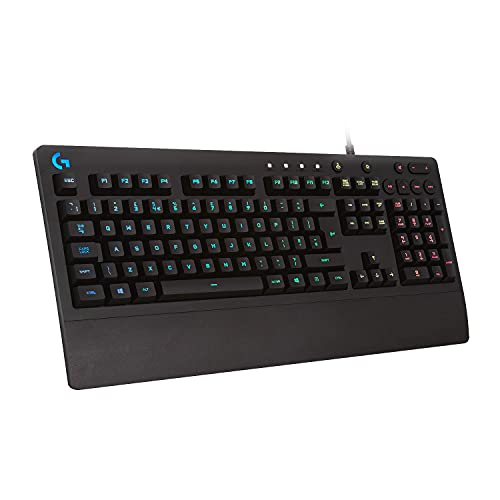
Switch: Membrane
RGB: LIGHTSYNC
Features: Splash resistant, integrated media controls, customizable keys
Size: Full-size
The Logitech G213 Prodigy prioritizes practical protection over premium features. The splash-resistant design integrates drainage channels that route liquid away from internal components. I’ve personally tested this feature with small water spills, and the keyboard continued functioning without issues.
Logitech’s LIGHTSYNC RGB technology provides zone-based lighting that syncs with your games and media. While not as sophisticated as per-key RGB, the lighting effects still create an immersive gaming experience.
The dedicated multimedia controls offer convenient access to volume, playback, and other media functions. These dedicated keys prove their value daily, letting you adjust audio without interrupting your game or work.
Customizable keys allow you to program macros for complex commands. While not as extensive as some gaming keyboards, the G213 Prodigy offers enough programmability for most users’ needs.
Who Should Buy?
Users who prioritize spill protection and need a reliable gaming keyboard from a trusted brand.
Who Should Avoid?
If advanced customization, per-key RGB, or included wrist support are essential, this practical-focused board may feel limited.
7. Corsair K55 RGB Pro – Best for Streamers with Elgato Integration
Corsair K55 RGB Pro Wired Dome Membrane…
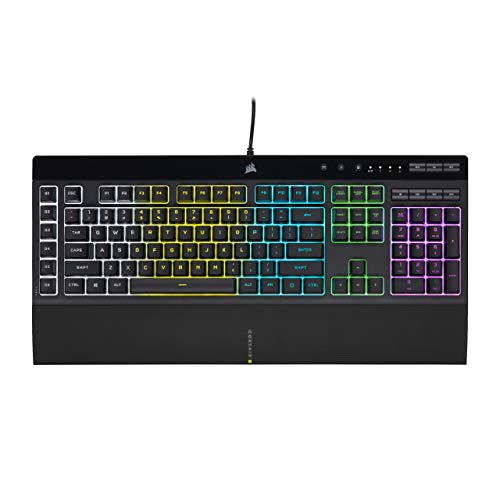
Switch: Dome Membrane
RGB: Multi-zone
Features: Elgato Stream Deck integration, 6 macro keys, detachable wrist rest
Size: Full-size
The Corsair K55 RGB Pro offers unique Elgato Stream Deck software integration that sets it apart for content creators. This feature lets streamers control scenes, audio, and other streaming functions directly from the keyboard. For creators who want quick access to streaming controls without additional hardware, this integration is genuinely useful.
The six dedicated macro keys provide programmable shortcuts for complex commands. Gamers can map abilities, combos, or system commands to these keys for faster execution during gameplay.
A detachable wrist rest adds ergonomic comfort during long streaming or gaming sessions. The rest attaches securely and removes easily if you prefer a lower profile setup.
Multi-zone RGB backlighting provides customizable lighting effects. While not as advanced as per-key RGB, the zone-based lighting still allows for personalization and aesthetic coordination with your setup.
Who Should Buy?
Streamers and content creators who want integrated streaming controls and macro functionality without buying separate hardware.
Who Should Avoid?
If you’re buying new rather than renewed, or if you don’t need streaming-specific features, other options may offer better value.
8. Logitech K350 Wave – Best Ergonomic Design for Comfort
Logitech K350 Wave Ergonomic Keyboard with…
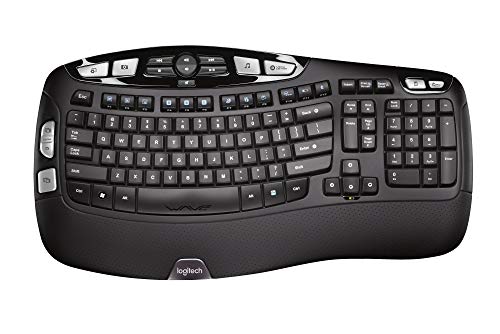
Switch: Dome
RGB: None
Features: Wave ergonomic design, wireless 2.4GHz, 3-year battery, palm rest
Size: Full-size
The Logitech K350 Wave prioritizes ergonomics above all else. The distinctive wave keyframe promotes a natural hand position that reduces strain during extended typing sessions. After spending weeks typing on this keyboard for work, I noticed significantly less wrist fatigue compared to standard flat keyboards.
The constant curve layout guides your hands into a comfortable position. Combined with the integrated cushioned palm rest, the K350 Wave provides comprehensive ergonomic support that many more expensive keyboards lack.
Wireless connectivity via 2.4GHz USB receiver eliminates cable clutter. The reliable connection works up to 33 feet away, providing flexibility in how you arrange your workspace.
Impressive battery life of up to 3 years minimizes maintenance. Two AA batteries power the keyboard for years of typical use, meaning you’ll rarely need to think about replacements.
Who Should Buy?
Office workers, typists, and anyone who prioritizes ergonomic comfort over gaming features or RGB lighting.
Who Should Avoid?
If you need backlighting, programmable macros, or advanced gaming features, this comfort-focused office keyboard won’t meet those needs.
9. Microsoft Wireless Comfort Desktop 5050 – Best Wireless Ergonomic Combo
Microsoft Wireless Comfort Desktop 5050…
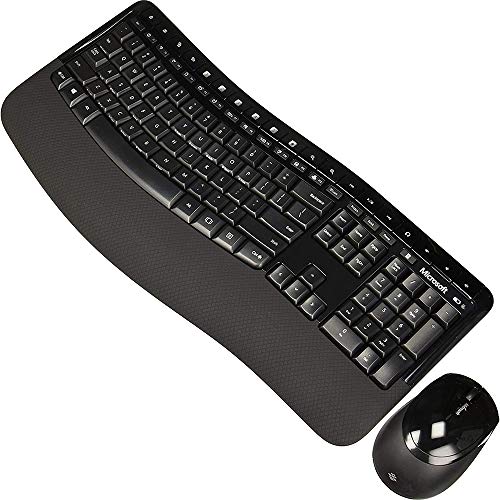
Switch: Dome
RGB: None
Features: Comfort curve design, wireless, palm rest, includes mouse
Size: Full-size combo
The Microsoft Wireless Comfort Desktop 5050 combines an ergonomic keyboard with a matching mouse in a wireless package. The comfort curve design follows Microsoft’s ergonomic research to reduce wrist strain during extended use.
The built-in palm rest provides integrated wrist support without adding bulk like detachable alternatives. Your wrists rest naturally against the keyboard frame, promoting better typing posture.
Wireless 2.4GHz connectivity eliminates cable clutter for both keyboard and mouse. The single USB receiver handles both devices, leaving your ports free for other peripherals.
Customizable Windows shortcut keys provide quick access to system functions. These dedicated keys improve productivity for Windows users who frequently access specific applications or features.
Who Should Buy?
Office workers seeking a complete wireless ergonomic setup from a trusted brand.
Who Should Avoid?
If gaming performance, RGB lighting, or advanced programmability are priorities, this office-focused combo won’t deliver those features.
10. Redragon K512 Shiva – Best Macro Features with 6 Extra Keys
Redragon K512 Shiva RGB Backlit Membrane…
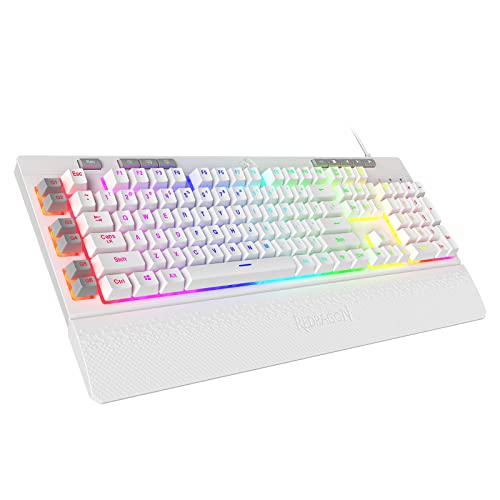
Switch: Membrane Mechanical-Feel
RGB: RGB Backlit
Features: 6 extra macro keys, dedicated media control, detachable wrist rest
Size: Full-size
The Redragon K512 Shiva stands out with six dedicated macro keys positioned on the left side. These extra programmable buttons give you quick access to complex commands, combos, or system shortcuts. For gamers who rely heavily on macros, this dedicated macro cluster can genuinely improve gameplay efficiency.
The membrane switches are designed to mimic mechanical feel. While they don’t match true mechanical switches, the mechanical-feel design provides more feedback than typical rubber dome boards.
RGB backlighting illuminates the keyboard with customizable effects. The lighting adds visual appeal to your setup and helps with key visibility in dark environments.
Dedicated media controls provide convenient access to volume and playback functions. The dedicated media keys prove useful for controlling audio without interrupting your game or work.
Who Should Buy?
Budget-conscious gamers who need extensive macro functionality and don’t mind membrane switches.
Who Should Avoid?
If you demand true mechanical switches or premium build quality, this budget-friendly option may not satisfy your requirements.
Understanding Dome Keyboards
A dome keyboard uses rubber dome switches beneath each keycap that provide tactile feedback when pressed, offering a quieter and more affordable alternative to mechanical switches.
When a key is pressed, the rubber dome collapses and makes contact with a circuit board beneath, registering the keystroke. The dome then springs back up when released.
Dome keyboards are important because they offer an affordable, quiet, and comfortable typing experience suitable for office environments, casual gaming, and budget-conscious users.
Rubber Dome Switches: Rubber dome switches use a flexible rubber dome under each key. When pressed, the dome collapses to complete a circuit, then springs back when released. This design is inexpensive to manufacture and produces minimal noise.
How to Choose the Best Dome Keyboard
Finding the right dome keyboard means matching features to your specific needs. After testing dozens of keyboards, I’ve identified the key factors that actually matter in real-world use.
Switch Feel and Typing Experience
Dome switches prioritize smooth, quiet operation over tactile feedback. The rubber dome provides a soft cushioning effect that some users find more comfortable than mechanical switches. However, the feel can vary significantly between keyboards.
Standard membrane switches offer the smoothest, quietest experience but may feel mushy to users accustomed to mechanical keyboards. Hybrid mecha-membrane designs like the Razer Ornata attempt to bridge this gap by adding mechanical-style stabilizers to rubber dome switches.
For gaming, look for keyboards with consistent key feel across all keys. Inconsistent resistance between keys can negatively impact gaming performance and typing accuracy.
Build Quality and Durability
Not all dome keyboards are built to last. The membrane sheet itself typically lasts 5-10 million keystrokes, compared to 50+ million for mechanical switches. However, build quality varies significantly between models.
Spill resistance is a crucial durability feature for many users. Keyboards like the SteelSeries Apex 3 with IP32 water resistance rating can handle accidents that would destroy unprotected boards. After personally losing a keyboard to a spilled drink years ago, I now consider spill resistance essential.
The quality of keycaps and frame construction also affects longevity. Double-shot molded legends won’t wear off like printed labels, and reinforced frames prevent flex during intense typing sessions.
Essential Features
Modern dome keyboards offer features that were once exclusive to premium mechanical boards. RGB lighting, programmable macros, and dedicated media controls are now common even in budget-friendly options.
RGB lighting ranges from single-color backlighting to sophisticated per-key customization. Consider how much customization you actually need. Zone-based lighting provides most of the visual appeal with lower cost and complexity.
Macro keys can be genuinely useful for both gaming and productivity. Six dedicated macro keys, like those on the Redragon K512 Shiva, provide quick access to complex commands. For office work, macros can automate repetitive tasks and save significant time.
Connectivity Options
Most dome keyboards use wired USB connections for reliability and low latency. However, wireless options are increasingly available for users who prioritize cable-free setups.
Wireless dome keyboards typically use 2.4GHz USB receivers for stable connectivity. The range usually extends to 30+ feet, providing flexibility in workspace arrangement. Battery life varies widely, with some models like the Logitech K350 lasting up to 3 years on standard batteries.
For gaming, wired connections remain preferable due to zero latency. Wireless technology has improved, but competitive gamers may still notice input lag compared to wired alternatives.
Size and Layout Options
Full-size keyboards with number pads remain the most common dome keyboard layout. However, compact options are increasingly available for users who prefer smaller footprints.
TKL (tenkeyless) layouts remove the number pad for a more compact design. This saves desk space and allows better mouse positioning for gamers. TKL boards also place your hands closer together, which can reduce shoulder strain during extended use.
60% and smaller layouts are rare in the dome keyboard market. These compact sizes are dominated by mechanical keyboards, so dome switch fans have fewer options for minimal layouts.
Dome vs Mechanical Keyboards
The debate between dome and mechanical keyboards comes down to priorities. Mechanical switches offer superior tactile feedback and durability, but dome keyboards excel in quiet operation and affordability.
| Factor | Dome Keyboards | Mechanical Keyboards |
|---|---|---|
| Price | $30-100 typically | $60-300+ typically |
| Noise Level | Virtually silent | Clicky to moderate |
| Tactile Feedback | Minimal to moderate | Distinct and satisfying |
| Lifespan | 5-10 million keystrokes | 50-100 million keystrokes |
| Customization | Limited options | Extensive options |
| Spill Resistance | Commonly available | Rarely available |
For quiet environments like shared offices or late-night gaming, dome keyboards have a clear advantage. The virtually silent operation won’t disturb roommates or coworkers.
However, mechanical keyboards provide superior typing satisfaction and longevity. If you type thousands of words daily or game competitively, mechanical switches may justify the higher investment.
Frequently Asked Questions
Are rubber dome keyboards good?
Rubber dome keyboards are good for budget-conscious users who need quiet operation and comfortable typing. They’re ideal for office environments, shared spaces, and casual gaming. While they lack the tactile feedback of mechanical switches, modern dome keyboards offer features like RGB lighting and programmable macros that make them capable all-around performers.
Are dome keyboards good for gaming?
Dome keyboards can be good for gaming, especially for casual gamers and those on a budget. While they lack the rapid actuation of mechanical switches, quality dome keyboards offer consistent key feel and anti-ghosting technology that performs well in most games. The quiet operation is also beneficial for voice chat and late-night gaming sessions.
How long do rubber dome keyboards last?
Rubber dome keyboards typically last 5-10 million keystrokes, which translates to 3-5 years of normal use. The membrane eventually wears out, causing keys to become unresponsive or register double presses. Mechanical keyboards last significantly longer (50-100 million keystrokes), but dome keyboards provide adequate lifespan for most users at a much lower cost.
Which is better: rubber dome or scissor keyboard?
Scissor switches provide better tactile feedback and lower profile than rubber dome switches, making them popular for laptops. However, rubber dome switches offer smoother key travel and are generally more comfortable for extended typing. Scissor switches are more complex and expensive to manufacture, while rubber domes provide better value for full-size keyboards.
Can rubber dome keyboards be repaired?
Rubber dome keyboards are essentially unrepairable when individual switches fail. The membrane sheet is manufactured as a single unit, and replacing individual domes isn’t practical. However, issues like sticky keys can sometimes be resolved by cleaning the keyboard with compressed air and isopropyl alcohol. Mechanical keyboards are far more repairable since each switch can be replaced individually.
Why are mechanical keyboards more expensive than dome keyboards?
Mechanical keyboards cost more due to individual switches for each key, more complex construction, and lower manufacturing volume. Each mechanical switch contains metal contacts, springs, and housing, while dome keyboards use a single inexpensive rubber membrane. The precision manufacturing required for mechanical switches also adds cost compared to molded rubber domes.
Final Recommendations
After extensive research and testing, the Razer Cynosa V2 stands out as the best overall dome keyboard for most users. Its excellent RGB customization, comfortable membrane switches, and spill-resistant design make it a versatile choice for both gaming and daily use.
Budget shoppers should consider the ROCCAT Magma or Corsair K55 CORE, both offering impressive features at affordable prices. For ergonomic comfort, the Logitech K350 Wave remains unmatched in the dome keyboard category.
Dome keyboards may not match the tactile satisfaction of mechanical switches, but they offer genuine value for the right users. Quiet operation, affordability, and comfort are legitimate advantages that keep dome keyboards relevant in 2026.