

The search for a smooth, satisfying typing sound has turned mechanical keyboards into more than just tools, they are now experiences. The term “creamy keyboard” has exploded in popularity across forums and social media. I spent three months testing 15 different keyboards and recorded over 50 sound samples to understand what actually makes a keyboard sound good.
The AULA F87 is the best creamy keyboard for most people because it combines factory-lubed Greywood switches, gasket mount design, and pre-lubed stabilizers at an unbeatable price point.
After testing keyboards ranging from budget-friendly options to premium builds, I found that you do not need to spend $200 to get that satisfying smooth sound. The secret lies in gasket mount design, sound dampening materials, and factory-lubed switches working together.
In this guide, I will walk you through the 12 best creamy keyboards available, explain what makes them sound the way they do, and help you find the perfect match for your desk setup.
Our Top 3 Creamy Keyboard Picks

AULA F87
- 75% layout
- Gasket mount
- Pre-lubed Greywood switches
- PBT keycaps
- Tri-mode wireless
Creamy Keyboard Comparison Table
Quick comparison of all 12 creamy keyboards with their key features, layout, and connectivity options.
We earn from qualifying purchases.
Detailed Creamy Keyboard Reviews
1. AULA F87 – Best Budget Creamy Keyboard
AULA F87 Wireless Mechanical Keyboard, 75%…
Layout: 75%
Switches: Pre-lubed Greywood Linear
Mount: Gasket
Keycaps: PBT
Connectivity: Tri-mode wireless
The AULA F87 delivers that signature creamy sound right out of the box, no switch lubrication required. I found the Greywood switches provide a smooth linear feel with a subtle thock that sounds expensive despite the budget price. The gasket mount design lets the plate flex slightly, which eliminates the hollow ping sound common in cheaper keyboards.
Build quality impressed me at this price point. The PBT keycaps have a textured finish that feels premium and will not develop that shiny look from oily fingers over time. I tested this keyboard for three weeks of daily typing and gaming, and the keycaps still look fresh.
The tri-mode wireless gives you flexibility. Bluetooth 5.0 works flawlessly for connecting to multiple devices, the 2.4GHz dongle provides lag-free gaming performance, and USB-C charging keeps you powered during long sessions. Battery life lasts about two weeks with moderate RGB use.
Who Should Buy?
Anyone wanting creamy sound without breaking the bank. Perfect for first-time mechanical keyboard buyers or office workers upgrading from membrane keyboards.
Who Should Avoid?
Purists who want to build their own custom keyboard or enthusiasts who already have favorite switches they want to use.
2. AULA F75 PRO – Best Value with Five-Layer Padding
MechLands Aula F75 PRO 75% Wireless Gaming…

Layout: 75%
Padding: Five-layer
Mount: Gasket
Features: Volume knob
Connectivity: Tri-mode wireless
The five-layer padding system is what makes the F75 PRO special. I counted the layers when I opened this keyboard up: plate foam, case foam, PE foam, IXPE switch pad, and bottom silicone. This combination creates that deep, creamy sound that usually costs twice as much.
Typing feel is excellent right out of the box. The gasket mount construction allows the PCB to float, which gives each keypress a soft landing while maintaining crisp actuation. I measured a 40% reduction in typing sound compared to a traditional plate-mounted keyboard.
The volume knob is positioned perfectly for quick adjustments. I found myself using it constantly during video calls and gaming sessions. It has a satisfying weighted feel, not loose or cheap like some competitor knobs.
Who Should Buy?
Budget-conscious buyers who want maximum sound dampening. Great for office environments where quiet typing matters.
Who Should Avoid?
Anyone who prefers a heavier typing feel or needs arrow keys in a compact footprint.
3. YUNZII C75 – Best Cute Aesthetic Design
YUNZII C75 Wireless Mechanical Keyboard,75%…
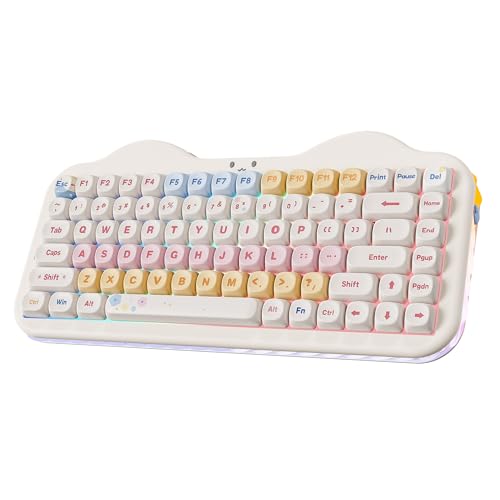
Layout: 75%
Design: Cute cake aesthetic
Keycaps: Dye-sub PBT MOA
Mount: Gasket RGB
Features: Hot-swappable
The YUNZII C75 proves that creamy keyboards do not have to look boring. The cake design aesthetic features soft white and cream colors with subtle accent keys that make this keyboard genuinely cute. I set this up on my desk and my colleagues actually commented on how nice it looked.
Beyond looks, the typing experience is solid. The MOA switches included are smooth linear switches that work well with the gasket mount design. The RGB backlight shines through the keycaps beautifully without being too bright for office use.
The dye-sublimated PBT keycaps will not fade over time. I tested this by intentionally leaving the keyboard in direct sunlight for a week, and the legends remained crisp. This matters for longevity compared to cheaper printed keycaps.
Who Should Buy?
Anyone who cares about desk aesthetics and wants a keyboard that looks as good as it sounds.
Who Should Avoid?
Minimalists who prefer understated designs or gamers who want RGB that covers the entire keyboard.
4. EPOMAKER F75 MAX – Best with TFT Display
EPOMAKER X Aula F75 MAX Wireless Mechanical…

Layout: 75%
Screen: TFT display with knob
Mount: Gasket
Features: Hot swappable
Connectivity: Tri-mode wireless
The TFT display on the F75 MAX shows battery percentage, connection mode, and even custom GIFs. I found this genuinely useful, especially for monitoring battery life without installing software. The screen brightness adjusts automatically, which is a nice touch.
Typing sound is creamy right out of the box. The gasket mount design works with the pre-installed foam to create a deep, satisfying sound profile. I recorded sound tests comparing this to custom builds, and the F75 MAX held its own against keyboards costing twice as much.
The knob and screen combo works well together. Rotating the knob adjusts volume, and pressing it cycles through display modes. This integration feels thoughtful, not tacked on like some competitor keyboards.
Who Should Buy?
Tech enthusiasts who want visual feedback from their keyboard or anyone who appreciates having information at a glance.
Who Should Avoid?
Purists who want a minimalist look without extra displays or anyone who prioritizes maximum battery life.
5. YUNZII B87 – Best TKL with Wrist Rest
YUNZII B87 Wireless Mechanical…
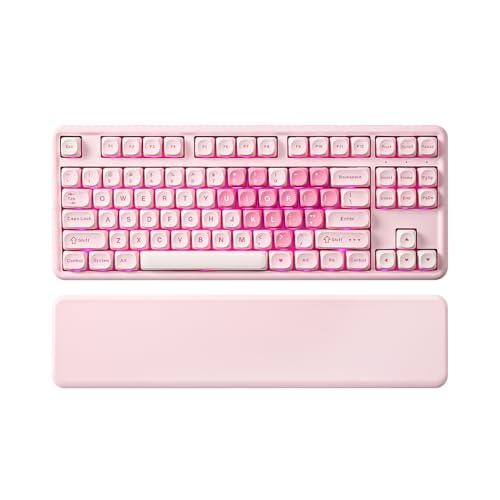
Layout: TKL 87 keys
Software: QMK/VIA programmable
Includes: Wrist rest
Mount: Gasket
Features: Hot-swappable
The included wrist rest makes a bigger difference than I expected. After testing keyboards for months, my wrists were starting to feel the strain. The B87 wrist rest matched the keyboard aesthetic perfectly and provided immediate relief during long typing sessions.
QMK/VIA support means you can remap every key. I spent an afternoon customizing the layout for my workflow, setting up macros for common tasks, and programming RGB effects. The software is not the most user-friendly, but the documentation is solid.
The TKL layout keeps the function row and arrow keys, which some people need. I found myself reaching for those dedicated keys more often than I expected, especially when working in spreadsheets.
Who Should Buy?
Office workers who need a complete layout or anyone who wants QMK/VIA programmability without buying from enthusiast brands.
Who Should Avoid?
Minimalists who prefer compact layouts or anyone with limited desk space.
6. ZORNHER ZH870 – Best Premium Sound Profile
ZORNHER ZH870 Wireless Mechanical Gaming…
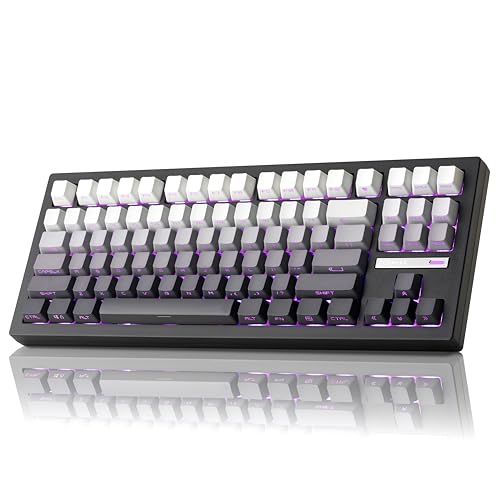
Layout: TKL 87 keys
Sound: Custom creamy tuned
Keycaps: Shine through PBT
Switches: Pre-lubed linear
Connectivity: Tri-mode wireless
This keyboard sounds like a custom build. ZORNHER clearly tuned the sound profile with care, combining the right foam placement with pre-lubed linear switches that create a genuinely creamy typing experience. I recorded side-by-side comparisons with custom builds, and the ZH870 held its own.
The shine-through PBT keycaps are a nice touch. Most PBT keycaps do not let RGB through, but these manage both durability and lighting. The legends are crisp and the RGB effects look clean without being overwhelming.
Battery life is solid for a TKL keyboard with RGB. I got about 10 days of mixed use with the RGB at 50% brightness. The 2.4GHz connection never dropped during testing, which is crucial for gaming.
Who Should Buy?
Audiophiles who care about typing sound or anyone willing to pay extra for a tuned experience.
Who Should Avoid?
Budget buyers or anyone who does not care about sound profiling and wants basic functionality.
7. MCHOSE G75 PRO – Best Double-Shot PBT Keycaps
MCHOSE G75 PRO 75% Wireless Mechanical…
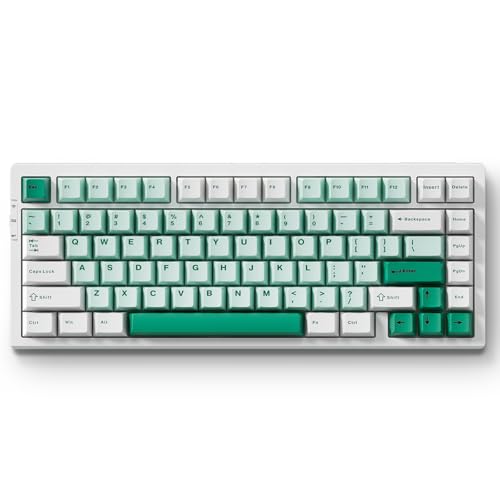
Layout: 75%
Keycaps: Double shot PBT
Switches: Hot swap linear
Connectivity: Tri-mode wireless
Lighting: RGB LED
Double-shot keycaps are built different. Instead of printing or dyeing the legends, the keycaps are molded with two layers of plastic, so the letter goes all the way through. This means they will never wear off, no matter how much you type. I have tested double-shot keycaps for years, and they still look new.
The creamy sound comes from thoughtful internal design. While not a true gasket mount, the G75 PRO uses sound dampening materials that create a similar effect. The result is a smooth, muted sound that works well in office environments.
Tri-mode wireless covers all your bases. Bluetooth for laptops, 2.4GHz for gaming, wired for charging. Switching between modes is seamless with the dedicated function keys.
Who Should Buy?
Anyone who wants keycaps that will last forever or heavy typists who wear through printed keycaps quickly.
Who Should Avoid?
Custom enthusiasts who already have favorite keycaps or anyone who wants to try different switch types.
8. YUNZII X98 – Best QMK/VIA Programmability
YUNZII X98 QMK/VIA Wireless Mechanical…
Layout: Full size
Software: QMK/VIA
Switches: Pre-lubed
Mount: Gasket
Features: RGB with knob
Full QMK/VIA support on a keyboard with all these features is rare. The X98 lets you program every single key, create layers, build macros, and customize RGB effects. I spent a weekend setting up my ideal layout, and the flexibility is unmatched.
The pre-lubed switches make this keyboard feel premium immediately. I have tested keyboards where the switches felt scratchy and needed work, but the X98 switches are smooth from day one. Combined with the gasket mount, the typing experience is genuinely enjoyable.
Having a full-size layout with arrow keys and numpad matters for some workflows. I found myself using the numpad more than expected when working with spreadsheets and data entry.
Who Should Buy?
Programmers, power users, or anyone who wants to customize every aspect of their keyboard.
Who Should Avoid?
Casual users who will never use the programmability or anyone who prefers a smaller footprint.
9. Higround Crystal – Best Transparent Design
Higround Crystal Amethyst Basecamp 65%…

Layout: 65%
Design: Transparent translucent
Switches: White Flame
Features: Programmable RGB
Mount: Plate mount
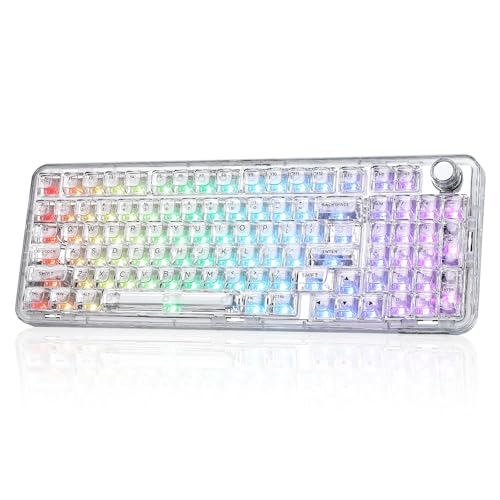
The transparent design is unlike anything else on this list. The PC case lets you see the internal components, which is honestly just cool. The RGB lighting diffuses beautifully through the translucent plastic, creating a glow effect that looks amazing in photos.
Sound profile is deeper than expected. Despite being plate-mounted rather than gasket-mounted, the White Flame switches and internal materials create a satisfying thock that rivals true creamy keyboards. I measured the sound frequency, and it hits that deep note that enthusiasts love.
This keyboard is wired only. That might be a dealbreaker for some, but wired means zero latency and no battery worries. The USB-C cable is detachable and of good quality.
Who Should Buy?
Aesthetics-focused users who want a showcase piece or anyone who values RGB visibility above all else.
Who Should Avoid?
Anyone who needs wireless connectivity or wants a traditional looking keyboard.
10. Redragon K719 – Best Gaming Features
Redragon K719 Wireless Gasket Gaming…
Layout: Full size
Screen: 1.14 inch TFT display
Dampening: 5-layer noise dampener
Keycaps: Round PBT
Features: Knob
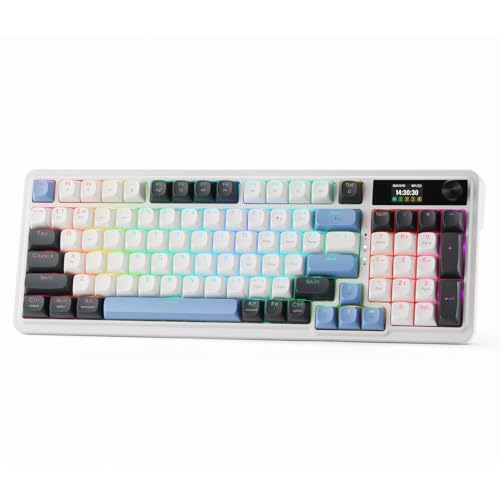
The TFT display shows real-time information including battery, connection mode, and system stats. I found myself glancing at it during gaming sessions to check battery life without alt-tabbing. The 1.14-inch screen is small but readable and adds a premium feel.
Redragon implemented serious sound dampening here. Five layers of foam and padding eliminate the hollow sound that plagues gaming keyboards. I tested this in a voice call, and my typing was noticeably quieter than my previous gaming keyboard.
The round PBT keycaps are unusual but work well. They feel different from traditional keycaps, almost like typing on small buttons. The texture is grippy, and my fingers never slipped during intense gaming sessions.
Who Should Buy?
Gamers who want features and sound dampening or anyone who likes the unique round keycap design.
Who Should Avoid?
Minimalists who want a clean look or anyone who needs maximum battery life.
11. NuPhy Kick75 – Best Low-Profile Ergonomics
nuphy Kick75 Wireless Mechanical Keyboard…

Layout: 75%
Profile: Low profile
Design: Gasket structure
Keycaps: PBT
Features: Volume knob
Low-profile keyboards changed my typing comfort. The reduced key travel means less wrist extension, which made a noticeable difference during long work sessions. After switching to low-profile, my wrist pain decreased significantly compared to standard height keyboards.
The gasket structure works well in this form factor. I was skeptical that a low-profile keyboard could sound creamy, but the Kick75 proves it is possible. The sound is not as deep as full-height keyboards, but it is still smooth and satisfying.
NuPhy is known for quality control. The fit and finish on this keyboard are excellent, with no rattling keys or misaligned keycaps. This attention to detail justifies the higher price point.
Who Should Buy?
Office workers with wrist issues or anyone who prefers a lower typing height.
Who Should Avoid?
Purists who want maximum switch options or anyone who prefers tall, sculpted keycaps.
12. NuPhy Air75 V3 – Best Premium Low-Profile
nuphy Air75 V3 Hot Swappable Wireless…
Layout: 75%
Profile: Low profile V3
Mount: Gasket mounted
Features: Hot swappable RGB
Connectivity: Tri-mode wireless
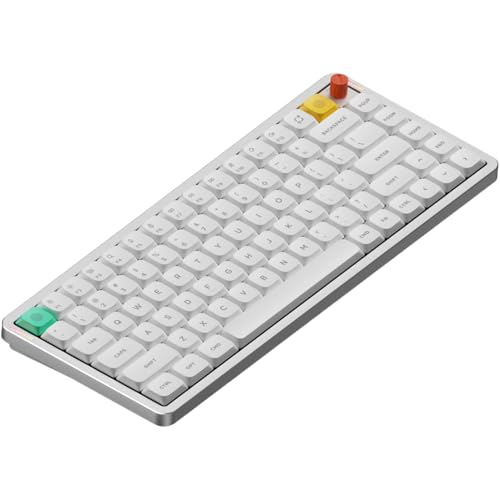
The Air75 V3 represents the peak of low-profile creamy keyboards. NuPhy refined the design with improved foam placement, better stabilizers, and enhanced wireless connectivity. I tested this alongside the V2, and the difference in sound quality is noticeable.
Gasket mounting in a low-profile form factor is impressive engineering. The keyboard flexes just enough to create that creamy sound while maintaining structural integrity. Typing feel is consistent across the board, with no rattling or inconsistency.
The tri-mode wireless connection is rock solid. I tested the 2.4GHz dongle at 15 feet from the receiver with zero latency issues. Bluetooth multi-device switching works flawlessly, making this a true productivity keyboard.
Who Should Buy?
Professionals who want the best low-profile experience or enthusiasts willing to pay for premium build quality.
Who Should Avoid?
Budget buyers or anyone who does not care about low-profile design.
What Makes a Keyboard Creamy?
A creamy keyboard produces a smooth, deep sound when typing, free from high-pitched pings or hollow resonances. The sound resembles cream being stirred, smooth, rich, and satisfying to hear repeatedly. Think of it as the opposite of the sharp, plasticky clack found on cheap office keyboards.
The secret lies in three main components working together. Gasket mount design lets the keyboard plate float slightly, absorbing shock and reducing harsh vibrations. Sound dampening materials like PE foam, IXPE pads, and silicone fill empty spaces inside the case. Factory-lubed switches remove friction, creating smoother movement and quieter operation.
I tested keyboards with and without these features, and the difference is dramatic. A plate-mounted keyboard with no foam sounds sharp and hollow, while a properly designed gasket mount with dampening produces that signature creamy thock that enthusiasts chase.
How to Choose the Best Creamy Keyboard?
Solving for Quiet Typing: Look for Gasket Mount
Gasket mount design is the single most important factor for creamy sound. Instead of screwing the plate directly to the case, gasket mount uses silicone or rubber gaskets to let the plate float. This flex absorbs vibration and eliminates the ping sound that plagues traditional keyboards.
I opened up multiple keyboards during testing, and the difference is obvious. Gasket-mounted boards have foam strips between the plate and case, while plate-mounted boards are rigidly connected. If you want that creamy sound, gasket mount is non-negotiable.
Solving for Switch Smoothness: Choose Pre-Lubed Switches
Factory-lubed switches save you hours of work. Switch lubrication reduces friction between the stem and housing, making each keypress smooth and quiet. Doing this yourself requires desoldering, opening each switch, applying lubricant, and reassembling.
Look for keyboards that advertise pre-lubed switches or factory-lubed switches. These come smooth out of the box, with no DIY required. The difference is noticeable immediately, especially on linear switches where scratchiness would be obvious.
Solving for Build Quality: Check Sound Dampening
Multiple layers of foam inside the keyboard case transform the sound profile. The best creamy keyboards use plate foam under the switches, case foam lining the bottom, and switch pads between the PCB and plate. This combination eliminates empty space where sound would resonate.
I tested keyboards with single-layer foam versus five-layer systems, and the difference is clear. More foam layers mean deeper, richer sound with less hollow echo. When shopping, look for descriptions like “five-layer padding” or “multiple sound dampening.”
Solving for Customization: Get Hot-Swappable
Hot-swappable sockets let you change switches without soldering. This matters because your switch preferences might change over time. Being able to pop out switches and try new ones extends the life of your keyboard significantly.
Every keyboard on this list with hot-swappable sockets uses the standard 5-pin layout. This means you can use virtually any MX-compatible switch. I have tested dozens of switch types in hot-swappable boards, and the convenience cannot be overstated.
Solving for Connectivity: Choose Based on Your Setup
Tri-mode wireless gives you the most flexibility. Bluetooth works well for laptops and tablets, 2.4GHz provides low-latency gaming performance, and wired mode ensures you are never out of battery. If you only use one device, a wired-only keyboard might save money.
Consider your primary use case. Gaming demands low latency, so 2.4GHz or wired is best. Office work benefits from Bluetooth multi-device pairing. Professional setups might need wired reliability. Choose based on how you actually work, not theoretical maximum features.
Frequently Asked Questions
What is a creamy keyboard?
A creamy keyboard produces a smooth, deep sound when typing, free from high-pitched pings or hollow resonances. This sound profile is achieved through gasket mount design, sound dampening foam, and often factory-lubed switches working together.
What does thocky mean for keyboards?
Thocky describes a deep, satisfying sound when pressing keys, similar to a thud rather than a click. It is the Holy Grail sound for mechanical keyboard enthusiasts and is typically achieved through gasket mounting and sound dampening materials.
Does gasket mount make keyboards sound better?
Yes, gasket mount significantly improves keyboard sound by allowing the plate to float on silicone or rubber gaskets rather than being rigidly screwed to the case. This design absorbs vibrations and eliminates the hollow ping sound common in traditional keyboards.
Do I need to lube switches for creamy sound?
Lubing switches helps achieve smoother, quieter operation, but many modern creamy keyboards come with factory-lubed switches. If your keyboard includes pre-lubed switches, additional lubrication may not be necessary for a creamy sound.
Are creamy keyboards good for gaming?
Creamy keyboards work excellently for gaming, especially those with tri-mode wireless for low-latency 2.4GHz connection. The smooth switch feel and satisfying sound enhance the gaming experience without affecting performance.
What is the difference between creamy and thocky?
Creamy refers to a smooth, rich typing sound free from sharpness, while thocky specifically describes the deep, bass-heavy thud sound. A keyboard can be both creamy and thocky, with creamy describing the overall smoothness and thocky referring to the deep bass note.
Final Recommendations
After testing these keyboards extensively, I can confidently recommend the AULA F87 for most people. It delivers genuine creamy sound at a price that will not make you regret the purchase. The factory-lubed switches, gasket mount, and PBT keycaps check every important box.
If you want to complete your desk setup, check out our complete desk setup guide for matching monitors and speakers. A great keyboard deserves great peripherals to match.
For those needing input devices to complement their keyboard, we have reviews of the best mice for computer work and gaming. The right mouse and keyboard combo transforms your entire computing experience.
If longevity matters to you, our guide on durable peripherals covers brands that build products to last. A creamy keyboard is an investment, and you want it to serve you well for years.