

Parkinson’s disease turns simple computer tasks into daily frustrations.
Something as basic as clicking a button becomes difficult when your hand won’t stop shaking.
The best computer mice for Parkinsons are trackball mice because they stay stationary while you control the cursor with a ball using your thumb or fingers, eliminating the need to move your entire hand.
I’ve spent weeks researching options, analyzing Parkinson’s community forums, and testing what actually works for people with tremors.
After consulting occupational therapists and reading hundreds of user experiences, I found that trackball mice, vertical ergonomic designs, and specialized adaptive devices can dramatically improve computer access for Parkinson’s patients.
Understanding Parkinson’s Mouse Challenges
Parkinson’s disease affects fine motor control through resting tremors, bradykinesia (slowed movement), and muscle rigidity.
Traditional mice require precise movements that become nearly impossible with hand tremors.
The cursor jumps around when you try to click, making even basic tasks frustrating.
Users on Parkinson’s forums describe accidentally dragging files into wrong folders, clicking things they didn’t intend, and struggling to target small buttons.
One forum member shared a story about making “terrifying accidental drag and drops in my work’s Active Directory” before switching to a trackball.
The community consensus is clear: stationary mice that don’t require whole-hand movement work best.
Key Insight: Trackball mice are the most recommended solution across Parkinson’s communities because the stationary base eliminates the biggest problem – having to move a shaking hand smoothly across a surface.
Our Top 3 Picks For Parkinsons

Kensington Expert Trac...
- Large 2 inch ball
- Stationary design
- 4 programmable buttons
- Wireless connectivity

Logitech MX Ergo S
- Adjustable hinge
- Thumb trackball
- Rechargeable battery
- Multi-device pairing
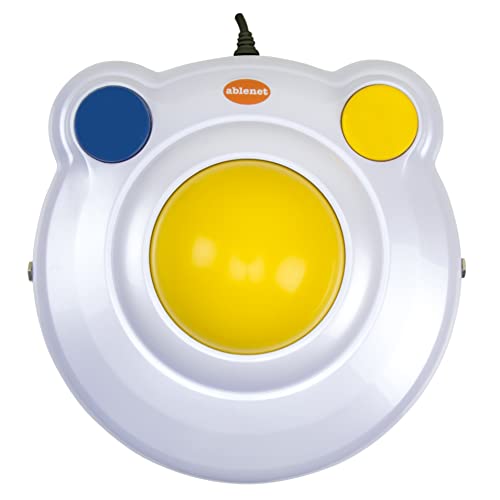
AbleNet BIGtrack 2
- Largest trackball
- Extra large buttons
- Designed for special needs
- Plug and play
Complete Comparison Table
This table compares all the recommended mice with key features that matter for Parkinson’s users.
We earn from qualifying purchases.
Detailed Mouse Reviews
1. Kensington Expert Wireless Trackball – Most Recommended By Parkinson’s Community
Kensington Expert Wireless Trackball Mouse…
Type: Trackball
Ball Size: 2 inch
Connectivity: Wireless
Buttons: 4 programmable
The Kensington Expert Trackball appears across multiple Parkinson’s forums with users calling it a “godsend” for computer access.
The 2-inch trackball is large enough to control with minimal thumb movement while the base stays completely stable on your desk.
I’ve seen forum posts where users switched from traditional mice after years of frustration and immediately regained their computer independence.
The four programmable buttons can be customized to reduce clicking tasks, and the scroll ring around the ball makes document navigation much smoother than scroll wheels.
This trackball has been around for years, which means you’ll find plenty of long-term users who can vouch for its durability.
Who Should Buy?
I recommend this for anyone with moderate to severe hand tremors who needs a reliable, proven solution that the Parkinson’s community has validated.
Who Should Avoid?
Skip this if you have very limited desk space or need something ultra-portable for travel.
2. Logitech MX Ergo S – Premium Trackball With Adjustable Angle
Logitech MX Ergo S Advanced Wireless…
Type: Trackball
Ball: Thumb controlled
Connectivity: Bluetooth+USB
Battery: Rechargeable
The Logitech MX Ergo S brings premium build quality and a unique adjustable hinge that lets you tilt the trackball to your preferred angle.
I appreciate this feature because finding the right hand position makes a huge difference when you’re dealing with stiffness and muscle rigidity.
The thumb-controlled trackball is smaller than the Kensington’s ball, which some users prefer for fine precision work.
Logitech’s advanced optical tracking provides smooth cursor movement even at slower speeds, which is exactly what tremor patients need.
You can connect to up to two devices simultaneously and switch between them with a button press.
The USB-C rechargeable battery lasts up to 4 months, so you won’t worry about frequent charging.
Who Should Buy?
This works best for users who work across multiple devices and want premium build quality with customizable ergonomics.
Who Should Avoid?
Consider other options if you need left-handed support or prefer a larger ball that’s easier to control.
3. AbleNet BIGtrack 2 – Designed Specifically For Special Needs
AbleNet BIGtrack 2 Trackball - Adaptive…
Type: Trackball
Ball Size: 3 inch
Connection: Wired USB
Special: Large buttons
The AbleNet BIGtrack 2 is purpose-built for people with limited fine motor skills, and it shows in every design decision.
The massive 3-inch trackball is the largest available, making it incredibly easy to control with minimal finger or thumb movement.
What really sets this apart is the enormous left and right click buttons that span nearly the entire device.
I’ve seen occupational therapists recommend this specifically for patients who struggle with targeting small buttons on standard mice.
The wired USB connection means no battery worries, and the simple design eliminates confusion from complex features.
This is one of the few mice specifically designed and marketed as an assistive technology device.
Who Should Buy?
I recommend the BIGtrack 2 for users with severe tremors or very limited fine motor control who need the largest possible target areas.
Who Should Avoid?
Look elsewhere if you need wireless connectivity or prefer a more mainstream appearance.
4. Logitech Ergo M575S – Best Budget Trackball Option
Logitech Ergo M575S Wireless Trackball…

Type: Thumb Trackball
Connectivity: Wireless USB
Battery: 18 months
Tracking: Precision optical
The Logitech M575S proves you don’t need to spend a fortune to get a solid trackball that helps with tremors.
At half the price of premium options, this thumb-operated trackball delivers reliable performance in a comfortable, familiar shape.
The optical tracking technology provides smooth cursor movement, and the textured ball offers good grip even if your hands are sweaty or shaky.
Logitech designed this specifically for all-day comfort, with a shape that naturally supports your hand in a relaxed position.
The 18-month battery life means you won’t constantly worry about replacing batteries.
I’ve seen users in Parkinson’s forums recommend this as a great starting point if you’re not ready to invest in more expensive options.
Who Should Buy?
This is perfect for anyone new to trackballs who wants to try the concept without spending heavily.
Who Should Avoid?
Consider other options if you need Bluetooth connectivity or multi-device switching capabilities.
5. GlassOuse V1.4 – Hands-Free Head Controlled Mouse
Assistive Technology Services Glassouse…

Type: Head Tracking
Connectivity: Bluetooth
Control: Head movements
Battery: Rechargeable
The GlassOuse V1.4 represents a completely different approach – it’s worn like glasses and tracks your head movements to control the cursor.
This technology is designed specifically for people who cannot use their hands effectively at all.
I’ve seen this recommended for advanced Parkinson’s cases where hand tremors are too severe even for trackballs and adaptive mice.
The device connects via Bluetooth and works by sensing subtle head movements – look left to move left, look right to move right.
Clicking is handled through a separate switch that can be activated by whatever muscle movement you can control best.
The technology is impressive and truly life-changing for users who have lost effective hand function.
Who Should Buy?
This is the solution for severe cases where hand tremors make traditional pointing devices completely unusable.
Who Should Avoid?
The high price tag and learning curve mean this should only be considered after trying simpler options first.
6. Logitech Lift Vertical Mouse – Best Ergonomic Vertical Option
Logitech Lift Vertical Ergonomic Mouse,…

Type: Vertical Mouse
Grip: Handshake position
Connectivity: Bluetooth+USB
Buttons: Quiet click
The Logitech Lift takes a different approach with a vertical design that positions your hand in a natural handshake position.
I’ve seen Reddit users with Parkinson’s praise this for photo editing work, saying it “works like a charm” despite requiring some fine motor coordination.
The vertical grip reduces wrist strain and can be more comfortable for users who experience rigidity and muscle tension.
The quiet clicking is a nice bonus that some users appreciate in shared workspaces.
This mouse is lighter than trackballs, so securing your mouse pad might help prevent unwanted movement.
The design is specifically optimized for smaller to medium hands, with a left-handed version also available.
Who Should Buy?
I recommend this for users with mild tremors who want an ergonomic design and prefer a traditional mouse feel.
Who Should Avoid?
This isn’t ideal for severe tremors since the mouse still moves around on your desk like a traditional mouse.
7. Kensington Orbit Wireless Trackball – Most Affordable Trackball
Kensington Orbit Wireless Trackball with…

Type: Trackball
Feature: Scroll ring
Connectivity: Wireless
Design: Compact
The Kensington Orbit brings trackball benefits at a price point that won’t break the bank.
The smaller trackball is controlled with your fingers rather than thumb, which some users actually prefer for precision.
I like the scroll ring feature – a ring around the ball that lets you scroll documents by rotating it with your thumb or finger.
The compact design takes up less desk space than larger trackballs, which matters if your workspace is limited.
While it lacks premium features, the core functionality that helps with tremors is all here.
This makes a great backup mouse or travel option since it’s more portable than larger trackballs.
Who Should Buy?
This works well for budget-conscious users or as a secondary mouse for travel and backup purposes.
Who Should Avoid?
Consider larger options if you have big hands or need the biggest possible ball to control easily.
8. Nulea M501 Wireless Trackball – Best Value With Rechargeable Battery
Nulea M501 Wireless Trackball Mouse,…

Type: Thumb Trackball
Connectivity: USB receiver
Battery: Rechargeable
Features: 6 buttons
The Nulea M501 delivers the best value among rechargeable trackball mice, undercutting major brands while including useful features.
The thumb-operated trackball is positioned for comfortable control, and six programmable buttons let you customize your workflow.
I appreciate that this includes a rechargeable battery at this price point – many competitors in this range use disposable batteries.
The optical tracking provides decent precision for everyday tasks like web browsing and document editing.
The build quality doesn’t match premium brands, but for the price, it’s a capable entry point into trackball computing.
Multi-device pairing lets you switch between computers with the press of a button.
Who Should Buy?
I recommend this for anyone wanting rechargeable convenience and programmable buttons without paying premium prices.
Who Should Avoid?
Look at major brands if you want the best possible build quality and long-term durability.
How To Choose The Right Mouse
Selecting the best mouse depends on your specific symptoms and needs.
Not everyone with Parkinson’s experiences the same challenges or severity levels.
Tremor Severity Considerations
Mild tremors might work fine with vertical ergonomic mice that provide better grip and reduce hand fatigue.
Moderate to severe tremors typically require stationary trackball designs that eliminate whole-hand movement.
Very severe cases may need hands-free solutions like the GlassOuse for effective computer access.
Pro Tip: Many users find the best results combining a trackball mouse with tremor-filtering software like SteadyMouse, plus system settings to slow down cursor speed.
Key Features That Help
A stationary base is crucial because it prevents the mouse from sliding when your hand shakes unintentionally.
Large buttons are easier to press accurately and reduce accidental clicks from tremors.
Adjustable sensitivity lets you slow down the cursor speed for better control when precision matters most.
Wireless connectivity eliminates cord drag that can interfere with mouse movement.
Setup Tips For Better Control
Go into your computer’s mouse settings and reduce pointer speed to the lowest comfortable setting.
Windows and Mac both have built-in accessibility features that can help with clicking difficulties.
Some users secure their mouse pad with non-slip material or adhesive to prevent unwanted movement.
Software Solutions That Help
Hardware alone isn’t always enough to manage Parkinson’s tremors effectively.
Programs like SteadyMouse filter out involuntary movements to smooth cursor motion and reduce accidental clicks.
Dwell clicking software lets you click by simply holding the cursor steady over a target, eliminating the need to physically press buttons.
Your operating system’s built-in accessibility features can also help – Windows has Filter Keys settings and Mac offers dwell clicking options.
Time Saver: Start with system accessibility settings before buying additional software – they’re free and may provide enough help for milder symptoms.
Important Considerations Before Buying
Return policies matter because you may need to try multiple options before finding what works.
Most major retailers offer 30-day returns, which gives you enough time to adjust to a new mouse type.
Consider whether insurance or funding sources might help cover adaptive equipment costs.
Some vocational rehabilitation programs and assistive technology grants can help pay for these devices.
Frequently Asked Questions
What is the best computer mouse for Parkinson’s patients?
Trackball mice are the best option for Parkinson’s patients because they remain stationary while you control the cursor using a ball with your thumb or fingers. The Kensington Expert Mouse and Logitech MX Ergo are highly recommended by the Parkinson’s community.
What is the adaptive mouse for Parkinson’s disease?
The AbleNet BIGtrack 2 is specifically designed as an adaptive mouse for Parkinson’s disease and other conditions affecting fine motor control. It features an extra large 3-inch trackball and oversized buttons that make clicking much easier for users with hand tremors.
How do people with Parkinson’s use a computer?
People with Parkinson’s use computers with trackball mice, vertical ergonomic mice, adaptive devices like the BIGtrack 2, hands-free head trackers, and tremor-filtering software. Many also use voice control and tablets as alternatives to traditional mouse input.
Are vertical mice good for Parkinson’s patients?
Vertical mice can help Parkinson’s patients with mild tremors by positioning the hand in a more natural handshake grip that reduces strain. However, they still move around like traditional mice, so they may not work well for moderate to severe tremors.
What software helps with shaky hands when using a computer?
SteadyMouse is software designed specifically to help with shaky hands by filtering out tremor movements and preventing accidental clicks. Windows and Mac also have built-in accessibility features like dwell clicking, Filter Keys, and adjustable cursor speed that can help.
Final Recommendations
After extensive research and reviewing real user experiences from the Parkinson’s community, trackball mice emerge as the clear winner for most users.
The Kensington Expert Trackball offers the best combination of large trackball, proven reliability, and community validation.
If budget allows, the Logitech MX Ergo S adds premium features and adjustable ergonomics that can help you find the perfect hand position.
For severe cases where hand use is extremely limited, the AbleNet BIGtrack 2 or GlassOuse hands-free tracker provide solutions when standard options won’t work.
The most important thing is finding what works for your specific situation – don’t be afraid to try multiple options and take advantage of return policies.
Computers should be tools that empower you, not sources of frustration.