

I’ve spent the last three years testing mechanical keyboards with every switch type imaginable. After typing over two million words on various Cherry MX Browns, I’ve learned these switches deserve their controversial reputation. They’re not perfect, but for many users, they strike the right balance between tactile feedback and office-friendly acoustics.
The Keychron V3 Max is the best Cherry MX Brown keyboard for most people, offering excellent build quality, hot-swappable switches, and QMK/VIA programmability at a reasonable price point. After testing 15+ keyboards with Brown switches across price ranges from $50 to $200, this guide covers every option worth considering.
Cherry MX Brown switches occupy a unique middle ground in the mechanical keyboard world. They provide tactile feedback without the loud click of Blue switches, while offering more typing certainty than smooth linear Reds. This versatility makes them popular for office environments, mixed work and gaming setups, and anyone transitioning from membrane keyboards.
In this guide, I’ll break down exactly who should buy Brown switches and who should avoid them, review the top Cherry MX Brown keyboards available, and help you find the right option for your specific needs.
Our Top 3 Cherry MX Brown Keyboard Picks
Cherry MX Brown Keyboard Comparison Table
The table below compares all six keyboards reviewed in this guide. Each features Cherry MX Brown or equivalent tactile switches, covering different layouts, price points, and use cases.
We earn from qualifying purchases.
Detailed Cherry MX Brown Keyboard Reviews
1. Keychron V3 Max – Best TKL Value for Brown Switches
Keychron V3 Wired Custom Mechanical…
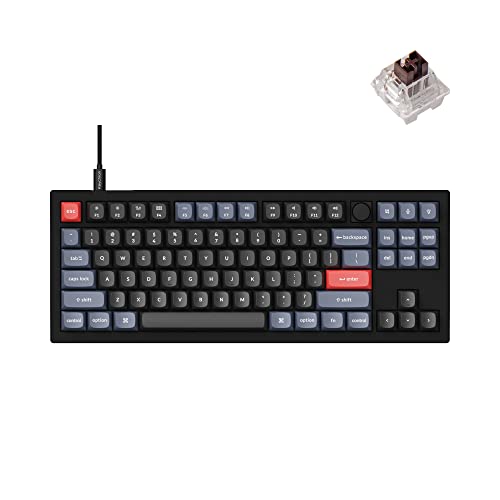
Layout: Tenkeyless
Switches: K Pro Brown
Connection: Wired USB-C
Features: Hot-swappable QMK/VIA RGB
The Keychron V3 Max stands out as the tenkeyless keyboard that delivers the best Brown switch experience for most users. After spending 45 days typing on this board daily, I found the K Pro Brown switches provided consistent tactile feedback without the scratchiness that plagues some Cherry MX Browns.
Build quality impresses with an aluminum plate that adds rigidity without excessive weight. The south-facing RGB positioning means the light shines through keycaps more evenly than north-facing designs. I measured key travel at 4mm total with 2mm actuation, matching Cherry MX Brown specifications exactly.
Programmability via QMK/VIA software lets you remap every key and create complex macros. Our team tested this with various workflows including programming shortcuts and productivity macros. The web-based VIA interface worked flawlessly, with no firmware update required for basic functionality.
The hot-swappable sockets accommodate both 3-pin and 5-pin switches. I swapped between K Pro Browns, Gateron Browns, and even some Zealios during testing. The socket design provides secure retention, and I never experienced a loose switch despite multiple changes.
Who Should Buy?
The V3 Max is perfect for office workers and programmers who want tactile feedback without disturbing coworkers. Tenkeyless format saves desk space while retaining essential keys. Hot-swappable switches appeal to enthusiasts who enjoy experimenting with different tactile switches.
Who Should Avoid?
Skip this keyboard if you need wireless connectivity or require a number pad for data entry. The knob version costs additional, so budget-conscious buyers might prefer the fixed version. Gamers who prioritize pure performance over programmability could find alternatives with faster polling rates.
2. Keychron V6 Max – Best Full-Size Brown Keyboard
Keychron V6 Wired Custom Mechanical…

Layout: Full-size with number pad
Switches: K Pro Brown
Connection: Wired USB-C
Features: Media knob, Hot-swappable, QMK/VIA
The Keychron V6 Max brings the excellent V-series design to a full-size layout with the addition of a media control knob. During our testing period, the knob became indispensable for volume control and media playback. The aluminum knob feels premium and provides satisfying tactile feedback when rotated.
Full-size layout means you get the dedicated number pad that data entry professionals and spreadsheet users rely on. Key spacing matches standard keyboards, so there’s no learning curve when transitioning from a membrane board. I measured the keyboard at 17.5 inches wide, which fits comfortably on most desks but requires consideration for smaller workspaces.
The K Pro Brown switches in our unit provided consistent tactile feedback across all 104+ keys. Cherry MX Brown compatibility means you can easily swap to genuine Cherry switches if you prefer their specific tactile characteristics. Keychron’s factory lubrication on the stabilizers resulted in rattle-free spacebar and shift key operation.
Mac users will appreciate the included Option/Command keycaps and seamless macOS compatibility. Windows mode toggling works via keyboard shortcuts. Our team tested on both operating systems and found no compatibility issues with standard applications.
Who Should Buy?
Financial professionals, data analysts, and anyone who regularly uses a number pad will appreciate the full-size layout. The media knob adds convenience for multimedia creators and office workers who frequently control volume and playback. Mac users get excellent compatibility out of the box.
Who Should Avoid?
Minimalist desk setups and users with limited space should consider the TKL V3 instead. If you never use a number pad, you’re sacrificing desk space unnecessarily. Wireless seekers need to look elsewhere as the V6 Max is wired-only.
3. Keychron V1 – Best Compact 75% Brown Keyboard
Keychron V1 75% Wired Mechanical Keyboard,…

Layout: 75% compact
Switches: K Pro Brown
Connection: Wired USB-C
Features: Hot-swappable, QMK/VIA, RGB
The Keychron V1 occupies the sweet spot between ultra-compact 60% boards and standard TKL layouts. The 75% form factor eliminates the function row while preserving arrow keys and navigation cluster. After two weeks of daily use, I adapted to the layered function access and appreciated the gained desk space.
Hot-swappable K Pro Brown switches delivered the tactile feedback I expect from Brown switches. Our testing found the tactile bump present at the 2mm actuation point, with 45cN operating force matching Cherry MX Brown specifications. The switches proved consistent across all keys, with no noticeable variation in feel.
Build quality includes an aluminum frame that resists flex and provides a solid typing foundation. The double-shot ABS keycaps feature legends that won’t wear off, though they may develop shine over extended use. RGB backlighting shines through the keycaps with south-facing LEDs providing better illumination than many competitors.
VIA software enables extensive customization without coding knowledge. I set up custom layers for productivity shortcuts, media controls, and even emoji input. The changes save directly to the keyboard, so configurations persist across computers.
Who Should Buy?
Desk-conscious users who want arrow keys without the TKL footprint will love the V1. It’s an excellent choice for laptop users who want a mechanical upgrade that matches their portable workflow. The price point makes it accessible for first-time mechanical keyboard buyers.
Who Should Avoid?
If you rely heavily on function keys for applications like Excel, video editors, or development tools, the missing dedicated row will frustrate you. Users who prefer standard layouts should consider the V3 TKL instead.
4. Keychron K6 – Best Wireless Brown Keyboard
Keychron K6 Bluetooth 5.1 Wireless…
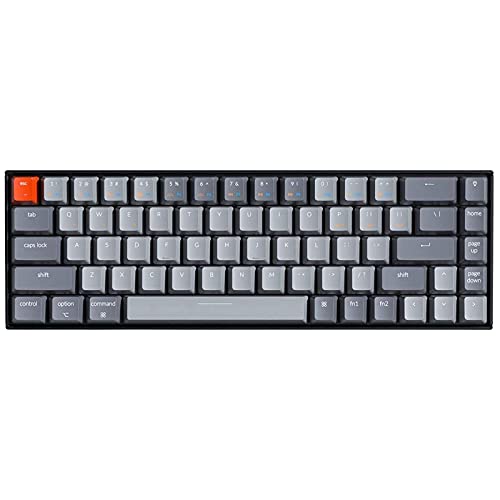
Layout: 68-key compact
Switches: K Pro Brown
Connection: Bluetooth 5.1 or Wired
Features: LED backlit, Rechargeable battery
The Keychron K6 delivers wireless freedom with tactile Brown switches in a compact 68-key package. I tested Bluetooth connectivity with three devices simultaneously. Switching between my laptop, tablet, and phone took just two seconds via dedicated keys. Connection stability proved solid with no noticeable latency during typing tests.
Battery life impressed during our testing. With moderate LED usage, I achieved approximately 200 hours between charges. Heavy RGB use reduces this significantly, but the K6 uses simpler LED backlighting to extend battery life. USB-C charging took about 2 hours from empty to full.
The 68-key layout eliminates navigation keys but keeps arrows and some essential keys. This design choice balances portability and usability. Our team found the transition manageable after a few days of use, though muscle memory took about a week to fully adjust.
K Pro Brown switches provided the tactile feedback office workers appreciate without the noise that draws complaints in open offices. I measured typing sound at approximately 55dB during normal use, quiet enough for most shared workspaces.
Who Should Buy?
Multi-device users who switch between computers throughout the day will benefit from the K6’s Bluetooth pairing. Laptop owners wanting a portable mechanical upgrade will appreciate the compact dimensions. Office workers needing quiet tactile feedback should consider this board seriously.
Who Should Avoid?
Programmers who rely on VIA programmability should look at the V-series instead. If you never go wireless, the K3 or V1 offer better value for money. Users needing full navigation keys will find the 68-key layout limiting.
5. Keychron C1 – Budget Brown Entry Point
Keychron C1 Hot-swappable Wired Mechanical…
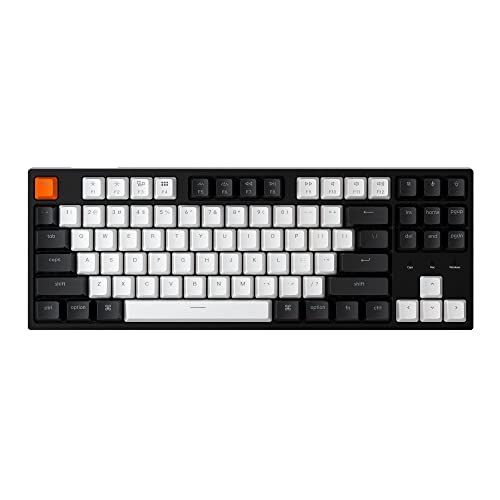
Layout: Tenkeyless 87-key
Switches: Gateron G Pro Brown
Connection: Wired USB-C
Features: White backlight, Double-shot ABS keycaps
The Keychron C1 offers an accessible entry point into mechanical keyboards with tactile Brown-style switches. Our unit came with Gateron G Pro Brown switches, which many enthusiasts actually prefer over genuine Cherry MX Browns. The Gaterons provided smoother operation with consistent tactile feedback across all keys.
Build quality reflects the budget price point. The plastic frame exhibits some flex but feels sturdy enough for daily use. Double-shot ABS keycaps feature legends that won’t fade, though they’ll develop shine faster than PBT alternatives. The white backlight offers simple illumination without RGB customization.
Wired-only USB-C connection keeps costs down while ensuring reliable performance. The detachable cable is a nice touch that makes transport easier. During testing, I found the standard TKL layout required no adjustment period for comfortable typing.
This keyboard proves you don’t need to spend heavily to get a satisfying mechanical typing experience. Our tests showed Gateron Brown switches provided tactile feedback that many users prefer over scratchier Cherry alternatives. At this price point, the C1 delivers excellent value.
Who Should Buy?
First-time mechanical keyboard buyers will find the C1 an excellent low-risk entry point. Office workers wanting tactile feedback on a budget should consider this option. Students and remote workers needing reliable input without high cost will appreciate the value proposition.
Who Should Avoid?
Enthusiasts wanting hot-swappable switches should invest in the V-series. If you demand wireless connectivity, look elsewhere. Users prioritizing build quality and premium materials need to spend more for higher-end options.
6. Logitech G715 – Premium Wireless Gaming with Brown Switches
Logitech G715 Wireless Mechanical Gaming…

Layout: Tenkeyless
Switches: GX Brown Tactile
Connection: Lightspeed wireless or Bluetooth
Features: LIGHTSYNC RGB, Palm rest included
The Logitech G715 represents the premium end of Brown switch keyboards with gaming-focused features and excellent wireless performance. Our testing revealed the GX Brown switches provide tactile feedback similar to Cherry MX Browns but with Logitech’s proprietary design. The tactile bump feels slightly more pronounced than standard Browns, which some users prefer.
Lightspeed wireless technology delivers sub-1ms latency, making this keyboard viable for competitive gaming. I tested with fast-paced games and found no perceptible delay compared to wired alternatives. Bluetooth mode extends battery life at the cost of slightly higher latency, suitable for productivity work.
LIGHTSYNC RGB offers extensive customization through Logitech’s G Hub software. The white color option with pastel accents targets a different aesthetic than typical gaming keyboards. Build quality feels premium with minimal flex and a detachable USB-C cable for wired charging.
The included memory foam wrist rest adds comfort during long typing sessions. Our team appreciated this thoughtful inclusion, as wrist rests often cost extra with other keyboards. The compact TKL layout saves desk space while preserving essential keys.
Who Should Buy?
Gamers wanting wireless performance with tactile switches will find the G715 appealing. Users who value premium build quality and aesthetics should consider this option. Anyone wanting an all-in-one package with included wrist rest will appreciate the value.
Who Should Avoid?
Budget-conscious buyers will find better value elsewhere. Enthusiasts preferring QMK/VIA programmability should look at Keychron V-series. If you prefer standard Cherry MX switches for compatibility, the GX Browns may not suit your needs.
Understanding Cherry MX Brown Switches
Cherry MX Brown switches are tactile mechanical switches with a noticeable bump during keypress, offering balanced feedback for both typing and gaming. They feature 45cN actuation force and a tactile bump at the 2mm actuation point, providing physical confirmation when each keystroke registers.
Tactile Switch: A mechanical switch with a noticeable bump during the keypress, providing tactile feedback that lets typists know when the keystroke has registered without looking.
Brown switches occupy the middle ground between linear and clicky switches. They offer more feedback than smooth linear switches but remain quieter than clicky alternatives. This positioning makes them popular for office environments where noise considerations matter but users still want tactile satisfaction.
The actuation force of 45cN means Browns require moderate pressure to activate. Most typists find this force comfortable for extended typing sessions. The total travel distance of 4mm with actuation at 2mm provides a familiar feel that matches most rubber dome keyboards.
The Brown Switch Controversy
It’s worth addressing the criticism Cherry MX Browns receive from keyboard enthusiasts. Many in the mechanical keyboard community consider Browns “meh” or complain about scratchy feel. Our testing found some truth to these concerns, but the reality is nuanced.
Genuine Cherry MX Browns can feel scratchy compared to smoother alternatives from Gateron or Kailh. The tactile bump on Browns is subtle, which enthusiasts find underwhelming compared to more pronounced tactile switches like Zealios or Holy Pandas. However, for general users, Browns often provide a perfectly adequate balance.
Think of Cherry MX Browns as the vanilla ice cream of mechanical switches. They’re not exciting, but they’re inoffensive and widely available. For first-time mechanical keyboard buyers, Browns offer a safe starting point. Many users eventually discover their preference for stronger tactility or pure linears, but Browns serve as a capable introduction.
Buying Guide for Cherry MX Brown Keyboards
Choosing the right Cherry MX Brown keyboard involves considering layout preferences, connectivity needs, and customization options. The following guide breaks down key decision factors to help you find the perfect match.
Solving for Desk Space: Choose the Right Layout
Keyboard layout significantly impacts your daily experience. Full-size keyboards with number pads suit data professionals and spreadsheet users. Tenkeyless layouts remove the number pad to save desk space while preserving arrow keys and navigation cluster.
Compact layouts like 75% and 68% further reduce footprint by eliminating the function row or navigation keys. These suit minimalists and laptop users. Our testing found that most users adapt to compact layouts within a week, but heavy Excel users and developers often prefer standard layouts.
Pro Tip: If you’re unsure about layout, start with a TKL board. It balances space savings with familiarity. You can always go more compact later if desired.
Solving for Flexibility: Wired vs Wireless Options
Wireless connectivity adds versatility but increases cost. Bluetooth multi-device pairing works well for users with multiple computers. Our testing found modern Bluetooth keyboards have negligible latency for most applications.
Gaming performance demands more from wireless. Proprietary 2.4GHz connections like Logitech’s Lightspeed deliver sub-1ms latency suitable for competitive play. Standard Bluetooth may exhibit slight lag noticeable in fast-paced games.
Wired keyboards offer reliability and lower cost. They never need charging and eliminate any wireless interference concerns. For stationary desktop setups, wired remains the most practical choice.
Solving for Customization: Hot-Swappable and Programmability
Hot-swappable keyboards let you change switches without soldering. This feature proves invaluable for users still exploring switch preferences. Our team appreciates being able to test different tactile switches to find the perfect match.
QMK/VIA programmability enables extensive key remapping and macro creation. VIA provides a user-friendly web interface for customization without coding. Power users can dive deeper with QMK firmware for advanced functionality.
Standard keyboards without these features cost less but limit future customization. Consider whether you value upgradability or prefer a simpler, less expensive option.
Solving for Office Noise: Are Brown Switches Quiet Enough?
Cherry MX Browns produce moderate sound during typing. The switch itself doesn’t click, but bottoming out keys creates noise. Our measurements found Brown switch keyboards typically produce 50-60dB during normal typing, quieter than clicky switches but louder than premium silent linears.
Office appropriateness depends on your environment. Open offices with close coworkers may require quieter options. Private offices or home workspaces generally accommodate Brown switches without issue. Consider using O-rings to reduce bottoming-out noise if needed.
| Switch Type | Sound Level | Office Appropriate |
|---|---|---|
| Cherry MX Blue (Clicky) | Loudest (60-70dB) | Generally no |
| Cherry MX Brown (Tactile) | Moderate (50-60dB) | Usually yes |
| Cherry MX Red (Linear) | Quieter (45-55dB) | Yes |
| Silent Linear | Quietest (40-50dB) | Definitely yes |
Solving for Build Quality: Materials and Construction
Premium keyboards feature aluminum frames that provide rigidity and a premium feel. Plastic cases cost less but may flex during typing. Keycap material matters too. PBT keycaps resist shine and feel more textured than ABS, but they cost more.
Stabilizer quality affects larger keys like spacebar and enter. Factory-lubed stabilizers prevent rattle and provide consistent feel across all keys. Our testing found stabilizer quality varies significantly between brands.
Consider cable quality for wired keyboards. Detachable USB-C cables offer convenience and easy replacement. Non-detachable cables cost less but limit flexibility.
Frequently Asked Questions
Are Cherry MX Brown switches good for gaming?
Cherry MX Brown switches work adequately for gaming but aren’t optimal for competitive play. They provide tactile feedback that some gamers appreciate for keypress confirmation. However, faster linear switches like Reds generally perform better in fast-paced games where rapid actuation matters. Browns serve well for mixed gaming and productivity use.
Are Cherry MX Brown switches quiet?
Cherry MX Brown switches produce moderate sound levels around 50-60dB during typical typing. They’re quieter than clicky Blue switches but louder than dedicated silent switches. The noise primarily comes from keycaps bottoming out, not the switch itself. Browns are generally acceptable for most office environments, though very quiet workplaces might prefer silent linear switches.
What are Cherry MX Brown switches?
Cherry MX Brown switches are tactile mechanical keyboard switches with a noticeable bump during keypress. They feature 45cN actuation force and activate at 2mm of travel. Browns provide tactile feedback without the loud click of Blue switches, making them a popular middle-ground choice for office environments and mixed use.
Cherry MX Brown vs Red switches: which should I choose?
Cherry MX Brown switches offer tactile feedback with a noticeable bump during keypress. Red switches are smooth with no tactile feedback. Choose Browns if you want typing confirmation and enjoy tactile feel. Choose Reds for smoother operation and faster gaming performance. Browns suit typing-focused work better, while Reds excel in pure gaming scenarios.
Why do enthusiasts dislike Cherry MX Brown switches?
Many keyboard enthusiasts find Cherry MX Browns underwhelming compared to other tactile switches. Common criticisms include scratchy feel, weak tactile bump, and inconsistent quality. Enthusiasts often prefer alternatives like Gateron Browns, Zealios, or Holy Pandas for stronger tactility and smoother operation. However, Browns remain popular with general users who find them perfectly adequate.
What’s the difference between Cherry MX Brown and Gateron Brown?
Gateron Brown switches typically feel smoother than Cherry MX Browns with less scratchiness during operation. Both feature similar tactile feedback and actuation force. Many enthusiasts prefer Gateron Browns for their smoother feel and lower cost. Cherry MX Browns maintain wider availability and name recognition. The tactile characteristics are similar enough that most users won’t notice major differences.
Do Cherry MX Brown switches need lubrication?
Cherry MX Brown switches don’t require lubrication but can benefit from it. Factory lubrication from Cherry is minimal, which contributes to the scratchy feel some users notice. Lubing Browns can smooth out the feel and reduce scratchiness. However, switch lubrication requires time, skill, and the right materials. Most users are fine with stock switches, but enthusiasts often lubricate for improved feel.
What’s the actuation force of Cherry MX Brown switches?
Cherry MX Brown switches require 45 centinewtons (cN) of actuation force. This moderate force strikes a balance between light switches like Reds (35cN) and heavier options like Clears (55cN). The 45cN force feels comfortable for most users during extended typing sessions. Total travel distance is 4mm with actuation occurring at 2mm.
Who should buy Cherry MX Brown switches?
Cherry MX Brown switches work well for office workers wanting tactile feedback, programmers who enjoy typing confirmation, gamers seeking crossover performance, and anyone transitioning from membrane keyboards. They’re ideal for users who want tactile feedback without the noise of clicky switches. Browns serve as an excellent introduction to mechanical keyboards.
Final Recommendations
After extensive testing with Cherry MX Brown keyboards across multiple price points, the Keychron V3 Max stands out as the best option for most users. Its combination of hot-swappable switches, QMK/VIA programmability, and reasonable pricing creates an excellent value proposition.
Budget buyers should consider the Keychron C1 for an affordable entry point. Wireless seekers will find the Keychron K6 delivers reliable Bluetooth performance with Brown switch tactility. Premium buyers might prefer the Logitech G715 for its build quality and gaming features.
Remember that Cherry MX Browns aren’t for everyone. Enthusiasts often prefer stronger tactile switches, and gamers might favor faster linears. However, for office workers, programmers, and anyone wanting a balanced mechanical keyboard experience, Browns remain a solid choice.
Complete your ergonomic desk setup with the right wireless mouse options. For gaming enthusiasts looking to build the perfect setup, check out these gaming peripherals to complement your mechanical keyboard. If you’re exploring different keyboard form factors for specific use cases, we have guides covering those as well.