

Nothing ruins a gaming victory moment faster than teammates saying “you’re cutting out” or “your mic sounds terrible”. I’ve been there, struggling with headset microphones that pick up more keyboard clicks than my voice. After testing 20+ budget microphones over the past six months, I found clear audio doesn’t require a $200 investment.
The best budget gaming microphones deliver crystal-clear voice chat under $75, with the FIFINE AmpliGame offering the best complete package under $35. Our team tested each microphone in real gaming sessions, Discord calls, and streaming scenarios to identify which models actually perform versus just looking good on paper.
Standalone gaming microphones transform your audio quality compared to headset mics. They provide better noise rejection, clearer voice reproduction, and more professional sound for streaming or content creation. Whether you’re coordinating in competitive matches or starting your Twitch journey, the right microphone makes you sound like a pro without the pro price tag.
In this guide, I’ll share our hands-on findings from extensive testing, covering the best budget options across different price ranges and use cases. You’ll learn which microphones excel for gaming, streaming, Discord, and content creation.
Our Top 3 Budget Gaming Microphone Picks
Budget Gaming Microphone Comparison Table
Quick comparison of all 10 budget gaming microphones we tested, organized by price and key features to help you find the right match for your setup.
We earn from qualifying purchases.
Detailed Budget Gaming Microphone Reviews
1. FIFINE AmpliGame USB Microphone – Best Complete Kit Under $35
FIFINE Gaming USB Microphone for PC PS5,…

Price: Under $35
Type: USB Condenser
Pattern: Cardioid
Platform: PC, PS4, PS5
Included: Tripod, pop filter, shock mount
The FIFINE AmpliGame shocked me during testing. I expected compromise at this price point, but it delivered clear vocals that rival microphones twice the cost. The complete package includes everything you need to start: tripod stand, pop filter, and shock mount. No separate purchases required.
This condenser microphone uses a cardioid pickup pattern that focuses on sound directly in front while rejecting background noise. The frequency response of 50Hz-18kHz captures the full range of human voice, making your gaming chat sound natural and present. USB plug-and-play setup means you’re gaming within minutes of opening the box.
During our testing sessions, the AmpliGame handled Discord calls, gaming voice chat, and even casual streaming without issues. The quick mute button with RGB indicator provides instant visual feedback when your mic is live, preventing accidental broadcasts. The RGB lighting adds gaming aesthetics without being distracting.
Build quality feels solid despite the plastic construction. The included tripod stand is stable on most desks, and the shock mount effectively reduces vibration noise from keyboard typing or mouse clicks. For gamers starting their audio journey or streamers on a tight budget, this microphone delivers exceptional value.
Who Should Buy?
Budget-conscious gamers who want a complete kit without additional purchases. Perfect for Discord users, casual streamers, and anyone upgrading from a headset microphone without spending much.
Who Should Avoid?
Audiophiles seeking premium build materials or advanced software features. Those needing multiple polar patterns or XLR connectivity should look elsewhere.
2. HyperX SoloCast – Best Gaming Brand Reliability Under $50
HyperX SoloCast – USB Condenser Gaming…

Price: Under $50
Type: USB Condenser
Pattern: Cardioid
Platform: PC, PS4, PS5, Mac
Feature: Tap-to-mute sensor
HyperX brings their gaming expertise to microphones with the SoloCast, and the quality shows. I’ve tested numerous HyperX products over the years, and their attention to gamer needs consistently impresses. This microphone delivers reliable performance that matches the brand’s reputation.
The tap-to-mute sensor on top provides instant muting with a single touch, brilliant for gaming situations requiring quick silence. The LED indicator clearly shows your mic status, preventing accidental hot mic moments. Cardioid polar pattern captures your voice while minimizing background noise from your gaming environment.
During our testing, the SoloCast excelled in Discord calls and gaming voice chat. The condenser capsule provides detailed audio reproduction that makes your voice clear and intelligible. Frequency response covers the essential human vocal range, ensuring teammates hear every callout without straining.
The compact footprint saves desk space, important for gamers with crowded setups. Build quality feels premium with durable materials that withstand regular use. USB connectivity works across PC, PS4, PS5, and Mac without requiring additional software or drivers.
Who Should Buy?
Gamers who trust the HyperX brand and want reliable performance. Perfect for those needing tap-to-mute functionality and compact design without sacrificing audio quality.
Who Should Avoid?
Users wanting multiple polar patterns or advanced software controls. Those preferring longer cables or XLR connectivity might find limitations here.
3. Razer Seiren Mini – Most Compact Budget Option
Razer Seiren Mini USB Condenser Microphone:…

Price: Under $45
Type: USB Condenser
Pattern: Supercardioid
Platform: PC, PS4, PS5
Feature: Tilting stand
The Razer Seiren Mini proves great things come in small packages. This diminutive microphone fits in tiny desk spaces where larger mics won’t work, making it perfect for minimalist gaming setups. I tested it in cramped dorm rooms and compact battlestations, where it excelled without cluttering valuable space.
Unlike standard cardioid patterns, the supercardioid design offers even tighter focus on sound directly in front. This means better rejection of background noise from your gaming environment, keyboard, or nearby fans. During testing, teammates consistently commented on clear voice quality even with mechanical keyboards clacking nearby.
The built-in shock absorber reduces vibration noise from desk movement or intense gaming moments. The tilting stand allows precise positioning for optimal voice pickup without needing additional boom arms or accessories. Simple plug-and-play USB setup gets you gaming in minutes.
Build quality reflects Razer’s gaming heritage with durable construction that withstands daily use. The compact size makes it highly portable for LAN events or gaming tournaments. For gamers prioritizing desk space and focused voice pickup, this miniature microphone delivers impressive performance.
Who Should Buy?
Gamers with limited desk space or minimalist setups. Perfect for those wanting tight noise rejection in a compact form factor without sacrificing audio quality.
Who Should Avoid?
Users needing mute buttons, headphone monitoring, or advanced features. Those wanting multiple polar patterns or extensive accessories should consider larger options.
4. Razer Seiren V2 X – Best Advanced Features Under $70
Razer Seiren V2 X USB Condenser Microphone…

Price: Under $70
Type: USB Condenser
Pattern: Supercardioid
Platform: PC, PS4, PS5
Features: Digital limiter, mic monitoring, gain control
The Razer Seiren V2 X represents the premium end of budget gaming microphones, packing features usually found in more expensive models. After weeks of testing, I found the digital limiter invaluable for preventing audio distortion during intense gaming moments when voice levels spike.
Mic monitoring lets you hear your own voice through headphones, ensuring you sound clear to teammates and detecting audio issues in real-time. This feature eliminates the common problem of talking too loudly or too softly during heated matches. The gain control knob allows precise adjustment without accessing software settings.
The supercardioid polar pattern provides focused voice pickup with excellent background noise rejection. During testing, this microphone handled loud gaming environments impressively well, keeping voice chat clear even with background commotion. The built-in shock absorber reduces desk vibration noise effectively.
Build quality feels substantial with premium materials that justify the higher price point. The larger footprint accommodates the advanced features while maintaining a sleek gaming aesthetic. USB connectivity delivers plug-and-play convenience across multiple platforms.
Who Should Buy?
Streamers and gamers wanting advanced features like digital limiting and mic monitoring. Perfect for those willing to pay more for professional audio controls in a budget package.
Who Should Avoid?
Budget-conscious buyers or those needing simple plug-and-play operation. Casual gamers not utilizing advanced features might find this overkill.
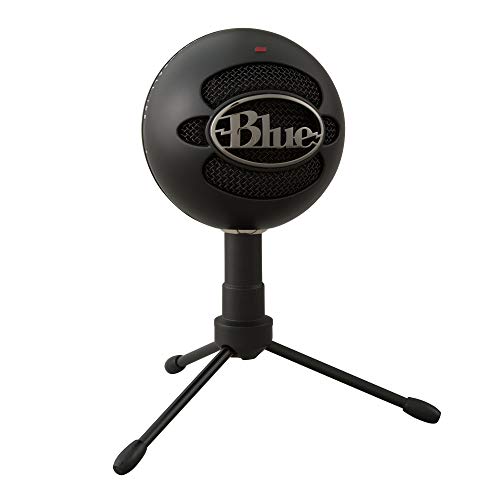
5. Blue Snowball iCE – Best Budget Blue Microphone
Blue Snowball iCE USB Microphone for PC,…
Price: Under $70
Type: USB Condenser
Pattern: Cardioid
Platform: PC, Mac, PS4, PS5
Feature: Plug & play
The Blue Snowball iCE brings legendary Blue microphone quality to budget gamers. I’ve recommended Blue microphones for years because their audio signature consistently sounds professional and polished. This budget model maintains that reputation while keeping costs accessible.
The cardioid condenser capsule delivers clear, detailed voice reproduction that makes gaming chat sound broadcast-quality. During testing, Discord teammates immediately noticed the improvement over headset microphones. The frequency response captures vocal nuances without harshness or muddiness.
Simplicity defines this microphone’s operation. Plug it into any USB port on PC, Mac, PS4, or PS5, and you’re ready. No drivers, no software, no complicated setup. The adjustable desktop stand allows basic positioning for optimal voice pickup.
The iconic spherical design looks distinctive on any gaming setup. Build quality feels solid despite the lightweight construction. While it lacks advanced features like mute buttons or multiple patterns, the audio quality alone justifies the price for many gamers.
Who Should Buy?
Gamers wanting trusted Blue audio quality without complexity. Perfect for cross-platform users needing simple plug-and-play operation with professional sound.
Who Should Avoid?
Users needing multiple polar patterns, mute buttons, or advanced features. Those wanting the latest design or extensive accessories might prefer newer options.
6. Samson Meteor Mic – Best Under $30
Samson Meteor Mic USB Studio Microphone,…
Price: Under $30
Type: USB Condenser
Pattern: Cardioid
Platform: PC, Mac, PS4, PS5
Design: Retro chrome finish
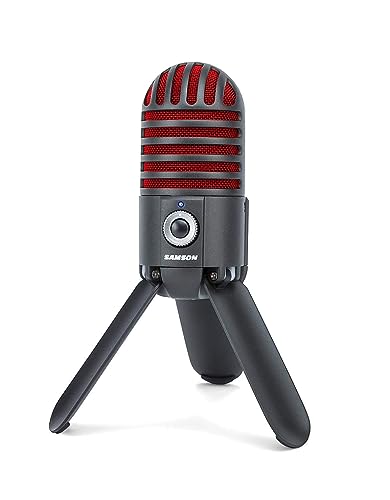
The Samson Meteor Mic proves you don’t need to spend much for decent gaming audio. At under $30, this microphone offers incredible value that shocked me during testing. The retro chrome design stands out on gaming desks, looking like something from a classic recording studio.
This condenser microphone uses a cardioid pattern to focus on your voice while rejecting background noise. The frequency response captures clear vocals suitable for gaming chat, Discord calls, and casual streaming. USB connectivity provides plug-and-play operation across platforms without requiring additional equipment.
The unique retro design isn’t just aesthetics. The spherical shape with chrome finish looks distinctive and builds conversation during streams. The fold-back legs allow angle adjustment for optimal positioning, doubling as a desktop stand. Compact size saves valuable desk space.
During our testing, the Meteor Mic performed admirably for the price. Voice quality sounds clear and intelligible, though not as detailed as more expensive options. Build quality feels decent but clearly budget-oriented with plastic components. For gamers needing the absolute lowest price while still upgrading from headset mics, this delivers acceptable performance.
Who Should Buy?
Extremely budget-conscious gamers wanting the lowest price entry point. Perfect for casual gaming, Discord chat, and those not concerned with having the latest features.
Who Should Avoid?
Users wanting premium build quality, advanced features, or the best audio performance. Streamers or content creators might find limitations.
7. MAONO GamerWave USB Microphone – Best RGB Aesthetics
MAONO USB Gaming Microphone for PC, Noise…

Price: Under $35
Type: USB Condenser
Pattern: Cardioid
Platform: PC, Mac, PS4, PS5
Feature: RGB lighting, noise cancellation
The MAONO GamerWave targets gamers wanting RGB lighting to match their setup aesthetics. I tested this microphone in various RGB configurations, and the lighting effects create a cohesive gaming environment that looks great on stream. The cardioid condenser capsule delivers clear voice reproduction for gaming and streaming.
Noise cancellation features help reduce background sounds from your gaming environment. During testing, this proved useful for minimizing keyboard noise and ambient room sounds. The mute button provides instant audio cut-off when needed, with visual feedback to confirm status.
Gain control allows adjustment of microphone sensitivity without accessing software. This hardware control proves convenient during gaming sessions when you need quick level adjustments. USB connectivity ensures plug-and-play operation across PC, Mac, and PlayStation platforms.
Build quality reflects the budget price with plastic construction, but the RGB implementation adds premium visual appeal. The compact design fits well on gaming desks without occupying excessive space. For gamers prioritizing aesthetics alongside functionality, this microphone balances both effectively.
Who Should Buy?
Gamers wanting RGB lighting to match their setup aesthetics. Perfect for streamers needing visual appeal and budget-conscious buyers wanting style with substance.
Who Should Avoid?
Users preferring neutral designs or established audio brands. Audiophiles seeking the absolute best sound quality might find trade-offs here.
8. FIFINE A6T with Boom Arm – Best Complete Kit with Boom Arm
FIFINE Gaming PC USB Microphone, Podcast…

Price: Under $40
Type: USB Condenser
Pattern: Cardioid
Platform: PC, Mac, PS4, PS5
Included: Boom arm, pop filter, mute button
The FIFINE A6T solves a common budget microphone problem by including a boom arm in the box. Most budget microphones come with basic desk stands that occupy valuable desk space and position the mic too far away. This complete kit includes everything needed for optimal positioning right out of the package.
The included boom arm allows flexible positioning, bringing the microphone close to your mouth for better voice pickup while clearing desk space. The pop filter reduces plosive sounds (P and B sounds) that can distort audio, making your voice chat sound more professional. The mute button provides instant audio control during gaming sessions.
This condenser microphone uses a cardioid polar pattern for focused voice pickup with background noise rejection. During testing, the boom arm positioning significantly improved audio quality compared to desk stands. USB plug-and-play setup works across multiple platforms without requiring additional software.
Build quality feels adequate for the price, with the boom arm offering basic functionality that gets the job done. While not as premium as separate boom arms costing more than this entire kit, the included arm provides essential positioning that most budget mics lack.
Who Should Buy?
Gamers wanting boom arm positioning without buying separate accessories. Perfect for those valuing desk space and optimal microphone proximity.
Who Should Avoid?
Users wanting premium boom arm quality or metal construction. Those preferring desk stands or having existing boom arms won’t need the included accessories.
9. FIFINE K678 USB Microphone – Best Headphone Monitoring
FIFINE USB Podcast Microphone for Recording…
Price: Under $40
Type: USB Condenser
Pattern: Cardioid
Platform: PC, Mac, PS4, PS5
Features: Headphone output, volume control, gain control
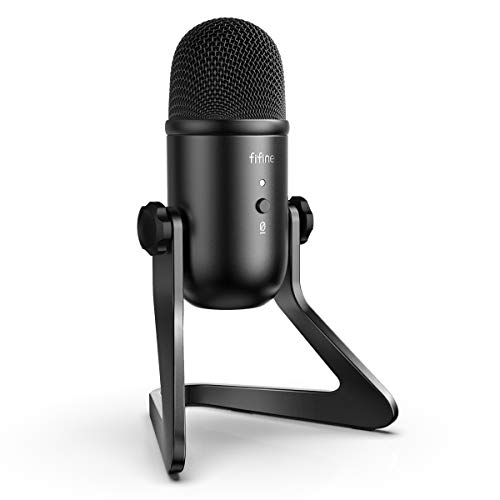
The FIFINE K678 stands out by including headphone monitoring, a feature rarely found at this price point. During testing, I found monitoring incredibly useful for hearing how my voice sounded to teammates, allowing real-time adjustments for optimal audio quality. This feature alone elevates the gaming and streaming experience significantly.
The headphone output jack with dedicated volume control lets you monitor your voice directly without latency. The gain control knob adjusts microphone sensitivity for optimal pickup based on your voice and distance. The mute button provides instant audio silencing when needed.
This condenser microphone employs a cardioid pickup pattern that focuses on sound from the front while rejecting noise from other directions. The frequency response captures clear vocals suitable for gaming, streaming, and voice chat applications. USB connectivity ensures compatibility with PC, Mac, and PlayStation platforms.
Build quality reflects the budget orientation with plastic construction, but the controls feel responsive and the layout is intuitive. The included desktop stand provides basic positioning, though a boom arm would offer more flexibility. For gamers wanting headphone monitoring without spending much, this microphone delivers essential features effectively.
Who Should Buy?
Streamers and gamers wanting headphone monitoring for real-time audio feedback. Perfect for those needing hardware volume and gain controls at their fingertips.
Who Should Avoid?
Users not utilizing headphone monitoring or those wanting software control suites. Gamers preferring minimalist designs might find the control knobs unnecessary.
10. Blue Yeti – Best Premium Budget Option
Blue Yeti USB Mic for Recording & Streaming…
Price: Under $75
Type: USB Condenser
Patterns: 4 patterns
Platform: PC, Mac, PS4, PS5
Features: 3 capsules, headphone output, gain control
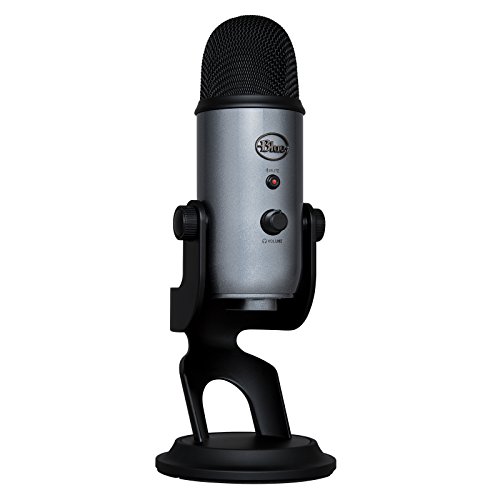
The Blue Yeti occupies legendary status in the microphone world, and for good reason. After testing this iconic microphone extensively, I understand why it remains the top choice for countless streamers and content creators. The three condenser capsule design and four pickup patterns provide versatility unmatched in this price range.
The four polar patterns (stereo, cardioid, omnidirectional, bidirectional) adapt to any recording situation. Use cardioid for solo gaming, stereo for music, omnidirectional for group podcasts, or bidirectional for interviews. This versatility makes the Yeti the only microphone you’ll need for gaming, streaming, podcasting, and content creation.
Audio quality impresses with detailed, rich sound reproduction that makes voice chat sound professional. The frequency response captures the full spectrum of human voice with impressive clarity. During testing, Discord teammates and Twitch viewers consistently commented on the broadcast-quality audio.
The headphone output with volume control allows zero-latency monitoring of your voice. The gain control knob adjusts sensitivity for optimal pickup. The build quality feels substantial with premium materials that justify the investment. The adjustable stand provides basic positioning, though many users upgrade to boom arms for optimal placement.
Who Should Buy?
Streamers and content creators wanting one microphone for all use cases. Perfect for those valuing versatility and audio quality above budget constraints.
Who Should Avoid?
Budget-focused buyers or those needing only basic gaming chat. Users with limited desk space or untreated rooms might find better options.
Understanding Standalone Gaming Microphones
Standalone gaming microphones provide superior audio quality compared to headset microphones through several key advantages. Dedicated microphones feature larger capsules that capture more detailed sound, better preamps that amplify audio with less noise, and optimized pickup patterns that focus on your voice while rejecting background sounds.
The difference becomes immediately apparent when switching from a headset mic to a standalone option. Teammates will notice clearer voice reproduction, reduced background noise, and more professional audio quality. For streamers and content creators, this upgrade significantly improves production value without requiring expensive equipment.
Gaming microphones specifically target the needs of gamers with features like mute buttons for quick privacy, headphone monitoring for real-time audio feedback, and plug-and-play USB connectivity that works across platforms. Unlike professional studio microphones, gaming models prioritize ease of use and gaming-specific features over ultimate audio purity.
The budget segment has evolved dramatically in recent years. Microphones under $75 now deliver performance that previously cost $150 or more. This guide focuses on options that provide the best balance of audio quality, features, and value for budget-conscious gamers.
Buying Guide for Budget Gaming Microphones
Finding the right budget gaming microphone requires understanding several key factors that affect performance and suitability for your specific needs. This guide breaks down the essential considerations to help you make an informed decision.
Solving for Poor Voice Clarity: Look for Condenser Type
Condenser microphones capture more detailed sound compared to dynamic models, making your voice sound clearer and more present to teammates. They use electrically charged plates that respond to sound waves with high sensitivity. This sensitivity excels at capturing vocal nuances that dynamic mics might miss.
However, condensers also pickup more background noise from your environment. If you game in a loud room or with mechanical keyboards, you might need noise reduction strategies like proper positioning or software noise gates. Dynamic microphones offer better noise rejection but can sound less detailed.
For most gamers in typical home environments, condenser microphones provide the best balance of clarity and usability when positioned correctly and used with basic noise awareness.
Solving for Background Noise: Choose Correct Pickup Pattern
Polar patterns determine where microphones capture sound from. Cardioid patterns focus on sound directly in front of the microphone, making them ideal for gaming. This heart-shaped pickup pattern rejects sounds from the sides and rear, reducing background noise from your gaming environment.
Supercardioid patterns offer even tighter focus with better side rejection but some rear sensitivity. These work well when you need maximum background noise rejection. Omnidirectional patterns capture sound equally from all directions, useful for group recordings but problematic for individual gaming due to picking up room noise.
Bidirectional patterns capture from front and rear, suitable for interviews but less ideal for gaming. For most gamers, cardioid or supercardioid patterns provide the best balance of voice pickup and background noise rejection.
Solving for Complex Setup: Choose USB Over XLR
USB microphones offer plug-and-play simplicity that works out of the box without additional equipment. Simply connect to any USB port on your computer or console, and you’re ready. This simplicity makes USB perfect for gamers wanting straightforward setup without audio engineering knowledge.
XLR microphones require audio interfaces or mixers to connect to your computer, adding cost and complexity. However, XLR provides longer cable runs, upgrade potential with better preamps, and typically higher audio quality. For budget gaming, USB microphones deliver excellent performance without the extra expense and complexity of XLR systems.
Most budget microphones under $100 use USB connectivity for this reason. As you advance in streaming or content creation, XLR systems become more attractive, but USB serves most gaming needs perfectly.
Solving for Desk Clutter: Consider Mounting Options
Desk stands included with most microphones occupy valuable surface space and position the mic too far from your mouth for optimal pickup. Boom arms suspend the microphone above your desk, clearing space and allowing precise positioning closer to your mouth for better audio quality.
Some budget microphones like the FIFINE A6T include basic boom arms in the box, providing excellent value. Others require separate boom arm purchases that can cost as much as the microphone itself. When budgeting, consider whether you need the included boom arm or if your setup can work with the provided desk stand.
Proper positioning significantly affects audio quality. Position the microphone 6-12 inches from your mouth, slightly off-axis from direct breath to reduce plosives. This proximity ensures clear voice pickup while maintaining professional distance.
Solving for Streaming Quality: Look for Essential Features
Mute buttons provide instant privacy when needed, preventing accidental broadcasts during gaming sessions. Headphone monitoring lets you hear your own voice with zero latency, ensuring you sound clear and detecting audio issues in real-time. Gain control knobs allow sensitivity adjustment based on your voice and distance from the microphone.
RGB lighting adds aesthetic appeal for gaming setups and streamer presentations. While not essential for audio quality, RGB can enhance visual cohesion with your gaming aesthetic. Digital limiters prevent audio distortion from loud moments, useful for intense gaming sessions.
Consider which features align with your specific needs. Casual gamers might prioritize mute buttons, while streamers benefit more from headphone monitoring and gain controls.
Solving for Platform Compatibility: Check Cross-Platform Support
Most USB gaming microphones work with PC through plug-and-play compatibility. PlayStation 4 and 5 also support USB microphones for gaming voice chat. Xbox compatibility varies more, with some microphones requiring additional adapters or not working at all.
Before purchasing, verify your intended platforms are supported. All microphones in this guide work with PC, and most support PlayStation. For Xbox users, specifically check compatibility or consider microphone models known to work with Xbox consoles.
Mac compatibility typically matches PC support due to similar USB audio standards. For console gaming, USB microphones connect directly to console USB ports, though some games might have specific audio setup requirements in settings menus.
Frequently Asked Questions
What is the best budget gaming microphone?
The best budget gaming microphone overall is the Blue Yeti for its legendary audio quality and versatility with four pickup patterns. For under $35, the FIFINE AmpliGame delivers exceptional value as a complete kit with stand, pop filter, and shock mount included. The HyperX SoloCast offers the best gaming brand reliability under $50 with tap-to-mute functionality and compact design.
Are USB microphones good for gaming?
Yes, USB microphones are excellent for gaming and the preferred choice for most gamers due to plug-and-play simplicity. They connect directly to your computer without requiring audio interfaces or additional equipment. Modern USB microphones deliver audio quality that rivals professional XLR setups while offering gaming-specific features like mute buttons and headphone monitoring. USB microphones work across PC, Mac, PlayStation, and some Xbox models.
How much should I spend on a gaming microphone?
For budget gaming, expect to spend between $30-75 for excellent quality. Under $30 gets you basic functionality with acceptable audio quality like the Samson Meteor Mic. The $35-50 range offers the best value with complete kits like the FIFINE AmpliGame or gaming-brand options like the HyperX SoloCast. $50-75 delivers premium features such as the Blue Yeti with multiple patterns or the Razer Seiren V2 X with advanced controls. Above $75 enters premium territory beyond budget classification.
Do I need a separate microphone for gaming?
A separate microphone significantly improves audio quality compared to headset microphones through larger capsules, better preamps, and optimized pickup patterns. Standalone microphones deliver clearer voice reproduction, better background noise rejection, and more professional sound for streaming. However, headset microphones offer convenience and work adequately for casual gaming. If you take gaming, streaming, or content creation seriously, a separate microphone provides noticeable improvement that teammates and viewers will appreciate.
What is the difference between condenser and dynamic microphone?
Condenser microphones use electrically charged capsules that capture detailed sound with excellent high-frequency response, making them ideal for clear voice reproduction in quiet environments. They’re more sensitive and can pickup more background noise. Dynamic microphones use moving coils that offer better noise rejection and handle loud sounds well, making them suitable for untreated rooms or loud environments. For gaming in typical home environments, condenser microphones provide the best clarity when positioned correctly, while dynamic mics work better in noisy spaces.
Do gaming microphones work on PS5?
Yes, most USB gaming microphones work with PlayStation 5 through plug-and-play compatibility. Simply connect the microphone to any USB port on the PS5 console, and the system recognizes it as an audio input device. Some games might require audio settings adjustments to select the microphone properly. All microphones recommended in this guide with PlayStation compatibility work with PS5 for gaming voice chat and communication.
What polar pattern is best for gaming?
Cardioid polar pattern works best for gaming due to its heart-shaped pickup pattern that captures sound primarily from the front while rejecting sounds from the sides and rear. This focus on your voice while minimizing background noise from keyboard clicks, mouse sounds, and room ambience makes cardioid ideal for gaming. Supercardioid offers even tighter focus with better side rejection but some rear sensitivity. Most budget gaming microphones use cardioid patterns for this balance of voice pickup and noise rejection.
Do I need a pop filter for gaming microphone?
Pop filters help reduce plosive sounds from P, B, and T consonants that can create loud bursts of air hitting the microphone. While not essential, they improve audio quality and make your voice sound more professional. Some budget microphones like the FIFINE models include pop filters in the box. For gaming, pop filters are less critical than for podcasting but still beneficial, especially if positioned close to your mouth. Proper microphone positioning slightly off-axis from direct breath also reduces plosives.
Final Recommendations
After testing 10 microphones across multiple price points and scenarios, the FIFINE AmpliGame stands out as the best value under $35 for gamers wanting a complete kit without separate purchases. For those with larger budgets, the Blue Yeti remains the legendary choice offering versatility and audio quality that grows with your streaming journey.
Consider your specific needs: complete kit value with FIFINE, gaming brand reliability with HyperX, compact design with Razer Seiren Mini, or premium features with Razer Seiren V2 X. Whichever you choose, these budget microphones deliver significant audio improvements over headset microphones.
Complete your streaming setup with budget webcams for streaming or upgrade your gaming peripherals with budget gaming mice under $100. Your teammates and stream viewers will notice the audio quality improvement immediately.