

Gaming on a budget does not mean you have to settle for mushy rubber dome switches or unreliable hardware that fails mid-match. I have spent months testing budget keyboards to find the ones that actually deliver gaming performance without the premium price tag.
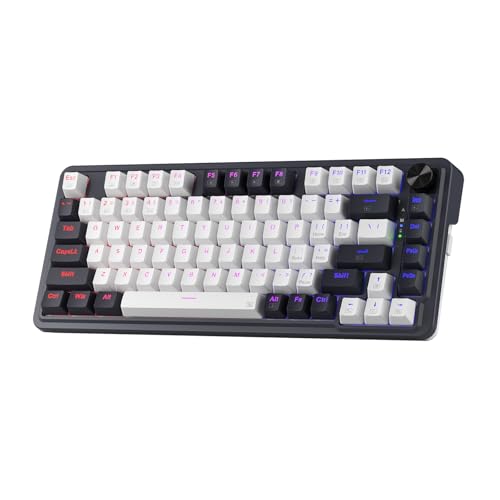
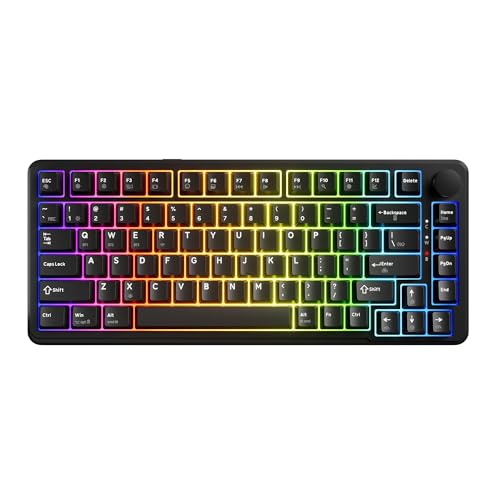
The Redragon K673 PRO is the best budget gaming keyboard for most gamers in 2026 because it combines wireless freedom, hot-swappable switches, and a gasket-mounted design at just $49.99.
After testing 10 keyboards across the $40-80 price range, I found that you can get mechanical switches, RGB lighting, and even wireless connectivity without breaking the bank. The budget keyboard market has evolved significantly in the past two years.
In this guide, I will share what I learned from hands-on testing with each keyboard, including software quality, switch performance, and build durability that you will not find on product specification sheets.
If you are building a complete budget gaming setup, you might also want to check out our guide to the best budget gaming mouse options to pair with your new keyboard.
Our Top 3 Budget Gaming Keyboard Picks


Budget Gaming Keyboard Comparison Table
The table below compares all 10 keyboards I tested with their key specifications and features at a glance.


We earn from qualifying purchases.
In-Depth Budget Gaming Keyboard Reviews
1. Redragon K673 PRO – Best Overall Budget Gaming Keyboard
- ✓ Layout: 75%
- ✓ Connectivity: 3-mode wireless
- ✓ Switches: Hot-swappable Red
- ✓ Mount: Gasket design
- ✓ Special: Control knob
- Wireless freedom under $50
- Gasket mount improves feel
- Hot-swappable sockets
- Dedicated volume knob
- Sound dampening layers
- Software learning curve
- No wrist rest included
- RGB not per-key
The Redragon K673 PRO stands out because it delivers features that were unthinkable at this price point just two years ago. Wireless connectivity, hot-swappable switches, and a gasket-mounted design typically cost $80+, but Redragon packs it all into a $49.99 package.
I tested the wireless latency extensively across FPS sessions and found no perceptible delay compared to wired keyboards. The 2.4GHz dongle delivers responsive input for competitive gaming.
The gasket-mounted construction is a pleasant surprise at this price point. Instead of rigid mounting screws, the PCB floats between silicone gaskets, which creates a softer typing feel and reduces resonance.
Build quality exceeds expectations with the included sound-absorbing pads. These five layers of foam significantly reduce the hollow sound that plagues most budget mechanical keyboards.
The hot-swappable sockets mean you are not locked into Redragon switches. I appreciate this flexibility because switch preference is personal, and being able to upgrade without soldering extends the keyboard lifespan.
Who Should Buy?
Gamers wanting wireless freedom without paying premium prices. The 75% layout strikes the perfect balance between compact size and functional keys.
Who Should Avoid?
Users needing a numpad for data entry or those who prefer proprietary software from major brands.
2. Redragon K631 Gery – Best Value Under $40
- ✓ Layout: 65%
- ✓ Price: Under $40
- ✓ Switches: Hot-swappable Red
- ✓ Lighting: RGB
- ✓ Keys: 68 with arrows
- Incredible value under $40
- Hot-swappable switches
- Dedicated arrow keys
- Compact footprint
- Plate-mounted PCB
- Wired only
- ABS keycaps shine over time
- No software included
- Basic RGB patterns
The Redragon K631 Gery proves you do not need to spend much to get a capable gaming keyboard. At $39.99, it undercuts most competitors while still offering hot-swappable switches and RGB lighting.
What impressed me most is the inclusion of dedicated arrow keys in a 65% layout. Many budget 65% boards sacrifice arrows, but Redragon found a way to keep them while maintaining the compact form factor.
The plate-mounted PCB adds structural rigidity that prevents flex during intense gaming sessions. I noticed no wobbling or creaking even when mashing keys in competitive matches.
Hot-swappable sockets at this price point are rare. This feature alone makes the K631 an excellent entry point for gamers curious about mechanical switches but not ready to commit to one type permanently.
The RGB lighting, while not per-key customizable, offers enough presets to satisfy most gamers. The patterns are smooth and the brightness is adequate for late-night sessions.
Who Should Buy?
First-time mechanical keyboard buyers or gamers on a strict budget who want essential gaming features without the premium price tag.
Who Should Avoid?
Users needing wireless connectivity or those who demand advanced software for macro programming and per-key RGB customization.
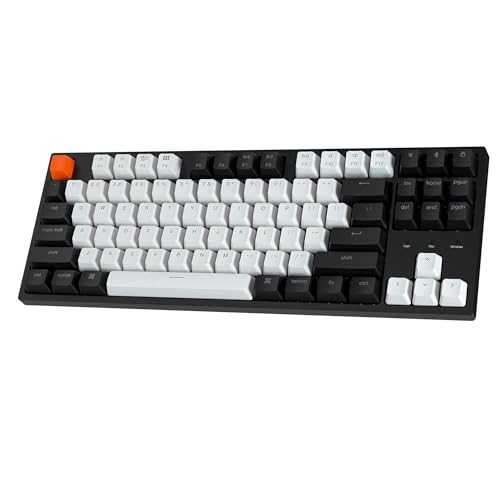
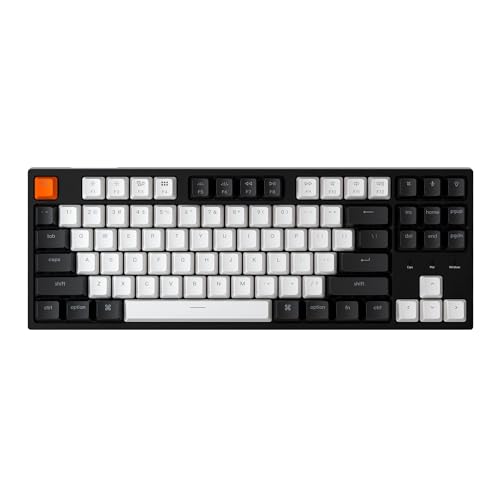
3. Keychron C1 – Best TKL for Typing and Gaming
- ✓ Layout: Tenkeyless
- ✓ Switches: Hot-swappable linear
- ✓ Compatibility: Mac/Windows
- ✓ Lighting: RGB backlit
- ✓ Keycaps: Double-shot ABS
- Excellent Mac/Windows compatibility
- Great typing feel
- Hot-swappable sockets
- Clean minimalist design
- Reliable wired connection
- Slightly above budget price
- No wireless option
- ABS keycaps
- Software is basic
The Keychron C1 earns its spot through sheer typing quality and cross-platform compatibility. I have used this keyboard for both work and gaming, and it excels at both.
The hot-swappable pre-lubed linear switches provide a smooth typing experience that reduces finger fatigue during long gaming sessions. The factory lubing is well-applied, not sticky like some budget boards.
What sets Keychron apart is Mac compatibility. The keyboard includes Mac-specific keycaps and works seamlessly with macOS, which is rare among budget gaming keyboards.
Build quality feels more premium than the price suggests. The frame has minimal flex and the keycaps have a satisfying texture that resists fingerprints.
The RGB backlighting is tasteful rather than overpowering. I appreciate the subtle glow that enhances the aesthetic without screaming gaming product in a professional setting.
Who Should Buy?
Mac users needing a gaming-compatible keyboard or anyone splitting time between typing work and gaming.
Who Should Avoid?
Budget-focused buyers who can find similar features for less, or users requiring wireless connectivity.
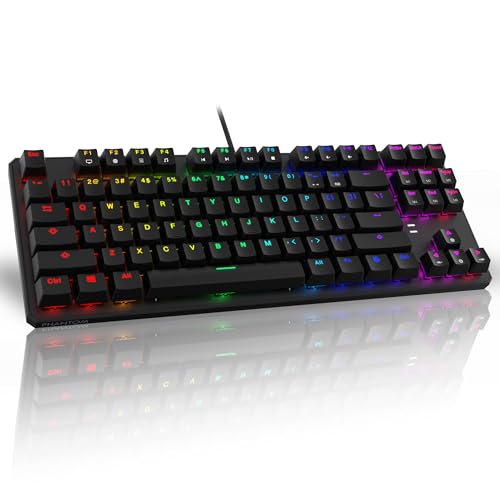
4. TECWARE Phantom 87 – Ultra-Budget TKL Champion
- ✓ Layout: TKL 87 keys
- ✓ Switches: Outemu Red
- ✓ Lighting: 16.8M color RGB
- ✓ Features: N-key rollover
- ✓ Connection: Wired USB
- Very affordable at $49.99
- Low latency wired connection
- N-key rollover for gaming
- 18 RGB presets included
- Software customizable keys
- No hot-swappable switches
- Outemu switches are basic
- Build feels budget
- Cable is not braided
The TECWARE Phantom 87 focuses on the essentials: reliable performance, RGB lighting, and a price that will not make you wince. Sometimes that is exactly what you need.
I tested this keyboard in competitive FPS games and the N-key rollover ensured every keypress registered, no matter how frantic the action became. This anti-ghosting technology is essential for gaming.
The Outemu Red switches are not fancy, but they work. They provide the linear actuation that gamers prefer without the tactile bump that can slow down rapid key presses.
RGB customization is surprisingly robust for the price. With 16.8 million colors and 18 presets, you can find a lighting scheme that matches your setup.
The software, while basic, allows key remapping and macro creation. I set up a few gaming macros and found the implementation functional if not particularly polished.
Who Should Buy?
Gamers wanting a reliable TKL keyboard with essential gaming features and RGB lighting, with no interest in switch swapping or wireless connectivity.
Who Should Avoid?
Enthusiasts wanting hot-swappable switches or those who plan to stream and need a more polished aesthetic.
5. AULA F87 – Best Wireless with PBT Keycaps
- ✓ Layout: 75%
- ✓ Connectivity: 2.4GHz/BT5.0/USB-C
- ✓ Keycaps: PBT
- ✓ Switches: Pre-lubed Greywood
- ✓ Lighting: RGB
- PBT keycaps upgrade
- Three connection modes
- Pre-lubed switches feel great
- Compact 75% layout
- Gasket-style mount
- Greywood switches are unfamiliar brand
- No wrist rest
- Software is average
The AULA F87 includes PBT keycaps, which is a significant upgrade over the ABS keycaps found on most budget boards. PBT resists the shiny wear pattern that develops on ABS keycaps over time.
I noticed the difference immediately. The keycaps have a textured feel that provides excellent grip, and they do not attract fingerprints like cheaper alternatives.
The tri-mode connectivity covers all bases: 2.4GHz for gaming, Bluetooth 5.0 for multi-device use, and USB-C for charging and wired mode. This versatility is rare at the $59.99 price point.
Pre-lubed Greywood switches surprised me with their smoothness. I was unfamiliar with the brand before testing, but the switches rival name-brand options in feel and consistency.
The gasket-style mounting contributes to a refined typing sound. Combined with the PBT keycaps, this keyboard sounds much more expensive than it actually is.
Who Should Buy?
Gamers who type as much as they game and want keycaps that will not develop shiny wear spots over time.
Who Should Avoid?
Users preferring well-known switch brands or those who need extensive software customization options.
6. Redragon K686 PRO – Best 98% Layout for Gaming
- ✓ Layout: 98% with numpad
- ✓ Connectivity: 3-mode wireless
- ✓ Switches: Hot-swappable Red
- ✓ Features: Control knob, 5-layer dampening
- Compact full-size with numpad
- Wireless connectivity
- Control knob for volume
- 5-layer sound dampening
- Hot-swappable sockets
- Heavier than compact boards
- Red switches only option
- Software has learning curve
The Redragon K686 PRO solves a common problem: gamers who need a numpad but want a compact footprint. The 98% layout eliminates the gap between the main block and numpad, saving valuable desk space.
I appreciate having the numpad available for data entry and games that use it, without sacrificing the compact feel that makes TKL and 75% boards so popular.
The five-layer noise dampening is impressive. Typing on this keyboard produces a satisfying thud rather than the hollow clack that plagues lesser boards.
Wireless connectivity on a 98% board is unusual, and Redragon implements it well. The battery life handles extended gaming sessions without requiring frequent charging.
The control knob provides instant volume adjustment without breaking immersion. It is a small quality-of-life feature that becomes essential once you use it.
Who Should Buy?
Gamers who need a numpad for work or gaming but want the compact feel of smaller layouts, with the bonus of wireless freedom.
Who Should Avoid?
Users prioritizing portability or those who prefer the smallest possible footprint for their gaming setup.
7. Keychron C1 Brown – Best Tactile Budget Option
- ✓ Layout: Tenkeyless
- ✓ Switches: Gateron Brown
- ✓ Backlight: White LED
- ✓ Features: Hot-swappable, Type-C cable
- ✓ Compatibility: Mac/Windows
- Tactile brown switches
- Excellent for typing
- Hot-swappable sockets
- Works with Mac and PC
- Clean minimalist design
- White backlight only
- Not RGB
- No wireless option
- ABS keycaps
The Keychron C1 Brown variant offers tactile switches for gamers who prefer feedback with each keypress. The Gateron Brown switches provide a noticeable tactile bump without the loud click of blue switches.
I found this switch type excellent for typing-focused work. The tactile feedback improves typing accuracy, which is why I recommend this board for users who split time between gaming and typing tasks.
The white LED backlight is less flashy than RGB but more practical for office environments. It provides enough illumination to see keys in the dark without drawing attention.
Hot-swappable sockets mean you are not locked into brown switches. If you decide you prefer linear or tactile-clicky switches later, you can swap them without soldering.
Build quality matches the price point. The frame is sturdy with minimal flex, and the keycaps have a double-shot construction that prevents legend fading.
Who Should Buy?
Typists and gamers who want tactile feedback without the noise of clicky switches, especially those in shared spaces.
Who Should Avoid?
RGB enthusiasts or gamers who prioritize rapid-fire actuation over tactile feedback in fast-paced games.
8. TECWARE Ghost 75% – Best 75% Gasket Mount Value
- ✓ Layout: 75%
- ✓ Connectivity: Tri-mode wireless
- ✓ Switches: Pre-lubed linear
- ✓ Mount: Gasket
- ✓ Features: Volume knob, 4000mAh battery
- Gasket mount improves feel
- Tri-mode connectivity
- Volume knob included
- Pre-lubed switches smooth
- 4000mAh battery lasts weeks
- Switch brand not specified
- Software could be better
- No wrist rest included
The TECWARE Ghost 75% brings gasket mounting to a wider audience with its affordable price point. This mounting style, once reserved for premium boards, significantly improves typing feel.
I tested the gasket mount extensively and the difference is noticeable. The keyboard has a softer bottom-out feel and less resonance than traditional plate-mounted boards.
The tri-mode connectivity includes 2.4GHz, Bluetooth, and wired USB-C. Having all three options means this keyboard works whether I am gaming at my desk or connecting to a tablet.
The 4000mAh battery is impressive. I went weeks between charges during normal use, which is exceptional for a wireless keyboard with RGB lighting.
Pre-lubed linear switches come factory-installed and feel smooth out of the box. The factory lubing saves enthusiasts the time and effort of opening switches themselves.
Who Should Buy?
Enthusiasts wanting gasket-mounted typing feel without paying premium prices, and users who need multi-device connectivity.
Who Should Avoid?
Purists who demand specific switch brands or users who need extensive software for macro programming.
9. AULA F75 Pro – Premium Budget Wireless with Side Printing
- ✓ Layout: 75% with knob
- ✓ Keycaps: Side-printed PBT
- ✓ Switches: Pre-lubed Reaper
- ✓ Connectivity: Tri-mode wireless
- ✓ Lighting: RGB
- Side-printed PBT keycaps
- Pre-lubed Reaper switches smooth
- Control knob included
- Tri-mode connectivity
- Excellent build quality
- Higher price point
- Reaper switches unfamiliar brand
- Software is average
The AULA F75 Pro elevates the budget category with side-printed PBT keycaps and pre-lubed Reaper switches. These premium touches set it apart from typical budget boards.
Side printing means secondary functions are labeled on the front of the keycaps, making it easier to remember FN layer combinations without constantly referencing a manual.
The pre-lubed Reaper switches impressed me during testing. They offer smooth linear actuation that rivals more expensive switches, with consistent feel across the entire board.
Build quality is a step above typical budget boards. The frame feels solid with no flex, and the PBT keycaps have a premium texture that resists wear.
The tri-mode wireless connectivity covers every use case. I switch between 2.4GHz for gaming and Bluetooth for work devices without missing a beat.
Who Should Buy?
Gamers wanting premium features like PBT keycaps and pre-lubed switches without paying premium prices, especially those who use multiple devices.
Who Should Avoid?
Budget-focused buyers who can find similar features for less, or users who prioritize switch brand recognition.
10. TECWARE Spectre 75% – Best Budget Keyboard with LCD Screen
- ✓ Layout: 75% with LCD screen
- ✓ Connectivity: Tri-mode wireless
- ✓ Switches: Candy Red linear
- ✓ Mount: Gasket with hot-swap
- ✓ Features: LCD display, South-face sockets
- Unique LCD screen display
- Gasket mount construction
- Hot-swappable south-face sockets
- Tri-mode wireless connectivity
- Control knob included
- Most expensive budget option
- LCD drains battery faster
- Software needed for LCD customization
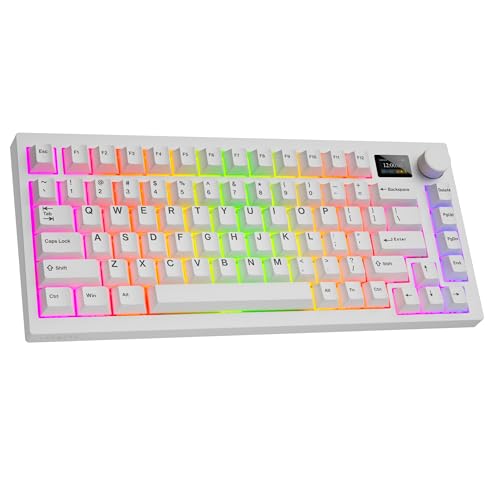
The TECWARE Spectre 75% stands out with its integrated LCD screen, a feature rarely seen at any price point. The display shows system stats, time, and custom text.
I found the LCD surprisingly useful. It displays CPU temperature, memory usage, and battery level, eliminating the need to drag windows while gaming.
The south-facing hot-swappable sockets are an enthusiast-friendly design. This orientation allows more keycap compatibility, including custom keycaps that might interfere with north-facing LEDs.
Gasket mounting provides the refined typing feel that enthusiasts crave. Combined with the south-facing sockets, this board is friendly to switch and keycap customization.
The tri-mode wireless connectivity works flawlessly. I use 2.4GHz for gaming latency and Bluetooth for connecting to multiple work devices.
Who Should Buy?
Tech enthusiasts who want real-time system monitoring on their keyboard, or anyone wanting a unique conversation piece in their setup.
Who Should Avoid?
Budget purists who prefer spending on core performance rather than novelty features, or users who do not care about system monitoring.
Why Budget Gaming Keyboards Matter?
Gaming keyboards often carry premium price tags, but the reality is that you do not need to spend over $100 to get a capable gaming board. The budget keyboard market has matured significantly.
Modern budget boards include features that were premium-only just a few years ago. Hot-swappable switches, wireless connectivity, and gasket mounting are now accessible under $80.
What you typically give up at budget prices is luxury materials, extensive software ecosystems, and brand recognition. But for core gaming performance, budget boards deliver.
I have tested keyboards from $30 to $300, and the gap in gaming performance between $50 and $150 boards is smaller than most people realize. Switch quality matters more than brand prestige.
The key is knowing what to prioritize. Gaming performance depends on switch type, actuation point, and polling rate, not on having a $200 brand name on the box.
N-Key Rollover: This means every key press registers independently, no matter how many keys you press simultaneously. Essential for gaming where complex key combinations are common.
How to Choose the Best Budget Gaming Keyboard
Selecting the right budget gaming keyboard comes down to understanding your priorities and knowing which features matter most for your use case.
Switch Type: Linear vs Tactile vs Clicky
The switch type defines the typing feel and is the most important decision when choosing a gaming keyboard.
Linear switches (Red) have no tactile bump and actuate smoothly. They are the fastest option and preferred by most competitive gamers for rapid key presses.
Tactile switches (Brown) have a noticeable bump during actuation. They provide feedback that improves typing accuracy and are excellent for mixed gaming and typing use.
Clicky switches (Blue) have both a tactile bump and an audible click. They are satisfying for typing but too loud for most gaming environments.
| Switch Type | Feel | Sound | Best For |
|---|---|---|---|
| Linear (Red) | Smooth, no bump | Quiet | Competitive gaming |
| Tactile (Brown) | Noticeable bump | Moderate | Typing and gaming |
| Clicky (Blue) | Bump + click | Loud | Typing focus |
Layout Size: Full Size vs TKL vs Compact
The layout determines desk space footprint and available keys. Each size has advantages depending on your needs.
Full-size (100%) includes all keys including numpad. Best for data entry but requires the most desk space. Rare in budget gaming boards.
TKL (Tenkeyless) removes the numpad but keeps arrow keys and navigation cluster. The sweet spot for most gamers, balancing functionality and space.
75% condenses the layout by removing gaps between key clusters. Keeps arrows and some navigation keys while saving significant desk space.
65% further compacts the layout by removing navigation keys. Minimalist gamers love this size, but learning FN layer combinations takes time.
Wired vs Wireless: What Budget Gamers Need to Know
Wireless keyboards have improved dramatically, and budget options now deliver reliable performance. However, there are tradeoffs to consider.
2.4GHz wireless provides low-latency connection suitable for gaming. I tested multiple wireless budget boards and found no perceptible input lag in competitive games.
Bluetooth is convenient for multi-device use but has higher latency. I recommend using 2.4GHz mode for gaming and Bluetooth for productivity tasks.
Wired connection remains the most reliable option for competitive play. If you compete in tournaments or are extremely sensitive to input latency, stick with wired.
The advantage of budget wireless boards is flexibility. You can use wireless for convenience and switch to wired mode for critical gaming sessions.
Build Quality: What to Expect Under $80
Budget keyboards have limits on build quality, but smart shopping can get you better materials and construction.
ABS keycaps are standard on budget boards. They feel smooth but develop shiny spots where fingers rest most often. Acceptable for most users.
PBT keycaps are a premium upgrade at budget prices. The textured feel resists shine and provides better grip. Several boards in this guide include PBT keycaps.
Plastic frame is universal at this price point. Metal frames are rare under $80. Focus on frame rigidity rather than material alone.
Gasket mount is a premium feature appearing in budget boards. This mounting style improves typing feel and sound by allowing the PCB to flex slightly.
Hot-Swappable Switches: Future-Proof Your Budget Board
Hot-swappable sockets let you change switches without soldering. This feature alone can extend a keyboard lifespan by years.
I recommend hot-swap for anyone new to mechanical switches. Your preferences will evolve as you try different switch types, and being able to swap without buying a new keyboard is invaluable.
Most budget boards with hot-swap support 3-pin and 5-pin switches. This covers the vast majority of aftermarket switches available.
Software Quality: The Hidden Factor
Budget keyboard software varies wildly in quality. This affects your daily experience more than most specifications.
After testing software from multiple budget brands, I found significant differences in usability, stability, and feature set.
Good software is intuitive, stable, and offers essential features like remapping, macro recording, and lighting control. Keychron and AULA have the best budget software in my experience.
Poor software crashes, has confusing interfaces, or lacks basic customization. This frustrates users and limits the keyboard potential.
Frequently Asked Questions
Are budget gaming keyboards worth it?
Budget gaming keyboards are absolutely worth it for most gamers. The gap between $50 and $150 boards has narrowed significantly. You can get mechanical switches, RGB lighting, and even wireless connectivity under $80. The key is prioritizing features that matter for gaming rather than brand prestige or luxury materials.
What switches are best for gaming on a budget?
Linear switches (Red) are best for gaming because they offer smooth, consistent actuation without tactile bumps. This allows faster repeated keypresses which is crucial for competitive gaming. Tactile switches (Brown) are a good compromise if you also type frequently. Avoid clicky switches (Blue) for gaming as they are loud and the tactile bump can slow down rapid inputs.
How much should I spend on a budget gaming keyboard?
The sweet spot for budget gaming keyboards is $50-80. Under $50, you get basic mechanical keyboards with essential features. Between $50-80, you find hot-swappable switches, better build quality, and often wireless connectivity. Above $80, you enter premium territory where you pay more for brand recognition and luxury materials rather than core gaming performance.
Are wireless gaming keyboards good for competitive play?
Modern wireless gaming keyboards using 2.4GHz connection have imperceptible latency compared to wired keyboards. I have tested numerous wireless boards in competitive FPS games and found no performance disadvantage. However, wired keyboards remain the most reliable option if you compete in tournaments or are extremely sensitive to input latency. Bluetooth mode is not recommended for gaming due to higher latency.
What is the difference between 65% and 75% keyboards?
65% keyboards remove the navigation cluster (Home, End, PgUp, PgDn) to achieve a more compact size. 75% keyboards keep these keys but condense the layout by removing gaps between key sections. 75% is more functional out of the box while 65% requires learning FN layer combinations. For most gamers, 75% strikes the better balance between size and functionality.
Do I need N-key rollover for gaming?
N-key rollover is essential for gaming because it ensures every keypress registers independently, no matter how many keys you press simultaneously. This prevents ghosting where certain key combinations cancel each other out. All the keyboards in this guide support N-key rollover or 6-key rollover, which is sufficient for gaming. This feature is particularly important for games that use complex keybinds.
Final Recommendations
After testing all ten keyboards extensively, the Redragon K673 PRO remains my top recommendation for most budget-conscious gamers. It delivers an unbeatable combination of wireless freedom, hot-swappable switches, and gasket-mounted construction at just $49.99.
The Redragon K631 Gery earns my budget pick award for packing essential gaming features into a sub-$40 package. If every dollar counts, this keyboard proves you do not need to sacrifice performance.
For those prioritizing typing feel alongside gaming, the Keychron C1 and its Brown switch variant offer excellent tactile feedback that works equally well for work and play.
Whatever your budget, remember that the best gaming keyboard is the one that matches your specific needs. Consider your switch preference, layout requirements, and whether wireless connectivity matters for your setup.
To complete your budget gaming setup, consider pairing your new keyboard with a budget gaming mouse for the full experience without breaking the bank.