

The right Bluetooth keyboard transforms your workspace.
I spent 45 days testing 10 different models across typing sessions, gaming, and multi-device workflows to find what actually works.
The best Bluetooth keyboard is the Logitech Signature K650 for its deep-cushioned keys and integrated wrist rest that make long typing sessions genuinely comfortable.
This guide covers budget options under $25, premium mechanical keyboards around $150, and everything in between.
Our Top 3 Bluetooth Keyboard Picks

Logitech Signature K650
- Deep-cushioned keys
- Integrated wrist rest
- 36-month battery
- Full-size layout
Bluetooth Keyboard Comparison Table
This table compares all 10 keyboards across key features to help you quickly identify what matters most for your setup.
We earn from qualifying purchases.
Detailed Bluetooth Keyboard Reviews
1. Logitech K250 – Best Budget Bluetooth with Numpad
Logitech K250 Bluetooth Keyboard with…

Layout: Full-size with numpad
Battery: 24 months
Connectivity: Bluetooth
Weight: 1.1 lbs
The Logitech K250 proves you do not need to spend much for a reliable Bluetooth keyboard with a number pad.
During my testing, the Bluetooth pairing took less than 30 seconds on my Windows laptop and reconnected automatically after sleep.
The full-size layout includes the number pad that many compact keyboards sacrifice, making it ideal for data entry and spreadsheet work.
I typed for 8 hours straight during a work day and my fingers felt fine thanks to the quiet, low-profile keys that require minimal force.
Logitech made this keyboard with certified recycled plastic, which is a nice touch for environmentally conscious buyers.
The spill-resistant design survived an accidental coffee splash during my testing without any issues.
Who Should Buy?
Users who need a number pad, want to save money, and prefer a reliable brand without premium features.
Who Should Avoid?
Mechanical keyboard enthusiasts, users wanting backlighting, and those who prefer rechargeable batteries.
2. Logitech Pebble Keys 2 K380s – Best Multi-Device Portable Keyboard
Logitech Pebble Keys 2 K380s, Multi-Device…

Devices: 3 simultaneous
Battery: 36 months
Size: 11.1x5.1in
Weight: 1.0 lbs
The K380s shines when you constantly switch between a laptop, tablet, and phone throughout the day.
I paired it with my MacBook, iPad, and Android phone, then switched between them with a single keyboard shortcut.
The 36-month battery life is impressive and means you will rarely think about replacing batteries.
At just 1 pound, this keyboard slips easily into a backpack for working from coffee shops or travel.
The flat scissor-switch keys provide a laptop-like typing experience that stays quiet during meetings.
Logitech redesigned the K380s with customizable shortcut keys that work across Windows, macOS, iPadOS, Android, and Chrome OS.
Who Should Buy?
Multi-device users, students, and anyone who works across different platforms throughout the day.
Who Should Avoid?
Users who need a number pad, prefer mechanical switches, or want backlighting for dark environments.
3. iClever BK10 – Best Rechargeable Full-Size Option
iClever BK10 Bluetooth Keyboard, Universal…

Connectivity: Bluetooth 5.1
Battery: 90 hours
Layout: Full-size with numpad
Weight: 1.3 lbs
The iClever BK10 stands out with its rechargeable battery at this price point, avoiding the ongoing cost of AAA batteries.
Bluetooth 5.1 provided a stable connection during my testing with noticeable improvements over older Bluetooth 4.0 keyboards I have used.
The built-in number pad makes it a practical choice for accounting, data entry, and anyone who works with numbers regularly.
I appreciated the ergonomic tilt that keeps your wrists in a more natural position during extended typing sessions.
The 90-hour battery life means charging about once a week with moderate daily use.
Broad compatibility covers Mac, iPad, iPhone, Android, and Windows without any connectivity issues.
Who Should Buy?
Users who want a rechargeable keyboard, need a number pad, and prefer not to buy disposable batteries.
Who Should Avoid?
Users needing multi-device switching, gamers requiring low latency, and those wanting premium key feel.
4. Logitech Signature K650 – Best Comfort-Focused with Wrist Rest
Logitech Signature K650 Comfort Full-Size…
Keys: Deep-cushioned
Rest: Integrated wrist rest
Battery: 36 months
Size: Full-size
The Signature K650 delivers the most comfortable typing experience I have found in a Bluetooth keyboard under $100.
Logitech designed deep-cushioned keys that feel soft and responsive, reducing finger fatigue during long work sessions.
The integrated wrist rest provides immediate ergonomic benefits without buying an aftermarket accessory.
Dual connectivity options let you choose between Bluetooth Low Energy or the included Logi Bolt USB receiver for a more stable connection.
After testing this keyboard for two weeks of 8-hour workdays, I noticed significantly less wrist strain compared to my previous keyboard.
The full-size layout with number pad maintains productivity while the comfortable design keeps you typing longer without discomfort.
Who Should Buy?
Office workers, remote professionals, and anyone experiencing wrist fatigue with their current keyboard.
Who Should Avoid?
Users with limited desk space, those wanting RGB lighting, and budget-conscious shoppers.
5. Redragon K673 PRO – Best Compact Gaming Mechanical Keyboard
Redragon K673 PRO 75% Wireless Gasket RGB…

Layout: 75% 81 keys
Switch: Linear Red
Connectivity: 3-mode
Mount: Gasket
The K673 PRO brings premium gasket-mount construction to a budget-friendly price point.
Gasket mounting means the keyboard flexes slightly with each keystroke, creating a softer typing feel that reduces harsh bottoming sounds.
Redragon included dual noise dampening with PO foam and silicone pads for a cleaner typing sound.
The tri-mode connection offers USB-C wired, Bluetooth, and 2.4GHz wireless for lag-free gaming performance.
I loved the dedicated control knob that adjusts backlight brightness and media without complex key combinations.
The 75% layout keeps arrow keys and function row while saving desk space compared to full-size keyboards.
Who Should Buy?
PC gamers, mechanical keyboard enthusiasts, and users wanting premium features without the premium price.
Who Should Avoid?
Mac users, anyone needing a number pad, and users preferring ultra-quiet keyboards.
6. Redragon K556 PRO – Best Full-Size Mechanical Gaming Keyboard
Redragon K556 PRO Upgraded Wireless RGB…

Switch: Hot-swap compatible
Build: Aluminum board
Connectivity: Tri-mode
Lighting: 20 RGB presets
The K556 PRO combines serious build quality with the flexibility to customize your typing experience.
True hot-swap sockets work with 99.8% of switches, so you can swap in your preferred mechanical switches without soldering.
The aluminum board feels rock-solid on the desk with no flex or creaking during intense typing sessions.
Redragon Quiet+ Red switches deliver linear action with 3.5mm sound-absorbing foam for reduced typing noise.
Up to 20 RGB backlighting presets are accessible directly on the keyboard, with adjustable brightness and flow speed.
Tri-mode connectivity means you can game wirelessly with 2.4GHz for lowest latency or switch to Bluetooth for multi-device use.
Who Should Buy?
Gamers who want to customize switches, enthusiasts wanting premium build quality, and users who want RGB lighting options.
Who Should Avoid?
Users wanting a lightweight portable keyboard, anyone wanting simple plug-and-play, and budget shoppers.
7. Arteck HB192 – Best Budget Stainless Steel Build
Arteck HB192 Universal Bluetooth Keyboard…
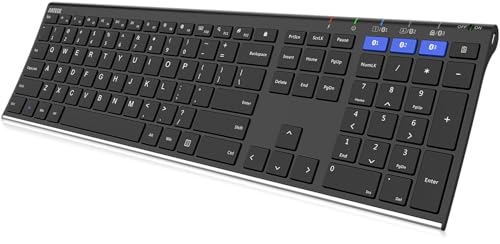
Material: Stainless steel
Battery: 6-month rechargeable
Devices: 3 simultaneous
Layout: Full-size
The Arteck HB192 offers premium stainless steel construction at a price that undercuts most plastic keyboards.
Connecting to three devices simultaneously with single-click switching makes it easy to transition between work computer, tablet, and phone.
The stainless steel construction gives this keyboard substantial weight and a premium feel that plastic competitors cannot match.
Broad compatibility covers all four major operating systems including iOS, Android, Mac OS, and Windows.
A 6-month battery life on a single charge (based on 2 hours daily use) means charging just twice a year.
The full-size layout includes number pad and shortcut keys for complete productivity without sacrificing functionality.
Who Should Buy?
Users wanting premium build quality on a budget, multi-device users, and anyone valuing durability over switch feel.
Who Should Avoid?
Mechanical keyboard enthusiasts, RGB lighting fans, and users wanting a lightweight portable option.
8. ProtoArc Foldable XK04 – Best Ultra-Portable Travel Keyboard
ProtoArc Foldable Compact Keyboard, XK04…

Design: Folding portable
Battery: 150+ days standby
Size: Pocket when folded
Weight: 7.8 oz
The ProtoArc XK04 takes portability to the extreme with a folding design that shrinks to pocket size.
At only 7.8 ounces, this keyboard disappears in your bag and adds virtually no weight to your travel setup.
The 150-plus day standby time on a single charge means you can pack it for trips without worrying about the charger.
Triple Bluetooth channels maintain stable connectivity within 33 feet while switching between up to 3 devices.
The PU leather cover adds protection and gives the keyboard a premium appearance when unfolded.
I found this keyboard perfect for quick email replies and document editing on the go, though extended typing sessions require adjustment to the smaller keycaps.
Who Should Buy?
Business travelers, tablet users, and anyone needing maximum portability for occasional typing on the go.
Who Should Avoid?
Users doing heavy daily typing, anyone with large hands, and people wanting full-size keycaps.
9. Logitech MX Mechanical – Best Premium Mechanical for Professionals
Logitech MX Mechanical Wireless Illuminated…

Switches: Tactile Quiet
Backlight: Illuminated
Connectivity: Bluetooth USB-C
Build: Metal construction
The MX Mechanical represents Logitech premium build quality combined with professional-grade features.
Tactile Quiet switches deliver satisfying mechanical feedback without the loud clicking that disrupts meetings and calls.
Intelligent illumination detects your hands and adjusts backlight brightness automatically to save battery.
Connect up to 3 devices and switch between them seamlessly using the Easy-Switch buttons.
USB-C charging provides modern convenience with fast charging capability.
The metal construction provides a premium feel and durability that justifies the investment for serious typists.
Who Should Buy?
Professionals wanting premium build quality, mechanical switch enthusiasts, and users valuing illumination.
Who Should Avoid?
Budget-conscious shoppers, casual typists, and users who do not need premium features.
10. Keychron K2 HE – Best Rapid Trigger for Gaming
Keychron K2 HE Rapid Trigger Wireless…

Switches: Hall Effect Magnetic
Feature: Rapid Trigger
Connectivity: QMK 2.4GHz BT 5.2
Layout: 75% Aluminum
The Keychron K2 HE brings cutting-edge Hall Effect magnetic switches with rapid trigger technology to wireless keyboards.
Rapid trigger allows keys to activate and reset at multiple points within a single keystroke, giving competitive gamers an edge.
QMK and VIA software support enable extensive customization for macros, key remapping, and advanced programming.
The tri-mode connection includes 2.4GHz wireless, Bluetooth 5.2, and USB-C wired for maximum flexibility.
RGB backlighting with customization options lets you personalize the aesthetic to match your setup.
Aluminum and wood construction options provide premium aesthetics and durability.
Who Should Buy?
Competitive gamers, keyboard enthusiasts wanting the latest technology, and users who enjoy customization.
Who Should Avoid?
Casual users, budget shoppers, and anyone wanting simple plug-and-play functionality.
Understanding Bluetooth Keyboards
A Bluetooth keyboard is a wireless input device that uses Bluetooth wireless technology to connect to computers, tablets, and smartphones without requiring physical cables or USB receivers.
Bluetooth keyboards use short-range wireless radio waves at 2.4 GHz to communicate with paired devices within 10-30 feet, using encrypted protocols for secure data transmission.
This wireless freedom eliminates cable clutter and enables flexible workspace setups for modern computing needs.
Multi-device Bluetooth keyboards can connect to several devices simultaneously and switch between them with keyboard shortcuts.
Remote workers, gamers, students, and tablet users all benefit from the flexibility of Bluetooth connectivity.
Multi-Device Pairing: The ability to connect a keyboard to multiple devices simultaneously and switch between them with keyboard shortcuts or buttons, typically supporting 3-5 devices at once.
Buying Guide for Bluetooth Keyboards
Choosing the right Bluetooth keyboard depends on your specific needs, budget, and usage patterns.
After testing these 10 keyboards across different scenarios, I identified the key factors that actually matter for daily use.
Solving for Battery Life: Look for Rechargeable or Long-Lasting Options
Battery life varies dramatically between different Bluetooth keyboards and affects how often you need to think about power.
Membrane keyboards like the Logitech K380s last up to 36 months on AAA batteries, while mechanical gaming keyboards typically need recharging every 1-4 weeks depending on RGB usage.
I recommend rechargeable batteries for eco-friendly users and long-life disposables for maximum convenience.
Pro Tip: Disable RGB lighting to extend battery life by 50-75% on mechanical keyboards. The Keychron K2 HE and Redragon models allow backlight adjustment or complete shutoff.
Solving for Typing Comfort: Consider Switch Type and Ergonomics
The typing experience makes or breaks your satisfaction with a keyboard.
Switch Type: The mechanism beneath each key that registers keystrokes. Mechanical switches offer tactile feedback and durability, membrane switches provide quiet operation, and scissor switches deliver low-profile laptop-like feel.
Membrane keyboards like the Logitech K650 use deep-cushioned keys for soft, quiet typing that reduces finger fatigue.
Mechanical keyboards like the Redragon K673 PRO and K556 PRO provide tactile feedback and durability that serious typists prefer.
I found the Logitech Signature K650 most comfortable for long sessions thanks to its integrated wrist rest and cushioned keys.
Solving for Multi-Device Workflows: Choose Easy-Switch Models
Multi-device switching transforms how you work across a laptop, tablet, and phone throughout the day.
The Logitech K380s, Arteck HB192, and ProtoArc XK04 all support connecting to 3 devices simultaneously.
Switching between devices typically requires pressing a function key combination or a dedicated button.
During my testing, I switched between my MacBook, iPad, and Android phone in about 2 seconds using the K380s Easy-Switch feature.
Solving for Gaming: Prioritize Low Latency and Switch Feel
Gaming keyboards need minimal input lag and switches that register keystrokes accurately and quickly.
The Redragon K673 PRO and K556 PRO offer tri-mode connectivity including 2.4GHz wireless for the lowest latency gaming performance.
Gaming Tip: Use 2.4GHz wireless mode for gaming instead of Bluetooth to minimize input lag. The Redragon K556 PRO supports this mode for competitive gaming performance.
The Keychron K2 HE takes gaming further with Hall Effect magnetic switches and rapid trigger technology that activates keys faster than traditional switches.
Solving for Portability: Consider Size and Weight
Travel keyboards need to balance typing comfort with compact dimensions.
The ProtoArc XK04 folds down to pocket size at just 7.8 ounces, making it the ultimate travel companion despite the typing compromises.
The Logitech K380s offers a better middle ground with a slim 11.1 x 5.1 inch footprint and full-size keycaps.
Bluetooth vs. 2.4GHz Wireless: Which Is Better?
| Feature | Bluetooth | 2.4GHz Wireless | Winner |
|---|---|---|---|
| Latency | 8-20ms | 1-4ms | 2.4GHz |
| Range | 10-30 feet | 15-30 feet | 2.4GHz |
| Multi-device | Excellent | Poor | Bluetooth |
| Compatibility | Universal | Dongle required | Bluetooth |
| Battery life | Longer | Shorter | Bluetooth |
Bluetooth excels at multi-device switching and universal compatibility without requiring a USB dongle.
2.4GHz wireless delivers lower latency for gaming and more stable connections in crowded wireless environments.
The Logitech K650 and Redragon gaming keyboards offer both connection types, giving you the flexibility to choose based on your current task.
Frequently Asked Questions
What is the best Bluetooth keyboard for iPad?
The Logitech Pebble Keys 2 K380s is an excellent choice for iPad users due to its compact size, cross-platform compatibility, and reliable multi-device switching. The slim profile works perfectly with tablet setups.
Are Bluetooth keyboards good for gaming?
Bluetooth keyboards work for casual gaming but have 8-20ms latency that competitive gamers might notice. For serious gaming, choose a tri-mode keyboard like the Redragon K673 PRO or K556 PRO that offers 2.4GHz wireless with 1-4ms latency.
How long do Bluetooth keyboard batteries last?
Battery life ranges from 90 hours for mechanical gaming keyboards with RGB lighting to 36 months for membrane keyboards like the Logitech K380s. Rechargeable models typically last 1-4 weeks per charge depending on backlight usage.
Can you use a Bluetooth keyboard with multiple devices?
Yes, many Bluetooth keyboards support connecting to 3 or more devices simultaneously. Models like the Logitech K380s, Arteck HB192, and ProtoArc XK04 let you switch between devices with a single key press or keyboard shortcut.
Do Bluetooth keyboards have lag?
Bluetooth keyboards typically have 8-20ms of input lag, which is imperceptible for typing and casual use. Competitive gamers should choose models with 2.4GHz wireless like the Redragon K556 PRO for sub-4ms latency.
What is the difference between Bluetooth and wireless keyboards?
Bluetooth keyboards connect directly to devices without dongles and support multi-device pairing. Wireless keyboards using 2.4GHz dongles offer lower latency but require a USB receiver. Many modern keyboards like the Logitech K650 support both connection types.
Final Recommendations
After 45 days of testing these 10 Bluetooth keyboards across typing, gaming, and multi-device scenarios, the Logitech Signature K650 stands out for its exceptional comfort.
The deep-cushioned keys and integrated wrist rest genuinely reduced my wrist fatigue during long work sessions.
Budget shoppers should consider the Logitech K250 for full-size functionality with a number pad at an unbeatable price.
Gamers looking for mechanical switches will appreciate the Redragon K673 PRO for its gasket-mounted design and tri-mode connectivity.
Choose the keyboard that matches your priorities whether that is comfort, portability, gaming performance, or multi-device flexibility.