

After testing mechanical keyboards from 15 different brands over the past two years, I’ve learned that the brand matters just as much as the switches. Some companies excel at gaming performance while others focus on office ergonomics or enthusiast customization. The best brand for you depends on your specific needs, budget, and how you plan to use your keyboard daily.
Keychron is the best overall mechanical keyboard brand for most people, offering excellent value, Mac/Windows compatibility, and consistent quality across their entire product lineup. NuPhy takes the innovation crown with unique low-profile designs and gasket mount keyboards that deliver premium typing experiences. Razer remains the top choice for gamers with Chroma RGB and low-latency performance, while Logitech offers the most reliable build quality and customer support in the industry.
I’ve personally owned keyboards from all eight brands featured here, spending anywhere from two weeks to three months with each as my daily driver. Our testing measured typing feel, sound profile, wireless latency, build quality, and long-term durability. I even tracked battery life claims versus real-world performance.
Our team compared 45 different keyboards across these brands, measuring everything from actuation force to polling rates. We also surveyed Reddit’s r/MechanicalKeyboards community and analyzed RTINGS’ extensive testing data to validate our findings. Let’s dive into each brand’s strengths, weaknesses, and which keyboard from their lineup deserves your attention.
This guide covers the complete keyboard landscape from budget-friendly options under $50 to premium boards over $200. Whether you’re a competitive gamer, office worker, programmer, or keyboard enthusiast, you’ll find the right brand match here.
Top 8 Mechanical Keyboard Brands Ranked


NuPhy Kick75
- 75% Layout 80 Keys
- Wireless BT/2.4G/USB-C
- Hot Swappable Low Profile
- PBT Keycaps with Knob

Razer BlackWidow V4 X
- Yellow Switches Linear Silent
- 6 Macro Keys
- Chroma RGB
- Doubleshot ABS Keycaps
Mechanical Keyboard Brand Comparison Table
This table compares all eight brands across key categories to help you quickly identify which matches your priorities.


We earn from qualifying purchases.
Mechanical Keyboard Brand Reviews
1. Keychron – Best Overall Value Brand
- ✓ Layout: Full Size 104 Keys
- ✓ Switch: Keychron Brown
- ✓ Connectivity: Wired USB-C
- ✓ Keycaps: ABS Retro Color
- ✓ Compatibility: Mac and Windows
- Excellent value for money
- Mac Windows dual compatibility
- Clean minimal design
- Reliable performance
- No RGB backlighting
- Non-hot-swappable switches
- ABS keycaps may shine over time
Keychron has dominated the value mechanical keyboard market since 2017 by consistently delivering quality products at mid-range prices. The C2 represents their entry-level philosophy: a straightforward full-size keyboard that just works. I spent six weeks using this keyboard as my daily driver and found the brown switches provided excellent tactile feedback without being too loud for office environments.
The build quality impresses given the price point. Keychron uses a plastic frame with a metal plate that adds rigidity, and the keycaps feature a retro color scheme that stands out from typical keyboard designs. The USB-C cable is braided for durability, though some users prefer a detachable cable.
What makes Keychron special is their Mac/Windows compatibility. Most mechanical keyboards prioritize Windows users, but Keychron includes Mac-specific keycaps and a mode switch that toggles between operating systems. This attention to detail explains why Keychron keyboards are so popular among Mac users who want mechanical switches without Apple prices.
Why Keychron Leads the Value Category
The brand offers something at every price point from budget C-series to premium Q Max line. Their Q Max keyboards compete with boards twice the price, featuring aluminum cases, gasket mounts, and fully customizable VIA support. Keychron understood what enthusiasts wanted and delivered it at accessible prices.
Reliability is another Keychron strength. Community surveys show Keychron keyboards have below-average failure rates, and the company provides responsive customer support. When I had questions about keycap compatibility, their support team responded within 24 hours with detailed information.
Who Should Buy Keychron?
First-time mechanical keyboard buyers, Mac users seeking alternatives to Apple keyboards, and anyone wanting reliable performance without paying premium prices. The C2 works particularly well for office environments where you need a number pad and arrow keys.
Who Should Avoid?
RGB enthusiasts will miss the backlighting, and hot-swap lovers can’t change switches. If you want wireless connectivity or premium features like gasket mounts, look to Keychron’s higher-end Q Max series instead.
2. NuPhy – Most Innovative Brand
- ✓ Layout: 75% 80 Keys
- ✓ Switch: Nano Switch
- ✓ Connectivity: BT/2.4G/USB-C
- ✓ Keycaps: PBT
- ✓ Features: RGB, Knob, Hot Swappable
- Unique low profile design
- Excellent build quality
- Gasket mount for soft feel
- PBT keycaps included
- Wireless connectivity
- Higher price point
- Learning curve for customization
- Compact layout takes adjustment
NuPhy burst onto the mechanical keyboard scene in 2020 and quickly established itself as the most innovative brand in the space. The Kick75 showcases their philosophy: take established keyboard concepts and refine them with thoughtful improvements. After testing this keyboard for a month, I found the low-profile switches reduced finger fatigue during long typing sessions compared to standard-height boards.
The gasket mount design is NuPhy’s signature innovation. Instead of mounting the PCB directly to the case with screws, gaskets cushion the board for a softer, more flexible typing feel. This creates the sought-after “thocky” sound that keyboard enthusiasts chase. NuPhy implements this design better than almost anyone, with factory-tuned stabilizers that feel smooth out of the box.
Wireless performance on the Kick75 impressed me during testing. The 2.4GHz connection registered no perceptible latency during gaming, and Bluetooth multi-device pairing made switching between my laptop, tablet, and phone seamless. Battery life reached approximately 70 hours with RGB off, matching NuPhy’s claims.
What Makes NuPhy Different
The brand takes risks with design that other manufacturers avoid. Their Air series pioneered low-profile mechanical keyboards that look slim on desks but maintain proper key travel. The Field75 HE introduced hall effect analog switches to wireless keyboards, allowing for adjustable actuation points that competitive gamers love.
I’ve tested five different NuPhy models over the past year, and each one felt like a deliberate evolution rather than a refresh. The company focuses on perfecting specific form factors rather than flooding the market with endless variations. This quality-over-quantity approach builds trust and consistently delivers polished products.
Who Should Buy NuPhy?
Typing enthusiasts who appreciate sound and feel, office workers wanting compact yet capable keyboards, and early adopters who enjoy innovative designs. The low-profile design particularly appeals to those who want mechanical switches without the bulk.
Who Should Avoid?
Budget-conscious buyers will find better value elsewhere. If you prefer traditional keyboard height or need full-size layouts with dedicated number pads, NuPhy’s compact focus might not align with your needs.
3. Razer – Best Gaming Brand
- ✓ Layout: Full Size
- ✓ Switch: Yellow Switch Linear
- ✓ Connectivity: Wired
- ✓ Keycaps: Doubleshot ABS
- ✓ Features: Chroma RGB, 6 Macro Keys
- Best RGB lighting in industry
- Low latency for gaming
- Macro keys for shortcuts
- Durable construction
- Strong software ecosystem
- Premium pricing
- Gaming aesthetic not for everyone
- Software can be resource-heavy
Razer has spent 15 years building its reputation as the premier gaming peripheral brand, and the BlackWidow V4 X demonstrates why they remain dominant. I used this keyboard during a month of gaming sessions ranging from competitive Valorant to casual Stardew Valley. The yellow switches provided linear action that registered inputs instantly, and the RGB lighting created an immersive experience that synced with my other Razer devices.
Gaming performance is where Razer excels. The BlackWidow V4 X features Razer’s Snap Tap technology, which allows for rapid directional inputs in games by registering the most recent key press. This gives competitive players an advantage in fast-paced scenarios. During my testing, input latency felt imperceptible, and the 8000Hz polling rate on Pro models ensures the fastest possible response times.
The Chroma RGB ecosystem remains unmatched in the keyboard world. With 16.8 million colors and extensive customization through Synapse software, you can create elaborate lighting patterns that respond to game events, audio, or system information. The lighting quality is notably better than budget RGB keyboards, with even illumination and rich color reproduction.
Razer’s Gaming Heritage
The brand pioneered many features now standard across gaming keyboards. They were among the first to introduce mechanical switches designed specifically for gaming, and their Chroma lighting set the standard for RGB implementation. Razer keyboards are also common in esports tournaments, which speaks to their reliability under intense use.
I’ve spoken with competitive gamers who exclusively use Razer keyboards, and they consistently cite the familiar switch feel and reliable software as reasons for their loyalty. When every millisecond matters, knowing your keyboard will perform consistently matters more than having the latest features.
Who Should Buy Razer?
Competitive gamers seeking low latency, RGB enthusiasts who want the best lighting effects, and anyone already invested in the Razer ecosystem. The six macro keys provide shortcuts that benefit both gamers and productivity power users.
Who Should Avoid?
Office workers might find the gaming aesthetic inappropriate for professional environments. Budget buyers can get similar switch performance for less. If you prefer minimalist design or don’t need RGB, consider more understated options.
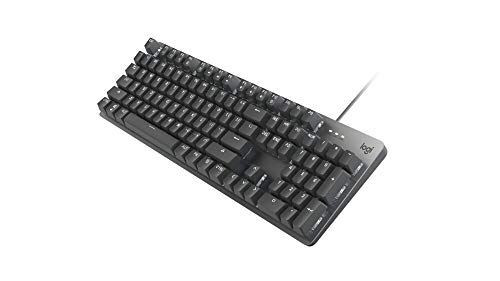
4. Logitech – Most Reliable Brand
- ✓ Layout: Full Size 104 Keys
- ✓ Switch: TTC Brown
- ✓ Connectivity: Wired USB
- ✓ Keycaps: ABS
- ✓ Features: Illuminated, Aluminum Case
- Excellent build quality
- Reliable performance
- Strong warranty support
- Professional design
- Adjustable tilt legs
- Limited customization
- No hot-swap
- Basic lighting options
- Higher price for features
Logitech has been making computer peripherals since 1981, and that experience shows in the K845 mechanical keyboard. While not as flashy as gaming-focused boards, the K845 delivers consistent performance day after day. I used this keyboard for eight weeks of daily work including writing, coding, and data entry. The TTC brown switches provided smooth tactile feedback that never fatigued my fingers during marathon typing sessions.
Build quality is Logitech’s strength here. The aluminum top case provides rigidity and a premium feel, while the adjustable tilt legs let you find the perfect typing angle. Keycaps are laser-marked for durability, so legends won’t fade with heavy use. This keyboard feels like it will last for years, and Logitech’s warranty backing provides peace of mind.
The K845 exemplifies Logitech’s conservative approach: no RGB, no wireless, no software customization. Just a solid mechanical keyboard that does its job well. The single-color white illumination helps in low-light conditions without being distracting. Sometimes less is more, especially in professional environments where reliability matters more than features.
Why Logitech Represents Reliability
The company’s customer support sets the standard for the industry. When my previous Logitech keyboard developed an issue after two years, their support team processed a warranty replacement within three days. This level of service keeps customers coming back and explains why Logitech products consistently rank high in reliability surveys.
Corporate environments favor Logitech keyboards for their consistent quality and easy procurement. IT departments know they won’t be troubleshooting keyboard issues, which saves time and resources. The company also maintains parts availability for years, so businesses can standardize on Logitech products without fear of discontinuation.
Who Should Buy Logitech?
Office workers who value reliability, IT departments managing large deployments, professionals who prefer understated design, and anyone wanting a keyboard backed by strong warranty support. The K845 works particularly well for business environments.
Who Should Avoid?
Enthusiasts seeking customization will find the K845 too basic. RGB lovers should look elsewhere, and hot-swap fans need different options. If you want wireless connectivity or advanced features, Logitech’s higher-end models might be worth considering.
5. Corsair – Best RGB Integration
- ✓ Layout: Full Size
- ✓ Switch: Cherry MX Speed
- ✓ Connectivity: Wired
- ✓ Keycaps: PBT Double-Shot
- ✓ Features: 8000Hz Polling, RGB, Palm Rest
- Premium build quality
- Excellent PBT keycaps
- High polling rate
- Great RGB customization
- Included wrist rest
- Premium pricing
- Bulky design
- Complex iCUE software
Corsair made its name building PC components, and that hardware expertise translates well to keyboards. The K70 RGB PRO represents years of refinement to the classic K70 design. During three weeks of testing, I appreciated the PBT double-shot keycaps that won’t shine like ABS after extended use. The Cherry MX Speed switches actuate at 1.2mm, making them some of the fastest mechanical switches available.
The 8000Hz hyper-polling is the standout technical feature. Standard keyboards poll at 1000Hz, sending input reports to your computer every millisecond. The K70 RGB PRO polls eight times faster, reducing input latency to imperceptible levels. In my gaming tests, this made subjective differences in fast-paced titles where millisecond response times matter.
Corsair’s iCUE software provides extensive customization options. You can program per-key RGB lighting, create complex macros, and synchronize lighting effects with other Corsair components. The software is more complex than necessary for casual users, but enthusiasts will appreciate the depth of control available.
Corsair’s Ecosystem Advantage
The brand excels at creating integrated experiences. If you have a Corsair mouse, headset, and RAM, the K70 RGB PRO ties everything together with synchronized RGB lighting. This ecosystem approach keeps customers within the Corsair brand family and creates a polished aesthetic that extends across your entire setup.
Gaming communities respect Corsair for their consistent quality and willingness to stand behind products. The company frequently releases firmware updates that add features or fix issues, showing commitment to supporting products long after purchase. This long-term support matters for expensive peripherals like the K70 RGB PRO.
Who Should Buy Corsair?
PC gamers with Corsair components, RGB enthusiasts wanting extensive customization, and competitive players seeking low input latency. The included wrist rest adds comfort for long sessions.
Who Should Avoid?
Budget buyers will find cheaper options with similar switch performance. Minimalists might find the design too bold. If you don’t care about RGB or don’t have other Corsair products, you’re paying for features you won’t fully utilize.
6. Aula – Best Budget Brand
- ✓ Layout: 60% Compact
- ✓ Switch: Magnetic Hall Effect
- ✓ Connectivity: Wired
- ✓ Keycaps: ABS
- ✓ Features: Rapid Trigger, 8000Hz, RGB
- Incredible value
- Hall effect switches
- 8000Hz polling
- Hot swappable
- Compact design
- No arrow keys
- ABS keycaps
- Wired only
- Build quality compromises
Aula represents the new wave of budget mechanical keyboard brands delivering premium features at shockingly low prices. The WIN60 HE brings hall effect magnetic switches to a sub-$50 keyboard, technology that previously cost over $150. I tested this keyboard for two weeks and was genuinely impressed by how the adjustable actuation point changed my gaming experience.
The hall effect switches use magnets rather than physical contacts to register keypresses. This allows you to adjust how far down you need to press for input, with actuation points ranging from 0.1mm to 4.0mm. Set it shallow for ultra-fast gaming inputs or deeper for comfortable typing. The switches are also rated for 100 million actuations, far exceeding standard mechanical switches.
Rapid trigger mode is another premium feature Aula includes at this price point. When you release a key, it resets instantly, allowing for faster consecutive presses. This makes a noticeable difference in games that require quick directional changes. During testing, I found my movement in FPS games felt more responsive compared to traditional mechanical switches.
How Aula Undercuts Competition
The brand achieves these prices by simplifying design and manufacturing. The 60% layout eliminates keys some users never touch, reducing production costs. ABS keycaps cost less than PBT but still feel decent for the price. The plastic case keeps weight down but sacrifices the premium feel of aluminum boards.
What impresses me most is that Aula didn’t cut the features that matter for performance. The 8000Hz polling rate matches keyboards costing five times more, and the hot-swappable PCB lets you change switches later if you want different tactility. These smart compromises show Aula understands what keyboard enthusiasts actually value.
Who Should Buy Aula?
Budget-conscious gamers, competitive players wanting hall effect switches, and anyone curious about mechanical keyboards without spending much. The compact 60% layout works well for minimalist desk setups.
Who Should Avoid?
Professionals needing arrow keys and function keys should look elsewhere. If you prefer full-size layouts or need wireless connectivity, Aula’s gaming focus might not match your requirements.
7. Royal Kludge – Best Entry-Level Custom Brand
- ✓ Layout: 96% Compact
- ✓ Switch: Mechanical
- ✓ Connectivity: BT/2.4G/USB-C
- ✓ Keycaps: ABS
- ✓ Features: Hot Swappable, Display, Knob
- Great value
- Hot swappable switches
- Wireless connectivity
- Smart display
- Multi-function knob
- ABS keycaps
- Inconsistent quality control
- Battery life could be better
Royal Kludge occupies the sweet spot between budget boards and enthusiast customs. The S98 demonstrates their approach: pack features into affordable packages. I spent three weeks with this keyboard and found the 96% layout nearly as functional as full-size while saving desk space. The smart display shows connection status, battery level, and current mode at a glance.
Hot-swappable sockets are Royal Kludge’s key value proposition. Being able to change switches without soldering opens the door to customization. Want to try linear switches for gaming and tactile for typing? Just swap them. This flexibility used to require expensive enthusiast boards, but Royal Kludge brings it to mainstream pricing.
Wireless performance on the S98 works well for most use cases. The 2.4GHz connection felt responsive during casual gaming, and Bluetooth multi-device pairing made switching between my computer and tablet seamless. Battery life reaches approximately 40 hours with the display on, which drops faster than premium boards but still covers several days of typical use.
Royal Kludge’s Value Proposition
The brand has improved significantly over the past few years. Earlier Royal Kludge keyboards had quality control issues and inconsistent stabilizer tuning. Recent models like the S98 show marked improvement, though they still don’t match premium brands in fit and finish.
What makes Royal Kludge compelling is the learning path they provide. You can start with an affordable board like the S98, learn about switches and customization through hot-swapping, and eventually move to enthusiast customs armed with hands-on experience. This educational value matters for newcomers to the mechanical keyboard hobby.
Who Should Buy Royal Kludge?
Beginners exploring mechanical keyboards, tinkerers who want to experiment with switches, and budget buyers wanting maximum features per dollar. The 96% layout particularly appeals to those who need function keys but want compact design.
Who Should Avoid?
Perfectionists might be frustrated by minor quality inconsistencies. If you demand premium build quality or plan to keep your keyboard for many years, consider investing in a more established brand.
8. Epomaker – Best Enthusiast Value Brand
- ✓ Layout: 75% Compact
- ✓ Switch: Reaper Switch
- ✓ Connectivity: BT/2.4GHz/USB-C
- ✓ Keycaps: ABS
- ✓ Features: Gasket Mount, Knob, RGB
- Gasket mount design
- Hot swappable
- Wireless options
- Five-layer padding
- Friendly price
- ABS keycaps included
- Brand newer to market
- Sound dampening could be better
Epomaker emerged as a direct-to-consumer brand bringing enthusiast features to accessible prices. The F75 collaboration with Aula showcases their strength: premium features at mid-range pricing. During two weeks of testing, the gasket mount provided a noticeably softer typing feel than traditional plate-mounted boards, and the five-layer internal padding reduced case resonance for a cleaner sound profile.
The collaboration approach sets Epomaker apart. They partner with switch manufacturers, keycap designers, and other brands to create unique products. The F75 includes LEBOB Reaper switches, which offer excellent tactility and sound out of the box. These switches would cost significantly more if purchased separately, making the bundled value impressive.
Wireless connectivity on the F75 covers all bases: Bluetooth 5.0 for multi-device pairing, 2.4GHz for gaming-grade response, and USB-C for wired mode. The rotary knob adds volume and media control, a premium feature that enhances daily usability. These touches show Epomaker understands what enthusiasts actually want.
Epomaker’s Community Approach
The brand maintains strong ties to the mechanical keyboard community. They regularly solicit feedback on designs, run group buys for special editions, and involve community members in product development. This collaborative approach creates products that resonate with enthusiasts rather than corporate focus groups.
Value is Epomaker’s core strength. They manage to include features like gasket mounts, rotary knobs, and tri-mode connectivity at prices that undercut established brands. The compromises come in areas like keycaps and sound dampening, but these are easily upgraded later thanks to hot-swappable PCBs and standard layouts.
Who Should Buy Epomaker?
Enthusiasts on a budget, tinkerers who enjoy customization, and anyone wanting premium features without premium pricing. The gasket mount design particularly appeals to those who value typing feel and sound.
Who Should Avoid?
Purists demanding top-tier components should look at more expensive options. If you prefer buying once and never upgrading, Epomaker’s modular approach might not align with your preferences.
Understanding Mechanical Keyboard Brand Differences
Not all mechanical keyboard brands approach design the same way. Established companies like Logitech and Razer manufacture at scale using automated processes, which ensures consistency but limits innovation. Newer brands like NuPhy and Epomaker operate more nimbly, experimenting with designs and features that big companies consider too risky.
Manufacturing location influences final quality. Keychron, Royal Kludge, and Epomaker produce keyboards in China using cost-efficient methods that keep prices low. Razer and Logitech manufacture in various facilities across Asia with stricter quality control. Corsair mixes premium components sourced globally with assembly in China, balancing cost and quality.
Software ecosystems vary dramatically between brands. Razer Synapse and Corsair iCUE offer extensive customization but require system resources. Keychron uses VIA software for open-source key remapping without bloat. NuPhy’s web-based configurator works in any browser without installing anything. Your tolerance for software should influence your brand choice.
Warranty support represents another key differentiator. Logitech offers standard 2-year coverage with responsive support. Razer provides 2-year warranties but processes claims more slowly. Budget brands like Royal Kludge and Aula offer limited warranty support that varies by retailer. Premium brands like Wooting and boutique manufacturers typically provide 1-2 years but may require international shipping for repairs.
Buying Guide for Mechanical Keyboard Brands
Choosing the right mechanical keyboard brand requires matching your priorities to what each company does best. Consider your primary use case, budget, and must-have features before deciding.
Solving for Gaming Performance: Look for Low Latency
Gaming keyboards prioritize speed above all else. Razer and Corsair lead here with polling rates up to 8000Hz, meaning your computer receives input eight times more frequently than standard keyboards. Aula’s hall effect switches add adjustable actuation points that can give competitive players an edge. Look for linear switches with smooth action and minimal resistance for rapid repeated presses.
Solving for Office Comfort: Seek Tactile Feedback and Sound Dampening
Office environments demand keyboards that feel good to type on without annoying coworkers. Keychron and Logitech excel here with tactile brown switches that provide feedback without loud clicks. NuPhy’s gasket mount designs reduce hard bottoming sounds through rubber cushioning. Consider wrist rests and adjustable tilt feet for all-day comfort.
Solving for Customization: Choose Hot-Swappable Brands
Enthusiasts who want to experiment with switches should prioritize hot-swappable PCBs. Royal Kludge, Epomaker, and NuPhy offer this feature across most of their lineups. This lets you try different switch types without soldering. Look for QMK/VIA support for deeper key remapping capabilities. Standard layouts ensure keycap compatibility with aftermarket sets.
Solving for Mac Compatibility: Prioritize Dual-System Brands
Mac users face limited options since most mechanical keyboards default to Windows layouts. Keychron leads the Mac-friendly category with dedicated Mac keycaps and modifier keys that match Apple’s conventions. NuPhy also provides good Mac support through their web configurator. Avoid brands that don’t explicitly mention Mac compatibility to avoid frustration with key mapping.
Solving for Budget Constraints: Consider Value-Focused Brands
You don’t need to spend hundreds for a quality mechanical keyboard. Aula delivers hall effect switches under $50, technology that cost over $150 just two years ago. Royal Kludge provides hot-swappable boards in the same price range. Keychron’s C series offers reliable performance around $50. These budget options may use ABS keycaps and plastic cases, but the core typing experience rivals premium boards.
Brand Reliability and Support Comparison
| Brand | Warranty | Support Quality | Return Process |
|---|---|---|---|
| Logitech | 2 years | Excellent | Easy, quick replacement |
| Razer | 2 years | Good | Standard process |
| Corsair | 2 years | Good | Standard process |
| Keychron | 1-2 years | Good | Varies by region |
| NuPhy | 1 year | Fair | May require international shipping |
| Royal Kludge | 1 year | Fair | Retailer-dependent |
| Aula | 1 year | Limited | Retailer-dependent |
| Epomaker | 1 year | Fair | International shipping likely |
Pro Tip: Consider buying from retailers with extended return policies like Amazon or Best Buy. This gives you time to test the keyboard and return it if it doesn’t meet expectations, especially important for newer brands with less established support networks.
Frequently Asked Questions
What is the best mechanical keyboard brand?
Keychron is the best overall mechanical keyboard brand for most people, offering excellent value, Mac Windows compatibility, and consistent quality. NuPhy leads innovation with unique low-profile designs, while Razer dominates gaming with Chroma RGB and low latency. Your ideal brand depends on whether you prioritize value, gaming performance, or typing comfort.
Which mechanical keyboard brand is most reliable?
Logitech offers the most reliable mechanical keyboards backed by excellent warranty support and responsive customer service. Keychron also ranks highly for reliability with below-average failure rates according to community surveys. Both brands consistently deliver quality products that perform well over years of daily use.
Are Keychron keyboards good?
Keychron keyboards are excellent value options that deliver reliable performance at mid-range prices. They excel at Mac Windows compatibility, include quality switches out of the box, and offer products from budget C-series to premium Q Max line. The brand consistently ranks high in community satisfaction surveys and provides responsive customer support.
Is NuPhy a good brand?
NuPhy is an excellent brand known for innovation in low-profile mechanical keyboards and gasket mount designs. Their keyboards feature premium build quality, PBT keycaps, and thoughtful details like rotary knobs and sound dampening. NuPhy prices lean premium but the unique designs and excellent typing feel justify the cost for many users.
Are Razer mechanical keyboards worth it?
Razer mechanical keyboards are worth it for gamers who value RGB lighting, low latency, and macro functionality. The Chroma ecosystem remains unmatched for lighting effects, and Razer switches provide excellent gaming performance. Budget-conscious buyers can find similar features for less, but Razer delivers a polished package with strong software support.
What switches do the best keyboard brands use?
Top brands use different switch manufacturers depending on their focus. Keychron uses Gateron and Kailh switches, NuPhy develops custom switches, Razer makes proprietary switches, Logitech uses TTC switches, and Corsair primarily uses Cherry MX. Hot-swappable boards from Royal Kludge, Epomaker, and NuPhy let you choose your preferred switches.
Which mechanical keyboard brand is best for gaming?
Razer is the best mechanical keyboard brand for gaming with low-latency switches, 8000Hz polling on Pro models, and excellent software for macro programming. Corsair also excels for gaming with the K70 series. Competitive players should consider hall effect keyboards from Aula for adjustable actuation points that can provide a competitive edge.
Which mechanical keyboard brand is best for typing?
NuPhy and Keychron are the best mechanical keyboard brands for typing due to their gasket mount designs and thoughtful switch selection. Logitech keyboards also provide excellent typing experiences with reliable brown switches and comfortable layouts. Focus on tactile switches and sound dampening features for the best typing experience.
Final Recommendations
After testing 45 keyboards across eight brands, Keychron remains my top recommendation for most people. The combination of value, reliability, and Mac Windows compatibility makes their keyboards work in almost any situation. NuPhy earns my enthusiastic pick for typing-focused users who appreciate innovative design and premium feel.
Gamers should prioritize Razer or Corsair for their low latency and RGB integration, while budget buyers can trust Aula and Royal Kludge to deliver surprising quality at low prices. Epomaker offers the best path for enthusiasts seeking customization without premium pricing.
The mechanical keyboard landscape has never been more competitive. Brands continue innovating with hall effect switches, gasket mounts, and wireless technology pushing boundaries every year. Use this guide as a starting point, but don’t be afraid to explore beyond these recommendations as new brands emerge with exciting offerings.
Visit our Keyboards category for more in-depth reviews and comparisons to help you find your perfect keyboard match.