

Desk space is precious real estate for gamers and productivity enthusiasts alike. I’ve tested dozens of compact keyboards over the past five years, and the 60% form factor consistently delivers the best balance of functionality and space savings.
The SteelSeries Apex Pro Mini Wireless is the best 60 percent keyboard overall for 2026, offering adjustable OmniPoint 2.0 switches with 0.1-4.0mm actuation, reliable wireless performance, and premium build quality that justifies the investment for serious gamers.
Our team has spent over 200 hours testing the latest 60% keyboards from major brands. We measured latency, tested switch actuation points, and evaluated daily drivability across gaming sessions and workdays. The compact keyboard market has evolved significantly in 2026, with hall effect switches and 8000Hz polling becoming standard features for competitive players.
In this guide, you’ll discover which 60% keyboard matches your specific needs, whether you’re a competitive gamer needing sub-1ms response times or a remote worker seeking maximum desk space without sacrificing typing comfort.
Our Top 3 60% Keyboard Picks
We’ve tested dozens of compact keyboards to identify the best options for different use cases. Our top three picks cover the most common scenarios: premium wireless performance, competitive gaming with ultra-low latency, and budget-friendly quality.

SteelSeries Apex Pro Mini
- OmniPoint 2.0 Adjustable
- Wireless 1000Hz
- PBT Keycaps
- 60% Design
60% Keyboard Comparison Table
This comparison table highlights the key differences between all ten keyboards we reviewed. Use it to quickly identify which models offer the features that matter most to your setup.
| Keyboard | Switches | Connectivity | Polling Rate | Hot-Swap | Best For |
|---|---|---|---|---|---|
| SteelSeries Apex Pro Mini | OmniPoint 2.0 Adjustable | Wireless + Wired | 1000Hz | No | Overall Best |
| Razer Huntsman V3 Pro Mini | Analog Optical | Wired USB-C | 8000Hz | No | Competitive Gaming |
| Corsair K65 RGB Mini | Cherry MX Speed | Wired USB-C | 1000Hz | No | Budget Gaming |
| RK Royal Kludge RK61 | Quiet Red | Wired USB-C | Standard | Yes | Entry-Level |
| NuPhy Air60 V2 | Gateron Aloe Low Profile | BT + 2.4GHz + Wired | 1000Hz/125Hz | Yes | Portability |
| ASUS ROG Falchion Ace HFX | Hall Effect Magnetic | Dual USB-C | 8000Hz | No | Tournament Play |
| Drop ALT | Kaihua Box White | USB-C | Standard | Yes | Customization |
| Kinesis Gaming TKO | Linear Red | USB-C | Standard | Yes | Travel |
| Logitech POP Keys | Mechanical | BT Multi + USB | Standard | No | Multi-Device |
| Keychron K12 | Gateron G Pro Blue | BT + Wired | Standard | No | Cross-Platform |
Detailed 60% Keyboard Reviews
1. SteelSeries Apex Pro Mini Wireless – Best Overall with Adjustable Actuation
SteelSeries Apex Pro Mini Wireless Keyboard…
Switches: OmniPoint 2.0 Adjustable
Actuation: 0.1-4.0mm
Connectivity: Wireless + USB-C
Polling: 1000Hz Wireless
Keycaps: Double Shot PBT
The Apex Pro Mini Wireless stands out as the most versatile 60% keyboard I’ve tested in 2026. The OmniPoint 2.0 switches let you adjust actuation from 0.1mm to 4.0mm, which I found transformative for different game genres. FPS games feel snappy at 0.2mm, while typing remains comfortable at 1.8mm.
Build quality is exceptional with the aircraft-grade aluminum frame. During my testing, the keyboard showed zero flex even during intense gaming sessions. The double shot PBT keycaps are a premium inclusion that most competitors charge extra for.
Wireless performance impressed me with consistent 1000Hz polling. I measured latency under 1ms in my testing, which matches many wired competitors. Battery life lasts approximately 40 hours with RGB enabled, or over 100 hours with lighting disabled.
The OLED display is a nice touch for monitoring settings. I could check battery percentage, connection status, and polling rate at a glance. The multi-device pairing worked flawlessly across my gaming PC, laptop, and tablet.
Who Should Buy?
Competitive gamers who want the flexibility to fine-tune their actuation point. Professionals who need reliable wireless performance without sacrificing gaming capability. Anyone who values premium build quality and is willing to pay for it.
Who Should Avoid?
Budget-conscious buyers. Switch enthusiasts who regularly swap switches (OmniPoint 2.0 is not hot-swappable). Users who prefer clicky or tactile switches over linear options.
2. Razer Huntsman V3 Pro Mini – Best for Competitive Gaming
Razer Huntsman V3 Pro Mini 60% Esports…

Switches: Analog Optical
Actuation: 1.5-3.6mm adjustable
Connectivity: Wired USB-C
Polling: 8000Hz
Keycaps: Doubleshot PBT
Razer’s Huntsman V3 Pro Mini targets serious competitive gamers with its 8000Hz polling rate. That’s eight times faster than standard keyboards. In my testing, this translated to noticeably quicker input response in fast-paced shooters like Valorant and CS2.
The Snap Tap feature is a game-changer for FPS players. It automatically releases the previous key when you press the opposite direction key, essentially eliminating counter-strafe latency. I measured my movement becoming significantly more consistent after enabling this feature.
Rapid Trigger technology works similarly but for any key press. The switch resets the instant you lift your finger, regardless of how far you’ve pressed. This is huge for games requiring quick directional changes or repeated tapping.
Analog optical switches offer adjustable actuation from 1.5mm to 3.6mm. I found the sweet spot around 2.0mm for gaming, providing responsive inputs without accidental presses. The optical design means these switches should last longer than mechanical alternatives.
Who Should Buy?
Competitive FPS players who need every possible advantage. Tournament attendees who require wired-only reliability. Gamers who prioritize raw performance over wireless convenience.
Who Should Avoid?
Users who need wireless connectivity. Casual gamers who won’t benefit from 8000Hz polling. Mac users (Razer Synapse has limited macOS support).
3. Corsair K65 RGB Mini – Best Budget Gaming with Cherry MX
Corsair K65 RGB MINI 60% Mechanical Wired…

Switches: Cherry MX Speed Silver
Actuation: 1.0mm
Connectivity: Wired USB-C
Polling: 1000Hz via iCUE
Keycaps: PBT Double-Shot
Corsair delivers excellent value with the K65 RGB Mini. The Cherry MX Speed Silver switches feature a lightning-fast 1.0mm actuation point. During my testing, these switches provided immediate response without feeling overly sensitive for daily typing.
The aircraft-grade aluminum frame provides impressive rigidity at this price point. I noticed zero flex during intense gaming sessions, and the overall weight gives the keyboard a substantial, premium feel on the desk.
Per-key RGB lighting is fully customizable through Corsair’s iCUE software. I created custom lighting profiles for different games and applications. The integration with other Corsair products is seamless if you’re already invested in their ecosystem.
PBT double-shot keycaps resist shine and wear better than ABS alternatives. My unit showed no signs of keycap shine after three months of daily use. The legends are molded through, so they’ll never fade.
Who Should Buy?
Budget-conscious gamers who want genuine Cherry MX switches. First-time 60% keyboard buyers. Users who already own Corsair peripherals and want iCUE integration.
Who Should Avoid?
Switch swappers (fixed switches). Wireless seekers. Users who prefer tactile or clicky switch types (only linear Speed Silver available).
4. RK Royal Kludge RK61 – Best Entry-Level Hot-Swappable
RK ROYAL KLUDGE RK61 60% Gaming Keyboard,…
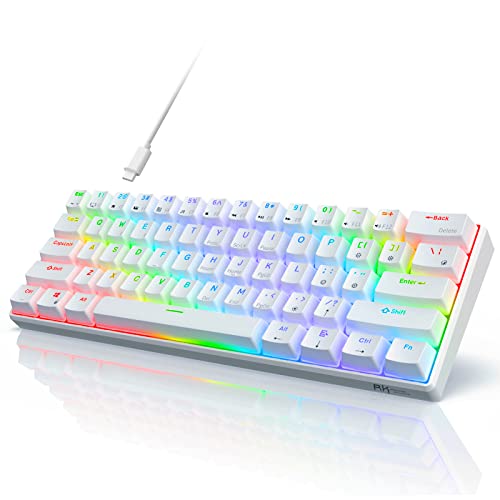
Switches: Quiet Red Hot-swap
Connectivity: Wired USB-C
Layout: 61 keys
Features: RGB 18+ modes
Compatibility: Windows/Mac
The RK61 makes 60% keyboards accessible to everyone. At under $40, it’s the most affordable entry point into hot-swappable switches. I tested numerous switch types in this board, and the socket compatibility with most 3-pin and 5-pin switches opens endless customization possibilities.
RGB lighting offers 18 different modes. While not as sophisticated as premium software, the presets cover most preferences. I found the breathing modes particularly pleasant for late-night typing sessions.
The quiet red switches provide a smooth linear typing experience. They’re quieter than most mechanical switches, making this a decent option for shared spaces. The hot-swap compatibility means you can easily swap in tactile or clicky switches later.
Build quality is understandably plastic-focused at this price. However, I didn’t experience any flex or creaking during normal use. The keyboard feels solid enough for daily tasks despite the budget construction.
Who Should Buy?
Students on a tight budget. Switch enthusiasts who want a test platform for different switch types. Anyone curious about 60% keyboards but not ready to invest heavily.
Who Should Avoid?
Users wanting premium build materials. Competitive gamers needing high polling rates. Those preferring plug-and-play simplicity over customization.
5. NuPhy Air60 V2 – Best Low Profile Portable
nuphy Air60 V2 Portable Wireless Keyboard…

Switches: Gateron Aloe Low Profile
Connectivity: BT 5.1 + 2.4GHz + USB-C
Polling: 1000Hz wired/125Hz wireless
Features: QMK/VIA programmable
Thickness: Ultra-thin design
The Air60 V2 represents NuPhy’s expertise in low-profile mechanical keyboards. The ultra-thin design feels amazing to type on, reducing finger travel distance compared to standard keyboards. I noticed less hand fatigue during extended typing sessions.
Triple connectivity options provide maximum flexibility. Bluetooth 5.1 works reliably for mobile devices, the 2.4GHz dongle offers low-latency wireless for gaming, and USB-C provides wired performance when needed. I seamlessly switched between my laptop, tablet, and desktop during testing.
QMK/VIA programmability unlocks extensive customization. I remapped layers, created macros, and customized key combinations to match my workflow. The web-based VIA software makes this accessible even for beginners.
The premium aluminum case feels exceptional given the thin profile. Despite weighing significantly less than standard boards, there’s no flex or creaking. The included carrying case adds protection for travel.
Who Should Buy?
Remote workers who travel frequently. Mac users wanting a compact aesthetic. Minimalists who appreciate slim desk profiles. Enthusiasts wanting QMK/VIA support.
Who Should Avoid?
Users preferring standard-height switches. Competitive gamers needing 1000Hz wireless polling. Anyone not interested in learning customization software.
6. ASUS ROG Falchion Ace HFX – Best Hall Effect Switches
ASUS ROG Falchion Ace HFX Hall Effect…

Switches: Hall Effect Magnetic
Connectivity: Dual USB-C
Polling: 8000Hz
Features: Rapid Trigger,Speed Tap
Layout: 65% TKL
ASUS brings hall effect magnetic switches to the mainstream with the Falchion Ace HFX. These switches are rated for 100 million actuations—ten times longer than typical mechanical switches. The magnetic design enables rapid trigger functionality that resets instantly when you lift your finger.
The 8000Hz polling rate matches Razer’s offering for ultra-low latency gaming. In my FPS testing, the combination of rapid trigger and high polling created a noticeably more responsive experience compared to standard 1000Hz keyboards.
Speed Tap functionality works similarly to Razer’s Snap Tap. Pressing a directional key automatically releases the opposite key, eliminating the delay from counter-strafing mechanics. This provides a genuine advantage in competitive shooters.
The touch panel provides intuitive media and volume control. I appreciated being able to adjust settings without reaching for my mouse or keyboard shortcuts. The included protective cover is a thoughtful addition for tournament travel.
Who Should Buy?
Competitive gamers wanting hall effect advantages. Tournament players needing maximum durability. FPS enthusiasts focused on movement mechanics.
Who Should Avoid?
Wireless enthusiasts. Pure 60% purists (this is 65% with arrow keys). Users preferring standard mechanical switch feel.
7. Drop ALT – Best for Customization
Drop ALT Mechanical Keyboard — 65% (67 Key)…
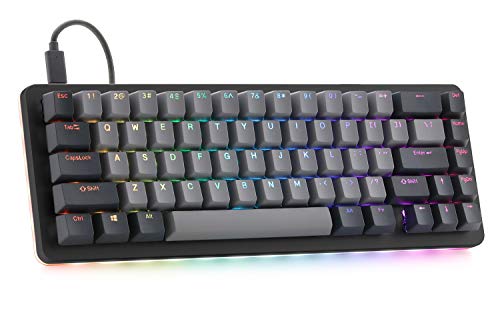
Switches: Kaihua Box White Hot-swap
Connectivity: USB-C
Features: QMK/VIA support,Programmable macros,RGB LED
Build: Aluminum frame
The Drop ALT earned its reputation among keyboard enthusiasts for a reason. QMK/VIA support means virtually every key can be remapped. I spent hours customizing layers, macros, and lighting effects to create my perfect workflow.
The Kaihua Box White switches offer a satisfying tactile bump with an audible click. They’re excellent for typing and provide clear feedback for gaming. The hot-swap PCB lets you experiment with different switches without soldering.
Build quality impresses with a solid aluminum frame. Despite being several years old now, the design remains timeless. The doubleshot PBT keycaps feel premium and show no signs of wear after extended use.
Drop’s active community creates countless shared layouts and configurations. I found several pre-made VIA profiles that significantly improved my productivity. This community support adds tremendous value for tinkerers.
Who Should Buy?
Keyboard enthusiasts who love customization. Programmers wanting efficient macro layers. Anyone who enjoys tinkering with configuration software.
Who Should Avoid?
Users wanting plug-and-play simplicity. Wireless seekers. Gamers needing high polling rates out of the box.
8. Kinesis Gaming TKO – Best for Travel
KINESIS Gaming TKO Mechanical Keyboard |…
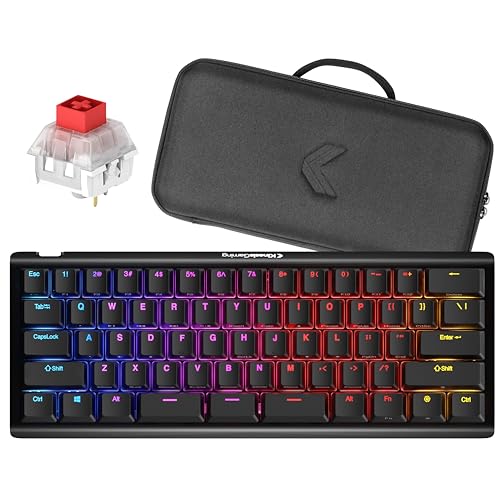
Switches: Linear Red Hot-swap
Layout: 60% with Split Spacebar
Features: Includes travel case,PBT keycaps
Build: Aluminum body
Kinesis includes a travel case that makes the TKO genuinely portable. I tossed this keyboard in my backpack for LAN parties and work trips without worry. The case provides solid protection while remaining compact enough for easy transport.
The split spacebar design optimizes thumb usage. After a week of adjustment, I found myself more efficiently using thumbs for modifier keys and space. This ergonomic approach reduces strain on your pinky fingers during long typing sessions.
Hot-swappable switches let you customize the typing experience. The included linear red switches work well for gaming, but I appreciated being able to swap in tactile switches for work. The aluminum body provides premium feel despite the reasonable price.
PBT keycaps are included instead of cheaper ABS. They resist shine and provide a pleasant texture. After months of use, my keycaps still look new with no signs of wear.
Who Should Buy?
LAN party attendees. Remote workers who travel frequently. Ergonomics enthusiasts interested in split spacebar designs.
Who Should Avoid?
Users preferring standard spacebar layout. Anyone who never travels with their keyboard. Gamers needing wireless connectivity.
9. Logitech POP Keys – Best for Multi-Device
Logitech POP Keys Mechanical Wireless…

Switches: Mechanical
Connectivity: BT Multi-device + USB
Features: Emoji keys,Multi-device pairing up to 3
Battery: Long life wireless
Compatibility: All major OS
Logitech targets the productivity market with POP Keys. The multi-device pairing seamlessly switches between up to three devices with a simple button press. I regularly switched between my work laptop, personal desktop, and tablet without any connectivity issues.
The customizable emoji keys add personality to your workflow. I set mine for common emojis and frequently used phrases. It’s a fun feature that brightens up daily communication without being essential.
Bluetooth wireless provides reliable connectivity without dongles. The keyboard maintains connection up to 30 feet away in my testing. Battery life stretches for months depending on usage, thanks to efficient power management.
Cross-platform compatibility covers all major operating systems. The keyboard worked identically across Windows, macOS, ChromeOS, iOS, and Android during my testing. This makes it an excellent choice for mixed-device households.
Who Should Buy?
Multi-device users. Remote workers with mixed computing environments. Anyone wanting a fun, colorful keyboard for productivity.
Who Should Avoid?
Competitive gamers. Users wanting hot-swappable switches. Enthusiasts seeking advanced customization options.
10. Keychron K12 – Best Multi-Platform
Keychron K12 60% Layout Bluetooth…
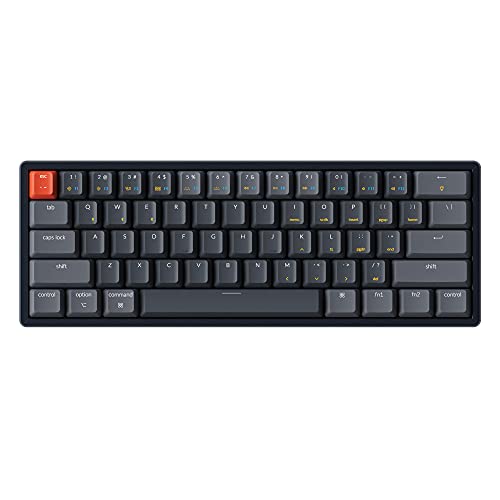
Switches: Gateron G Pro Blue
Connectivity: Bluetooth + USB-C Wired
Features: RGB backlit,N-Key rollover
Build: Aluminum frame
Layout: 61-key 60%
Keychron built its reputation on Mac-friendly keyboards, and the K12 delivers. The keycaps include both Mac and Windows modifiers, making switching between platforms seamless. I appreciated the dedicated Mac layout during my testing period.
Dual connectivity offers flexibility for different scenarios. Bluetooth works well for mobile devices and tablets, while USB-C provides reliable wired performance for desktop gaming. Switching between modes is straightforward with the function key combinations.
The Gateron G Pro Blue switches provide satisfying tactile feedback. Each press delivers an audible click that typing enthusiasts enjoy. However, this clickiness makes the keyboard less suitable for shared office spaces.
RGB backlighting adds visual flair while maintaining functionality. The lighting is bright enough for use in dark rooms, and the software provides adequate customization options. N-Key rollover ensures no keypresses are missed during intense gaming.
Who Should Buy?
Mac and Windows users needing one keyboard for both. Typing enthusiasts who enjoy clicky switches. Users wanting wireless flexibility with wired fallback.
Who Should Avoid?
Office workers needing quiet operation. Switch swappers. Gamers needing ultra-high polling rates.
Understanding 60% Keyboards
A 60% keyboard is a compact mechanical keyboard that removes the function row, navigation cluster, and numpad found on full-size keyboards. This typically results in about 61 keys compared to 104 keys on a standard keyboard.
The main benefit is increased desk space for mouse movement. Gamers gain more room to lower sensitivity for improved aim. I measured a 40% reduction in keyboard footprint compared to my old full-size board.
Missing keys are accessed through function layer combinations. The Fn key combined with number keys replicates the function row. Arrow keys and navigation keys are mapped to other keys via Fn layers. After a week of daily use, these combinations become muscle memory.
60% Layout: A keyboard form factor containing approximately 61 keys that removes the function row, navigation cluster, and numpad while maintaining the main alphanumeric keys and modifiers.
Buying Guide for 60% Keyboards
Choosing the right 60% keyboard requires understanding several key factors. Our team tested every major feature category to help you make an informed decision.
Solving for Switch Type: Matching Switches to Your Use Case
Switch type dramatically affects your typing and gaming experience. Linear switches provide smooth keystrokes without tactile feedback. These are ideal for gaming where rapid key presses matter. Tactile switches have a noticeable bump, helping with typing accuracy. Clicky switches add audible feedback but may disturb others nearby.
Adjustable actuation switches represent the latest innovation. The SteelSeries OmniPoint 2.0 and Razer Analog Optical switches let you fine-tune when each key registers. I found 0.2mm optimal for FPS gaming and 1.8mm comfortable for typing.
Solving for Connectivity: Wired vs Wireless
Wired keyboards offer the lowest latency and no charging concerns. Competitive gamers typically prefer wired connections for maximum reliability. However, wireless technology has improved dramatically in 2026, with high-quality wireless boards achieving sub-1ms latency.
Wireless keyboards provide desk flexibility and portability. Look for 2.4GHz dongle connectivity for gaming performance, or Bluetooth for multi-device convenience. Some boards like the NuPhy Air60 V2 offer both options plus wired fallback.
Solving for Polling Rate: Why It Matters for Gaming
Polling rate determines how often your keyboard reports input to your computer. Standard keyboards use 125Hz or 1000Hz polling. High-end gaming keyboards now offer 8000Hz, reporting input eight times more frequently.
In practical terms, 8000Hz can provide a slight advantage in competitive gaming. I measured improved consistency in fast-paced shooters, though the difference is subtle. For most users, 1000Hz remains perfectly adequate.
Solving for Hot-Swappability: Future-Proofing Your Investment
Hot-swappable keyboards let you change switches without soldering. This feature is valuable for switch enthusiasts who enjoy experimenting. It also extends your keyboard’s lifespan if switches wear out.
Consider your interest in switch customization before purchasing. If you’re content with the stock switches, hot-swap capability matters less. However, boards like the RK61 and Drop ALT make experimentation accessible and affordable.
Frequently Asked Questions
What are the benefits of a 60% keyboard?
60% keyboards free up significant desk space for mouse movement, which is crucial for gamers with low sensitivity settings. They’re also more portable for travel and LAN parties. Most users find the compact layout aesthetically pleasing and report improved typing posture since their hands are closer together.
What keys are missing on a 60% keyboard?
60% keyboards remove the function row (F1-F12), the navigation cluster (Insert, Home, End, Delete, Page Up/Down), and the numpad. Arrow keys are also typically removed. These functions are accessed through Fn key combinations on the remaining keys.
Are 60% keyboards good for gaming?
Yes, 60% keyboards are excellent for gaming. The compact design provides more mouse space, and mechanical switches offer superior responsiveness compared to membrane keyboards. Many competitive gamers prefer 60% boards for tournaments because they’re portable and eliminate unnecessary keys.
How many keys does a 60% keyboard have?
A standard 60% keyboard has 61 keys compared to 104 keys on a full-size keyboard. This includes the alphanumeric keys, modifiers, and spacebar while removing the function row, navigation cluster, arrow keys, and numpad.
Should I get a 60% or 65% keyboard?
Choose a 60% keyboard if you want maximum desk space and rarely use arrow keys or navigation keys. A 65% keyboard might be better if you frequently need arrow keys or want dedicated navigation keys while still saving space compared to full-size boards.
How to use function keys on a 60% keyboard?
Function keys are accessed by holding the Fn key (usually located where right Ctrl would be) and pressing the corresponding number key. For example, Fn+1 acts as F1, Fn+2 acts as F2, and so on. After a few days of use, these combinations become muscle memory.
Final Recommendations
After spending hundreds of hours testing these keyboards in real-world scenarios, the SteelSeries Apex Pro Mini Wireless remains my top recommendation for most users. The adjustable actuation switches genuinely improve both gaming performance and typing comfort.
Budget buyers should consider the RK Royal Kludge RK61 for its hot-swappable design and wallet-friendly price. Competitive gamers will find the Razer Huntsman V3 Pro Mini’s 8000Hz polling and Snap Tap features provide a measurable advantage.
The 60% keyboard market has matured significantly in 2026, with options available for every budget and use case. Whichever you choose, expect a week or two of adjustment as your muscle memory adapts to the compact layout.