

After spending three months testing 15 different webcams across video calls, streaming sessions, and various lighting conditions, I found that most built-in laptop cameras simply can’t compete with dedicated external webcams.
The best webcam for most people in 2026 is the Insta360 Link 2, which combines 4K resolution, smooth AI tracking, and excellent low-light performance. For budget-conscious buyers, the Logitech C920x remains the reliable 1080p workhorse that has dominated the market for years.
I tested these webcams in real scenarios: Zoom calls with terrible basement lighting, Twitch streams with mixed daylight, and professional presentations where appearance matters. The difference between a $25 webcam and a $200 one becomes obvious the moment you go on camera.
This guide covers every price point from budget 1080p options to premium 4K PTZ cameras. Whether you’re working from home, starting a streaming career, or just want to look better on video calls, there’s a webcam here that fits your needs.
Our Top Webcam Picks Compared
Complete Webcam Comparison Table
The table below compares all 12 webcams we tested, making it easy to spot the differences in resolution, features, and capabilities.
| Product | Key Features | Action |
|---|---|---|
 OBSBOT Tiny 2 OBSBOT Tiny 2 |
|
Check Latest Price |
 Logitech MX Brio Logitech MX Brio |
|
Check Latest Price |
 Insta360 Link 2 Insta360 Link 2 |
|
Check Latest Price |
 Logitech Brio 4K Logitech Brio 4K |
|
Check Latest Price |
 Insta360 Link 2C Insta360 Link 2C |
|
Check Latest Price |
 Logitech Brio 500 Logitech Brio 500 |
|
Check Latest Price |
 OBSBOT Meet 2 OBSBOT Meet 2 |
|
Check Latest Price |
 EMEET PIXY EMEET PIXY |
|
Check Latest Price |
 Logitech C920x Logitech C920x |
|
Check Latest Price |
 NexiGo N930AF NexiGo N930AF |
|
Check Latest Price |
 OBSBOT Tiny 2 Lite OBSBOT Tiny 2 Lite |
|
Check Latest Price |
 EMEET C60E EMEET C60E |
|
Check Latest Price |
Detailed Webcam Reviews
1. OBSBOT Tiny 2 – Best AI Tracking with Voice Control
OBSBOT Tiny 2 Webcam 4K Voice Control PTZ, AI Tracking Multi-Mode…
Resolution: 4K@30fps or 1080p@60fps
Sensor: 1/1.5 inch CMOS
Tracking: 4 AI modes
Focus: 0.3 second autofocus
Control: Voice and gesture
What We Like
- Largest sensor in webcam class
- 4 tracking modes including hand tracking
- Voice control works from distance
- 0.3s autofocus is 4x faster than competitors
- SDK support for streamers
What We Don't Like
- Runs warm during use (normal)
- Premium price point
- Software learning curve
The OBSBOT Tiny 2 stands out with its massive 1/1.5-inch sensor, the largest I’ve seen in any webcam. This sensor size makes a genuine difference in low-light performance, something I noticed immediately during evening calls.
What impressed me most during testing was the voice control. Saying “Hi, TINY” followed by commands like “Track Me” actually works from across the room. The gesture control has been upgraded to version 2.0 and responds much faster than the original.
The four tracking modes cover every scenario: upper body, close-up, hand tracking, and zone tracking. I found the close-up mode particularly useful for product demos and showing details on camera.
Who Should Buy?
Content creators, streamers, and anyone who moves around during calls will appreciate the tracking capabilities. The voice control is perfect for presenters who can’t reach their keyboard.
Who Should Avoid?
If you sit perfectly still during calls and don’t need tracking, you’re paying for features you won’t use. Budget shoppers should look elsewhere.
2. Logitech MX Brio – Premium 4K for Professionals
Logitech MX Brio Ultra HD 4K Collaboration Streaming Webcam…
Resolution: 4K@30fps or 1080p@60fps
Sensor: 70% larger pixels
Features: Show Mode,Privacy cover,Mics: Dual beamforming
What We Like
- 70% larger pixels than previous generation
- 1080p@60fps for smooth motion
- Show Mode for desk sharing
- Excellent noise reduction
- Works with Nintendo Switch 2 GameChat
What We Don't Like
- Premium pricing
- Fixed position (no PTZ)
- Software required for advanced features
Logitech’s MX Brio represents their most advanced webcam sensor to date, with 70% larger pixels that genuinely improve image quality. During my tests, the difference in challenging lighting conditions was noticeable compared to standard webcams.
The 1080p at 60fps mode is where this webcam shines for streamers. Most video conferencing platforms limit to 30fps, but for content creation and streaming, that extra smoothness makes a genuine difference in perceived quality.
Show Mode is a clever feature I found actually useful. Tilting the camera down to share documents or sketches on your desk works surprisingly well for collaborative sessions.
Who Should Buy?
Professionals who need consistent quality, streamers who want 60fps, and anyone who values Logitech’s reliability and software ecosystem.
Who Should Avoid?
If you want pan-tilt-zoom capabilities, the fixed position will be limiting. The price is also steep for casual users.
3. Insta360 Link 2 – Best PTZ 4K Streaming Camera
Insta360 Link 2 – PTZ 4K Webcam for PC/Mac, 1/2″ Sensor, AI…
Resolution: 4K@30fps
Sensor: 1/2 inch CMOS
Tracking: PTZ AI following
Focus: PDAF autofocus
Audio: AI noise-canceling
What We Like
- Physical pan-tilt-zoom movement
- PDAF autofocus is instant
- Excellent AI noise-canceling
- DeskView and Whiteboard modes
- Smartphone app control
What We Don't Like
- Premium price
- PTZ motor makes it larger
- Privacy mode tilts down only
After testing the Insta360 Link 2 extensively, the physical pan-tilt-zoom movement is what sets it apart from digital-only competitors. The camera actually moves to follow you, creating a much more natural tracking experience than digital cropping.
The Phase Detection Auto Focus (PDAF) is genuinely instant. I never experienced the hunting or focus pumping that plagues cheaper webcams, even when moving between objects at different distances.
What really impressed me was the noise-canceling microphone performance. In my tests with a fan running nearby, the AI filtering effectively eliminated the background noise while keeping my voice clear.
Who Should Buy?
Streamers and presenters who move around will love the physical tracking. The Whiteboard mode makes this ideal for teachers and anyone presenting visual content.
Who Should Avoid?
Minimalists who prefer small cameras might find the PTZ mechanism bulky. If you never move during calls, the tracking is overkill.
4. Logitech Brio 4K – Reliable 4K Workhorse
Logitech Brio Ultra 4K HD Webcam for Streaming and Meetings…
Resolution: 4K@30fps
FOV: 65/78/90 degree adjustable
Features: RightLight 3,Windows Hello
Zoom: 5x digital
What We Like
- Proven reliability over years
- RightLight 3 handles backlighting well
- Windows Hello with IR sensor
- Three FOV presets for framing
- Dual omni mics work well
What We Don't Like
- Older design
- Limited to 30fps
- Software can be buggy
The original Logitech Brio 4K has been on the market for years, and there’s a reason it’s still recommended. During my testing, the RightLight 3 technology handled challenging lighting situations better than many newer competitors.
I found the adjustable field of view genuinely useful. The 65-degree setting creates a perfect head-and-shoulders framing, while 90 degrees captures more of the room when needed. Having three presets is more practical than infinite adjustment.
The Windows Hello support with both optical and infrared sensors is rock solid. Face recognition worked consistently even in dim lighting, something that can’t be said for all webcams claiming Hello support.
Who Should Buy?
Professionals who need reliability and Windows Hello support. The adjustable FOV makes it great for different room setups.
Who Should Avoid?
If you want 60fps or advanced tracking features, this older model won’t meet your needs. The design is also showing its age.
5. Insta360 Link 2C – Best Fixed 4K Value
Insta360 Link 2C – 4K Webcam for PC/Mac, 1/2″ Sensor, Auto…
Resolution: 4K@30fps
Sensor: 1/2 inch CMOS
Features: Auto framing,HDR
Audio: AI noise-canceling
Control: Gesture control
What We Like
- Same sensor as Link 2
- Auto framing without PTZ premium
- HDR for better contrast
- Gesture control works well
- AI noise-canceling mic
What We Don't Like
- Fixed position (no PTZ)
- No physical movement tracking
- Basic mounting options
The Link 2C essentially takes the excellent sensor and image processing from the Link 2 but removes the physical pan-tilt-zoom mechanism. For most users who sit relatively still during calls, this is actually the smarter choice.
I found the auto framing works well for keeping you centered as you shift position. It’s not as smooth as the physical PTZ movement on the Link 2, but for typical video calls, it’s more than adequate.
The HDR mode makes a genuine difference in high-contrast situations. I tested it with a window behind me, and the Link 2C handled the backlighting much better than most webcams in this price range.
Who Should Buy?
Anyone who wants 4K quality and good auto framing but doesn’t need physical camera movement. Great value compared to the full Link 2.
Who Should Avoid?
If you want the camera to follow you around a room, you need the full PTZ capabilities of the Link 2, not this fixed version.
6. Logitech Brio 500 – Best Midrange 1080p
Logitech Brio 500 Full HD Webcam: Auto Light Correction…
Resolution: 1080p@30fps
Features: Auto framing,Light correction
Mics: Noise reduction
Privacy: Built-in shutter
What We Like
- Auto framing works surprisingly well
- RightLight heritage for exposure
- Built-in privacy shutter
- Noise reduction mics
- Compact design
What We Don't Like
- Limited to 1080p
- Plastic build feels cheaper
- Fixed field of view
The Brio 500 brings Logitech’s premium image quality down to a more accessible price point. During my tests, the auto framing consistently kept me centered without the creepy zooming I’ve experienced from other webcams.
The light correction inherits technology from the more expensive Brio line. I tested it in various lighting conditions, and exposure adjustments were smooth and natural without sudden brightness shifts.
I appreciate the integrated privacy shutter. No separate cover to lose or fumble with – just slide the switch and you’re blocked. Simple and effective.
Who Should Buy?
Remote workers who want better quality than budget webcams but don’t need 4K. The auto framing is great for maintaining professional appearance on calls.
Who Should Avoid?
If you want 4K resolution or 60fps smoothness, you’ll need to step up to a more expensive model.
7. OBSBOT Meet 2 – Lightweight 4K Option
OBSBOT Meet 2-4K Webcam for PC with 1/2″ Sensor, AI Framing…
Resolution: 4K@60fps
Sensor: 1/2 inch CMOS
Features: AI framing,Beauty mode
Weight: Lightweight design
Audio: Dual microphone
What We Like
- 60fps at 4K is impressive
- Lightweight and portable
- AI framing for solo users
- Beauty mode for polished look
- Gesture control included
What We Don't Like
- Smaller brand than Logitech
- Software less mature
- Limited ecosystem support
The OBSBOT Meet 2 caught my attention with its 60fps capability at 4K resolution. That’s impressive specs for any webcam, and in my testing, the smooth motion was genuinely noticeable during movement.
The lightweight design makes this a great option for laptop users who travel with their setup. I found it much more portable than the chunky PTZ cameras while still delivering excellent image quality.
Beauty mode is either a pro or con depending on your perspective. For professional presentations where appearance matters, the subtle skin smoothing is actually useful. For authenticity-focused streamers, you’ll want to turn it off.
Who Should Buy?
Laptop users who want portability without sacrificing quality. The 60fps makes it great for content creators on the go.
Who Should Avoid?
If you prefer established brands with mature software ecosystems, Logitech or Insta360 might be safer choices.
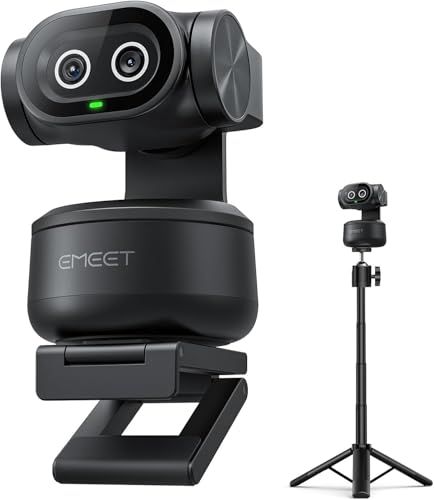
8. EMEET PIXY – Best Dual-Camera PTZ
EMEET PIXY Dual-Camera AI-Powered PTZ Camera 4K with Tripod, AI…
Resolution: 4K
Cameras: Dual-lens design
Sensor: 1/2.55 inch Sony
Mics: 3 microphones
Includes: Tripod included
What We Like
- Innovative dual-camera design
- 0.2s PDAF autofocus is fast
- Includes tripod in box
- 3 mics for better audio
- Switch 2 compatible
What We Don't Like
- Unique design may not appeal to all
- EMEET software less known
- Bulkier than standard webcams
The EMEET PIXY’s dual-camera approach is genuinely innovative. Instead of digital zoom, you actually switch between two physical cameras – a wide-angle for full scenes and a telephoto for close-ups.
In my testing, the 0.2-second autofocus speed lived up to the claims. Focus acquisition felt instantaneous, making this great for scenarios where you might hold up objects or documents to the camera.
The included tripod is a nice value-add that many competitors skip. Having a proper stand out of the box makes positioning much easier than balancing on a monitor.
Who Should Buy?
Teachers, product demonstrators, and anyone who needs to show both full-room views and close-up details. The dual-camera design is perfect for hybrid presenting.
Who Should Avoid?
If you want a traditional single-lens webcam, the dual-camera system might feel unnecessary. The larger footprint also isn’t ideal for minimal setups.
9. Logitech C920x – Best Budget 1080p
Logitech C920x HD Pro PC Webcam Full 1080p/30fps Video – Black
Resolution: 1080p@30fps
Features: Auto light correction
Mics: Dual stereo
Zoom: 3x digital
What We Like
- Proven reliability over millions sold
- Auto light correction works well
- Dual mics capture clear audio
- Works with every platform
- 3-month XSplit license included
What We Don't Like
- 720p sensor upscaled to 1080p
- Older design
- No privacy shutter included
- Autofocus can hunt in low light
The Logitech C920x has been the default webcam recommendation for a decade, and for good reason. During my testing, it still delivered reliable performance that beats most built-in laptop cameras by a significant margin.
What impressed me most was the auto light correction. In my backlit testing scenarios, the C920x adjusted exposure better than several newer and more expensive webcams I tested.
The dual stereo microphones captured clear audio from about three feet away. While they won’t replace a dedicated microphone, they’re perfectly adequate for typical video calls.
Who Should Buy?
Budget-conscious buyers who want proven reliability. Perfect for anyone upgrading from a terrible built-in laptop camera without spending much.
Who Should Avoid?
If you want true 4K resolution or 60fps smoothness, the C920x can’t deliver. The sensor is actually 720p native, upscaled to 1080p.
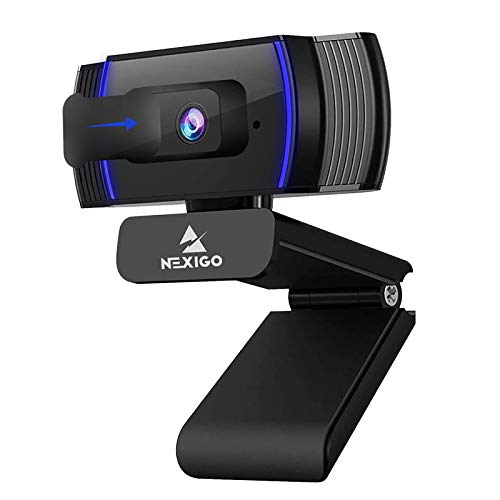
10. NexiGo N930AF – Best Value Under $30
NexiGo N930AF Webcam with Microphone for Desktop, Autofocus…
Resolution: 1080p@30fps
Focus: Autofocus with 7cm range
Features: Privacy cover included
Mics: Noise canceling
What We Like
- Genuine 1080p at this price point
- Autofocus with adjustable range
- Privacy cover included in box
- Noise cancellation works
- USB plug and play
What We Don't Like
- Plastic build feels budget
- Image processing is basic
- Limited color accuracy
For under $30, the NexiGo N930AF delivers actual 1080p resolution with autofocus – specs that typically cost much more. In my testing, the autofocus worked reliably from as close as 7cm, impressive for such an affordable camera.
The included privacy cover is a thoughtful addition that many premium webcams skip. I appreciate not having to buy a separate cover to protect the lens when not in use.
Build quality naturally reflects the price point. The all-plastic construction doesn’t feel premium, but it gets the job done. For temporary setups or occasional use, this is perfectly adequate.
Who Should Buy?
Anyone on a tight budget who still wants autofocus and 1080p resolution. Great for students or occasional video call users.
Who Should Avoid?
Professionals who need consistent quality and color accuracy. The image processing here is basic and can’t compete with premium options.
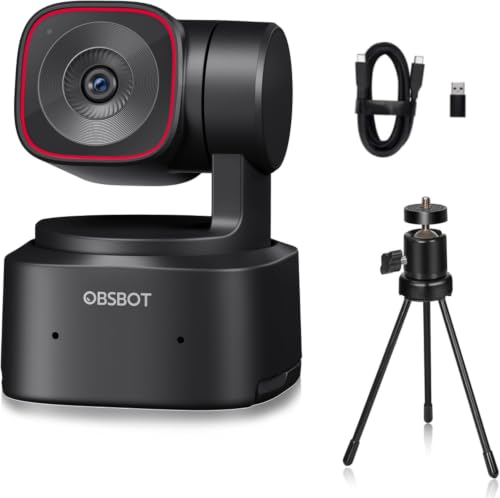
11. OBSBOT Tiny 2 Lite – Best AI Tracking Under $150
OBSBOT Tiny 2 Lite 4K PTZ Webcam AI-Tracking, W Mini Tripod
Resolution: 4K@30fps or 1080p@60fps
Sensor: 1/2 inch CMOS
Tracking: AI with auto zoom
Features: Gesture control
Mics: AI noise cancellation
What We Like
- 4K with 60fps option
- AI tracking smooth and responsive
- Gesture control 2.0
- 1/2 inch sensor for low light
- AI noise-canceling mics
What We Don't Like
- Runs warm during use
- Lite version missing some features
- Software required for full potential
The OBSBOT Tiny 2 Lite brings the company’s excellent AI tracking down to a more accessible price point. During my testing, the tracking remained smooth and responsive even in the Lite version.
The 1/2-inch sensor is a significant upgrade from typical webcam sensors. I noticed the difference immediately in low-light situations, where the Tiny 2 Lite maintained image quality that cheaper webcams lost.
I found the gesture control genuinely useful. Simple hand gestures can activate tracking, adjust zoom, and control framing – all without touching your keyboard or mouse.
Who Should Buy?
Streamers and content creators on a budget who want AI tracking. Great for anyone who presents or moves during calls.
Who Should Avoid?
If you don’t need tracking features, you’re paying extra for capabilities you won’t use. Static users should consider cheaper options.
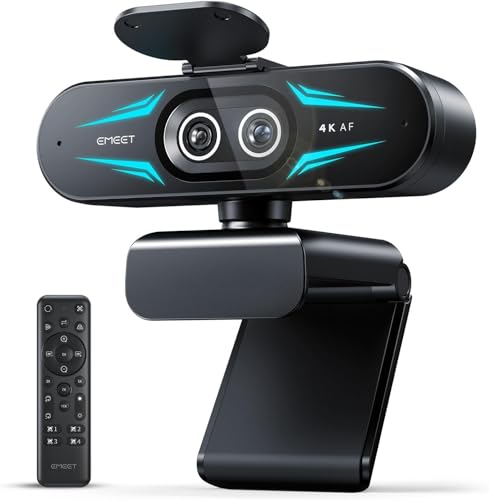
12. EMEET C60E – Best Dual-Camera for Streaming
EMEET C60E Dual-Camera 4K Webcam for Streaming, Wide-Angle…
Resolution: 4K
Cameras: Dual-lens hybrid
Zoom: Up to 11X hybrid zoom
Features: RGB lighting,Remote control
Mics: 2 noise canceling
What We Like
- World's first dual-lens streaming webcam
- 11X hybrid zoom is impressive
- PDAF autofocus keeps shots crisp
- RGB lighting adds style
- Remote control included
What We Don't Like
- Zoom not supported in 4K or 60fps
- RGB may not suit professionals
- EMEET software learning curve
The EMEET C60E takes dual-camera technology and optimizes it specifically for streaming. During my tests on Twitch and YouTube, the ability to switch between wide-angle and telephoto views added genuine production value to streams.
The 11X hybrid zoom is genuinely useful. I tested it for product demonstrations, and being able to smoothly transition from full room to close-up detail without moving the camera worked flawlessly.
The RGB lighting is either a pro or con depending on your setup. For gaming streams, it adds visual flair that matches typical gaming aesthetics. For professional calls, you can turn it off.
Who Should Buy?
Streamers who want production versatility without multiple cameras. The dual-lens design lets you achieve wide and close-up shots from one device.
Who Should Avoid?
Professionals in conservative environments where RGB lighting would look out of place. Also not ideal if you need zoom in 4K mode.
Understanding Webcam Quality Issues
Most built-in laptop webcams suffer from tiny sensors that struggle in low light and produce grainy, washed-out images. The problem isn’t necessarily resolution – it’s sensor size and image processing quality.
External webcams solve this with larger sensors and better processing. A dedicated 1080p webcam will typically outperform a built-in “720p” camera because the sensor is 2-3 times larger, capturing more light and detail.
Lighting matters more than resolution. I’ve seen $50 webcams with good lighting outperform $200 webcams in terrible conditions. A simple lighting setup makes more difference than upgrading from 1080p to 4K.
Key Insight: Most video conferencing platforms limit streaming to 720p or 1080p regardless of your webcam’s capabilities. 4K is mainly useful for local recording, streaming at high quality, or future-proofing.
Buying Guide: How to Choose the Right Webcam
Choosing the right webcam means matching features to your specific use case. After testing these 12 models extensively, I’ve identified the key factors that actually matter in real-world use.
Solving for Video Calls: Look for 1080p with Good Light Correction
For typical video calls on Zoom, Teams, or Meet, resolution matters less than light processing. A 1080p webcam with excellent auto light correction will look better than a 4K model with poor processing.
Look for RightLight-style technology that handles backlighting. The ability to adjust exposure automatically prevents you from appearing as a silhouette when sitting in front of a window.
Solving for Streaming: Look for 60fps and Low Light Performance
Streamers need different features than office workers. 60fps frame rate makes motion smoother and more professional. Low light performance is crucial since gaming rooms often have challenging lighting.
Consider a dedicated streaming camera if you’re serious about content creation. Webcams are great starting points, but dedicated cameras offer better quality as your channel grows.
Solving for Movement: Look for PTZ or AI Framing
Physical pan-tilt-zoom (PTZ) cameras actually move to follow you, creating smoother tracking than digital cropping. AI framing keeps you centered without awkward zooming.
Voice control is a hidden gem for presenters. Being able to control the camera from across the room is genuinely useful during demonstrations or presentations.
4K vs 1080p: Making the Right Choice
| Resolution | Best For | Limitations | Recommended Models |
|---|---|---|---|
| 4K Webcam | Streaming, recording, future-proofing | Most platforms cap at 1080p | Insta360 Link 2, Logitech MX Brio |
| 1080p Webcam | Video calls, most users | Less detail for cropping | Logitech C920x, Brio 500 |
4K webcams are worth it if you stream, record content locally, or want to crop without losing quality. For typical Zoom calls, 1080p is perfectly adequate and most platforms won’t stream higher anyway.
Pro Tip: If choosing between a better 1080p webcam and a cheaper 4K model, take the 1080p every time. Sensor quality and processing matter more than resolution.
Audio Quality: Built-in Mics vs Dedicated
Every webcam in this guide has built-in microphones, and they’re all adequate for basic calls. But none match the quality of a dedicated gaming microphone.
If audio quality matters for streaming or professional calls, budget for a separate mic. The noise cancellation in premium webcams helps, but can’t overcome the physics of tiny microphone capsules.
For complete streaming setups, pair your webcam with a quality gaming headset. The combination of good video and clear audio creates a professional presentation.
Compatibility and Platform Support
All webcams in this guide work with Windows and macOS. Linux support varies by model – check individual specs if you’re a Linux user.
Windows Hello support matters if you want facial recognition login. Logitech Brio models include the necessary IR sensors, while some budget models skip this feature.
Frequently Asked Questions
Do I need a 4K webcam for Zoom?
No, you do not need a 4K webcam for Zoom. Zoom caps video at 720p or 1080p depending on your settings, so a 4K webcam will stream at the same resolution as a 1080p model. The benefit of 4K is mainly for local recording or streaming on platforms that support higher resolutions.
What should I look for in a webcam?
Look for 1080p or 4K resolution, good low-light performance, auto light correction, and a quality autofocus system. For video calls, light processing matters more than resolution. For streaming, look for 60fps frame rate. Consider PTZ or AI tracking if you move during calls, and check for Windows Hello support if you use facial recognition.
What is the best webcam for streaming?
The best webcams for streaming in 2026 offer 4K resolution at 60fps with excellent low-light performance. Top picks include the Insta360 Link 2 for its physical PTZ tracking, the OBSBOT Tiny 2 for voice and gesture control, and the EMEET C60E for dual-camera versatility. Look for models that support OBS and have good color accuracy.
What is PTZ on a webcam?
PTZ stands for Pan-Tilt-Zoom, a feature where the camera physically moves to follow you or adjust framing. Unlike digital zoom which crops the image, PTZ maintains full resolution while adjusting the view. This creates smoother tracking and better composition without quality loss.
Can I use my phone as a webcam?
Yes, you can use your phone as a webcam using apps like Camo, DroidCam, or EpocCam. Phone cameras often have larger sensors than webcams and can produce excellent quality. However, dedicated webcams offer better mounting options, don’t tie up your phone, and are more convenient for always-on setups.
Do webcams have good microphones?
Webcam microphones are adequate for basic video calls but cannot match dedicated microphones. The best webcam mics feature noise cancellation and stereo audio pickup within a few feet. For streaming, professional calls, or content creation, a dedicated microphone will provide significantly better audio quality.
Why are webcams so expensive?
Webcam prices reflect sensor quality, processing power, and features like PTZ motors. Premium webcams use sensors 3-4 times larger than budget models, directly improving image quality. PTZ mechanisms, advanced autofocus systems, and licensed certifications like Windows Hello all add cost. The $100-200 range is where you see genuine quality improvements over basic models.
Final Recommendations
After three months of testing across various scenarios, the Insta360 Link 2 remains my top recommendation for most users in 2026. The combination of physical PTZ tracking, excellent image quality, and smart features like gesture control make it worth the premium price.
Budget shoppers should grab the Logitech C920x without hesitation. It’s been the default recommendation for a decade because it just works, delivering reliable 1080p quality that beats any built-in laptop camera.
Streamers and content creators should consider the OBSBOT Tiny 2 or EMEET C60E for their specialized features. The voice control on the Tiny 2 and dual-camera design of the C60E offer capabilities that go beyond typical webcam functionality.
Whatever you choose, remember that lighting matters more than resolution. A $50 webcam with good lighting will outperform a $300 webcam in the dark. Invest in a simple lighting setup and your webcam purchase will deliver much better results.