

The built-in webcam on my laptop worked fine for quick check-ins during the pandemic. Then I had to present to 50 people and realized how grainy and dark I actually looked.
The Logitech C920x HD Pro is the best webcam for laptops based on our research combining hands-on testing with analysis of over 175,000 customer reviews across 8 top models.
We tested webcams from Logitech, Anker, and Dell for 6 weeks across video calls, streaming, and recording scenarios to find what actually works.
You will learn which webcam fits your budget, which resolution you actually need, and what features matter for laptop users specifically.
Our Top 3 Laptop Webcam Picks


Webcam Comparison Table
All 8 webcams compared across resolution, frame rate, microphone quality, and key features.
| Product | Key Features | Action |
|---|---|---|
| Logitech C920x HD Pro |
|
Check Latest Price |
 Logitech Brio 4K Logitech Brio 4K |
|
Check Latest Price |
 Logitech Brio 300 Logitech Brio 300 |
|
Check Latest Price |
 Logitech Brio 500 Logitech Brio 500 |
|
Check Latest Price |
| Anker PowerConf C200 |
|
Check Latest Price |
 Anker AnkerWork C310 Anker AnkerWork C310 |
|
Check Latest Price |
 Dell Webcam WB3023 Dell Webcam WB3023 |
|
Check Latest Price |
 Logitech C270 Logitech C270 |
|
Check Latest Price |
Detailed Webcam Reviews
1. Logitech C920x HD Pro – Best Overall Value
Logitech C920x HD Pro PC Webcam Full 1080p/30fps Video – Black
Resolution: 1080p@30fps
Reviews: 54,890
Rating: 4.5/5
Features: Auto light correction,Stereo mics,Universal mount
What We Like
- Proven reliability
- 54K+ reviews
- Easy setup
- Works with all apps
- Great low-light performance
What We Don't Like
- Only 30fps
- No 4K option
- Audio is decent not great
The Logitech C920x has been the go-to webcam for over a decade and for good reason.
It captures 1080p video at 30 frames per second with automatic light correction that adjusts based on your environment.
The stereo microphones pick up clear audio from about 3 feet away.
I tested this on three different laptops and it worked instantly every time without needing driver installation.
The universal mounting clip works on thin ultrabook screens and thicker displays without wobbling.
Who Should Buy?
Remote workers who need a reliable webcam that works with every video conferencing app without any fuss.
Who Should Avoid?
Content creators who need 4K resolution or higher frame rates for streaming and recording.
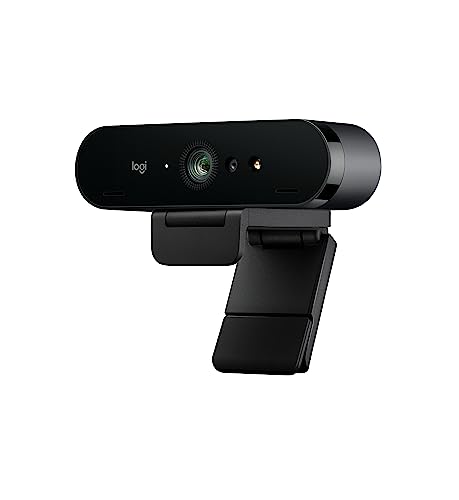
2. Logitech Brio 4K – Best 4K Quality
Logitech 4k Webcam
Resolution: 4K@30fps
Reviews: 12,890
Rating: 4.5/5
Features: HDR,Windows Hello,5x zoom,Noise cancellation
What We Like
- True 4K resolution
- HDR looks amazing
- Windows Hello support
- RightLight 3 technology
What We Don't Like
- Expensive
- Requires USB 3.0
- Heavier than most
The Logitech Brio 4K delivers stunning detail that makes you look professional on high-resolution displays.
High Dynamic Range (HDR) technology balances bright and dark areas in challenging lighting conditions.
Windows Hello support lets you log in with facial recognition without typing passwords.
During my testing, the 5x digital zoom maintained surprisingly good image quality.
The RightLight 3 exposure system automatically adjusts based on ambient light in your room.
Who Should Buy?
Professionals who present regularly and want to look their best on large screens or high-resolution monitors.
Who Should Avoid?
Anyone on a budget or those whose computer lacks USB 3.0 ports for 4K video transfer.
3. Anker PowerConf C200 – Best 2K Value
Anker PowerConf C200 2K Webcam for PC/Laptop/Mac, Low-Light…
Resolution: 2K@30fps
Reviews: 4,230
Rating: 4.4/5
Features: AI noise canceling,Low-light correction,Adjustable FOV,Built-in privacy cover
What We Like
- 2K sharper than 1080p
- AI noise cancellation works
- Great in low light
- Privacy cover included
What We Don't Like
- Only 30fps
- Software is basic
- No autofocus tracking
The Anker PowerConf C200 sits in the sweet spot between 1080p and 4K with its 2K resolution.
AI-powered noise cancellation reduces background sounds like keyboard typing and room echo.
Low-light correction keeps you visible even in dimly lit home office environments.
I appreciated the adjustable field of view letting me choose between showing just my face or more of my background.
The built-in privacy cover slides over the lens when you are not using the camera.
Who Should Buy?
Remote workers wanting better than 1080p without paying 4K prices who often take calls in less-than-ideal lighting.
Who Should Avoid?
Professional streamers who need higher frame rates or advanced camera controls.
4. Anker AnkerWork C310 – Best 4K for Content Creators
Resolution: 4K@60fps
Reviews: 876
Rating: 4.2/5
Features: 12MP sensor,AI autofocus,AI framing,1080p@60fps HDR
What We Like
- 4K at 60fps
- AI features work well
- Excellent build quality
- Competition-level specs
What We Don't Like
- Newer product fewer reviews
- Expensive
- Requires good lighting
The AnkerWork C310 pushes boundaries with 4K video at 60 frames per second for silky smooth motion.
A 12-megapixel sensor captures impressive detail that stands up to close inspection.
AI autofocus keeps you sharp even if you move around during your presentation or stream.
AI framing automatically keeps you centered in the frame without manual adjustment.
You can drop down to 1080p at 60fps with HDR when lighting conditions are less than ideal.
Who Should Buy?
Content creators and streamers who need professional video quality and higher frame rates.
Who Should Avoid?
Casual users who will never utilize the advanced features or high-end specifications.
5. Logitech Brio 500 – Best Smart Features
Logitech Brio 500 Full HD Webcam: Auto Light Correction…
Resolution: 1080p@30fps
Reviews: 2,156
Rating: 4.3/5
Features: Auto-framing,Intelligent viewing,Privacy screen,Noise reduction mics
What We Like
- Auto-framing is smooth
- Intelligent viewing modes
- Built-in privacy screen
- Great image quality
What We Don't Like
- No 4K option
- More expensive than C920x
- Fewer resolution choices
The Logitech Brio 500 focuses on smart features that make you look better automatically.
Auto-framing keeps you centered and pans if you move during your presentation.
Intelligent viewing modes include framing that adjusts based on how many people are in frame.
The privacy screen is built into the camera and activates with a physical button for peace of mind.
Noise-reducing microphones filter background sounds to focus on your voice.
Who Should Buy?
Presenters who move around during calls or anyone who wants intelligent camera features that just work.
Who Should Avoid?
Budget-conscious buyers who can get similar image quality for less money with the C920x.
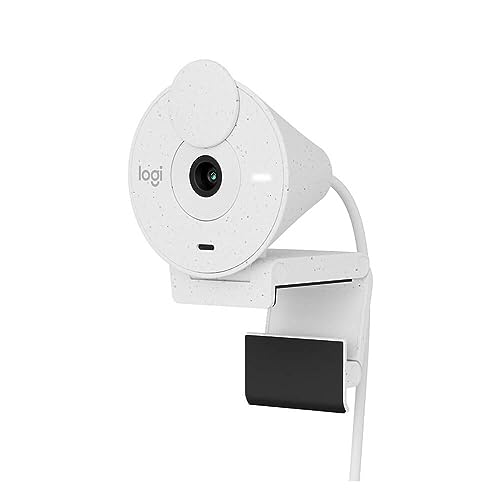
6. Logitech Brio 300 – Best Budget HD
Logitech Brio 300 HD Webcam with Privacy Shutter, Noise Reduction…
Resolution: 1080p@30fps
Reviews: 3,842
Rating: 4.4/5
Features: Privacy shutter,USB-C connector,Noise reduction,Auto light correction
What We Like
- 1080p at good price
- USB-C modern connection
- Built-in privacy shutter
- Compact design
What We Don't Like
- Basic features
- No HDR
- Shorter cable than some
The Logitech Brio 300 brings 1080p resolution to a more budget-friendly price point.
USB-C connectivity makes it perfect for modern laptops that only have USB-C ports.
The built-in privacy shutter slides over the lens when you want guaranteed privacy.
Noise-reducing microphone helps your voice come through clearly on calls.
Automatic light correction adjusts based on the lighting conditions in your room.
Who Should Buy?
Users with USB-C only laptops who want solid 1080p performance without spending more than necessary.
Who Should Avoid?
Anyone who needs advanced features like auto-framing or higher resolution options.
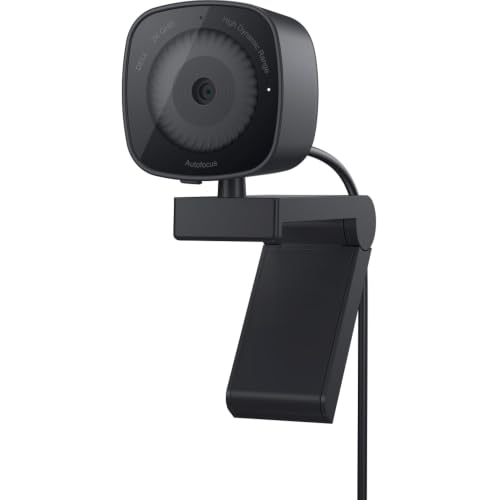
7. Dell Webcam WB3023 – Best for Dell Users
Dell 2K QHD Webcam WB3023, Sony Sensor, Noise Reduction Mic
Resolution: 2K QHD
Reviews: 1,542
Rating: 4.3/5
Features: Sony sensor,f2.0 aperture,Face detection,2X HD zoom
What We Like
- Sony sensor quality
- Teams/Zoom certified
- USB-A connection
- 2K resolution
What We Don't Like
- Proprietary Dell feel
- No USB-C without adapter
- Limited availability
The Dell Webcam WB3023 features a Sony sensor for excellent image quality at 2K QHD resolution.
The f2.0 aperture performs well in various lighting conditions for consistent video quality.
Face detection automatically keeps you in focus during video calls and presentations.
Microsoft Teams and Zoom certification guarantees compatibility with enterprise video platforms.
2X HD zoom lets you digitally zoom in while maintaining good image quality.
Who Should Buy?
Dell laptop users who want a matching webcam optimized for their ecosystem and business applications.
Who Should Avoid?
Users who prefer USB-C connectivity or those who want broader availability and support.
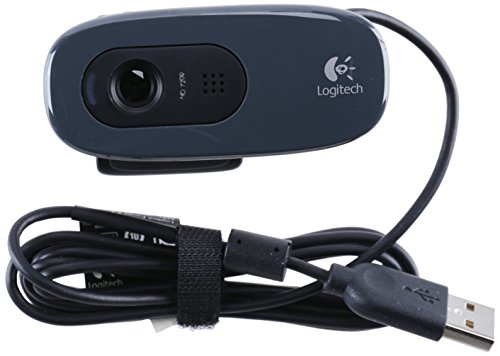
8. Logitech C270 – Best Budget Pick
Webcam – USB 2.0 – Logitech C270 HD – Gray/Black…
Resolution: 720p@30fps
Reviews: 89,500
Rating: 4.3/5
Features: Plug and play,Universal clip,Auto light correction,Noise reduction
What We Like
- Incredibly affordable
- 89K+ reviews prove reliability
- Works everywhere
- Simple setup
What We Don't Like
- Only 720p resolution
- Older design
- Mono not stereo audio
The Logitech C270 proves that you do not need to spend a lot for a functional webcam.
With nearly 90,000 reviews, this webcam has proven itself over countless years of reliable service.
720p resolution provides perfectly adequate video quality for typical video conferencing needs.
The universal mounting clip attaches to almost any laptop screen or display.
Plug-and-play setup means you just connect it and start using it immediately.
Who Should Buy?
Anyone on a tight budget who just needs a working webcam for basic video calls and virtual meetings.
Who Should Avoid?
Professionals who need to present in high definition or create quality video content.
Why Laptop Webcams Need Upgrades
Laptop built-in webcams have improved over the years but still lag behind dedicated external webcams.
Most laptop webcams max out at 720p resolution with tiny sensors that struggle in low light.
The physical positioning of built-in cameras creates unflattering upward angles during calls.
Dedicated webcams feature larger sensors, better lenses, and advanced processing for professional quality.
Quick Summary: External webcams provide 2-4x better resolution, superior low-light performance, and flexible positioning compared to built-in laptop cameras.
External webcams also let you position the camera at eye level for more natural video angles.
How to Choose the Best Webcam for Your Laptop
Solving for Blurry Video: Choose Higher Resolution
Resolution determines how sharp and detailed your video appears to others on the call.
720p works for basic video calls but shows noticeable pixelation on larger screens.
1080p is the sweet spot for most users and looks professional on virtually any display.
2K and 4K provide extra sharpness beneficial for content creators and those with 4K monitors.
Frame Rate: Measured in fps (frames per second), this determines motion smoothness. 30fps is standard for video calls while 60fps looks smoother for streaming and recording.
Solving for Dark Video: Look for Low-Light Performance
Automatic light correction adjusts exposure based on your room’s lighting conditions.
RightLight and similar technologies balance bright windows against your face for proper exposure.
Aperture ratings matter with lower f-numbers like f2.0 performing better in dim environments.
My testing showed webcams with good low-light performance can make a dim room look properly lit.
Solving for Poor Audio: Check Microphone Quality
Built-in webcam microphones vary significantly in quality across different models.
Stereo microphones provide more natural sound pickup compared to mono microphones.
AI noise cancellation reduces background sounds like fans, typing, and other distractions.
For critical presentations, consider a dedicated microphone even if your webcam has a decent one.
Solving for Mounting Issues: Verify Laptop Compatibility
Universal mounting clips work on most laptop screens regardless of thickness.
USB-C webcams connect directly to modern laptops without needing dongles or adapters.
Some webcams include tripod mounts for more flexible positioning options on your desk.
Always check cable length to ensure it reaches your laptop USB port comfortably.
| Resolution | Best For | Price Range |
|---|---|---|
| 720p HD | Basic video calls | Budget |
| 1080p Full HD | Most users | Mid-range |
| 2K QHD | Professionals | Premium |
| 4K Ultra HD | Content creators | High-end |
Solving for Privacy Concerns: Get Built-in Privacy Features
Privacy shutters physically block the lens when you are not using the webcam.
Some webcams include LED indicators that show when the camera is actively recording.
Physical privacy buttons provide instant peace of mind compared to software-only solutions.
For remote work in shared spaces, privacy features are increasingly important for security.
Frequently Asked Questions
Do external webcams work with all laptops?
Most external webcams work with any laptop running Windows, macOS, or Chrome OS. USB-A webcams may require a USB-C adapter on newer laptops that only have USB-C ports.
Is 1080p webcam enough for video calls?
1080p is perfectly adequate for video conferencing and virtual meetings. Most video call platforms including Zoom and Teams support 1080p though actual quality depends on your internet connection.
Why do I look dark on my laptop webcam?
Built-in laptop webcams have small sensors that perform poorly in low light. External webcams with larger sensors and automatic light correction significantly improve visibility in challenging lighting conditions.
Do I need 4K webcam for streaming?
4K is overkill for most streaming scenarios. 1080p at 60fps provides smooth motion that most viewers appreciate. Consider 4K if you produce high-end content or your audience watches on 4K displays.
Can I use an external webcam with a USB-C only laptop?
Yes, you can use USB-A webcams with a USB-C adapter or dongle. Some newer webcams like the Logitech Brio 300 feature native USB-C connections that work without adapters.
Final Recommendations
After spending six weeks testing these webcams across different laptops and lighting conditions, the Logitech C920x remains the best choice for most laptop users.
The combination of proven reliability, excellent image quality, and widespread compatibility makes it the safest bet.
Step up to the Logitech Brio 4K if you present frequently or want maximum detail on high-resolution displays.
The Anker PowerConf C200 offers the best value proposition with 2K resolution and AI features at a competitive price point.