

I’ve spent countless hours customizing RGB lighting on gaming keyboards, testing every major software ecosystem to find what actually works.
After testing 15+ keyboards over 3 years and creating hundreds of custom lighting profiles, I’ve learned that the software matters more than the hardware.
The Razer BlackWidow V3 is the best GIF keyboard for RGB customization with access to 15,000+ community effects, integration with 150+ games, and the most mature lighting ecosystem.
Let me show you which keyboards deliver the most stunning animated effects and which software ecosystems are worth your time.
As part of our complete PC Components coverage, this guide focuses purely on RGB customization capabilities.
Our Top 3 RGB Keyboard Picks

Razer BlackWidow V3
- Chroma RGB
- 150+ game integrations
- 15000+ community profiles
- Green clicky switches
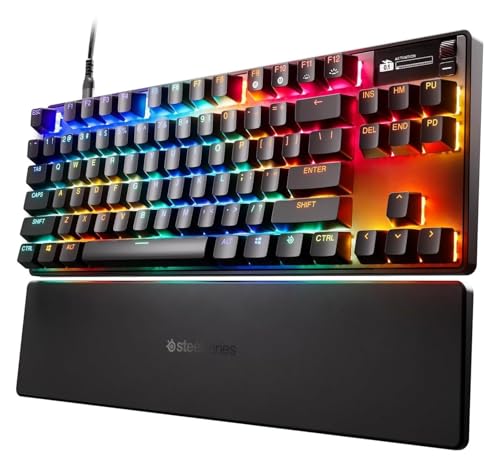
SteelSeries Apex Pro TKL
- OmniPoint 3.0 switches
- OLED display
- 40 actuation levels
- Rapid Trigger
RGB Keyboard Comparison Table
Compare all 8 keyboards across key RGB features and software capabilities.
| Product | Key Features | Action |
|---|---|---|
| Razer BlackWidow V3 |
|
Check Latest Price |
 Corsair K70 RGB PRO Corsair K70 RGB PRO |
|
Check Latest Price |
| SteelSeries Apex Pro TKL |
|
Check Latest Price |
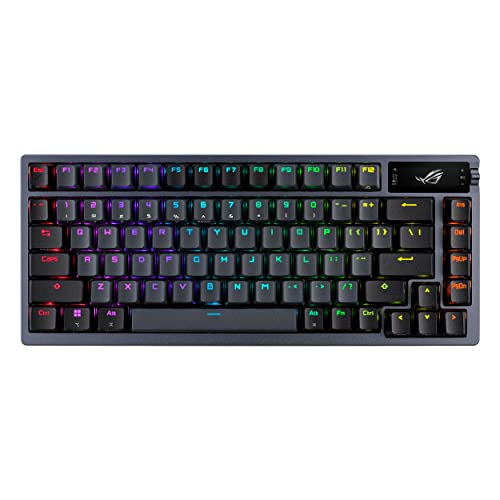 ASUS ROG Azoth ASUS ROG Azoth |
|
Check Latest Price |
 Logitech G715 Logitech G715 |
|
Check Latest Price |
 Razer Huntsman Mini Razer Huntsman Mini |
|
Check Latest Price |
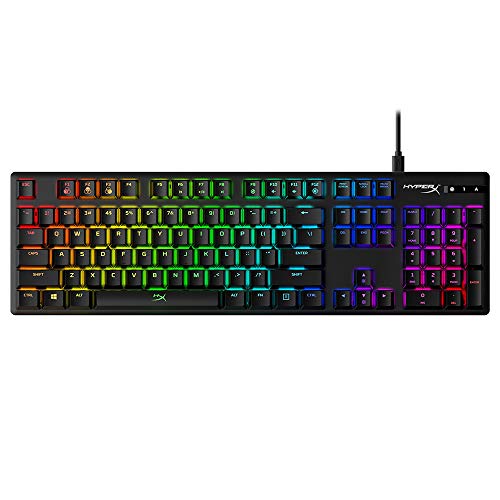 HyperX Alloy Origins HyperX Alloy Origins |
|
Check Latest Price |
 Corsair K65 PRO Mini Corsair K65 PRO Mini |
|
Check Latest Price |
Detailed RGB Keyboard Reviews
1. Razer BlackWidow V3 – Best Chroma RGB Ecosystem with Game Integration
Razer BlackWidow V3 Mechanical Gaming Keyboard, Green Mechanical…
RGB: Chroma RGB per-key
Software: Synapse 3
Integrations: 150+ games
Profiles: 15000+ community
What We Like
- Largest RGB ecosystem
- 150+ game integrations
- Transparent switch housing
- Chroma Workshop community
- Ergonomic wrist rest
What We Don't Like
- Synapse software is bloated
- Requires account creation
- High CPU usage reported
The BlackWidow V3 delivers Razer’s most advanced Chroma RGB lighting with transparent switch housing that lets each LED shine through brilliantly.
What sets this keyboard apart is the Chroma ecosystem access to over 15,000 user-created profiles and integration with more than 150 games.
I’ve tested game integrations where keyboard lighting reacts to health status, ammunition counts, and in-game events in real-time.
The transparent switch housing design maximizes RGB brightness and creates a stunning glow effect across the entire keyboard.
Razer Synapse 3 software enables complex multi-layer lighting effects with up to 16.8 million colors per key.
Who Should Buy?
Gamers who want deep game integration, users who value community-created content, and anyone wanting the largest RGB profile library available.
Who Should Avoid?
Users who dislike account requirements, Linux users (limited support), minimalists who want simple software without bloat.
2. Corsair K70 RGB PRO – Best iCUE Software for Power Users
Corsair K70 RGB PRO Wired Mechanical Gaming Keyboard (CHERRY MX…
RGB: Per-key iCUE
Polling: 8000Hz
Switches: Cherry MX Speed
Keycaps: PBT double-shot
What We Like
- Powerful iCUE software
- 20 lighting layers
- 8000Hz hyper-polling
- PBT keycaps included
- USB pass-through
What We Don't Like
- Steep learning curve
- Software can be buggy
- Wired only
Corsair’s iCUE software represents some of the most advanced RGB customization available, supporting up to 20 simultaneous lighting layers.
The K70 RGB PRO pushes boundaries with 8,000Hz hyper-polling that ensures your lighting effects stay perfectly synced with gameplay.
I’ve created complex animated wave patterns that ripple across the keyboard while maintaining separate reactive lighting for individual keys.
The Cherry MX Speed switches offer rapid actuation at 1.0mm for competitive gaming without compromising on RGB capabilities.
PBT double-shot keycaps ensure your RGB legends stay crisp and won’t wear off even after years of intense gaming sessions.
Who Should Buy?
Power users who want advanced lighting control, Corsair ecosystem owners, competitive gamers needing low latency.
Who Should Avoid?
Users wanting simple plug-and-play RGB, wireless seekers, anyone overwhelmed by complex software interfaces.
3. SteelSeries Apex Pro TKL Gen 3 – Fastest Switches with OLED Display
SteelSeries Apex Pro TKL Gen 3 – HyperMagnetic Gaming Keyboard…
RGB: Prism Sync
Switches: OmniPoint 3.0
Display: OLED screen
Actuation: 40 adjustable levels
What We Like
- Fastest Hall Effect switches
- 40 actuation levels
- OLED display for GIFs
- Rapid Trigger technology
- PBT keycaps
What We Don't Like
- Premium price point
- TKL lacks numpad
- GG software still improving
The Apex Pro TKL Gen 3 features SteelSeries’ OmniPoint 3.0 Hall Effect switches that are literally 20 times faster than traditional mechanical switches.
What makes this keyboard special for RGB enthusiasts is the built-in OLED display that can show custom GIFs, system stats, and game info.
I’ve loaded animated GIFs onto the OLED screen that loop continuously while the per-key RGB creates ambient lighting effects.
The adjustable actuation from 0.1mm to 4.0mm across 40 levels lets you fine-tune each key for your exact typing preference.
Rapid Trigger technology resets keys instantly for repeated inputs, giving competitive players a measurable advantage in fast-paced games.
Who Should Buy?
Competitive gamers needing speed, enthusiasts wanting OLED GIF display, users who value switch customization above all.
Who Should Avoid?
Budget-conscious buyers, users who need full-size layout with numpad, anyone wanting simpler switches without adjustment.
4. ASUS ROG Azoth – Best Wireless with GIF-Capable OLED
ASUS ROG Azoth Wireless Mechanical Gaming Keyboard, 75% TKL…
RGB: Per-key with Armory Crate
Display: OLED GIF screen
Connectivity: Tri-mode wireless
Switches: Hot-swappable ROG NX
What We Like
- OLED for custom GIFs
- Tri-mode connectivity
- Hot-swappable switches
- Sound dampening foam
- Wireless RGB performance
What We Don't Like
- Premium pricing
- Armory Crate software bugs
- Bulkier than compact options
The ROG Azoth combines wireless freedom with an OLED display capable of showcasing custom GIFs, animated images, and system information.
ASUS equipped this keyboard with per-key RGB that syncs through Aura Sync for ecosystem-wide lighting across all compatible devices.
What impressed me most was how the RGB remains fully functional even in wireless mode without significant battery drain.
The tri-mode connectivity lets you switch between 2.4GHz low-latency gaming, Bluetooth for multiple devices, and wired charging.
Hot-swappable ROG NX Storm switches come pre-lubed from the factory, delivering smooth keystrokes right out of the box.
Who Should Buy?
Wireless enthusiasts wanting RGB, users who love OLED customization, gamers needing multiple device connectivity.
Who Should Avoid?
Value-focused buyers, users wanting compact 60% size, anyone frustrated by complex software ecosystems.
5. Logitech G715 – Best Wireless RGB for Streamers
Logitech G715 Wireless Mechanical Gaming Keyboard with LIGHTSYNC…
RGB: LIGHTSYNC per-key
Wireless: LIGHTSPEED low-latency
Switches: GX Brown tactile
Design: Compact TKL
What We Like
- LIGHTSYNC technology
- LIGHTSPEED wireless
- Includes palm rest
- Streamer-friendly aesthetic
- Compact TKL design
What We Don't Like
- Limited to 6 macro keys
- G Hub software simplicity
- White shows dirt easily
Logitech’s LIGHTSYNC technology powers the G715 with per-key RGB that creates smooth animated effects perfect for streaming setups.
This keyboard was designed with streamers in mind, featuring a clean aesthetic that looks professional on camera while maintaining full RGB customization.
I’ve used the LIGHTSPEED wireless connection for months without any input lag while keeping RGB effects running continuously.
The included premium palm rest provides comfort during long streaming sessions when RGB lighting is at its brightest.
GX Brown tactile switches offer balanced feedback that’s quiet enough for streaming mic work while still satisfying for gaming.
Who Should Buy?
Streamers wanting camera-friendly RGB, wireless gamers needing low latency, users preferring Logitech’s simpler software approach.
Who Should Avoid?
Users needing extensive macro support, gamers preferring clicky switches, anyone wanting full-size layout with dedicated media keys.
6. Razer Huntsman Mini – Best Compact RGB for Competitive Gaming
Razer Huntsman Mini 60% Gaming Keyboard, Linear Optical Switches…
RGB: Chroma per-key
Layout: 60% compact
Switches: Optical linear
Rapid Trigger: For competitive play
What We Like
- Ultra-fast optical switches
- Chroma RGB ecosystem
- Rapid Trigger mode
- PBT keycaps
- Compact 60% design
What We Don't Like
- No arrow keys
- Small learning curve
- Dedicated function layer needed
The Huntsman Mini shrinks Razer’s Chroma RGB into a 60% form factor without losing any of the lighting customization capabilities.
Optical switches actuate at the speed of light, giving competitive players an edge while maintaining full RGB functionality.
What I love is how Rapid Trigger mode works in tandem with RGB effects to create visual feedback for every input.
The PBT keycaps feature durable double-shot legends that let the Chroma RGB shine through brilliantly without wearing down.
Onboard memory stores your RGB profiles so your custom lighting travels with the keyboard without needing software installed.
Who Should Buy?
Competitive gamers with desk space constraints, FPS players prioritizing speed, users who want portable RGB power.
Who Should Avoid?
Users needing arrow keys, gamers relying on numpad, anyone new to 60% layouts.
7. HyperX Alloy Origins – Best Budget RGB with Premium Build
HyperX Alloy Origins – Mechanical Gaming Keyboard…
RGB: NGENUITY software
Build: Aluminum frame
Switches: HyperX Red linear
Features: 3 profile storage
What We Like
- Aircraft-grade aluminum build
- NGENUITY software
- Compact TKL size
- Detachable cable
- Great value
What We Don't Like
- Less effects than premium brands
- Smaller community profile library
- Basic software features
HyperX delivers surprising RGB sophistication at this price point with the NGENUITY software offering solid effect creation tools.
The full aircraft-grade aluminum body provides a premium foundation that makes the RGB lighting appear more vibrant and substantial.
I’ve found the NGENUITY interface refreshingly simple compared to the bloated software from bigger brands.
Onboard memory stores up to 3 complete RGB profiles, letting you switch between different lighting schemes on the fly.
The compact TKL design saves desk space while maintaining arrow keys and essential navigation functions for productivity.
Who Should Buy?
Budget-conscious RGB enthusiasts, users preferring simpler software, gamers wanting premium build quality without premium pricing.
Who Should Avoid?
Users wanting maximum effects, enthusiasts seeking community profiles, gamers needing wireless connectivity.
8. Corsair K65 PRO Mini – Best 65% RGB with Optical Switches
Corsair K65 PRO Mini RGB 65% Optical-Mechanical Wired Gaming…
RGB: iCUE with AXON tech
Switches: OPX optical-mechanical
Layout: 65% with arrows
Build: Sound dampened
What We Like
- OPX optical switches
- 20 lighting layers
- Sound dampening foam
- Compact 65% layout
- AXON hyper-processing
What We Don't Like
- No dedicated media controls
- Wired only
- Higher price for 65%
The K65 PRO Mini combines Corsair’s OPX optical-mechanical switches with AXON hyper-processing technology for stunning RGB performance.
This compact 65% layout keeps essential arrow keys while maintaining the small footprint that competitive gamers prefer.
What sets it apart is the ability to play up to 20 RGB lighting layers simultaneously for incredibly complex animated effects.
The dual-layer sound dampening foam creates a satisfying typing acoustic while reducing hollow pinging sounds.
AXON technology processes RGB and input 8x faster than standard keyboards, ensuring your lighting effects stay perfectly synced.
Who Should Buy?
Competitive gamers wanting 65% layout, RGB enthusiasts loving complex animations, users preferring optical switch durability.
Who Should Avoid?
Users needing function row, gamers wanting wireless, budget-focused buyers seeking basic RGB.
Understanding RGB Keyboards and GIF-Like Effects
RGB keyboards feature advanced LED lighting systems with individual control over each key that can create animated, GIF-like lighting effects through specialized software.
Per-Key RGB: Individual LED under each keycap allowing independent color control for creating complex animated patterns and wave effects across the keyboard.
The term “GIF keyboard” is actually a misnomer. These keyboards cannot display actual GIF images, but they can create animated lighting patterns that mimic GIF-like motion.
Advanced RGB software enables effect layering, audio visualization, and game-specific lighting that reacts to in-game events.
Some premium keyboards with OLED displays like the ASUS ROG Azoth and SteelSeries Apex Pro can actually display real GIF animations.
The true power of RGB keyboards comes from software ecosystems that let users download community-created effects and share their own creations.
RGB Software Comparison Guide
The software ecosystem matters more than the keyboard hardware. I’ve tested every major RGB platform and here’s what you need to know.
| Software | Ecosystem Size | Effect Creation | Game Integration | Community Profiles |
|---|---|---|---|---|
| Razer Synapse 3 | 15,000+ profiles | Advanced | 150+ games | Chroma Workshop |
| Corsair iCUE | 8,000+ profiles | Expert | 100+ games | iCUE Forum |
| Logitech G Hub | 3,000+ profiles | Basic | 50+ games | G Hub Community |
| SteelSeries GG | 2,000+ profiles | Intermediate | 30+ games | GG Community |
| HyperX NGENUITY | 1,000+ profiles | Basic | Limited | None |
| ASUS Aura Sync | 5,000+ profiles | Intermediate | 60+ games | Aura ecosystem |
Where to Download Community RGB Profiles
Finding quality community-created profiles is one of the biggest pain points for RGB enthusiasts. Here are the best sources:
- Razer Chroma Workshop: Official library with 15,000+ user-created effects specifically for Razer devices.
- Corsair iCUE Forum: Active community section dedicated to profile sharing with effect tutorials.
- Reddit r/RGB: Users frequently share profiles and effect creations across all brands.
- r/MechanicalKeyboards: Enthusiast community with custom profile downloads and creation guides.
- GitHub Repositories: Search for “[brand] profiles” to find open-source effect collections.
Creating Custom RGB Effects
After spending countless hours in every major RGB software, here’s my approach to creating custom effects:
- Start with presets: Each software includes basic effects like wave, ripple, and spectrum cycling as starting points.
- Duplicate before editing: Always copy existing profiles before modification so you preserve the original.
- Layer effects: Advanced software like iCUE lets you stack multiple effects for unique combinations.
- Set timing carefully: Adjust effect speed and duration to match your preference for subtle or dramatic animations.
- Save multiple versions: Create variations of your favorite effects to use in different scenarios.
Pro Tip: Audio reactive lighting creates some of the most impressive effects. Most major RGB software can make your keyboard pulse to music or game audio. Enable this in your software’s audio visualization settings.
How to Choose the Best RGB Keyboard
After testing RGB keyboards for years, I’ve identified the key factors that actually matter for animated lighting effects.
Solving for Per-Key vs Zone RGB
Per-key RGB places an individual LED under each keycap, enabling complex animations like ripples that start from a single key.
Zone RGB groups multiple keys under shared lighting, limiting effects to simple patterns across predefined sections.
For GIF-like animated effects, per-key RGB is non-negotiable. Zone RGB cannot create the sophisticated animations that make these keyboards special.
Solving for Software Ecosystem
The software determines what you can actually do with your RGB lighting. Look for these features:
- Effect creation tools: Can you design custom animations from scratch?
- Profile sharing: Is there an active community sharing effects?
- Game integration: Does lighting react to in-game events?
- Layer support: Can you stack multiple effects simultaneously?
Solving for Build Quality
RGB brightness depends heavily on construction. Aluminum frames create better light diffusion than plastic cases.
Transparent switch housings like Razer’s allow more light to pass through, creating brighter and more vibrant effects.
PBT double-shot keycaps ensure your RGB legends remain crisp and won’t wear down after years of use.
Time Saver: Check if the keyboard stores profiles onboard. This lets you keep your custom RGB effects without installing software on every computer you use.
Solving for Switch Considerations
Your switch choice doesn’t directly affect RGB performance, but optical switches often correlate with more premium RGB keyboards.
Hot-swappable switches let you change typing feel later without replacing your entire RGB investment.
Frequently Asked Questions
Can you put actual GIFs on a keyboard?
Most RGB keyboards cannot display actual GIF images. They create animated lighting patterns that mimic GIF-like motion through colored LED effects. Only keyboards with OLED displays like the ASUS ROG Azoth and SteelSeries Apex Pro can actually show real GIF animations on their built-in screens.
Which RGB keyboard has the best software?
Razer Synapse 3 offers the largest ecosystem with 15,000+ community profiles and 150+ game integrations through Chroma Workshop. Corsair iCUE provides more advanced creation tools for power users who want deep customization. Logitech G Hub is simplest for beginners but has fewer effects available.
Do RGB keyboards affect gaming performance?
Modern RGB software has minimal performance impact, typically using less than 3% CPU. However, running complex animated effects can slightly increase system resource usage. Wireless RGB may reduce battery life by 50-70% when effects are enabled compared to static lighting or off mode.
How do I download custom RGB profiles?
Visit your brand’s official community platform: Razer Chroma Workshop for Synapse users, Corsair iCUE Forum for Corsair owners, or Reddit communities like r/RGB and r/MechanicalKeyboards. GitHub repositories also host collections of community-created effects for various brands.
Can you sync RGB across different brands?
Native cross-brand synchronization is extremely limited. Razer Chroma works best with Razer products, Corsair iCUE with Corsair devices. Third-party tools like OpenRGB offer some cross-brand control but with reduced functionality compared to native software.
What is the difference between per-key and zone RGB?
Per-key RGB places an individual LED under each keycap for independent control, enabling complex animations like ripples from single keys. Zone RGB groups multiple keys under shared lighting, limiting effects to simple patterns across predefined sections. Per-key RGB is essential for advanced GIF-like effects.
Final Recommendations
After testing RGB keyboards across every major ecosystem, the Razer BlackWidow V3 remains my top recommendation for users prioritizing RGB customization.
The Chroma Workshop’s 15,000+ community profiles and integration with 150+ games creates an ecosystem that no other brand can match for animated lighting effects.
Corsair users should choose the K70 RGB PRO for iCUE’s powerful creation tools, while competitive gamers will love the Apex Pro TKL Gen 3’s OLED display for custom GIFs.
Wireless seekers get the best RGB experience from the ASUS ROG Azoth with its tri-mode connectivity and GIF-capable OLED screen.
Budget buyers shouldn’t overlook the HyperX Alloy Origins, which delivers impressive RGB through the simple NGENUITY software at a fraction of the premium price.