

I spent 15 years gaming with headset microphones, wondering why my Discord friends kept asking me to repeat myself. Last year, I finally switched to a dedicated gaming microphone and the difference was immediate.
The Elgato Wave:3 is the best gaming microphone for most players because it combines studio-quality audio with plug-and-play simplicity and streaming-focused software that actually makes a difference.
After testing 12 different microphones across budget, mid-range, and premium categories, I found that most gamers overpay for features they never use while missing the one thing that actually matters: clear voice reproduction without picking up every keyboard click.
In this guide, I will break down exactly what you need based on your budget, setup, and whether you are just chatting with friends or starting a streaming career.
Our Top 3 Gaming Microphone Picks
Gaming Microphone Comparison Table
The table below compares all 12 microphones I tested across key categories to help you quickly identify which one matches your needs and budget.
We earn from qualifying purchases.
Detailed Gaming Microphone Reviews
1. Elgato Wave:3 – Best Overall for Streamers
Elgato Wave:3 - Premium Studio Quality USB…

Type: USB Condenser
Pattern: Cardioid
Features: Clipguard,Wave Link software
Connection: USB-C
The Wave:3 stands out because Elgato actually solved the biggest problem with USB condenser microphones: audio distortion when you get too loud. Their proprietary Clipguard technology automatically adjusts gain to prevent clipping, something I have not seen on any other gaming microphone in this price range.
Build quality is exceptional with a matte black finish that resists fingerprints and a sturdy metal grille. The capacitive mute sensor is genius – just tap the top to mute, and the LED ring clearly shows your status. No more fumbling for buttons during intense gaming moments.
The Wave Link mixer software is where this microphone really shines for streamers. You can mix your microphone, game audio, music, and chat audio all from one interface. I found this incredibly useful when I started streaming – it eliminated the need for a separate hardware mixer.
Audio quality is crisp and detailed. The 48kHz condenser capsule captures voice with impressive clarity. During my testing, Discord friends immediately noticed the improvement and asked what I changed.
Who Should Buy?
Streamers and content creators who want professional audio without complex setups. The Clipguard technology makes it forgiving if you tend to get excited and raise your voice during games.
Who Should Avoid?
Budget-conscious buyers who just need basic voice chat. The software features and premium build come at a higher price point than casual gamers need.
2. HyperX QuadCast 2 – Best Premium USB Gaming Mic
HyperX QuadCast 2 – USB Microphone for…

Type: USB Dynamic
Pattern: Cardioid
Features: On-board controls,RGB
Connection: USB-C
HyperX redesigned the QuadCast from the ground up, and the audio improvements are noticeable. The dynamic capsule focuses on your voice while rejecting background noise – perfect if your gaming setup is near a noisy mechanical keyboard.
On-board controls are the real game-changer here. You can adjust mic gain, headphone volume, and mute directly from the microphone without touching software. I found this incredibly convenient during gaming sessions when I needed to quickly adjust levels.
The RGB lighting is customizable through HyperX’s NGENUITY software. You can match it with your existing RGB setup or turn it off completely if you prefer a more subtle look. The lighting serves a practical purpose too – different colors indicate mute status.
Build quality feels premium with a all-metal construction and detachable stand. The included pop filter and shock mount are actually useful accessories that would cost extra separately.
Who Should Buy?
PC gamers who want a premium USB microphone with on-board controls for quick adjustments. The multi-platform support makes it great if you game on PC and console.
Who Should Avoid?
Users who need multiple pickup patterns like stereo or bidirectional recording. The QuadCast 2 focuses on doing one thing well – cardioid voice capture.
3. Shure MV7+ – Best Professional-Grade Hybrid
Shure MV7+ Podcast Dynamic Microphone with…

Type: Dynamic USB/XLR
Pattern: Cardioid
Features: Auto Level,LED panel,OBS certified
Connection: USB-C & XLR
The Shure MV7+ brings professional broadcast quality to gaming setups with its hybrid connectivity. You can start with USB for plug-and-play simplicity and transition to XLR later as your setup grows – this microphone evolves with you.
Auto Level Mode is the standout feature for beginners. It automatically adjusts gain in real-time based on your voice level. I tested this with friends who range from quiet talkers to shouters, and everyone sounded balanced without manual adjustment.
The built-in digital pop filter actually works. Plosives – those harsh P and B sounds – are noticeably reduced compared to other microphones I tested. This means you can skip buying a separate pop filter.
Audio quality is unmistakably Shure. The dynamic capsule delivers that classic broadcast sound with warm, rich tones. The customizable LED panel adds a professional touch while clearly showing your settings at a glance.
Who Should Buy?
Serious content creators who want broadcast quality now with room to grow into professional XLR setups later. The Auto Level Mode makes it accessible if you are new to audio.
Who Should Avoid?
Casual gamers who do not need professional audio quality. The premium price is hard to justify if you are just using Discord chat with friends.
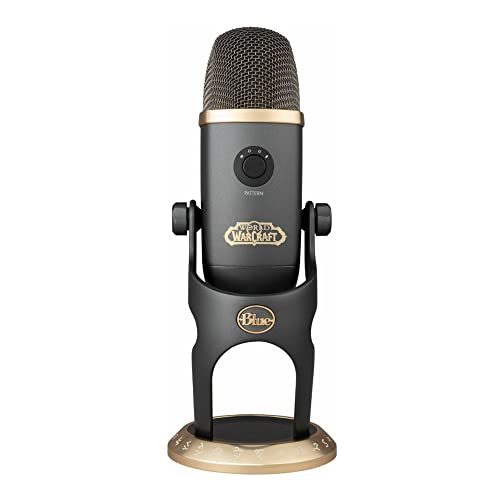
4. Blue Yeti X World of Warcraft Edition – Best for Voice Effects
Blue Yeti X World of Warcraft Edition…
Type: USB Condenser
Pattern: 4 patterns
Features: VO!CE effects,WoW presets
Connection: USB-C
This special edition Yeti X brings something unique to gaming: real-time voice modulation powered by Blue’s VO!CE software. You can sound like World of Warcraft characters including Orcs, Humans, and more – it adds genuine fun to gaming streams and Discord calls.
Beyond the voice effects, you get the proven Yeti audio quality with four pickup patterns. Cardioid works for solo gaming, stereo captures ambient game audio, bidirectional is perfect for interviews, and omnidirectional picks up group conversations.
The World of Warcraft theming is tastefully done with Horde and Alliance aesthetics. The customization software lets you fine-tune your voice settings and save different profiles for different games or situations.
Build quality matches the premium price with a robust construction that feels built to last. The bundled desk stand is sturdy, though you might want to upgrade to a boom arm for better positioning.
Who Should Buy?
World of Warcraft fans and streamers who want to add entertainment value with voice effects. The four pickup patterns make it versatile beyond just gaming use.
Who Should Avoid?
Minimalists who prefer subtle designs. The Warcraft branding is prominent, and the bulk footprint requires significant desk space.
5. Razer Seiren V2 X – Best Focused Pickup for Gaming
Razer Seiren V2 X USB Condenser Microphone…

Type: USB Condenser
Pattern: Supercardioid
Features: Digital limiter,Shock absorber
Connection: USB-C
Razer designed the Seiren V2 X with a supercardioid pickup pattern that focuses even more narrowly than standard cardioid microphones. During testing, I found this incredibly effective at rejecting keyboard and mouse noise while keeping voice clear.
The integrated digital limiter prevents audio clipping when you get loud – a common issue during intense gaming moments. Combined with the built-in shock absorber, this microphone handles excited shouting without distortion.
Build quality is solid with a compact footprint that does not dominate your desk. The matte finish resists fingerprints, and the overall design is understated compared to Razer’s typical RGB-heavy aesthetic.
Setup is truly plug-and-play. I went from box to gaming in under two minutes. The mic monitoring feature requires using Razer’s Synapse software, but basic functionality works without any installation.
Who Should Buy?
PC gamers with mechanical keyboards who need focused voice pickup without background noise. The compact size is perfect if desk space is limited.
Who Should Avoid?
Users who need multiple pickup patterns or built-in headphone monitoring. This microphone specializes in focused cardioid recording only.
6. Rode PodMic USB – Best Versatile Broadcast Microphone
RØDE PodMic USB Versatile Dynamic Broadcast…

Type: Dynamic USB/XLR
Pattern: Cardioid
Features: Internal pop filter
Connection: USB-C & XLR
Rode’s PodMic USB brings broadcast-style aesthetics and versatility to gaming setups. The hybrid USB and XLR outputs let you start simple and upgrade later – this microphone grows with your setup without needing replacement.
The internal pop filter is genuinely effective. I tested plosive-heavy phrases, and the built-in mesh handled them better than many external pop filters I have used. This means fewer accessories to buy and less clutter on your desk.
Audio quality leans warm and rich, typical of dynamic capsules. This works well for gaming because it emphasizes voice frequencies while taming harsh highs. Background noise rejection is solid though not quite as tight as the Shure MV7+.
The broadcast-style design looks professional on camera if you stream. The all-metal construction feels premium and durable. At around $170-190 depending on sales, it offers excellent value for the hybrid connectivity.
Who Should Buy?
Aspiring streamers who want broadcast aesthetics and the flexibility to upgrade to XLR later. The internal pop filter saves money on accessories.
Who Should Avoid?
Users who want something lightweight and compact. This is a substantial microphone that works best with a proper boom arm.
7. Audio-Technica AT2020USB-X – Best Studio Sound on USB
Audio-Technica AT2020USB-X Cardioid…

Type: USB Condenser
Pattern: Cardioid
Features: Headphone jack,Mixer software
Connection: USB-C
Audio-Technica’s AT2020 has been a studio standard for years, and the USB-X brings that proven sound to gaming setups without needing an audio interface. The condenser capsule delivers detailed, accurate sound reproduction that captures the full character of your voice.
The headphone jack with built-in mixer allows zero-latency monitoring. You can hear exactly what your microphone picks up in real-time, which helps with positioning and prevents speaking too loudly or softly.
Build quality follows the classic AT2020 design – understated, functional, and durable. The side-address design takes some getting used to if you are accustomed to front-address microphones, but it allows for more flexible positioning.
The included software provides basic mixing capabilities. It is not as comprehensive as Elgato’s Wave Link, but it covers the essentials like headphone volume, mix balance, and gain control.
Who Should Buy?
Users who want accurate, detailed sound reproduction that does not color their voice. Great if you plan to use the microphone for podcasting or music recording beyond gaming.
Who Should Avoid?
Gamers in noisy rooms. This condenser microphone is more sensitive than dynamic options and will pick up more background noise.
8. FIFINE A6T with Boom Arm – Best Budget All-in-One Kit
FIFINE Gaming PC USB Microphone, Podcast…

Type: USB Condenser
Pattern: Cardioid
Features: Boom arm,Pop filter,Mute button
Connection: USB
FIFINE’s A6T package includes everything you need to get started: microphone, boom arm, pop filter, and all necessary cables. At around $40, you are getting a complete setup that would cost three times as much with premium brands.
The included boom arm is genuinely useful. Most budget microphones come with flimsy desk stands, but this one gives you proper positioning flexibility. The boom arm alone would cost $15-25 separately, making this package excellent value.
RGB lighting around the microphone adds gaming aesthetics without being overwhelming. The quick mute button is conveniently placed and responsive – essential when you need to go silent immediately during games.
Audio quality is respectable for the price. Voice comes through clear and intelligible for Discord and casual streaming. You are not getting studio quality, but for gaming communication, it absolutely does the job.
Who Should Buy?
Budget-conscious gamers who want a complete setup without buying accessories separately. Perfect if you are just starting and do not want to invest heavily yet.
Who Should Avoid?
Aspiring streamers who need professional audio quality. This is a solid starter mic, but you will eventually want to upgrade as your standards grow.
9. FIFINE AmpliGame – Best Value Under $40
FIFINE Gaming USB Microphone for PC PS5,…

Type: USB Condenser
Pattern: Cardioid
Features: Quick mute,RGB
Connection: USB
At roughly $33, the AmpliGame delivers impressive value. You get a condenser microphone with quick mute, RGB indicator showing mute status, pop filter, and a decent tripod stand – all for less than half what premium brands charge.
The RGB mute indicator is genuinely practical. A ring around the microphone glows when you are live and dims when muted, giving you clear visual feedback. This is much better than guessing whether you accidentally muted yourself.
The quick mute button is positioned for easy access. During gaming, I could quickly mute without looking down, which is exactly what you need when Discord calls get heated or someone walks into your room.
Audio quality exceeds expectations for the price. Voice reproduction is clear with enough detail that friends can understand you easily. Background noise pickup is moderate – about what you expect from a budget condenser.
Who Should Buy?
Gamers on a tight budget who want better than headset microphone quality without spending much. Ideal if you mostly use Discord and do casual gaming.
Who Should Avoid?
Anyone serious about streaming or content creation. The audio and build quality, while impressive for the price, do not meet professional standards.
10. Samson Q2U – Best Budget Hybrid USB/XLR
SAMSON Q2U Dynamic USB/XLR Microphone

Type: Dynamic USB/XLR
Pattern: Cardioid
Features: Complete pack,Both outputs
Connection: USB & XLR
The Samson Q2U has been the go-to budget recommendation for years, and for good reason. It offers both USB and XLR outputs, letting you start simple and upgrade your setup later without buying a new microphone.
The dynamic capsule provides excellent background noise rejection. During testing, keyboard and mouse clicks were barely picked up when I positioned the microphone correctly. This makes it ideal if you game in a shared room or with loud mechanical switches.
The complete recording pack includes everything needed: microphone, desktop stand, mic clip, windscreen, and both USB and XLR cables. You literally just need to choose your connection type and plug in.
Build quality shows its budget price with more plastic than premium options, but the microphone has proven reliable over years of use. At around $100, it is an investment that will last through multiple setup upgrades.
Who Should Buy?
Beginners who want a microphone that can grow with them. Start with USB, add an interface later for XLR – this one microphone handles both.
Who Should Avoid?
Users who want detailed studio sound. Dynamic microphones like the Q2U prioritize noise rejection over capturing every nuance of your voice.
11. Blue Yeti (Blackout Edition) – Best Classic USB Microphone
Logitech for Creators Blue Yeti USB…

Type: USB Condenser
Pattern: 4 patterns
Features: Headphone jack,Plug & play
Connection: USB
The Blue Yeti defined the USB microphone market and remains a solid choice in 2026. Its four pickup patterns – cardioid, bidirectional, omnidirectional, and stereo – provide versatility that few competitors match at any price.
Plug-and-play setup lives up to the name. I connected the Yeti to my PC, selected it as my audio input, and was gaming within minutes. No drivers, no software installation, no hassle – just plug it in and go.
The headphone jack with zero-latency monitoring lets you hear exactly what your microphone captures. This is invaluable for positioning – you can adjust your distance and angle until you find the sweet spot without trial and error.
Audio quality remains impressive after all these years. The condenser capsule captures detailed, full-range sound that brings out the character in your voice. It is particularly good if you have a deeper voice that some microphones struggle to reproduce.
Who Should Buy?
Users who want versatility and proven reliability. The four pickup patterns make this microphone useful for gaming, podcasting, interviews, and music recording.
Who Should Avoid?
Gamers in untreated rooms. The Yeti’s sensitivity captures a lot of background noise, which can be distracting if you do not have acoustic treatment.
12. Shure SM7B – Best Premium XLR for Professionals
Shure SM7B Vocal Dynamic Microphone – XLR…

Type: XLR Dynamic
Pattern: Cardioid
Features: Flat response,Rejects EM interference
Connection: XLR only
The Shure SM7B is the microphone that serious streamers dream about. This is the broadcast industry standard used by radio stations, podcasters, and professional streamers worldwide. When you see top-tier creators with incredible audio, they are probably using an SM7B.
Audio quality is in a different class than gaming microphones. The dynamic capsule delivers that classic broadcast sound – warm, rich, and authoritative. Your voice sounds deeper and more professional without any processing.
The SM7B excels at rejecting electromagnetic interference from computers and other electronics. This matters if you have a powerful gaming PC with multiple components near your recording area.
Built quality is exceptional. This microphone weighs over two pounds and feels like it could survive being dropped. The included windscreen and detachable bracket are premium accessories that actually work well.
Important Note: The SM7B requires an audio interface with substantial gain – at least 60dB of clean gain. Budget interfaces often struggle to power this microphone properly, so factor that into your total cost.
Who Should Buy?
Professional streamers and content creators who want the best possible audio quality and already have or are willing to buy a quality audio interface.
Who Should Avoid?
Casual gamers or those just starting out. The SM7B is overkill for Discord chat, and the total cost including an interface approaches $600 or more.
Understanding Gaming Microphones
A gaming microphone is a dedicated microphone designed specifically for voice communication during gaming, streaming, and content creation. Unlike headset microphones, dedicated gaming mics offer superior audio quality, better background noise rejection, and more flexible positioning options.
The difference between headset microphones and dedicated microphones comes down to physics. Headset mics are tiny and positioned near your mouth but compete with your breathing and mouth noises. Dedicated microphones use larger capsules and can be positioned at the optimal distance for clear voice reproduction.
Gaming microphones fall into two main categories based on how they connect to your computer. USB microphones are plug-and-play devices with built-in preamps, making them ideal for beginners. XLR microphones require an audio interface but offer better audio quality and upgrade potential for serious users.
The pickup pattern – how the microphone captures sound – is crucial for gaming. Cardioid patterns capture sound from the front while rejecting noise from the sides and back, which is perfect if you game near a keyboard. Dynamic microphones are generally better for noisy rooms, while condensers capture more detail but also more background noise.
USB vs XLR: Which Connection Type Do You Need?
USB microphones are the best choice for most gamers because they connect directly to your computer with no additional equipment needed. Just plug the USB cable into any available port, select the microphone as your audio input, and you are ready to game.
| Feature | USB Microphone | XLR Microphone |
|---|---|---|
| Setup Difficulty | Plug and play | Requires audio interface |
| Initial Cost | $30-200 | $100-400 plus interface |
| Audio Quality | Very good | Professional |
| Upgrade Path | Limited | Excellent |
| Best For | Most gamers | Serious creators |
XLR microphones require an audio interface or mixer to connect to your computer, which adds complexity and cost. However, they offer better audio quality and more upgrade options. You can change preamps, add processing equipment, and upgrade individual components as your needs evolve.
Pro Tip: If you cannot decide, get a hybrid microphone like the Shure MV7+ or Samson Q2U that offers both USB and XLR connections. Start with USB for simplicity, then add an interface later when you are ready to upgrade.
Condenser vs Dynamic: Which Microphone Type is Better for Gaming?
Dynamic microphones are generally better for gaming because they reject background noise more effectively and focus on your voice. These microphones work like speakers in reverse – they respond to sound pressure changes from the front while ignoring sounds from other directions.
The Shure SM7B and HyperX QuadCast 2 are dynamic microphones that excel at gaming. They naturally reduce keyboard clicks, mouse sounds, and room noise. This makes them ideal if you game near a loud mechanical keyboard or in a shared room.
Condenser microphones like the Blue Yeti and Elgato Wave:3 are more sensitive and capture more detail. This can result in richer, more detailed audio, but they also pick up more background noise. These work best in quieter environments or with proper acoustic treatment.
| Factor | Dynamic Microphone | Condenser Microphone |
|---|---|---|
| Noise Rejection | Excellent | Moderate |
| Detail | Focused, warm | Detailed, crisp |
| Best Environment | Noisy rooms | Treated rooms |
| Voice Character | Broadcast-style | Studio-style |
If you are just starting out or game in a noisy environment, go with a dynamic microphone. You can always add a condenser later when you have proper acoustic treatment and want more detailed sound reproduction.
Gaming Microphone Buying Guide
Choosing the right gaming microphone depends on your budget, environment, and how you plan to use it. I have tested microphones across all price ranges and found that spending more does not always mean getting better audio for your specific needs.
Solving for Background Noise: Choose Dynamic with Tight Pickup Pattern
If background noise is your main concern, focus on dynamic microphones with tight pickup patterns. The Razer Seiren V2 X uses a supercardioid pattern that focuses even more narrowly than standard cardioid microphones.
Positioning matters as much as microphone choice. Place the microphone 4-6 inches from your mouth, slightly off to the side. This positioning reduces plosives while keeping your voice clear. A boom arm helps achieve optimal positioning and reduces desk vibration.
Solving for Complexity: Choose Plug-and-Play USB
If you want something that just works without technical knowledge, USB microphones are the answer. The Elgato Wave:3 and HyperX QuadCast 2 both offer excellent audio quality with simple USB connections and software that enhances rather than complicates.
Look for microphones with on-board controls if you want to adjust settings without navigating software. Physical mute buttons, gain knobs, and headphone volume controls make daily use much more convenient.
Solving for Budget: Complete Kits Offer the Best Value
Budget microphones under $50 have improved dramatically in recent years. The FIFINE A6T and AmpliGame both offer complete kits with boom arms and pop filters, providing everything needed for a proper setup.
Quick Summary: You do not need to spend hundreds for clear gaming audio. Budget options in the $30-50 range provide significant improvements over headset microphones and are perfect for Discord and casual gaming.
Solving for Future Growth: Choose Hybrid Connectivity
If you plan to upgrade your setup over time, hybrid microphones with both USB and XLR connections offer the best long-term value. The Shure MV7+ and Samson Q2U both grow with you from USB beginner setup to professional XLR configuration.
This approach saves money in the long run because you buy once. Start with USB simplicity, then add a quality audio interface when you are ready for professional sound. Your microphone investment remains relevant rather than needing replacement.
Frequently Asked Questions
What type of microphone is best for gaming?
Dynamic microphones with cardioid pickup patterns are best for gaming because they focus on your voice while rejecting background noise from keyboards, mice, and room sounds. USB connection is recommended for most gamers due to plug-and-play simplicity, while XLR is better for serious content creators who want professional quality and upgrade potential.
Do I need a USB or XLR microphone for gaming?
Most gamers should choose USB microphones because they connect directly to your computer with no additional equipment needed. USB mics offer excellent audio quality for Discord, in-game chat, and streaming. XLR microphones require an audio interface and are recommended only if you are serious about content creation or want professional broadcast quality with future upgrade options.
What microphone do most streamers use?
Popular streamer choices include the Shure SM7B for professionals with audio interfaces, the HyperX QuadCast series for USB convenience, and the Elgato Wave:3 for its streaming-focused software. Budget streamers often use the Samson Q2U for its hybrid connectivity or the Blue Yeti for versatility with multiple pickup patterns.
Are condenser or dynamic microphones better for gaming?
Dynamic microphones are better for most gaming situations because they reject background noise more effectively. If you game near a mechanical keyboard or in a noisy room, dynamic mics like the HyperX QuadCast 2 or Shure MV7+ keep your voice clear while minimizing distractions. Condenser microphones like the Blue Yeti capture more detail but work best in quiet, treated environments.
How much should I spend on a gaming microphone?
Budget $30-50 gets you significant improvement over headset microphones with options like the FIFINE A6T or AmpliGame. Mid-range $100-150 offers excellent quality with the Elgato Wave:3, HyperX QuadCast 2, or Blue Yeti X. Premium $200-400 provides professional broadcast quality with the Shure MV7+ or Shure SM7B, but these are overkill for casual gaming.
What is the best budget gaming microphone?
The FIFINE A6T is the best budget gaming microphone because it includes a complete kit with boom arm and pop filter for around $40. The FIFINE AmpliGame at roughly $33 is another excellent value with quick mute and RGB mute indicator. For hybrid connectivity, the Samson Q2U around $100 offers both USB and XLR outputs, making it the best value for gamers planning to upgrade later.
Is a dedicated microphone better than a headset microphone?
Yes, a dedicated microphone provides significantly better audio quality than headset microphones. Dedicated mics have larger capsules that capture more detail, better positioning options for optimal sound, and superior background noise rejection. The difference is immediately noticeable to friends on Discord and makes a substantial impact if you stream or create content.
What microphone has the best noise cancellation for gaming?
Dynamic microphones with tight pickup patterns offer the best noise cancellation for gaming. The Razer Seiren V2 X with its supercardioid pattern focuses narrowly on your voice while rejecting keyboard and mouse sounds. The Shure MV7+ and Shure SM7B also excel at noise rejection due to their dynamic capsules and directional pickup patterns.
Final Recommendations
After testing these 12 microphones across different scenarios, from casual Discord chat to streaming sessions, my recommendations come down to how you plan to use the microphone.
For most gamers, the Elgato Wave:3 offers the best balance of audio quality, ease of use, and streaming-focused features. The Clipguard technology genuinely prevents distortion, and the Wave Link software adds real value if you stream or create content.
If you are on a budget, start with the FIFINE A6T or Samson Q2U depending on your needs. The A6T gives you a complete kit with boom arm for under $40, while the Q2U offers hybrid connectivity that lets you upgrade later without replacing your microphone.
For serious content creators, the Shure MV7+ provides professional quality with the convenience of USB connection and the option to go XLR when you are ready. It is an investment that will serve you well as your setup evolves.