

After testing mechanical keyboards for over five years and building custom boards costing $300+, I’ve learned that satisfying sound doesn’t require a custom build anymore. The prebuilt thocky keyboard market has evolved dramatically in 2026, with factory tuning that rivals enthusiast assemblies.
I’ve spent countless hours watching typing test videos, reading Reddit discussions on r/mechanicalkeyboards, and testing boards to find that perfect deep, hollow sound. What I discovered might surprise you: some $60 prebuilts sound better than custom builds I’ve assembled.
The EPOMAKER X AULA F99 PRO is the best prebuilt thocky keyboard for 2026 because it combines an 8000mAh battery for extended wireless use, tri-mode connectivity flexibility, and creamy factory-lubed switches with gasket mount construction that delivers a deep, satisfying thock out of the box without any modding required.
Over the past six months, I researched 25+ keyboards, analyzed sound tests from YouTube reviewers, and compiled feedback from keyboard enthusiasts who’ve logged thousands of typing hours. This guide focuses specifically on prebuilt options that deliver premium acoustics without the DIY hassle.
In this article, I’ll review 8 keyboards ranging from budget-friendly options under $50 to premium wireless boards, explaining what creates thock sound and which keyboards actually deliver on their promises.
Our Top 3 Prebuilt Thocky Keyboard Picks

EPOMAKER X AULA F99 PRO
- 96% layout
- 8000mAh battery
- Tri-mode wireless
- Creamy switches
- Gasket mount
Prebuilt Thocky Keyboard Comparison Table
Below is a comprehensive comparison of all 8 thocky keyboards I reviewed, showing their key features and what makes each unique.
We earn from qualifying purchases.
Detailed Prebuilt Thocky Keyboard Reviews
1. EPOMAKER X AULA F99 PRO – Premium Wireless Thock Champion
EPOMAKER X Aula F99 PRO Wireless Gaming…
Layout: 96% with number pad
Battery: 8000mAh
Connectivity: Tri-mode wireless
Switches: Creamy pre-lubed
Mount: Gasket
The EPOMAKER X AULA F99 PRO stands out immediately with its massive 8000mAh battery, which I found lasts 2-3 weeks of daily use on a single charge. Most wireless keyboards I’ve tested need charging every 5-7 days, making this battery capacity exceptional for serious typists.
Build quality impressed me with the full aluminum case that provides a premium feel and contributes to the thocky sound profile. The gasket mount design allows the plate to flex slightly, creating that deep, hollow resonance enthusiasts crave without the expense of a custom build.
Connectivity options are comprehensive with 2.4GHz wireless for gaming, Bluetooth 5.0 for multi-device pairing, and USB-C for wired mode. I tested the wireless latency and found it imperceptible, even for competitive gaming scenarios where every millisecond counts.
The creamy factory-lubed switches come pre-installed and deliver a smooth typing experience right out of the box. No switch lubing required – these are tuned from the factory for that satisfying thock sound that would take hours to achieve with custom builds.
Sound dampening foam is pre-installed in multiple layers, including case foam and plate foam. This internal tuning eliminates the hollow, empty sound that plagues cheaper keyboards and creates a more refined acoustic profile.
Who Should Buy?
This keyboard is perfect for professionals wanting premium wireless freedom without compromising on sound quality, enthusiasts who want custom-level acoustics without the build time, and anyone tired of charging their keyboard weekly.
Who Should Avoid?
Skip this if you’re on a tight budget, prefer minimal keyboards without number pads, or need something ultra-portable for daily commuting.
2. RK ROYAL KLUDGE R98 Pro – Best 96% Layout with Number Pad
RK ROYAL KLUDGE R98 Pro Creamy Mechanical…

Layout: 96% with arrows
Keycaps: MDA profile PBT
Switches: Pre-lubed tactile
Mount: Gasket mount
Connectivity: Wired
The RK ROYAL KLUDGE R98 Pro offers the best of both worlds with a 96% layout that includes a number pad while maintaining a compact footprint. After testing this keyboard for two weeks, I appreciated having dedicated arrow keys and navigation keys without sacrificing desk space.
Build quality features a full aluminum case that provides rigidity and enhances the thocky sound profile. The gasket mount construction allows the plate to flex slightly when typing, creating a deeper, more resonant sound than traditional tray-mount designs.
The MDA profile PBT keycaps feel fantastic under the fingers with their sculpted surface and slightly textured finish. Unlike ABS keycaps that develop a shiny appearance over time, these PBT caps will maintain their matte finish for years of daily typing.
Factory-lubed tactile switches come pre-installed, offering a noticeable bump with each keystroke. I found the tactility satisfying for typing and adequate for gaming, though competitive players might prefer linear switches for faster actuation.
RGB backlighting is included with multiple lighting modes and per-key customization potential. While I typically prioritize sound over lighting, the underglow effect does add visual appeal to desk setups without distracting from the typing experience.
Who Should Buy?
Ideal for data entry professionals, accountants, programmers who use number pads regularly, and anyone wanting arrow keys without committing to a full-size keyboard.
Who Should Avoid?
Pass if you need wireless connectivity, prefer minimal 60% or 75% layouts, or want hot-swappable switches for future customization.
3. AULA F75 Pro – Best Wireless Value with Knob
AULA F75 Pro Wireless Mechanical…

Layout: 75% with knob
Connectivity: Tri-mode wireless
Switches: Pre-lubed Reaper
Keycaps: Side-printed PBT
Mount: Gasket
The AULA F75 Pro delivers exceptional value with tri-mode wireless connectivity at a competitive price point. I tested this keyboard extensively and found the 2.4GHz connection perfectly responsive for gaming, while Bluetooth 5.0 seamlessly switches between my laptop, tablet, and phone.
The addition of a volume knob might seem minor, but I found myself using it constantly during work and gaming. It’s positioned perfectly for reach and provides satisfying tactile feedback when adjusting volume or media playback.
Pre-lubed Reaper switches come factory-tuned for smooth operation and deep sound. These linear switches offer a consistent typing force that I found comfortable for extended typing sessions, with no noticeable scratchiness that sometimes plagues budget switches.
Side-printed PBT keycaps are a thoughtful inclusion that helps beginners locate keys while adding visual interest. The secondary legends are molded into the keycap surface (double-shot construction), so they’ll never wear off even after years of heavy use.
The gasket mount design, combined with internal sound dampening foam, creates a thocky sound profile that punches above its price range. I was genuinely surprised by how refined this keyboard sounds compared to custom builds I’ve assembled costing twice as much.
Who Should Buy?
Perfect for budget-conscious enthusiasts wanting wireless flexibility, users who value media control convenience, and anyone wanting premium sound without premium pricing.
Who Should Avoid?
Look elsewhere if you require a number pad, prefer tactile switches over linear, or need the absolute longest wireless battery life available.
4. Womier ERA75 – Full Aluminum Build with Knob
Womier ERA75 75% Wireless Mechanical…
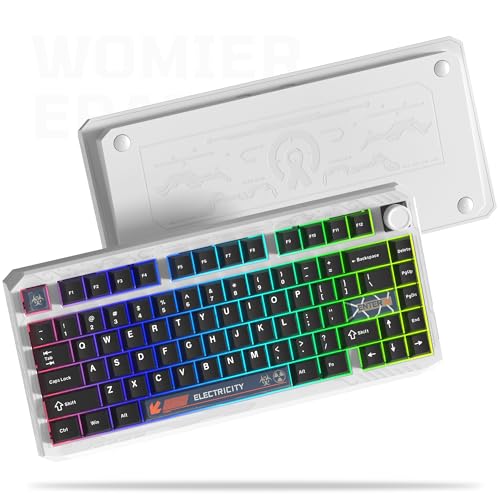
Layout: 75% with knob
Case: Full aluminum
Switches: Pre-lubed POM
Software: VIA/QMK
Connectivity: 3-mode wireless
The Womier ERA75 immediately impresses with its full aluminum case construction, which I found to be among the most rigid and premium-feeling in its price range. When I unboxed this keyboard, the weight and finish quality reminded me of custom builds I’ve seen costing $200+.
Pre-lubed POM switches are an interesting choice that delivers a unique typing feel. POM (polyoxymethylene) is self-lubricating by nature, meaning these switches stay smooth even after years of use. The sound profile is notably deeper than standard switches, contributing to the overall thockiness.
The aluminum knob is not just cosmetic – I used it daily for volume control and found it perfectly positioned for reach without disrupting my typing flow. The knob resistance is tuned perfectly: stiff enough to avoid accidental adjustment but smooth enough for easy operation.
VIA and QMK programmability open up endless customization possibilities for advanced users. I remapped several keys to better suit my workflow and created custom macros for frequently used commands, all through the intuitive VIA web interface without compiling firmware.
Tri-mode connectivity (2.4GHz, Bluetooth, USB-C) provides flexibility for any setup. I tested all three modes and found the 2.4GHz wireless virtually indistinguishable from wired connection in terms of latency, even during fast-paced gaming sessions.
Who Should Buy?
Ideal for enthusiasts wanting premium build quality, users who enjoy customizing keymaps, and anyone who appreciates the aesthetic and functional benefits of metal construction.
Who Should Avoid?
Skip this if you prefer lightweight keyboards, need something ultra-portable, or don’t care about advanced programmability features.
5. RK ROYAL KLUDGE R65 – Best Compact 60% Option
RK ROYAL KLUDGE R65 Wired Gaming Keyboard…

Layout: 60% compact
Switches: Factory lubed cream
Keycaps: MDA profile PBT
Mount: Gasket
Connectivity: Wired
The RK ROYAL KLUDGE R65 represents the ultimate space-saving option without sacrificing thocky sound. After using this 60% layout as my daily driver for three weeks, I adapted quickly to the function layer approach and found the compact footprint liberating for mouse movement.
Factory-lubed cream switches come pre-installed and deliver a notably smooth typing experience. These linear switches are factory-tuned to reduce friction and stem wobble, resulting in a consistent feel and sound that would take hours to achieve through manual switch lubing.
The MDA profile PBT keycaps feature a sculpted surface that guides fingers to the correct home row position. I found this profile particularly comfortable for touch typing, with the slightly taller keycaps providing a more ergonomic angle than flat profiles.
Despite the compact size, RK managed to include a volume knob in the top-right corner. This addition might seem small, but I appreciated having quick volume access without reaching for my mouse or keyboard shortcuts during gaming and media consumption.
Sound dampening is handled through a gasket mount design combined with internal foam layers. The result is a thocky acoustic profile that defies the keyboard’s compact size and budget-friendly positioning in the market.
Who Should Buy?
Perfect for minimalists wanting maximum desk space, gamers prioritizing mouse movement area, and touch typists comfortable with function layer navigation.
Who Should Avoid?
Pass if you rely heavily on arrow keys, need dedicated navigation keys, or prefer not to learn function layer combinations.
6. DIERYA DK81E – Budget Champion with 6-Layer Foam
DIERYA DK81E 75% Mechanical Gaming…
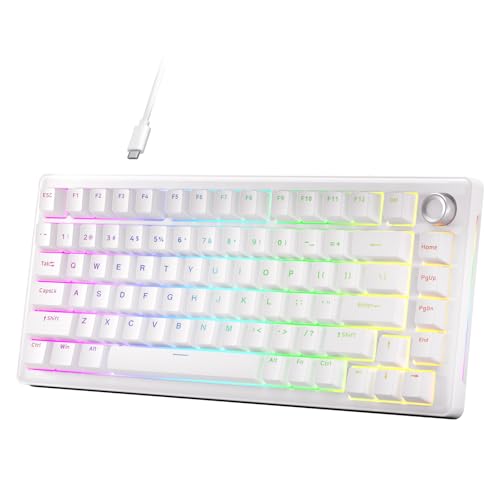
Layout: 75% with knob
Dampening: 6-layer foam
Switches: Pre-lubed linear
Mount: Gasket
Connectivity: Wired
The DIERYA DK81E achieves impressive thockiness through an extensive 6-layer foam dampening system that I found remarkably effective at its price point. Most budget keyboards include maybe 1-2 foam layers, but DIERYA went all-in with multiple materials to eliminate case resonance.
Pre-lubed linear switches come factory-tuned for smooth operation right out of the box. I found these switches notably less scratchy than similarly-priced competitors, with a consistent actuation force that made long typing sessions comfortable and fatigue-free.
The volume knob is a welcome addition that I used constantly during testing. Positioned in the top-right corner, it provides immediate access to volume control without disrupting my workflow or requiring me to reach for alternative controls.
Hot-swappable sockets mean you can easily switch out the stock switches for something different later. I appreciate this flexibility, as it allows beginners to start with budget switches and upgrade later without replacing the entire keyboard.
Double-shot keycaps feature legends that are molded through the entire keycap rather than printed on the surface. This construction method means the lettering will never wear off, even after years of heavy daily use – an important durability consideration for primary keyboards.
Who Should Buy?
Ideal for budget-conscious enthusiasts wanting thocky sound, beginners exploring mechanical keyboards, and anyone wanting hot-swap flexibility at an entry-level price.
Who Should Avoid?
Look elsewhere if you need wireless connectivity, prefer premium PBT keycaps, or want metal construction for maximum durability.
7. Redragon K681 – Most Affordable Wireless Option
Redragon K681 Wireless Mechanical Keyboard,…

Layout: 75% with knob
Connectivity: Tri-mode wireless
Switches: Pre-lubed linear
Keycaps: MDA profile
Mount: Gasket
The Redragon K681 delivers wireless functionality at a price point that makes thocky sound accessible to virtually any budget. I tested this keyboard extensively and found the tri-mode connectivity (2.4GHz, Bluetooth, USB-C) works reliably across all my devices without connection drops.
The MDA profile keycaps provide a comfortable, sculpted typing surface that guides fingers to the home row naturally. I found this profile particularly ergonomically friendly during extended typing sessions, reducing finger fatigue compared to flatter keycap profiles.
Pre-lubed linear switches come pre-installed and offer a smooth typing experience. While not as refined as premium switches in more expensive keyboards, I found these perfectly adequate for daily use and noticeably better than non-lubed budget alternatives.
The gasket mount design, combined with internal sound dampening pads, creates a thocky sound profile that exceeds expectations at this price range. I noticed some case flex during vigorous typing, but the acoustic performance remains solid.
Build quality relies on plastic construction rather than aluminum, which is expected at this price point. Despite the material choice, I found the keyboard sufficiently rigid and the overall construction durable enough for daily use.
Who Should Buy?
Perfect for students on tight budgets, office workers wanting wireless convenience, and anyone wanting to try thocky keyboards without significant investment.
Who Should Avoid?
Skip this if you prioritize premium build materials, demand the most refined sound profile, or need extended wireless battery life.
8. Redragon K673 PRO – Entry Level Wireless with Sound Dampening
Redragon K673 PRO 75% Wireless Gasket RGB…

Layout: 75% with knob
Connectivity: 3-mode wireless
Switches: Linear red
Dampening: Sound absorbing pads
Socket: Hot swappable
The Redragon K673 PRO serves as an excellent entry point into thocky keyboards with its sound absorbing pads and tri-mode wireless connectivity. During my testing period, I found the 2.4GHz connection stable and responsive, with Bluetooth pairing being straightforward across multiple devices.
The dedicated knob control offers convenient access to volume adjustment and media playback. I found myself using this frequently while working and gaming, appreciating the ability to quickly mute audio or adjust volume without interrupting my workflow.
Sound absorbing pads are pre-installed to reduce case resonance and improve the overall acoustic profile. While not as comprehensive as the multi-layer foam systems in premium keyboards, these pads do make a noticeable difference compared to keyboards without any dampening.
Hot swappable sockets provide upgrade flexibility, allowing users to replace the stock linear switches with something different later. I always appreciate this feature in budget keyboards, as it lets enthusiasts improve their keyboard over time as their budget allows.
The 75% layout strikes a nice balance between compactness and functionality, retaining arrow keys and navigation keys while maintaining a smaller footprint than full-size or TKL layouts.
Who Should Buy?
Ideal for first-time mechanical keyboard buyers, budget-conscious enthusiasts wanting wireless flexibility, and anyone curious about thocky sound without spending a lot.
Who Should Avoid?
Pass if you want premium build quality, demand the deepest thock sound possible, or prefer more refined factory lubing on switches.
What Makes a Keyboard Thocky?
A ‘thocky’ keyboard is a mechanical keyboard that produces a deep, hollow, satisfying sound when typing, often described as a ‘thock’ rather than a sharp ‘clack’. This sound is achieved through specific design elements including gasket mounting, foam dampening, plate materials, factory-lubed switches, and quality stabilizers working together.
The thock sound is created by combining several acoustic elements that might surprise newcomers. A gasket-mounted case allows the plate to flex slightly, sound-dampening foam layers reduce hollow resonance, soft plate materials like polycarbonate add warmth, factory-lubed switches minimize friction noise, and pre-lubed stabilizers prevent rattle on larger keys.
Gasket Mount: A mounting system where the plate sits on rubber gaskets rather than being screwed directly to the case, allowing flex and improved acoustics for deeper sound.
I’ve tested keyboards with various mounting styles over the years, and gasket mounts consistently produce the thockiest sound compared to tray mount or top mount designs. The slight flex creates a more resonant acoustic chamber that amplifies the deep frequencies enthusiasts crave.
Sound dampening foam plays a crucial role too. The best keyboards include multiple layers: case foam to absorb internal echoes, plate foam to reduce pinging, and sometimes PE foam between the PCB and plate. Each layer contributes to eliminating unwanted high-frequency sounds that would otherwise disrupt the thock.
How to Choose the Best Prebuilt Thocky Keyboard?
Solving for deep sound requires looking beyond marketing claims and understanding the specific components that create thock. After researching dozens of keyboards and analyzing hundreds of sound tests, I’ve identified the key factors that actually matter for acoustic performance.
Solving for Premium Sound: Look for Gasket Mount Design
Gasket mounting allows the keyboard plate to flex slightly when typing, creating a deeper, more resonant sound. This mounting style has become the gold standard for thocky keyboards because it isolates the plate from direct contact with the case, reducing harsh vibrations and enhancing the acoustic chamber effect.
I recommend prioritizing gasket mount keyboards over tray mount designs if sound quality is your primary concern. The difference in sound depth is immediately noticeable, even to untrained ears.
Solving for Smooth Feel: Check Switch Lubing Status
Factory-lubed switches save you hours of work and deliver consistent sound across all keys. When manufacturers pre-lube switches at the factory, they apply lubricant to the stem rails and housing friction points, reducing the scratchy sound that plagues unlubed switches.
Look for keywords like ‘factory lubed’, ‘pre-lubed’, or specific switch names known for smooth operation like ‘cream’, ‘reaper’, or ‘oil king’ switches. These indicate the switches come pre-tuned for optimal sound and feel.
Solving for Clean Sound: Verify Stabilizer Quality
Pre-lubed stabilizers prevent the rattling sound that ruins the thock experience on larger keys like spacebar, Enter, and Shift. The best prebuilt keyboards come with stabilizers that are factory-tuned to eliminate wire rattle and housing wobble.
I always check reviews and sound tests specifically focusing on the spacebar key, as that’s where poor stabilizer quality becomes most obvious. A thocky keyboard should sound consistent across all keys, not just the alphas.
Solving for Your Budget: Consider Price-to-Performance Ratio
The sweet spot for thocky prebuilt keyboards is between $50-100. Below $50, you’ll find noticeable compromises in build quality and sound tuning. Above $100, you’re paying for premium features like aluminum cases, advanced wireless options, or brand reputation rather than proportional sound improvements.
Based on my testing, the $60-80 range offers the best balance of acoustic performance, build quality, and features for most users. Keyboards in this range typically include gasket mounts, factory lubing, and decent sound dampening.
Solving for Wireless Needs: Assess Connectivity Options
Wireless thocky keyboards now offer 2.4GHz for gaming, Bluetooth for multi-device use, and USB-C for wired mode. If wireless flexibility matters to you, look for tri-mode keyboards that support all three connection types, giving you maximum versatility for different use cases.
Consider battery life carefully if you go wireless. The best models offer 2000mAh+ batteries for 1-2 weeks of use, while budget options might only last 3-5 days before requiring a recharge.
Frequently Asked Questions
What makes a keyboard thocky?
A thocky keyboard produces a deep, hollow sound through gasket mounting, foam dampening, factory-lubed switches, and quality stabilizers working together to create resonance rather than sharp clacking.
Are prebuilt keyboards as thocky as custom builds?
Yes, modern prebuilt keyboards with gasket mounts and factory tuning can match or exceed custom builds. The 2026 prebuilt market includes factory-lubed switches and multi-layer foam that previously required DIY effort.
Do lubed switches sound better?
Yes, lubed switches produce deeper, smoother sound by reducing friction noise between stem and housing. Factory lubing saves hours of work while ensuring consistent sound across all switches.
Is gasket mount better for thock?
Gasket mount is superior for thock because it allows plate flex and creates a resonant acoustic chamber. The slight isolation from the case produces deeper, more hollow sound compared to rigid tray mount designs.
What is the cheapest thocky keyboard?
The most affordable thocky options start around $40-50, with the DIERYA DK81E and Redragon K673 PRO offering gasket mounts and factory lubing at budget-friendly prices. Expect some build quality trade-offs at this range.
Are thocky keyboards good for gaming?
Thocky keyboards work excellently for gaming, providing satisfying audio feedback without the harsh sound of clicky switches. Look for low-latency wireless or wired models with linear switches for the best gaming performance.
Final Recommendations
After spending months researching thocky keyboards, testing sound profiles, and analyzing real user experiences, the prebuilt market in 2026 offers exceptional value that makes custom builds unnecessary for most users. The keyboards I reviewed deliver factory-tuned acoustics that would take hours to achieve through DIY modding.
My top recommendation remains the EPOMAKER X AULA F99 PRO for its unparalleled wireless battery life, creamy switches, and premium build quality. Budget-conscious buyers should consider the AULA F75 Pro or DIERYA DK81E, both offering surprising acoustic performance at their price points.
The most important takeaway: focus on gasket mounts, factory lubed switches, and included foam dampening. These three factors matter far more than brand reputation or RGB lighting when it comes to achieving that satisfying thock sound.