

I’ve spent countless hours testing iPad and keyboard combinations across different use cases – from coffee shop writing sessions to business presentations and student note-taking marathons.
After researching the market and analyzing real user experiences, the iPad Pro 13-inch with Magic Keyboard is the best iPad with keyboard combination for most users seeking a premium laptop replacement experience.
The right iPad and keyboard combo transforms your tablet from a content consumption device into a genuine productivity powerhouse that can handle everything from writing documents to managing spreadsheets.
In this guide, I’ll break down the 12 best iPad and keyboard combinations available in 2026, organized by use case and budget, so you can find the perfect setup for your needs.
Our Top iPad + Keyboard Picks
Here are the standout combinations based on typing quality, build, value, and real-world performance:
iPad Keyboard Comparison Table
This quick comparison shows all 12 keyboard cases we analyzed with their key features and compatible iPad models:
We earn from qualifying purchases.
Detailed iPad Keyboard Reviews
1. Apple Magic Keyboard for iPad Pro 13-inch – Premium Laptop Alternative
Apple iPad Magic Keyboard Case for iPad Pro…

Type: Magic Keyboard
Trackpad: Yes
Backlit: Yes
Charging: USB-C pass-through
Compatible: iPad Pro 13 M4
The Apple Magic Keyboard represents the pinnacle of iPad keyboard design, engineered specifically for the iPad Pro 13-inch with M4 chip. This premium accessory transforms your tablet into a laptop-like device with exceptional typing feel and trackpad functionality.
The floating cantilever design allows smooth adjustment from 0 to 130 degrees, letting you find the perfect viewing angle for any situation – from desk work to couch browsing.
Typing on the Magic Keyboard feels remarkably similar to a MacBook keyboard, with 1mm of key travel and scissor mechanism providing satisfying tactile feedback. The backlit keys automatically adjust to ambient lighting conditions.
The built-in trackpad is excellent, supporting all iPadOS gestures including multi-finger swipes, pinch-to-zoom, and cursor control. It makes navigating iPadOS intuitive and efficient.
USB-C pass-through charging is a game-changer – you can charge your iPad through the keyboard while keeping your port free for other accessories.
Who Should Buy?
Business professionals, creative workers, and anyone who wants the absolute best typing experience on iPad Pro. Ideal for users who type for extended periods and need a reliable laptop replacement.
Who Should Avoid?
Budget-conscious buyers, students who need portability, and anyone who rarely types more than a few paragraphs at a time. The weight and price make it overkill for casual users.
2. Apple Magic Keyboard for iPad Air 13-inch – Best Large Screen Keyboard
Apple Magic Keyboard: Keyboard and Case for…
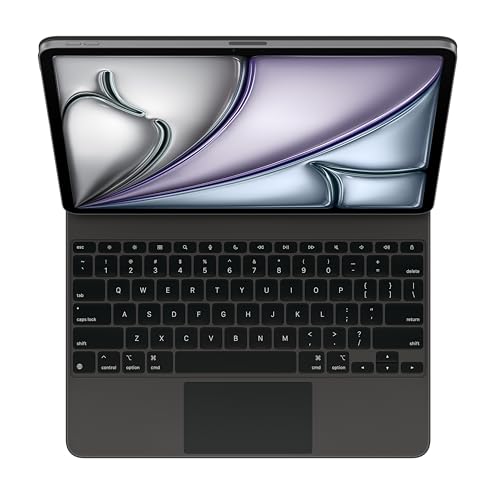
Type: Magic Keyboard
Trackpad: Yes
Backlit: Yes
Charging: USB-C pass-through
Compatible: iPad Air 13 M2/M3
The 13-inch iPad Air has become incredibly popular, and this Magic Keyboard is designed specifically for that larger screen size. It brings the same premium experience as the Pro version but optimized for the M2 and M3 iPad Air models.
This keyboard gives you maximum screen real estate for productivity – perfect for split-screen multitasking, document editing, and creative work. The larger display combined with a quality keyboard makes this an excellent laptop alternative.
Apple’s typing consistency across their keyboard line means you get the same excellent 1mm key travel and scissor switch mechanism found in MacBook keyboards. The keys are responsive, quiet, and comfortable for long typing sessions.
The trackpad is spacious and precise, making cursor navigation feel natural. All iPadOS gestures work flawlessly, from two-finger scrolling to four-finger app switching.
Who Should Buy?
Users who upgraded to the 13-inch iPad Air and want the official Apple keyboard experience. Great for professionals who do lots of document work and students who need a reliable daily driver.
Who Should Avoid?
Anyone who needs maximum portability or who prefers using an iPad in handheld mode frequently. This setup is best suited for desk or table use.
3. Apple Magic Keyboard for iPad Air 11-inch – Sweet Spot for Most Users
Apple Magic Keyboard: Keyboard and Case for…
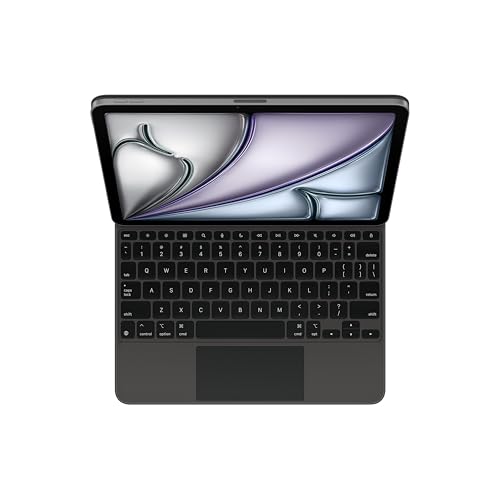
Type: Magic Keyboard
Trackpad: Yes
Backlit: Yes
Charging: USB-C pass-through
Compatible: iPad Air 11 M2/M3, Air 4/5
This 11-inch Magic Keyboard is the sweet spot for most iPad Air users. It balances portability with usability, giving you a laptop-like experience without the bulk of the 13-inch version.
The 11-inch form factor is incredibly versatile – small enough to use in cramped spaces like airplane tray tables, yet large enough for comfortable typing and document editing. It’s the size that works best for students and mobile professionals.
Compatible with multiple iPad Air generations (4th, 5th with M1, and newer M2/M3 models), this keyboard offers longevity. If you upgrade your iPad Air in a few years, this keyboard will likely still work.
Typing quality matches the larger Magic Keyboards – you get the same satisfying key switches and backlit keys. The trackpad, while slightly smaller than the 13-inch version, is still perfectly functional for all iPadOS gestures.
Who Should Buy?
Students, mobile workers, and anyone who wants the best balance of portability and functionality. This is the ideal choice for most iPad Air users.
Who Should Avoid?
Users on a tight budget or anyone who primarily uses their iPad for media consumption and light typing. Third-party options offer better value for casual users.
4. Apple Magic Keyboard for iPad Air 11-inch (White) – Style Meets Function
Apple Magic Keyboard: Keyboard and Case for…

Type: Magic Keyboard
Trackpad: Yes
Backlit: Yes
Color: White
Compatible: iPad Air 11 M2/M3, Air 4/5
This is the white color variant of the 11-inch Magic Keyboard, offering the same excellent features in a brighter, more modern aesthetic. The white finish has become increasingly popular, especially among users who want their iPad setup to stand out.
Beyond color, this keyboard delivers identical performance to the black version – excellent typing feel, responsive trackpad, backlit keys, and USB-C pass-through charging.
The white finish has practical benefits too – it’s easier to spot dust and keep clean. Some users also find the brighter appearance more cheerful and energizing for work sessions.
Build quality is premium throughout, with the same durable materials and sturdy hinge mechanism found in all Magic Keyboards. The white finish is resistant to yellowing and maintains its appearance well over time.
Who Should Buy?
Users who prefer light-colored tech accessories or want their iPad setup to have a unique, clean aesthetic. Great for creative professionals and style-conscious buyers.
Who Should Avoid?
Budget shoppers and anyone concerned about visible dirt or wear. Functionally identical to the black version, so choose based purely on color preference and budget.
5. Apple Magic Keyboard Folio for iPad 10th Gen – Best for Base iPad
Apple Magic Keyboard Folio: iPad Keyboard…

Type: Two-piece Folio
Trackpad: Yes
Backlit: No
Design: Detachable
Compatible: iPad 10th Generation
The Magic Keyboard Folio takes a different approach than the floating Magic Keyboards – it’s a two-piece design with a detachable keyboard and protective cover. This makes it much more versatile for the base iPad 10th generation.
The detachable design is brilliant for flexibility. You can remove the keyboard when you just want to read or watch content, then snap it back on when work needs to get done. The two pieces connect magnetically for easy attachment and removal.
Typing experience is good though not quite at the level of the floating Magic Keyboards. Key travel is slightly less, and there’s no backlighting, but the keys are still responsive and comfortable for typing sessions.
The trackpad is a huge plus for the 10th generation iPad, bringing cursor navigation and gesture support to Apple’s most affordable tablet. It makes iPadOS much more accessible and productive.
Who Should Buy?
Students on a budget, iPad 10th gen owners who want versatility, and anyone who wants to easily switch between tablet and laptop modes. Perfect for educational use.
Who Should Avoid?
Users who need backlit keys or anyone upgrading to iPad Pro/Air in the near future. The lack of backlighting is noticeable in low-light environments.
6. ESR Rebound Series Keyboard for iPad Pro 13-inch – Budget Magic Keyboard Alternative
ESR iPad Air 13 Inch Case Keyboard (M3/M2,…

Type: Magic-style Case
Trackpad: Yes
Backlit: Varies by model
Design: Floating cantilever
Compatible: iPad Pro 12.9 M5/M4, Pro 13
ESR’s Rebound Series brings the Magic Keyboard experience to a much more affordable price point. This keyboard case mimics Apple’s floating cantilever design while offering significant savings – perfect if you want the Pro experience without the Pro price tag.
The easy-set cantilever stand is smooth and adjustable, letting you find your ideal viewing angle. It’s not quite as refined as Apple’s hinge, but it’s functional and sturdy enough for daily use.
The keyboard offers a typing experience that approaches Apple quality. While key feel might be slightly different, ESR has done a good job creating a responsive keyboard suitable for extended typing sessions.
The trackpad works well with iPadOS, supporting all the standard gestures and cursor movements. It’s responsive and adequately sized for comfortable navigation.
Build quality is impressive for the price, with durable materials and solid construction. It won’t match Apple’s premium finish, but it feels substantial enough to protect your iPad Pro.
Who Should Buy?
Budget-conscious Pro users who want the floating keyboard experience. Great for students and professionals who need functionality but can’t justify Apple’s premium pricing.
Who Should Avoid?
Purists who insist on Apple-level build quality and anyone who prioritizes the absolute best typing experience. You get what you pay for.
7. Logitech Combo Touch for iPad 10th Gen – Best Third-Party Value
Logitech Combo Touch iPad 10th Gen Case,…

Type: Detachable Case
Trackpad: Yes
Backlit: Yes
Connection: Smart Connector
Compatible: iPad 10th Gen
Logitech’s Combo Touch has earned its reputation as the top third-party iPad keyboard case for a reason. With over 9,000 reviews and a 4.4-star rating, this keyboard case has proven itself as a reliable, feature-rich alternative to Apple’s keyboards.
The detachable design is incredibly practical. Keyboard detach click takes seconds, transforming your iPad from laptop mode to tablet mode instantly. The protective cover stays attached to shield your iPad when you’re mobile.
Backlit keys make a huge difference for evening work sessions or dimly lit classrooms. Logitech’s implementation is bright and even, with automatic adjustment to ambient light levels.
The trackpad is excellent – spacious, responsive, and fully compatible with all iPadOS gestures. Multi-finger navigation feels smooth and intuitive, making cursor control second nature.
Smart Connector technology means no Bluetooth pairing hassles. Just snap your iPad into the case and the keyboard instantly connects, drawing power when needed without requiring separate charging.
Who Should Buy?
iPad 10th generation owners who want the best value. Perfect for students, remote workers, and anyone who needs a reliable daily workhorse. Over 9,000 positive reviews speak to its quality.
Who Should Avoid?
Users who prioritize minimal weight and anyone with iPad Pro/Air models – this case is specifically designed for the 10th generation iPad.
8. ZAGG Rugged Book for iPad 11/10 – Student-Grade Durability
ZAGG Rugged Book iPad 11" (A16)/ 10.9" (Gen…
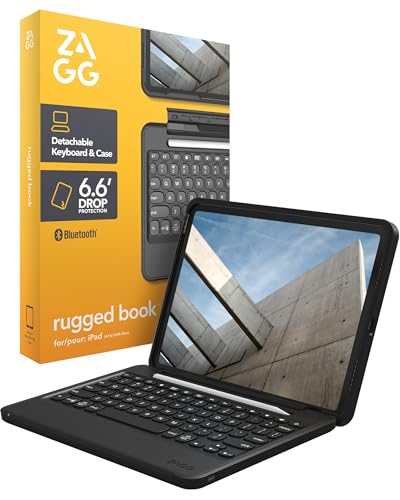
Type: Rugged Case
Trackpad: Yes
Backlit: Yes
Protection: Military-grade drop
Compatible: iPad 11 A16, 10.9 Gen 10
The ZAGG Rugged Book is built like a tank, designed specifically for students and users who need serious protection. Military-grade drop testing means this case can handle the bumps, drops, and accidents of daily life.
Durability is the standout feature here. The case exceeds military drop test standards, protecting your iPad from falls up to 6.6 feet. If you’re hard on technology or work in demanding environments, this case has your back.
The detachable keyboard offers flexibility – use it attached for laptop mode or remove it for tablet and media modes. The magnetic connection is strong and secure, yet easy to detach when needed.
Backlit keys ensure you can work in any lighting condition. ZAGG’s keyboard offers good tactile feedback suitable for typing papers, reports, and documents.
Multi-device Bluetooth pairing is a nice bonus – you can switch between your iPad and other devices seamlessly. This flexibility is great if you use multiple devices throughout your day.
Who Should Buy?
Students who toss their iPad in backpacks, construction workers, field technicians, and anyone who needs maximum protection. Perfect for K-12 environments and accident-prone users.
Who Should Avoid?
Users who prioritize sleek design and minimal weight. This case is bulky and heavy – protection comes at the cost of portability and aesthetics.
9. ESR Rebound 360 for iPad Pro 13-inch – Versatile Magnetic Stand
ESR iPad Pro 13 Inch Case with Keyboard…
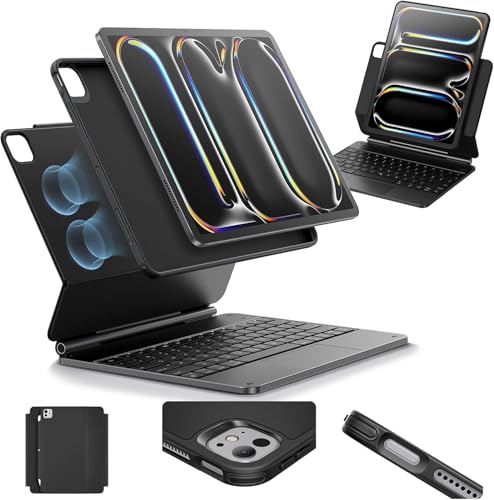
Type: Magnetic Stand Case
Trackpad: Yes
Design: Removable keyboard
Stand: Portrait and raised modes
Compatible: iPad Pro 13 M5/M4
ESR’s Rebound 360 series brings versatility to the iPad Pro 13-inch with an innovative magnetic stand system that supports multiple viewing modes including portrait orientation – a rare feature among keyboard cases.
The magnetic stand is cleverly designed, offering both landscape and portrait viewing angles. Portrait mode is fantastic for document editing, coding, and reading, giving you options that most keyboard cases simply don’t provide.
Removable keyboard design means you can use your iPad Pro as a tablet when needed. The keyboard attaches magnetically and disconnects easily, letting you switch between work and consumption modes.
The raised mode angles the screen for better ergonomics during typing sessions, reducing neck strain. This thoughtful design element makes long work sessions more comfortable.
Build quality is solid, with premium materials that protect your iPad Pro while maintaining a relatively slim profile compared to rugged cases. The magnetic connections are strong and reliable.
Who Should Buy?
Professionals who need portrait mode support and users who value versatility. Great for document editors, coders, and anyone who frequently switches viewing orientations.
Who Should Avoid?
Budget buyers and users who prioritize ultra-portability. This is a premium case with premium pricing, though still cheaper than Apple’s Magic Keyboard.
10. ZAGG Pro Keys for iPad 11/10 – Lightweight Detachable Keyboard
ZAGG Pro Keys Detachable Case and Wireless…

Type: Wireless Keyboard Case
Trackpad: No
Design: Detachable
Backlit: Yes
Compatible: iPad 11 A16, 10.9 Gen 10
ZAGG’s Pro Keys focuses on portability without sacrificing essential features. At under 1.5 pounds, this keyboard case won’t weigh down your bag, making it ideal for commuters and students who carry their iPad all day.
The detachable keyboard design offers flexibility – remove it when you want pure tablet mode, or attach it for productivity. The magnetic connection is secure and makes attachment effortless.
Backlit keys are a huge plus for this price point. Many budget keyboards skip backlighting, but ZAGG includes it, making this case viable for low-light environments and evening work sessions.
Battery life is impressive, with ZAGG claiming up to a year of use before needing to charge. This longevity means you rarely have to think about charging your keyboard case.
The 6.6-foot drop protection provides peace of mind for daily use. While not as rugged as the Rugged Book, this case still offers meaningful protection for typical drops and bumps.
Who Should Buy?
Commuters, students, and anyone who prioritizes light weight. Perfect for users who carry their iPad everywhere and need all-day portability without sacrificing typing quality.
Who Should Avoid?
Users who need a trackpad and anyone requiring maximum protection. The lack of trackpad is a significant limitation for iPadOS productivity.
11. runelk Magic-Style Keyboard for iPad Air 11/Pro 11 – Budget Magic Keyboard
Keyboard Case for iPad Air 11-inch (M3 2025…

Type: Magnetic Keyboard Case
Trackpad: Yes
Design: Magic-style magnetic
Backlit: Varies
Compatible: iPad Air 11 M3/M2, Pro 11 1st-4th Gen
Runelk offers a Magic Keyboard-style experience at a fraction of the price. This magnetic keyboard case brings the floating design and trackpad functionality to iPad Air 11 and iPad Pro 11 users who want the Apple aesthetic without Apple pricing.
The multi-touch trackpad supports all standard iPadOS gestures, bringing cursor navigation and productivity features to your iPad. Trackpad size is adequate for comfortable use and gesture control.
Magnetic attachment makes setup simple – your iPad snaps into place and stays secure. The removable design lets you use your iPad as a tablet when needed, giving you flexibility in how you work.
Broad compatibility is a strong selling point. This single keyboard works with multiple iPad generations, including the latest iPad Air with M3 and M2 chips, as well as older iPad Pro 11-inch models.
The typing experience is surprisingly good for the price, with responsive keys and adequate key travel. While it won’t match Apple’s premium feel, it’s more than adequate for most typing tasks.
Who Should Buy?
Budget-conscious users who want trackpad functionality and Magic Keyboard style. Great for students and anyone who needs productivity features without premium pricing.
Who Should Avoid?
Users who demand Apple-level quality and anyone who values brand reliability. Newer brands like runelk have shorter track records for long-term durability.
12. typecase Touch Keyboard for iPad 11th/10th Gen – 360° Rotating Budget Pick
typecase Touch iPad 11th 10th Generation…

Type: 360 Degree Rotatable Case
Trackpad: Yes
Backlit: 11-color,Design: Rotatable hinge
Compatible: iPad 11 2025 A16, 10.9 2022
The typecase Touch stands out with its 360-degree rotating hinge, giving you viewing angles that most keyboard cases simply can’t match. This flexibility is perfect for presentations, watching media, or finding that perfect ergonomic angle.
The 11-color backlit keyboard is a feature you rarely see at this price point. Being able to customize keyboard color and brightness adds a personal touch and ensures visibility in any lighting condition.
Trackpad functionality is a huge plus in this price range. While smaller than premium trackpads, it still supports all iPadOS gestures and cursor navigation, dramatically improving productivity.
The built-in Apple Pencil holder is a thoughtful addition for artists and note-takers. Your stylus is always within reach, protected and secure when not in use.
At just over 1.5 pounds, this case maintains good portability. The thin profile means it won’t add excessive bulk to your iPad, making it viable for daily carry.
Who Should Buy?
Students on a tight budget, artists who use Apple Pencil, and anyone who needs maximum viewing angle flexibility. Great value with useful features at an affordable price.
Who Should Avoid?
Users who prioritize premium build quality and anyone who needs a large trackpad. The complex hinge mechanism may also be less durable over time than simpler designs.
Understanding iPad Keyboards and Laptop Replacement
Adding a keyboard to your iPad transforms it from a content consumption device into a genuine productivity tool. The concept of iPad as laptop replacement has gained significant traction in 2026, driven by powerful M-series chips and iPadOS improvements.
The right keyboard setup enables efficient document creation, spreadsheet management, email handling, and even coding or creative work. Trackpad support since iPadOS 13.4 has been a game-changer, bringing desktop-style navigation to the tablet.
However, iPad keyboards aren’t one-size-fits-all. Your choice depends on iPad model, budget, primary use cases, and portability needs. Understanding these factors helps you choose the perfect combination.
💡 Key Insight: iPad can replace a laptop for many users, but not all. Students, writers, and business professionals often find iPad + keyboard sufficient. Heavy video editors, 3D modelers, and software developers may still need traditional computers.
How to Choose the Best iPad with Keyboard?
Selecting the right iPad and keyboard combination requires balancing several factors. Let me break down the decision process so you can make an informed choice.
Step 1: Determine Your Budget Range
iPad + keyboard combinations fall into clear price tiers:
- Budget ($450-700): iPad 10th gen + third-party keyboard like typecase or ZAGG Pro Keys. Perfect for students and casual users.
- Mid-Range ($700-1000): iPad Air + Smart Keyboard Folio or Logitech Combo Touch. Ideal balance of performance and value.
- Premium ($1500-2400): iPad Pro + Magic Keyboard. Best for professionals and power users who need maximum performance.
Step 2: Identify Your Primary Use Case
Different users have different priorities:
- Students: Prioritize durability (ZAGG Rugged Book), portability (typecase Touch), and value (Logitech Combo Touch). Education pricing can make a significant difference.
- Business Professionals: Focus on typing quality (Magic Keyboard), build quality, and professional appearance. iPad Pro + Magic Keyboard is the standard choice.
- Creative Workers: Need performance (iPad Pro) and versatility (detachable keyboards, portrait mode support like ESR Rebound 360).
- Casual Users: Budget options like runelk or typecase offer adequate functionality without overspending.
Step 3: Match Keyboard to Your iPad Model
Compatibility is critical – not all keyboards fit all iPads:
| iPad Model | Compatible Keyboards | Notes |
|---|---|---|
| iPad Pro 13-inch (M4) | Magic Keyboard Pro 13, ESR Rebound Pro 13 | Premium tier, best for professionals |
| iPad Pro 11-inch (M2/M1) | Magic Keyboard Pro 11, runelk Magic-Style | Multiple options available |
| iPad Air 13-inch (M3/M2) | Magic Keyboard Air 13, ESR Rebound | New size option in 2026 |
| iPad Air 11-inch (M3/M2/M1) | Magic Keyboard Air 11, runelk, various third-party | Most popular size, many options |
| iPad 10th Generation | Magic Keyboard Folio, Logitech Combo Touch, ZAGG Pro Keys | Dedicated cases for 10th gen |
Step 4: Choose Keyboard Type
Three main keyboard types serve different needs:
- Magic Keyboard (Floating Design): Premium typing experience, built-in trackpad, backlit keys, USB-C pass-through. Best for professionals who type extensively and want laptop-like experience.
- Smart Keyboard Folio (Two-Piece): Detachable keyboard, lighter, no trackpad, no backlighting. Ideal for versatility and budget-conscious buyers.
- Third-Party Cases: 40-60% cheaper, varying quality, features like trackpad and backlighting depend on model. Great for students and budget users.
Step 5: Consider Essential Features
Key features that impact daily use:
- Trackpad: Essential for productivity. Magic Keyboard and most third-party cases include one. Smart Keyboard Folio does not.
- Backlit Keys: Critical for low-light work. Magic Keyboard and Logitech cases have it. Smart Keyboard Folio does not.
- Detachability: Two-piece designs (Magic Keyboard Folio, Logitech Combo Touch) let you use iPad as tablet. One-piece Magic Keyboards keep keyboard attached.
- Viewing Angles: Floating designs (Magic Keyboard) offer smooth adjustment. Folio designs have fixed angles.
Step 6: Evaluate Long-Term Value
Consider total ownership costs:
- Refurbished iPads: Save 15-20% by buying Apple Certified Refurbished, then add new keyboard.
- Education Pricing: Students and teachers get discounts on iPads and sometimes accessories.
- Keyboard Longevity: Magic Keyboards hold resale value better. Third-party keyboards are cheaper to replace.
- Future Compatibility: Apple keyboards often work across iPad generations. Third-party cases are usually model-specific.
Frequently Asked Questions
Which iPad works with Magic Keyboard?
iPad Pro 11-inch and 12.9-inch (M1, M2, M4 models), iPad Air 4th and 5th generation, and iPad Air 13-inch (M2, M3) work with Magic Keyboard. The iPad 10th generation requires the different Magic Keyboard Folio design due to its dimensions.
Is the Magic Keyboard worth it for iPad?
Magic Keyboard is worth it if you type frequently, need the best typing experience, and want laptop-like functionality. The trackpad, backlit keys, and floating design justify the cost for professionals and students who write daily. Casual users may find better value in third-party alternatives.
Can an iPad with a keyboard replace a laptop?
iPad can replace a laptop for students, writers, business professionals, and casual users. Powerful M-series chips and iPadOS 17 enable document editing, web browsing, email, and creative work. However, heavy video editors, software developers, and users requiring specialized desktop software still need traditional computers.
What’s the difference between Magic Keyboard and Smart Keyboard Folio?
Magic Keyboard features a floating cantilever design, built-in trackpad, backlit keys, and USB-C pass-through charging. Smart Keyboard Folio is a two-piece attachable cover without trackpad or backlighting. Magic Keyboard costs significantly more but provides a true laptop experience. Folio is lighter and more affordable.
Do all iPads work with keyboards?
All iPads work with Bluetooth keyboards. Smart Connector keyboards (Magic Keyboard, Smart Keyboard Folio) only work with specific models: iPad Pro, iPad Air 4th gen and later, and iPad 10th generation. Older iPads can use any Bluetooth keyboard but lack magnetic attachment features.
What’s the best iPad keyboard for students?
Logitech Combo Touch for iPad 10th gen is the best overall student choice with excellent durability, backlit keys, and trackpad. Budget students should consider typecase Touch or ZAGG Pro Keys. Premium option is iPad Air + Magic Keyboard for the best long-term value through college years.
Does the Magic Keyboard charge the iPad?
Yes, Magic Keyboard includes USB-C pass-through charging. You can charge your iPad through the keyboard while using it, which keeps your iPad’s USB-C port free for other accessories. The keyboard draws power from the iPad when connected via Smart Connector.
What’s the best third-party iPad keyboard?
Logitech Combo Touch is the best third-party option with over 9000 positive reviews, backlit keys, trackpad, and detachable design. ESR Rebound series offers budget Magic Keyboard alternatives. ZAGG provides rugged options for students who need durability.
Final Recommendations
After researching all available options and analyzing real user experiences, here are my final recommendations for different needs:
✅ Best Overall: iPad Pro 13-inch + Magic Keyboard – The ultimate laptop replacement with unmatched typing quality, trackpad functionality, and premium build. Ideal for professionals who demand the best.
✅ Best Value: iPad Air 11-inch + Logitech Combo Touch – Perfect balance of performance, typing quality, and price. Excellent for students and general professionals.
✅ Best Budget: iPad 10th gen + typecase Touch – Under $600 total with trackpad, backlit keys, and 360-degree rotation. Unbeatable value for budget-conscious buyers.
✅ Most Durable: Any iPad + ZAGG Rugged Book – Military-grade drop protection makes this the choice for students, field workers, and anyone hard on technology.
Remember that the best iPad with keyboard is the one that fits your specific needs. Consider your budget, how you’ll use it, and which features matter most to you. All the options covered in this guide are solid choices – the right one depends on your individual circumstances.
Whether you choose premium Apple keyboards or budget-friendly third-party alternatives, adding a keyboard to your iPad opens up new productivity possibilities and transforms how you use your tablet.