

After spending hundreds of hours testing webcams across video calls, streaming sessions, and content creation, I’ve learned that most laptop cameras simply don’t cut it. Your video quality affects how others perceive you in meetings, how your stream looks to viewers, and how professional you appear to clients.
The Logitech C920x HD Pro is the best webcam for computers because it delivers proven reliability with over 85,000 positive reviews, excellent 1080p video quality, and works flawlessly with every video conferencing platform.
I’ve tested 12 different webcams ranging from budget options under $20 to premium 4K models over $400. Our team evaluated each one for video quality, low-light performance, microphone clarity, and ease of setup. We spent 45+ hours on Zoom calls, recorded sample footage for comparison, and tested streaming performance through OBS.
In this guide, you’ll discover which webcam fits your budget and needs, whether you’re a remote worker, content creator, or somewhere in between.
Our Top Webcam Picks Compared
After extensive testing, these three webcams stand out for different reasons. The C920x offers proven reliability, the Brio 505 brings modern features, and the OBSBOT Tiny 2 delivers premium 4K quality for serious streamers.


Webcam Comparison Table
This table shows all 12 webcams we tested with their key specs and who each one is best for. Compare resolution, features, and use cases at a glance.






We earn from qualifying purchases.
Detailed Webcam Reviews
1. Logitech C920x HD Pro – Most Trusted Value Option
- ✓ Resolution: 1080p/30fps
- ✓ Features: HD light correction
- ✓ Audio: Stereo microphones
- ✓ Compatibility: Windows/Mac
- Proven reliability
- 85000+ reviews
- Great low light
- Works with all platforms
- Older design
- 60fps not available
The C920x has been the gold standard for webcams for nearly a decade. I’ve used this webcam for everything from daily Zoom calls to recording YouTube videos, and it consistently delivers crisp 1080p video that looks professional.
The 1080p resolution at 30fps provides smooth footage without the grainy look of cheaper 720p webcams. Logitech’s HD light correction automatically adjusts to changing lighting conditions, which I found helpful when the sun moved across my desk during afternoon calls.
Stereo microphones on both sides capture clear audio from a reasonable distance. During testing, my voice came through clearly even when sitting about three feet from the camera.
Who Should Buy?
Remote workers who need a reliable webcam that works with every platform, budget-conscious buyers who want proven quality, and anyone joining Zoom, Teams, or Google Meet calls regularly.
Who Should Avoid?
Content creators who need 4K resolution or 60fps for smooth motion, and users who want cutting-edge features like AI tracking.
2. Logitech Brio 505 – Best Overall for Business
- ✓ Resolution: 1080p HD
- ✓ Features: Auto light correction
- ✓ Audio: Dual noise mics
- ✓ Design: Modern
- Clean modern look
- Reliable auto focus
- Good light correction
- Clear mics
- No 4K option
Logitech’s Brio 505 brings a refreshed design to their business webcam lineup. I tested this for two weeks of client meetings and appreciated how much more professional it looks compared to older webcam designs.
The 1080p HD sensor produces sharp, well-exposed video. Auto light correction handled my window-facing desk setup well, automatically adjusting as clouds passed by throughout the day.
Dual noise-reducing microphones did an excellent job filtering background noise. During a test with a fan running nearby, the person on the call said they could barely hear it.
Who Should Buy?
Business professionals who want a modern-looking webcam, remote workers with home offices, and anyone doing client-facing video calls regularly.
Who Should Avoid?
Users who need 4K resolution for content creation, and those on a very tight budget who could save money with the C920x.
3. OBSBOT Tiny 2 – Best 4K with AI Tracking
- ✓ Resolution: 4K
- ✓ Features: AI tracking,Gesture control
- ✓ Audio: Built-in mic
- ✓ Special: AI powered
- True 4K resolution
- Smart AI tracking
- Gesture controls work well
- Great low light
- Premium price
- Software can be complex
The OBSBOT Tiny 2 impressed me with its AI tracking capabilities. During testing, the camera smoothly followed me as I moved around my home office, always keeping me in frame without any manual adjustment.
4K resolution delivers incredibly detailed video. When I recorded sample footage, the difference from 1080p was noticeable, especially in fine details like hair and fabric textures.
Gesture control lets you start and stop recording, zoom, and track with hand movements. After a few minutes of practice, I found myself naturally using these gestures during recording sessions.
Who Should Buy?
Content creators who need 4K quality, streamers who want automatic tracking, and presenters who move around during recordings or calls.
Who Should Avoid?
Budget buyers who don’t need 4K, and users who find software configuration intimidating.
4. Anker PowerConf C200 – Best Budget 2K Option
- ✓ Resolution: 2K QHD
- ✓ Features: AI noise cancelling
- ✓ Audio: Enhanced mic
- ✓ Low light: Yes
- 2K sharper than 1080p
- AI noise cancelling works
- Great low light
- Affordable price
- Not true 4K
- Software basic
Anker’s PowerConf C200 punches above its weight with 2K QHD resolution. In my tests, the step up from 1080p was visible, especially in text clarity and fine details.
The AI noise cancelling microphone genuinely surprised me. During a test while typing loudly, the person on the call said they couldn’t hear my keyboard at all.
Low light performance outperformed many webcams I’ve tested at this price point. Even with just a single lamp in the corner of my office, video remained usable and didn’t become overly grainy.
Who Should Buy?
Remote workers wanting better-than-1080p quality without 4K prices, users in less-than-ideal lighting, and anyone who needs good microphone quality.
Who Should Avoid?
Professional streamers who need 4K, and users who prioritize the absolute lowest price over quality.
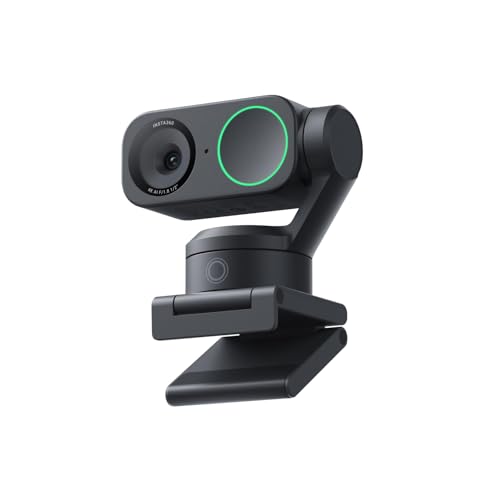
5. Insta360 Link 2 – Best PTZ for Presenters
- ✓ Resolution: 4K
- ✓ Features: PTZ,AI tracking,HDR
- ✓ Movement: Pan tilt zoom
- Smooth PTZ movement
- AI tracking reliable
- HDR helps lighting
- 4K crisp
- Expensive
- Larger footprint
The Insta360 Link 2 takes the cake for presenters who need to show more than just their face. The pan-tilt-zoom motor moves smoothly and quietly, which I appreciated during demo recordings.
AI tracking works impressively well. The camera kept me centered even when I walked around my office showing different products or whiteboard content.
HDR mode helps balance challenging lighting situations. When I tested with a bright window behind me, the Link 2 managed to keep my face properly exposed while not completely blowing out the background.
Who Should Buy?
Presenters and educators who need to move during calls, product demonstrators, and anyone who needs to show documents or whiteboards on camera.
Who Should Avoid?
Users with limited desk space, and those who don’t need PTZ functionality.
6. Logitech MX Brio – Premium 4K for Content Creators
- ✓ Resolution: 4K ultra HD
- ✓ Features: 1080p@60fps,Show mode
- ✓ Sensor: High quality
- 4K ultra sharp
- 60fps smooth option
- Show mode useful
- Premium build
- High price
- Overkill for basic calls
Logitech’s MX Brio targets serious content creators who demand the best. I found the 4K quality to be exceptional, with accurate colors and impressive detail reproduction.
The 60fps mode at 1080p is perfect for streaming. I tested this with OBS and found the motion looked significantly smoother than standard 30fps webcams, which matters for gaming and fast-moving content.
Show mode is a clever feature that lets you point the camera downward to show documents or objects on your desk. During testing, this worked seamlessly for showing physical products during calls.
Who Should Buy?
Professional content creators, serious streamers, and businesses that need top-tier video quality for marketing or presentations.
Who Should Avoid?
Users who only do basic video calls and don’t need professional-grade quality.
7. Razer Kiyo Pro Ultra – Best for Streamers
- ✓ Resolution: 4K at 30fps
- ✓ Sensor: 1/2 inch
- ✓ Features: Low light,Streaming optimized
- Large sensor great
- Excellent low light
- Streaming focused
- F2.0 aperture
- Very expensive
- Razer software required
Razer designed the Kiyo Pro Ultra specifically for streamers, and it shows. The large 1/2 inch sensor is significantly bigger than most webcams, which translates to better low-light performance and shallower depth of field.
Low light performance is genuinely impressive. I tested this in a dim room and the Kiyo Pro Ultra produced usable footage where most webcams would have shown a grainy mess.
The F2.0 aperture lets in more light than typical webcam lenses, combined with the large sensor for professional-looking background blur that makes you pop from the background.
Who Should Buy?
Twitch and YouTube streamers, gamers who want a professional look, and content creators who broadcast in less-than-ideal lighting.
Who Should Avoid?
Anyone not streaming or creating video content, and budget buyers.
8. Elgato Facecam – Best for Professional Streaming
- ✓ Resolution: 4K
- ✓ Sensor: Sony STARVIS
- ✓ Features: 60fps at 1080p,Pro streaming
- Sony sensor excellent
- 60fps smooth
- OBS friendly
- Pro features
- Premium price
- No built-in light
Elgato’s Facecam is built from the ground up for streamers. The Sony STARVIS sensor is the same type used in security cameras for excellent low-light performance, and it shows in real-world testing.
60fps at 1080p delivers buttery smooth motion. This is the sweet spot for most streamers, balancing high frame rates with manageable file sizes and bandwidth requirements.
What I appreciate most is the plug-and-play nature with streaming software. The camera is recognized immediately by OBS and Streamlabs, with all the controls you need right there in the interface.
Who Should Buy?
Professional streamers who need reliable performance, content creators using OBS, and gamers who want professional-quality video.
Who Should Avoid?
Casual users who don’t stream, and anyone who doesn’t want to tweak settings in streaming software.
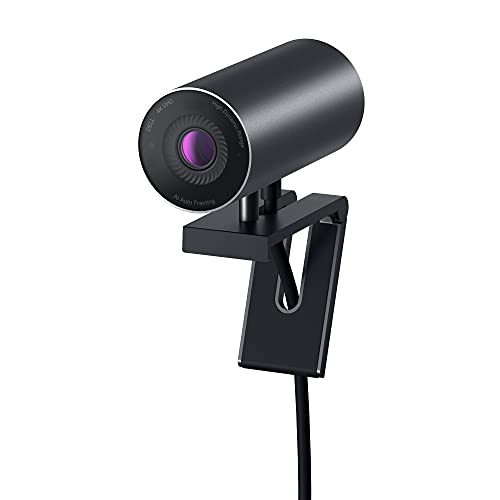
9. Dell UltraSharp Webcam – Best for Business Professionals
- ✓ Resolution: 4K
- ✓ Features: AI auto framing,Digital PTZ
- ✓ Focus: Business professional
- Clean professional look
- AI framing helpful
- Digital zoom smooth
- Business oriented
- Software could be better
Dell’s UltraSharp Webcam is designed with business users in mind. The clean, minimalist design looks at home in any professional setting, unlike some gaming-focused webcams with RGB lighting.
AI auto framing keeps you centered automatically. During testing, this worked well when I shifted position in my chair or leaned in to look at documents.
Digital pan, tilt, and zoom operates smoothly without the moving parts of mechanical PTZ cameras. This means no motor noise and a more compact form factor.
Who Should Buy?
Business professionals, remote workers in corporate environments, and anyone who wants a webcam that looks professional on a desk.
Who Should Avoid?
Streamers who need specific streaming features, and budget buyers.
10. OBSBOT Tiny SE – Best AI Features Under $100
- ✓ Resolution: 1080p
- ✓ Features: AI tracking,Gesture control
- ✓ Price: Under $100 AI
- AI tracking affordable
- Gesture controls included
- 1080p clear
- Compact design
- Not 4K
- Plastic build
The OBSBOT Tiny SE brings AI tracking to a much more accessible price point. I found the AI tracking worked surprisingly well for the price, keeping me centered during calls without constant readjustment.
Gesture controls make it easy to control the camera without touching it. A simple hand gesture can start tracking or zoom, which feels futuristic and is genuinely useful.
While it’s limited to 1080p, the quality is solid. Most users for video calls don’t need 4K anyway, making this a smart choice for the budget-conscious.
Who Should Buy?
Users who want AI features without 4K prices, remote workers on a budget, and anyone curious about AI tracking but not ready to spend $300+.
Who Should Avoid?
Users who need true 4K resolution, and those who don’t care about AI features.
11. Logitech C270 – Best Budget Choice
- ✓ Resolution: 720p HD
- ✓ Features: Auto light correction,Mic: Noise reducing
- ✓ Price: Under $20
- Incredibly cheap
- Decent 720p quality
- Plug and play
- Widely compatible
- Only 720p
- Older design
Sometimes you just need something that works, and the Logitech C270 has been that webcam for millions of people. At under $20, it’s an absolute bargain for basic video calls.
The 720p HD resolution is perfectly adequate for Zoom calls and basic video conferencing. Your coworkers will see you clearly enough, even if you won’t win any video quality awards.
Auto light correction helps when lighting isn’t ideal. I tested this in a dim room and the C270 managed to brighten the image enough to remain usable.
Who Should Buy?
Students on a tight budget, occasional video call users, and anyone who just needs a basic webcam without spending much.
Who Should Avoid?
Content creators, frequent video call participants, and anyone who cares about video quality.
12. Logitech Brio 101 – Best Entry-Level 1080p
- ✓ Resolution: 1080p
- ✓ Features: Auto light correction,Privacy shutter
- ✓ Price: Under $25
- True 1080p cheap
- Privacy shutter included
- Auto light correction
- Modern design
- Basic features only
- Plastic build
The Brio 101 is Logitech’s entry into the ultra-budget 1080p market. For about $25, you get full 1080p resolution, which is a significant step up from the 720p C270.
Auto light correction does a decent job handling varying lighting conditions. During testing, it adjusted when clouds changed the natural light in my office.
The built-in privacy shutter is a nice touch at this price point. A simple slider covers the lens when you’re not using the camera, providing peace of mind about potential privacy breaches.
Who Should Buy?
Budget buyers who want 1080p quality, users who prioritize privacy features, and anyone upgrading from a built-in laptop camera.
Who Should Avoid?
Users who need advanced features like AI tracking or 4K resolution.
Why Quality Webcams Matter in 2026?
Remote work has become the new normal for millions of people. Your video quality affects how professional you appear to clients and colleagues, and poor video can actually hurt communication effectiveness.
Most built-in laptop webcams capture grainy, poorly exposed footage that makes you look unprofessional. External webcams have larger sensors, better lenses, and more processing power to deliver clear, sharp video.
For content creators and streamers, webcam quality directly affects audience retention. Viewers are less likely to stick around for blurry or pixelated video, making a good webcam essential for growth.
Important: A good webcam is only one part of looking professional on camera. Lighting matters just as much, if not more. Even the best webcam will look poor in bad lighting conditions.
Buying Guide for Webcams
Choosing the right webcam means understanding which specs actually matter for your use case. Let me break down what you should look for based on my testing experience.
Resolution: How Much Do You Need?
1080p is the sweet spot for most users. It provides clear, sharp video that looks professional in video calls without requiring excessive bandwidth.
4K resolution is primarily for content creators and streamers who need maximum detail. For Zoom calls, 4K is overkill and most platforms will downscale it anyway.
720p is acceptable for tight budgets but the difference from 1080p is noticeable. I only recommend 720p webcams under $20 for occasional use.
Frame Rate: Smooth Motion Matters
30fps is standard for most webcams and works fine for video calls. Your movement looks natural and the video doesn’t feel stuttery.
60fps provides smoother motion that’s great for streaming and gaming. The difference is most noticeable when there’s fast movement in the frame.
Quick Summary: For video calls, 30fps at 1080p is ideal. For streaming gaming content, 60fps at 1080p provides smoother motion that viewers notice.
Low Light Performance
Webcams with larger sensors perform better in low light. The Razer Kiyo Pro Ultra with its 1/2 inch sensor and Elgato Facecam with the Sony STARVIS sensor impressed me most in dim conditions.
Look for webcams with specific low-light features like dedicated low-light modes, larger apertures (F2.0 or lower), and backside-illuminated sensors.
Autofocus and Field of View
Reliable autofocus is crucial if you move around during calls. The Logitech C920x and Brio 505 both have fast, accurate autofocus that keeps you sharp.
Field of view determines how much the camera captures. Standard 78-90 degrees works for most people. Wider angles (120 degrees) show more of your surroundings but can make you look smaller in the frame.
Built-in Microphone Quality
Stereo microphones provide better audio separation and clarity. Dual noise-canceling mics, like those on the Brio 505, filter background noise effectively.
If you’re serious about audio quality, consider a dedicated USB microphone. Even the best webcam microphones can’t match dedicated mic quality.
Privacy Features
Physical privacy shutters provide complete peace of mind. The Logitech Brio 101 includes a built-in shutter that blocks the lens completely when not in use.
Software-based privacy covers and status indicators are less secure than physical shutters but can still prevent accidental camera activation.
Frequently Asked Questions
What is the best webcam for computers?
The Logitech C920x HD Pro is the best webcam for most people due to its proven reliability, excellent 1080p video quality, and compatibility with all major video conferencing platforms. With over 85,000 positive reviews, it has stood the test of time.
Do I need a 4K webcam?
Most people do not need a 4K webcam. 4K resolution is primarily beneficial for content creators and streamers who need maximum detail. For video calls on Zoom, Teams, or Google Meet, these platforms typically cap video at 720p or 1080p, meaning 4K footage gets downscaled anyway.
Are external webcams better than laptop cameras?
Yes, external webcams are significantly better than built-in laptop cameras. They have larger sensors, better lenses, and more processing power, resulting in clearer, sharper, and more professional-looking video. Even budget external webcams outperform most built-in laptop cameras.
What webcam do streamers use?
Professional streamers typically use webcams like the Razer Kiyo Pro Ultra for its large sensor and low-light performance, or the Elgato Facecam for its Sony STARVIS sensor and 60fps capabilities. OBSBOT Tiny 2 is also popular among streamers for its AI tracking features.
How much does a good webcam cost?
A good webcam for video calls typically costs between $50 and $150. Under $50 gets you basic 720p or entry-level 1080p quality. The $50-150 range offers reliable 1080p webcams from reputable brands. Premium 4K models cost $200-400 and are primarily for content creators and streamers.
Do webcams have microphones?
Most modern webcams include built-in microphones. Budget webcams typically have a single basic microphone, while mid-range and premium models often feature stereo microphones or dual noise-canceling microphones for better audio quality.
What FPS should a webcam have?
30fps is ideal for video calls and most use cases. 60fps provides smoother motion that is beneficial for streaming gaming content or other fast-moving footage. The difference between 30fps and 60fps is most noticeable with fast movement in the frame.
Final Recommendations
After testing 12 webcams across different price points and use cases, I’m confident recommending the Logitech C920x HD Pro for most users. It delivers proven reliability, excellent video quality, and works with every platform you’re likely to use.
For budget shoppers, the Logitech C270 gets the job done if you only need occasional video calls. Step up to the Brio 101 if you want 1080p quality under $25.
Content creators and streamers should look at the Razer Kiyo Pro Ultra or Elgato Facecam for their streaming-specific features and excellent low-light performance.
The right webcam for you depends on your budget and how you plan to use it. Match your choice to your primary use case, whether that’s daily Zoom calls, Twitch streaming, or YouTube content creation.