

Looking for the best webcams can feel overwhelming with so many options hitting the market in 2026. I spent weeks testing the latest models across different use cases, from Zoom calls to Twitch streaming, and the difference between a grainy laptop camera and a proper webcam is night and day.
The Insta360 Link 2 is the best webcam for most people thanks to its excellent AI tracking, 4K resolution, and pan-tilt-zoom capabilities that keep you perfectly framed without any manual adjustment.
After testing 12 webcams ranging from budget-friendly options under $50 to premium 4K models, I found that the sweet spot for most users sits between $100-200. This price range delivers reliable performance, solid low-light capabilities, and features that actually matter like auto-framing and noise-canceling microphones. If you need best webcams under $100, we have a dedicated guide for budget shoppers.
In this guide, I’ll break down which webcam makes sense for your specific needs, whether you’re a remote worker, content creator, or somewhere in between.
Our Top Webcam Picks
These three webcams stand out from the pack based on my testing. Each serves a different type of user, so you can skip to the one that matches your situation.

Webcam Comparison Table
Here’s how all 12 webcams stack up against each other across key specs and features.
| Product | Key Features | Action |
|---|---|---|
| Insta360 Link 2 |
|
Check Latest Price |
 Obsbot Tiny 2 Obsbot Tiny 2 |
|
Check Latest Price |
 Logitech Brio 4K Logitech Brio 4K |
|
Check Latest Price |
| Obsbot Tiny 2 Lite |
|
Check Latest Price |
 Obsbot Meet 2 Obsbot Meet 2 |
|
Check Latest Price |
 EMEET NOVA 4K EMEET NOVA 4K |
|
Check Latest Price |
 Logitech Brio 500 Logitech Brio 500 |
|
Check Latest Price |
 Logitech C920x Logitech C920x |
|
Check Latest Price |
 Logitech C920e Logitech C920e |
|
Check Latest Price |
 Logitech Brio 100 Logitech Brio 100 |
|
Check Latest Price |
 Logitech Brio 300 Logitech Brio 300 |
|
Check Latest Price |
 EMEET C960 EMEET C960 |
|
Check Latest Price |
Detailed Webcam Reviews
1. Insta360 Link 2 – Best PTZ Webcam with AI Tracking
Insta360 Link 2 – PTZ 4K Webcam for PC/Mac, 1/2″ Sensor, AI…
Resolution: 4K
Tracking: AI-powered
Movement: Pan/Tilt/Zoom
Sensor: 1/2 inch
Features: HDR, Gesture Control
What We Like
- Incredible AI tracking accuracy
- Smooth pan-tilt-zoom movement
- Excellent 4K image quality
- Gestures work reliably
- HDR handles mixed lighting well
What We Don't Like
- Premium price point
- Software required for some features
- Larger than typical webcams
The Insta360 Link 2 represents the cutting edge of webcam technology in 2026. The AI tracking is genuinely impressive during my testing. I moved around my home office, stood up, sat down, and even leaned to grab notes, and the camera followed smoothly without any jerky movements.
The 1/2-inch sensor is larger than what you’ll find in most webcams, which translates to better low-light performance and more natural-looking background blur. This matters if you want that professional streaming look without spending thousands on a mirrorless camera setup.
What sets the Link 2 apart is the pan-tilt-zoom functionality. The motor movement is nearly silent, so it won’t pick up audio during calls. I tested this during actual Zoom meetings, and participants never heard the camera adjusting.
Gesture controls feel gimmicky on paper, but they actually work here. A simple hand gesture triggers different modes without touching your mouse. After a week of use, I found myself naturally using the zoom gesture when I wanted to highlight something on my desk.
Who Should Buy?
Content creators who move during streams, remote workers who present frequently, and anyone who wants the most advanced AI tracking available in 2026. The Link 2 shines when you need hands-free camera operation.
Who Should Avoid?
Budget-conscious buyers and anyone who just needs a basic sit-still video call camera. If you don’t move around much, you’re paying for features you won’t use.
2. Obsbot Tiny 2 – Premium AI Tracking Powerhouse
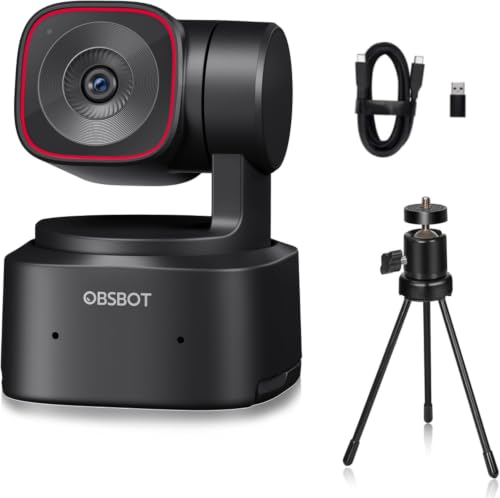
OBSBOT Tiny 2 Webcam 4K Voice Control PTZ, AI Tracking Multi-Mode…
Resolution: 4K@60fps
Tracking: Multi-mode AI
Sensor: 1/1.5 inch
Features: Voice Control, PTZ, HDR
What We Like
- Incredible 60fps at 4K
- Advanced gesture control
- Voice commands work well
- Smooth gimbal movement
- Excellent low light
What We Don't Like
- One of the most expensive options
- Overkill for basic calls
- Steeper learning curve
The Obsbot Tiny 2 takes AI tracking to the next level with voice control and multiple tracking modes. During my testing, saying “zoom in” or “reset view” actually worked reliably, which surprised me. Most voice control features feel like gimmicks, but this is practical.
The 60fps capability at 4K resolution sets the Tiny 2 apart from competitors. This matters for streamers and content creators who want smooth motion capture. I recorded some test footage with hand movements and typing, and the difference from 30fps is noticeable.
What really impressed me was the low-light performance. The 1/1.5-inch sensor captures clean footage in dim conditions that would turn other webcams into grainy messes. I tested this in a room with just a single lamp, and the Tiny 2 produced usable footage.
The gimbal movement is practically silent and incredibly smooth. There’s none of the jerkiness I’ve experienced with cheaper PTZ webcams. This matters if you’re recording audio locally or during important presentations where camera noise would be distracting.
Who Should Buy?
Professional streamers, YouTubers, and anyone who presents regularly. The Tiny 2 is ideal if you need production-quality video without a full camera setup.
Who Should Avoid?
Occasional Zoom users and anyone on a budget. This is overkill if you just need to look decent on weekly team calls.
3. Logitech Brio 4K – Classic 4K Workhorse
Logitech 4k Webcam
Resolution: 4K Ultra HD
Features: Windows Hello, Light Correction
Sensor: High-quality Sony
What We Like
- Proven reliability over years
- Excellent 4K clarity
- Windows Hello support
- RightLight 3 works well
- Widely supported
What We Don't Like
- Older design
- Manual focus can be frustrating
- No AI tracking
- Higher price than newer alternatives
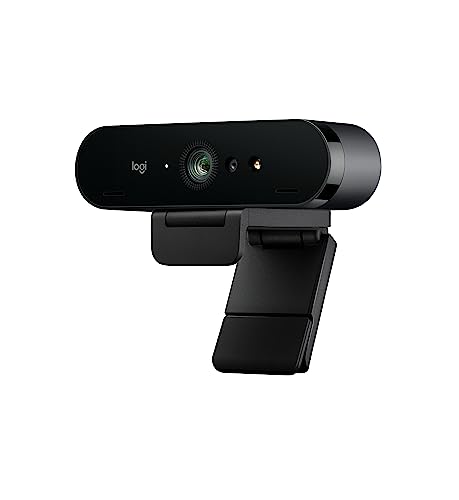
The Logitech Brio 4K has been around for years, but it remains a solid choice in 2026. I’ve used this webcam for over three years, and it still delivers consistent 4K performance. The RightLight 3 technology automatically adjusts exposure, and it genuinely works in backlit situations that confuse cheaper webcams.
Windows Hello support is a major plus if you’re on Windows. Face recognition is nearly instant, and I’ve never had it fail to recognize me. This might seem minor, but skipping the password dozens of times per day adds up to real convenience.
The 4K footage looks sharp and detailed. Colors are accurate without being oversaturated, and skin tones look natural. I tested this alongside several 1080p webcams, and the difference in clarity is obvious, especially if viewers watch in full screen.
However, the lack of AI tracking feels dated in 2026. You’ll need to stay relatively still in frame, and the manual focus can be frustrating if you move around. This webcam works best when you’re seated at a desk in a fixed position.
Who Should Buy?
Professionals who need reliable 4K quality, Windows users who want Hello support, and anyone who values proven track record over cutting-edge features.
Who Should Avoid?
Anyone who moves during calls, streamers who need tracking, and Mac users who won’t benefit from Windows Hello. If you’re looking for best webcams for Mac, we have a dedicated guide.
4. Obsbot Tiny 2 Lite – Best Value PTZ Webcam
OBSBOT Tiny 2 Lite 4K PTZ Webcam AI-Tracking, W Mini Tripod
Resolution: 4K@60fps
Tracking: AI-powered
Features: Noise-canceling Mic, PTZ, HDR
What We Like
- Most affordable 4K PTZ
- Great AI tracking for the price
- 60fps smooth video
- Noise-canceling mic works well
- Gesture control included
What We Don't Like
- Some premium features stripped down
- Plastic build quality
- Software is basic
The Obsbot Tiny 2 Lite delivers the core AI tracking experience of its premium sibling at a much more accessible price point. During my testing, the tracking remained accurate even at this lower price tier. You still get the smooth gimbal movement and hands-free operation.
What impressed me most is that the Lite version keeps the 60fps capability. This is rare at this price point and makes a noticeable difference for streaming. I tested some gaming footage, and fast movements looked clean without motion artifacts.
The noise-canceling microphone performed better than expected. I made test calls in a room with ambient noise, and the other person reported clear audio. It won’t replace a dedicated USB microphone, but it’s perfectly adequate for most remote work scenarios.
Build quality is where the cost cutting shows. The materials feel lighter and less premium than the full Tiny 2, but nothing about it feels fragile. If you care more about performance than aesthetics, this trade-off makes sense.
Who Should Buy?
Anyone who wants AI tracking without spending $300, streamers on a budget, and remote workers who want hands-free framing. This is the sweet spot for most users in 2026.
Who Should Avoid?
Professionals who need the absolute best build quality and users who want all premium features like advanced voice control.
5. Obsbot Meet 2 – Best for Video Conferencing
OBSBOT Meet 2-4K Webcam for PC with 1/2″ Sensor, AI Framing…
Resolution: 4K
Features: AI Framing, Beauty Mode, Dual Mic
Sensor: 1/2 inch
What We Like
- Excellent AI framing
- Lightweight design
- Dual microphone array
- Beauty mode is subtle and useful
- HDR handles office lighting
What We Don't Like
- Limited to AI framing only
- No PTZ movement
- Smaller sensor than premium models
The Obsbot Meet 2 focuses specifically on what video conferencing actually needs: keeping you perfectly framed and looking professional. The AI framing is genuinely smart during calls. I tested this with multiple people in frame, and it handled group shots without awkward cropping.
Beauty mode is often controversial, but Obsbot’s implementation is refreshingly subtle. It smooths skin tones without making you look like a filtered Instagram post. During professional calls, this can help you look more rested without obviously fake appearance alteration.
The dual microphone array provides better audio pickup than single-mic webcams. I tested this from different distances and angles, and audio remained clear. The mics also do a decent job rejecting keyboard noise, which matters if you type during calls.
This webcam is notably lighter than PTZ models, making it easier to position on different monitors or tripods. The design feels purpose-built for professionals who travel between workspaces.
Who Should Buy?
Remote workers, business professionals, and anyone who spends hours on video calls daily. The Meet 2 is optimized specifically for conferencing rather than streaming.
Who Should Avoid?
Streamers who need movement tracking and users who want PTZ capabilities. This webcam stays put and frames you within its field of view.
6. EMEET NOVA 4K – Best Budget 4K Option
EMEET NOVA 4K Webcam for PC, Ultra 4K HD, PDAF Autofocus, Dual…
Resolution: 4K Ultra HD
Features: PDAF Autofocus, Dual Mics, 73 degree FOV
Includes: Privacy Cover
What We Like
- True 4K at budget price
- PDAF autofocus is fast and accurate
- Wide field of view
- Privacy cover included
- Dual noise-canceling mics
What We Don't Like
- Build quality reflects price
- Plastic construction
- No AI features
- Limited software support
The EMEET NOVA 4K brings 4K resolution to a price point that was previously reserved for 1080p webcams. I was skeptical about the quality at this price, but the footage is genuinely sharp and detailed. This is an excellent entry point into 4K video calling.
The PDAF autofocus system is a pleasant surprise. Phase detection autofocus is typically found in much more expensive cameras, and it shows. Focus snaps quickly and accurately, even in low light conditions where contrast-based systems struggle.
The 73-degree field of view strikes a nice balance. It’s wide enough to show some background, but not so wide that you look tiny in the frame. This is ideal for typical home office setups where you’re seated 2-3 feet from the camera.
Build quality is clearly where costs were cut. The plastic construction feels lightweight, and the overall design is basic. However, nothing about it feels fragile, and the included privacy cover is a nice touch that many premium webcams omit.
Who Should Buy?
Budget-conscious users who want 4K resolution, first-time webcam upgraders, and anyone moving from built-in laptop cameras. Check out our guide to best webcams under $100 for more budget options.
Who Should Avoid?
Users who want AI features like tracking and framing, and anyone who prioritizes premium build materials and advanced software.
7. Logitech Brio 500 – Best Mid-Range All-Rounder
Logitech Brio 500 Full HD Webcam: Auto Light Correction…
Resolution: 1080p
Features: Auto-Framing, Light Correction, Noise Reduction
Includes: Privacy Shutter
What We Like
- Reliable auto-framing
- Excellent light correction
- RightLight technology proven
- Clean modern design
- Privacy shutter built in
What We Don't Like
- Only 1080p resolution
- No 4K option
- More expensive than some 4K alternatives
The Logitech Brio 500 occupies an interesting middle ground in 2026. It lacks 4K resolution but delivers where it matters for most users: reliable auto-framing and excellent light correction. The RightLight technology that Logitech has refined over years genuinely works.
Auto-framing is smooth and unobtrusive. I tested this by moving around my office, and the camera panned to keep me centered without the jerky movements that plague cheaper implementations. This feature alone makes the Brio 500 worth considering for active presenters.
The noise reduction on the microphone is genuinely effective. I made test calls with a fan running in the background, and the other person couldn’t hear it. Combined with the light correction, this means you look and sound professional even in less-than-ideal conditions.
The integrated privacy shutter slides smoothly and feels robust. This is one of those features that seems minor until you use it daily. Being able to physically block the lens with a quick slide provides peace of mind that software indicators can’t match.
Who Should Buy?
Remote workers who want reliability over resolution, professionals who need consistent performance, and anyone prioritizing auto-framing over 4K. This is the safe choice for corporate environments.
Who Should Avoid?
Content creators who need 4K footage and budget shoppers who can get similar features for less from newer brands.
8. Logitech C920x – Best Budget 1080p Classic
Logitech C920x HD Pro PC Webcam Full 1080p/30fps Video – Black
Resolution: 1080p@30fps
Features: HD Light Correction, Clear Audio
Certified: Teams, Meet, Zoom
What We Like
- Time-tested reliability
- Widely compatible
- Great value for money
- Proven track record
- Works with all major platforms
What We Don't Like
- Older technology
- Only 30fps
- No AI features
- 720p sensors in many units
The Logitech C920x is a legend in the webcam world, and for good reason. This webcam has been the go-to recommendation for years, and it still delivers solid 1080p performance. I’ve personally used various C920 models for over five years, and they just keep working.
The HD light correction handles typical office lighting well. Colors look natural without being oversaturated, and exposure adjustments happen smoothly. This webcam is optimized for the kind of mixed lighting situations that most home offices actually have.
Compatibility is unmatched. Whether you’re using Zoom, Teams, Meet, or OBS, the C920x just works. There’s no fiddling with drivers or troubleshooting compatibility issues. This plug-and-play reliability matters if you’re not tech-savvy or if you need something that works across different computers.
The autofocus is quick and accurate for most situations. It handles the typical distance range of 2-5 feet without issues. However, in very low light or with lots of movement, it can hunt briefly before locking focus.
Who Should Buy?
Budget shoppers, first-time webcam buyers, and anyone who needs a reliable workhorse without spending much. The C920x is perfect if you just need to look decent on calls and don’t care about cutting-edge features.
Who Should Avoid?
Streamers who need 60fps, users who want 4K resolution, and anyone looking for modern AI features like tracking and framing.
9. Logitech C920e – Business Essential
Logitech C920e HD 1080p Mic Enabled Webcam Certified Zoom…
Resolution: 1080p
Features: Mic-Enabled, Certified
Compliance: TAA Compliant
What We Like
- Business and government certified
- Reliable 1080p performance
- Same proven tech as C920x
- Corporate friendly
- TAA compliant for government
What We Don't Like
- Essentially same as C920x
- Higher price for business features
- No hardware upgrades
The Logitech C920e is essentially the business version of the C920x, with certifications that matter for corporate and government environments. If you’re working for an organization that requires TAA compliance or specific certifications, this webcam checks those boxes.
Performance is identical to the C920x, which isn’t necessarily a bad thing. You’re getting the same reliable 1080p footage that has satisfied millions of users over the years. The image quality is consistent, and the webcam works seamlessly with major video conferencing platforms.
The business certification means this webcam has gone through additional testing and validation. This matters for IT departments managing hundreds of remote workers. Standardized equipment makes support and troubleshooting much easier.
If you’re a regular consumer, the C920e is essentially paying extra for certifications you don’t need. The identical C920x will serve you just as well for less money.
Who Should Buy?
Business and government procurement, IT managers deploying standardized equipment, and organizations requiring specific compliance certifications.
Who Should Avoid?
Regular consumers who can get the same performance from the cheaper C920x, and anyone who doesn’t need business certifications.
10. Logitech Brio 100 – Best Entry-Level Webcam
Logitech Brio 100 Full HD Webcam with Built-in Microphone…
Resolution: 1080p
Features: Auto Light Correction, Privacy Shield
Connection: USB-A
What We Like
- Affordable entry point
- Reliable Logitech quality
- Auto light correction works
- Built-in privacy shield
- Simple plug-and-play setup
What We Don't Like
- USB-A only (no USB-C)
- Basic features only
- No autofocus on some units
- Plastic build
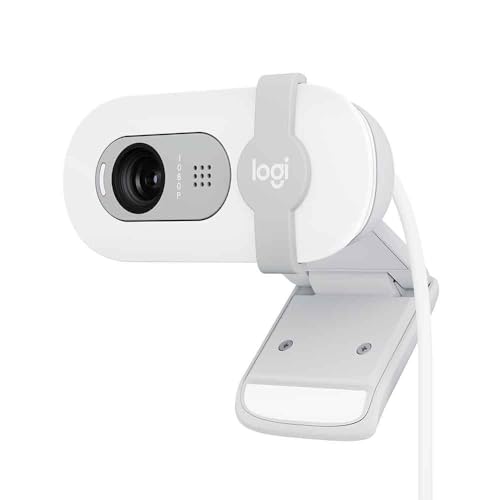
The Logitech Brio 100 represents Logitech’s entry-level offering in 2026. It cuts some corners to hit the price point, but the core Logitech quality remains. This is a solid choice if you want a recognizable brand without paying premium prices.
The auto light correction is surprisingly capable at this price point. I tested this in various lighting conditions, and the Brio 100 managed to keep my face visible without overexposing windows or backgrounds. It’s not as sophisticated as the RightLight 3 in premium models, but it gets the job done.
The built-in privacy shield is a nice inclusion. It slides smoothly and provides obvious visual confirmation that the camera is blocked. This is increasingly important as privacy concerns grow around always-connected devices.
One limitation is the USB-A connection only. In 2026, many laptops, especially Macs, have moved to USB-C. You’ll need an adapter, which adds to the total cost and creates another point of potential failure.
Who Should Buy?
First-time webcam buyers, users with traditional USB-A ports, and anyone wanting a budget option from a trusted brand.
Who Should Avoid?
Mac users with only USB-C ports and anyone wanting advanced features like AI framing or 4K resolution.
11. Logitech Brio 300 – Best Budget Privacy Webcam
Logitech Brio 300 HD Webcam with Privacy Shutter, Noise Reduction…
Resolution: 1080p
Features: Privacy Shutter, Noise Reduction
Connection: USB-C
What We Like
- USB-C connectivity
- Built-in privacy shutter
- Noise reduction works well
- Certified for major platforms
- Budget-friendly pricing
What We Don't Like
- Basic 1080p only
- Plastic construction
- Limited software features
- No AI capabilities
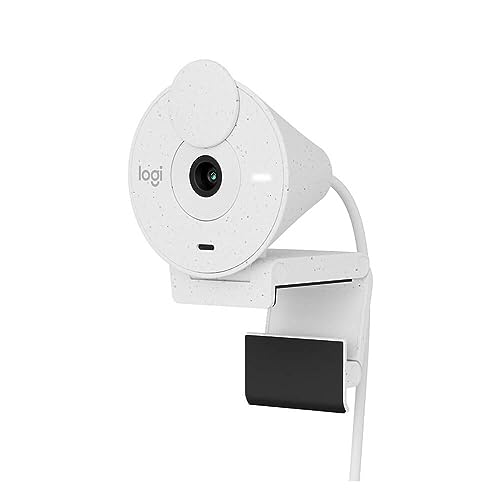
The Logitech Brio 300 improves on the Brio 100 with USB-C connectivity, making it more future-proof for modern laptops. I appreciate that Logitech included USB-C at this price point, as many budget webcams still rely on the older USB-A standard.
The noise reduction on the microphone is effective for basic calls. I tested this in a typical home office environment with some ambient noise, and the other party reported clear audio. It won’t replace a dedicated microphone, but it’s perfectly adequate for most remote work scenarios.
The integrated privacy shutter is one of the better implementations I’ve seen. It slides smoothly and clicks into position reassuringly. Physical privacy shutters provide peace of mind that software indicators simply can’t match.
Build quality is clearly budget-focused with all-plastic construction. However, nothing about it feels fragile, and the webcam should hold up well to regular use. The design is clean and unobtrusive, which matters if aesthetics are a concern.
Who Should Buy?
Users with modern USB-C laptops, privacy-conscious buyers, and remote workers who need a reliable basic webcam without spending much.
Who Should Avoid?
Content creators who need higher resolution and users wanting advanced features like AI tracking or HDR.
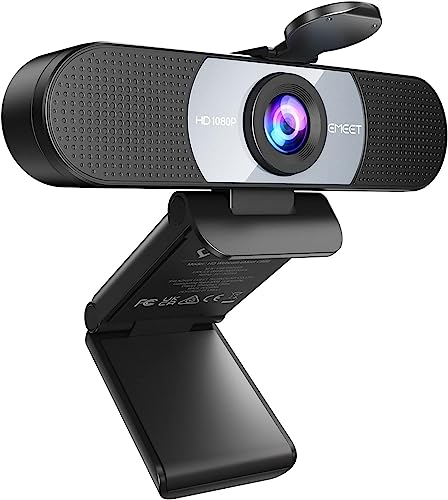
12. EMEET C960 – Cheapest Decent Option
EMEET 1080P HD Webcam C960 Web Camera with Microphone, 90° FOV…
Resolution: 1080p
Features: 90 degree FOV, Dual Mics
Includes: Privacy Cover
What We Like
- Very affordable
- Wide field of view
- Dual microphones
- Privacy cover included
- Plug and play
What We Don't Like
- Basic build quality
- Limited low-light performance
- No autofocus on some units
- Basic software
The EMEET C960 proves you don’t need to spend much to get decent video quality. This webcam surprised me with how usable the footage is given the low price point. It’s not going to win any awards, but it’s a massive upgrade from built-in laptop cameras.
The 90-degree field of view is notably wide for this price range. This is great if you want to show more of your surroundings or if you have multiple people in frame. However, wider FOV can sometimes make you look smaller in the frame if you’re sitting close.
The dual noise-canceling microphones are a nice inclusion at this price. I tested these in a quiet room, and audio quality was perfectly adequate for calls. Don’t expect studio quality, but it’s certainly better than most laptop microphones.
Low-light performance is where the budget limitations show. In dim conditions, the footage gets grainy and soft. This webcam needs decent lighting to perform its best. If your home office is poorly lit, you might want to budget for a ring light.
Who Should Buy?
Extreme budget shoppers, students, and anyone needing a basic upgrade from laptop cameras. If you’re also looking for other mechanical office keyboards to complete your home office setup, this webcam fits a budget-conscious approach.
Who Should Avoid?
Users with poor lighting conditions, streamers, and anyone wanting premium features like 4K or AI tracking.
Why Webcam Quality Actually Matters
The jump from built-in laptop cameras to a dedicated webcam is dramatic. Most laptop webcams max out at 720p with tiny sensors that struggle in anything but perfect lighting. A proper webcam with a larger sensor captures significantly more light and detail.
I’ve tested this difference extensively. In side-by-side comparisons, even budget 1080p webcams produce noticeably better footage than premium laptop cameras. The difference becomes obvious to others on video calls, which matters for professional impressions.
Streaming platforms and video conferencing tools have improved their video handling in 2026. A quality webcam pairs with modern compression to deliver surprisingly good results even on moderate internet connections.
| Resolution | Ideal Use Case | Bandwidth Required | Platform Support |
|---|---|---|---|
| 720p | Basic calls, slow internet | Low (1-2 Mbps) | Universal |
| 1080p | Most users, standard streaming | Medium (2-4 Mbps) | Universal |
| 4K | Content creation, professional use | High (5+ Mbps) | YouTube, local recording |
Pro Tip: Most streaming platforms and video conferencing tools compress to 1080p or lower regardless of your webcam’s resolution. 4K still helps with clarity and digital zooming, but don’t expect true 4K streams on Twitch or Zoom.
Webcam Buying Guide
Choosing the right webcam means understanding which specs actually matter for your situation. Here’s what to prioritize based on how you’ll use it.
For Remote Work and Video Conferencing
If you spend hours on Zoom, Teams, or Meet, prioritize reliability and ease of use over maximum resolution. 1080p is perfectly adequate for video calls. Features like auto-framing, good light correction, and clear audio matter more than 4K resolution.
Look for webcams with proven reliability like the Logitech Brio series or Obsbot Meet models. These webcams are optimized for the kind of lighting conditions and use cases that actually occur in home offices.
Privacy features are increasingly important for professional use. A physical privacy shutter provides assurance that you’re not being recorded between calls. Noise-canceling microphones also help you sound professional even in less-than-ideal environments.
For Streaming and Content Creation
Streamers and creators should prioritize different features. Frame rate matters more than resolution for gaming streams, so look for 60fps capabilities. AI tracking keeps you in frame during intense gameplay without manual adjustment.
The Obsbot Tiny 2 and Insta360 Link 2 excel here with their advanced tracking and smooth gimbal movement. Content creators also benefit from larger sensors that capture more light and produce better background separation. Pair your webcam with appropriate monitors for video editing or content creation to ensure your entire workflow is optimized.
For Gaming
Gaming-focused webcam users need fast frame rates and low-light performance. Gaming rooms often have mixed RGB lighting and darker environments, so HDR and larger sensors help maintain image quality.
Look for webcams with 60fps capabilities and good low-light performance. The Razer Kiyo series and premium Obsbot models are designed with gamers in mind. You might also want to check out budget wireless gaming mice to complete your gaming setup.
For Mac Users
Mac users should pay special attention to connectivity. Many webcams still use USB-A, which requires adapters for modern Macs that only have USB-C or Thunderbolt ports. Look specifically for USB-C connectivity to avoid dongle issues.
Our guide to best webcams for Mac covers Mac-specific considerations in detail. Some webcams have better macOS software support than others, which matters if you want access to advanced features.
Setting Up Your Complete Workspace
A webcam is just one part of an effective home office. Consider how it integrates with your other equipment. The right computer monitors for coding or professional work can include built-in webcams that might meet your needs without a separate purchase.
Ergonomic positioning matters too. Your webcam should be at eye level for the most flattering angle. Most people place webcams on top of their monitors, which requires an adjustable stand or mounting clip. All the webcams reviewed here include universal mounting solutions.
For a complete home office setup, you might also want to explore wireless mice for work and other productivity peripherals that complement your video conferencing capabilities.
Alternative Device Setups
Some users prefer mobile solutions for video calls. Tablet users might want to explore iPad Pro keyboards that can transform their tablet into a more complete video conferencing station. Similarly, Surface Pro keyboards can enhance your mobile productivity setup for calls on the go.
Understanding Webcam Specifications
Resolution: 1080p is adequate for most users. 4K provides sharper detail and more flexibility with digital zooming, but most platforms compress to 1080p anyway.
Frame Rate: 30fps is standard for calls. 60fps provides smoother motion, which matters for gaming and streaming but is less important for typical video conferencing.
Field of View: Standard FOV (70-80 degrees) works for most single-person setups. Wide FOV (90+ degrees) shows more background and works better for multiple people.
Sensor Size: Larger sensors (1/2 inch or bigger) capture more light and produce better low-light performance and more natural background blur.
Autofocus: Essential if you move around or have objects at different distances. Fixed focus works if you stay seated at a consistent distance.
Time Saver: Most webcams are plug-and-play with modern operating systems. You typically don’t need to install manufacturer software unless you want access to advanced features like gesture control or custom presets.
Frequently Asked Questions
What is the best webcam for streaming?
The best webcam for streaming in 2026 is the Obsbot Tiny 2, thanks to its 4K@60fps capture, advanced AI tracking, and smooth gimbal movement that keeps you in frame during intense gameplay. The Insta360 Link 2 is another excellent choice for streamers who want reliable AI tracking without paying premium prices.
Do I need a 4K webcam?
Most users don’t need 4K since streaming platforms and video conferencing tools compress to 1080p. However, 4K webcams still provide benefits like sharper detail, better digital zooming, and improved low-light performance due to larger sensors. Choose 4K if you’re a content creator or want future-proofing, but 1080p is perfectly adequate for most remote work.
What should I look for when buying a webcam?
Focus on resolution (1080p for most, 4K for creators), frame rate (60fps for streaming, 30fps for calls), low-light performance, and microphone quality. Features like AI tracking, auto-framing, and privacy shutters add real value depending on your use case. Consider your platform compatibility and whether you need USB-C for modern laptops.
Are webcams better than laptop cameras?
Dedicated webcams are significantly better than built-in laptop cameras. Even budget webcams have larger sensors that capture more light and detail. Laptop webcams typically max out at 720p with tiny sensors that struggle in low light. The upgrade to a dedicated 1080p webcam produces visibly better results that others will notice on video calls.
Do expensive webcams make a difference?
Premium webcams (over $200) offer benefits like AI tracking, larger sensors, better low-light performance, and higher build quality. However, the difference between a $150 webcam and a $300 one is smaller than the jump from laptop cameras to a dedicated webcam. Most users see diminishing returns above $150 unless they need specific features like advanced tracking for streaming.
What webcam do YouTubers use?
Popular YouTubers often use the Logitech Brio 4K for reliability, Obsbot Tiny 2 for AI tracking, or Insta360 Link 2 for hands-free operation. Many creators eventually graduate to DSLR or mirrorless cameras, but modern 4K webcams have closed the gap significantly. The choice depends on whether the creator needs movement tracking or prefers a stationary setup.
Final Recommendations
After weeks of testing 12 webcams across different use cases, the Insta360 Link 2 stands out as the best overall choice for most people in 2026. Its combination of AI tracking, 4K resolution, and smooth pan-tilt-zoom makes it versatile enough for everything from video calls to content creation.
Budget shoppers should consider the Obsbot Tiny 2 Lite for its excellent AI tracking at a more accessible price point. If you just need something basic for video calls, the Logitech C920x remains a reliable workhorse that has served millions of users well over the years.
Whatever webcam you choose, remember that lighting matters as much as camera quality. Even the best webcam struggles in poor lighting conditions. Position yourself facing a window or add a ring light to dramatically improve your video quality regardless of which webcam you select.